
Creator Studio - Pricing
Creator Studio can create everything from a single social media post to full sets of ad designs, flyers, images and short promotional videos, all from a natural-language prompt. Because each request differs in format and scope, the work Creator Studio performs varies from one session to the next: the number of designs generated, whether images or video are created, and how many follow-up edits are requested.
This article explains how Creator Studio sessions work, how usage is priced, and what influences the amount of work involved, using real-world examples.
TABLE OF CONTENTS
- Understanding Creator Studio Sessions
- Creator Studio Pricing Overview
- Before You Start
- Example 1: Creating an Instagram Post
- Example 2: Creating a Facebook Ad
- Example 3: Creating a Promotional Video
- What Affects Creator Studio Usage?
- Creator Studio Usage and Spending Notifications
- Troubleshooting
- Frequently Asked Questions
- Related Articles
Understanding Creator Studio Sessions
A Creator Studio session is one or more conversational turns. In each turn the AI interprets your request, chooses a format, generates designs, images or video, and returns results you can edit or download. Each session is measured by the work performed, not simply by the number of prompts you send.
A typical session may include:
- Understanding your request and selecting a format (for example, Instagram Post or flyer)
- Generating multiple design variations for a single request
- Generating AI images or short video clips
- Rendering designs with individually editable layers
- Offering follow-up suggestions, such as resizing to a different format
- Applying changes requested in follow-up messages
- Saving the session as a project
Video generation, more design variations and repeated refinements generally involve more processing than a single design or image.
Creator Studio Pricing Overview
Creator Studio uses usage-based pricing. Included usage and available output quality depend on your access type and AI Employee subscription. Agency users get Creator Studio usage at no additional cost, subject to fair use. Sub-account users can access Creator Studio through an AI Employee subscription or pay-per-use billing.
Creator Studio Usage by User Type and Plan
| User Type / Plan | Included Usage | Output Quality |
|---|---|---|
| Agency Admins & Users ($97 & $297 agency plans) | Free, subject to fair use* | Standard, High |
| Agency Admins & Users ($497 agency plan) | Free, subject to fair use* | Standard, High, Ultra |
| Sub-Account Users (without an AI Employee plan) | Not included; Pay-per-use | — |
| AI Employee Starter ($20/month) | Standard Usage* | Standard, High |
| AI Employee Growth ($50/month) | High Usage* | Standard, High, Ultra |
| AI Employee Unlimited ($97/month) | Unlimited Usage* | Standard, High, Ultra |
*Fair Use Policy: Free, standard, high and unlimited usage is subject to Chat To Clients CRM's Terms of Service, including excessive-use restrictions. If usage is excessive, abusive, or negatively affects platform performance, Chat To Clients CRM may throttle, limit, require service upgrades, or terminate access with or without notice.Plan Availability: The AI Employee Starter plan is available only to agencies on the $497 plan. Each AI Employee plan includes a separate usage allowance for Ask AI, AI Studio and Creator Studio, so using one doesn't reduce the allowance for the others.
Usage Limits: Creator Studio usage is measured in rolling five-hour windows, with additional usage protections. Included allowances vary by plan. When an allowance is reached, additional usage may be billed at pay-per-use rates if Extra Usage is enabled. Otherwise, access pauses until the allowance resets.
Pay-Per-Use Pricing: Creator Studio charges are based on the AI models, output quality and generations used during a session. Costs vary with the type and amount of content created.
Factors that influence Creator Studio usage include:
- Content type (designs, images or video)
- Number of design variations generated
- Video generation
- Selected output quality (Standard, High or Ultra)
- Follow-up edits and regenerations
- Resizing designs to new formats
Want to estimate your usage? Use the AI Plan Calculator to see what your included Creator Studio usage looks like.Before You Start
Creator Studio is a Labs feature. An agency admin must enable it for each sub-account.
Enable Creator Studio
- Go to Agency Settings → Labs → Sub-Account.
- Find Creator Studio and click Activate Feature.
- Search for the sub-account, switch Enable on, and click Save.
Access Creator Studio
- Open the sub-account.
- Press ⌘K (or click Search).
- Type Creator Studio and open it.
How to Create a Design
- Open Creator Studio.
- (Optional) Choose Design, Image, or Video clip under the prompt box.
- Describe what you want to create. Include details such as:
- Business name
- Offer or promotion
- Call to action (CTA)
- Click Send to generate your content.
- Results typically appear within 2–3 minutes.
- To make changes:
- Click Edit on a design to modify individual layers.
- Type a follow-up message to request changes.
Example 1: Creating an Instagram Post
Prompt Used
Create an Instagram post for BrightSmile Dental Clinic announcing a teeth-whitening offer: 30% off this November. Clean, modern, friendly look with a 'Book now' call to action.
What Happened
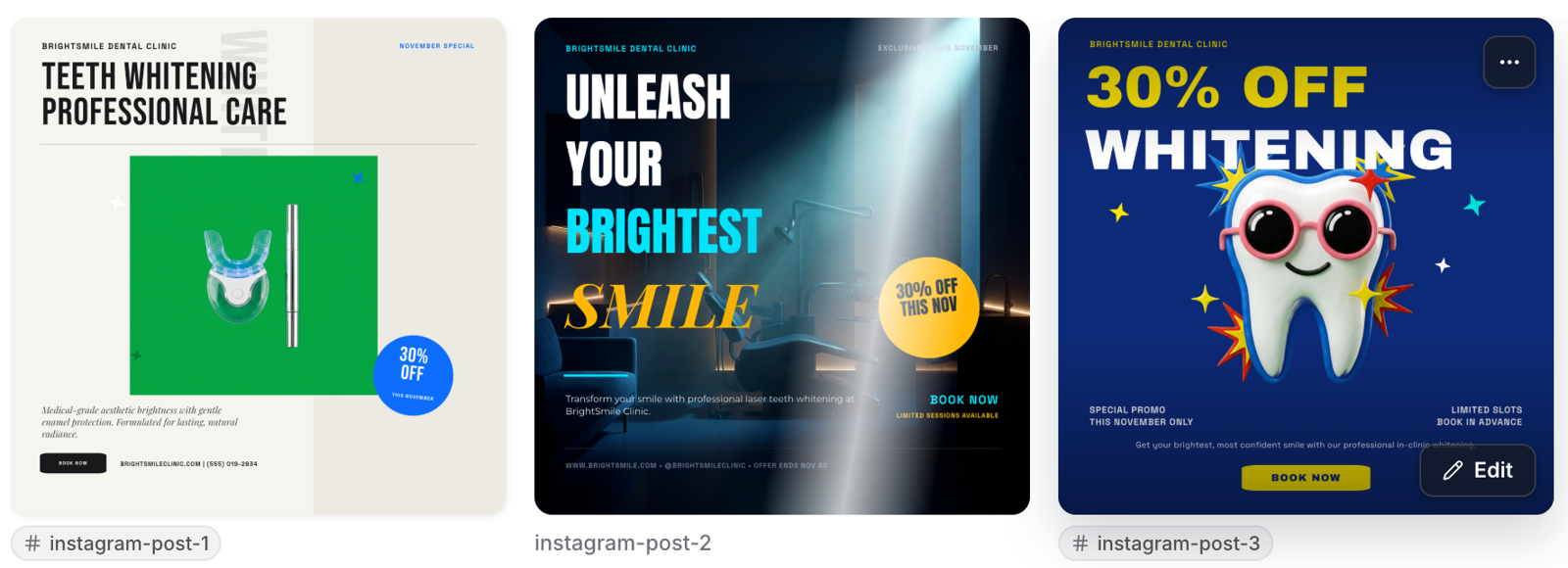
Creator Studio automatically selected Social media → Instagram Post and generated three design variations.
All three designs included the clinic name, promotional offer, and call-to-action button.
Session Details
| Item | Value |
|---|---|
| User Messages | 1 |
| Tools Used | 3 design generations |
| Rendering | 3 AI-generated Instagram post designs, every layer editable |
| Platform Actions | Saved as project "BrightSmile Whitening Offer" |
| Final Result | 3 posts with the offer, clinic name and "Book now" button, ready to edit or download |
| Total Session Cost | $1.20 |
Result
Three Instagram post designs for BrightSmile Dental Clinic
The designs are ready for further customization using the editor or for downloading.
Example 2: Creating a Facebook Ad
Prompt Used
Create a Facebook ad for a free live webinar: '5 Marketing Automations Every Local Business Needs', Thursday 21 November at 7pm EST, hosted by GrowthLab. Bold, professional look with a 'Register free' call to action.
What Happened
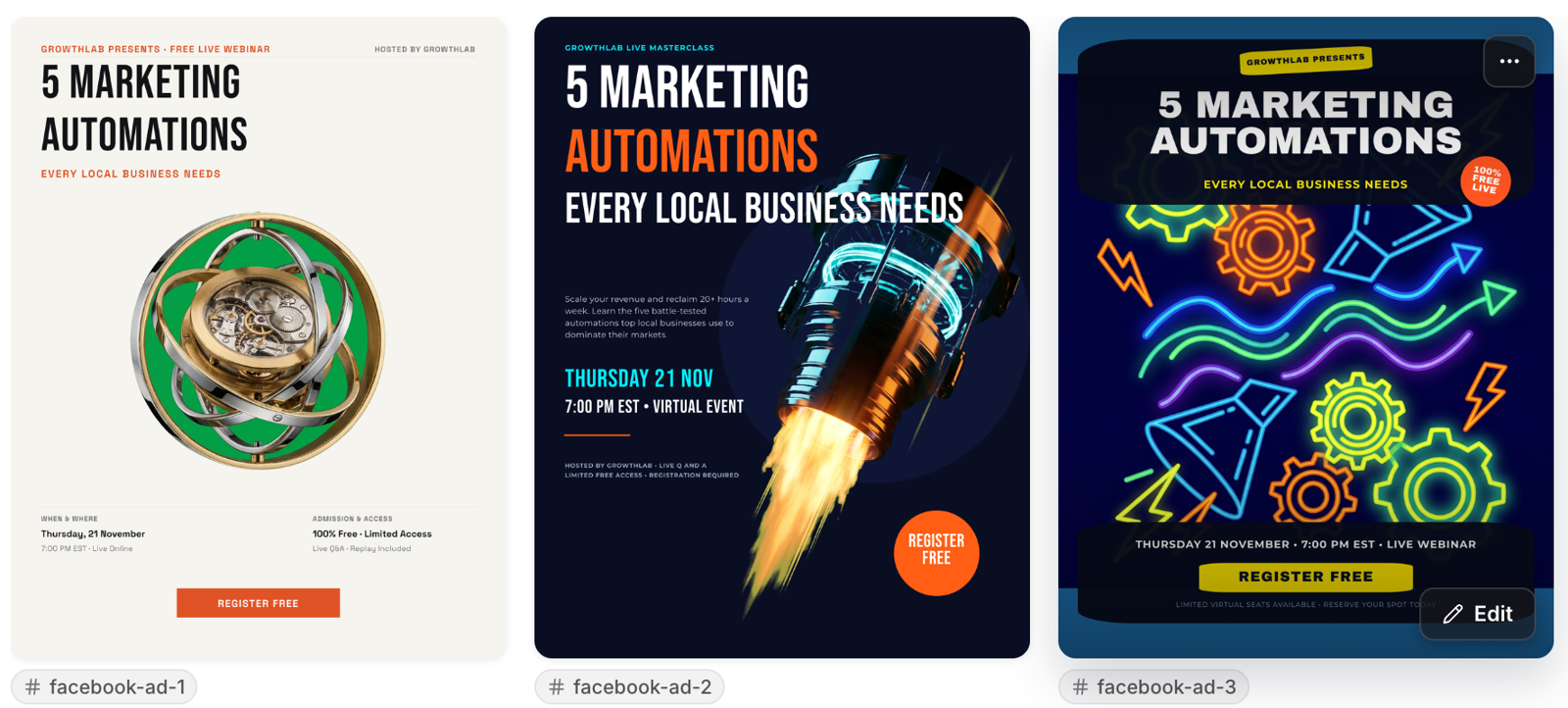
Creator Studio generated three promotional designs in flyer format (8.5 × 11 inches).
It also provided four follow-up suggestions, including Resize to square 1:1 ad format.
Session Details
| Item | Value |
|---|---|
| User Messages | 1 |
| Tools Used | 3 design generations |
| Rendering | 3 AI-generated flyer designs (8.5 × 11 in) + 4 follow-up suggestions |
| Platform Actions | Saved as project "GrowthLab Webinar Ad" |
| Final Result | 3 webinar promos with title, date, host and "Register free" button; resize to 1:1 before running as a Facebook ad |
| Total Session Cost | $0.93 |
Result
Three webinar ad designs for GrowthLab
All three designs include the webinar title, date, host, and registration call to action.
Tip: Facebook ad requests may initially generate designs in flyer dimensions. To get the desired format:
- Click the Resize to square 1:1 ad format suggestion.
- Alternatively, specify the dimensions directly in your original prompt.
Example 3: Creating a Promotional Video
Prompt Used
Create a short promo video clip for Sweet Crumbs Bakery's festive holiday menu: fresh cinnamon rolls, gingerbread cookies and a Christmas fruit cake. Warm, cozy bakery mood, ending with 'Order now for pickup'.
What Happened
With Video clip selected, Creator Studio generated one 6-second promotional video.
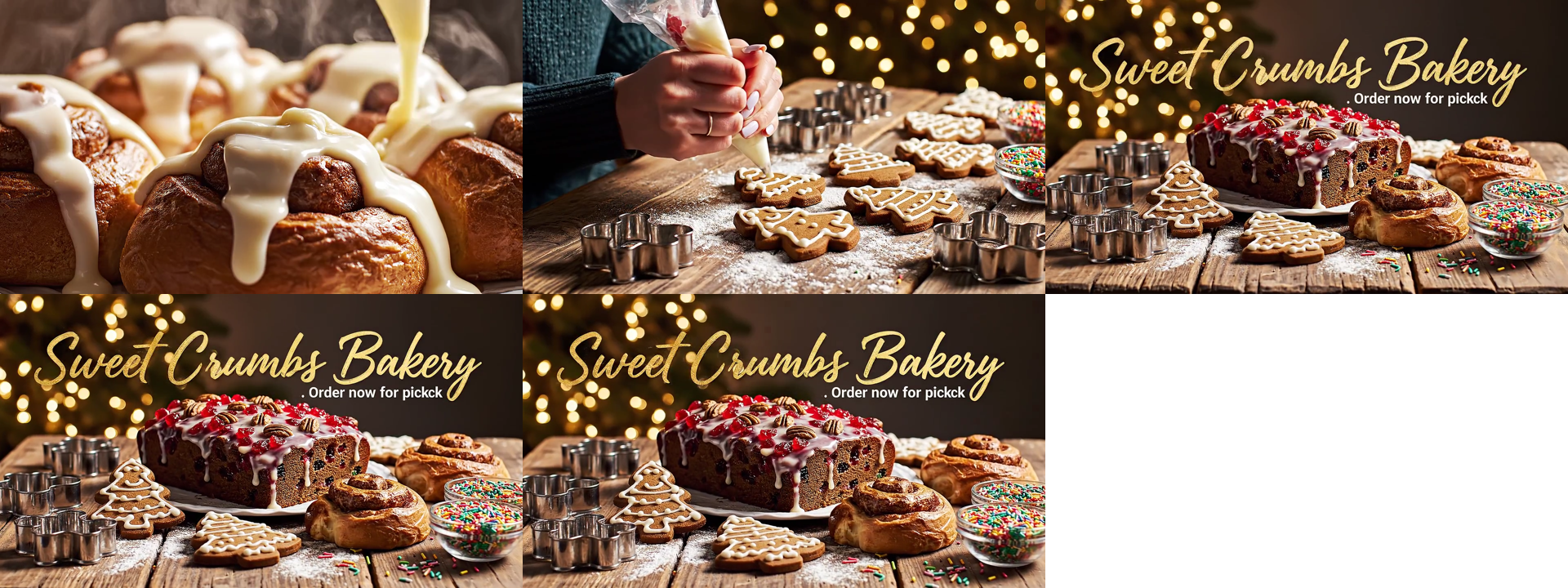
The video contained the following sequence:
- Cinnamon rolls
- Gingerbread cookies
- End card displaying the bakery name
Session Details
| Item | Value |
|---|---|
| User Messages | 1 |
| Tools Used | 1 video generation |
| Rendering | 6-second AI video, 1080p, no audio |
| Platform Actions | Saved as project "Sweet Crumbs Holiday…" |
| Final Result | Holiday promo video; the end card reads "Order now for pickck", so it needs a regenerate before use |
| Total Session Cost | $1.40 |
Result
Video frames: Cinnamon rolls → Gingerbread cookies → End card
The generated video successfully captured the intended holiday theme. However, the end card contained a spelling mistake.
Important: Text inside an AI-generated video cannot be edited directly. If the generated video contains incorrect or misspelled text, you must regenerate it.What Affects Creator Studio Usage?
Creator Studio usage is based on the work performed during a session rather than the number of prompts alone. Sessions become more resource-intensive as more content is generated or refined. Factors that increase overall work include:
- Generating video rather than designs or images
- Generating more design variations per request
- Selecting higher output quality
- Follow-up edits and multiple refinements
- Regenerating content, such as a video with incorrect text
- Resizing designs to new formats
Based on the examples above:
- Video generation is the largest single driver: one 6-second video cost more than three Instagram post designs.
- Design sessions cost roughly the same whether they produce social posts or flyers, with small differences based on the design generated.
- Getting it right the first time keeps usage down. Include the format, dimensions and exact text in your prompt to avoid resizing or regenerating.
Creator Studio Usage and Spending Notifications
Creator Studio sends usage notifications to help users monitor consumption and spending before they reach their limits. Notifications are enabled automatically for users with access to Creator Studio, so no additional setup is required.
Usage Notifications
Agency users and AI Employee subscribers receive email and in-app notifications as their usage increases:
- 75% usage: Usage alert
- 90% usage: Warning
Depending on billing permissions, the notification can provide actions to adjust usage limits or request an increase from the Agency Admin.
Pay-Per-Use Notifications
While an account is using pay-per-use billing, a persistent banner shows that usage is being charged at pay-per-use rates.
For detailed information about configuring spending limits, requesting additional usage, and managing limit-increase requests, see AI Usage Limits.
Troubleshooting
If you encounter an issue while using Creator Studio, refer to the following solutions.
| Problem | What to Do |
|---|---|
| Creator Studio doesn't appear in the sub-account | Enable Creator Studio in Labs. Refer to the Before You Start section. |
| Design comes back in the wrong size | Use the Resize suggestion, or specify the size in your prompt (for example, "square 1:1"). |
| Spelling mistake in a video | Regenerate the video. Text inside generated videos isn't editable. |
| Video is widescreen when 1:1 was selected | This is a known issue. Regenerate the video and contact support. |
Frequently Asked Questions
Q: How much does Creator Studio cost?
Creator Studio is included at no additional cost for agency users on all Chat To Clients CRM agency plans, subject to fair use. Sub-account users can access Creator Studio through an AI Employee Starter ($20/month), Growth ($50/month), or Unlimited ($97/month) subscription, or through pay-per-use billing. The Starter plan is available exclusively to agencies on the $497/month plan.
Q: Does every prompt do the same amount of work?
No. The work varies with the type of content, the number of designs generated, the output quality selected, and any follow-up edits.
Q: Does video generation involve more work than designs?
Generally, yes. Generating video typically requires more processing than generating designs or images.
Q: Does regenerating content count toward my usage?
Yes. Each regeneration is a new generation and counts toward your usage. Including the format, dimensions and exact text in your prompt helps avoid regenerations.
Q: Which plans include Ultra output quality?
Ultra quality is available to agency users on the $497 plan and to sub-accounts on the AI Employee Growth and Unlimited plans.
Q: Does Creator Studio usage affect my Ask AI or AI Studio usage?
No. On AI Employee plans, Ask AI, AI Studio and Creator Studio each have their own usage allowance.