
AI Studio - Pricing
AI Studio can build everything from a single landing page to complete, multi-page web experiences with forms, booking flows, and connected domains. Because each request differs in scope, the work AI Studio performs — the number of prompts, reasoning steps, generated assets, and connection actions — varies from one project to the next.
This article explains how AI Studio projects are structured, what happens during a build session, and what influences the amount of work involved, using real-world examples.
TABLE OF CONTENTS
- Understanding AI Studio Build Sessions
- AI Studio Pricing Overview
- Yoga Lead-Capture Landing Page
- Image-Forward Editorial Fashion Landing Page
- 7-Page Travel Website with a CMS
- What Affects AI Studio Usage?
- Frequently Asked Questions
- Related Articles
Understanding AI Studio Build Sessions
An AI Studio project consists of one or more conversational turns where the AI plans, reasons, generates content and visuals, renders a live preview, and performs supported actions such as connecting a form or calendar. Each session is measured by the work performed rather than simply the number of prompts submitted.
A typical build session may include:
- Understanding your request
- Asking follow-up questions when the request is broad
- Using a reference URL, screenshot, or uploaded images for direction
- Planning single-page or multi-page structure
- Generating layout, copy, and visuals
- Rendering a live, editable preview
- Creating a new version on each change
- Connecting supported components such as forms and calendars
- Publishing to a preview or custom domain
More complex projects — more pages, more refinements, connected components — generally involve more processing than a single-page draft.
AI Studio Pricing Overview
AI Studio uses usage-based pricing, with included usage determined by the user's access type and AI Employee subscription. Agency users receive AI Studio usage at no additional cost, subject to fair use, while sub-account users can access AI Studio through an AI Employee subscription or pay-per-use billing.
AI Studio Usage by User Type and Plan
| User Type / Plan | Included Usage |
|---|---|
| Agency Admins & Users ($97, $297 & $497 agency plans) | Free, subject to fair use* |
| Sub-Account Users (without an AI Employee plan) | Not included; Pay-per-use |
| AI Employee Starter ($20/month) | Standard Usage* |
| AI Employee Growth ($50/month) | High Usage* |
| AI Employee Unlimited ($97/month) | Unlimited Usage* |
*Fair Use Policy: Free, standard, high and unlimited usage is subject to Chat To Clients CRM's Terms of Service, including excessive-use restrictions. If usage is excessive, abusive, or negatively affects platform performance, Chat To Clients CRM may throttle, limit, require service upgrades, or terminate access with or without notice.Usage Limits: AI Studio usage is measured in rolling five-hour windows, with additional usage protections. Included allowances vary by plan. When an allowance is reached, additional usage may be billed at pay-per-use rates if Extra Usage is enabled. Otherwise, access may pause until the applicable allowance resets.
Pay-Per-Use Pricing: AI Studio charges are based on the AI models, tokens, resources, and actions used during a session. Costs vary depending on project complexity, generated content, and the work performed.
Factors that influence AI Studio usage include:
Number of reasoning and planning steps
Number of pages generated
Content and copy generation
AI-generated images and other media
Reference URL or image analysis
Form and calendar connections
Iterative refinements and version history
Publishing and custom domain setup
Want to estimate your usage? Use the AI Plan Calculator to see what your included AI Studio usage looks like.Important: AI Studio Cloud Hosting is billed separately from AI Studio generation usage. Nano hosting is free, while Micro and higher cloud tiers have additional charges, regardless of the AI Employee subscription. For additional pricing details, see AI Studio Cloud Pricing.
Yoga Lead-Capture Landing Page
This example shows AI Studio building a polished single-page lead-capture site from a short prompt — generating imagery, a themed design system, and a validated lead form, then offering to connect it to the CRM.
Overview
AI Studio built a single-page yoga lead-capture landing page, "Sahaja," with a hero, benefits grid, class styles, weekly schedule, instructor bio, testimonials, and a validated lead form. It was themed with a sage-green palette and Fraunces/Inter typography, then prompted the user to connect the form to the CRM.
User Request
Create a landing page to capture leads for my yoga classes
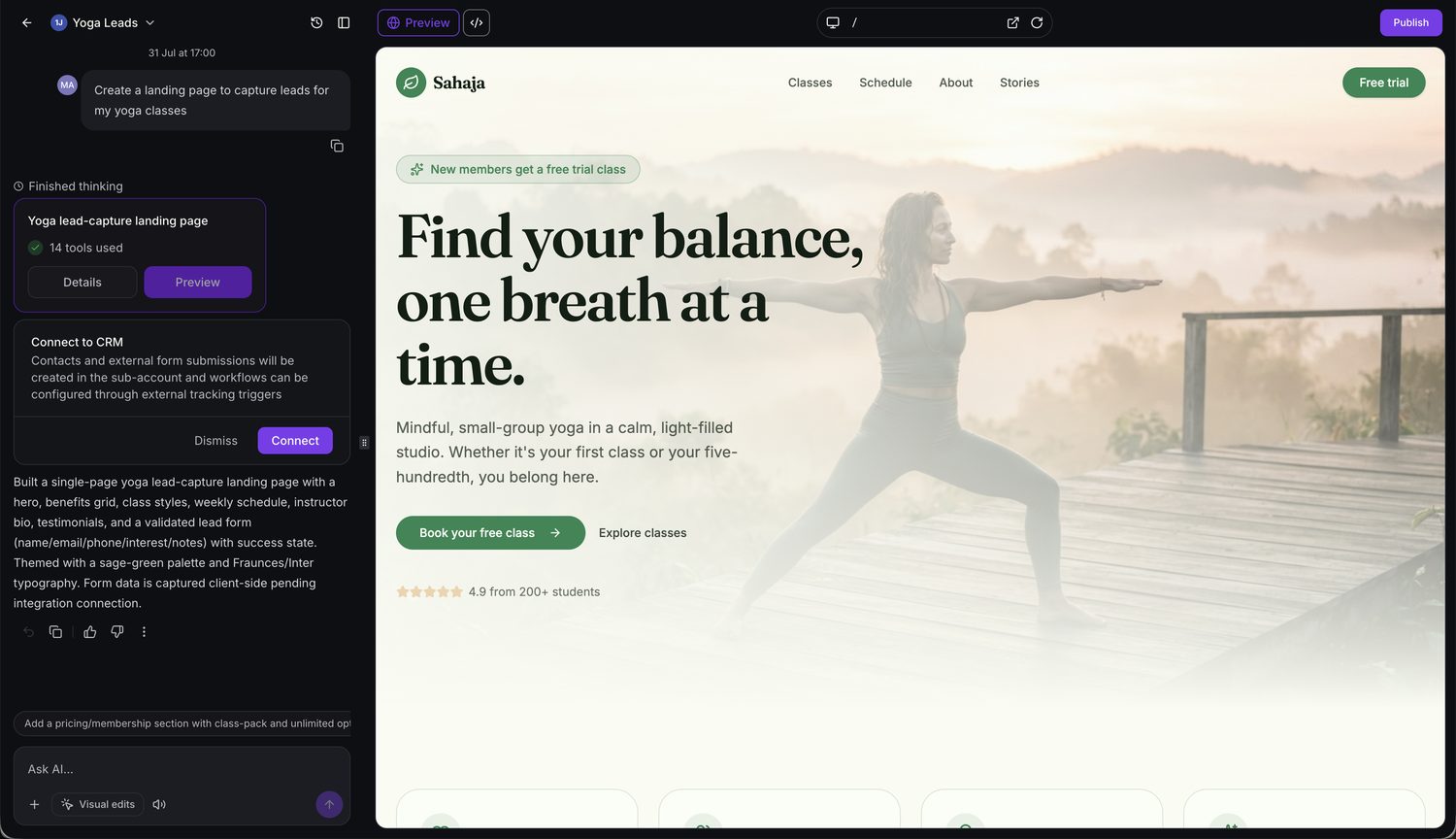
The generated Sahaja yoga landing page with a "Find your balance" hero and free-trial call to action.
How AI Studio Processed the Task
AI Studio:
- Generated sunrise yoga imagery and set up the design system in parallel
- Set up the sage-green design tokens and Fraunces/Inter fonts
- Built a shared site header and the landing page (hero, benefits, class styles, schedule, bio, testimonials)
- Built a validated lead-capture form (name, email, phone, class interest, notes) with a success state
- Verified the build was clean
- Prompted the user to connect the form to the CRM
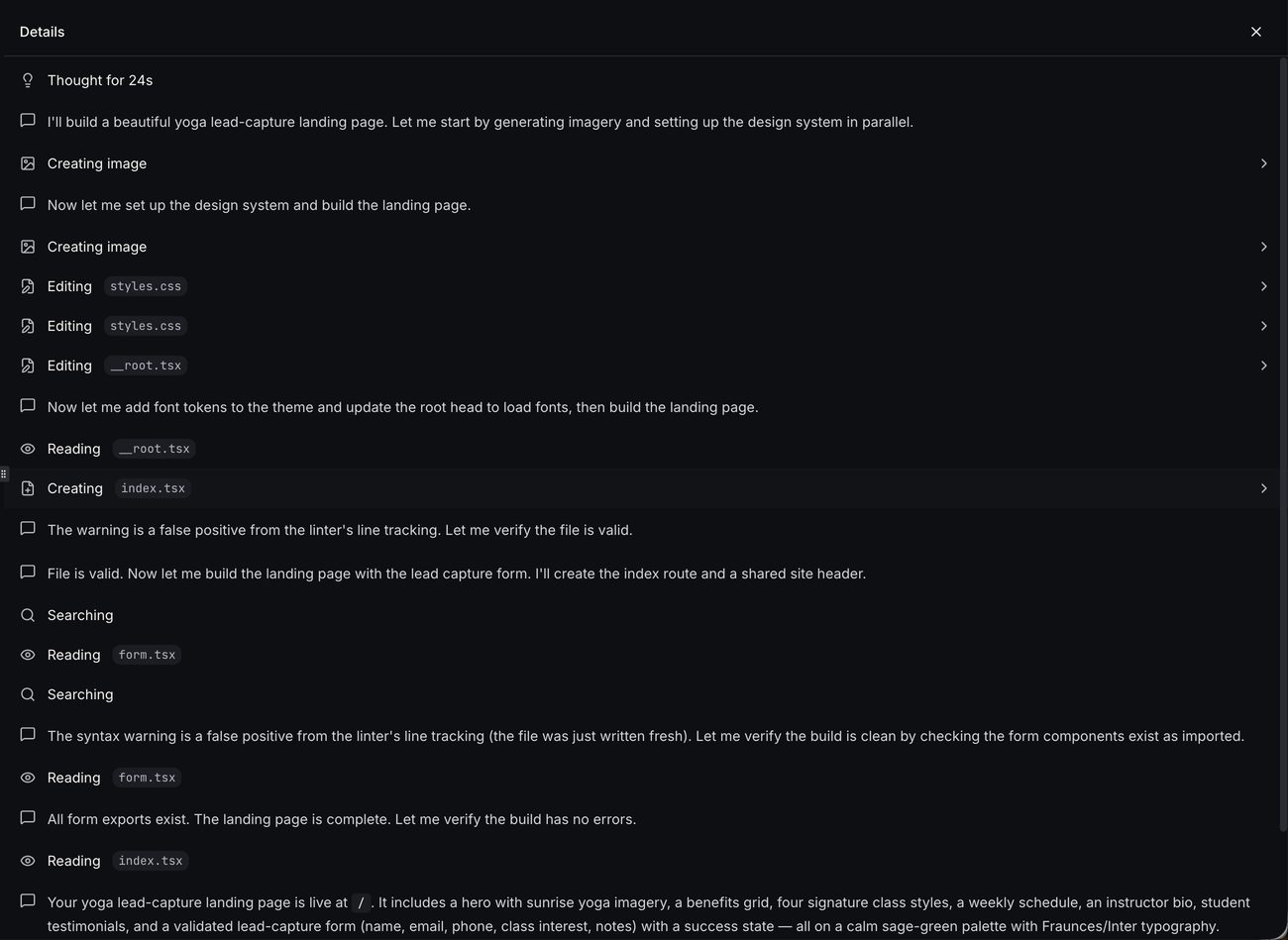
The build session steps — generating imagery, setting up the design system, and building the page and lead form (14 tools used).
What Was Built
- Hero with sunrise yoga imagery and a free-trial call to action
- Benefits grid and four signature class styles
- Weekly schedule and instructor bio
- Student testimonials
- Validated lead-capture form (name, email, phone, class interest, notes) with a success state
- Sage-green palette with Fraunces/Inter typography
Session Details
| Item | Value |
|---|---|
| User Messages | 1 |
| Tools Used | 14 |
| Rendering | AI-generated images, "Connect to CRM" card |
| Platform Actions | Lead form connection prompted (captured client-side pending connection) |
| Final Result | Yoga lead-capture landing page, ready to connect and publish |
| Total Session Cost | $0.60 |
Image-Forward Editorial Fashion Landing Page
This example shows how AI Studio builds a highly designed, animation-rich landing page from a detailed prompt — installing a dependency, generating a full set of imagery, and applying custom typography and motion.
Overview
AI Studio built a luxury editorial fashion landing page, "Maison Noir," with a full-bleed parallax hero, alternating image/text collection sections, a full-width masonry gallery, and smooth hover animations — all from a single detailed prompt.
User Request
Create a visually striking, image-forward landing page for a fashion brand. Full-bleed hero image, bold typography, parallax scroll, alternating image/text sections, a full-width gallery grid, and smooth hover animations. Premium, editorial feel with generous whitespace and a cohesive color palette.
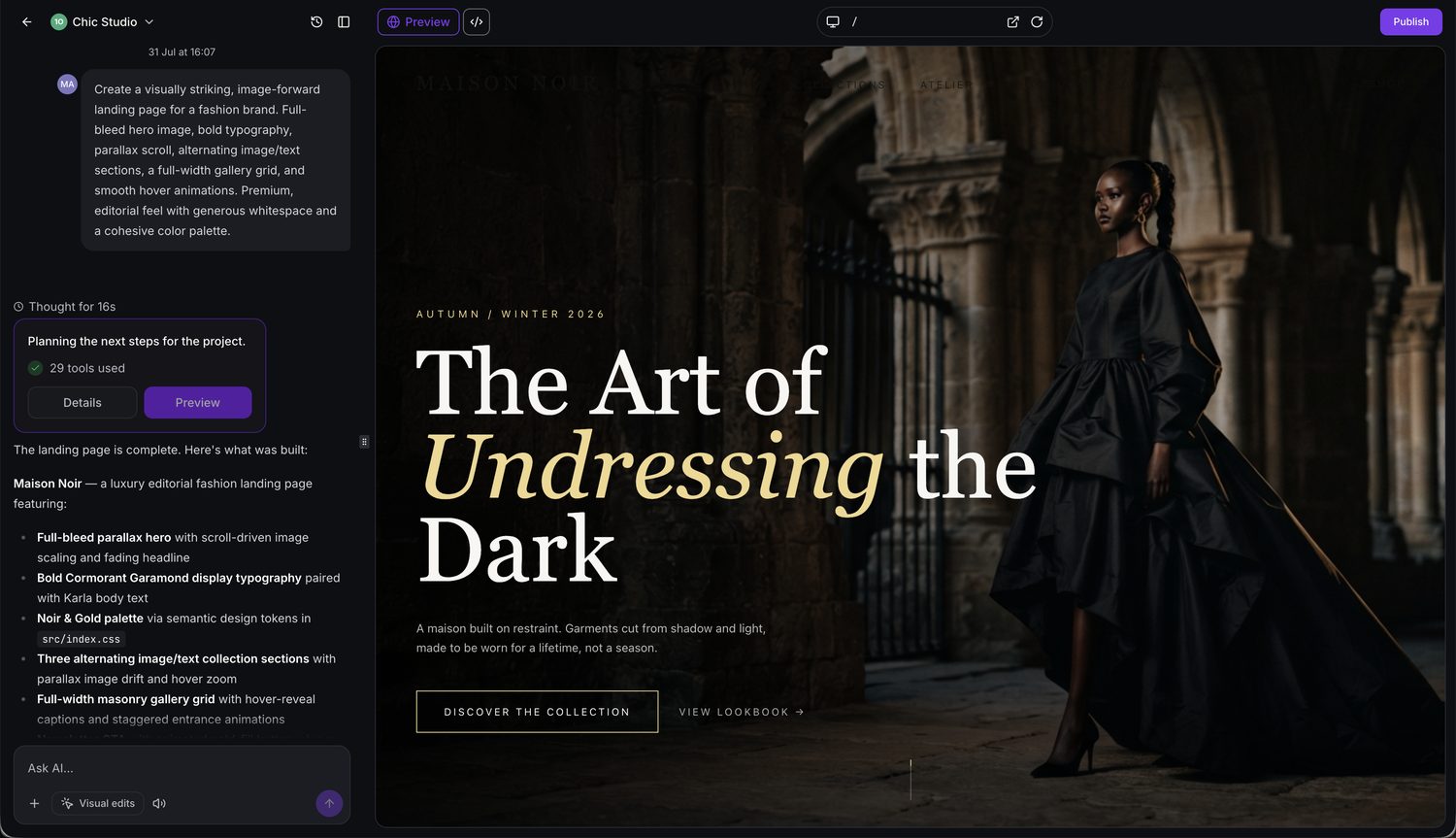
The generated "The Art of Undressing the Dark" editorial hero with parallax and Cormorant Garamond display type.
How AI Studio Processed the Task
AI Studio:
- Chose a Noir & Gold luxury direction with Cormorant display + Karla body typography
- Installed
framer-motionfor scroll and hover animations - Generated the full set of hero and collection imagery in parallel
- Set up design tokens with the Noir & Gold palette and editorial typography
- Built the page — hero with parallax, alternating collection sections, gallery grid, and footer
- Created and iteratively refined the page files
What Was Built
- Full-bleed parallax hero with scroll-driven image scaling and a fading headline
- Bold Cormorant Garamond display typography paired with Karla body text
- Noir & Gold palette via semantic design tokens in
src/index.css - Three alternating image/text collection sections with parallax image drift and hover zoom
- Full-width masonry gallery grid with hover-reveal captions and staggered entrance animations
Session Details
| Item | Value |
|---|---|
| User Messages | 1 |
| Tools Used | 29 |
| Dependencies | framer-motion installed |
| Rendering | Multiple AI-generated images, parallax and hover animations |
| Final Result | Luxury editorial fashion landing page, ready to publish |
| Total Session Cost | $1.30 |
7-Page Travel Website with a CMS
This example shows AI Studio building a larger, multi-page site with editable content collections, a contact form, and shared navigation — the kind of structured project that involves the most planning and page generation.
Overview
AI Studio built a complete 7-page website, "Bharat Voyages," for a travel business in India — with shared nav and footer, a CMS for blog posts and tours, responsive design, SEO metadata, and a contact form ready to connect to the CRM.
User Request
Build a 7-page website with a CMS for a travel business in India. Home, About, Services, Blog (CMS collection), Portfolio/Projects (CMS collection), Pricing, and Contact (with form). Shared nav and footer, responsive design, editable content collections for blog posts and projects, and SEO-friendly structure.
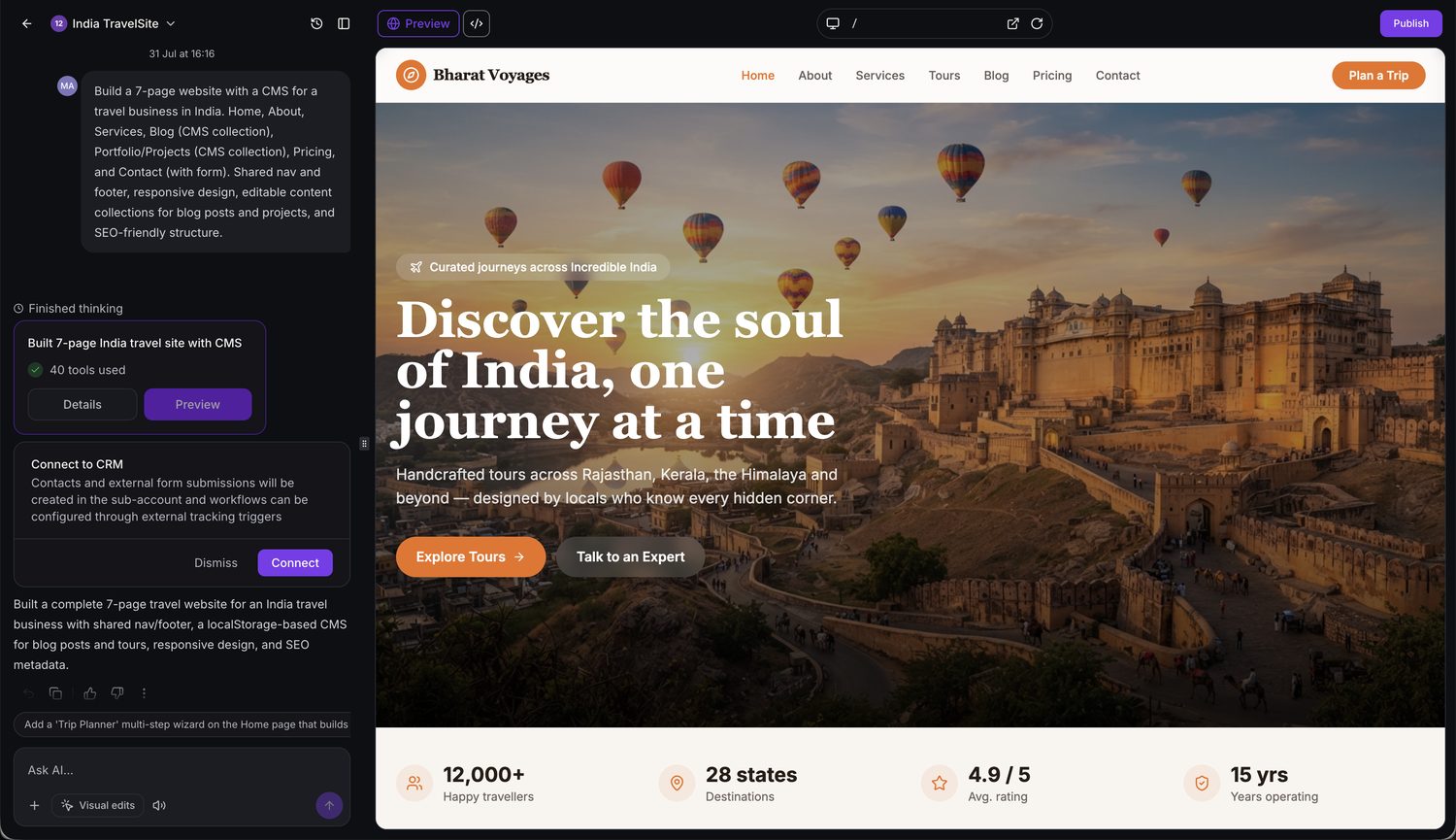
The generated Bharat Voyages home page with shared nav, hero, and stats band — plus the "Connect to CRM" prompt for the contact form.
How AI Studio Processed the Task
AI Studio:
- Planned a 7-page structure with shared navigation and footer
- Generated content and imagery across the pages
- Built editable CMS content collections for blog posts and tours
- Applied responsive design and SEO metadata
- Built a contact form and prompted to connect it to the CRM
Pages Created
| Page | Purpose |
|---|---|
| Home | Hero, highlights, and primary calls to action |
| About | Company story and credibility |
| Services | Overview of travel offerings |
| Blog | Editable CMS collection of posts |
| Portfolio / Projects | Editable CMS collection of tours |
| Pricing | Package and pricing details |
| Contact | Contact form (connectable to CRM) |
Session Details
| Item | Value |
|---|---|
| User Messages | 1 |
| Tools Used | 40 |
| Output | 7-page site with CMS collections and contact form |
| Rendering | Generated content and imagery, "Connect to CRM" card |
| Platform Actions | Contact form connection prompted |
| Final Result | Complete 7-page travel website, ready to publish |
| Total Session Cost | $1.10 |
What Affects AI Studio Usage?
AI Studio usage is based on the work performed during a session rather than the number of prompts alone. Sessions become more resource-intensive as additional reasoning, generation, or connection actions are required. Factors that increase overall work include:
- Multi-page structures and larger projects
- Follow-up questions and multiple refinements
- AI-generated images and other media
- Reference URL and image analysis
- Form and calendar connections
- Custom domain setup and publishing
- Version history from repeated changes
Based on the examples above:
- AI-generated imagery is often the largest single driver — image-heavy pages can cost more than sites with more pages but less generated media.
- Page count alone is not a reliable predictor of cost; a structured 7-page site can cost less than a single image-forward landing page.
- Text, layout, and CMS structure generally involve less processing than generating visuals.
AI Studio Usage and Spending Notifications
AI Studio displays usage notification banners to help users monitor consumption and spending before they reach their limits. These banners are enabled automatically for users who have access to AI Studio, so no additional setup is required.
Subscription Usage Notifications
Subscription users receive notifications as their AI Studio usage increases:
- 70% usage: Usage alert
- 85% usage: Warning
- Approaching or reaching 100%: Critical and usage exhaustion notifications
Depending on billing permissions, the banner can provide actions to adjust usage limits or request an increase from the Agency Admin.
Pay-Per-Use Spending Notifications
Pay-per-use users receive a spending notification for every $50 spent on AI Studio. These notifications help users monitor ongoing usage and costs as spending increases.
For detailed information about configuring spending limits, requesting additional usage, and managing limit-increase requests, see AI Usage Limits.
Frequently Asked Questions
Q: How much does AI Studio cost?
AI Studio is included at no additional cost for agency users on all Chat To Clients CRM agency plans, subject to fair use. Sub-account users can access AI Studio through an AI Employee Starter ($20/month), Growth ($50/month), or Unlimited ($97/month) subscription, or through pay-per-use billing. The Starter plan is available exclusively to agencies on the $497/month plan.
Q: Does every prompt do the same amount of work?
No. The work varies with the complexity of the request — the number of pages, refinements, generated assets, and connection actions involved.
Q: Does image generation involve more work than text?
Generally, yes. Generating images or other visual assets typically requires more processing than generating text alone.
Q: Are forms and calendars connected automatically?
No. AI Studio builds the form or booking layout first, then connects it after you ask it to or click Connect. Submissions and bookings flow into your sub-account only after that step.
Q: Can AI Studio recreate a site exactly from a URL?
A reference URL or image should be treated as inspiration for structure, layout, and style rather than an exact one-to-one copy.