
How to Create Flow-Based Voice AI Agents Using Ask AI
Creating a flow-based Voice AI agent is now easier with Ask AI in Chat To Clients CRM. Instead of building complex conversation flows from scratch, you can describe what you want your agent to do, answer a few guided questions, and let Ask AI generate a visual flow. You can review the build plan, customize the generated flow, and test your agent before putting it to use. This makes it easier to create structured voice conversations while maintaining control over your agent's behavior.
TABLE OF CONTENTS
- What is Flow-Based Voice AI Agent Creation in Ask AI?
- Key Benefits of Creating Flow-Based Voice AI Agents Using Ask AI
- Guided Requirement Collection in Ask AI
- Visual Build Plan and Approval
- Editing, Saving, Testing, and Rebuilding Voice Flows
- Editing the Generated Voice Flow
- Saving Your Changes
- Testing the Generated Flow
- Rebuilding the Generated Flow
- How to Create a Flow-Based Voice AI Agent Using Ask AI
- Frequently Asked Questions
- Related Articles
What is Flow-Based Voice AI Agent Creation in Ask AI?
Flow-Based Voice AI Agent Creation in Ask AI allows you to build structured voice conversations using natural-language instructions. Rather than manually adding and connecting individual nodes, you can describe your business requirements and have Ask AI create an initial flow based on your instructions.
Ask AI guides you through the creation process by gathering your requirements, preparing a visual build plan, and generating an editable voice flow. You can review the conversation paths, make changes directly on the canvas, save and test your work, or open the flow in the full Voice Flow Builder for additional configuration.
For example, you can ask Ask AI to create a voice agent that welcomes callers, identifies whether they need sales or customer support, and routes them to the appropriate conversation path.
Note: Prompt-Based Voice AI agent creation remains available. The new Ask AI experience provides an additional method for creating Flow-Based Voice AI agents.Key Benefits of Creating Flow-Based Voice AI Agents Using Ask AI
Creating Voice AI agents through Ask AI reduces the manual effort required to build structured call flows. It combines conversational instructions with visual editing tools, making it easier to turn your business requirements into an organized voice-agent workflow.
Faster Agent Creation: Generate an initial voice flow from a natural-language request instead of manually building every conversation path from a blank canvas.
Guided Setup: Answer follow-up questions that help Ask AI understand your business requirements, conversation goals, and expected caller interactions.
Visual Build Planning: Review the proposed flow structure before generation to confirm that the planned conversation matches your requirements.
Editable Voice Flows: Customize the generated conversation paths and configurations using the visual canvas.
Flexible Rebuilding: Request another version of the flow when you need to refine its overall structure or behavior.
Testing and Validation: Test your generated voice flow to identify potential conversation issues before using it with callers.
Full Builder Access: Open your generated flow in the Voice Flow Builder whenever you need additional configuration or advanced editing.
Guided Requirement Collection in Ask AI
Clear requirements help Ask AI generate a voice flow that matches your intended business process. When you request a flow-based agent, Ask AI can ask follow-up questions to clarify what the agent should do, what information it needs to collect, and how it should respond to different caller scenarios.
Start by describing the main purpose of your Voice AI agent. Include relevant details such as:
Agent Purpose: What the agent should accomplish, such as qualifying leads, answering customer questions, or assisting with appointment scheduling.
Caller Information: Details the agent should collect, such as the caller's name, contact information, or reason for calling.
Conversation Paths: Different ways the conversation should proceed based on caller responses.
Expected Outcomes: What should happen when a caller completes a particular conversation path.
Required Actions: Any supported actions or integrations needed to complete the workflow.
For example, you could enter the following request into Ask AI:
"Create a flow-based Voice AI agent for my dental clinic. The agent should greet callers, determine whether they want to book an appointment, ask about office hours, or speak to the staff, and direct the conversation accordingly. Collect the caller's name and phone number when they request an appointment."
Ask AI can then ask additional questions to clarify the desired behavior before preparing the build plan.
Visual Build Plan and Approval
A build plan outlines how Ask AI intends to organize your Voice AI conversation before generating the actual flow. Reviewing this plan helps you identify missing steps, unnecessary conversation paths, or incorrect assumptions before proceeding.
After gathering your requirements, Ask AI prepares a proposed build plan for your review.
Depending on your requested workflow, the plan may describe:
The agent's primary responsibilities.
The expected sequence of the conversation.
Different conversation paths based on caller intent.
The actions needed to complete supported tasks.
How the conversation should conclude.
Review the proposed plan and confirm that it reflects your requirements. If the plan does not match your intended workflow, provide additional instructions or request changes before approving it.
Once you approve the build plan, Ask AI generates the corresponding editable voice flow.
Editing, Saving, Testing, and Rebuilding Voice Flows
Generating a voice flow is only the starting point. The editable canvas allows you to review the resulting conversation structure and make adjustments before using the agent. Saving your work and testing different caller scenarios help ensure that the flow behaves as expected.
Editing the Generated Voice Flow
After Ask AI generates the flow, review its structure on the visual canvas. Depending on the generated configuration and the editing controls available, you may need to review or adjust:
Individual AI Agent nodes and their responsibilities.
Conversation paths and routing conditions.
Supported actions and integrations.
Connections between different stages of the conversation.
How each conversation path ends.
Review the entire flow to confirm that callers can follow the expected conversation paths.
Saving Your Changes
Saving your edits helps preserve the changes you make to the generated voice flow. After modifying the canvas, use the available save option to retain your changes.
Important: Save any canvas edits before requesting a rebuild. This helps prevent your latest changes from being left unsaved when Ask AI generates another version of the flow.Testing the Generated Flow
Testing helps you understand how the Voice AI agent responds to different caller requests and whether the generated conversation paths work as intended.
After saving your flow:
Use the available testing option to start a test conversation.
Interact with the agent using realistic caller questions.
Check whether the agent responds appropriately and follows the expected conversation path.
Test different caller requests to verify the configured routing behavior.
Review the results and make changes where necessary.
Save your updates and test again.
The full Voice Flow Builder also provides Web Call and Phone Call testing options for validating conversation behavior.
For more detailed testing and configuration instructions, refer to How to Create and Configure Voice AI Flows in Chat To Clients CRM.
Rebuilding the Generated Flow
Rebuilding allows you to request another generated version of the flow when the current structure does not fully meet your requirements.
Before rebuilding:
Review the changes you have already made to the canvas.
Save your existing edits.
Describe the adjustments you want Ask AI to make.
Request a rebuild using the available control.
Review the newly generated flow and confirm that it matches your updated requirements.
Important: Always save canvas edits before requesting a rebuild.
How to Create a Flow-Based Voice AI Agent Using Ask AI
Creating a flow-based Voice AI agent through Ask AI begins with a description of your business requirements. Following the guided creation process, reviewing the proposed build plan, and testing the resulting flow help you produce an agent that supports your intended calling experience.
Before You Begin:
Make sure your Chat To Clients CRM sub-account has access to Ask AI and Voice AI.
Identify the main purpose of the Voice AI agent you want to create.
Prepare a basic outline of the conversation and expected caller outcomes.
Identify any information, actions, or integrations the agent may require.
Note: This feature is rolling out to sub-accounts with Ask AI and Voice AI access. It may not appear in every eligible sub-account immediately.
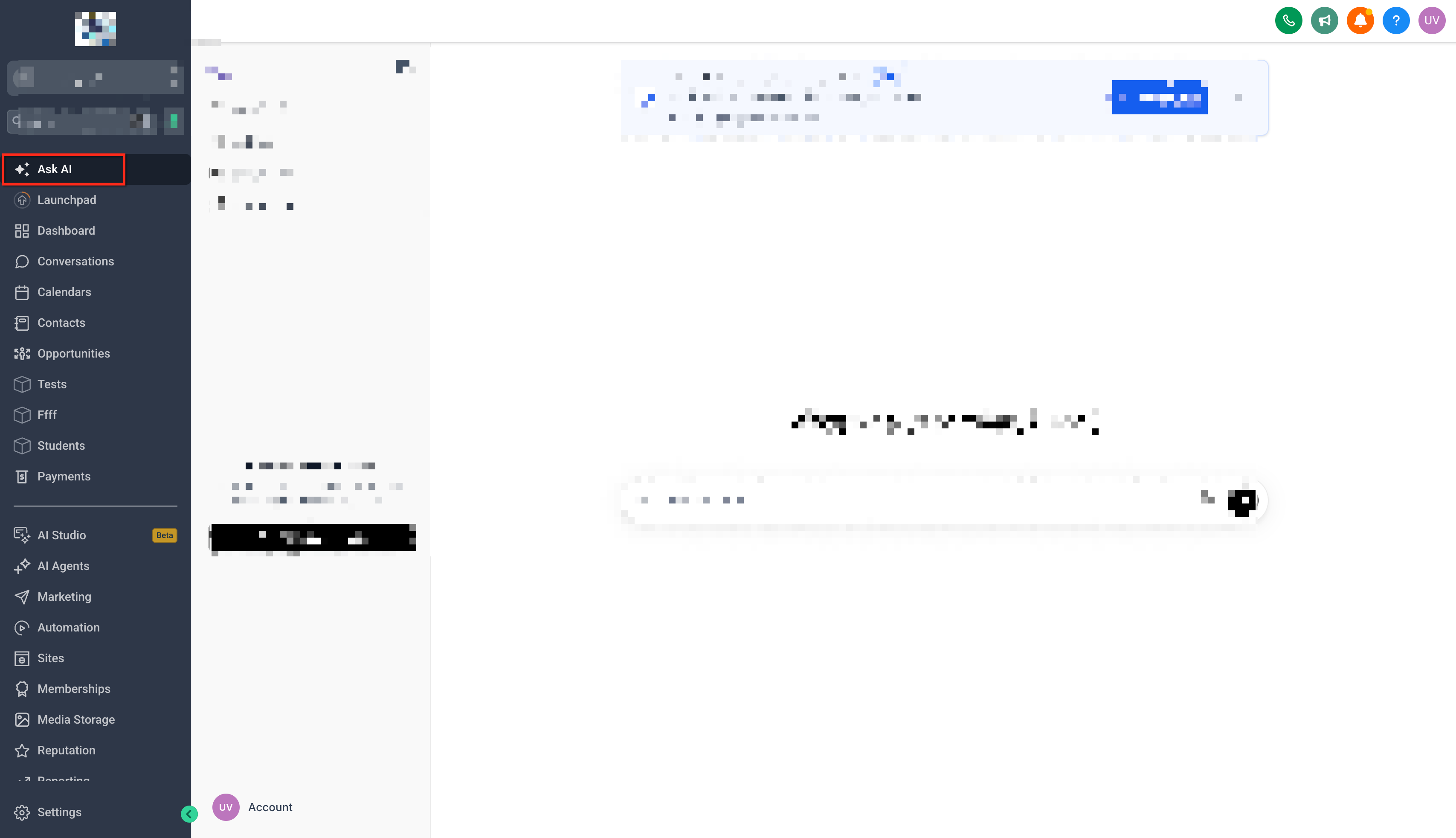
Step 1: Open Ask AI
Log in to your Chat To Clients CRM account.
Switch to the sub-account where you want to create the Voice AI agent.
Click the Ask AI icon in the top navigation bar to open the assistant.
Start a new conversation or use the available prompt field.
Step 2: Request a Flow-Based Voice AI Agent
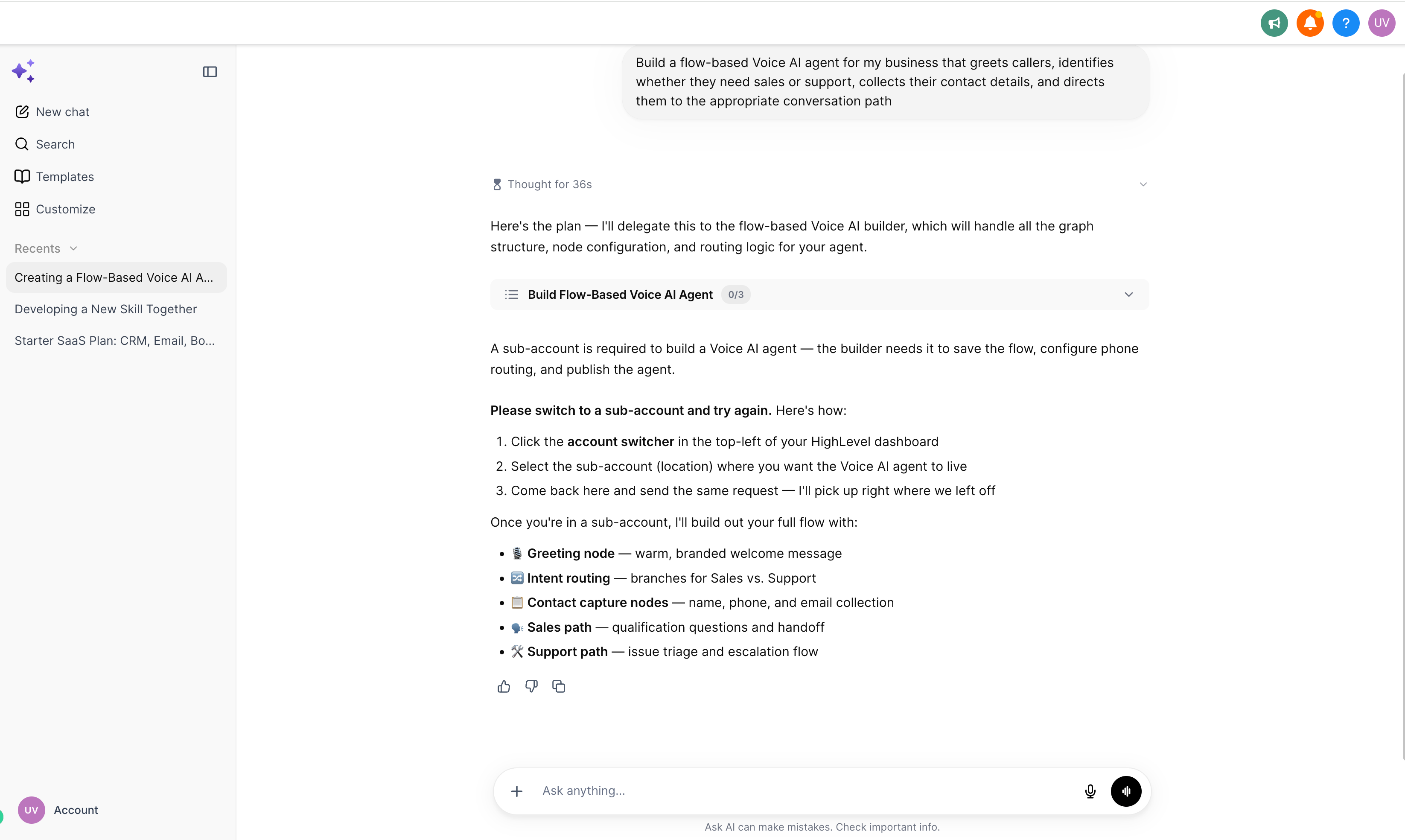
Enter a request describing the Voice AI agent you want to build.
Specify that you want a flow-based Voice AI agent.
Include the agent's purpose, expected conversation paths, and any relevant business requirements.
Submit your request.
Example prompt:
"Build a flow-based Voice AI agent for my business that greets callers, identifies whether they need sales or support, collects their contact details, and directs them to the appropriate conversation path."
Providing specific requirements helps Ask AI prepare a more relevant build plan.
Step 3: Answer the Guided Questions
Review the follow-up questions presented by Ask AI.
Provide the requested details about your business and conversation requirements.
Clarify how the agent should respond to different caller scenarios.
Continue answering questions until Ask AI has enough information to prepare the build plan.
Step 4: Review and Approve the Build Plan
Review the visual build plan generated by Ask AI.
Check whether the proposed conversation paths match your intended workflow.
Identify any missing steps or adjustments.
Request changes to the plan if necessary.
Approve the plan when you are satisfied with the proposed structure.
Ask AI uses the approved plan to generate the voice flow.
Step 5: Review and Edit the Generated Voice Flow
Examine the generated flow on the visual canvas.
Review the conversation paths, connected nodes, and available configurations.
Make any necessary adjustments using the available editing controls.
Confirm that the flow includes the required conversation outcomes.
Save your changes.
Step 6: Test or Rebuild the Flow
Use the available testing option to evaluate the generated agent.
Test different caller scenarios to verify the conversation behavior.
Identify any areas that need improvement.
Make and save additional edits as needed.
If the flow requires broader changes, save the existing canvas edits before requesting a rebuild.
Review and test the updated flow.
Step 7: Open the Full Voice Flow Builder
Locate the option to open your generated flow in the full Voice Flow Builder.
Open the flow in the builder.
Review its node configurations, routing paths, and supported actions.
Complete any additional settings or integrations required for your use case.
Save and test the completed configuration before deploying the agent.
For additional guidance on configuring and deploying flows, see How to Create and Configure Voice AI Flows in Chat To Clients CRM.
Frequently Asked Questions
Q: Why don't I see the option to create flow-based Voice AI agents in Ask AI?
The feature is being released gradually to sub-accounts with Ask AI and Voice AI access. If the option is unavailable, confirm that your sub-account has access to both products and check again as the rollout progresses.
Q: Can I continue creating Prompt-Based Voice AI agents?
Yes. Prompt-Based Voice AI agent creation remains available. The new Ask AI experience provides an additional option for generating flow-based agents.
Q: Do I need to know how to configure Voice AI nodes before using Ask AI?
No prior experience with manually building flows is required to begin. Ask AI can generate the initial structure from your instructions. However, understanding the available nodes and actions can help when reviewing or customizing complex flows.
Q: Can I create a Voice AI agent for a specific business scenario?
Yes. You can describe scenarios such as lead qualification, appointment inquiries, customer support, or call routing. Ask AI uses the requirements you provide to prepare a build plan and generate the initial flow. Any required actions or integrations must be supported and properly configured.
Q: What should I do if Ask AI generates a flow that doesn't match my requirements?
Review the generated flow and identify what needs to change. You can edit the flow or request a rebuild with updated instructions. Save any canvas edits before rebuilding.
Q: Can I test the agent without assigning a live phone number?
The full Voice Flow Builder supports browser-based Web Call testing, allowing you to evaluate supported conversation behavior without assigning a phone number. Some capabilities, such as call transfers, require Phone Call testing.
Q: Will Ask AI automatically configure every external integration my agent needs?
Not necessarily. Some actions and integrations require additional configuration, credentials, permissions, or authentication. Review these requirements in the full Voice Flow Builder before relying on the flow for live calls.
Q: Can I edit the generated flow after opening it in the full Voice Flow Builder?
Yes. The full Voice Flow Builder supports editing nodes, routing conditions, supported actions, and other available configuration settings.