
AI Preflight Checks for Chat To Clients CRM Marketplace App Listings
AI-powered preflight checks in the Chat To Clients CRM Developer Marketplace help developers identify policy violations, resolve white-label compliance issues, and improve app listing content before submission. Automated checks provide real-time feedback on listing details, while built-in AI tools help generate or improve taglines and descriptions. This helps reduce preventable rejections and streamline the Marketplace review process.
TABLE OF CONTENTS
- What Are AI-Powered Preflight Checks in the Developer Marketplace?
- Key Benefits of AI-Powered Preflight Checks
- AI Preflight Validation
- White-Label Compliance Detection
- AI Content Enhancements
- How to Use AI-Powered Preflight Checks
- Frequently Asked Questions
- Related Articles
What Are AI-Powered Preflight Checks in the Developer Marketplace?
AI-powered preflight checks automatically review Marketplace app listings for potential policy and branding violations during listing creation. They help developers identify issues early and make corrections before submitting their apps for review.
The feature checks app names, taglines, descriptions, logos, and preview images. When a potential issue is found,
developers receive a notification with guidance on how to resolve it.
Key Benefits of AI-Powered Preflight Checks
AI-powered preflight checks make it easier to prepare compliant, high-quality Marketplace listings while reducing the need for repeated corrections.
Early Issue Detection: Identify potential compliance violations before submitting an app.
White-Label Compliance: Detect restricted branding references and receive correction guidance.
AI Content Assistance: Generate or improve app taglines and descriptions.
Real-Time Feedback: Receive notifications when potential issues are detected.
Fewer Rejections: Reduce preventable submission errors.
Faster Review Preparation: Prepare more complete, review-ready listings.
AI Preflight Validation
AI Preflight Validation automatically scans supported listing content to identify potential policy violations before submission.
The validation covers:
| Listing Element | Validation |
|---|---|
| App Name | Checks for potential policy and branding issues. |
| Tagline | Reviews short app descriptions for compliance. |
| Description | Identifies potentially noncompliant content. |
| Logo | Checks for potential visual policy violations. |
| Preview Images | Reviews uploaded images for compliance concerns. |
Validation runs in the background during listing creation. When an issue is detected, the system displays a notification with suggested corrections.
White-Label Compliance Detection
White-label Marketplace listings must follow specific branding requirements. AI-powered checks help developers identify restricted references that could cause compliance issues.
The system can detect references such as:
Chat To Clients CRM
Chat To Clients CRM
Chat To Clients CRM
If a restricted reference is detected, developers receive feedback explaining the issue and how to correct it. For example, a flagged tagline can be revised to use brand-neutral wording while accurately describing the app.
For more information, see Configure Marketplace App Listing Type.
AI Content Enhancements
AI Content Enhancements help developers create clear, informative Marketplace listings without manually drafting every detail. The built-in AI tools support:
Tagline Generation: Create short descriptions that highlight an app's purpose.
Tagline Improvement: Refine existing wording for clarity.
Description Generation: Generate informative app descriptions.
Description Improvement: Improve existing descriptions to communicate features and benefits more effectively.
Developers should review AI-generated content for accuracy and compliance before submission.
How to Use AI-Powered Preflight Checks
Preflight checks work during Marketplace listing creation, helping developers identify issues, make corrections, and improve content before submitting their apps.
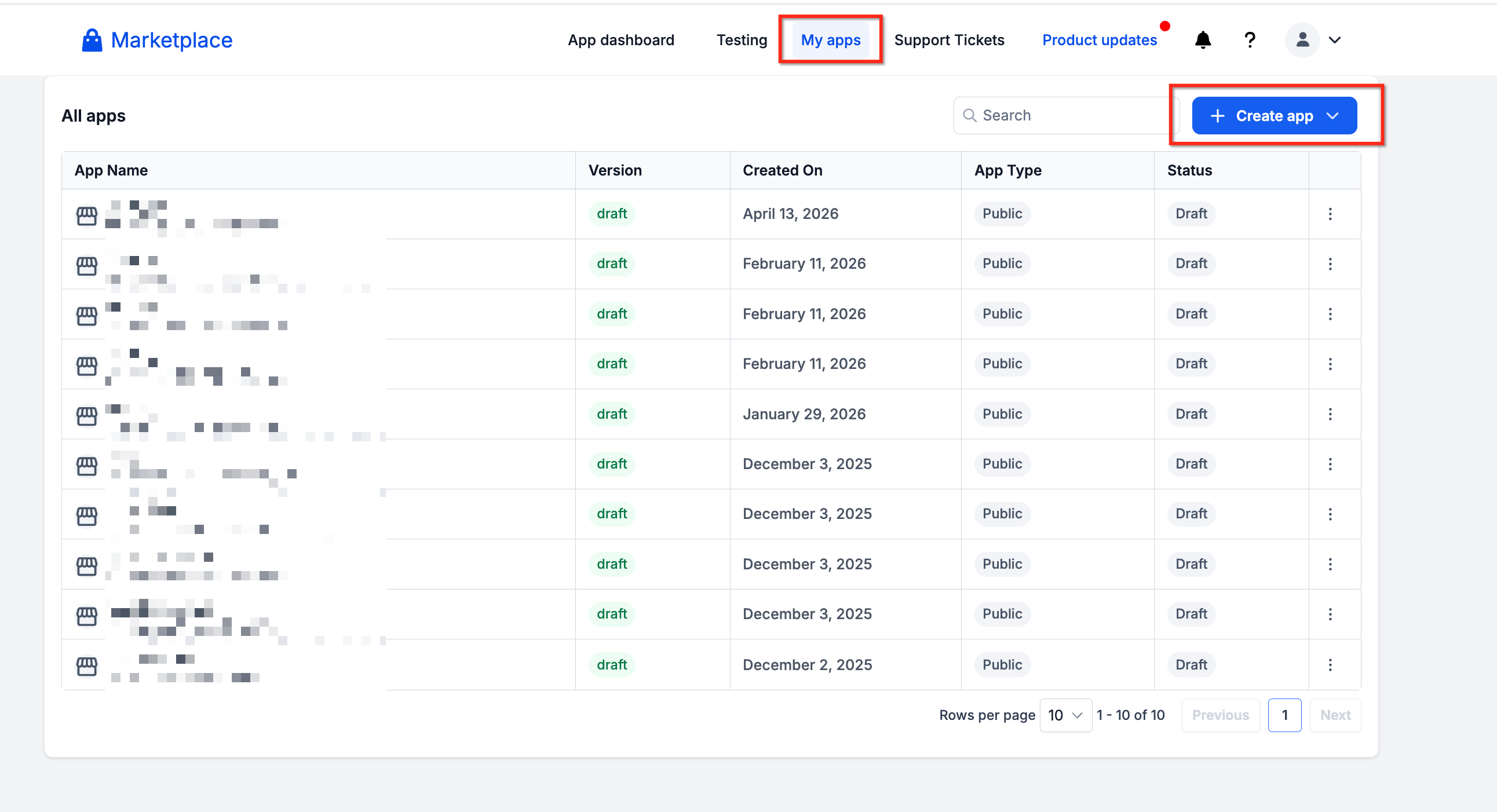
Step 1: Open Your Marketplace App
Visit the Chat To Clients CRM Developer Marketplace.
Sign in and navigate to My Apps.
Select an existing app or click Create App.
Step 2: Complete Your App Listing
Open the app listing configuration.
Enter the app name, tagline, and description.
Upload the app logo and preview images.
Review the applicable listing and branding requirements.
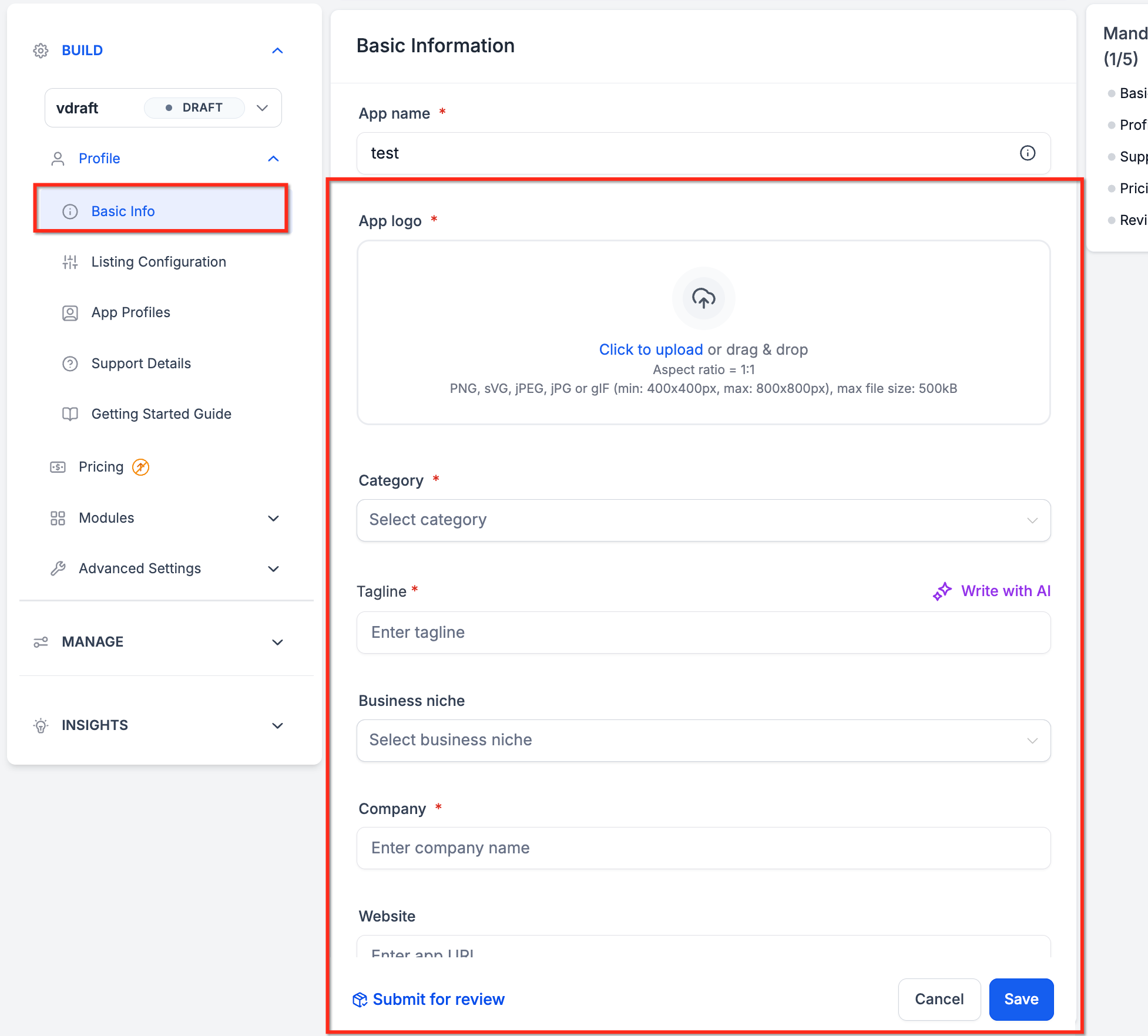
AI-powered checks run in the background as you create the listing.
Step 3: Review and Resolve Compliance Warnings|
Review any AI preflight notifications that appear.
Identify the flagged text or image.
Follow the suggested guidance to correct the issue.
Review your updated listing for additional compliance concerns.
Step 4: Improve Listing Content with AI
Locate the AI enhancement option for the tagline or description.
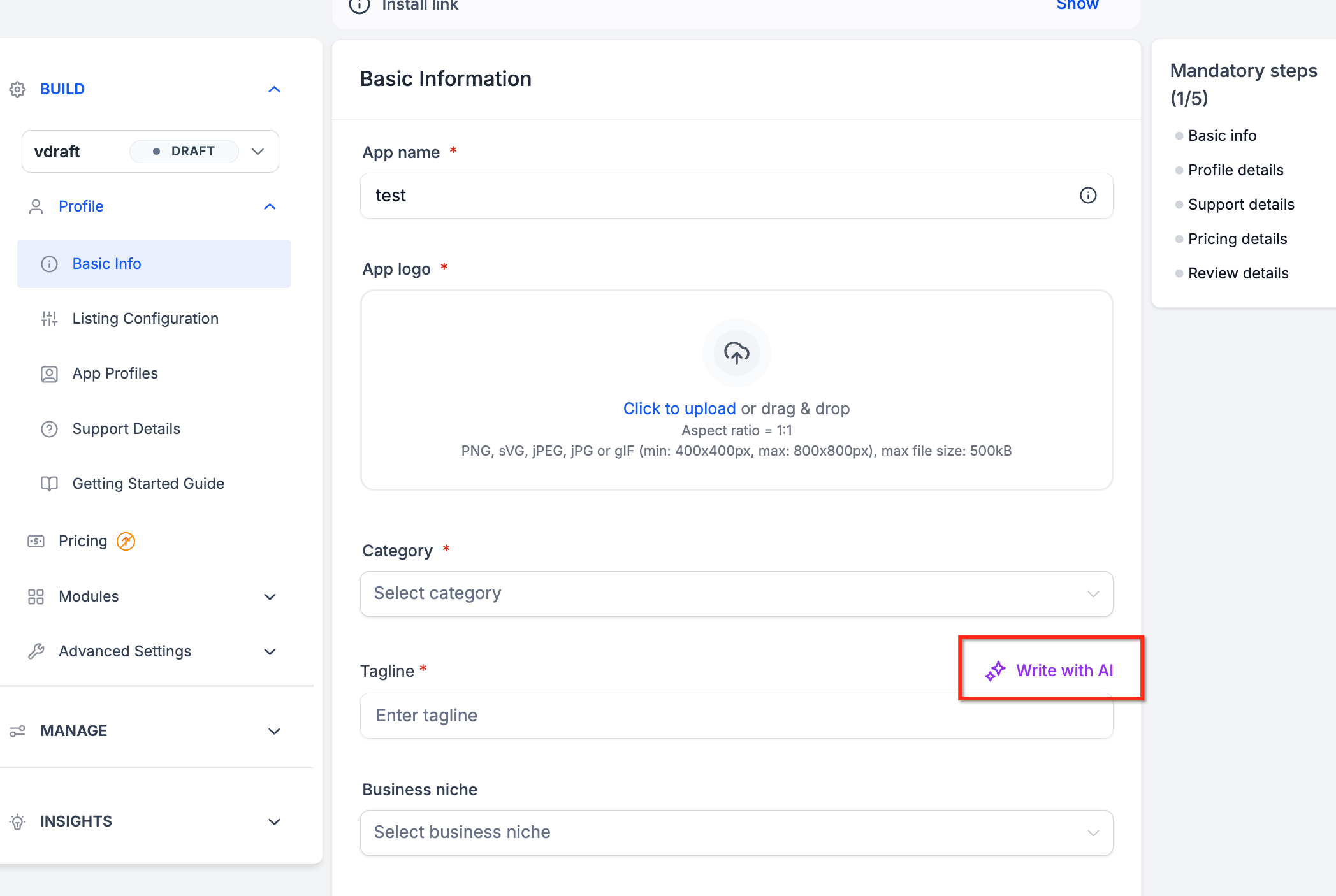
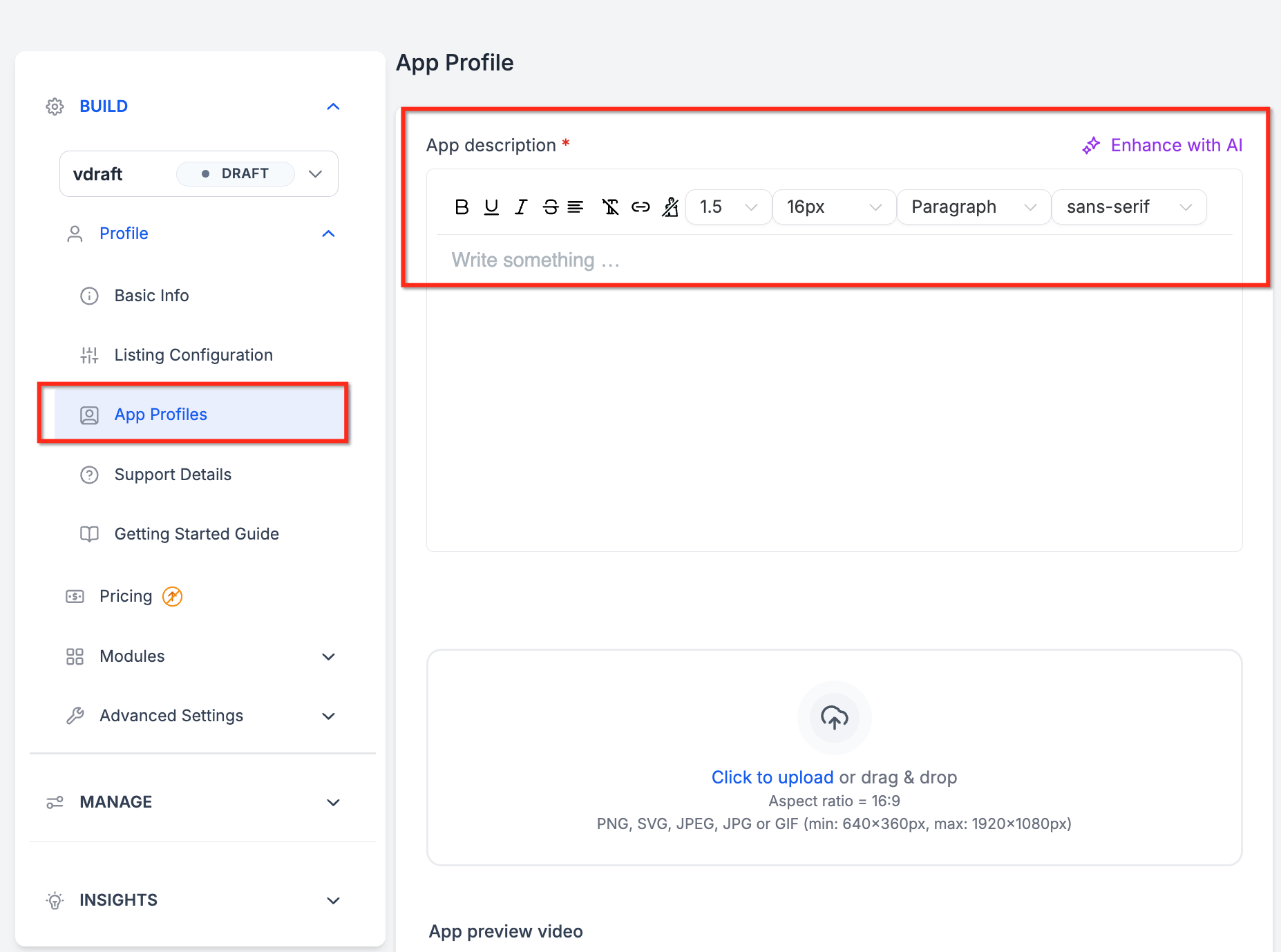
Generate new content or improve existing text.
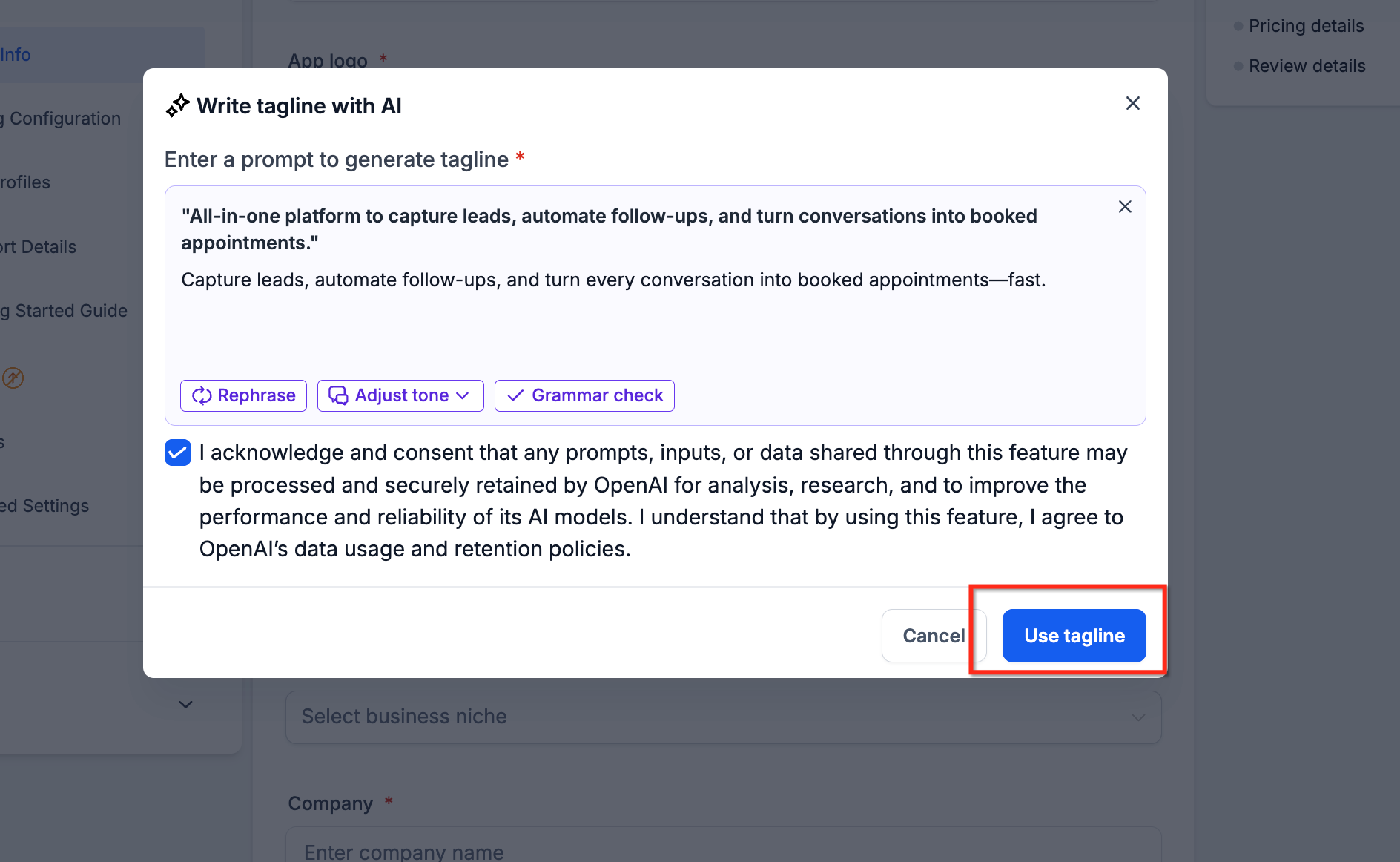
Review the AI-generated suggestion.
Apply the content using the available editor controls.
Step 5: Review and Submit Your App
Before submission, verify that:
All listing details are accurate and complete.
Branding and compliance issues have been addressed.
Logos and preview images are appropriate.
AI-generated content has been reviewed.
Once ready, proceed with the Marketplace submission process.
Note: Passing AI preflight checks does not guarantee Marketplace approval. Apps remain subject to the applicable review process.Frequently Asked Questions
Q: Do AI preflight checks guarantee Marketplace approval?
No. They help identify potential issues before submission but do not replace Marketplace review.
Q: Are preflight checks automatic?
Yes. Validation runs in the background during listing creation.
Q: Does preflight validation check images?
Yes. App logos and preview images are included in the validation process.
Q: Can AI improve an existing tagline or description?
Yes. AI Content Enhancements can generate new content or improve existing listing text.