
How to Create and Manage Subagents in Chat To Clients CRM Agent Studio
Managed Agents in Chat To Clients CRM can use Subagents to complete complex, multi-step jobs as a team. The main agent delegates specialized tasks, runs independent work in parallel, and reviews results before responding.
This helps businesses automate research, CRM updates, and other operations with greater efficiency, accuracy, and execution visibility.
TABLE OF CONTENTS
- What Are Subagents in Managed Agents?
- Key Benefits of Subagents
- Performance Results
- How Subagent Delegation Works
- Configuring and Managing Subagents
- Monitoring Subagent Activity
- Subagent Permissions and Execution Safeguards
- Subagent Costs and Usage
- How to Set Up Subagents in Managed Agents
- Frequently Asked Questions
- Related Articles
What Are Subagents in Managed Agents?
Subagents are specialized AI agents that work under a main Managed Agent. Each receives a focused task with access to the relevant apps, tools, and information, while the main agent coordinates execution and verifies results.
A Managed Agent team includes:
Main Agent (Coordinator): Plans tasks, delegates work, reviews results, and responds.
Subagents (Specialists): Execute assigned tasks using relevant tools and app connections.
Task Reports: Return results to the coordinator for review and consolidation.
For example, a sales agent can delegate company research and CRM analysis to separate specialists, then combine their findings into one actionable response.
Unlike Flow Agents, which use visual, node-based orchestration, subagents operate within Managed Agents.
Key Benefits of Subagents
Subagents divide complex jobs into focused tasks, reducing unnecessary processing while improving execution speed, accuracy, and visibility.
Complex Job Automation: Complete multi-step jobs through coordinated specialists instead of a single long execution.
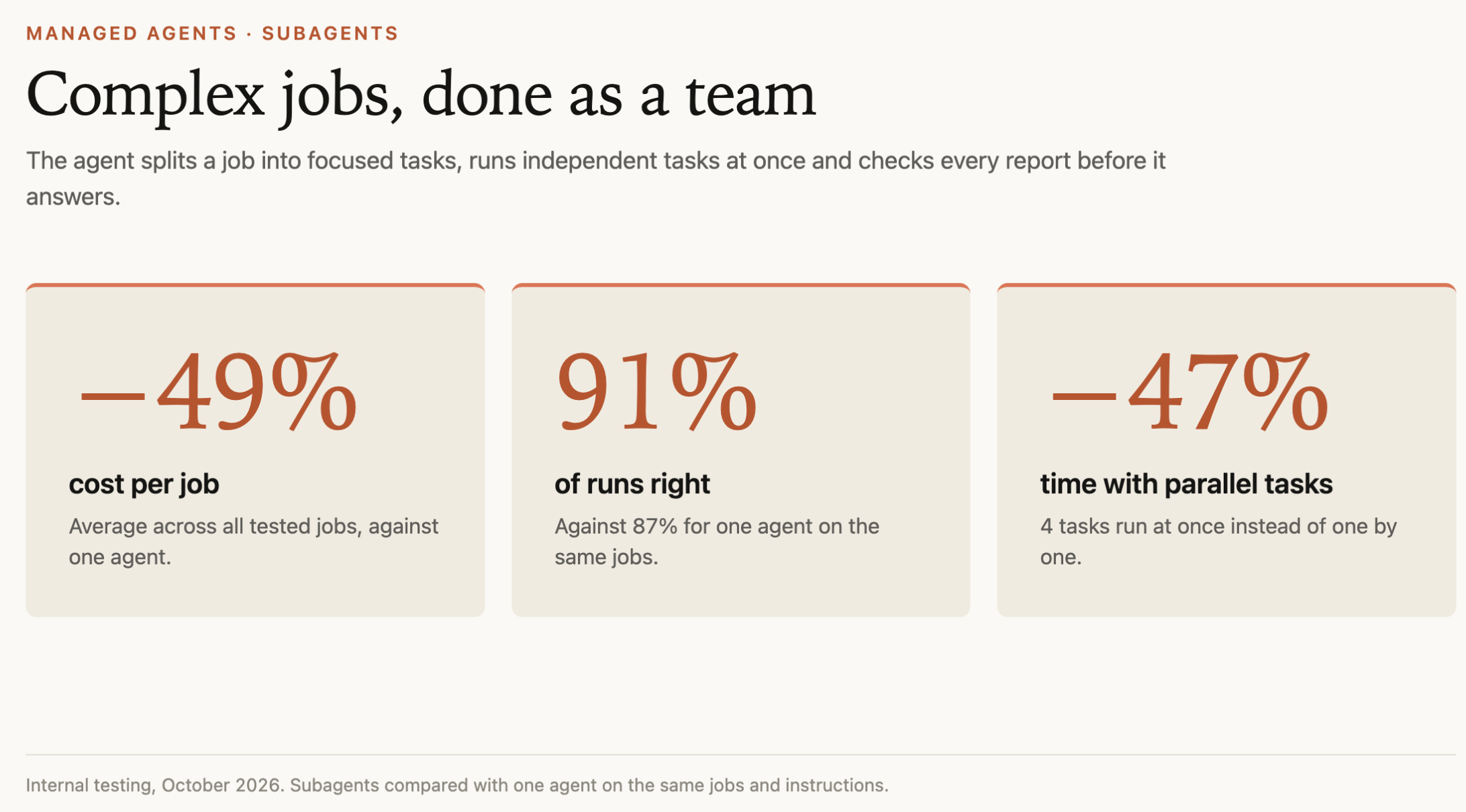
Faster Execution: Run independent tasks in parallel. Internal testing showed 47% less execution time for four parallel tasks.
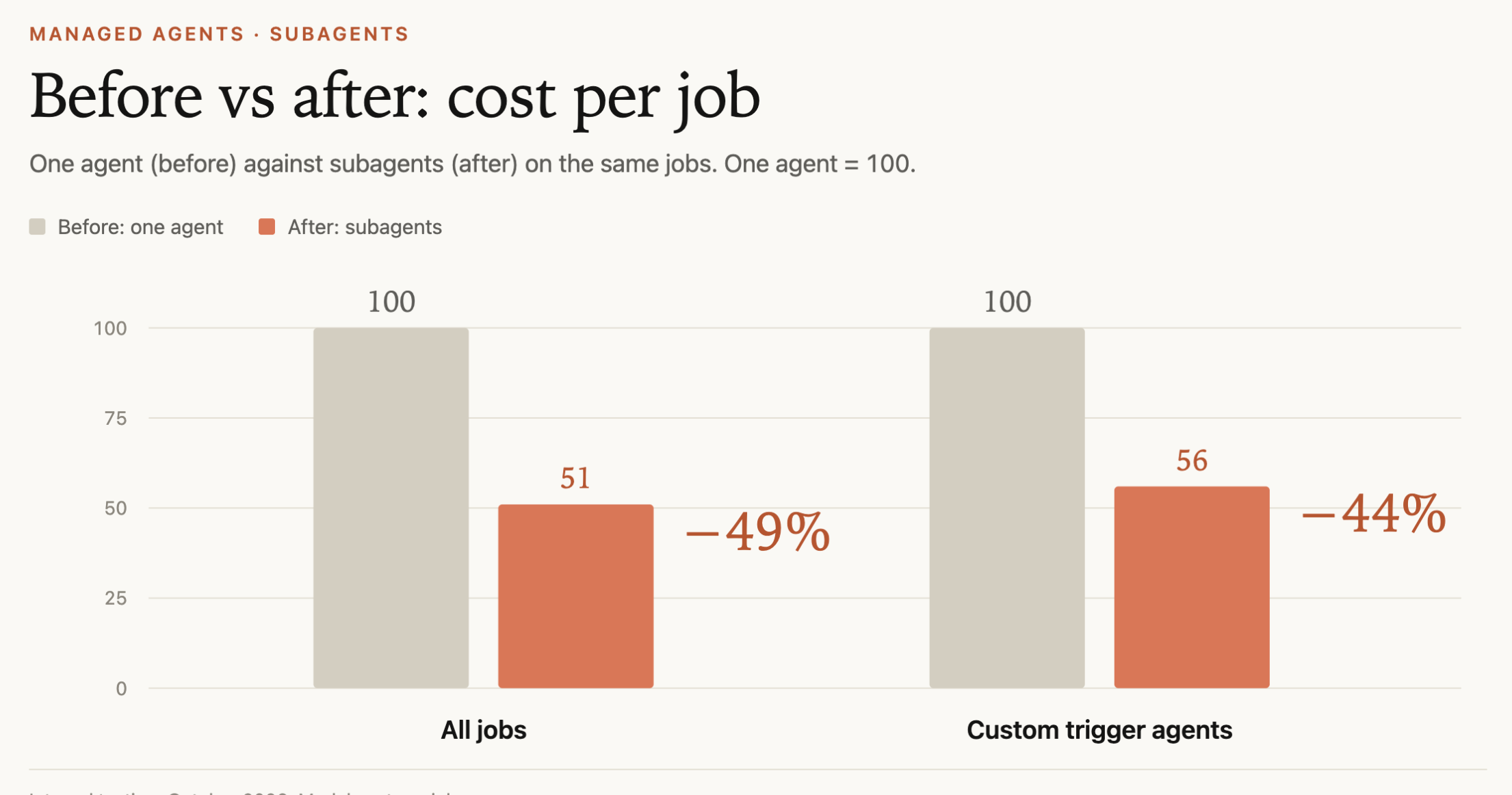
Lower Model Costs: Shorter, task-specific context reduces processing. Internal testing showed 49% lower average model costs.
Improved Accuracy: The coordinator reviews specialist results before responding. Successful runs increased from 87% to 91% in internal testing.
Specialized Execution: Delegate research, CRM analysis, opportunity updates, Notion updates, and other authorized operations.
Execution Transparency: Inspect specialist tasks, reports, sources, statuses, and changes.
Controlled Permissions: Restrict subagents to the apps, records, and actions needed for their assignments.
Performance Results
Chat To Clients CRM internal testing in October 2026 compared subagents with a single agent completing the same jobs and instructions.
| Metric | Result |
|---|---|
| Average model cost | 49% lower |
| Successful runs | 91% vs. 87% |
| Execution time with four parallel tasks | 47% lower |
| Model cost for tested custom-trigger agents | 44% lower |
Some trigger-based executions achieved savings of up to 80%, according to additional internal testing information.
These are internal testing results, not guaranteed cost savings or performance improvements. Actual results depend on workload, task complexity, tools, and execution requirements.
How Subagent Delegation Works
The main agent breaks a request into focused assignments, delegates them to relevant specialists, and reviews their results before responding. Independent tasks can run simultaneously, while dependent tasks follow the required execution order.
Plan: The main agent analyzes the request and identifies tasks.
Delegate: Specialists receive focused briefs, relevant context, and appropriate tool access.
Execute: Independent tasks run in parallel; dependent tasks wait for required results.
Review: The main agent checks specialist reports and can request additional work.
Respond: The coordinator consolidates findings or completes authorized actions.
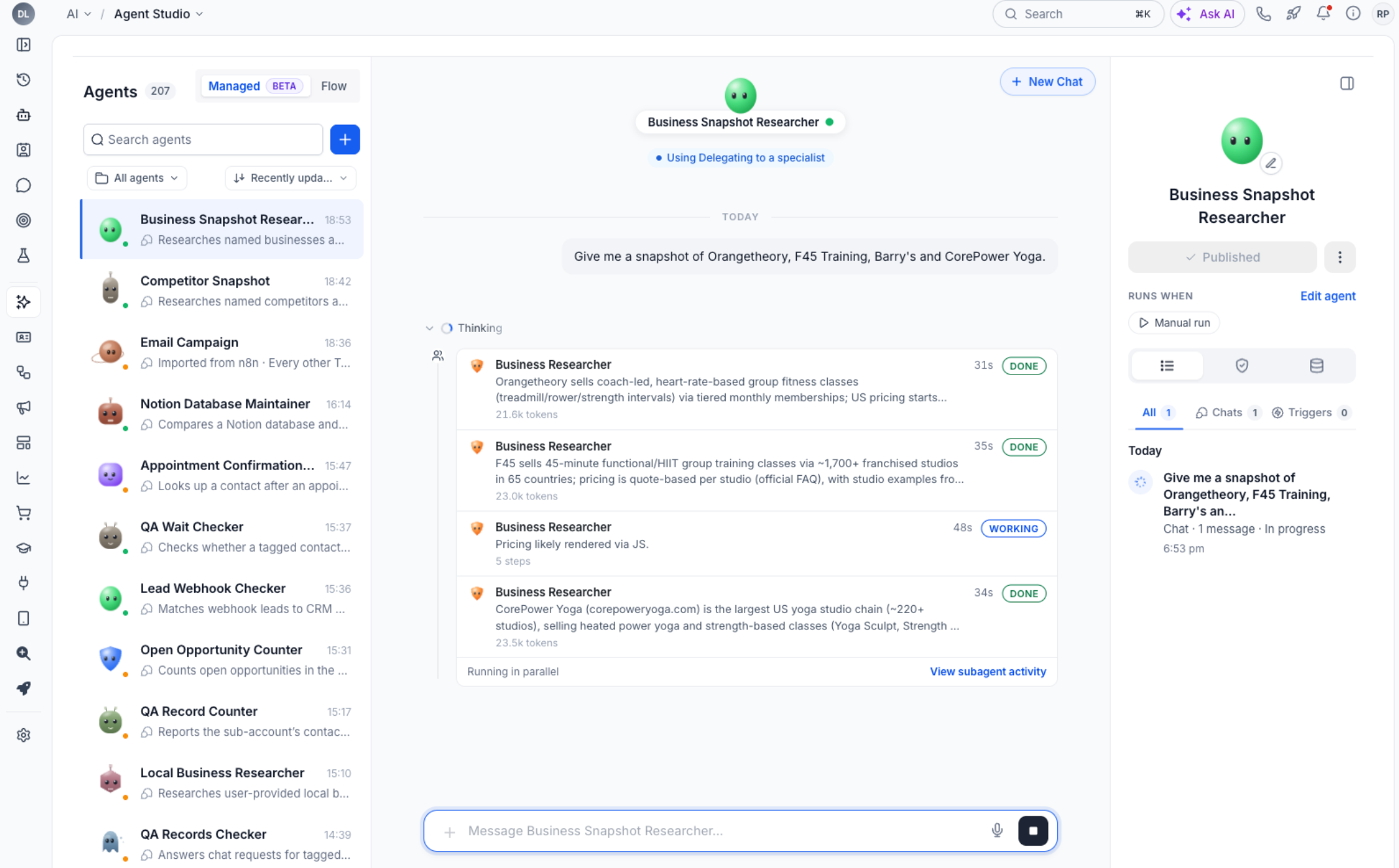
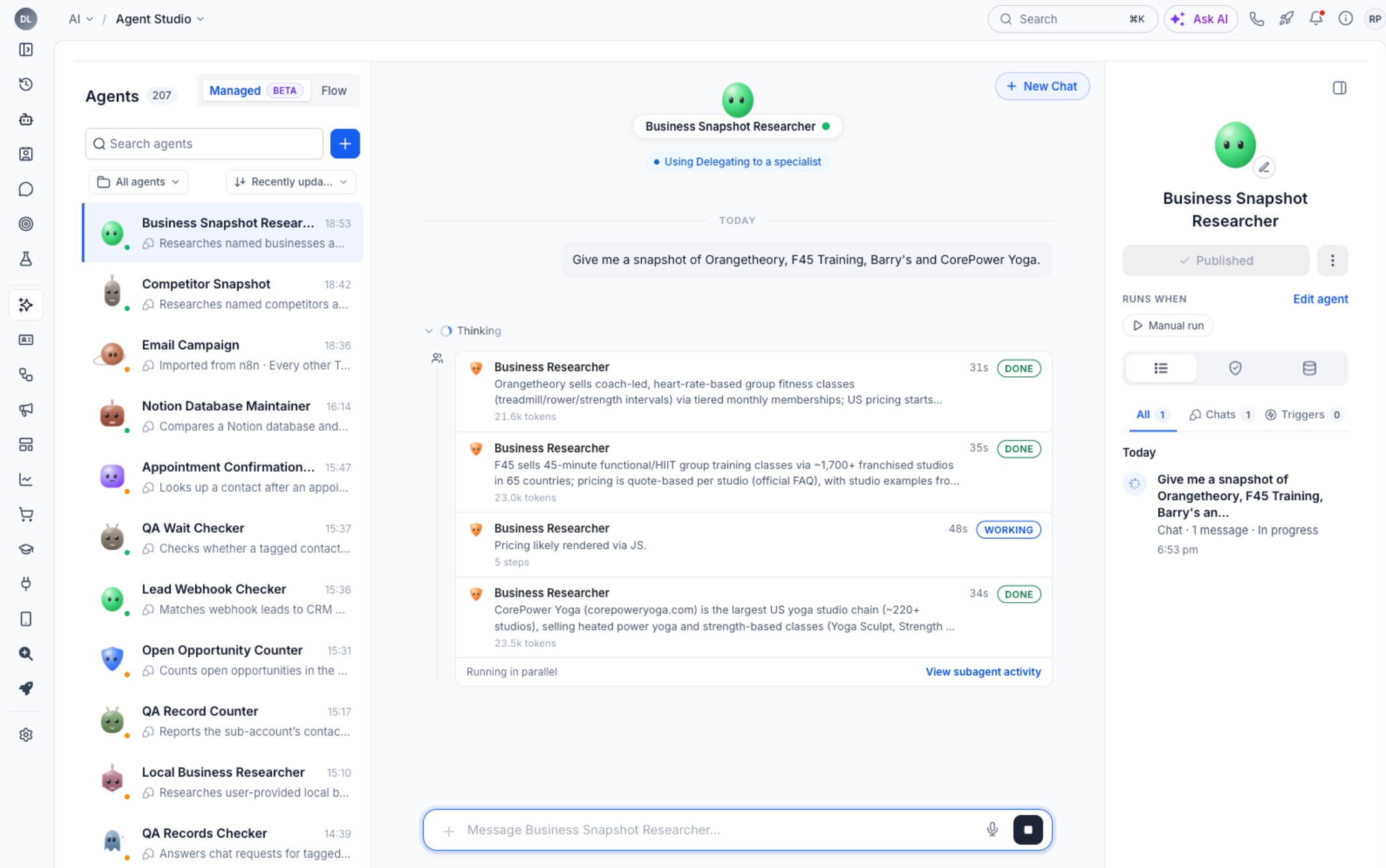
Example: Ask a Managed Agent to compare Orangetheory, F45 Training, Barry's, and CorePower Yoga. It can delegate company research to specialists simultaneously, review their findings, request follow-up research if necessary, and return a consolidated comparison.
Because each specialist uses only its assigned context rather than the entire conversation, unnecessary processing is reduced.
Configuring and Managing Subagents
Managed Agents can create and adjust specialist teams through natural-language instructions. The builder decides when delegation is useful and configures specialists based on the requested job.
1. Creating Subagents
Describe the desired outcome to the builder, including relevant tasks and apps.
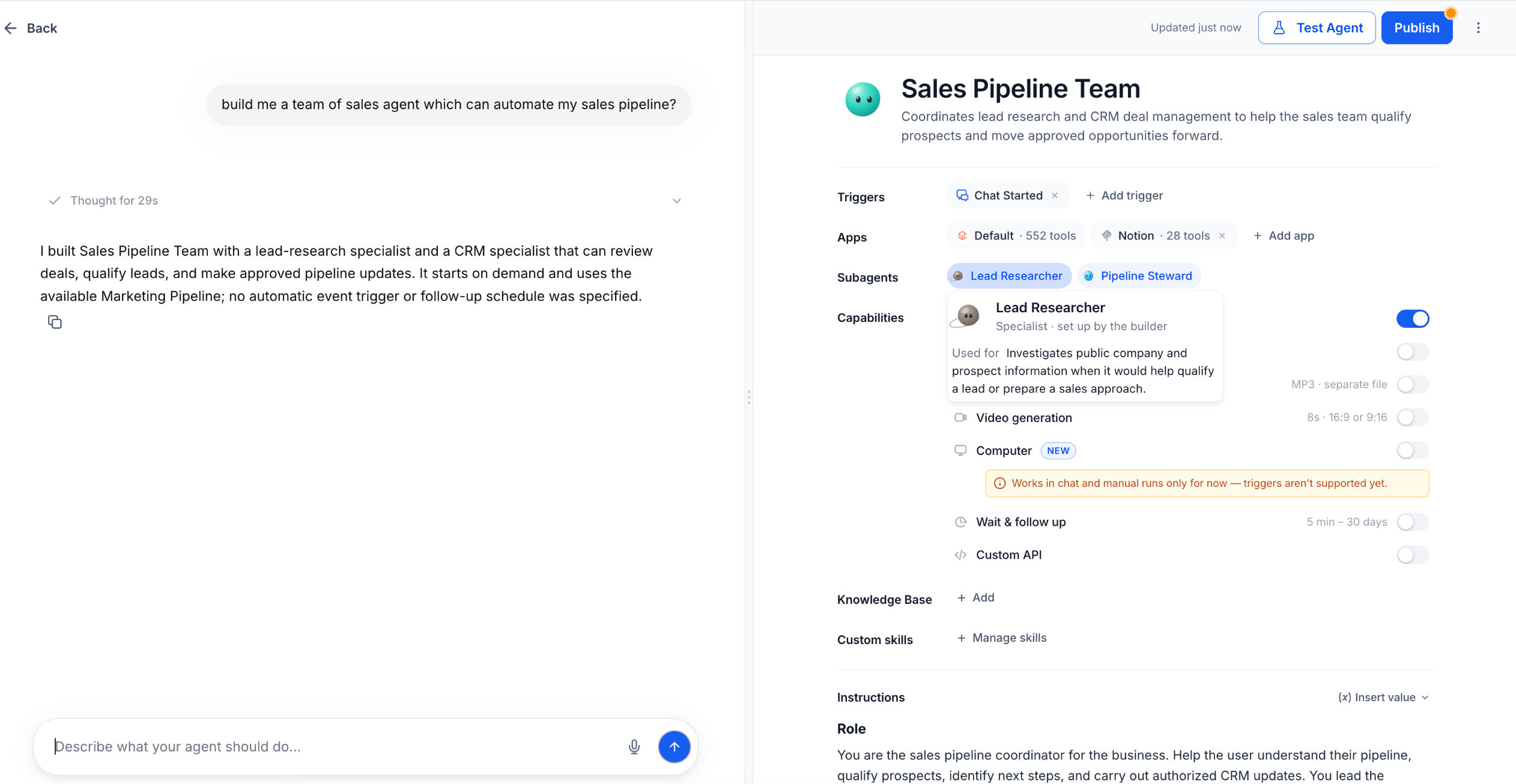
Example prompt: "Build me a team of sales agents that can automate my sales pipeline."
The builder can create a Sales Pipeline Team with specialists such as Lead Researcher and Pipeline Steward.
Review the generated specialists in the Subagents row to verify their assigned responsibilities.
2. Adding or Modifying Subagents
Ask the builder to adjust the team using plain language.
Examples:
"Split this into research and CRM update subagents."
"Add a subagent that checks the calendar."
"Create a specialist that reviews opportunity records."
"Make the research specialist read-only."
Review the updated Subagents row after each change.
Note: Not every request requires subagents. The builder determines whether a team would be beneficial.
3. Subagents vs. Custom Skills
These capabilities serve different purposes:
Subagents: Specialized workers that execute delegated tasks.
Custom Skills: Reusable instructions defining how tasks should be performed.
Apps and Tools: Connected capabilities used to retrieve information or perform authorized actions.
For example, a Lead Researcher subagent can follow a Custom Skill containing lead qualification rules.
Learn more: Create Custom Skills for Managed Agents.
Monitoring Subagent Activity
Subagent Activity shows how the main agent delegates work, which specialists complete each task, and how the final response is produced. This helps verify results, identify changes, and investigate execution issues.
Viewing Subagent Activity
Click View subagent activity beneath a response containing delegated work.
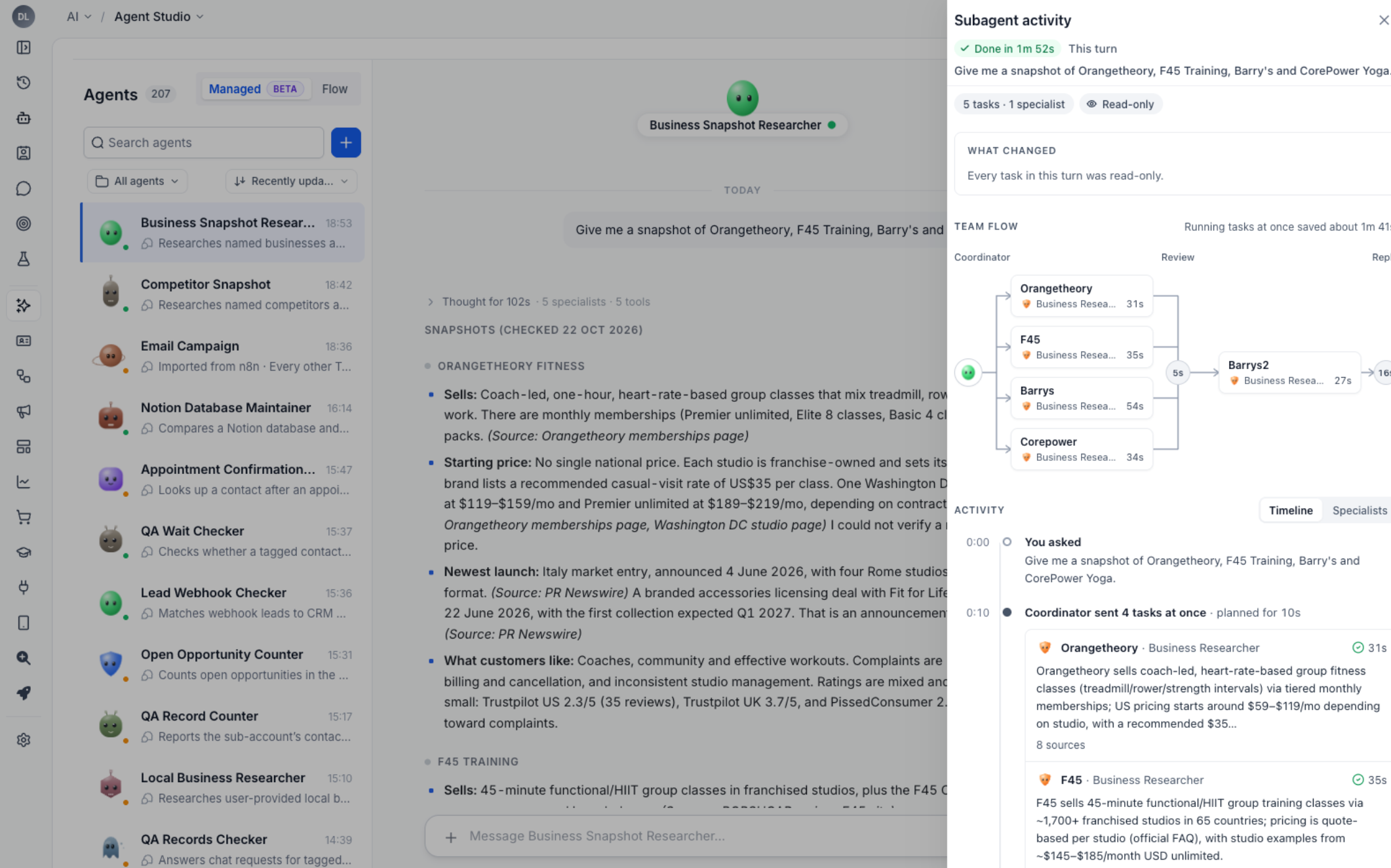
The activity panel provides:
Team Flow: Coordinator, specialist tasks, review, and final response.
Task Status and Duration: Execution status and completion time.
What Changed: Summary of actions or changes during the run.
Specialist Details: Assigned subagents and their responsibilities.
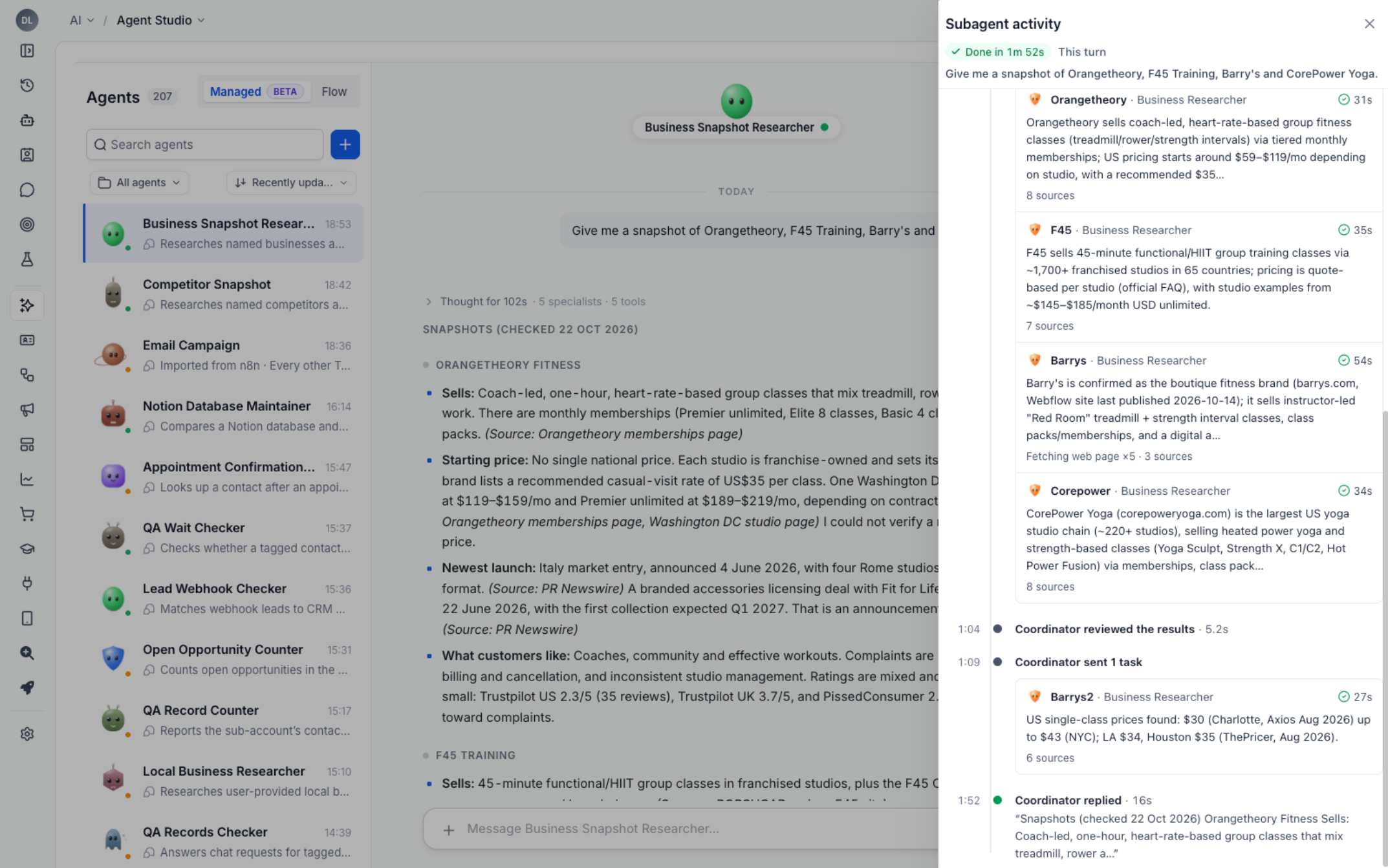
Task Reports: Results, sources, execution steps, and available briefs.
Activity Timeline: Chronological view of delegation, reviews, and replies.
Reviewing Individual Tasks
Open the Managed Agent conversation.
Click View subagent activity.
Select a specialist task from the flow or timeline.
Review its result, steps, sources, brief, and full report where available.
Compare its findings with the coordinator's final response.
This is useful when validating competitor research, CRM updates, or other multi-specialist operations.
Trigger and API Runs
Subagents also work with supported triggers, waits, follow-ups, and API executions.
Review automated runs through the Managed Agent's Activity tab. Use Agent Logs for detailed execution steps and troubleshooting.
Learn more: Managed Agent Activity Feed.
Subagent Permissions and Execution Safeguards
Subagents use task-specific permissions to limit unnecessary access and unauthorized changes. They operate through the main agent's app connections, but individual tasks remain restricted to their assigned scope.
Read-Only Tasks: Research and lookup tasks cannot modify records.
Scoped Updates: Update tasks can modify only the records authorized in their briefs and permissions.
Shared Connections: Subagents use the main agent's existing app connections.
Restricted Tools: Computer browser operations and Custom API calls remain with the main agent.
Message Review: The main agent checks customer messages drafted by specialists before sending.
Loop Protection: Subagents repeatedly calling the same tool without progress can be stopped.
For example, a research subagent can analyze a contact without modifying its CRM record, while a separate update specialist may change specifically authorized opportunity records.
Important: Tool availability depends on execution type. The Computer capability currently supports chat and manual runs, not triggers. This does not restrict all subagent delegation to manual execution.
Learn more: Skills Platform for AI Agents.
Subagent Costs and Usage
Subagents reduce model processing costs by working with shorter, task-specific briefs instead of carrying the entire conversation through every step. The main agent handles planning and review, while specialists perform focused operations, potentially using lighter models.
October 2026 internal testing found:
49% lower average model cost across tested jobs.
44% lower model cost for tested custom-trigger agents.
Up to 80% lower model cost in some trigger-based executions, according to supplementary internal testing.
47% less execution time in the tested four-task parallel workload.
Subagent work is billed as part of its parent Managed Agent run, without a separate subagent billing category.
Note: Internal model-cost reductions do not necessarily translate to equivalent customer billing reductions. Actual charges depend on the applicable Chat To Clients CRM pricing plan and usage.
Learn more: Chat To Clients CRM AI Products Pricing.
How to Set Up Subagents in Managed Agents
A well-configured Managed Agent ensures specialists receive appropriate responsibilities and permissions. Testing before publishing helps confirm that delegation, record access, and final responses work as intended.
Step 1: Open Managed Agents
Log in to your Chat To Clients CRM sub-account.
Navigate to AI Agents → Agent Studio → Managed.
Open an existing agent or click + Create Agent.
Step 2: Describe the Job
Enter a natural-language description of the desired workflow.
Example: "Build a sales pipeline team that researches prospects, reviews CRM opportunities, identifies stalled deals, and recommends next steps."
The builder generates the agent configuration and determines whether specialists are needed.
Step 3: Review the Subagent Team
Review the generated agent description.
Find the Subagents row.
Inspect each specialist's role and responsibilities.
Confirm that the team matches the intended workflow.
Step 4: Refine the Team
Ask the builder to add, remove, or adjust specialists.
Example: "Add a specialist that checks existing opportunities before recommending CRM updates."
Verify the changes in the Subagents row.
Step 5: Review Apps and Permissions
Verify the main agent's connected apps and tools.
Review instructions and enabled Custom Skills.
Confirm appropriate read-only and update permissions.
Restrict sensitive actions to authorized operations.
Subagents use the main agent's app connections within their task-specific restrictions.
Step 6: Test the Agent
Click Test Agent.
Submit a realistic multi-step request.
Review the response and delegated tasks.
Open View subagent activity.
Verify specialist results, task scope, and the final response.
Example: "Review this prospect's CRM details, open opportunities, recent notes, and public company information. Recommend the next action."
Step 7: Publish and Run
Review the configuration and permissions.
Add any supported triggers.
Click Publish.
Run the agent through chat or another supported execution method.
Monitor the resulting activity.
Subagents support chat, applicable triggers, waits, follow-ups, and API runs. Individual tools may have separate execution restrictions.
Learn more: Scheduled Triggers for Managed Agents.
Step 8: Review and Improve
After execution, inspect Subagent Activity and Agent Logs, verify task results and record changes, and refine the agent's instructions or specialist responsibilities as needed. Test significant changes before using them in automated workflows.
Frequently Asked Questions
Q: Do all Managed Agent tasks require subagents?
A: No. The builder determines when delegation would be useful. Simpler requests may run without specialists.
Q: Can multiple subagents work simultaneously?
A: Yes. Independent tasks can run in parallel, while dependent tasks execute in the required order.
Q: Can subagents update CRM records?
A: Yes, when authorized. Read-only tasks cannot modify records, and update tasks are limited to their assigned scope.
Q: Do subagents need separate app connections?
A: No. They use the main agent's connections with task-specific restrictions.
Q: Can subagents use Computer or Custom API directly?
A: No. Those capabilities remain with the main agent.
Q: Can subagents run through automated triggers?
A: Yes, through supported trigger types. Individual capabilities may have additional execution restrictions.
Q: Do subagents always reduce costs and execution time?
A: No. Internal testing demonstrated improvements, but actual results depend on workload complexity, tools, and task dependencies.
Q: What happens if a subagent repeatedly calls a tool?
A: Repeated-call protection can stop a subagent that is not making progress. Review Activity or Agent Logs for further investigation.
Q: Can I inspect individual subagent results?
A: Yes. Subagent Activity shows specialist tasks, available reports, sources, and execution details.
Q: How are subagents different from Flow Agents and Custom Skills?
A: Subagents execute delegated work within Managed Agents. Flow Agents use visual workflows, while Custom Skills provide reusable instructions.