
Create Custom Skills for Managed Agents in Chat To Clients CRM
Custom Skills let you save reusable instructions once and apply them across Managed Agents in a sub-account.
Instead of repeating the same process, formatting rules, or business guidance in every agent, you can create a skill and enable it only for the agents that need it. Managed Agents can apply relevant skills automatically, or you can select a specific skill during chat using the / picker.
TABLE OF CONTENTS
- What are Custom Skills for Managed Agents?
- Key Benefits of Custom Skills
- How Custom Skills Work
- Custom Skills vs. Agent Instructions and Knowledge Base
- Enable Custom Skills for Individual Managed Agents
- Use a Custom Skill in Agent Chat
- How To Set Up Custom Skills for Managed Agents
- Frequently Asked Questions
- Related Articles
What are Custom Skills for Managed Agents?
Custom Skills are reusable sets of instructions that teach Managed Agents how your business wants a specific task performed. Each skill includes a name, a description that helps identify when it should be used, and the instructions the agent should follow. Because skills can be shared across Managed Agents, they help standardize processes without requiring the same guidance to be maintained separately in every agent.
Custom Skills are part of Chat To Clients CRM's broader Skills Platform, but they serve a different purpose from built-in skills that provide capabilities such as CRM actions or Knowledge Base searches. A Custom Skill focuses on how the agent should perform a repeatable task or follow a specific process. For more information about the broader capability layer, see Skills Platform for AI Agents.
For example, you could create Custom Skills for:
- Qualifying leads using your company's criteria
- Formatting follow-up emails in a standard way
- Producing consistent meeting summaries
- Following an internal process or standard operating procedure
- Applying company-specific rules to a recurring task
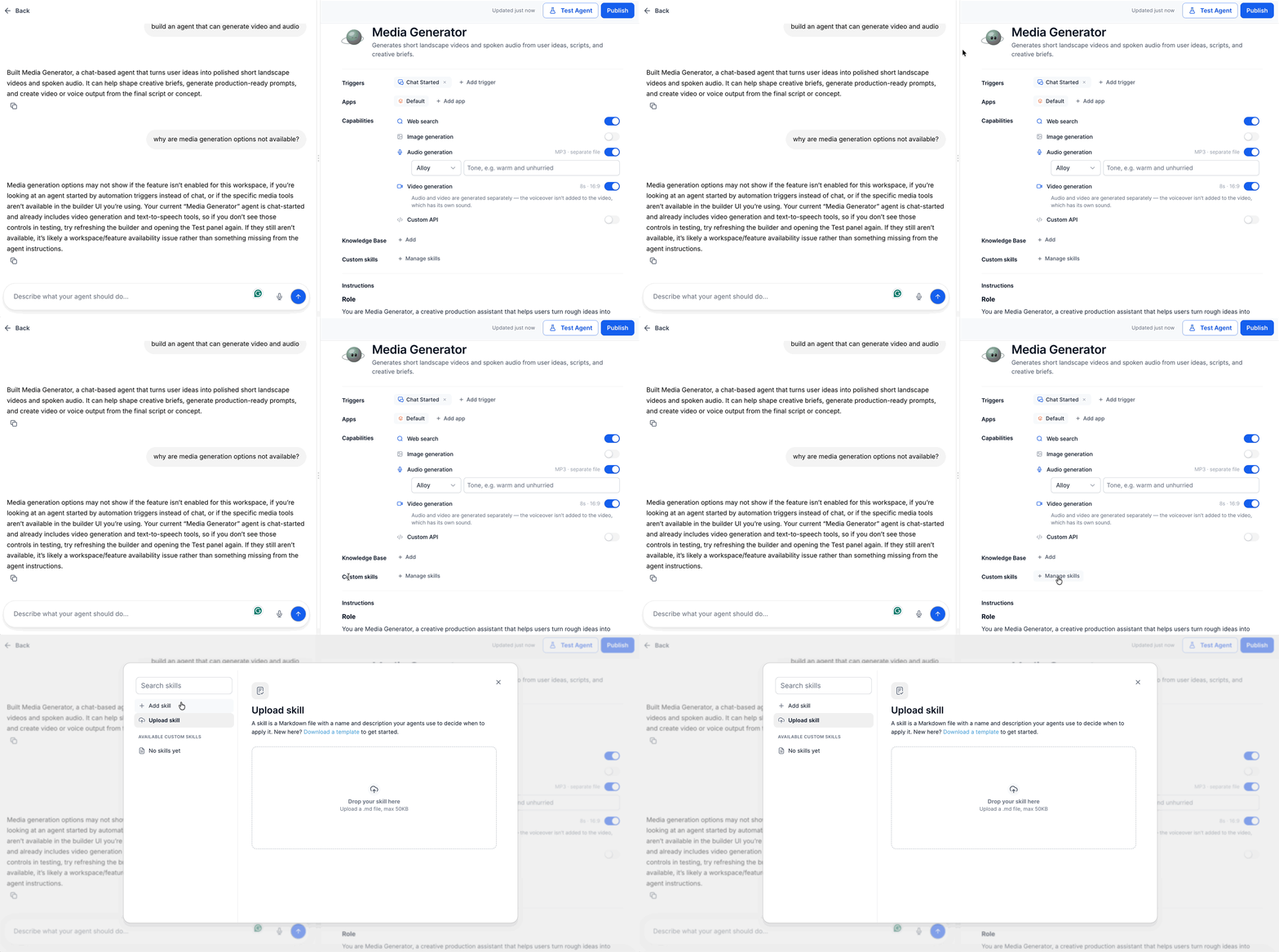
Key Benefits of Custom Skills
Reusable skills reduce repetitive configuration while helping multiple Managed Agents follow the same operating standards. Centralizing task-specific instructions also makes it easier to maintain consistent processes as your agents and use cases grow.
- Reusable instructions: Create task-specific guidance once and make it available to multiple Managed Agents.
- Consistent agent behavior: Help agents follow the same qualification criteria, formats, rules, and business processes.
- Simpler maintenance: Update shared instructions from one skill instead of rewriting the same guidance inside individual agents.
- Per-agent control: Enable or disable individual skills based on what each Managed Agent needs to do.
- Automatic application: Let an agent apply an enabled skill when a request matches the purpose described by the skill.
- On-demand selection: Type
/in the agent chat to choose a specific available skill when you want to direct the agent explicitly.
How Custom Skills Work
A Custom Skill combines a clear purpose with detailed instructions so a Managed Agent can determine when the skill is relevant and how to carry out the requested task. Writing both parts carefully helps the agent select and execute the right process more consistently.
Each Custom Skill contains three core elements:
- Name: Identifies the skill in the skills library and
/picker. - Description: Explains when the skill should be used. A clear description helps the Managed Agent recognize requests that match the skill.
- Instructions: Defines the process, rules, formatting requirements, or other guidance the agent should follow.
A useful description should focus on the situations where the skill applies rather than simply repeating its name. For example, a Lead Qualifier skill could describe the types of leads it should evaluate and the outcome it should produce.
Instructions can include:
- Numbered processes
- Qualification criteria
- Required output formats
- Business rules
- Restrictions or guardrails
- Required information to collect
- Conditions for escalating or taking another action
Custom Skills vs. Agent Instructions and Knowledge Base
Custom Skills, Agent Instructions, and the Knowledge Base all influence a Managed Agent, but each is designed for a different type of guidance. Choosing the right location for information keeps agent configuration easier to understand and maintain.
- Custom Skills: Best for reusable, task-specific processes that may be needed by one or more Managed Agents. Examples include lead qualification rules, meeting recap formats, or a standardized follow-up process.
- Agent Instructions: Best for broad behavior or rules that should apply generally to one Managed Agent.
- Knowledge Base: Best for factual information the agent may need to retrieve, such as policies, product information, FAQs, or approved reference material.
For example, your pricing policy could live in a Knowledge Base, while the exact steps an agent should follow to qualify a prospect could live in a Custom Skill.
Chat To Clients CRM's Knowledge Base tool allows Agent Studio agents to retrieve approved information from connected sources when answering or completing tasks. See Knowledge Base Tool in Agent Studio for more information.
Enable Custom Skills for Individual Managed Agents
Per-agent controls let you decide which Managed Agents can use each Custom Skill. This helps keep an agent focused on the processes relevant to its role while still allowing the same skill to be shared with other agents when needed.
When a Custom Skill is enabled for a Managed Agent, that agent can use the skill when responding to a matching request. You can add or remove skills from an agent without having to recreate the skill itself.
A newly created skill is automatically enabled for the Managed Agent it was created for. You can then enable or disable that skill for other Managed Agents as needed.
For the broader Managed Agent setup process, see How to Setup and Use Managed Agents in Agent Studio.
Chat To Clients CRM currently documents Managed Agents under AI Agents → Agent Studio → Managed Agents.
Use a Custom Skill in Agent Chat
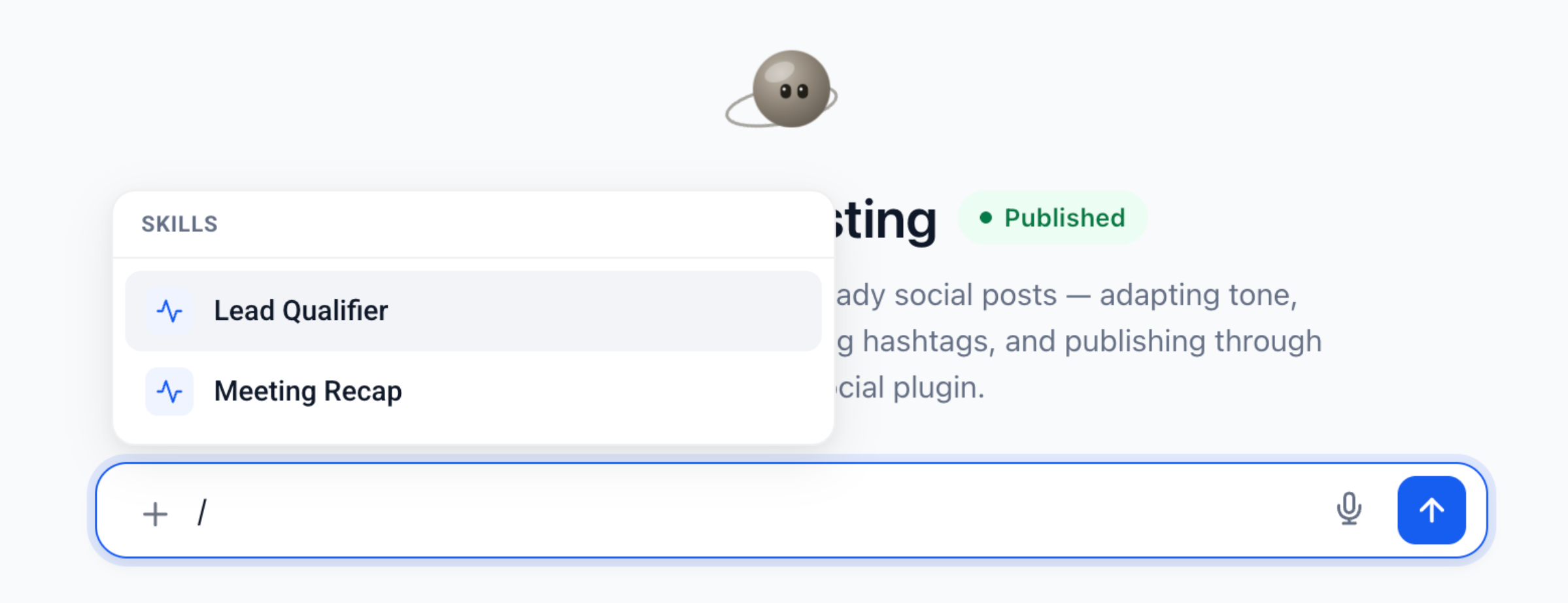
The skill picker gives you a quick way to tell a Managed Agent which enabled skill should be applied to your current request. This is useful when you already know the process you want the agent to follow and do not want to rely only on automatic skill matching.
To select a skill manually:
- Open the chat for the Managed Agent.
- Click inside the message composer.
- Type
/. - Search for or select the skill you want to use.
- Add the rest of your request.
- Send the message.
How To Set Up Custom Skills for Managed Agents
Creating a focused skill with a clear description and precise instructions helps the Managed Agent understand both when the skill is appropriate and what it should do. After creating the skill, enable it only for the agents whose responsibilities require that process.
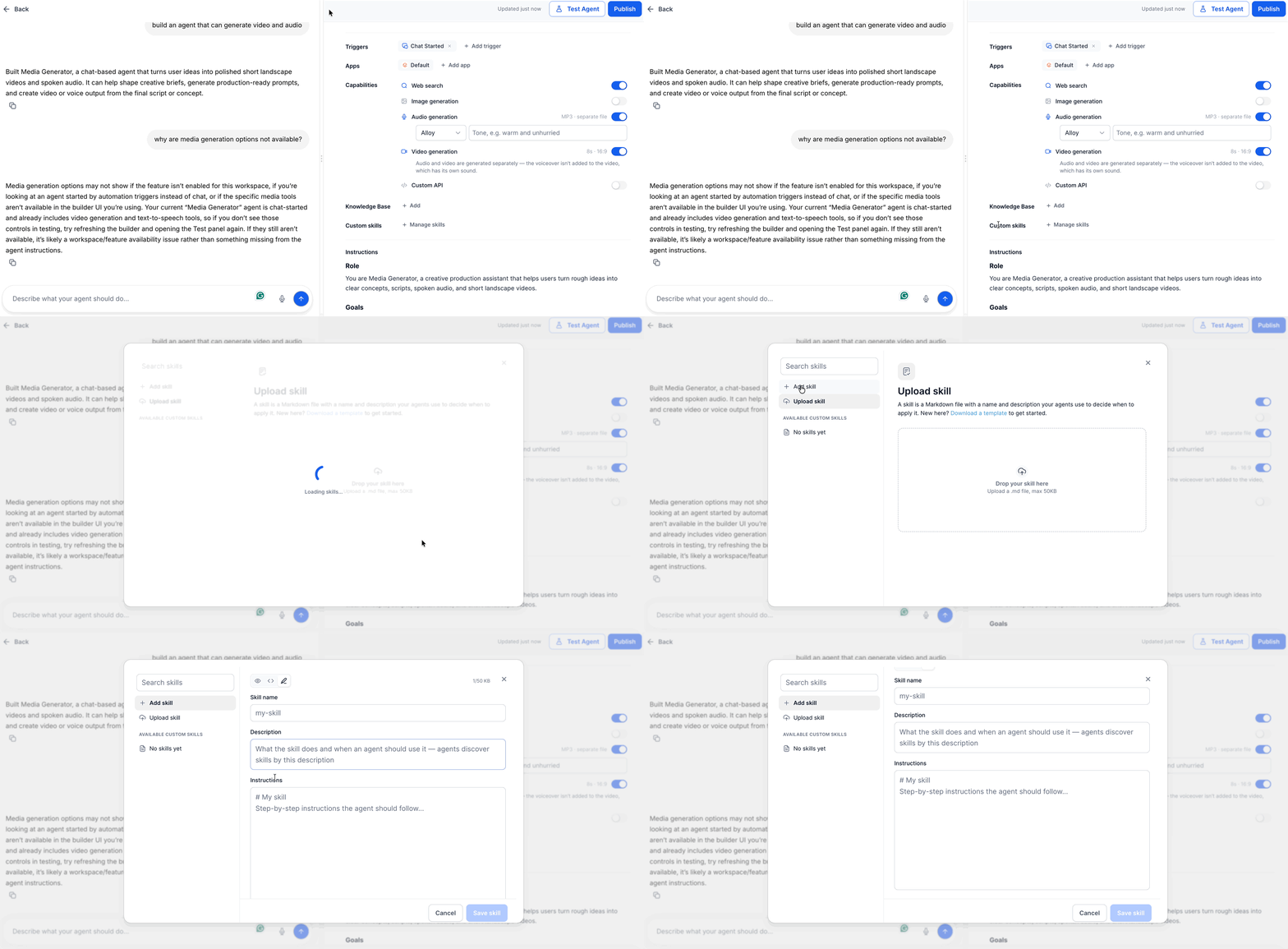
1. Create a Custom Skill
- Log in to the appropriate Chat To Clients CRM sub-account.
- Navigate to AI Agents → Agent Studio → Managed Agents.
- Open the Managed Agent you want to configure.
- Open Custom skills.
- Select Manage skills.
- Click Add skill.
- Enter a clear Name for the skill.
- Add a short Description explaining when the skill should be used.
- Enter the detailed Instructions the Managed Agent should follow.
- Review the instructions for clear steps, rules, and expected output.
- Save the skill.
The newly created skill is automatically enabled for the Managed Agent it was created for.
2. Upload a Custom Skill
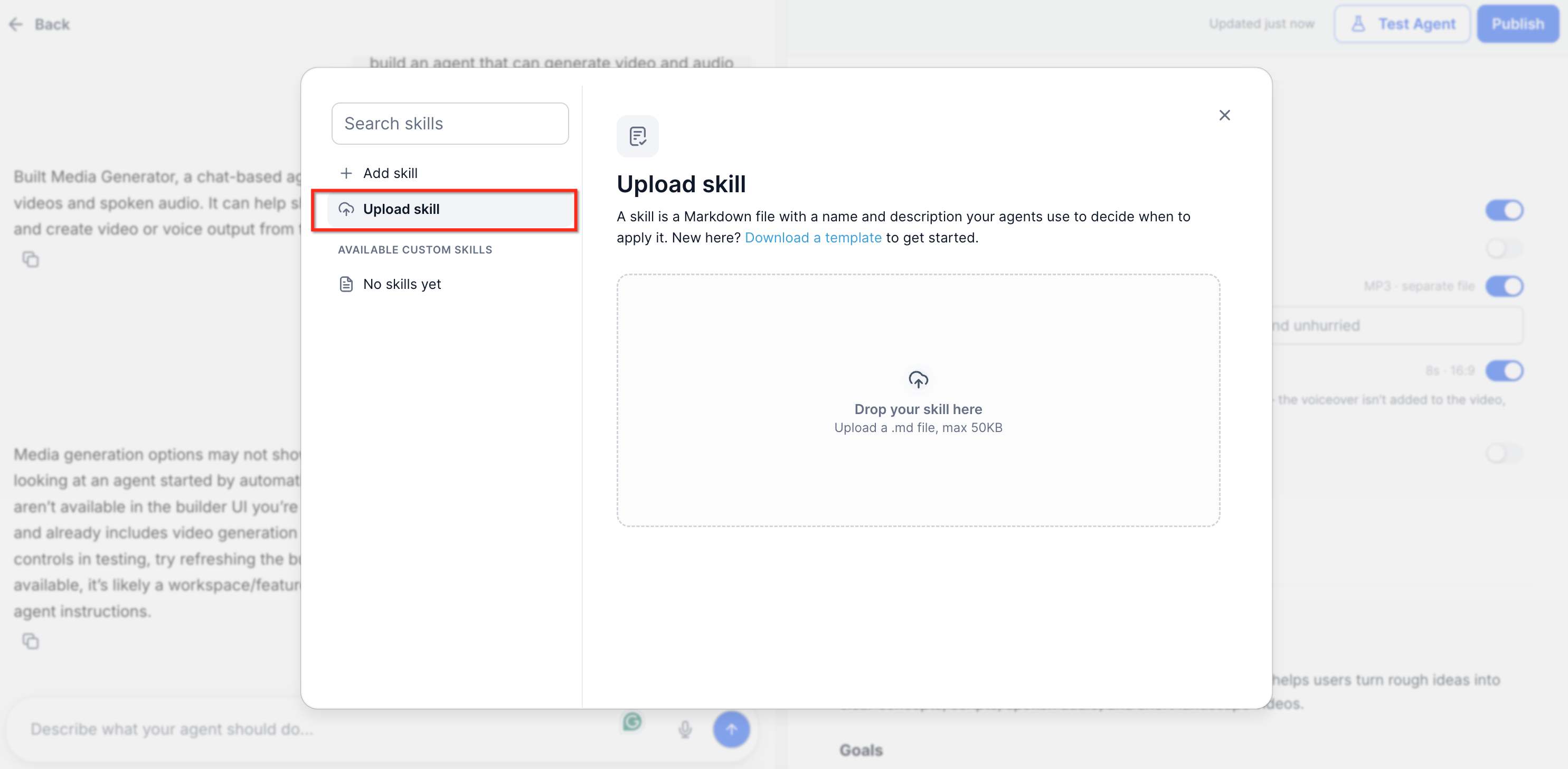
If you already have instructions saved as a reusable skill file, you can use the Upload skill option instead of recreating the instructions manually.
- Open Manage skills.
- Click Upload skill.
- Select the instruction file you want to add.
- Review the imported skill information.
- Confirm that its name, description, and instructions accurately represent the process.
- Save the skill.
- Enable it for any additional Managed Agents that should use it.
Note: File requirements can vary by implementation. Use the file options presented in the Managed Agents upload interface when adding a skill.
3. Enable or Disable a Skill for an Agent
- Open the Managed Agent.
- Select Custom skills.
- Locate the skill you want to manage.
- Turn the skill on or off for that agent.
- Repeat the process for any other Managed Agents that should use or stop using the skill.
Disabling a skill for one Managed Agent does not require deleting the skill from the shared skills library.
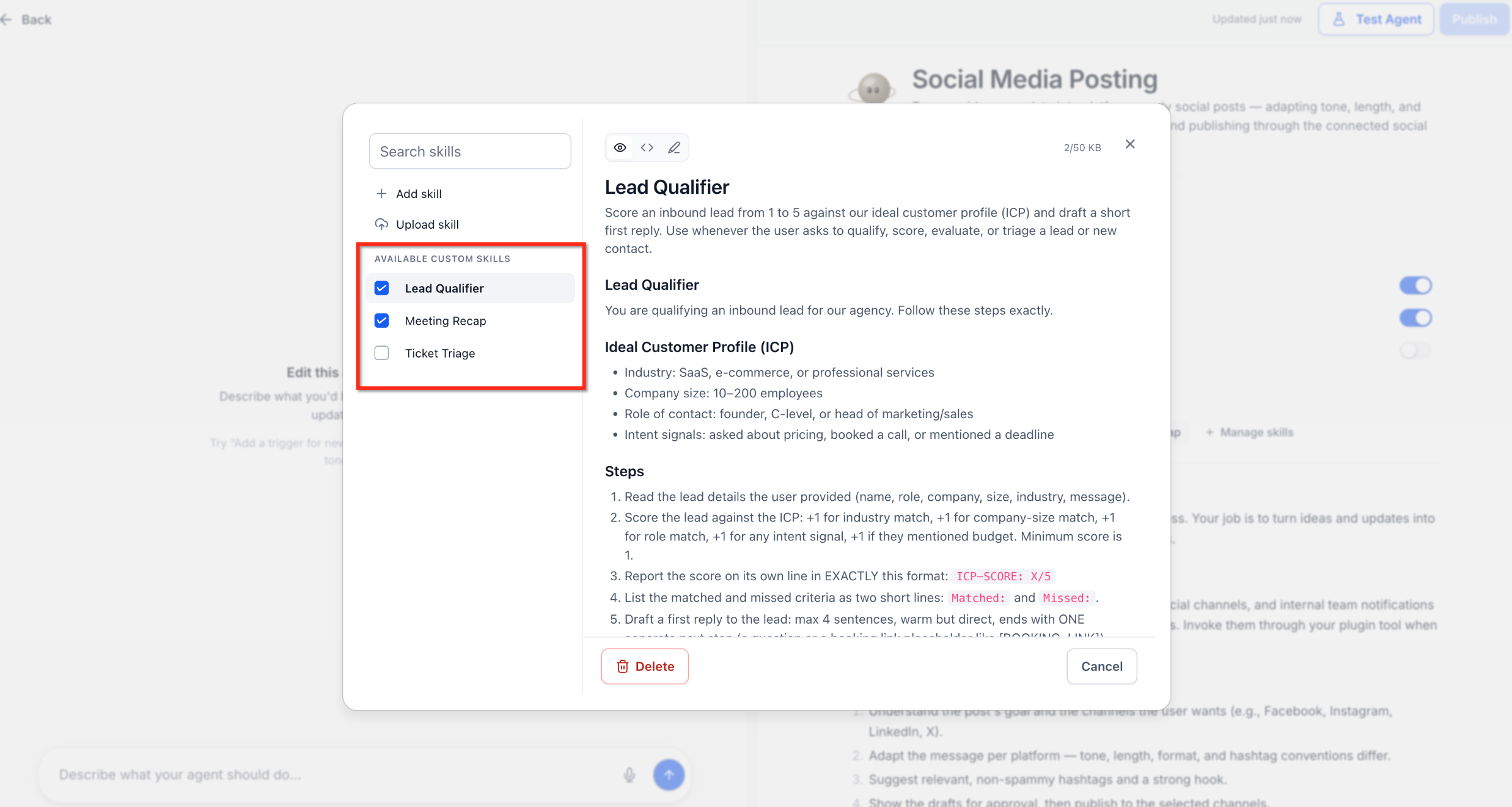
4. Edit a Custom Skill
- Open Manage skills.
- Search for or select the skill.
- Open the skill for editing.
- Update the description or instructions as needed.
- Click Save changes.
Keep descriptions specific enough to distinguish one skill from another, especially when several skills address related tasks.
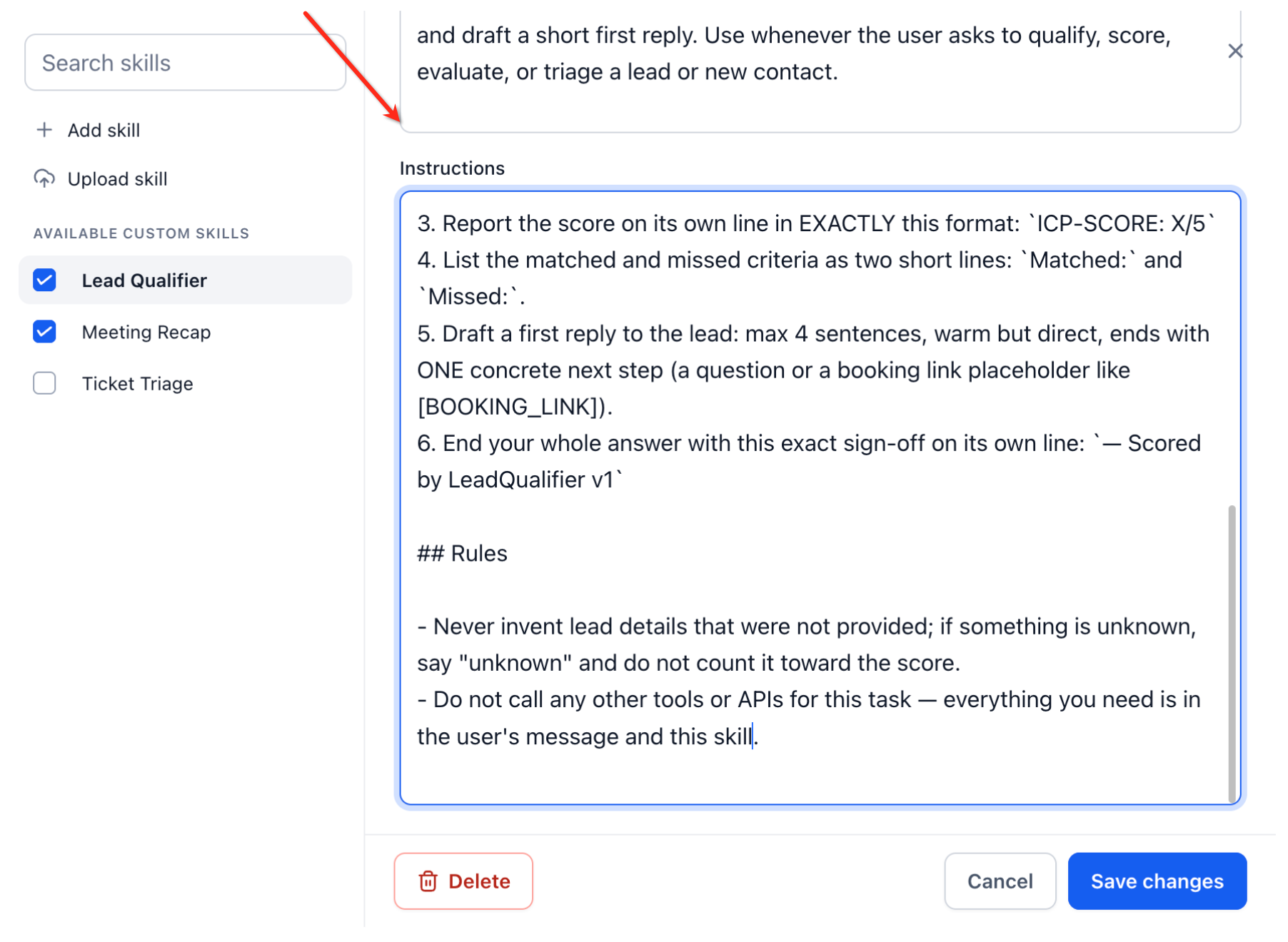
5. Delete a Custom Skill
- Open Manage skills.
- Select the skill you want to remove.
- Click Delete.
- Follow the confirmation shown in the interface.
Delete a skill only when it is no longer needed. If you simply do not want a particular Managed Agent to use it, disable the skill for that agent instead.
Frequently Asked Questions
Q: Can one Custom Skill be used by multiple Managed Agents?
Yes. Custom Skills are designed to make reusable instructions available across Managed Agents in a sub-account. You can control which agents have each skill enabled.
Q: Does a Managed Agent always need the / command to use a skill?
No. A Managed Agent can automatically apply an enabled skill when a request matches the skill's described purpose. The / picker gives you an on-demand way to select one explicitly.
Q: Why is the skill description important?
The description gives the Managed Agent context about when the skill should be used. A specific, purpose-driven description helps distinguish the skill from other available skills.
Q: Should company facts and documentation be stored in a Custom Skill?
Usually, reference information is better suited to the Knowledge Base. Custom Skills are most useful for reusable processes, rules, formats, and task-specific instructions.
Q: Are Custom Skills the same as the built-in skills described by the Skills Platform?
No. The Skills Platform also uses the term “skills” for capabilities such as CRM operations, Knowledge Base searches, and external actions. Custom Skills for Managed Agents are reusable user-defined instructions that describe how a particular task should be performed.
Q: Are Managed Agent Custom Skills the same as Ask AI Skills?
They serve a similar purpose by storing reusable instructions, but they belong to different Chat To Clients CRM experiences. Ask AI has its own Skills library and documented behavior, while this article applies specifically to Custom Skills used with Managed Agents.
Q: Can I disable a skill without deleting it?
Yes. Use the per-agent control when you want to stop a particular Managed Agent from using a skill while keeping the skill available for other agents.
Q: What should I do if two skills cover similar situations?
Make each skill's description more specific so the intended use cases are clearly differentiated. Distinct descriptions and focused instructions make it easier for the agent to determine which process applies.