
Memory for Managed Agents in Chat To Clients CRM
Memory for Managed Agents helps Chat To Clients CRM AI agents deliver more personalized responses and complete repeat tasks more efficiently. By remembering important user details and learning reusable task procedures, agents can reduce repetitive questions, unnecessary steps, and token consumption. Users can also review and manage stored information through the Memory tab. This article explains how Memory works, its benefits, and how to enable and manage it.
TABLE OF CONTENTS
- What is Memory for Managed Agents?
- Key Benefits of Memory for Managed Agents
- How to Set Up Memory for Managed Agents
- User-Specific Memory and Facts
- Frequently Asked Questions
- Related Articles
What is Memory for Managed Agents?
Memory for Managed Agents is a feature that allows Chat To Clients CRM AI agents to retain relevant information about individual users and learn from previously completed tasks. Instead of starting from scratch with every interaction, agents can use stored context and reusable procedures to deliver faster, more consistent results.
Memory works through two main capabilities:
User Memory: Retains important information about individual users, including their identity, preferences, goals, and recent events.
Learned Procedures: Saves the steps used to complete tasks so the agent can reuse them when similar requests occur.
These capabilities work together to improve both personalization and efficiency. For example, if a user regularly asks an agent to prepare weekly sales summaries, the agent can remember the user's preferred reporting format and learn the steps needed to generate those summaries. When the user makes a similar request, the agent can apply that knowledge without repeatedly asking for the same preferences or determining the entire process again.
Memory can be used during agent conversations and supported automations, helping agents become more efficient as they complete recurring tasks.
Key Benefits of Memory for Managed Agents
Memory helps agents work more efficiently while reducing the need for repeated instructions and unnecessary processing. By combining personalized context with reusable task procedures, Managed Agents can deliver a more consistent experience and make better use of available resources.
Faster Task Execution: Reuse previously learned procedures instead of determining the same steps every time a similar task is requested.
Reduced Token Consumption: Minimize unnecessary reasoning steps and load detailed procedures only when they are needed.
Personalized Interactions: Remember individual users' preferences, goals, and other relevant information to provide more tailored responses.
Fewer Repeated Questions: Use stored information to avoid asking users to provide details they have already shared.
Improved Automation Efficiency: Apply learned procedures during recurring automation tasks, reducing unnecessary processing.
Better Memory Management: View, add, edit, and delete stored user facts from a centralized Memory interface.
Greater Transparency: Review what the agent remembers, where information originated, and which procedures it has learned.
Privacy and Security: Keep user memories separate and apply safeguards that prevent sensitive information from being retained.
How to Set Up Memory for Managed Agents
Enabling Memory allows Managed Agents to begin retaining relevant user information and learning reusable task procedures. Proper setup helps ensure the feature is available for the intended agents and that users understand how to review and manage stored information. Memory is introduced through Chat To Clients CRM Labs, which provides access to new and evolving features.
Step 1: Locate Memory in Labs
Log in to your Chat To Clients CRM account.
Open Settings → Labs in the applicable Agency or sub-account view.
Locate the Labs feature for Managed Agents Memory.
Review the feature description and any availability requirements.
Note: Labs features may be configured at the Agency or sub-account level. The exact Labs location and feature-card name for Managed Agents Memory should be verified before publication. For more information about Labs settings and availability, see Labs Features – Complete Overview.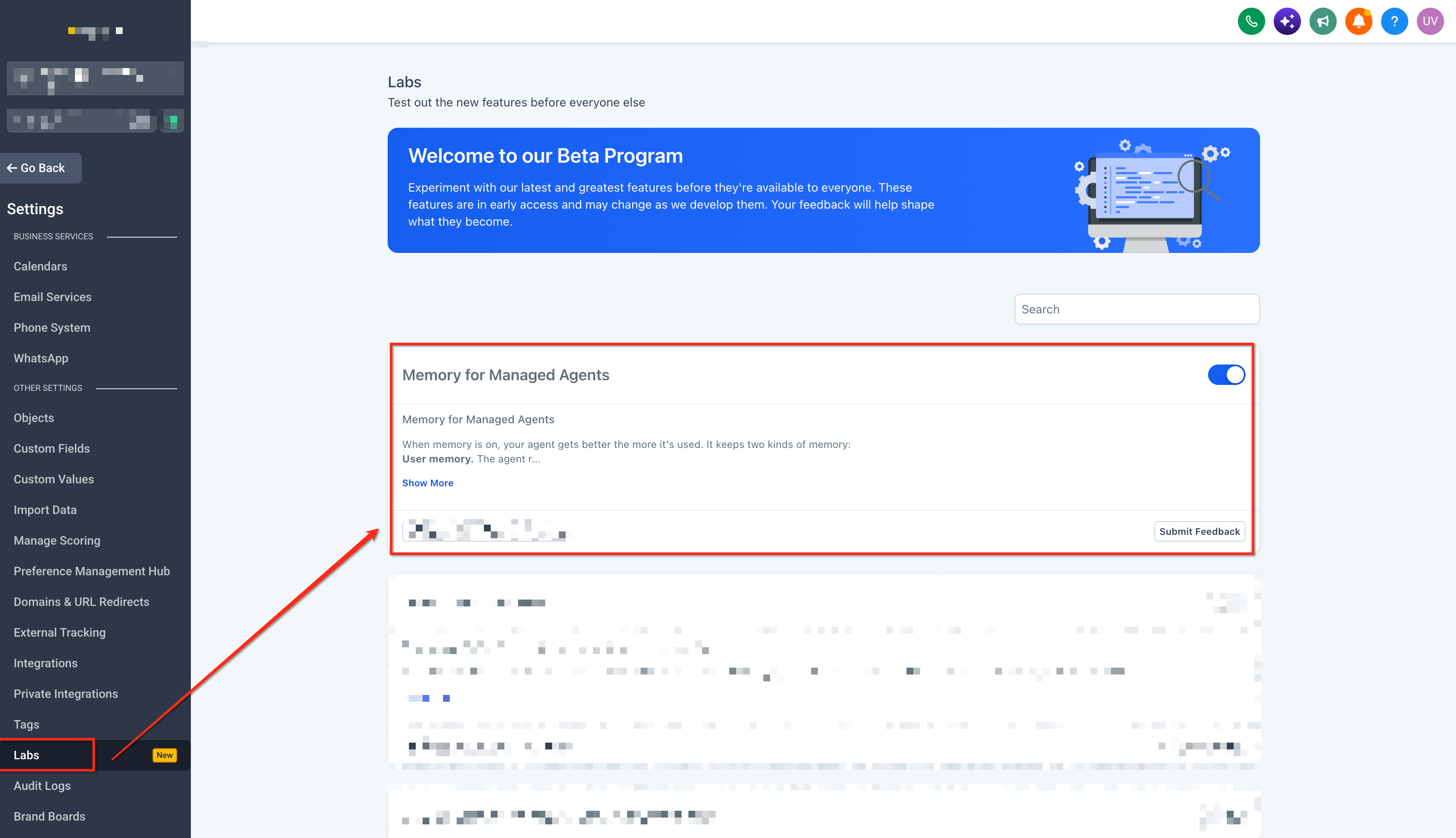
Step 2: Open Your Managed Agent
Navigate to AI Agents → Agent Studio → Managed Agents.
Select the Managed Agent you want to use with Memory.
Open the agent's Memory interface.
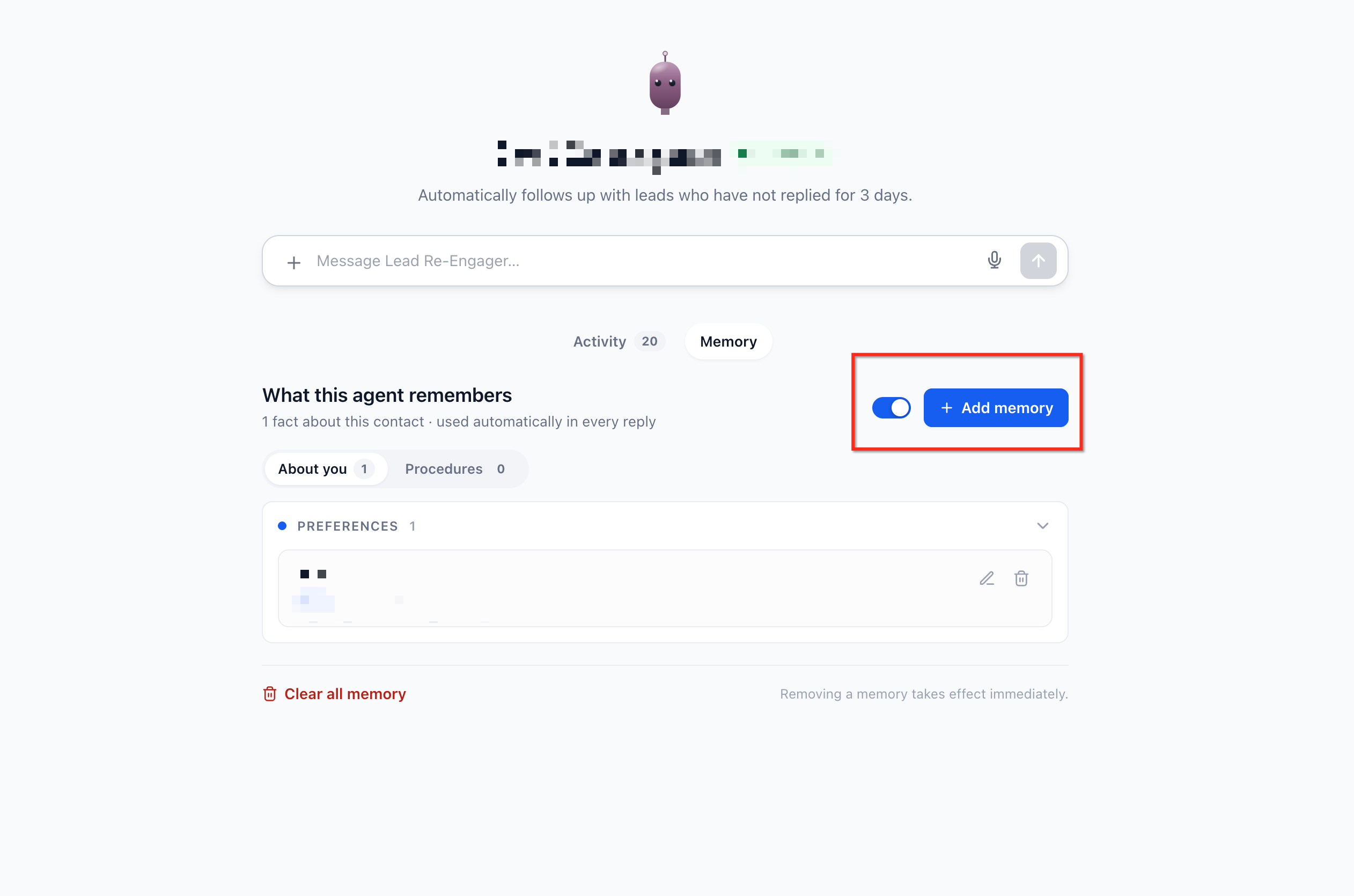
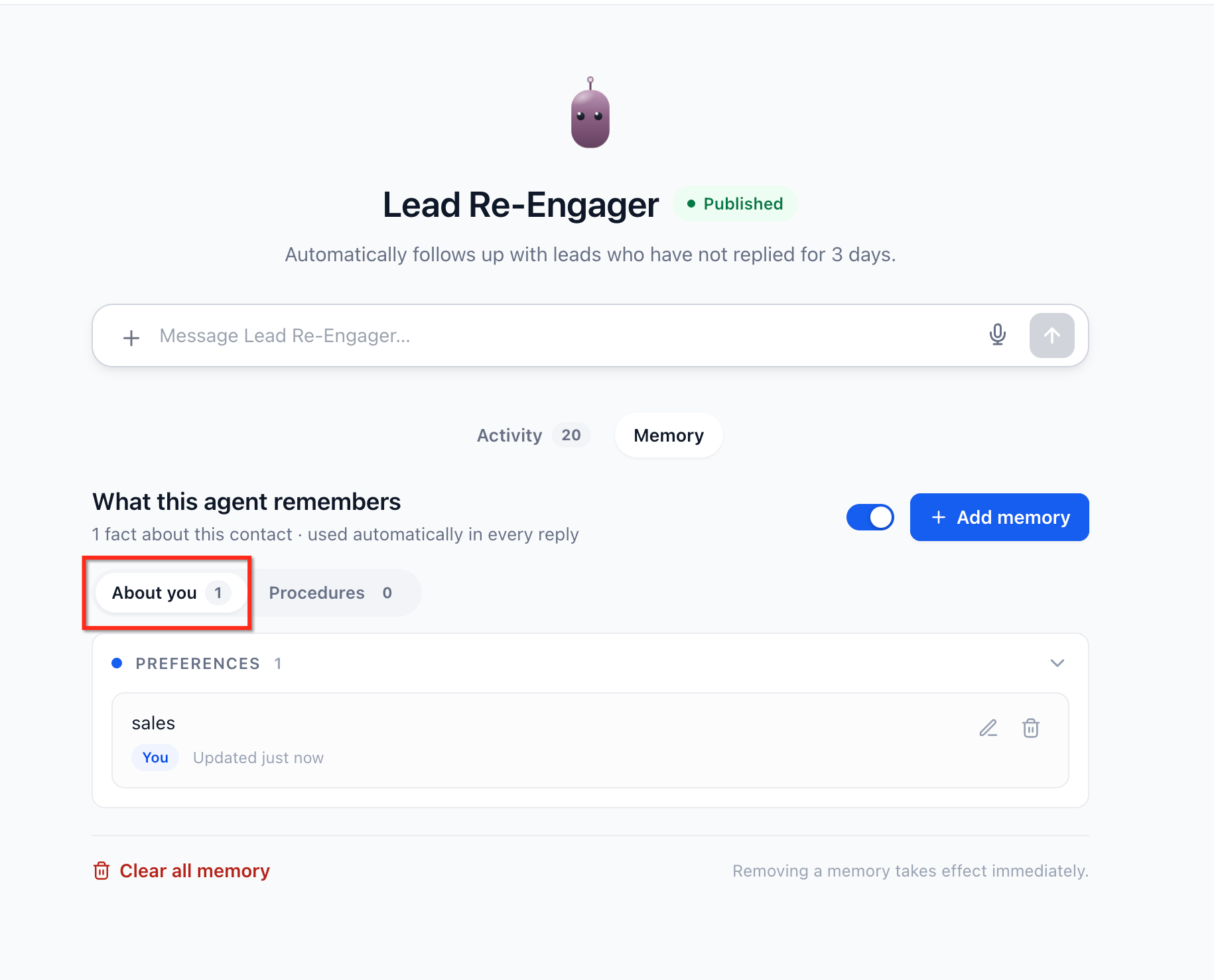
Step 3: Review User Memory
Open the About you area.
Review any available stored facts.
Add or update relevant information using the available controls.
Remove outdated or incorrect details when necessary.
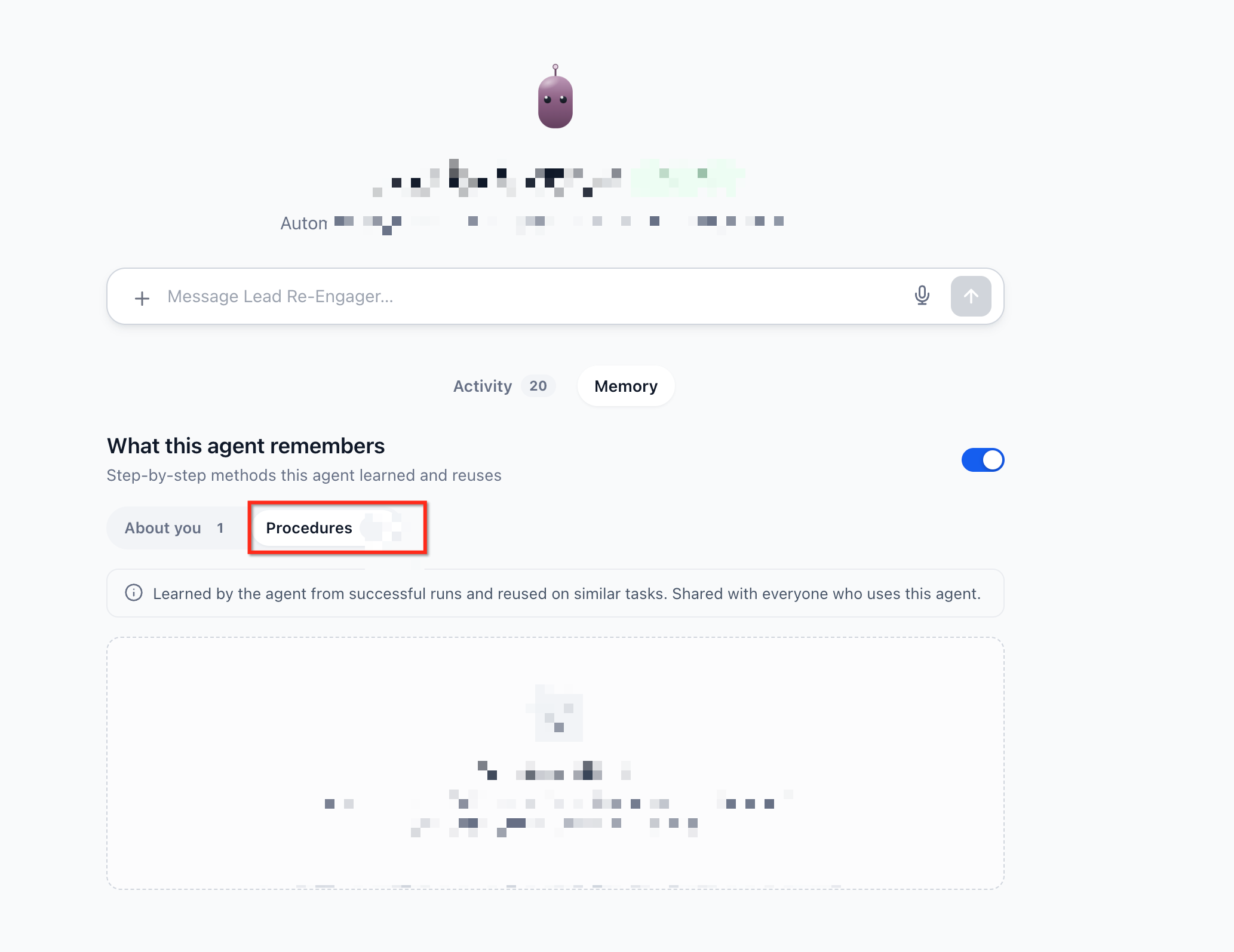
Step 4: Review Learned Procedures
Open the Procedures area.
Review the available procedures.
Check their sources and usage counts.
Delete procedures that are no longer relevant.
Step 5: Test Memory in a Conversation
After enabling Memory, test it with a simple, repeatable task.
Open a conversation with the Managed Agent.
Share a relevant preference, such as a preferred report format.
Ask the agent to complete a task using that preference.
Start a subsequent interaction and make a similar request.
Check whether the agent applies the relevant preference without requiring it to be repeated.
Review the Memory tab to inspect any retained information.
For learned Procedures, repeat an appropriate task and review the Procedures area to determine whether reusable steps have been saved.
Note: Memory and procedure creation depend on the relevance of the information and the tasks completed. Not every message or completed task necessarily creates a stored fact or Procedure.User-Specific Memory and Facts
User-specific Memory allows Managed Agents to retain relevant information about each person they interact with. This helps agents maintain continuity between conversations while keeping each user's information separate.
How User Memory Works
Every user has their own memory associated with each Managed Agent. Information remembered about one user is not shared with other users. Similarly, information saved by one agent is not automatically shared with another agent.
When Memory is enabled, stored facts are automatically included as relevant context during interactions. For example, an agent might remember that a user:
Manages the Austin office.
Prefers concise weekly summaries.
Is working toward a quarterly sales target.
Recently completed a particular business initiative.
These details help the agent tailor future responses without requiring the user to repeat information.
Memory Categories
Managed Agents organize stored user information into four categories.
| Category | Description | Example |
|---|---|---|
| Identity | Details about who the user is or their responsibilities. | Manages the Austin office. |
| Preferences | Information about how the user prefers to work or communicate. | Prefers short summaries with bullet points. |
| Goals | Objectives or ongoing priorities that remain relevant over time. | Wants to improve monthly lead conversion. |
| Recent Events | Meaningful developments that provide context for future interactions. | Recently launched a new marketing campaign. |
The agent focuses on retaining information that is likely to be useful in future conversations. One-time requests, casual conversation, and repetitive information are not intended to become permanent memories.
For example, a Managed Agent invoked by a recurring workflow may reuse the steps it previously learned for processing and summarizing lead information. To learn more about invoking agents through automations, see Workflow Action – Invoke Managed Agent.
Frequently Asked Questions
Q: Does Memory automatically save every message exchanged with a Managed Agent?
No. Memory is designed to retain relevant facts rather than a complete conversation history. Temporary requests, casual messages, and duplicate information are not intended to be stored as individual memories.
Q: Can a Managed Agent use a learned Procedure for a different type of task?
Procedures are intended for similar tasks. A procedure learned for one process may not be applicable to an unrelated request, and the agent must still follow its configured instructions and safety requirements.
Q: What happens if an agent remembers information that is no longer correct?
Stored user facts can be edited or deleted through the About you area. Correcting outdated information helps the agent use more accurate context in future interactions.
Q: Will every automation execution become faster after Memory is enabled?
Not necessarily. Improvements are expected when an agent can reuse an appropriate learned Procedure. Tasks without relevant procedures may not see the same benefits.
Q: Does Memory guarantee a lower token cost for every interaction?
No. Memory is designed to minimize unnecessary token usage through compact summaries and on-demand procedure loading. The actual cost of an interaction depends on the task and the information required.
Q. What Happens When Memory Is Disabled?
Disabling Memory does not delete previously stored memories. Existing information is retained and can be reused when Memory is enabled again. This allows users to temporarily turn off Memory without permanently losing previously saved information.