
How to create a Meta Sales objective campaign for Conversion
In this article, we will discuss in detail the steps to create a Meta Ad for Sales objective with conversion locations as Messaging Apps and Website.
TABLE OF CONTENTS
- Introduction
- How to set up a Sales Objective Campaign
- Step 1: Access Ad Manager
- Step 2: Choose the Facebook page and Instagram account
- Step 3: Choose the Ad Objective
- Step 4: Select a Conversion Location
- Step 5: Set Up Conversion Tracking
- Step 6: Create Your Ad
- Step 7: Set Your Budget
- Step 8: Define Your Audience
- Step 9: Review & Launch
- Step 10: Monitor Campaign Performance
- FAQs
- Troubleshooting Tips
- Best Practices for Maximising Sales with Meta Ads
Introduction
With the launch of the Sales objective in Meta Ads, we aim to drive sales conversions on both Website and Messaging apps. This new feature will allow you to maximise the effectiveness of your ad campaigns by selecting either a Website or Messaging app as your conversion location. The following sections will guide you through setting up the Sales objective, answer frequently asked questions, and provide troubleshooting tips.
With the Sales Objective, businesses can run highly optimised ads using the following conversion locations:
Website Conversions – Use Meta Pixel to track and optimise actions such as purchases and sign-ups on your website.
Messaging Apps – Drive direct customer interactions via Facebook Messenger, Instagram Direct and WhatsApp messages to increase engagement and conversions.
Note: Currently, only Website and Messaging Apps are supported as conversion locations. Other locations like App and In-Store are not available at this time.
How to set up a Sales Objective Campaign
Step 1: Access Ad Manager
- Go to sub-account > Marketing > Ad Manager provided your onboarding is completed. (Refer link on how to enable and resell ad manager)
- Click on + Create Campaign to start a new campaign.
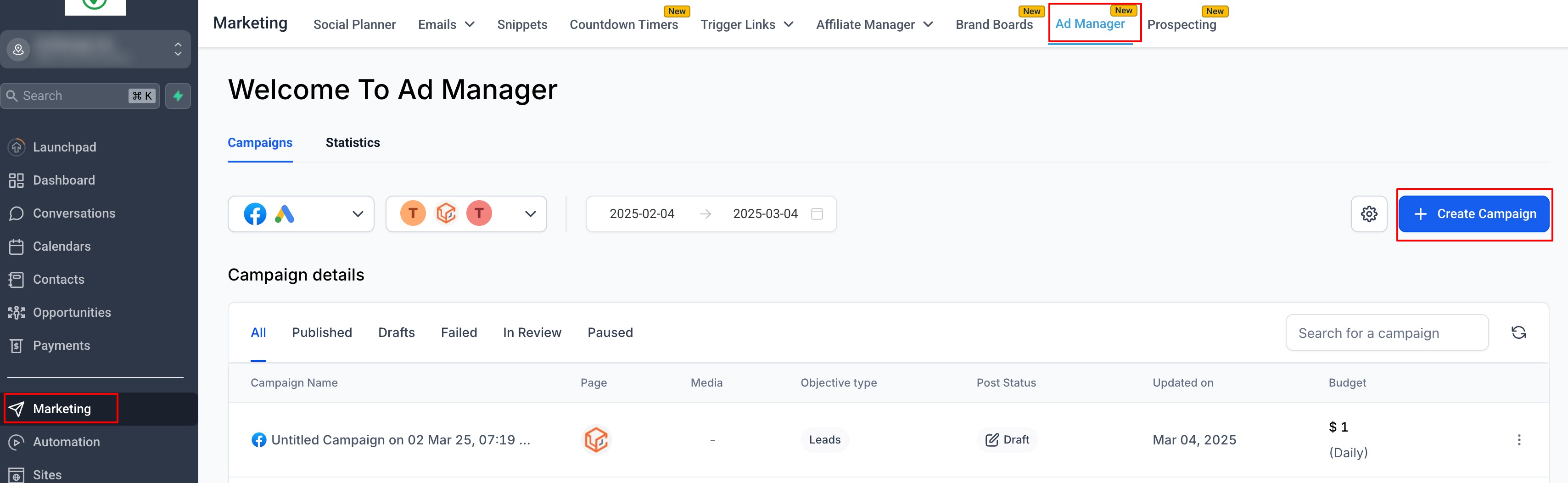
- Select Facebook Campaign and Start from scratch.
Step 2: Choose the Facebook page and Instagram account
- Select the Facebook page you want your ad to associate with and reflect your business.
- Either select an Instagram account that's connected to the selected FB page or use the Facebook page itself to showcase your ad on Instagram. Details on how to connect an Instagram account with the FB page and other important info is listed in the following help article.
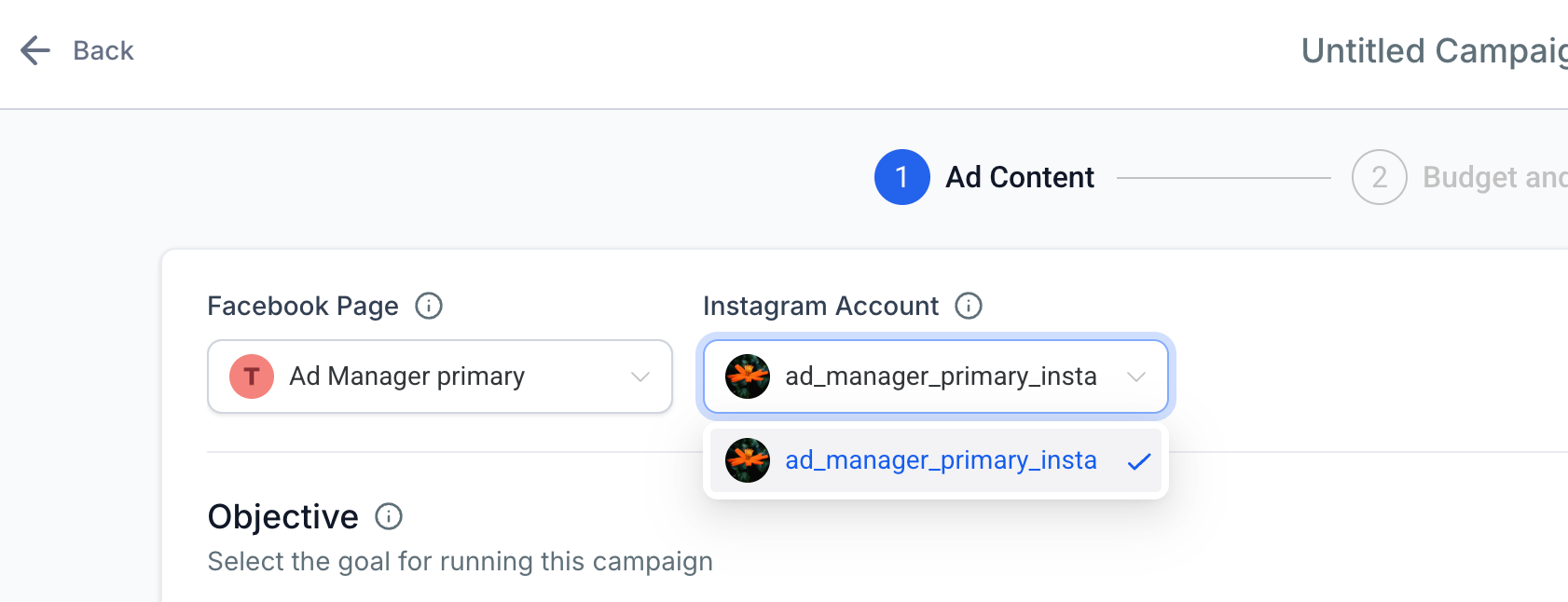
Note: Instagram messaging app will not be eligible for Click to Direct ads if there is no Insta account connected to the selected page.
Step 3: Choose the Ad Objective
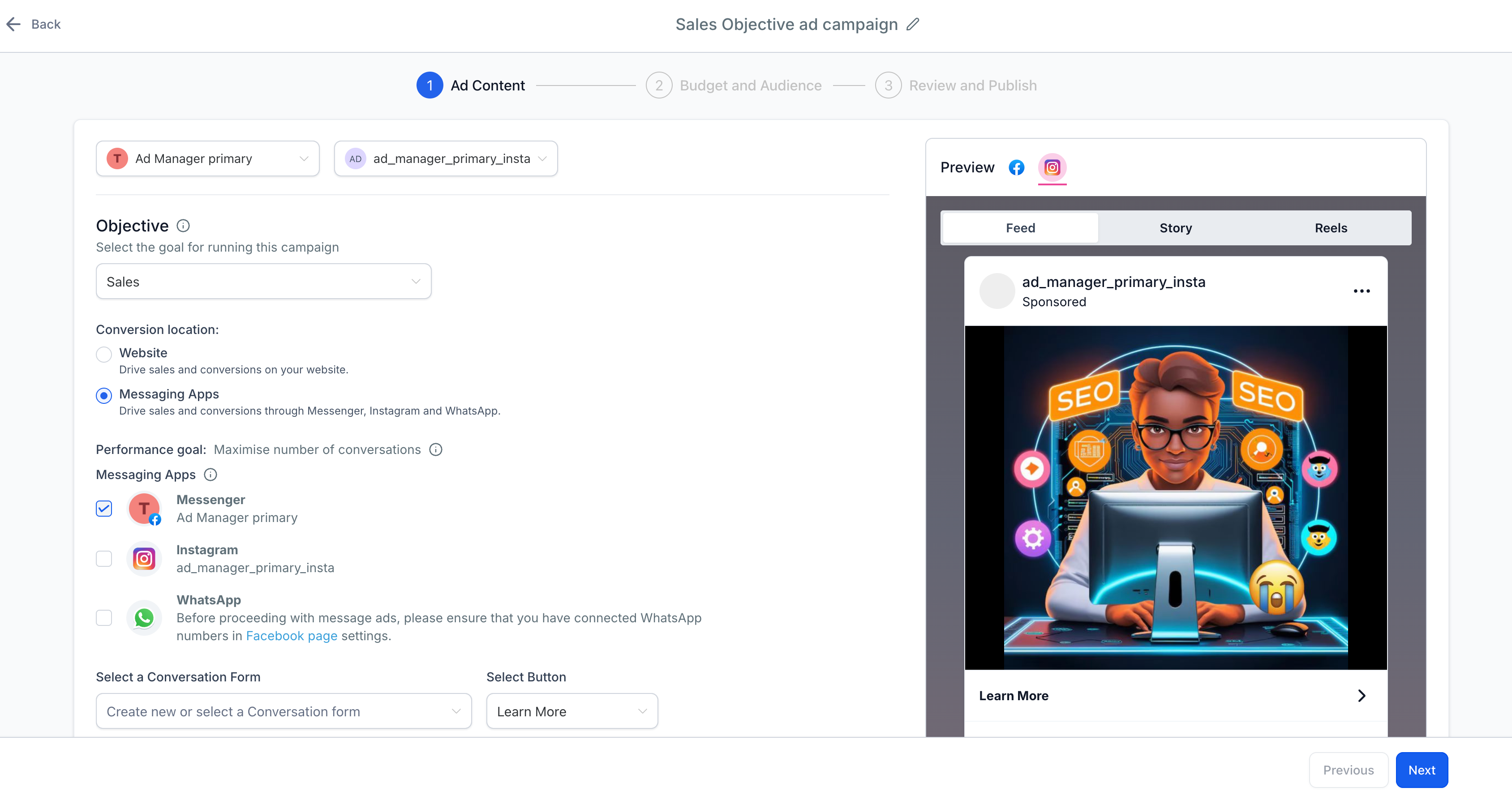
- Select Sales as the objective.
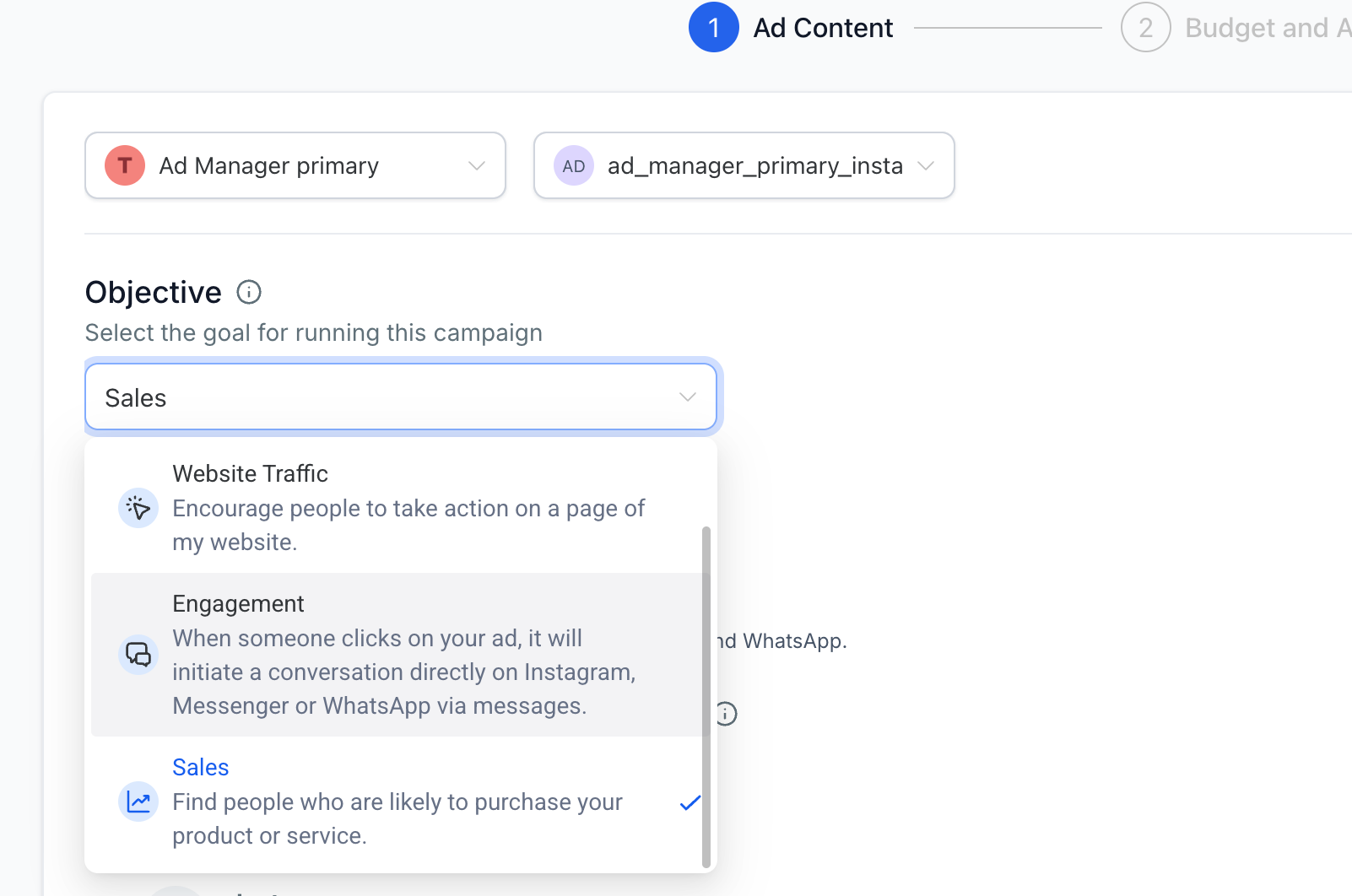
Step 4: Select a Conversion Location
- Choose Website if you want to track purchases, sign-ups, or other key actions on your site.
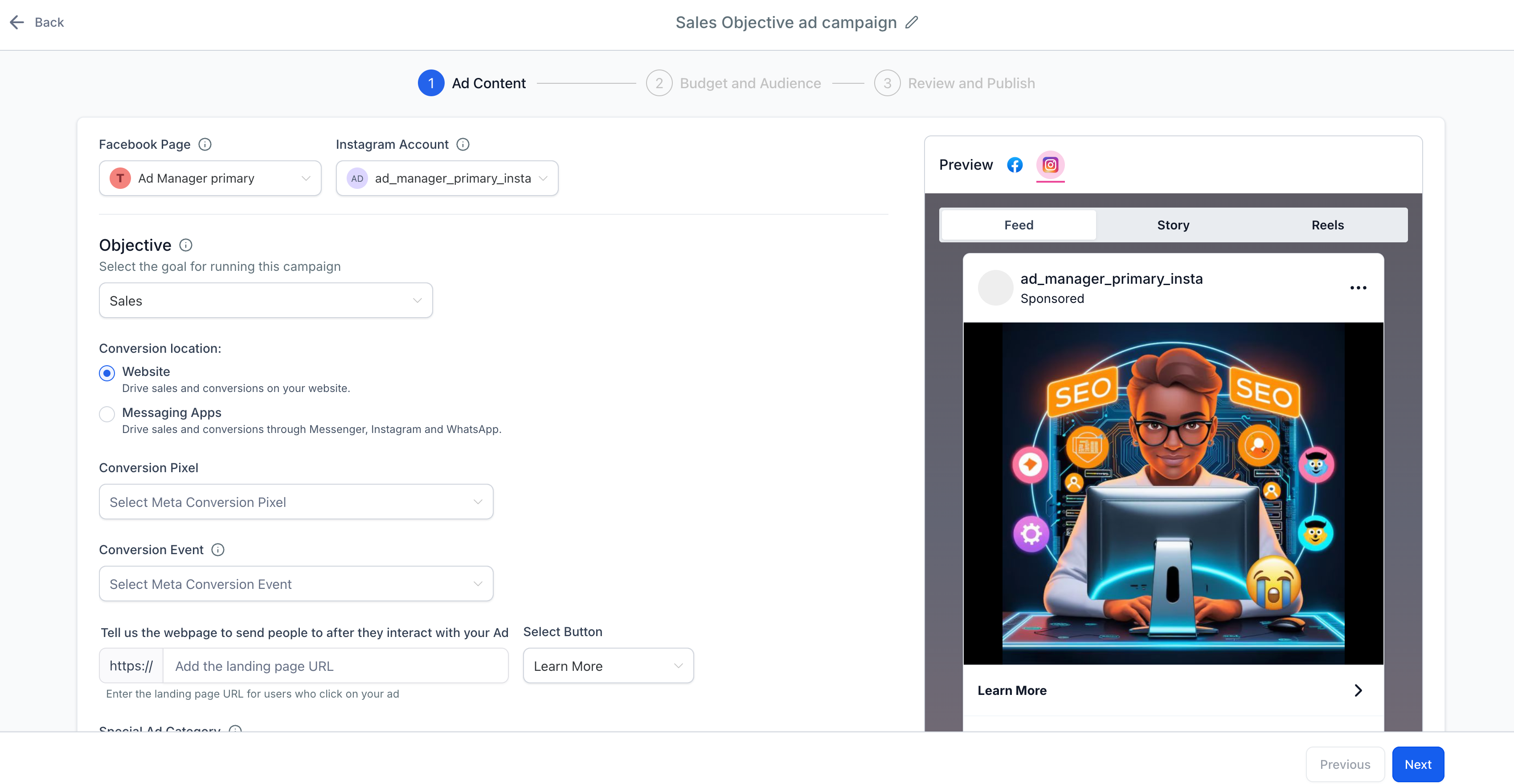
- Choose Messaging Apps (Facebook Messenger, Instagram Direct or WhatsApp) to encourage direct interactions with potential customers.
Step 5: Set Up Conversion Tracking
For Website Conversions:
- Ensure your Meta Pixel is correctly installed on your website.
- Select a conversion event (Purchase, Add to Cart, Lead, etc.).
For Messaging Apps:
- Choose between Facebook Messenger, Instagram Direct or WhatsApp as your destination.
- Set up automated responses to guide users toward completing a conversion.
Step 6: Create Your Ad
- Select an ad format (Single Image/Video or Carousel).
- Upload your creative assets and write compelling ad copy.
- Add a strong Call-to-Action (CTA) (e.g., Shop Now, Get Offer, Sign Up).
Step 7: Set Your Budget
- Choose between a Daily Budget (spend a fixed amount per day) or Lifetime Budget (spend a total amount over the campaign duration).
- Ensure the budget aligns with your campaign goals.
Step 8: Define Your Audience
- Custom Audiences – Retarget people who have previously interacted with your business.
- Lookalike Audiences – Reach new users similar to your existing customers.
- Interest-Based Targeting – Define your ideal customer based on demographics, behaviors, and interests.
Step 9: Review & Launch
- Review all your campaign settings, including geographic locations, audience, budget, and creatives.
- Once everything looks good, click Publish to launch your campaign.
Step 10: Monitor Campaign Performance
- Use Meta Pixel for website conversions and review your campaign's performance under Ad Manager Statistics.
- Adjust your budget, creatives, or audience based on the results to optimize the campaign for better performance.
FAQs
- What is the Sales Objective?
The Sales objective is designed to help you drive conversions with a focus on direct sales. You can either drive traffic to your website to make a purchase or direct users to messaging apps where they can make a transaction or engage with your business. - What conversion locations are supported for the Sales objective?
Currently, only Website and Messaging Apps (such as Messenger and WhatsApp) are supported for the Sales objective. - How do I track conversions on my website?
To track conversions on your website, you must have the Meta Pixel installed on your website. This pixel will track actions such as purchases, add-to-cart events, and other relevant conversion activities. - Can I use both Website and Messaging Apps for the same campaign?
No, you must choose one conversion location for each campaign. If you need both types of conversions, create separate campaigns - one for the website and another for the messaging app. - Do I need to install any code to track conversions via Messaging Apps?
No additional code is needed for tracking conversions via messaging apps. However, ensure your messaging app is set up to track user interactions. - Can I target users who have interacted with my business before?
Yes, using Custom Audiences, you can target users who have interacted with your business, such as website visitors or users who have engaged with your messaging app.
Troubleshooting Tips
1. My website conversions aren’t being tracked.
- Check Meta Pixel installation: Ensure the Meta Pixel is installed and firing correctly on your website. You can use the Pixel Helper Chrome extension to verify if the Pixel is working as expected.
- Check Pixel settings: Make sure the Pixel is configured to track the specific conversion actions (e.g., purchase, add to cart).
- Verify URL settings: Ensure that the Pixel is correctly linked to the specific pages where conversions are happening.
2. My Messaging App isn’t tracking conversions properly.
- Ensure messaging is enabled: Check that messaging apps (like Messenger, Instagram Direct or WhatsApp) are properly set up within Meta Ads and linked to your business.
- Test interaction tracking: Try interacting with your messaging app via an ad and verify that the conversion event is being tracked in your Meta Ads Manager.
3. My campaign is not delivering as expected.
- Adjust your budget: If your budget is too low, it may impact the delivery of your campaign. Consider increasing it to allow the system more flexibility to optimize.
- Check audience targeting: Ensure that your audience settings are broad enough to generate conversions. Narrow targeting can limit delivery.
- Review ad creatives: Ads that are too similar or non-engaging may perform poorly. Test different creatives to see which resonates best with your audience.
4. How do I fix low conversion rates?
- Optimise your landing page: Ensure your website or landing page is optimized for conversions with a clear call to action and fast load times.
- Refine your audience targeting: Analyze your audience performance and adjust it to ensure you’re targeting those most likely to convert.
- Improve ad creatives: Refresh your ads regularly and test new formats to keep your campaigns fresh and engaging.
Best Practices for Maximising Sales with Meta Ads
- Use High-Quality Creatives: Eye-catching visuals improve engagement.
- Leverage retargeting: Retarget website visitors or people who’ve interacted with your messaging app to bring them back to complete the conversion.
- Optimise for mobile: Ensure your website and messaging app are optimised for mobile users, as a significant portion of Meta Ads traffic comes from mobile devices.
- Test and learn: Continuously test your ad creatives, targeting options, and budgets to optimise your campaign performance.