
Overview of Ad Manager
It simplifies digital advertising by consolidating workflows, providing actionable insights, and helping agencies deliver measurable results to their clients.
TABLE OF CONTENTS
- What is Ad Manager?
- Supported Platforms and Campaign Types
- What You Can Do with Ad Manager
- Key Benefits of Ad Manager
- Pricing & Access
- How to Set Up Ad Manager
- How to Create a Meta Business Portfolio
- Frequently Asked Questions
- Related Articles
What is Ad Manager?
Ad Manager brings Facebook, Instagram, Google, and LinkedIn Ads together into one easy-to-use dashboard.
Instead of switching between different ad platforms, users can create campaigns, track performance, and optimize results — directly within Chat To Clients CRM. This saves time, reduces complexity, and makes professional advertising accessible for businesses of all sizes.
Ad Manager enables both agencies and sub-accounts to run high-performing campaigns and analyze performance without leaving the Chat To Clients CRM platform.
Supported Platforms and Campaign Types
Ad Manager supports multiple platforms and ad types. The table below outlines what objectives and formats are available on each platform.
Platform | Campaign Objectives | Ad Formats Supported |
|---|---|---|
Meta (Facebook & Instagram) | Lead Generation, Website Traffic, Engagement, Sales | Single Image, Video, Carousel (up to 10), Lead Forms, Conversation Forms |
Google Ads | Search Campaigns, Demand Generation (coming soon) | Search Ads, Image, Video, Carousel (Demand Gen) |
LinkedIn Ads | Lead Generation, Website Visits | Single Image, Video, Carousel, Lead Forms |
What You Can Do with Ad Manager
Ad Manager brings campaign creation, management, and reporting tools into Chat To Clients CRM. The table below provides an overview of its key capabilities.
Capability | What You Can Do |
|---|---|
Multi-Platform Ad Management | Create and manage supported advertising campaigns across Meta (Facebook and Instagram), Google, and LinkedIn from within Chat To Clients CRM. |
Campaign Creation | Build campaigns using supported objectives and configure campaign settings such as audience targeting, budget, schedule, and ad creatives. |
Audience Targeting | Configure supported targeting options to reach relevant audiences based on the selected advertising platform and campaign type. |
Campaign Templates | Use reusable campaign templates to streamline campaign creation and reduce repetitive setup. |
Campaign Management | Manage supported campaigns from Chat To Clients CRM and make changes without having to handle every campaign task directly within each advertising platform. |
Performance Reporting | Monitor campaign metrics such as impressions, clicks, conversions, and spend from the Ad Manager dashboard. |
Campaign Review and Optimization | Review campaign performance and use available insights and recommendations to identify opportunities for improvement. |
AskAI for Ad Manager | Use conversational AI for supported advertising workflows, including campaign creation, management, and performance analysis. |
Ad Manager APIs | Use available APIs to build automated campaign management, integration, and reporting workflows. |
Agency and Sub-Account Management | Enable agencies and sub-accounts to manage advertising workflows within Chat To Clients CRM while agencies oversee access across client accounts. |
Key Benefits of Ad Manager
Ad Manager provides powerful advantages for both agencies and sub-accounts by simplifying campaign execution, improving transparency, and enabling measurable results.
- All-in-One Advertising: Manage campaigns across Facebook, Instagram, Google, and LinkedIn from a single dashboard.
- Time-Saving Workflows: Guided setup helps users launch ads quickly and efficiently.
- Simplified Targeting: Reach the right audience through goal-based campaign objectives.
- Clear ROI: Gain instant visibility into ad performance, spend, and conversion metrics.
- Outcome-Focused: Run lead generation, traffic, or conversion campaigns that drive tangible business results.
- Operational Efficiency for Agencies: Manage multiple clients’ campaigns seamlessly.
- Resell Opportunity: Agencies can monetize Ad Manager access by offering it to sub-accounts as a value-added service.
Pricing & Access
Ad Manager is available free for agencies, giving them flexibility to resell access to sub-accounts and create new revenue opportunities.
Key Details
- Agencies: Ad Manager access is included at no cost.
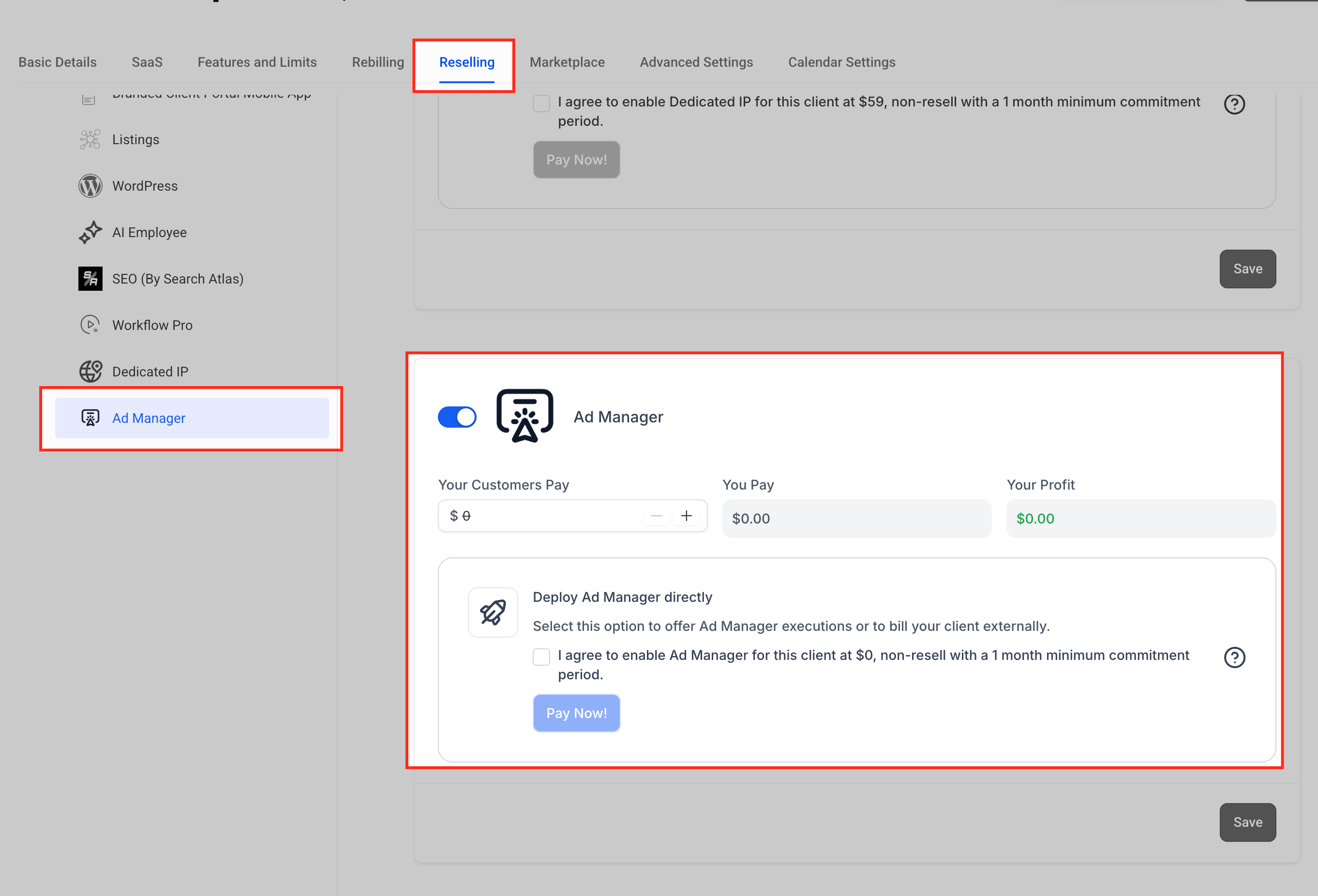
- Sub-Accounts: Agencies can choose to resell access and set their own pricing.
- Profit Control: Whatever price the agency sets becomes its profit — Chat To Clients CRM’s base cost is always $0.
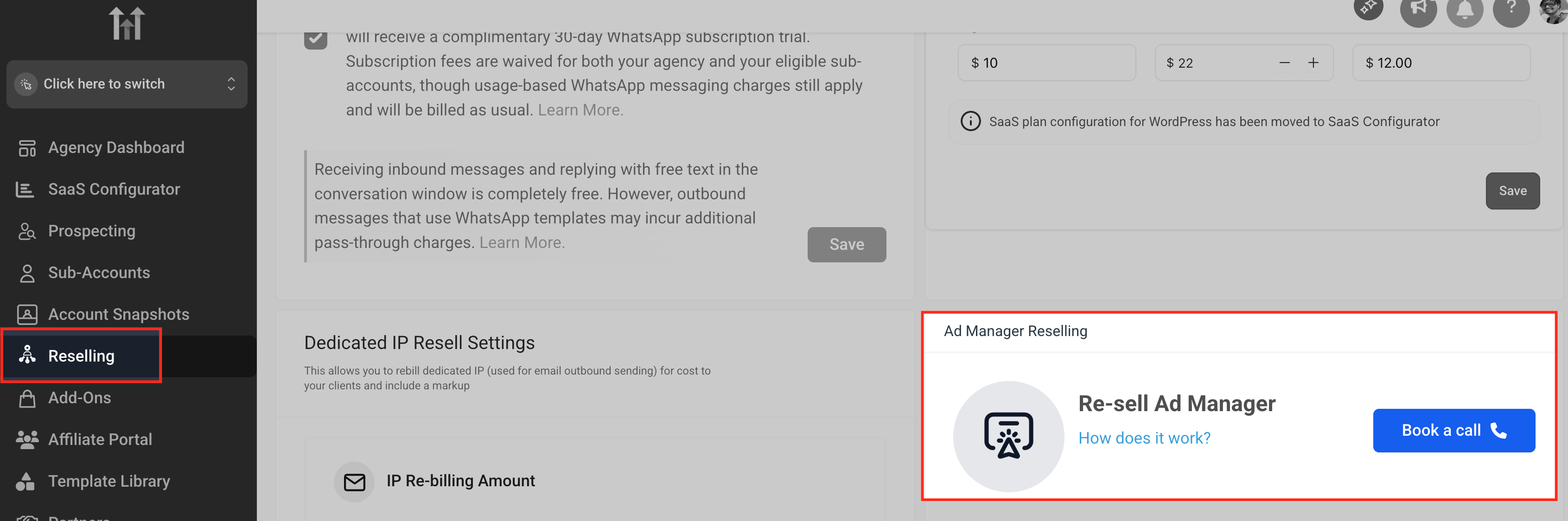
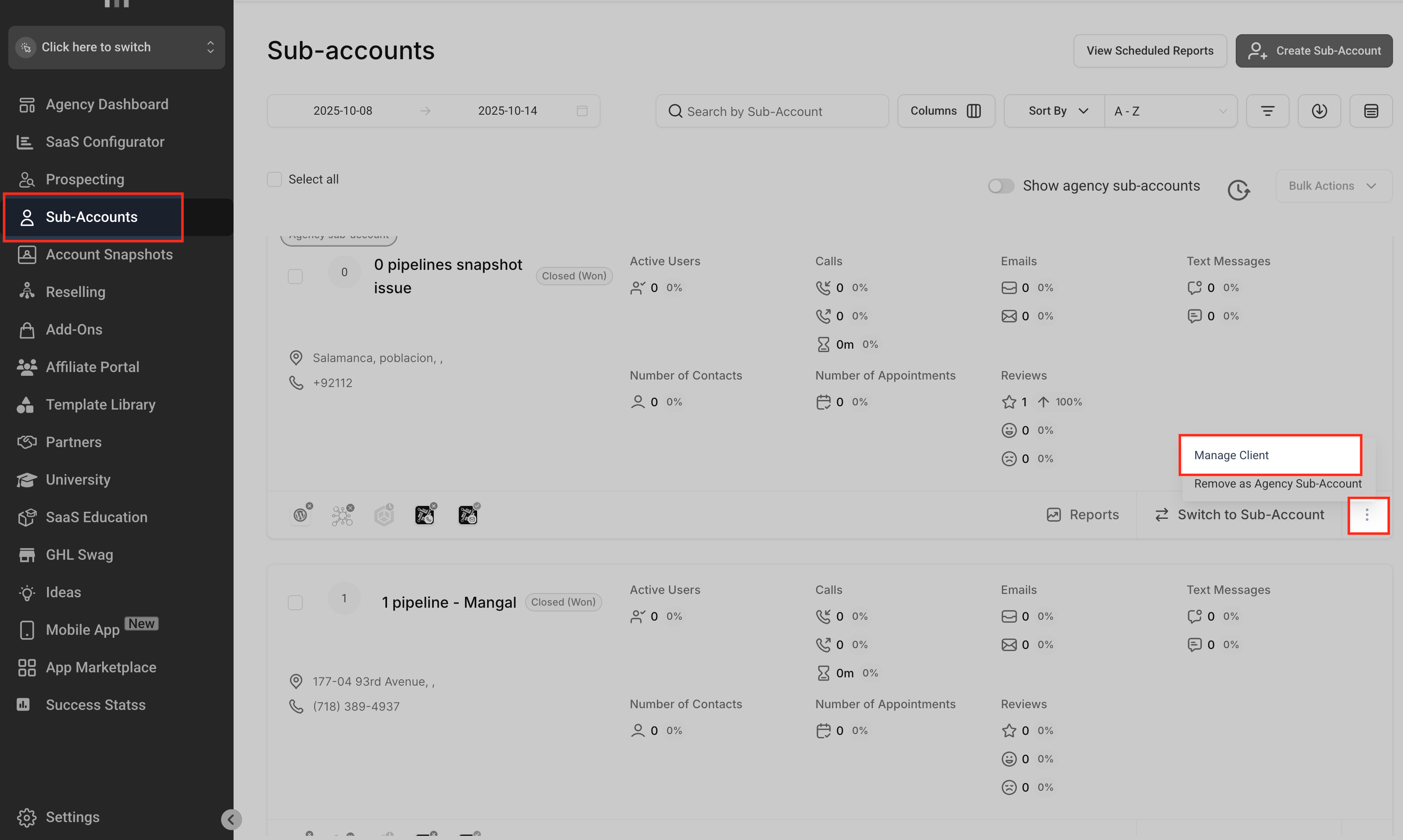
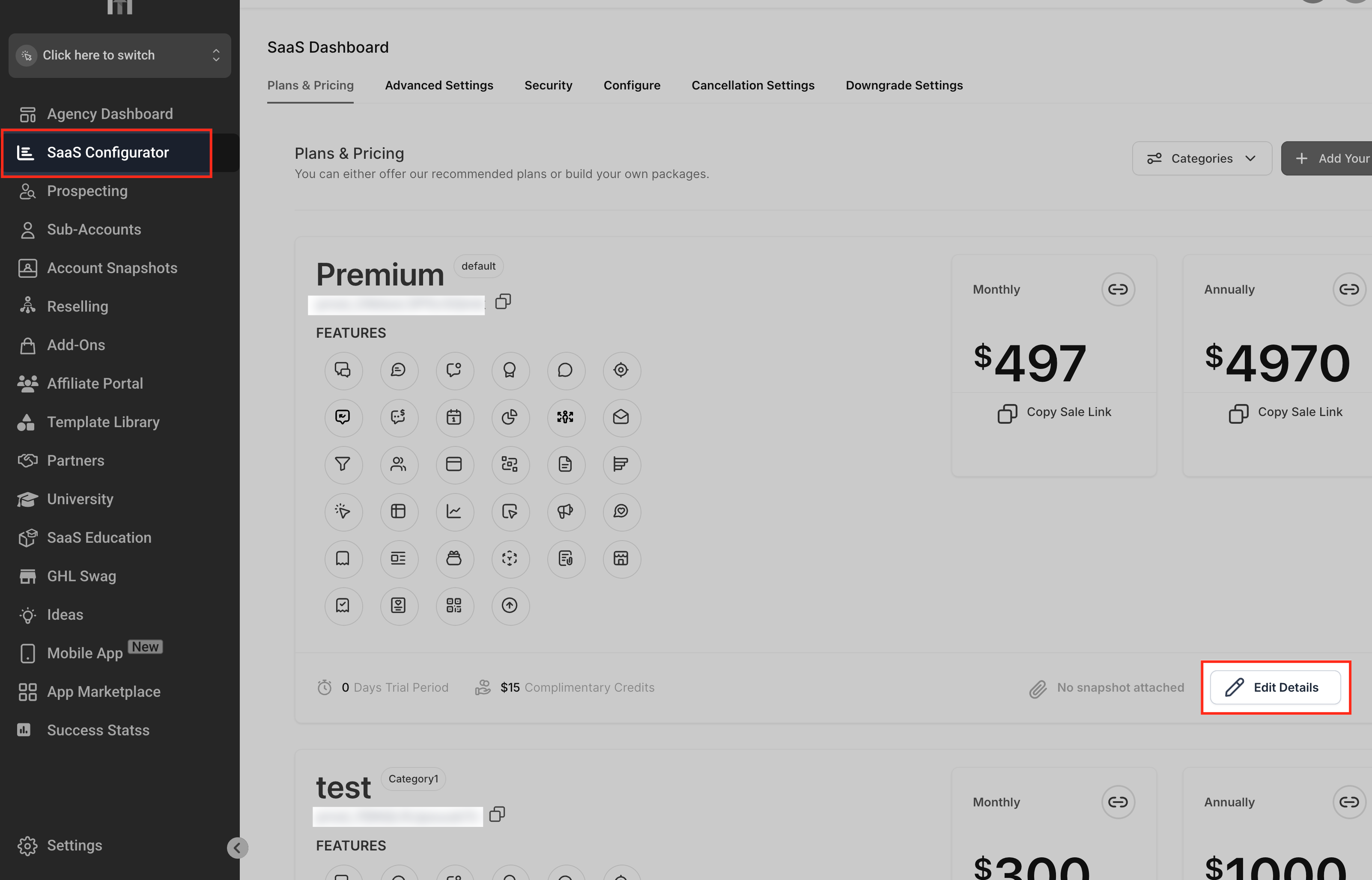
Agencies can manage Ad Manager availability and pricing in three places:
- Agency → Reselling Tab – Define default pricing for all sub-accounts.
- Sub-Account → Reselling Tab – Set or override pricing individually.
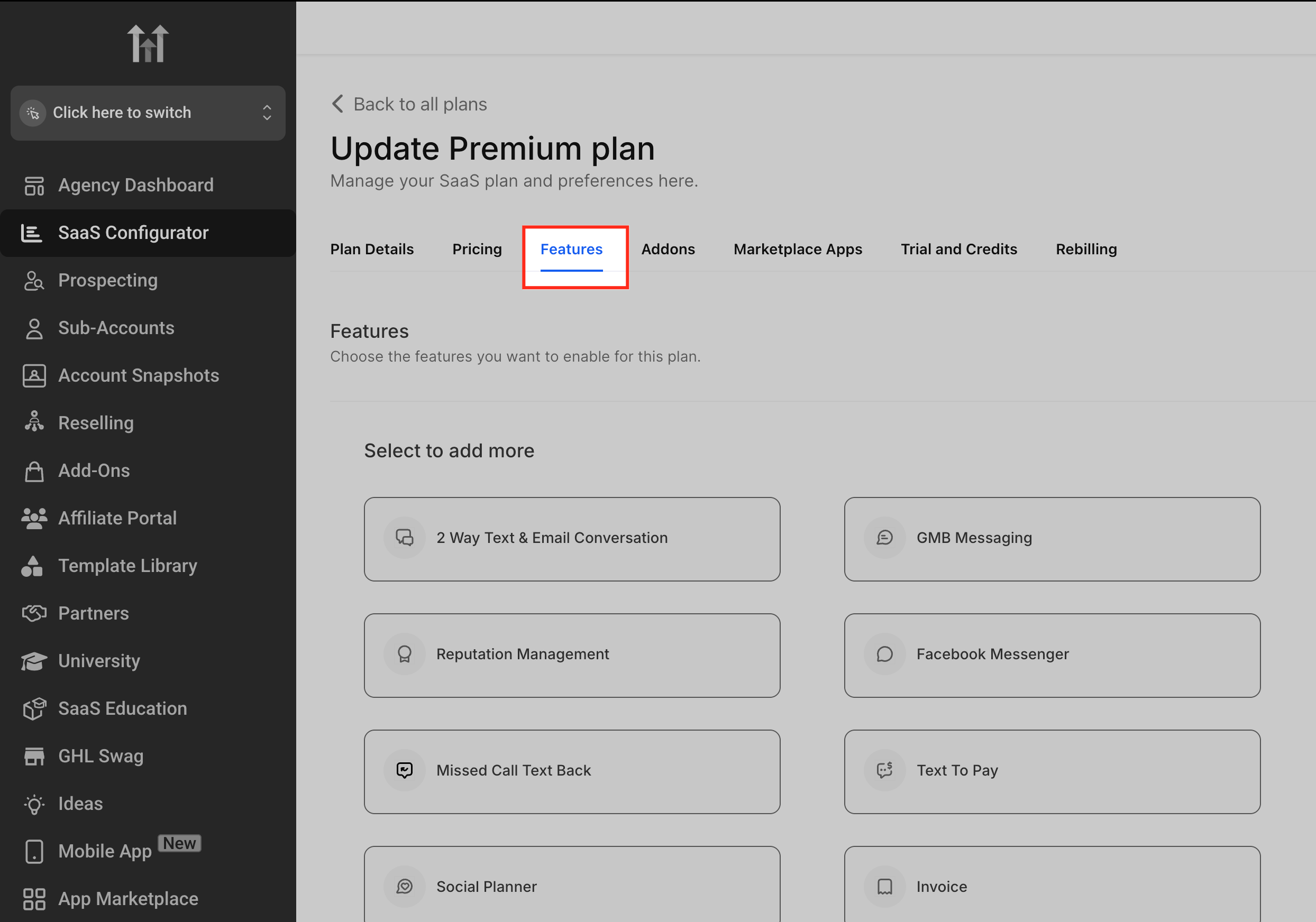
- SaaS Configurator → Features Tab – Include Ad Manager as part of a SaaS plan.
How to Set Up Ad Manager
Follow these steps to set up Ad Manager and start running campaigns:
Access Ad Manager:
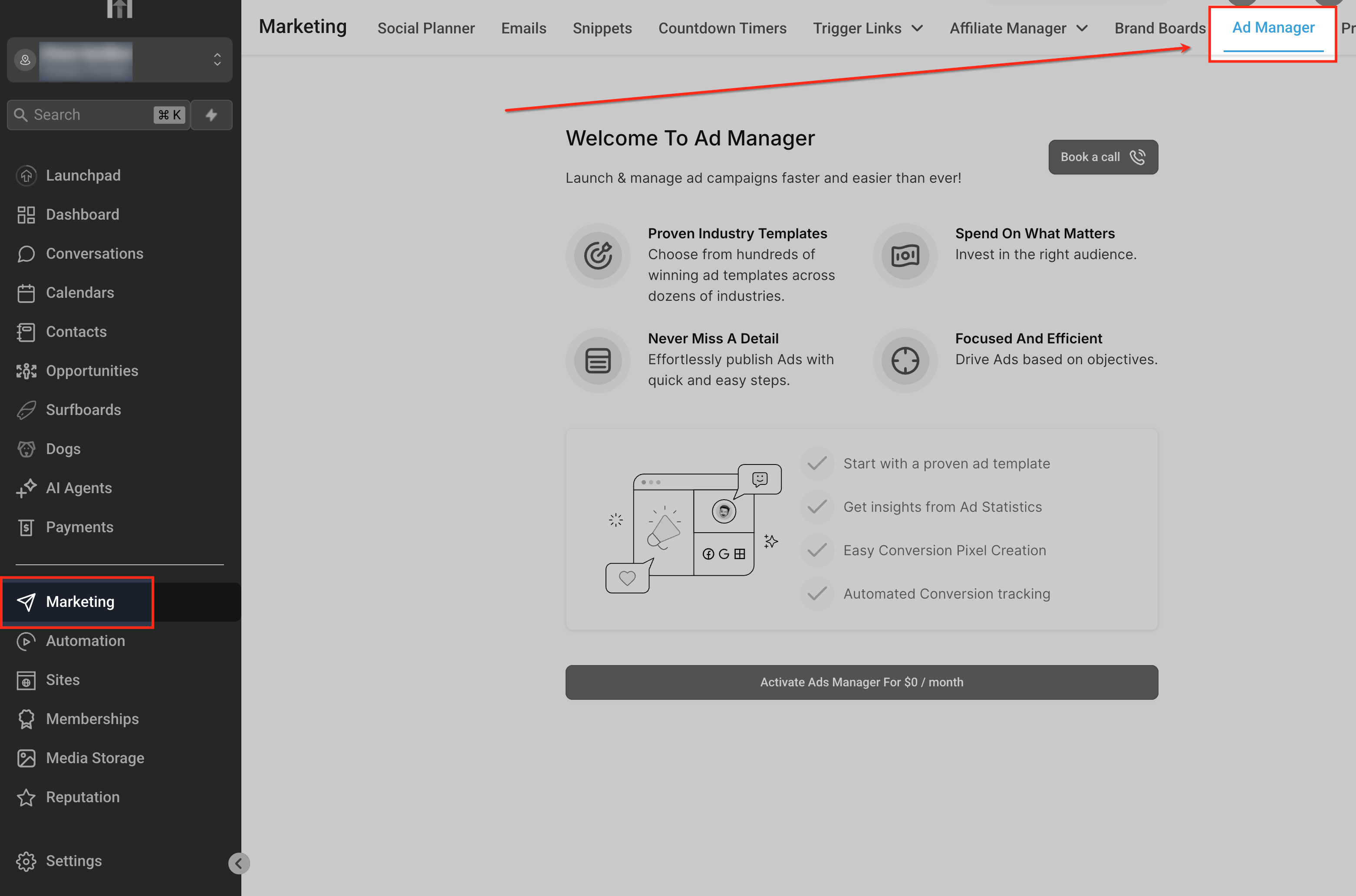
From your Chat To Clients CRM dashboard, navigate to Marketing → Ad Manager.
Connect Ad Accounts:
Click Connect Accounts and follow the prompts to link your Facebook, Instagram, Google, or LinkedIn Ads account.
Set Permissions
Ensure correct permissions are granted for creating and managing campaigns.
Create a Campaign
Choose the platform (Facebook, Instagram, Google, or LinkedIn). Define your campaign objective (e.g., Awareness, Traffic, Conversions, or Lead Generation). Set audience targeting, budget, and schedule.
Monitor Results
Track performance metrics such as impressions, clicks, conversions, and spend in the Ad Manager dashboard.
Get Started with Ad Manager
Ready to start using Ad Manager? Learn how to enable Ad Manager for sub-accounts, configure access, and set up reselling options with our step-by-step guide How to Enable and Resell Ad Manager.
How to Create a Meta Business Portfolio
To connect Facebook to Chat To Clients CRM Ad Manager, you need access to a Meta Business Portfolio (formerly Business Manager), a Meta ads account, and a Facebook Page.
If you do not have a Meta Business Portfolio, follow Meta’s official guide to create one. Meta manages the Business Portfolio creation process, and the setup experience may change over time. For the latest steps, refer to Create a business portfolio in Meta Business Suite.
Once created, make sure the required Facebook Page and ads account are added and that you have the appropriate access.
Frequently Asked Questions
Q: Do agencies pay for Ad Manager?
No. Agencies get free access to Ad Manager. They may choose to resell it to sub-accounts.
Q: What platforms are supported in Ad Manager?
Currently supported platforms are Facebook, Instagram, Google, and LinkedIn Ads.
Q: Can agencies set their own pricing for sub-accounts?
Yes. Agencies can define pricing in the Reselling tab, Sub-Account Reselling tab, or SaaS Configurator.
Q: Where can sub-accounts see their reports?
All performance reports are available within the Ad Manager dashboard in real-time.
Q: Do sub-accounts provide their own ad budgets?
Yes. Each sub-account is responsible for its own ad spend budget.
Related Articles
- How to Get Started with Meta Campaigns in Ad Manager
- Connecting Facebook Business Account to Ad Manager
- Ad Manager - Create New Facebook Ad Campaigns
- Ad Manager - Create a Google Search Ad Campaign
- How to Create a LinkedIn Ad Campaign in Ad Manager
- Ad Manager: Create Ad Campaigns Using Templates
- How to Enable and Resell Ad Manager