
Moving US numbers from Twilio to Chat To Clients CRM(LC)
Moving US Phone Numbers from Twilio to Chat To Clients Phone
This guide walks you through migrating US local and toll-free phone numbers from your Twilio account to Chat To Clients CRM's Chat To Clients Phone system.
You'll learn what information to gather before migration, how to submit a migration request, what moves with the phone number, and how to verify calling, SMS, and messaging registration after the cutover.
What is Phone Number Migration?
Phone number migration transfers control of a US local or toll-free phone number from one phone system provider to another. When you migrate a phone number from your Twilio account to Chat To Clients CRM's Chat To Clients Phone system, the number becomes managed by Chat To Clients Phone for all future calling, SMS, and messaging functionality.
This migration process changes which platform manages the number but does not automatically move historical data, call recordings, or messaging registration from your Twilio account.
Chat To Clients CRM Support coordinates the migration end-to-end after you provide the required account and phone number identifiers.
Key Benefits
Migrating your US phone numbers from Twilio to Chat To Clients Phone centralizes phone management inside Chat To Clients CRM and provides access to native Chat To Clients Phone features.
What Moves with the Phone Number?
Moving a phone number changes which phone system manages the number. It does not automatically migrate historical phone-system data from the original Twilio account.
| Asset | Migration Behavior |
|---|---|
| Phone number | Moves to Chat To Clients Phone |
| Future calls and SMS | Route through Chat To Clients Phone after cutover |
| Historical Twilio recordings | Do not automatically migrate |
| Historical voicemails | Do not automatically migrate |
| Contacts and Conversations | Are not transferred as part of phone number migration |
| A2P / Toll-Free registration | Must be verified after migration and may require re-registration |
A2P registration may need to be completed again after moving from your own Twilio account to Chat To Clients Phone. Existing A2P registration from Twilio does not automatically migrate to Chat To Clients Phone. After migration, complete or verify A2P registration in Chat To Clients CRM and confirm each applicable US local number is associated with the correct approved Campaign before resuming A2P messaging.
After migration, confirm the number's Toll-Free Verification status before resuming messaging. Verification status should not be assumed to transfer automatically.
Before the Migration
Preparing the destination location and preserving information you may need later reduces disruption during the cutover.
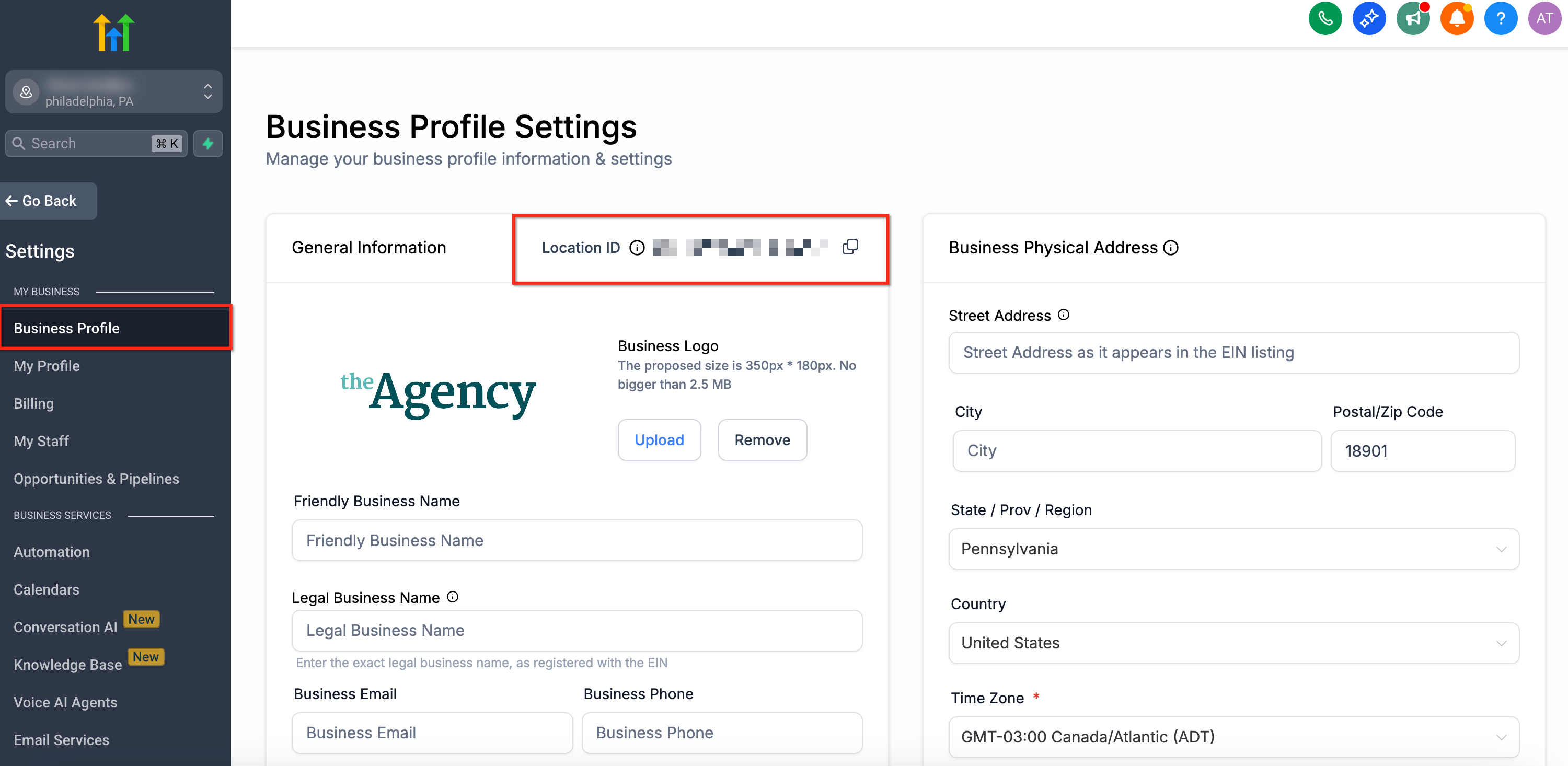
Identify the Chat To Clients CRM Sub-account ID (Location ID) where the phone number will reside after migration.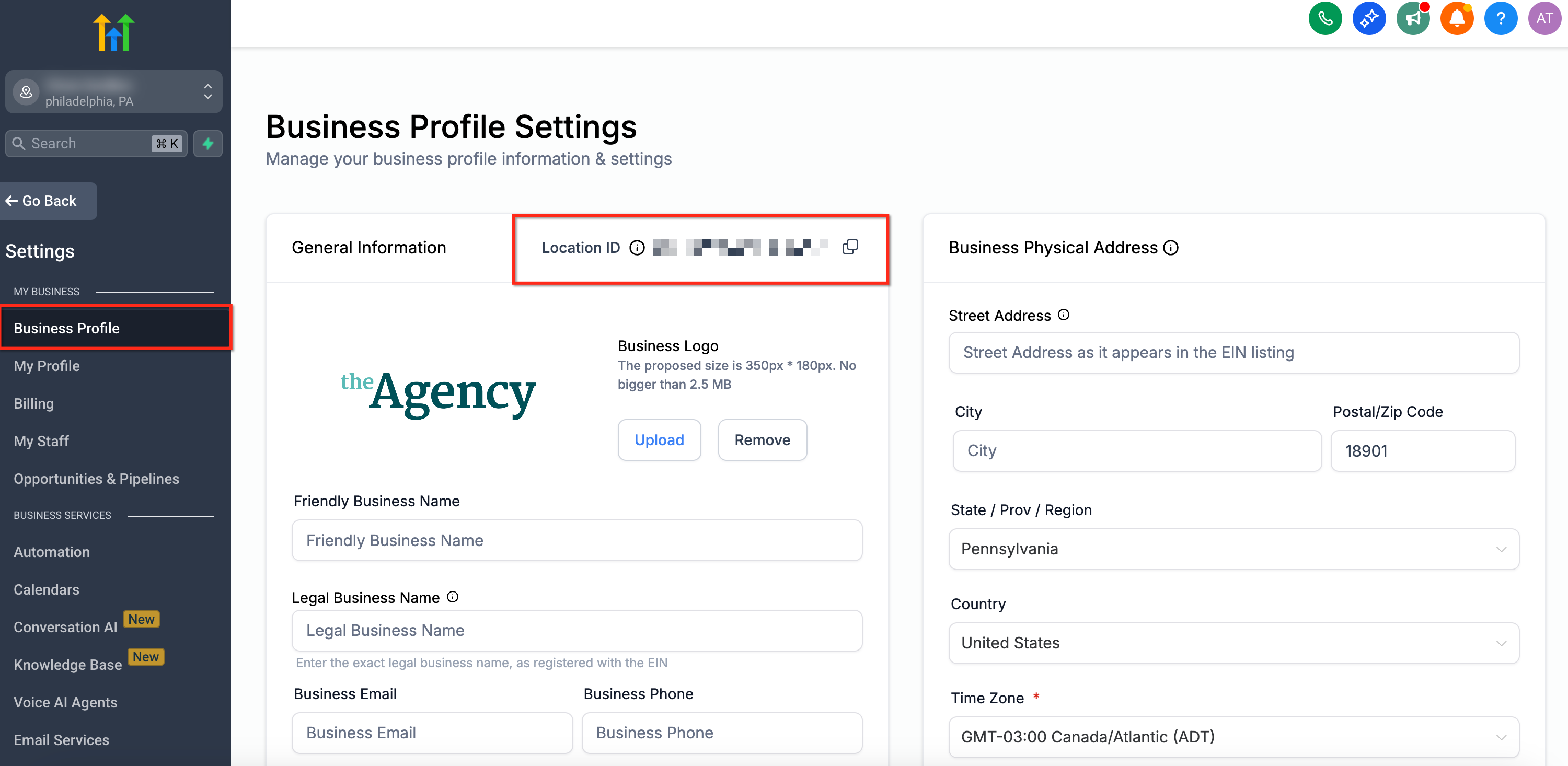
Locate the Twilio Account SID currently holding the phone number. This identifier is required for the migration request.
Format phone numbers in E.164 format (e.g., +1XXXXXXXXXX) when possible.
Historical recordings and voicemails do not automatically migrate to Chat To Clients Phone. Export and save any critical assets from your Twilio account before migration.
Check whether the number has active A2P 10DLC or Toll-Free Verification in Twilio. You may need to re-register or verify the number in Chat To Clients CRM after migration.
Document how the number currently routes calls and SMS so you can replicate this configuration in Chat To Clients Phone.
Check Chat To Clients CRM workflows, third-party integrations, and automations that may use the phone number. Update these configurations after migration if needed.
Include a preferred migration time in your Chat To Clients CRM Support request to minimize impact on calling and messaging.
For non-US numbers, use the international number migration guide.
How to Move a US Number from Twilio to Chat To Clients Phone
Chat To Clients CRM Support coordinates the migration end-to-end after you provide the required identifiers and cutover preferences.
Find the losing Twilio Account SID in your Twilio console. This identifier is required to initiate the migration.
Identify the Chat To Clients CRM Sub-account ID where the phone number will reside after migration.
Submit a support request through the Chat To Clients CRM Help Center. Include the following information:
- Phone number(s) you want to migrate (preferably in E.164 format, e.g., +1XXXXXXXXXX)
- Losing Twilio Account SID
- Destination Chat To Clients CRM Sub-account ID (Location ID)
- Preferred cutover window (date and time)
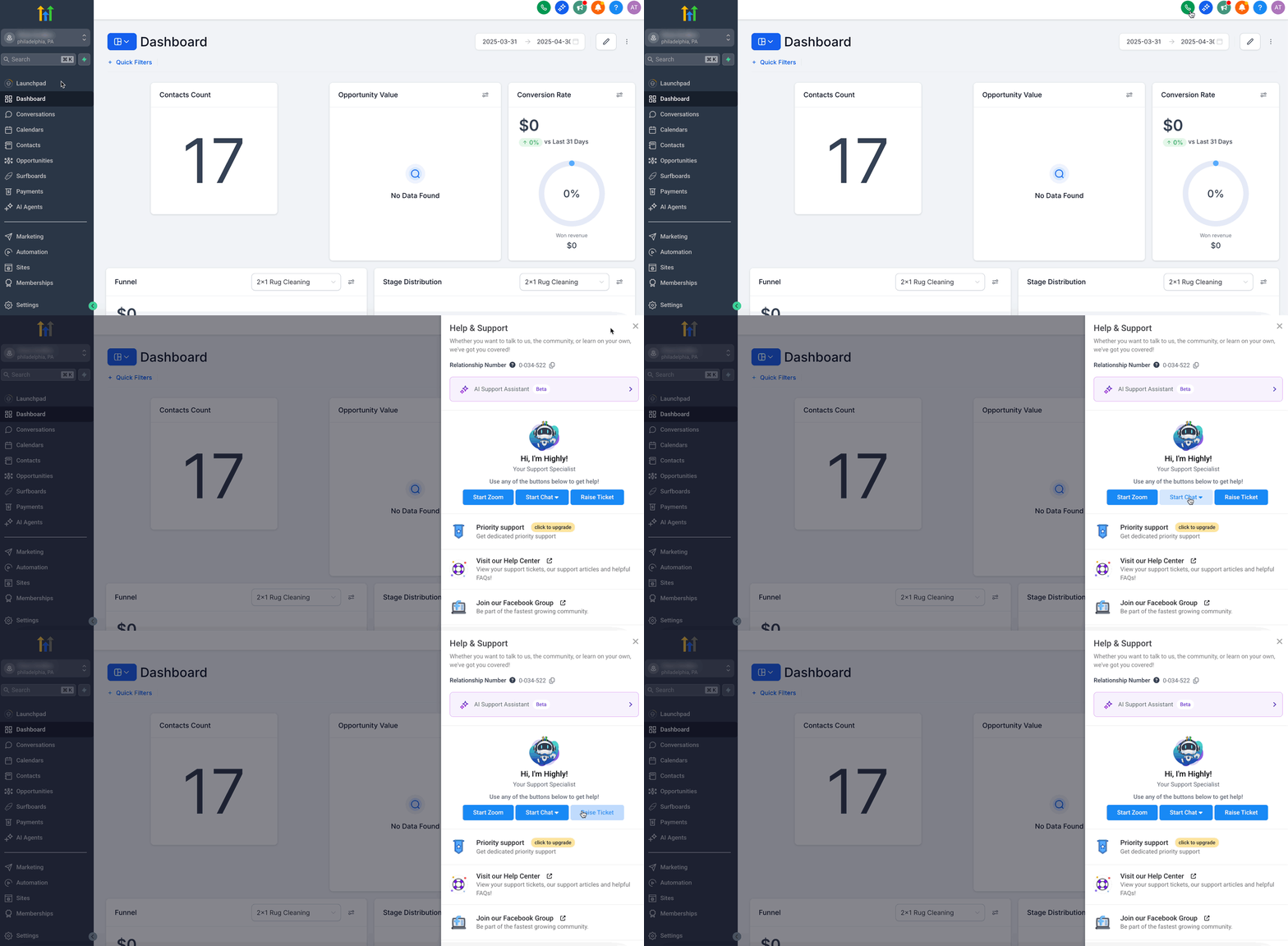
Chat To Clients CRM Support processes the migration request and notifies you when the phone number has been successfully moved to Chat To Clients Phone.
Verify that the phone number is functioning correctly in Chat To Clients Phone by testing calls and messages.
Migration timing depends on receiving all required information and the scheduled cutover. Chat To Clients CRM Support will confirm the migration window once the request is ready to process.
Verify the Number After Migration
Testing the number immediately after cutover confirms that voice, SMS, routing, and messaging registration are working correctly in Chat To Clients Phone.
Check the phone numbers list in the destination sub-account to verify the number has been added.
Make a test call from the migrated number to confirm outbound calling works.
Call the migrated number from an external phone to verify inbound calling routes correctly.
Send a test message from the migrated number to confirm outbound SMS works.
Send a message to the migrated number from an external phone to verify inbound SMS routing.
Confirm that call forwarding and routing rules match your intended configuration.
Check that the number is assigned to the correct user or team in Chat To Clients CRM.
For US local numbers, verify that the number is attached to an approved A2P Campaign in Chat To Clients CRM's Trust Center before resuming A2P messaging.
For toll-free numbers, confirm the Toll-Free Verification status before resuming messaging. Verification status should not be assumed to transfer automatically.
Check Chat To Clients CRM workflows and third-party integrations to confirm they reference the correct phone number after migration.
Once all verification steps are complete, the phone number is ready for production use in Chat To Clients Phone.
Related Articles
- Moving Phone Numbers: Migration Guide
- Moving Phone Numbers Across Accounts (US and International)
- Migrating International Numbers from Twilio to Chat To Clients Phone
- How Do I Migrate My Agency and Sub-Account to Chat To Clients Phone?
- A2P Campaign Registration: Step-by-Step Guide and FAQs
- Moving Numbers Between Sub-Accounts (Same Agency)