
Content AI with Social Planner
Create high-quality, platform-specific social media content faster with Chat To Clients CRM’s new guided Content AI questions in Social Planner. This update streamlines your workflow, ensures brand consistency, and helps you generate more engaging posts tailored to each platform.
TABLE OF CONTENTS
- What is Content AI in Social Planner?
- Key Benefits of Content AI in Social Planner
- How Guided Content Questions Work
- Using Brand Voice with Content AI
- How to Create a Social Post with Content AI
- Refine Your Generated Post
- Frequently Asked Questions
- Related Articles
What is Content AI in Social Planner?
Content AI in Social Planner helps you create social media post drafts using guided inputs tailored to your selected platform and content type. You can provide information about your content goal, audience, call to action, and Brand Voice, then use Content AI to generate a draft directly within your social post workflow. After generating the content, you can review and refine the copy before publishing immediately or scheduling it for later.
Content AI simplifies the process of turning an idea into social media copy. Guided Content Questions collect relevant information about the post you want to create, while Brand Voice can help generated content reflect your established brand identity. Because the inputs can adapt to the platform and content type you select, you can provide context that is relevant to the post you are creating.
Prerequisite: Connect at least one supported social account to Social Planner before creating and publishing social content. If you have not configured Social Planner yet, see Getting Started - Setup Social Planner.
Key Benefits of Content AI in Social Planner
Content AI combines guided content creation with the existing Social Planner workflow, helping you move from an idea to a reviewable social post without leaving Chat To Clients CRM. Platform-aware questions, optional Brand Voice information, and AI-assisted editing provide additional context and control over the generated copy.
Guided Content Creation: Answer focused questions about the post you want to create instead of writing a complete prompt from scratch.
Platform-Aware Inputs: Content AI adapts its guided questions based on the selected social platform and content type.
Brand Voice Support: Apply a saved Brand Voice to help generated content align with your established brand identity.
Flexible Content Refinement: Review and manually edit generated copy or use available AI editing tools before publishing.
Integrated Social Publishing: Create, refine, and continue to publishing or scheduling from the Social Planner workflow.
How Guided Content Questions Work
Guided Content Questions help Content AI gather the context needed to create your social post. The questions presented can change based on your selected platform and content type, allowing the generation process to focus on information relevant to the post you are creating.
When creating content, you can provide information such as:
The social platform where you plan to publish.
The type of content you want to create.
The purpose or goal of the post.
Information you want included in the generated content.
Your preferred call to action.
Brand Voice information when available.
Additional optional details that provide more context.
Some questions are required to generate the post, while additional questions can be expanded and completed when you want to provide more context.
Providing optional information can help Content AI create a draft that more closely reflects the specific message you want to communicate.
Using Brand Voice with Content AI
Brand Voice allows Content AI to use saved information about how your brand communicates. Selecting an existing Brand Voice can help maintain greater consistency across generated content while still allowing you to adjust information for an individual social post.
If a Brand Voice is available, select the appropriate Brand Voice when creating your content. Review the information being applied and adjust or override values for the individual post when needed.
Note: If you have not created a Brand Voice, you can configure one from Marketing > Brand Boards > Brand Voice. See Create a Brand Voice from Text or URL for setup instructions.
For more information about how saved Brand Voice information works with generated content, see Brand Voice Integration in Content AI.
How to Create a Social Post with Content AI
Creating a post with Content AI starts in the standard Social Planner workflow. Selecting the destination platform, content type, and relevant content details before generation gives Content AI the context it needs to create an editable first draft.
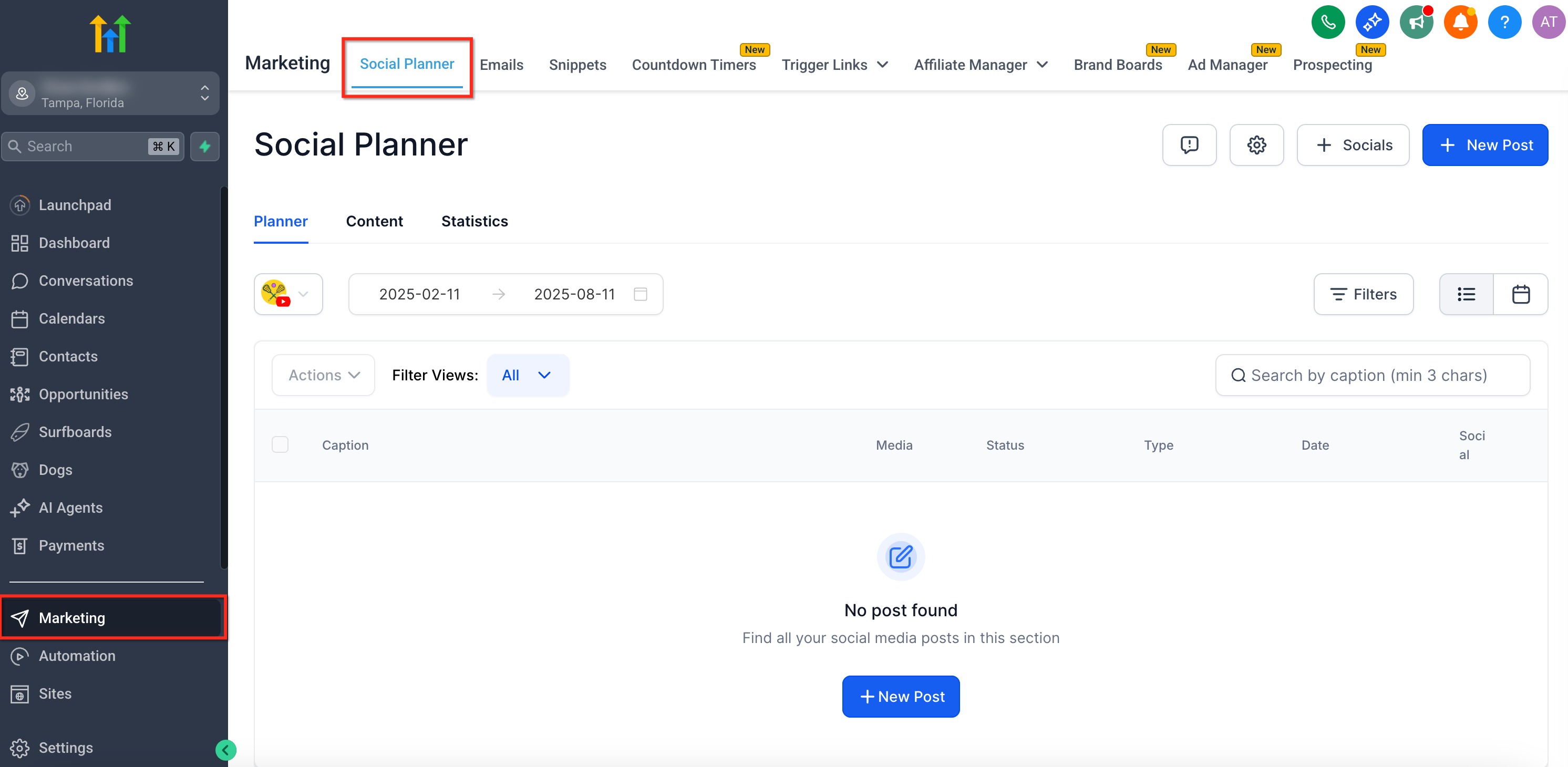
From your sub-account, navigate to Marketing > Social Planner.
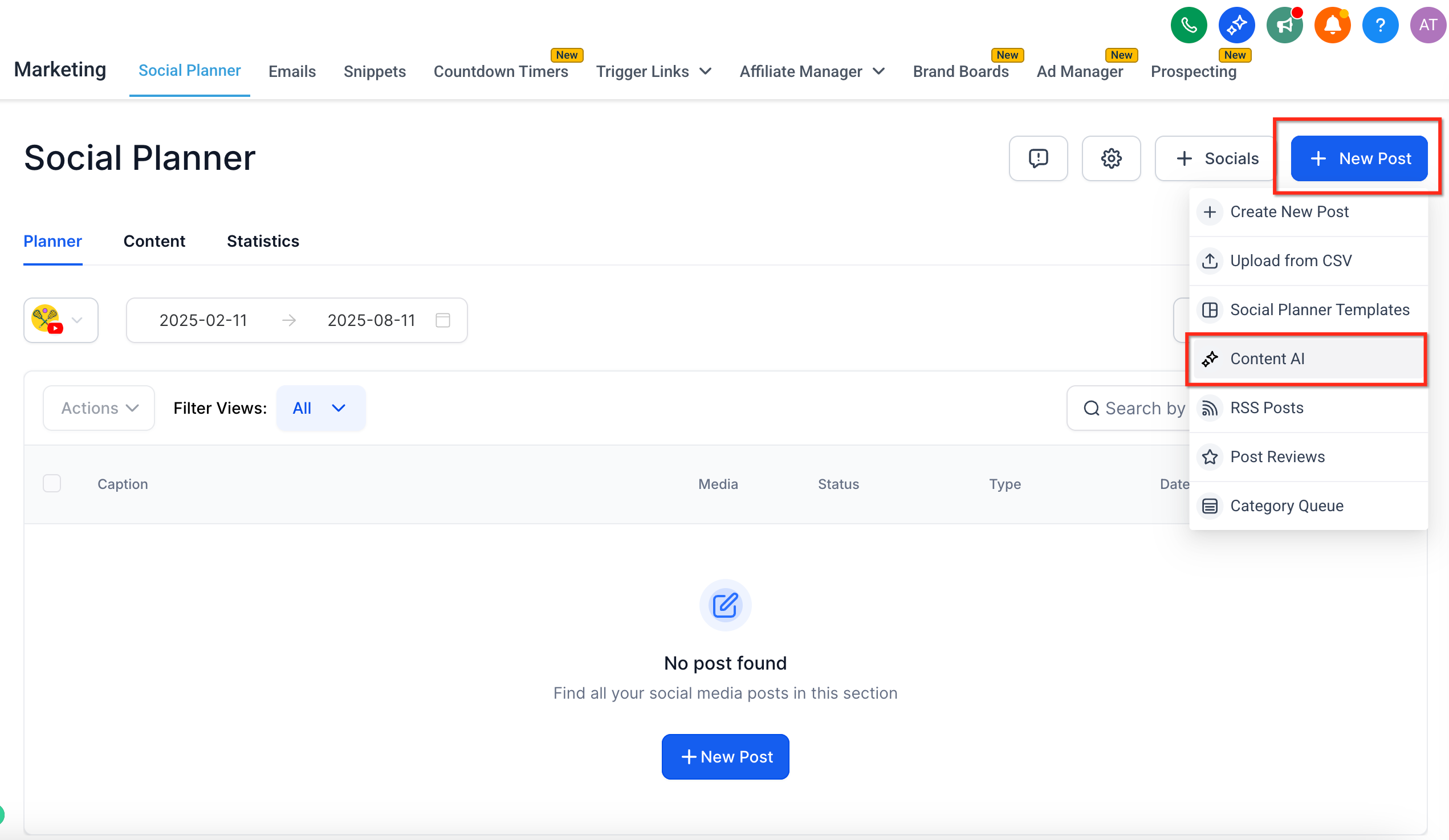
Click + New Post and select the option to create content using Content AI.
Select the social platform where you want to publish the content.
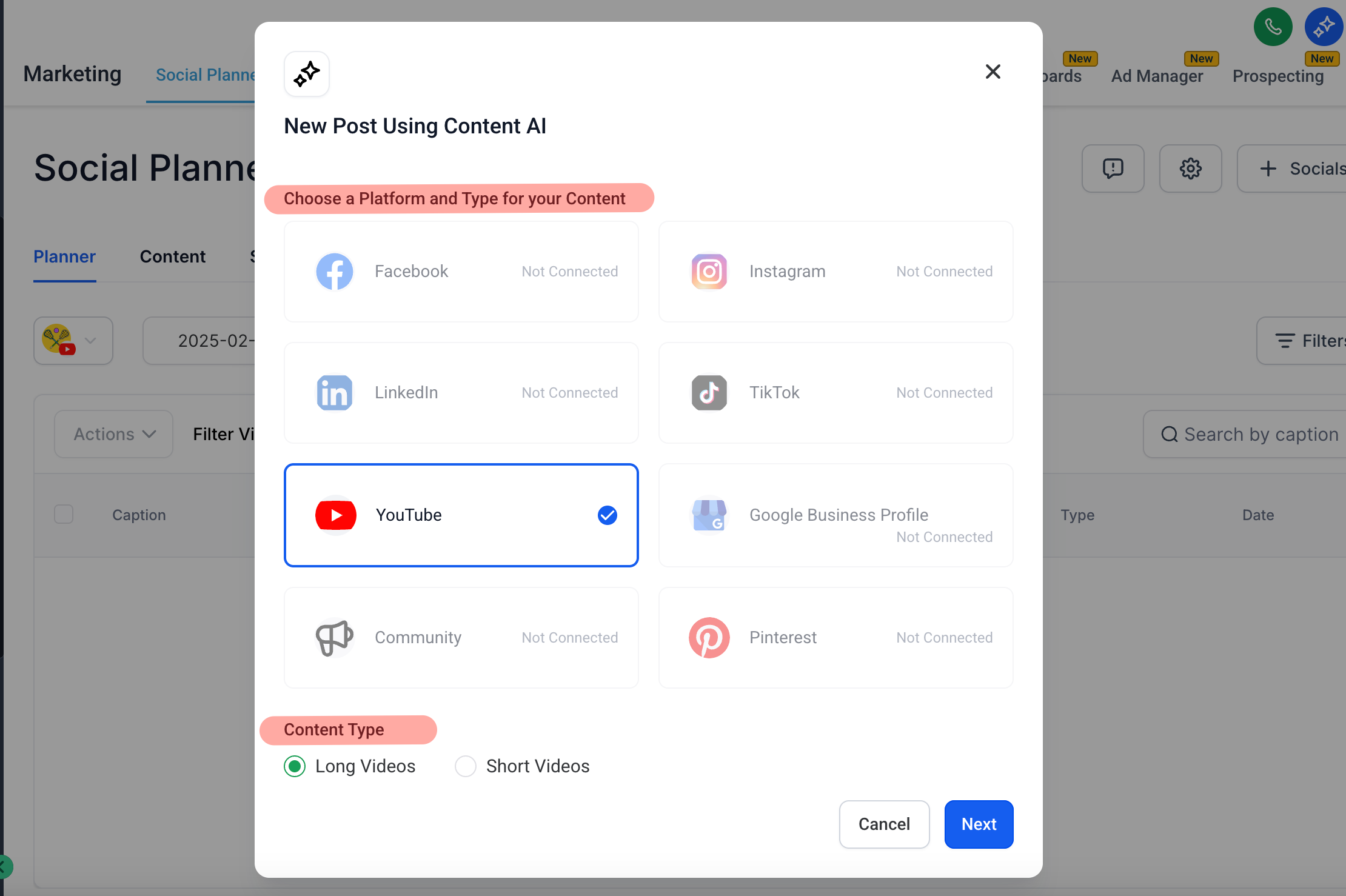
Select the appropriate content type for the post.
Select your Brand Voice if you want to use saved brand information.
Review the Brand Voice information and adjust any values you want to customize for this particular post.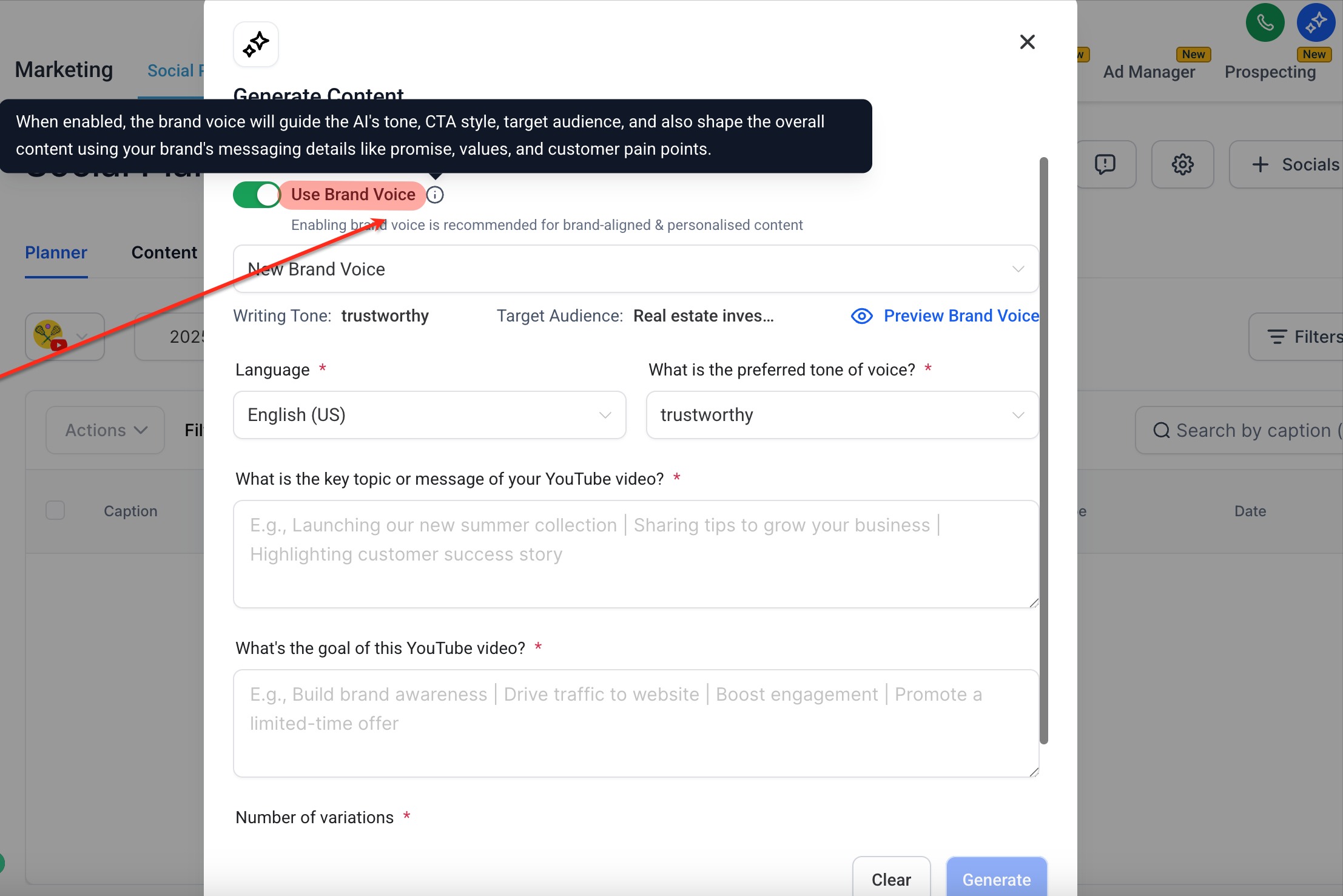
Complete the required Guided Content Questions.
Provide clear information about what you want the post to communicate. Expand and answer optional questions when you want to give Content AI additional context.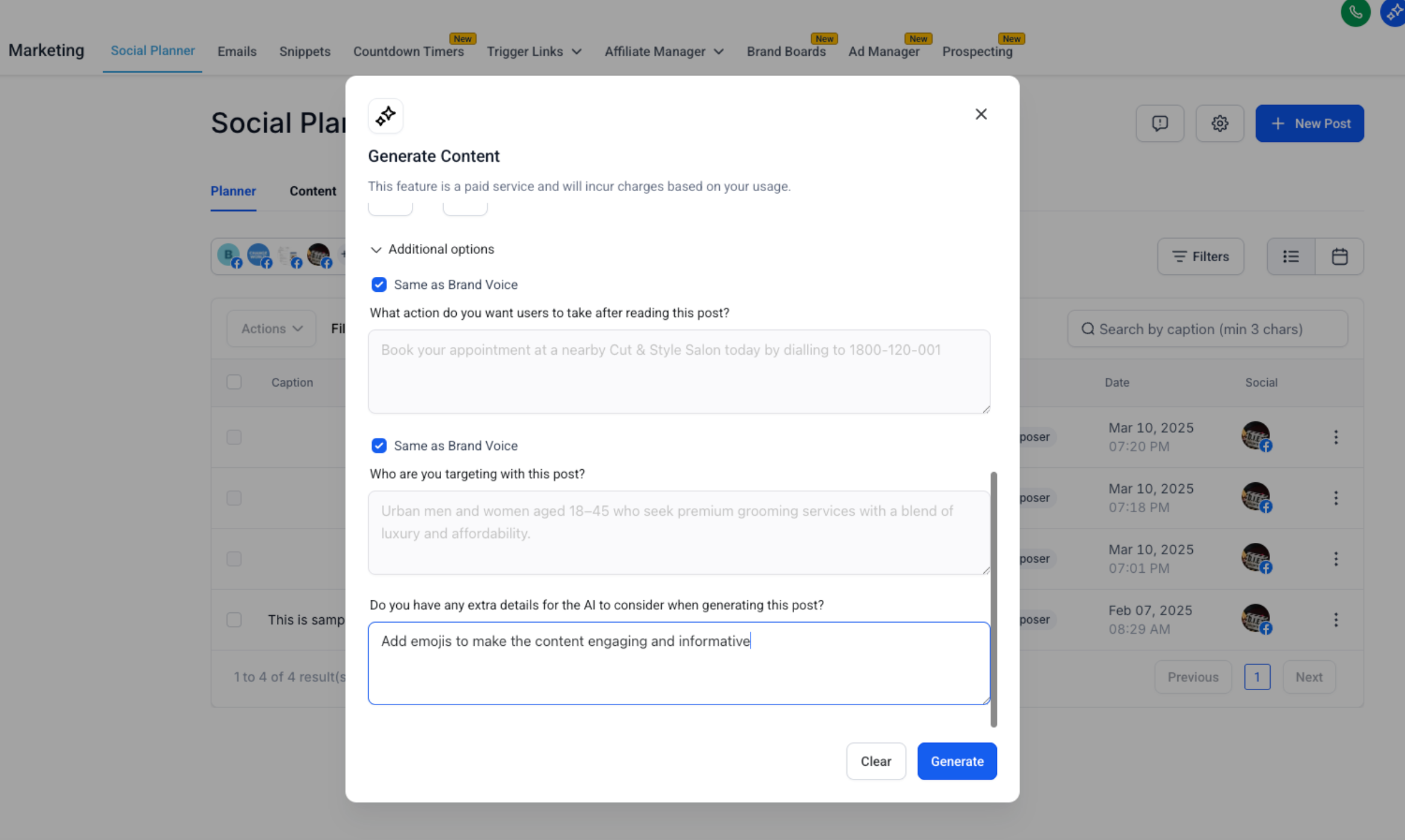
Click Generate to create the social post draft.
Review the generated content before publishing.
Check the copy for accuracy, tone, brand alignment, links, calls to action, and any information that should be changed before your audience sees it.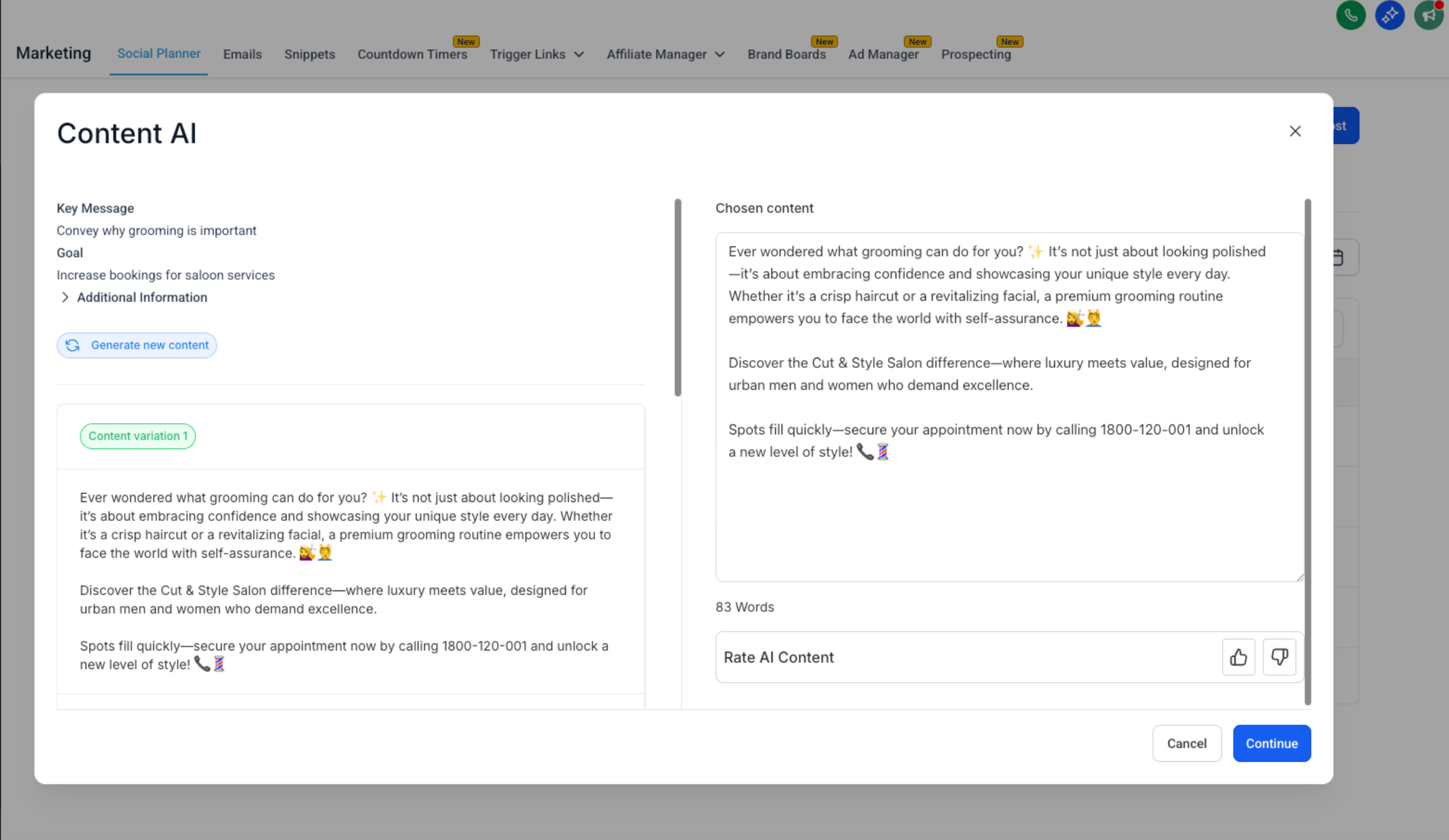
Make any necessary changes to the generated content. You can manually edit the draft or use the available AI-assisted editing options to refine it further.
Add or review any media required for your post.
Supported image, video, and other post requirements vary by social platform. See Social Planner Content Guidelines - Image, Video, and Text if you need to verify platform-specific requirements.
Complete the normal Social Planner publishing workflow by choosing whether to publish the post immediately or schedule it for later.
Refine Your Generated Post
AI-generated content should be treated as an editable draft rather than content that must be published exactly as generated. Social Planner provides multiple ways to refine the copy so you can correct details, adjust the wording, or better match the message you want to communicate.
After generating your draft, you can:
Edit manually: Change any part of the generated text directly in the post editor.
Use Quick AI actions: Apply available one-click AI editing actions to make targeted improvements to selected content.
Use Edit with Ask AI: Provide custom instructions for how you want the content changed when a more specific revision is needed.
For example, you might ask AI to adjust the tone, rewrite a portion of the post, or make another contextual change before publishing.
For detailed instructions, see Use Edit with Ask AI in Social Planner.
Frequently Asked Questions
Q: Do I need to connect a social account before using Content AI in Social Planner?
A supported social account should be connected to Social Planner before completing the publishing workflow. The accounts connected to Social Planner also determine which destinations are available when creating your post.
Q: Do I need to create a Brand Voice before I can use Content AI?
No. Brand Voice provides additional brand context for generated content, but you can create Content AI content without first configuring a Brand Voice.
Q: Do the Guided Content Questions change depending on the social platform?
Yes. Content AI can adapt the guided inputs based on the selected platform and content type so the information collected is relevant to the post being created.
Q: Do I have to use Content AI to create posts in Social Planner?
No. Content AI provides an AI-assisted creation workflow, but you can continue creating posts using Social Planner's standard post creation options when you prefer to write the content yourself.
Q: Can I edit Content AI-generated content before publishing it?
Yes. Generated content can be reviewed and edited before publishing. You can make manual changes or use available AI-assisted editing tools to refine the draft.
Q: How can I provide feedback about Content AI output?
Supported AI-generated content in Social Planner can be rated using the available thumbs-up or thumbs-down feedback controls. Selecting negative feedback may provide additional options for sharing information about the result. See Thumbs Up/Down Feedback for Content AI for more information.
Q: Are image and video requirements the same for every social platform?
No. Supported formats, dimensions, file sizes, and other media requirements can differ between social platforms. Review the Social Planner content guidelines before publishing if your post includes media.