
How to Generate Leads Using the Chat To Clients CRM Prospecting Tool
The Prospecting Tool helps you to find Local businesses nearby and generate Marketing Audit Reports for them. This Report gives you detailed insights about your prospects - that you can use to target and convert them to potential customers in just a few clicks.
This tool analyzes the strength of your prospects' online presence in terms of their Listings and Reviews. The Report also clearly showcases the gaps in their online marketing strategies. An Agency could highlight these issues, propose optimal solutions, and convert them to potential customers.
TABLE OF CONTENTS
- What is the Prospecting Tool?
- What are the benefits of the Prospecting Tool?
- Generating Reports using Chat To Clients CRM's Prospecting Tool
- 1. Access the Prospecting Tool
- 2. Search Options
- Analyzing the Marketing Audit Report
- Lead Contact Details
- How to Access POC Details of a Prospect
- Frequently Asked Questions
More Tutorials from the Community
What is the Prospecting Tool?
The Prospecting Tool is a software tool designed to help businesses and agencies find potential customers, generate marketing audit reports for them and start outreach all at once place!. It uses search parameters like location and keywords to identify potential customers and then generates a marketing audit report that provides insights into the prospects' online presence regarding their listings and reviews, and then start outrach by sending personalised Email or SMS.
The tool identifies gaps in the prospects' online marketing strategies and provides recommendations for improvement. Thus, our Prospecting Tool not only streamlines the lead generation process, but also post lead generation nurturing which saves time and resources, and helps businesses and agencies target potential customers more efficiently.
Who is this feature most useful for?
The Prospecting Tool can be used by various businesses and agencies that want to generate leads and find potential customers. It can be particularly beneficial for:
- Marketing Agencies: Marketing agencies can use the Prospecting Tool to generate leads for their clients and provide them with detailed insights into their online presence.
- Small Business Owners: Small business owners can use the Prospecting Tool to identify potential customers in their local area and target them more efficiently.
- Digital Marketers: Digital marketers can use the Prospecting Tool to generate leads for their clients and provide them with detailed insights into their online presence.
- Sales Professionals: Sales professionals can use the Prospecting Tool to find potential customers and generate leads for their sales pipeline.
- SEO Specialists: SEO specialists can use the Prospecting Tool to identify businesses that need help with their online listings and reviews and provide them with recommendations for improvement.
What are the benefits of the Prospecting Tool?
The Prospecting Tool has several benefits, including:
- Finding Local businesses nearby: The Prospecting Tool helps you find local businesses near you, making it easier to target and convert them into potential customers. Find more than 50 leads per search!
- Generating Marketing Audit Reports: The Marketing Audit Report provides detailed insights into the prospects' online presence regarding their Listings and Reviews. This information can be used to target and convert potential customers more efficiently.
- Automate Lead Generation:With Prospect AI which comes with both basic free tier prospecting and with Premium Prospecting as well. Setup you niche, Zipcode, etc., and let AI finds and recommend you leads every week!
- Automate Outreach: The Prospecting Tool is live on Sub Accounts, which automates and streamlines the post lead generation nurturing actions using workflows such as sending personalised email, welcome SMS which include link to audit reports to leads. Add leads to opportunities and much more
- Saving time and resources: The Prospecting Tool automates and streamlines the lead generation process, enabling agencies to reach more potential clients with a more targeted and efficient approach.
Manage prospects on the dashboard
Prospect Cards let you track lead outcomes directly in Prospecting.
Open is the default state.
Use the Prospect Card dropdown to mark a lead as Won or Lost.
Needs confirmation: whether changing this status updates Opportunities or any other CRM records.
Generating Reports using Chat To Clients CRM's Prospecting Tool
1. Access the Prospecting Tool
- Inside Agency: Click on the Prospecting Tab from the left menu
- Inside a Sub Account
- Enable Prospecting in a Sub Account: Either via Turning ON Prospecting in Reselling Tab or deploying it your Agency's specific Sub Account only, read more here.
- And then, Click Marketing Tab in left and then Prospecting Tab on Top Navigation bar
- Advance Prospecting like triggering workflows, saving leads to contacts etc possible in Sub-Accounts. You can also enable Prospecting in your desired Sub-Accounts
- Enable Prospecting in a Sub Account: Either via Turning ON Prospecting in Reselling Tab or deploying it your Agency's specific Sub Account only, read more here.
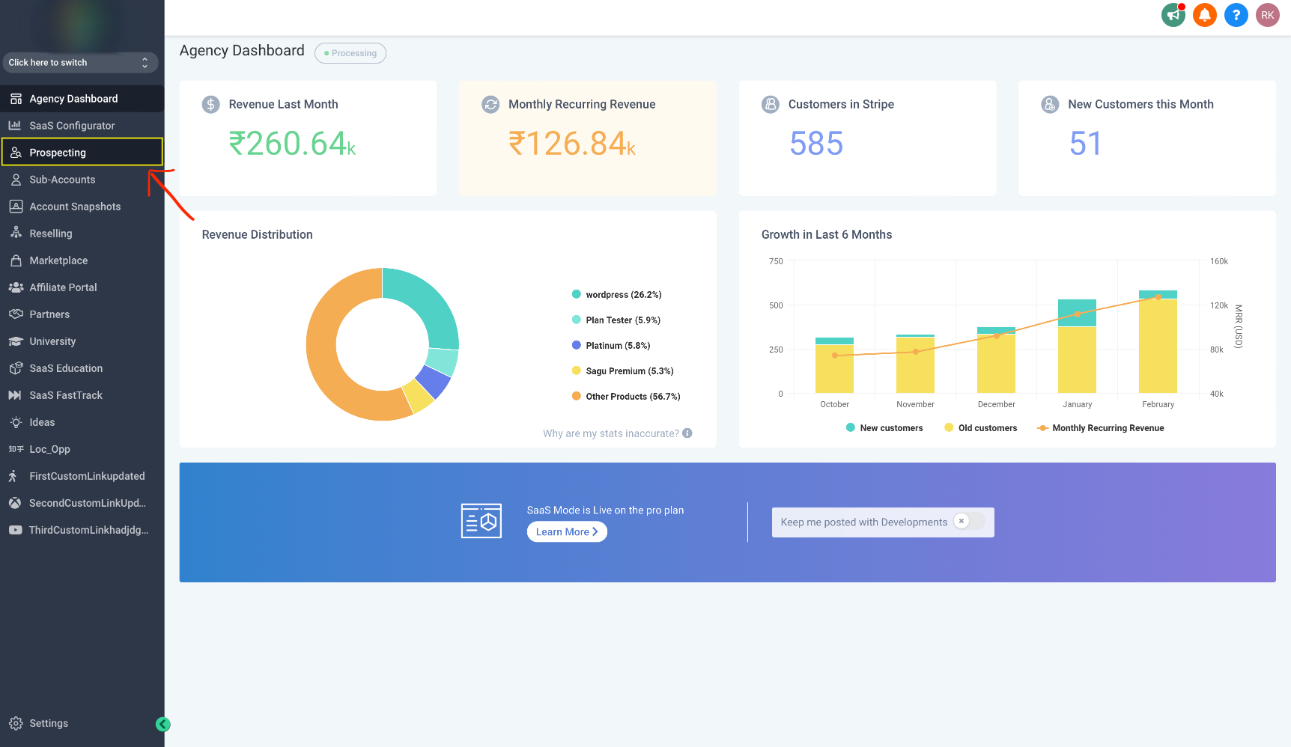
2. Search Options
Click on the "Add Prospect" Button. You will be redirected to the search page. You have multiple ways to search for leads:
A. Keyword Search
Enter any business type or keyword (e.g., “Dentist”, “Real Estate Agent”, “Contractor”).
You can also enter a specific brand name (e.g., “KFC”) to find exact matches.
B. Location Search (in Labs currently)
Enter a location like a city, postal code, or full address (e.g., 77024, Houston, TX 77024, USA).
You can also select a location directly on the map.
If you want to find leads near your current location, type “near me” — we’ll use your IP location for search.
C. Set Search Radius (in Labs currently)
Choose the radius from your center location (up to 30 miles).
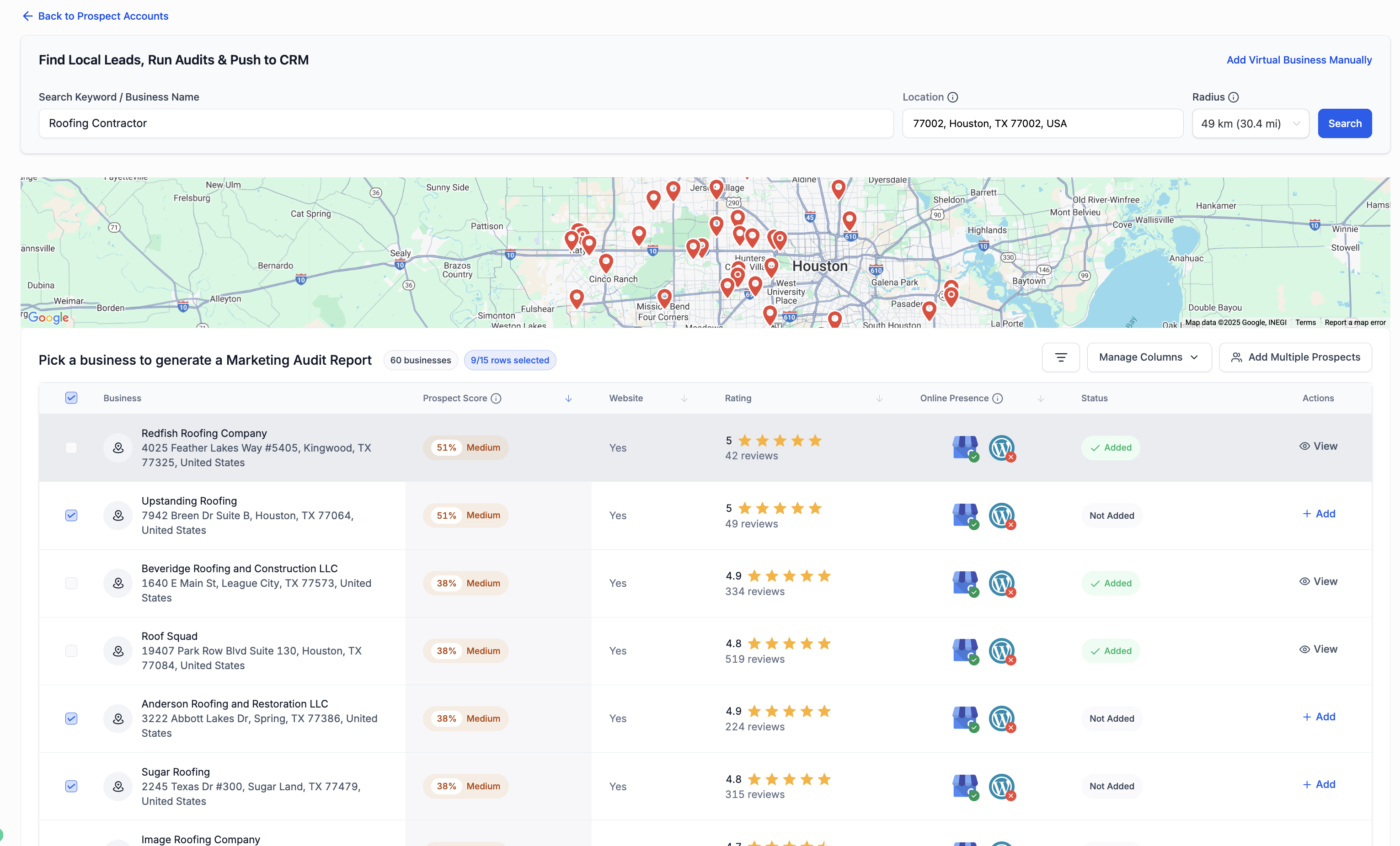
Save More & Multiple Leads from the search results (in Labs currently)
Get more leads per search upto 60
Save multiple leads with Add Bulk Prospect
View more leads per page upto 15
- You will be redirected to the prospect's detail page. If you know any Point of contact (POC) for that location, enable the POC toggle and enter their details. Click on Save Location to Proceed.
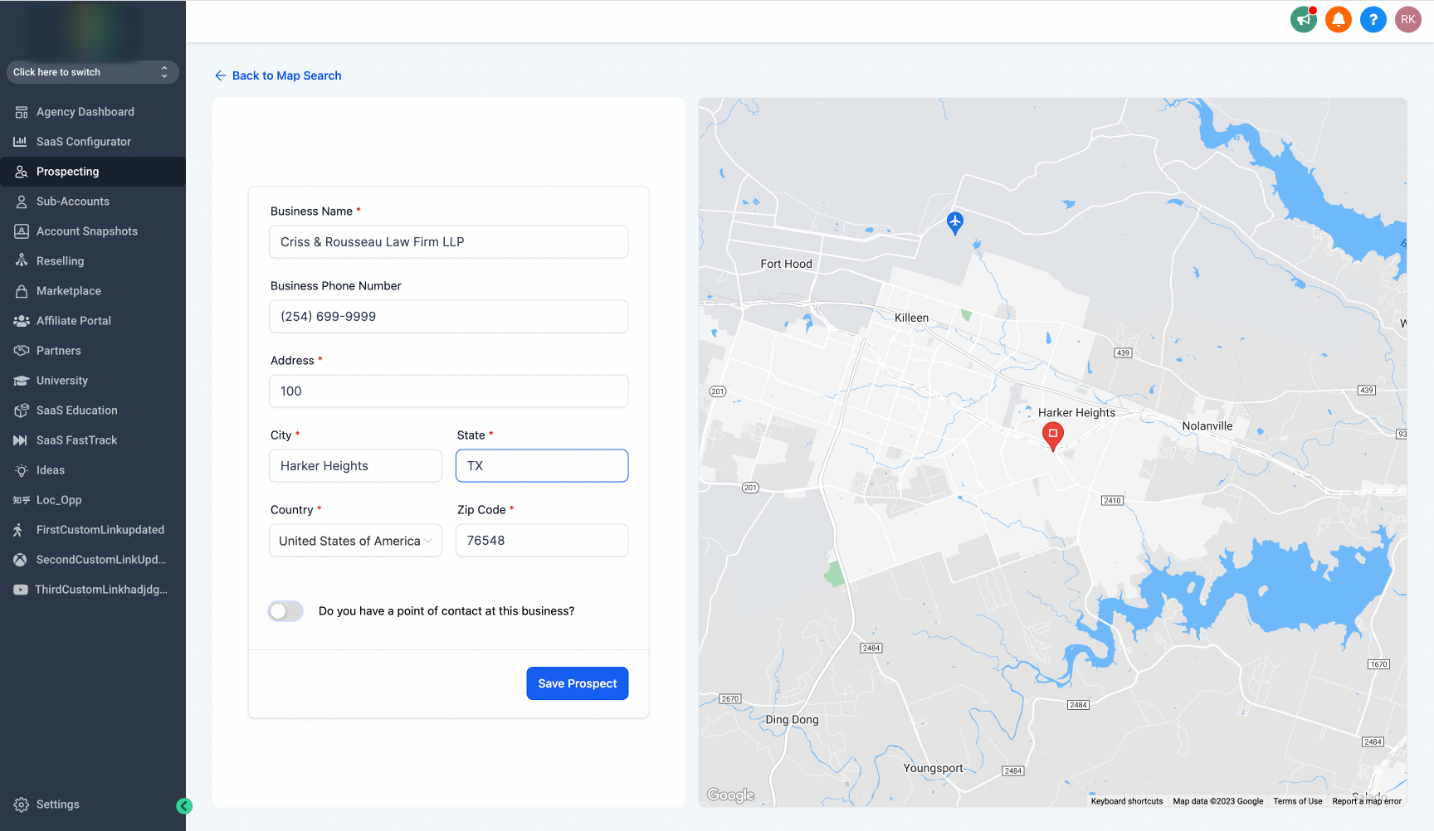
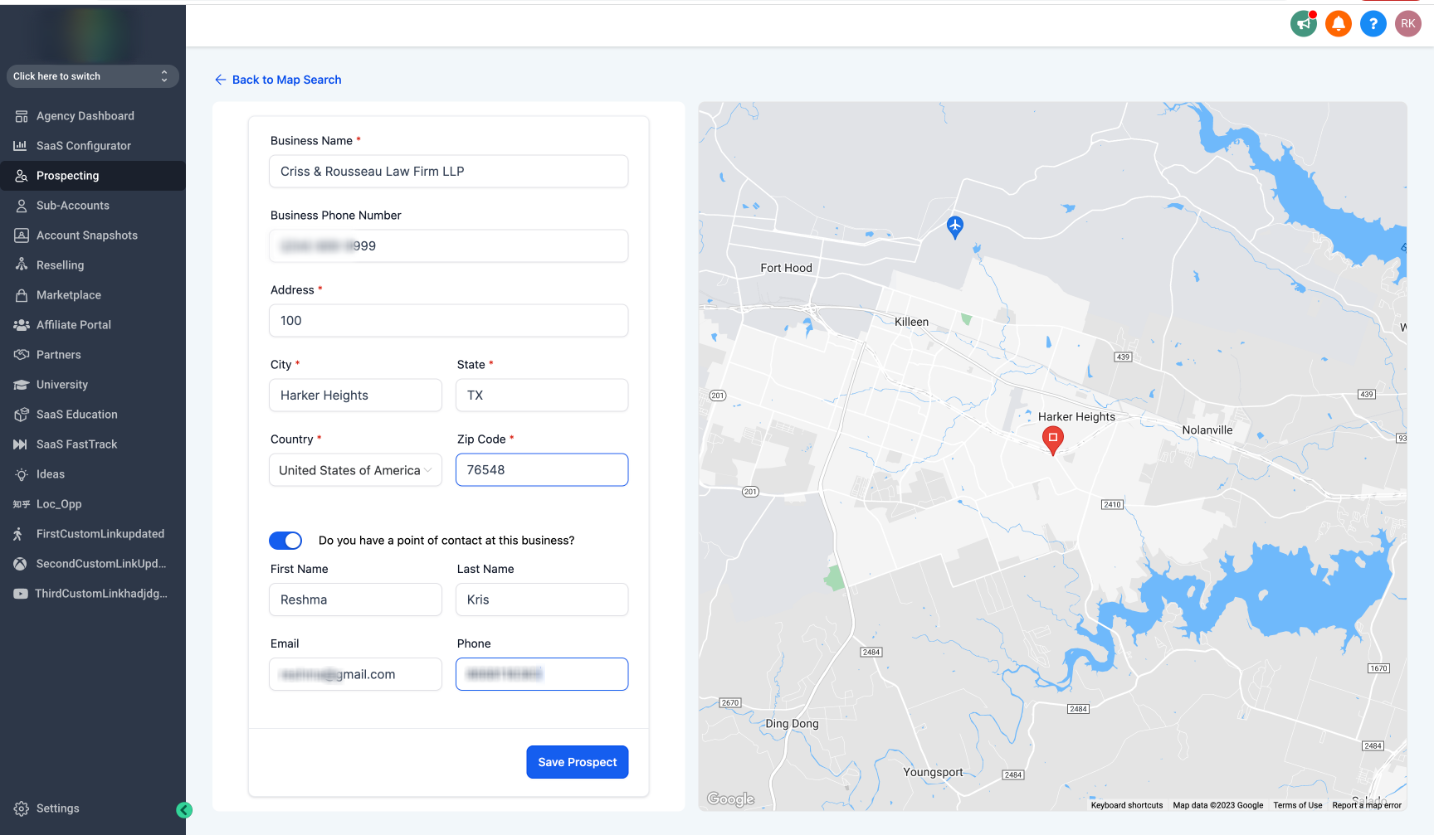
4. Alternatively, if you already know a business, click "Search Business Manually" and save the prospectLocation.
5. The Marketing Audit Report gets generated in a few seconds. In this Report, you will be able to see the Online Health score of the prospect location, followed by their Listings and Reviews.
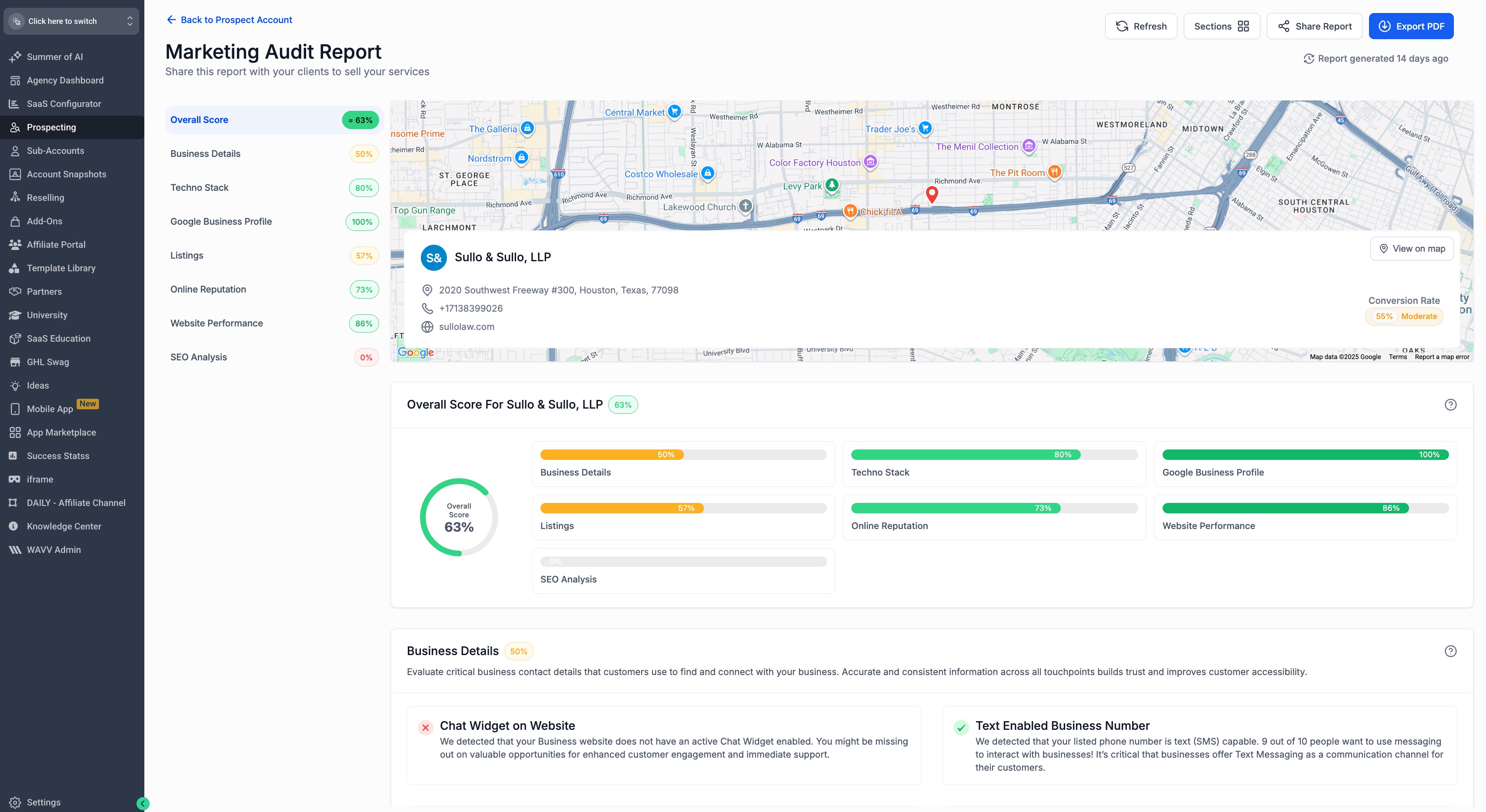
6. All the prospect locations get saved in the dashboard or to your contacts list if using Prospecting in a Sub Account. You can click on any saved prospect to view their Report.
7. Alternatively, if you find the prospect irrelevant, you can proceed to delete it from your dashboard.
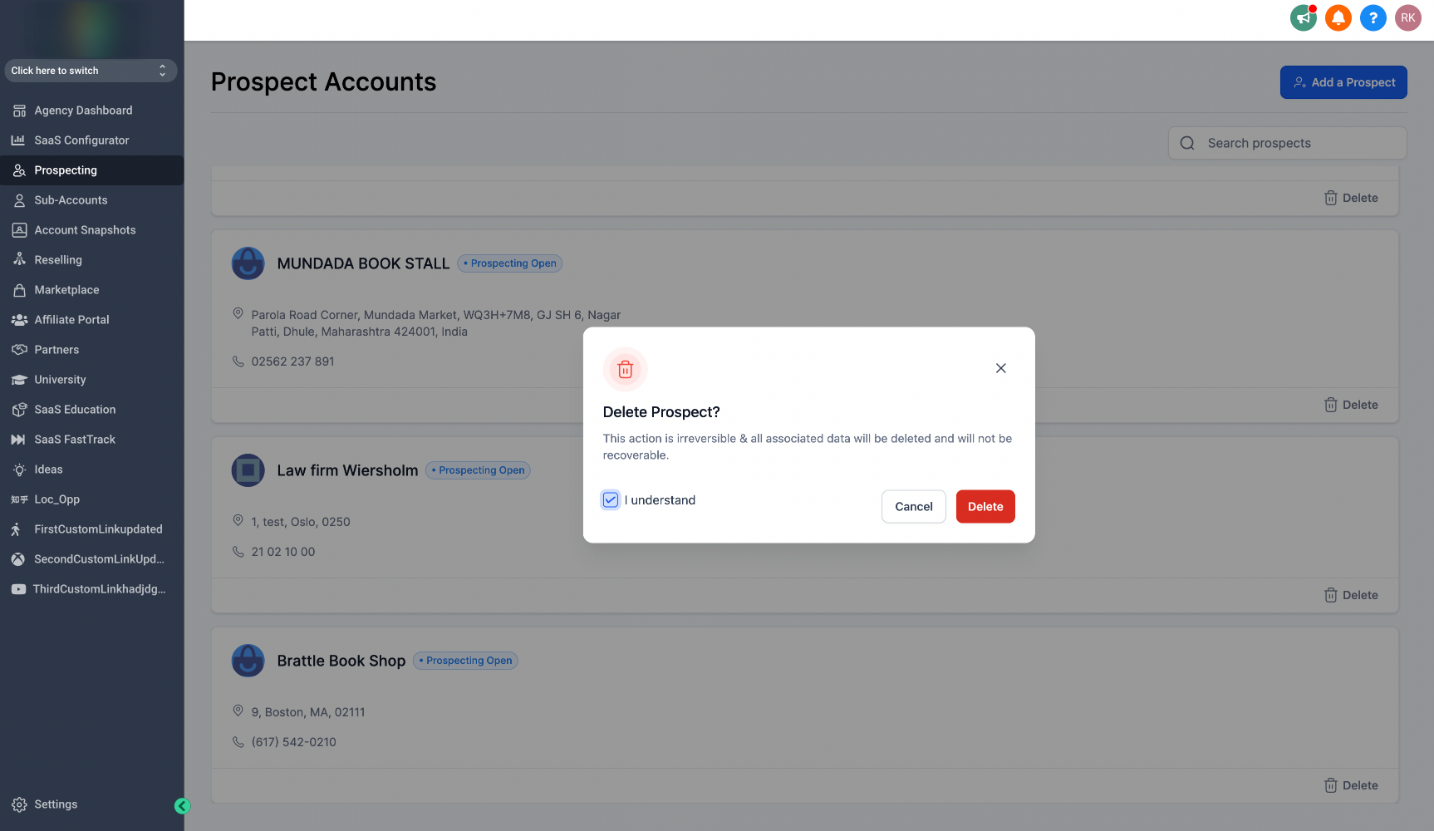
8. You can prospect for 50 leads in day with basic plan and unlimited with Prospecting Premium Subscription. You can always come back later and prospect more.
Analyzing the Marketing Audit Report
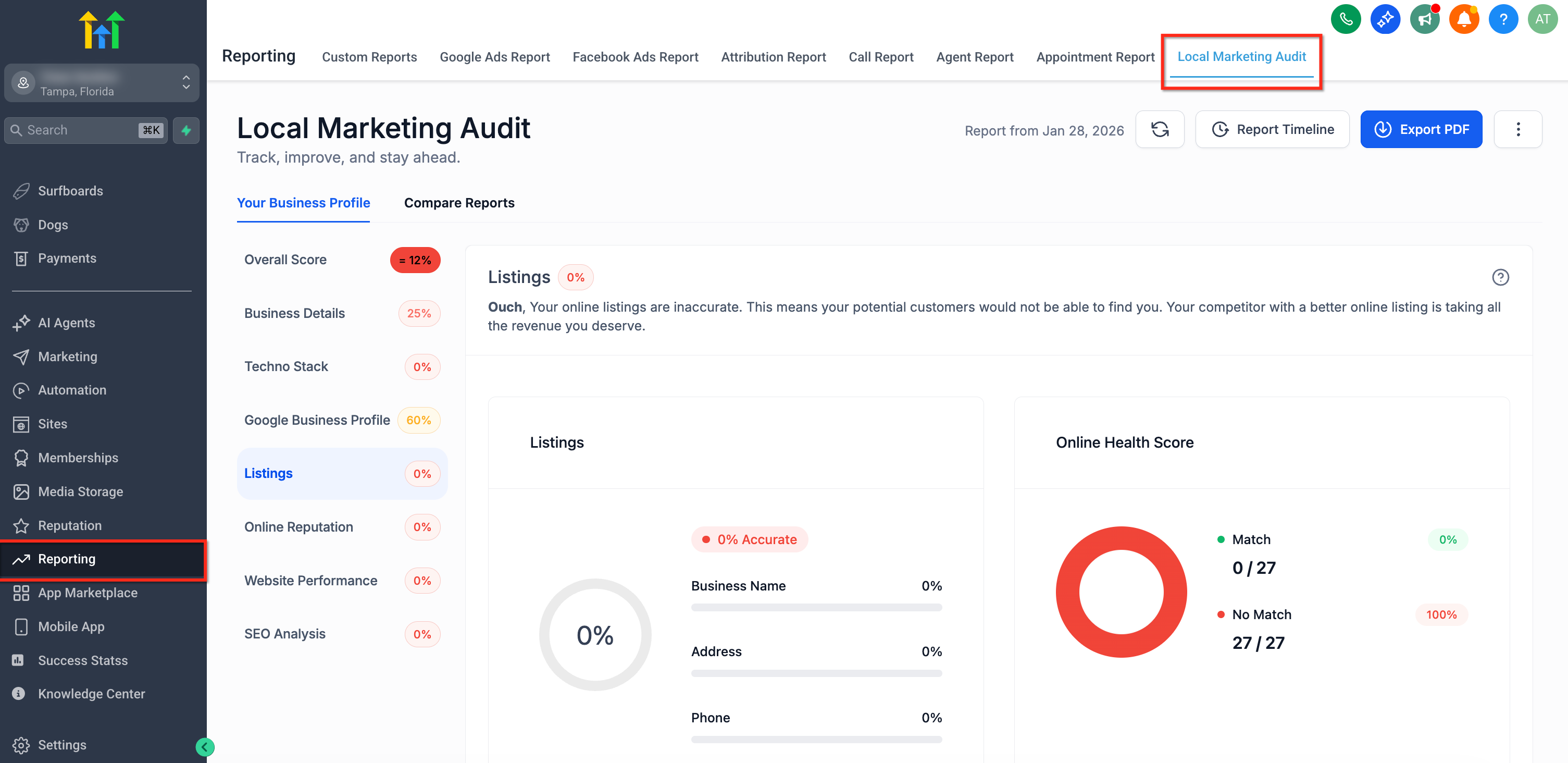
The Marketing Audit report comprises two major sections - the Listings and the Reviews.
For more on Marketing Audit Reports, refer to Enhanced Listings Audit in Prospecting & Marketing Audit Reports.
Listings:
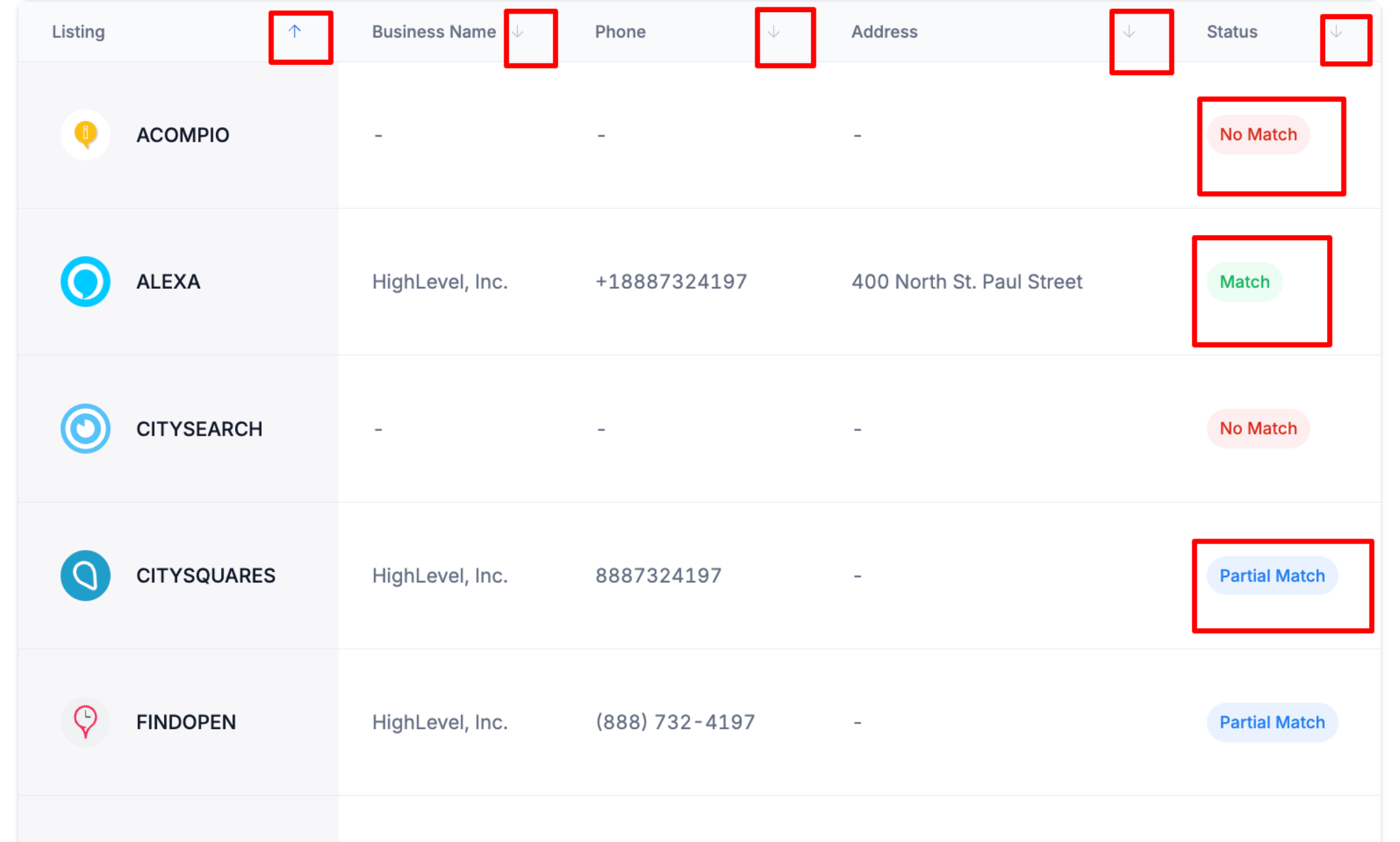
The Listing Report aggregates data from over 70+ online directories to show your prospects:
Number of listings
Accuracy of listings
Missing listings on sites
Local Businesses need accurate listings on many business directories to ensure people can find them online. The availability of accurate listings ensures customers can find your business locations while it's still open for business.
Reviews:
The Reviews section shows the online reputation of the prospect location. The Reviews Section gives a detailed breakdown of the GMB and FB reviews.
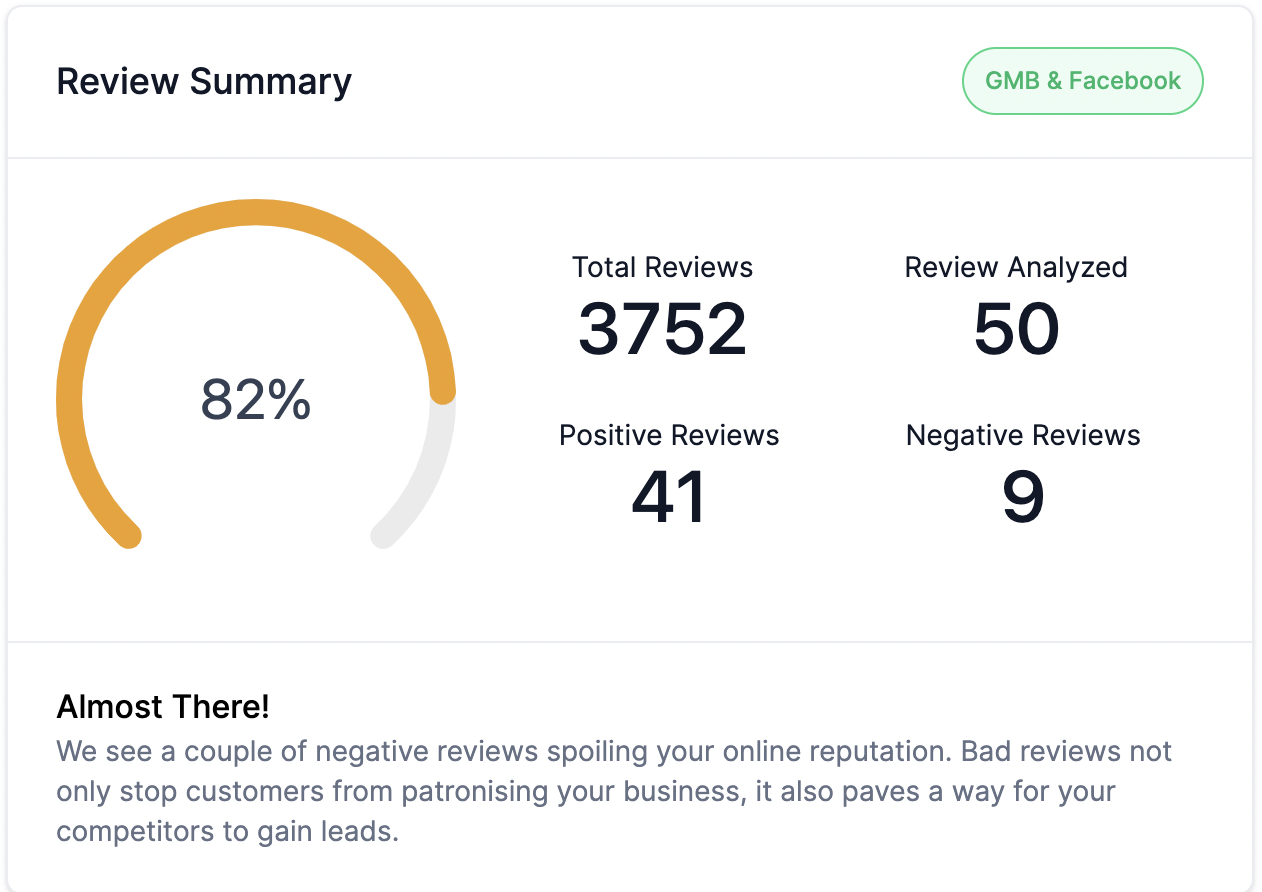
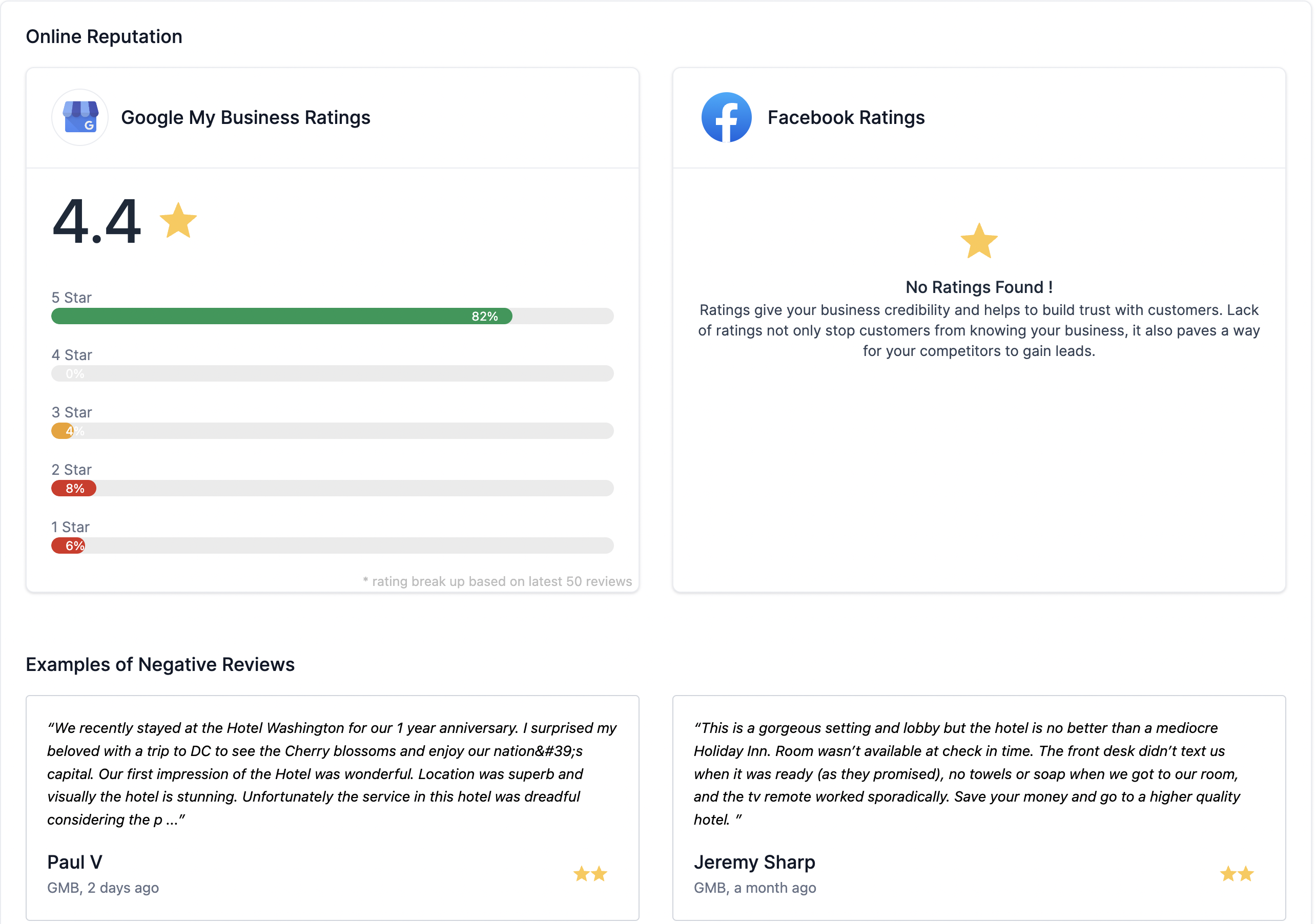
Google My Business profile contains a significant amount of valuable information to potential customers. This includes your contact info, reviews, website, hours of operation, etc. Local Businesses need plenty of positive online reviews to keep them on par with their competitors.for
This marketing Audit report is easy to share with your prospects. Click on Share Report and share the link with your prospect in seconds.
IMPORTANT: For more on Marketing Audit Reports refer to Enhanced Listings Audit in Prospecting & Marketing Audit Reports.
Chat To Clients CRM's prospecting tool provides agencies with the ability to automate and streamline their lead generation processes, enabling them to reach a larger number of potential clients with a more targeted and efficient approach. Agencies now can save time and resources, while also improving the efficiency and effectiveness of their prospecting efforts.
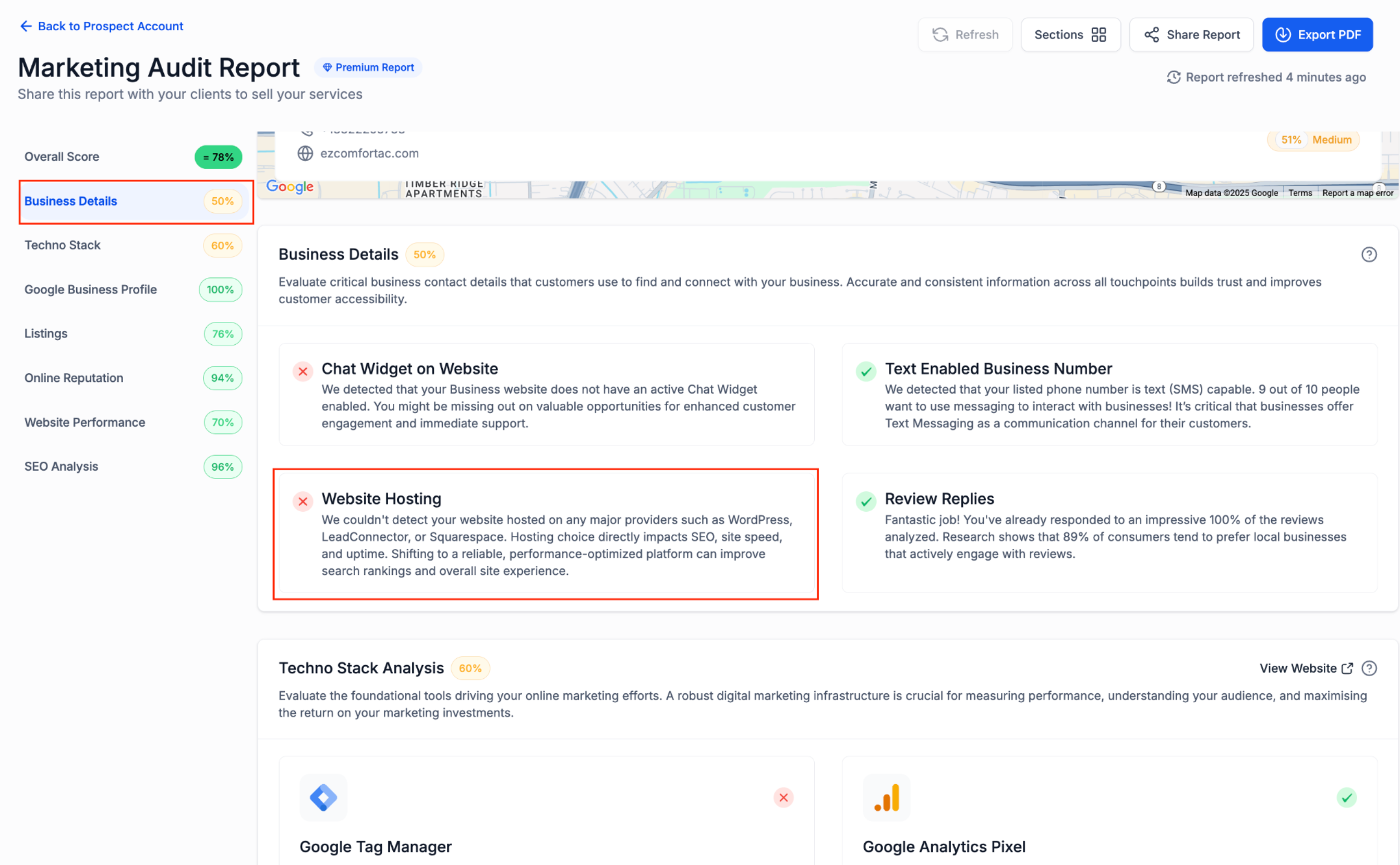
Website Hosting in Marketing Audit Reports
Marketing Audit Reports can include a Website Hosting section that helps you show prospects where their site is hosted. This section can detect supported providers such as WordPress, Chat To Clients CRM, Webflow, Squarespace, Wix, and Framer.
You can manage which providers are checked and whether the section appears in reports from Prospecting Settings under Report Settings.
Lead Contact Details
- Lead Information: For each generated prospect, users can now access vital lead details such as their role, expertise, and more.
- Social Media Profiles: Easily connect with prospects through their linked Facebook, Twitter, and LinkedIn profiles (if available).
- Location Details: Gain insights into the geographical location of prospects, helping you tailor your outreach strategies effectively.
- Contact Information: Access essential contact details, including phone numbers and email addresses, streamlining your communication process.
How to Access POC Details of a Prospect
- In the Agency View, go to "Prospecting" in the side navigation menu
- Go to any Prospect Account in the Dashboard
- Proceed to the Point of Contacts tab to view the Lead information
Frequently Asked Questions
Q. What types of businesses can benefit most from using the Chat To Clients CRM Prospecting Tool?
The Chat To Clients CRM Prospecting Tool is designed for agencies and marketers looking to generate leads for various industries, including local businesses, service providers, and e-commerce. It’s particularly useful for those seeking to improve their online presence and client engagement through comprehensive reporting and analysis.
Q. How can I track the effectiveness of my lead generation efforts using this tool?
You can track the effectiveness of your lead generation efforts by utilizing the reporting features within the Prospecting Tool. This includes monitoring the number of reports generated, engagement rates, and the conversion of prospects into clients. Regularly reviewing these metrics will help you refine your strategies and improve outcomes.
Q. Are there any best practices for using the Prospecting Tool effectively?
Always recommended to use prospecting tool inside your Agency's subaccount so you can automatically save leads to contact list, trigger workflows, auto sends personalised emails to leads. Thus better chances to convert leads
Some best practices include setting clear lead generation goals, regularly updating your prospect list, personalizing outreach messages, and leveraging the insights gained from reports to tailor your marketing strategies. Consistent follow-up and engagement with prospects are also crucial for maximizing results.