
Using Call Connect to Ensure Accurate Call Status Tracking
This article explains how the Call Connect feature ensures your call outcomes, like voicemail, pickup, or missed call—are accurately tracked. This gives you clear visibility into which calls were truly connected, not just attempted.
TABLE OF CONTENTS
- What is Call Connect?
- Key Benefits of Using Call Connect to Track Call Status
- Why “Completed” Call Status Can Be Misleading
- How To Enable Call Connect
- Frequently Asked Questions
- Related Articles
What is Call Connect?
Call Connect is a call routing feature that ensures a real human interaction takes place before a call is marked as connected. When a contact answers, the system calls your assigned agent and waits for them to press a key (like “1”) before connecting the two parties. This keypad confirmation ensures the call is actually answered by an agent—not just sent to voicemail or missed—helping you avoid misleading “Completed” call statuses that can disrupt reporting and automations.
Key Benefits of Using Call Connect to Track Call Status
Improved tracking accuracy: Requires agent input to confirm pickup, reducing mislabeling of calls.
Reliable call reporting: Only real conversations are counted, not missed calls or voicemails.
Accurate workflow triggers: Automations respond only to actual agent-connected calls
Voicemail filtering: Helps separate true pickups from voicemail routing.
Increased accountability: Makes it easy to see when agents are engaging or missing calls.
Better lead follow-up: Ensures follow-ups are based on real human interaction, not call attempts
Why “Completed” Call Status Can Be Misleading
Twilio marks all calls as “Completed” once they finish routing—even if no one answers. This means calls sent to voicemail, missed by the agent, or timed out can still appear as successfully connected.
Call Connect solves this. With Call Connect enabled:
The agent receives a whisper message prompting them to press any button to accept the call.
- If the agent doesn’t answer or press a key, the call is never connected—and won’t be falsely marked as answered.
This small confirmation step makes a big difference in ensuring only real conversations are counted as successful connections.
How To Enable Call Connect
You can enable Call Connect directly from the Phone Number settings, which is ideal for inbound calls routed through assigned users or teams.
Go to Settings > Phone System
.Click the three dots next to the phone number you want to configure, then select Edit Configuration.
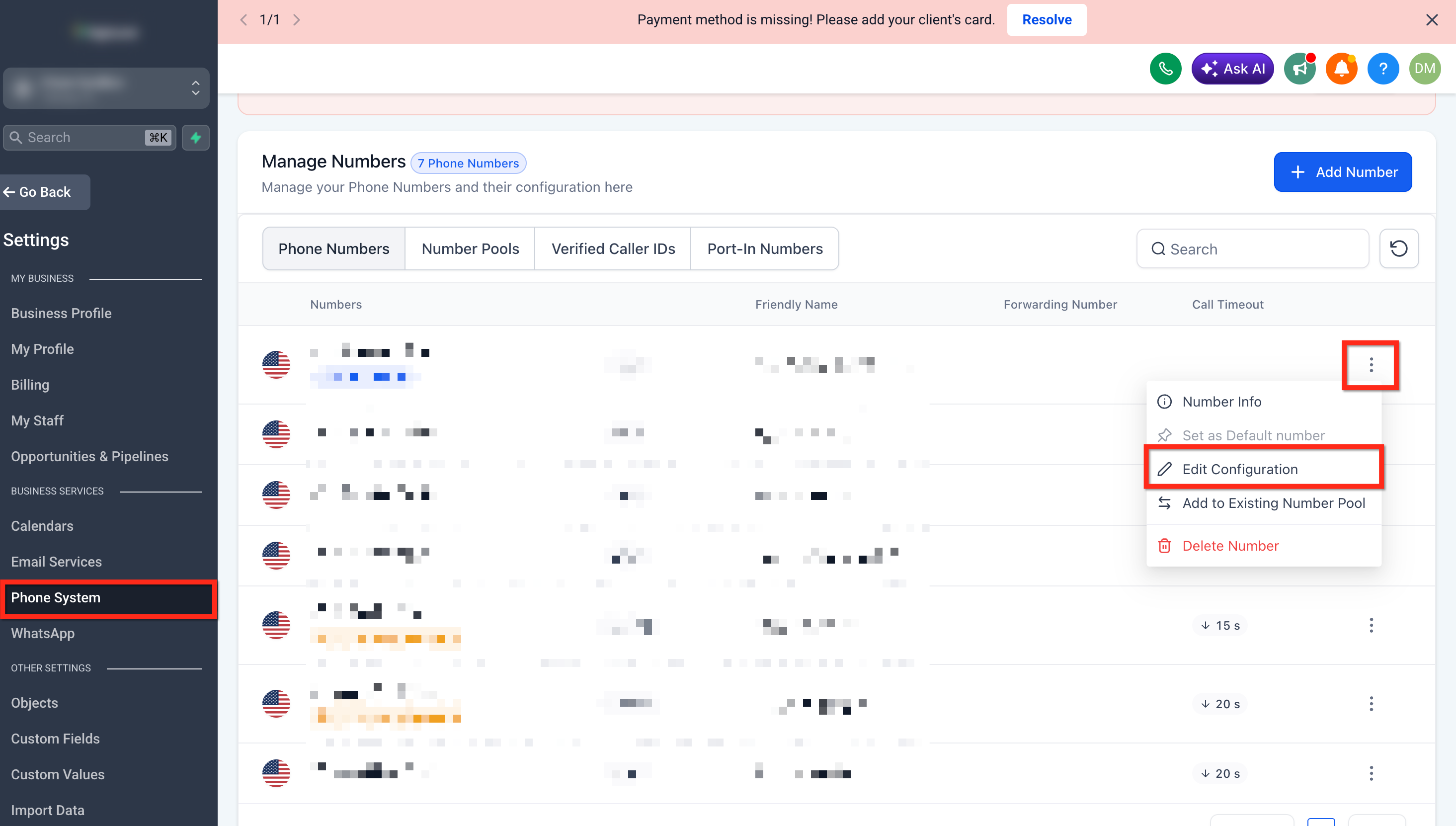
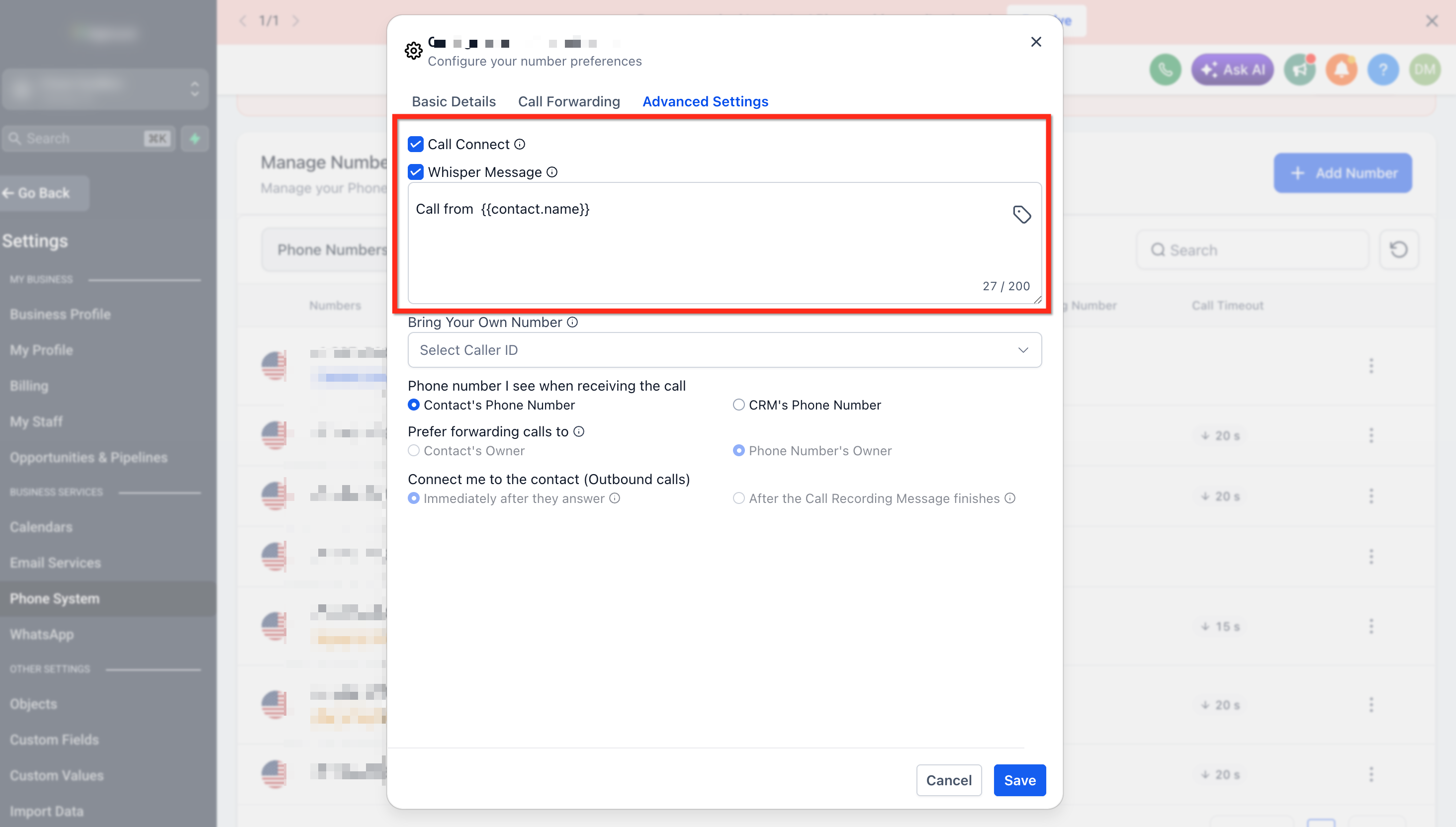
Go to Advanced Settings
Toggle on Call Connect.
Toggle on Play Whisper Message.
Customize the whisper message to instruct the user to connect (e.g., “You have a new call. Press any key to connect.”)
Click Save to apply the changes.
Frequently Asked Questions
Q: Why are my calls marked “Completed” when no one answered?
Twilio’s default behavior marks all call attempts as “Completed,” even if the call wasn’t picked up or went to voicemail.
Q: How does Call Connect improve this?
It requires a human confirmation (keypress), so the system knows whether the call really connected.
Q: Does this apply to outbound and inbound calls?
Yes, it works in both directions. It's especially useful for inbound routing and rapid lead response.
Q: What if the agent doesn’t press a key?
The call is not considered connected, ensuring better tracking and cleaner reporting.
Q: Will this impact my automations?
Yes, in a good way! You'll be able to trigger automations only on truly connected calls.
Q: Does Call Connect work with calls answered in the Chat To Clients CRM Web App?
Calls can be answered directly in the Web App, but Call Connect is generally not needed for these calls because Chat To Clients CRM can already confirm that a person answered within the app. Call Connect is primarily useful when calls are routed to an external phone number.
Q: Does Call Connect work with calls answered in the Mobile App?
Calls can also be answered through the Chat To Clients CRM Mobile App. Similar to the Web App, Call Connect is generally not required when answering inside the app because Chat To Clients CRM can identify that the call was answered by a person
Q: Does Call Connect work if my Chat To Clients CRM number is forwarded to my personal or external phone number?
Yes. This is one of the main use cases for Call Connect. When a call is forwarded to an external or personal phone number, the person answering the call is prompted to press a key before being connected. This helps Chat To Clients CRM distinguish between a real person answering and voicemail or an answering machine.