
Show Popup on Entering Funnel/Website
This article explains how to configure a popup to appear automatically after a visitor lands on a Funnel or Website page. Chat To Clients CRM supports multiple popups on the same page, and each popup can have its own trigger, including a time delay. This feature helps boost conversions by capturing attention right away—without waiting for the user to click or scroll.
TABLE OF CONTENTS
- What Is a Popup That Shows on Page Load?
- Key Benefits of Using a Page Load Popup
- How to Set a Popup to Show on Page Load
- Frequently Asked Questions
- Related Articles
What Is a Popup That Shows on Page Load?
A page load popup is a type of message or form that automatically appears shortly after a visitor arrives on your website or funnel page—without them clicking or scrolling. This kind of popup is triggered by a timing setting (like a 2-second delay) and is used to grab the visitor’s attention right away. It’s commonly used to promote time-sensitive offers, capture leads, or display welcome messages that encourage action early in the visit. If a page contains multiple popups, the delay is configured separately for each popup.
Key Benefits of Using a Page Load Popup
- Automation: Automatically launch popups without requiring the user to click anything.
- Lead generation: Perfect for growing email lists or offering limited-time deals the moment a user lands.
- Conversion optimization:Use immediate popups to boost funnel conversions with time-sensitive CTAs.
- Behavior targeting: Choose exactly when the popup should appear with a customizable delay timer.
- Broad compatibility: Works on both Funnels and Websites inside the Chat To Clients CRM platform.
How to Set a Popup to Show on Page Load
Chat To Clients CRM supports multiple popups on the same Funnel or Website page. Each popup can have its own content, styling, and trigger.
Available trigger options include:
- Delay — displays the popup after the configured number of seconds.
- Exit Intent — displays the popup when desktop cursor behavior indicates that the visitor may be leaving the page.
- None — keeps the popup available for manual triggers, such as a button, image, or text link.
If multiple popups use the same trigger condition, the popup with the higher priority in the Popup Settings panel appears first.
Follow these steps to configure a popup that automatically appears after a user lands on a page.
Step 1: Navigate to Popup Settings
- In the left-hand menu of your sub-account dashboard, click on Sites. Then choose either Funnels or Websites tab in the upper navigation bar.
- Open your chosen funnel or website and click on the specific step or page where the popup should be added.
- Click the blue button labeled Edit to launch the page editor.
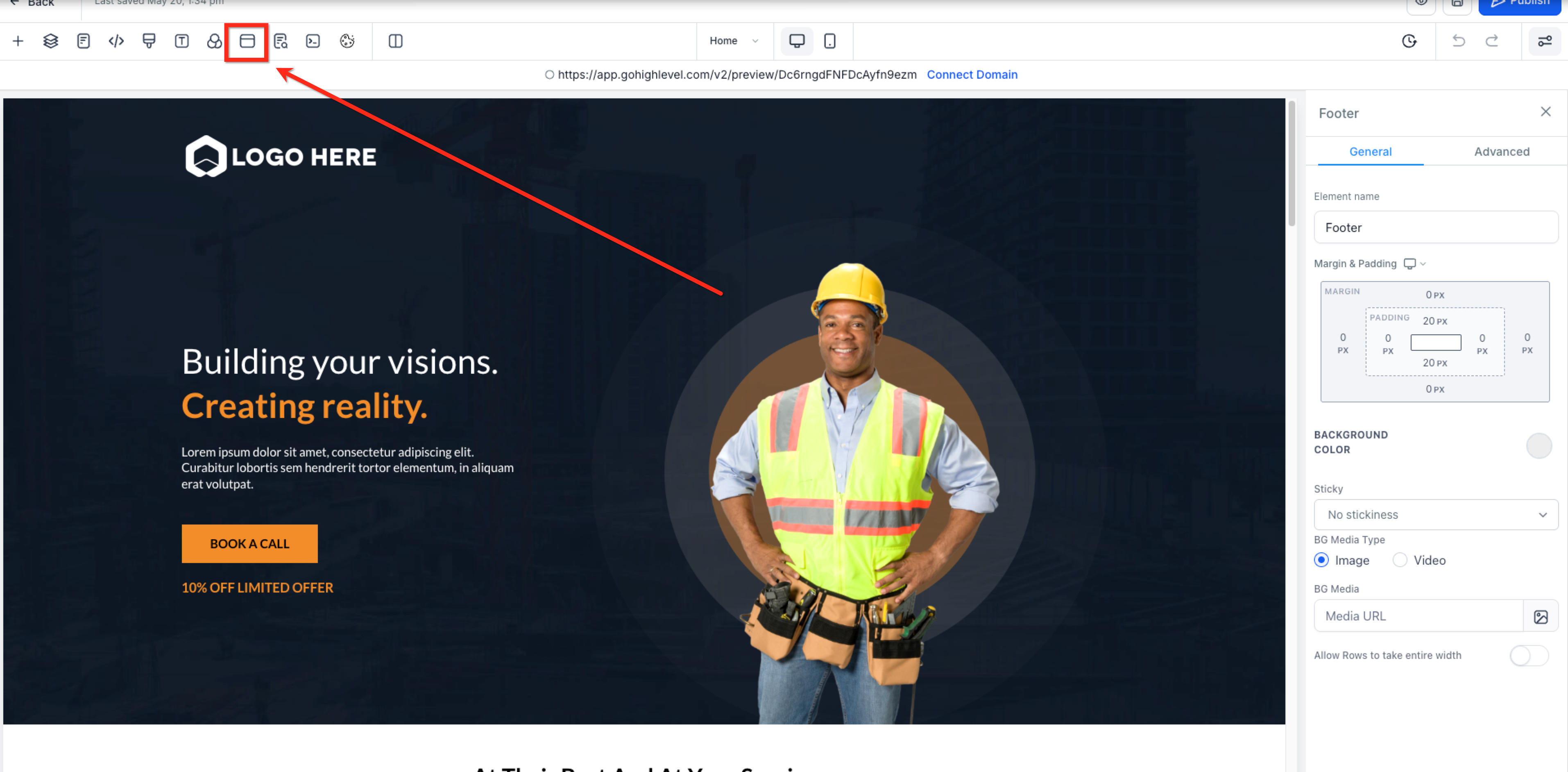
- In the top menu bar of the website builder, click the PopupSettings icon to open the popup settings.
Step 2: Configure the Popup Settings
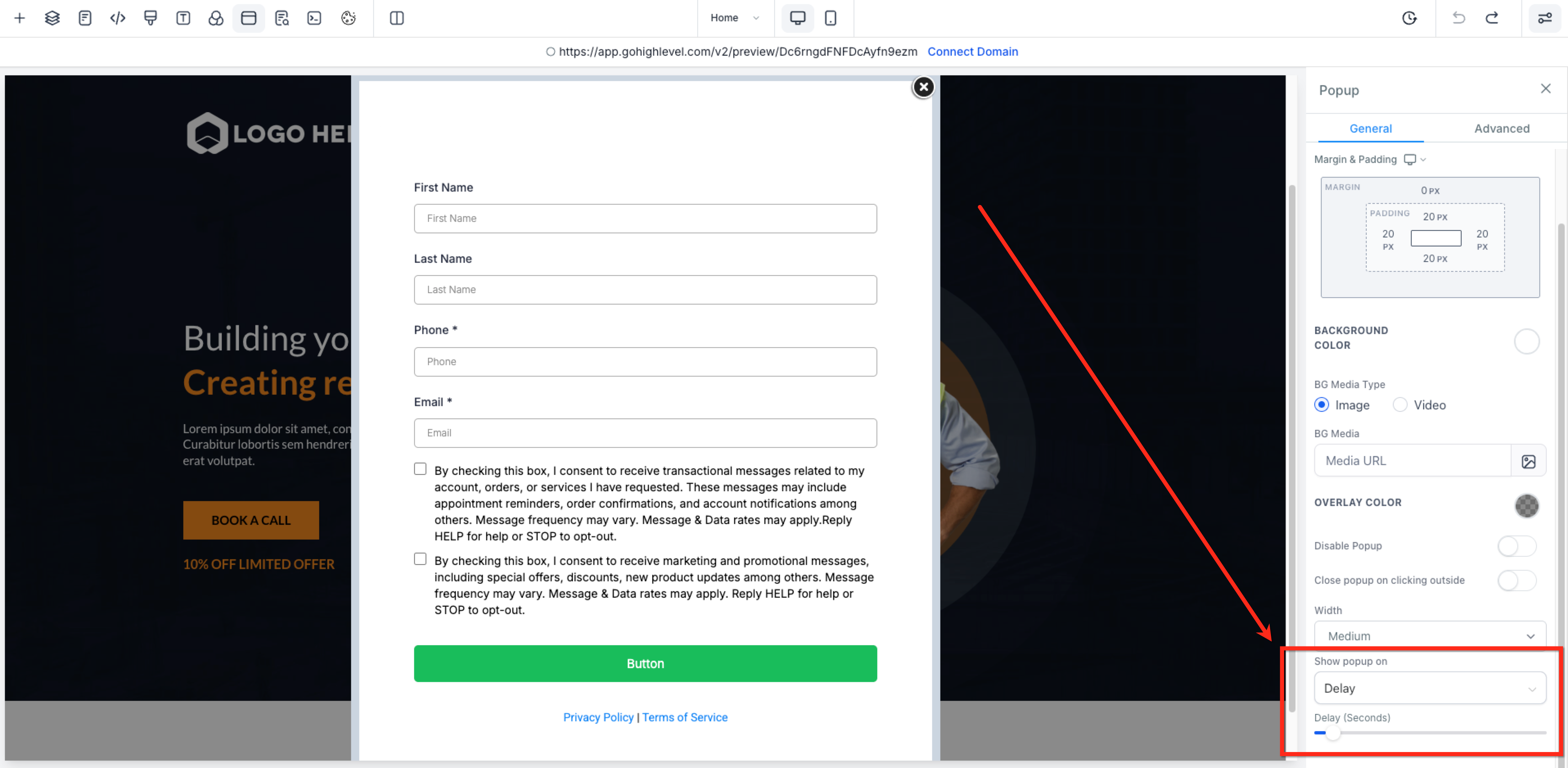
- In the Popup Settings panel, select the popup you want to configure. Open its Settings tab, then under Show Popup On, select Delay.
- Enter the number of seconds to wait before the popup appears.
- Save or publish the page after configuring the popup.
Frequently Asked Questions
Q: Can I set the popup to show only once per visit or session?
Chat To Clients CRM’s documented popup settings currently focus on trigger types such as Delay, Exit Intent, and manual triggers. Session-level display limits are not documented in the current popup setup flow.
Q: What if I want the popup to show when someone tries to leave?
Use the Exit / Exit Intent trigger under Show Popup On to display the popup when desktop cursor behavior indicates that the visitor may be leaving the page.
Note: Exit-intent detection uses mouse cursor movement, so it works on desktop and does not function the same way on mobile touchscreens.
Q: Can I use this on both Funnels and Websites?
Yes. Popup triggers are supported in both Funnels and Websites within the Chat To Clients CRM Page Builder.
Q: What happens if the popup is opened manually before the delay time is reached?
If the same popup is opened manually before the delay timer finishes, the delayed display is canceled for that page view. This prevents the popup from appearing twice.
Q: Can I use more than one popup on the same page?
Yes. Chat To Clients CRM supports multiple popups on the same Funnel or Website page. Each popup can have its own content, styling, and trigger.
Q: What happens if multiple popups use the same trigger?
If multiple popups use the same trigger condition, the popup with the higher priority in the Popup Settings panel appears first.