
Free AI for Agency Users
Free AI gives your whole agency team (agency users and admins) access to Chat To Clients CRM's AI Assistants. It's on automatically from Level Up, with fair-use limits that reset every month. Free AI is designed to cover your team’s everyday building and setup work. Each agency plan includes a fair-use allowance that grows with your plan.
TABLE OF CONTENTS
What is Free AI?
Free AI is AI usage included with your Chat To Clients CRM agency plan ($97, $297 or $497) for agency admins and users.
- AI Assistants (Included for Agency Users): Tools that help users create, build, and manage their business, such as Ask AI and AI Studio. These are included at no additional cost, subject to fair-use limits.
- AI Agents: Tools that perform ongoing tasks on behalf of a business, such as handling customer conversations, answering calls, and managing reviews. These remain paid products and may be billed through subscriptions or pay-per-use pricing.
The table below compares which AI features are included without purchasing an additional AI Employee subscription.
AI Feature | Agency Users ($97/$297/$497 Plans) | Sub-Account Users |
Ask AI | Free* | Paid |
AI Studio | Free* | Paid |
Creator Studio | Free* | Paid |
Content AI | Free* | Paid |
Funnel & Website AI | Free* | Free* |
Email AI | Free* | Free* |
Calendar AI | Free* | Free* |
Layout AI | Free* | Free* |
Knowledge Base | Free* | Free* |
Workflow AI Builder | Free* | Free* |
AI Agents (Conversation AI, Conversation AI Prompt Optimizer, Voice AI, Voice AI Prompt Optimizer, Reviews AI, Managed Agents, Workflow AI Actions) | Paid | Paid |
*Fair Usage Policy: Free AI features are subject to fair-use limits. Agency users on higher-tier plans receive increased allowances, and the $497 agency plan includes access to advanced Creator Studio models.
Key Benefits of Free AI
Free AI removes the cost of building with AI, so you & your team can use it to setup your business without extra spend.
- No cost to build: AI Assistants usage by agency users and admins is included in your agency plan, subject to fair use limits.
- Nothing to set up: Free AI is on for every agency automatically, without additional purchase..
- No surprise charges: When a limit is reached, AI pauses until it resets. You're only charged if you choose to turn on Extra Usage or the sub-account where you are using AI product is subscribed to an AI Employee Subscription.
- Clear visibility: AI Suite page shows how much of each limit your team has used and when it resets.
Prerequisites and Limitations
Free AI is built for your agency team and included on every agency plan. Here’s who it covers, how fair use works, and how it fits alongside the AI your clients use in their sub-accounts.
To use Free AI, make sure:
- Your agency is on the $97, $297 or $497 Chat To Clients CRM plan.
- The person using AI is an agency owner, admin or agency user.
Eligibility and Fair Use
- Each agency plan includes a fair-use allowance that grows with your plan: the $297 plan includes higher limits than the $97 plan, and the $497 Founder’s plan includes the highest limits plus access to advanced models.
- Sub-account users aren't covered. Their AI usage is billed through an AI Employee plan or pay-per-use.
- Free AI can't be resold or transferred to sub-accounts or sub-account users.
- One shared monthly allowance per agency. Limits aren't split per user or per sub-account.
- Some products stop at their limit. Funnel & Website AI, Email AI, Workflow AI Builder and Memberships AI have no pay-per-use option, so they pause until reset even with Extra Usage on.
- AI Studio hosting is billed separately. Nano hosting is free; Micro and above are charged. Refer to AI Studio Cloud Pricing for more details.
*Fair Usage Policy: Free AI features are subject to fair-use limits. Agency users on higher-tier plans receive increased allowances, and the $497 agency plan includes access to advanced Creator Studio models.How To Setup Extra Usage
Extra Usage starts only when a Free AI limit (5-hour or monthly) is reached and there's no AI Employee subscription to draw usage from: in a sub-account without a subscription, or once a sub-account's plan (AI Employee Starter/AI Employee Growth/AI Employee Unlimited) has used up its included usage.
Extra Usage lets your team keep working when a limit is reached instead of waiting for it to reset. It's off by default, and when it's on, usage past any 5-hour or monthly limit is billed at standard pay-per-use rates.
- From the agency view, select AI Suite in the left-hand menu.
- Select the Usage Dashboard tab.
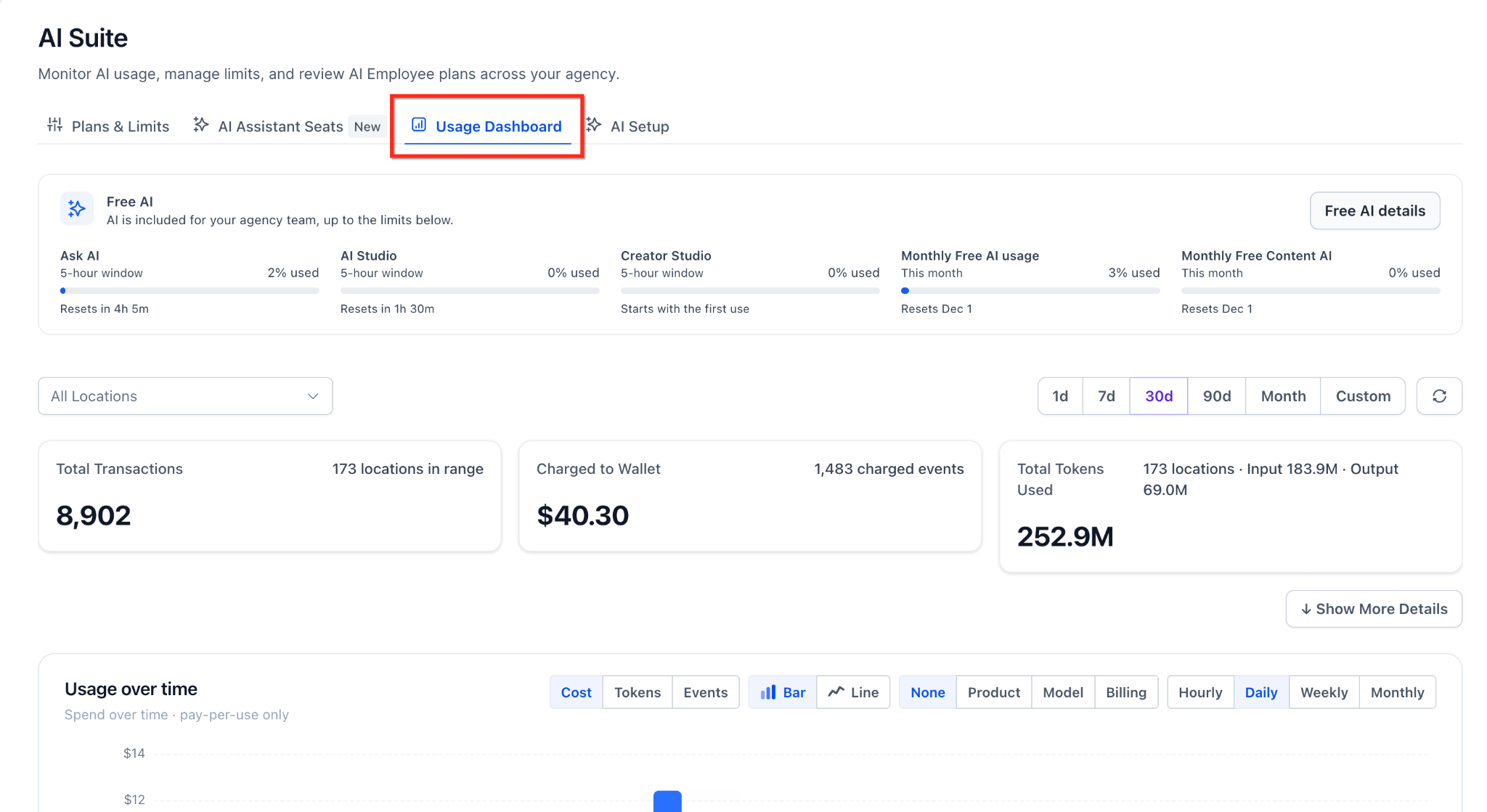
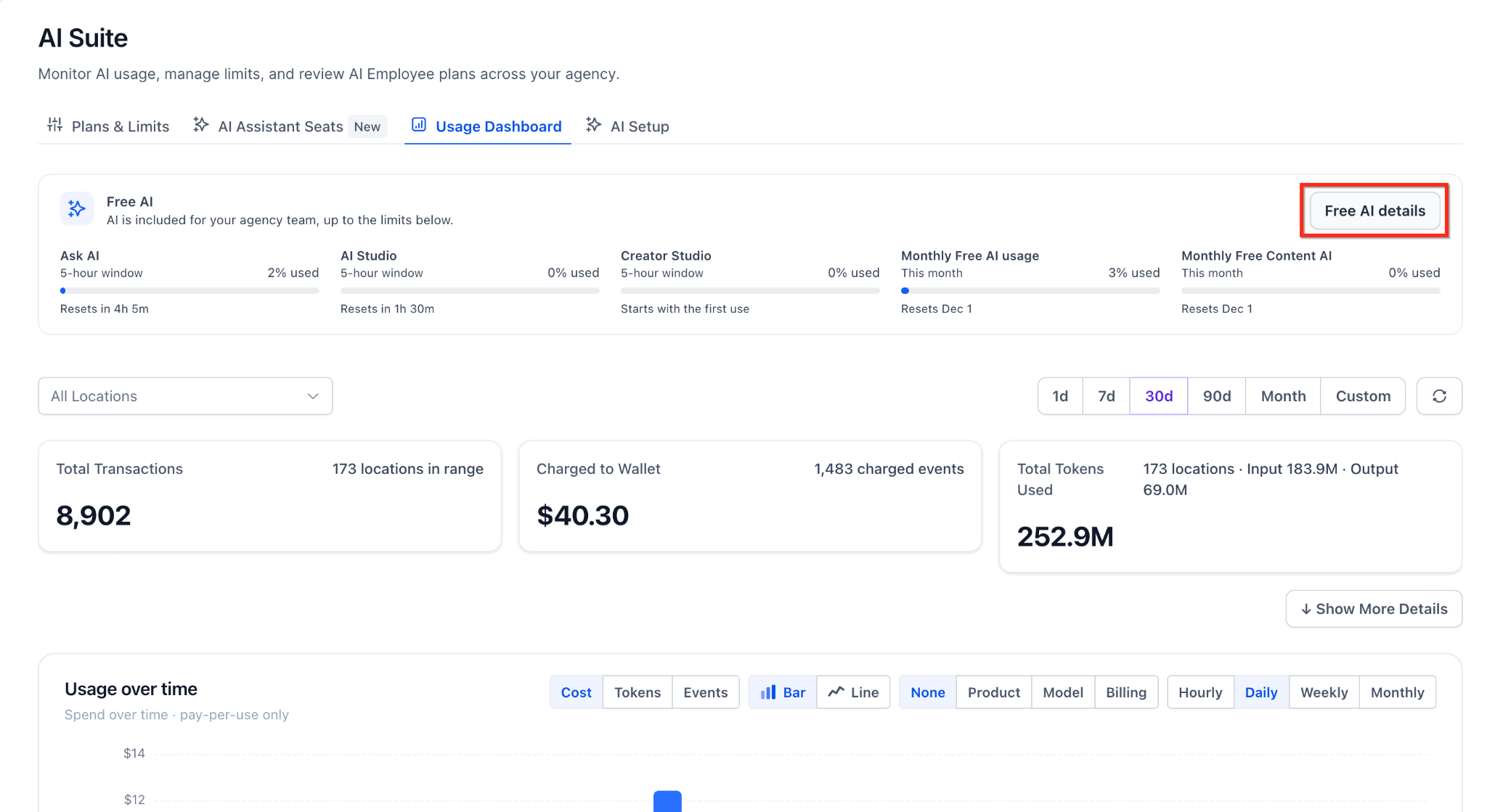
- On the Free AI card, select Free AI details.
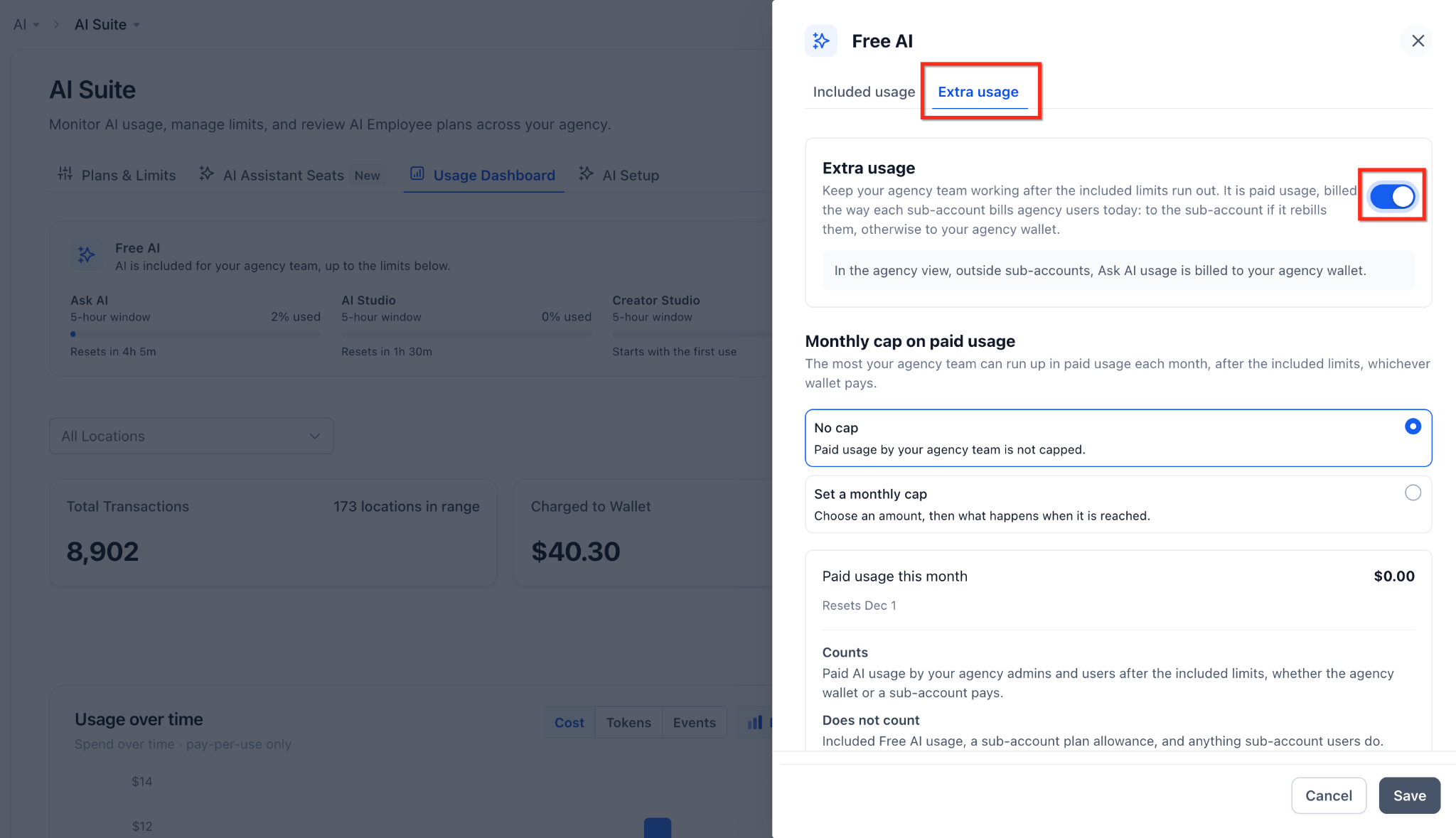
- In the side panel, select the Extra usage tab, Turn on the Extra usage toggle.
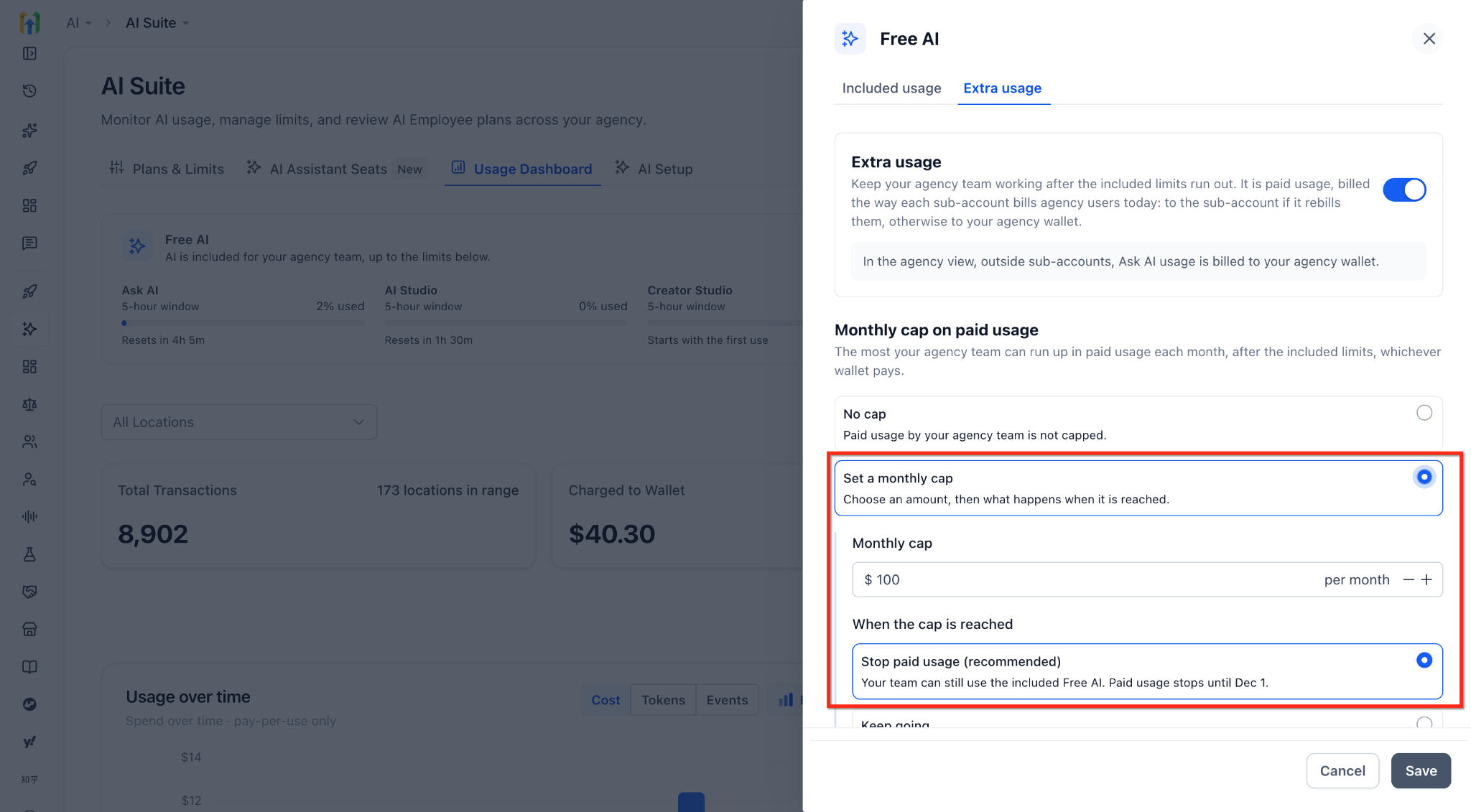
- Optionally, set a monthly spending cap for your team's paid usage, and choose whether AI stops or keeps working when the cap is reached. The cap counts all paid usage by your agency team and never counts usage by sub-account users.
- Select Save.
How Free AI Limits Work
Understanding the two layers, 5-hour windows and monthly limits, explains why AI might pause and when it will be back.
- 5-hour windows: Ask AI, AI Studio and Creator Studio each have their own window, shared by your whole agency team. A window starts with the first request in that product and resets 5 hours later.
- Monthly limits: One monthly limit covers Ask AI, AI Studio and Creator Studio and Content AI together. It resets on the 1st of each month, at 00:00 UTC.
5 Hour & Monthly allowances increase with higher agency plans. Agency users on higher-tier plans receive increased allowances, and the $497 agency plan includes access to advanced models.
What Happens When a Limit Is Reached
When your team reaches a 5-hour or monthly Free AI limit, what happens next depends on where the agency user is working:
- Inside a sub-account with an AI Employee subscription: usage draws from that sub-account's plan (Starter, Growth or Unlimited). Once the plan's included usage runs out, usage moves to Extra Usage.
- Inside a sub-account without a subscription: usage moves straight to Extra Usage.
- Inside the agency view: usage moves straight to Extra Usage.
With Extra Usage off, there's no paid usage at all, and AI pauses until the limit resets. With Extra Usage on, usage continues at pay-per-use rates, and who pays depends on where the agency user is working and your rebilling settings:
Where the agency user is working | Rebilling setting | Who pays |
Inside the agency view (Ask AI only) | — | Agency wallet |
Inside a sub-account | Off | Agency wallet |
Inside a sub-account | On | The sub-account |
Inside a sub-account | On, with "Charge agency user usage to agency" on | Agency wallet |
Frequently Asked Questions
Q: Is the Free AI allowance per agency user, per sub-account, or for the whole agency?
For the whole agency team including the agency owner, admins and agency users. All share one allowance per month. It isn't split per user or per sub-account, and sub-account users aren't covered.
Q: What are the exact Free AI limits on my plan?
Free AI limits are fair-use allowances, not fixed quotas, and they’re sized for everyday building and setup work. Higher plans get larger allowances: $97 includes standard limits, $297 high limits, and $497 the highest limits plus advanced models. To see how much your team has used, and when each limit resets, open AI Suite → Usage Dashboard. You’ll also get alerts at 75% and 90% of your monthly limit.
Q: Which products have a 5-hour limit, and which have a monthly limit?
Ask AI, AI Studio and Creator Studio each have their own 5-hour limit. Ask AI, AI Studio, Creator Studio and Content AI share one monthly limit.
Q: Do Creator Studio, AI Studio and other AI tools count toward the same allowance?
Partly. Each of Ask AI, AI Studio and Creator Studio has its own 5-hour window, so using one doesn't use up another's window. All of them, plus Content AI, draw from the same monthly limits.
Q: Where can I check how much Free AI my team has used and how much is left?
From the agency view, go to AI Suite, then Usage Dashboard. The Free AI card shows the percentage used for each limit and when it resets, and Free AI details show more.
Q: Will I be warned before my team reaches a limit?
Yes. Agency owners and admins get email and in-app alerts at 75% and 90% of the monthly limits, and again when a monthly limit runs out. They’re also alerted when the 5-hour limit runs out for Ask AI, AI Studio or Creator Studio.
Q: When do the limits reset? Is Free AI a one-time allowance?
Free AI isn't a one-time allowance. Each 5-hour window resets 5 hours after the first request in that product, and the monthly limit resets on the 1st of every month.
Q: What happens when the Free AI allowance runs out? Will my agency be charged automatically?
Not automatically. If the agency user is working inside a sub-account with an AI Employee subscription, usage continues on that plan's included usage. Otherwise, AI pauses until the limit resets, unless an admin has turned on Extra Usage. With Extra Usage on, usage is billed at pay-per-use rates according to your rebilling settings.
Q: How can my team keep using AI past the 5-hour limit, not only the monthly limit?
Turn on Extra Usage. One setting covers both the 5-hour and monthly limits, so usage continues at pay-per-use rates past either one. See How To Setup Extra Usage.
Q: Can I resell Free AI to my clients?
No. Free AI can't be resold, transferred or shared with sub-account users. You can resell AI Employee plans (Starter, Growth or Unlimited) at your own price, or rebill pay-per-use AI with your markup.
Q: If I turn off rebilling, can my clients still use pay-per-use AI?
Yes. Their usage continues at pay-per-use rates and is charged to your agency wallet instead of the sub-account.
Related Articles
- AI Product Pricing
- AI Usage Limits
- AI Usage Dashboard
- AI Employee: Access, Rebilling and Reselling
- How to Upgrade a Sub-Account to the AI Employee Starter Plan
- AI Studio Cloud Pricing