How to Upgrade a Sub-Account to the AI Employee Starter Plan
The AI Employee Starter plan gives your sub-account access to Ask AI and AI Studio for $20/month. You can upgrade a sub-account directly from your agency's AI Suite.
Important: The Starter plan is available exclusively to agencies subscribed to Chat To Clients CRM's $497 Founder plan. Growth and Unlimited are available to eligible sub-accounts across agency plans.TABLE OF CONTENTS
How to Upgrade to the AI Employee Starter Plan
- Log in to Chat To Clients CRM and switch to Agency View.
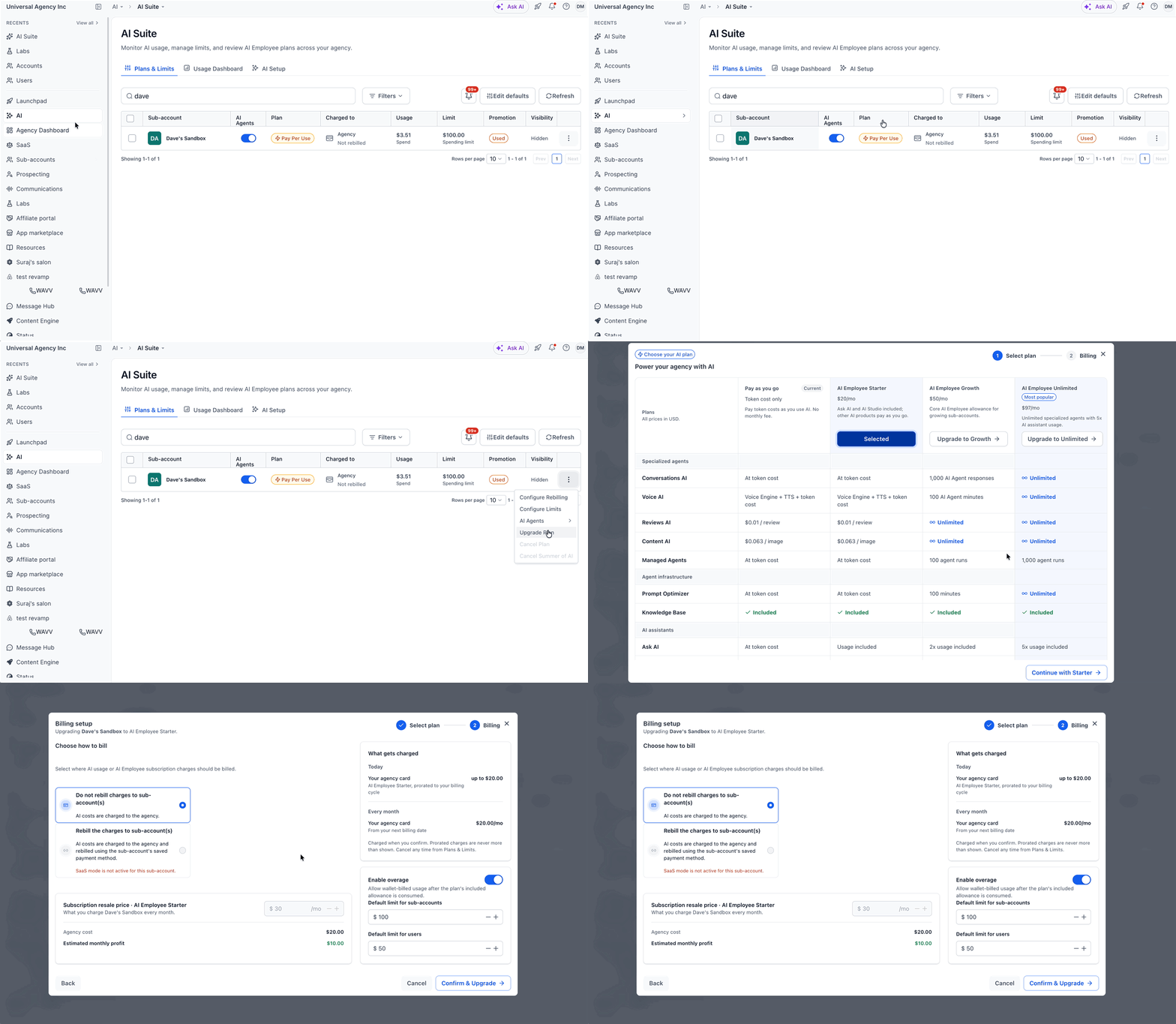
- From the left menu, go to AI > AI Suite.
- Under the Plans & Limits tab, find the sub-account you want to upgrade and click the three-dot menu on the right.
- Select Upgrade Plan.
- Find AI Employee Starter and click Continue with Starter.
- Continue to the billing setup to review the subscription details and complete the purchase using the available on-screen instructions. Then click Confirm & Upgrade.
Note: The AI Employee Starter plan costs $20/month per sub-account. Other AI products may have additional pay-per-use charges.