
Estimates and Invoices in Field Services
Estimates and invoices are the two billing documents you will use most in Field Services. An estimate tells a customer what the work is expected to cost before they agree to it. An invoice asks them to pay for the work. This article explains what each one is, how they differ, when to use each, and how they connect to your requests and jobs.
Note: Field Services is currently in private beta and is available to selected accounts. Features and screens may change as we improve them.
In this article
- What are estimates and invoices?
- Estimates vs invoices
- When to use each
- Estimates
- Invoices
- Billing on a job
- Estimates and invoices on Home
- Frequently asked questions
- Related articles
What are estimates and invoices?
An estimate (sometimes called a quote) is a proposed price for work you have not started yet. It lists the services and products you plan to provide and what they will cost, so the customer can review and decide. An estimate is not a request for payment.
An invoice is a bill for work that is agreed or done. It shows the total, what has been paid and what is still owed, and it is how you collect payment from the customer.
A typical flow looks like this:
- A request comes in.
- You send an estimate.
- The customer approves it.
- You convert the work into a job and schedule visits.
- You invoice and collect payment when the work is done.
You can also skip the estimate and convert a request straight to a job. See Requests in Field Services and Jobs in Field Services.
Estimates vs invoices
The two documents look similar, but they serve different moments in the life of a job.
| Estimate | Invoice | |
|---|---|---|
| Purpose | Propose a price so the customer can decide. | Bill the customer for the work. |
| When it is used | Before the work is agreed or started. | When the work is agreed or done and it is time to be paid. |
| Does the customer owe money? | No. It is a proposal. | Yes. It shows what is owed and what has been paid. |
| Where you create it | From Estimates, or by converting a request. | From the job, using the Billing card. |
| What you track | Whether the customer has responded. | What is invoiced, paid and outstanding. |
| Where it shows on Home | Estimates awaiting response. | Jobs awaiting invoices, Awaiting payment and Payments collected. |
When to use each
Send an estimate when
- The customer needs a price before they commit, for example a larger repair or a replacement.
- The scope is not clear yet and a request visit helps you quote accurately.
- You want the customer to approve the price in writing before any work is scheduled.
Skip the estimate when
- The price is already known, for example a standard service booked from your booking page.
- The customer has already agreed to the work. Use Convert to job on the request.
Send an invoice when
- The work is finished and the job is ready to be billed.
- You are billing part of a larger job, for example after one of several visits.
- You need to collect a payment that is still outstanding.
Note: A simple rule of thumb: an estimate answers "how much will it cost?" and an invoice answers "how much do you owe?"
Estimates
- Go to Field Services > Estimates.
The list shows each estimate's Contact, quote name, estimate number, issue date, value and status. Use the search box to find an estimate, and the Status filter to narrow the list. The Created by filter is set to Field services by default so you only see estimates created from Field Services. Choose All to include every estimate in the sub-account.
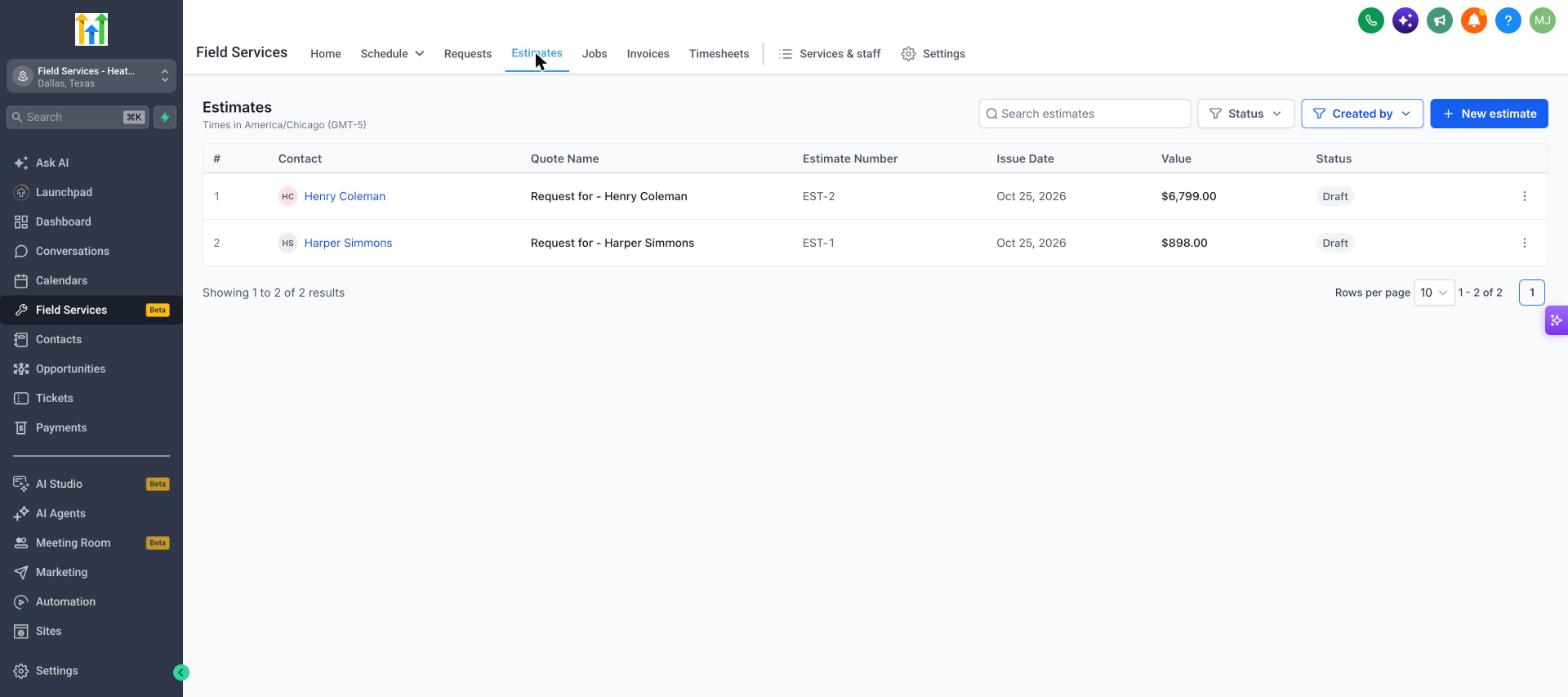
To create an estimate, you can:
- Click New estimate on the Estimates page.
- Open a request and choose Convert to estimate from the three dots menu.
Converting a request carries over the customer and the work you already captured, so you do not need to enter it again.
Invoices
- Go to Field Services > Invoices.
Invoices raised from your jobs show up here, with their totals and what is still owed. Use the search box and the Status filter to find an invoice.
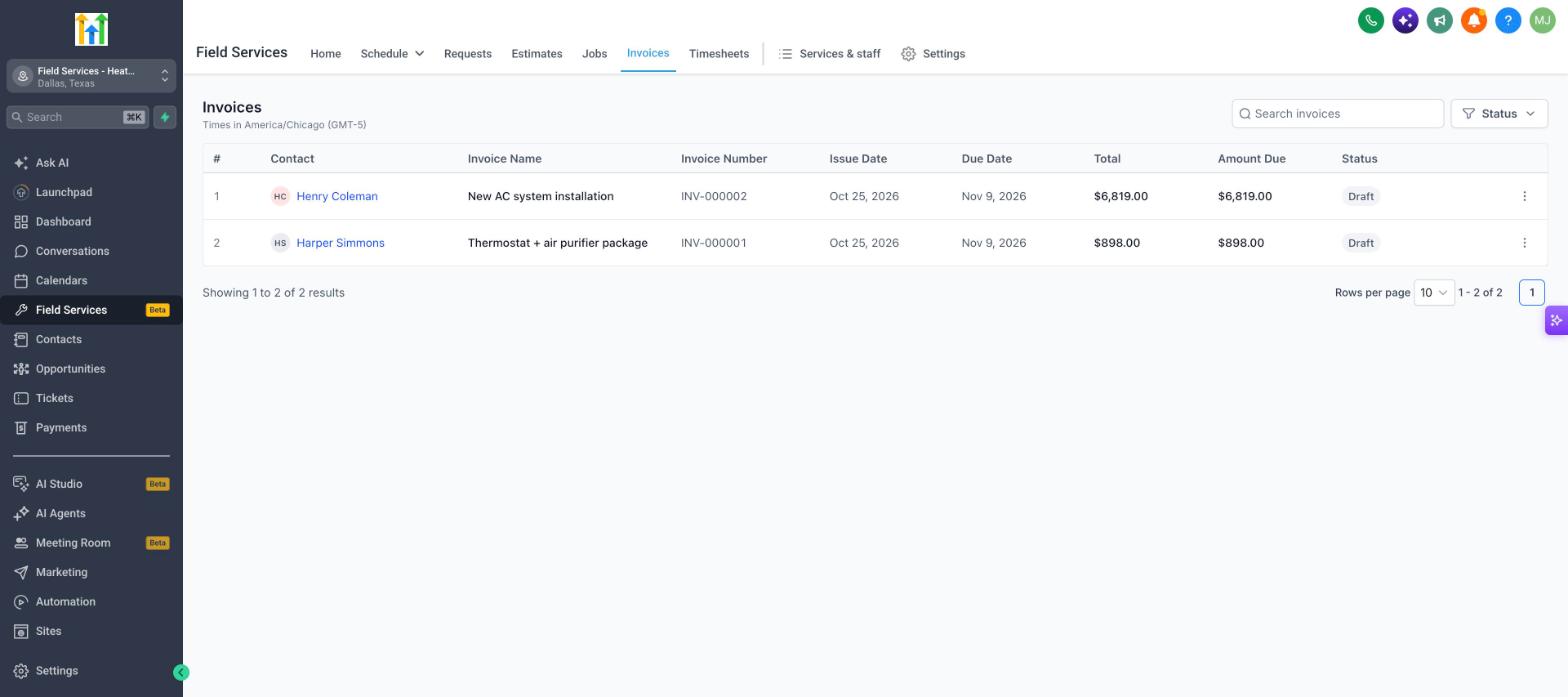
Billing on a job
The fastest way to bill is from the job itself. On a job page, the Billing card shows the current job total, what has been invoiced, what has been paid and what is outstanding. A tag next to the card, such as Not invoiced, shows where the job stands.
| Action | What it does |
|---|---|
| Show job total breakdown | See how the total is calculated. |
| Create invoice | Start an invoice for the job. |
| Invoices and Transactions | See invoices and payments tied to the job. |
Estimates and invoices on Home
The Home page shows Estimates awaiting response, Jobs awaiting invoices, Awaiting payment and Payments collected so you can see at a glance what needs follow-up. See Field Services Home Overview.
Frequently asked questions
What is the difference between an estimate and an invoice?
An estimate is a proposed price the customer can review before work starts. An invoice is a bill for work that is agreed or done. See Estimates vs invoices above.
Do I have to send an estimate before every job?
No. Estimates are optional. You can convert a request straight to a job, or create a job yourself, and invoice when the work is done.
Can one job have more than one invoice?
Yes. A job can have several visits, so you can invoice as the work progresses. The Billing card tracks what has been invoiced, paid and outstanding across all of them.
Do I need a payment provider to send invoices?
You can create invoices without one. To let customers pay online you need to connect a payment provider.
What happens to the job total if I change the scope?
The Billing card shows the current job total. If you change services or products after invoicing, review the invoice before you send it again.
Can I turn a request straight into a job and skip the estimate?
Yes. Use Convert to job on the request.