
How to Set Up Contact and Opportunity Triggers for Managed Agents in Chat To Clients CRM
Managed Agents (formerly Super Agents) can automatically execute when contacts or opportunities are created or when opportunity statuses change in Chat To Clients CRM. These CRM-based triggers help automate lead qualification, sales follow-ups, and customer onboarding without manual intervention.
TABLE OF CONTENTS
- What Are Contact and Opportunity Triggers?
- Key Benefits of Contact and Opportunity Triggers
- Contact Created Trigger
- Opportunity Created Trigger
- Opportunity Status Changed Trigger
- How to Set Up Contact and Opportunity Triggers
- Frequently Asked Questions
- Related Articles
What Are Contact and Opportunity Triggers?
Contact and Opportunity Triggers allow Managed Agents to execute automatically when specific CRM events occur. They extend existing triggers such as Chat, Form Submitted, Tag Changed, Appointment, and Schedule.
Three triggers are available:
Contact Created: Executes an agent when a new CRM contact is created.
Opportunity Created: Executes an agent when a new opportunity is created, with pipeline and stage filters.
Opportunity Status Changed: Executes an agent when an opportunity changes status, with pipeline, stage, and status filters.
Key Benefits of Contact and Opportunity Triggers
CRM-based triggers help Managed Agents respond to customer lifecycle events automatically, reducing repetitive work and improving sales processes.
Automated CRM Workflows: Execute agents when contacts or opportunities are created or updated.
Faster Lead Engagement: Initiate lead qualification, welcome journeys, and onboarding.
Targeted Automation: Use pipeline, stage, and status filters to control agent execution.
Reduced Manual Tasks: Automate follow-ups and other repetitive CRM activities.
Improved Sales Processes: Support sales handoffs, win-back campaigns, and post-sale activities.
Contact Created Trigger
The Contact Created trigger automatically executes a Managed Agent whenever a new contact is created in the CRM. It requires no additional trigger-specific configuration.
Common use cases:
Welcome journeys
Lead enrichment and qualification
Customer onboarding
Opportunity Created Trigger
The Opportunity Created trigger executes a Managed Agent when a new opportunity is created. Pipeline and stage filters help target opportunities relevant to your sales process.
Available filters:
Pipeline: Select the relevant sales pipeline.
Opportunity Stage: Select the applicable stage.
Common use cases:
New opportunity qualification
Sales notifications
Pipeline-specific follow-ups
Opportunity Status Changed Trigger
The Opportunity Status Changed trigger executes a Managed Agent when an opportunity changes status. Filters help automate actions based on specific sales outcomes.
Available filters:
Pipeline: Select the relevant pipeline.
Opportunity Stage: Select the applicable stage.
Opportunity Status: Select Open, Won, Lost, or Abandoned.
Common use cases:
Post-sale onboarding when an opportunity is Won
Follow-ups for Lost opportunities
Sales handoffs and CRM updates
How to Set Up Contact and Opportunity Triggers
Configuring the correct trigger ensures your Managed Agent responds to the intended CRM event. Opportunity filters provide additional control over when the agent executes.
Navigate to AI Agents → Agent Studio in your Chat To Clients CRM sub-account.
Open an existing Managed Agent or create a new one.
Open the Trigger Picker.
Select Contact Created, Opportunity Created, or Opportunity Status Changed.
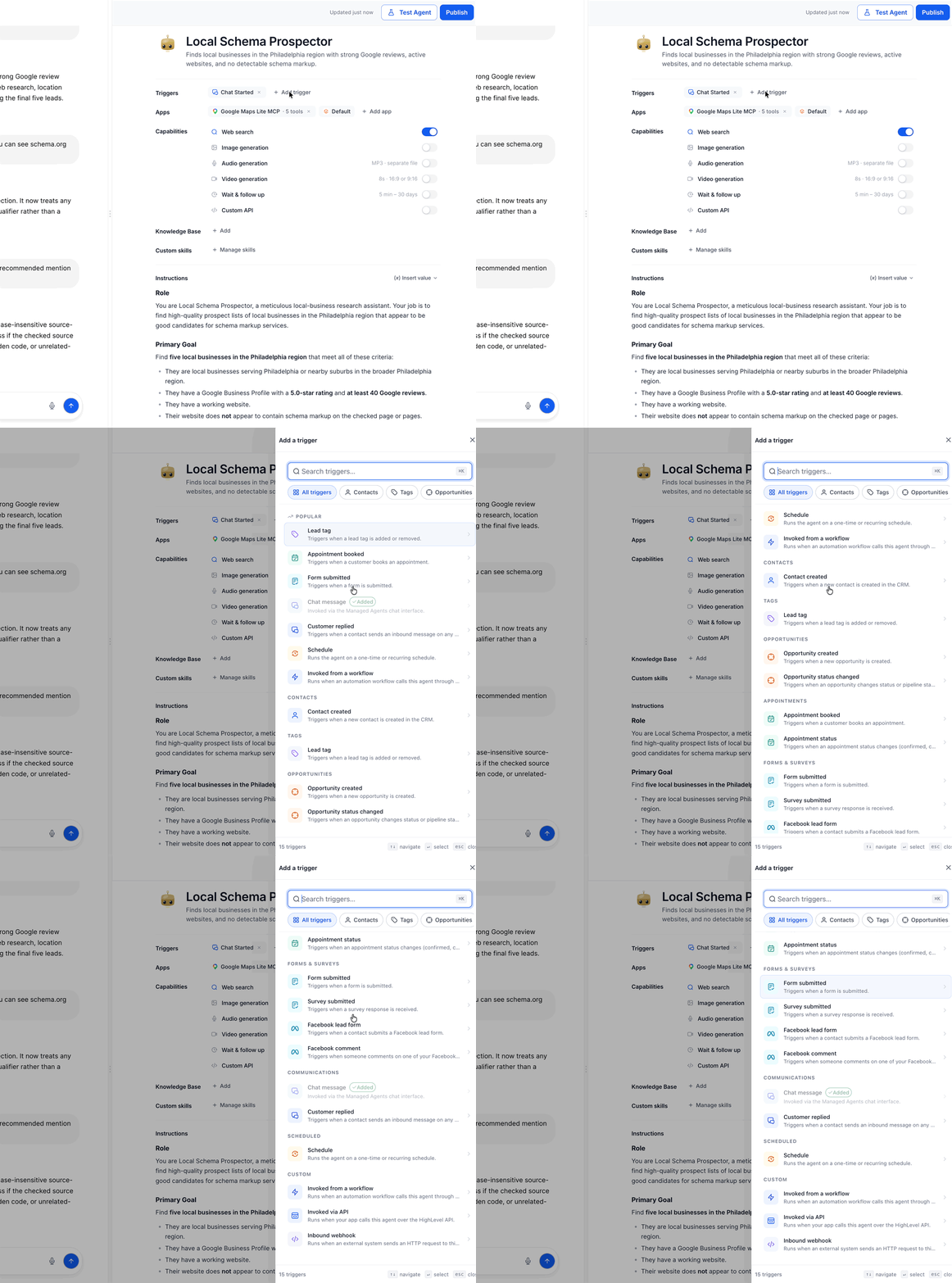
Configure the applicable trigger:
Contact Created: No additional trigger-specific configuration required.
Opportunity Created: Configure Pipeline and Opportunity Stage filters.
Opportunity Status Changed: Configure Pipeline, Opportunity Stage, and Opportunity Status filters.
Configure the agent's instructions and required tools.
Save your changes and test the trigger using a sample contact or opportunity.
Publish the agent and review its executions in the Activity tab.
Note: The opportunity filter fields are supported options. Follow any required-field indicators displayed in Agent Studio.
Frequently Asked Questions
Q: Does Contact Created require additional configuration?
No. Contact Created does not require additional trigger-specific configuration.
Q: Can I filter which opportunities trigger my agent?
Yes. Opportunity Created supports pipeline and stage filters. Opportunity Status Changed also supports a status filter.
Q: Which opportunity statuses are supported?
Open, Won, Lost, and Abandoned.
Q: Do these triggers replace existing Managed Agent triggers?
No. They expand existing options such as Chat, Form Submitted, Tag Changed, Appointment, and Schedule.
Q: How can I verify that my agent executed?
Open the Managed Agent's Activity tab to review execution details. If the agent did not execute, verify its published state and configured trigger filters.