
AI Studio Cloud Pricing
AI Studio Cloud pricing is based on the resources your app uses to run and store data. Cloud charges depend on three factors: instance size, reserved database storage, and actual file storage usage. Each project includes free allowances for all three, so smaller apps may run without additional Cloud charges.
Note: Cloud charges are separate from the AI Studio usage charges incurred when building or modifying your app.
TABLE OF CONTENTS
- What Is AI Studio Cloud and How Much Does It Cost?
- What is Free in Cloud
- Instance Pricing in Cloud
- Database Storage Pricing
- File Storage Pricing
- How Pausing and Removing Cloud Affect Charges
- How Cloud Billing Works
- Low Balance and Spending Limits
- Cloud Pricing Examples
- Frequently Asked Questions
- Related Articles
What Is AI Studio Cloud and How Much Does It Cost?
AI Studio Cloud provides a built-in backend for apps that need databases, user authentication, and file storage without requiring a separate backend service. For example, a member portal can use Cloud to manage user accounts, store profile information, and handle document uploads.
To learn more about how Cloud works, its features, and setup instructions, refer to Managed Cloud Backend in AI Studio.
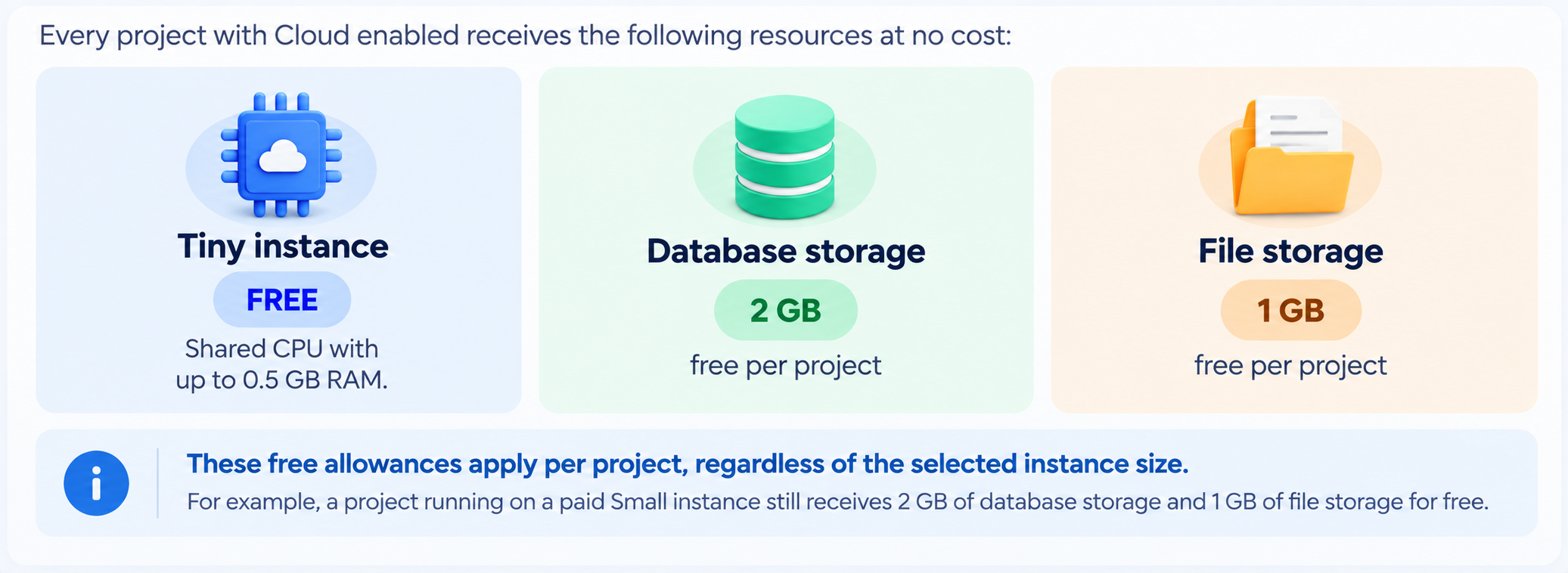
Cloud pricing depends on the instance size, reserved database storage, and actual file storage usage. Every project includes a free Tiny instance, 2 GB of database storage, and 1 GB of file storage. Charges apply only when you select a larger instance or exceed the free storage allowances.
What is Free in Cloud
Instance Pricing in Cloud
An instance determines the computing resources available to your app, including CPU and memory. The Tiny instance is free, while larger instances are billed hourly for as long as Cloud is running.
| Instance | CPU | Memory | Price per hour | Approx. per month* |
|---|---|---|---|---|
| Tiny | Shared CPU | Up to 0.5 GB RAM | Free | Free |
| Mini | 2-core ARM, shared | 1 GB RAM | $0.015456 | $11.28 |
| Small | 2-core ARM, shared | 2 GB RAM | $0.02369 | $17.29 |
| Medium | 2-core ARM, shared | 4 GB RAM | $0.09453 | $69.01 |
| Large | 2-core ARM, dedicated | 8 GB RAM | $0.174455 | $127.35 |
| X-Large | 4-core ARM, dedicated | 16 GB RAM | $0.330855 | $241.52 |
Note: Monthly estimates are based on 730 hours, assuming Cloud runs continuously throughout the month.
How instance size changes affect billing:
Changing instance size: You can increase or decrease your instance size once per clock hour.
Billing during a size change: When you change sizes, the hour of the change is billed as one full hour at the previous instance rate plus one full hour at the new instance rate. Starting the following hour, only the new instance rate applies.
Switching to Tiny: Moving back to the free Tiny instance stops paid instance charges starting the following hour.
Important: Pausing Cloud can stop instance charges, but the hour in which you pause may still be billed.Database Storage Pricing
Database storage holds your app's tables and rows. Each project includes 2 GB of free database storage. Additional storage costs $0.000197 per GB per hour, or approximately $0.14 per GB per month.
Unlike file storage, database storage is billed based on the amount of storage you reserve, not the amount of data you actually use.
Important: Before increasing database storage, review your current usage under Advanced settings → Database storage. Increase the capacity only when your data is approaching the existing limit, since the change cannot be reversed.How database storage billing works:
You pay for the size you reserve, not what you use: Database storage is billed on its provisioned (reserved) size every hour, whether or not that space is filled. The smallest increase is to 8 GB, so after your first increase you're charged for 6 GB above the free 2 GB, even if your data takes up only 0.25 GB.
It can only go up: Database storage can be increased but never reduced. Once you increase it, the higher size is charged until you remove Cloud.
Pausing doesn't stop it: Database storage above 2 GB keeps being charged while Cloud is paused. Only removing Cloud stops this charge.
File Storage Pricing
File storage holds content uploaded to your app's storage buckets, such as images, PDFs, and documents. Each project includes 1 GB of free file storage. Additional storage costs $0.000047 per GB per hour, or approximately $0.034 per GB per month.
Unlike database storage, file storage is billed based on the space your files actually occupy.
You pay for what you store: File storage grows automatically as files are uploaded, and you're charged only for the space your files actually use.
Deleting files lowers the charge: If you remove files and your usage drops back under 1 GB, file storage charges stop.
Pausing doesn't stop it: File storage above 1 GB keeps being charged while Cloud is paused. Delete files or remove Cloud to stop this charge.
Storage Rates at a Glance
Database and file storage have different billing methods. Comparing their rates and free allowances can help you understand how storage changes affect your Cloud costs.
| Storage type | Free per project | Price above the free amount | Approx. per GB per month* | Billed on |
|---|---|---|---|---|
| Database storage | 2 GB | $0.000197 per GB per hour | $0.14 | Reserved size |
| File storage | 1 GB | $0.000047 per GB per hour | $0.034 | Actual usage |
Note: Monthly estimates are based on 730 hours.How Pausing and Removing Cloud Affect Charges
Pausing and removing Cloud have different effects on billing and stored data. Pausing temporarily stops your app while preserving its data, whereas removing Cloud permanently deletes its database, users, and files.
| Charge | Cloud running | Cloud paused | Cloud removed |
|---|---|---|---|
| Instance (Mini and above) | Charged | Not charged | Not charged |
| Database storage above 2 GB | Charged | Charged | Not charged |
| File storage above 1 GB | Charged | Charged | Not charged |
Important billing considerations:
Pausing Cloud: Instance charges stop only for hours in which Cloud remains paused for the entire hour. If the instance runs during any part of an hour, that hour is billed in full.
Storage charges while paused: Database storage above 2 GB and file storage above 1 GB continue to incur charges while Cloud is paused.
Removing Cloud: Removing Cloud stops all Cloud charges but permanently deletes the database, users, and files.
Choose Pause when you want to temporarily stop your app while keeping its data. Choose Remove Cloud only when you no longer need the Cloud environment or its stored data.
How Cloud Billing Works
Cloud usage is billed through your Chat To Clients CRM wallet, while AI Studio building activity is billed separately. Understanding these charges helps you distinguish ongoing Cloud costs from AI Studio usage.
Wallet billing: Cloud charges accumulate throughout the day and are deducted from your wallet once daily. If auto-recharge is enabled, your wallet is replenished according to your existing settings.
Agency rebilling: Agencies can rebill Cloud charges to their sub-accounts. Cloud automatically uses the same rebilling configuration already established for AI Studio, so no additional setup is required.
Separate AI Studio usage: Messages sent to AI Studio are billed as AI Studio usage, not Cloud usage. This includes actions such as Optimize → Send to chat and Try to fix in the Security Advisor.
Low Balance and Spending Limits
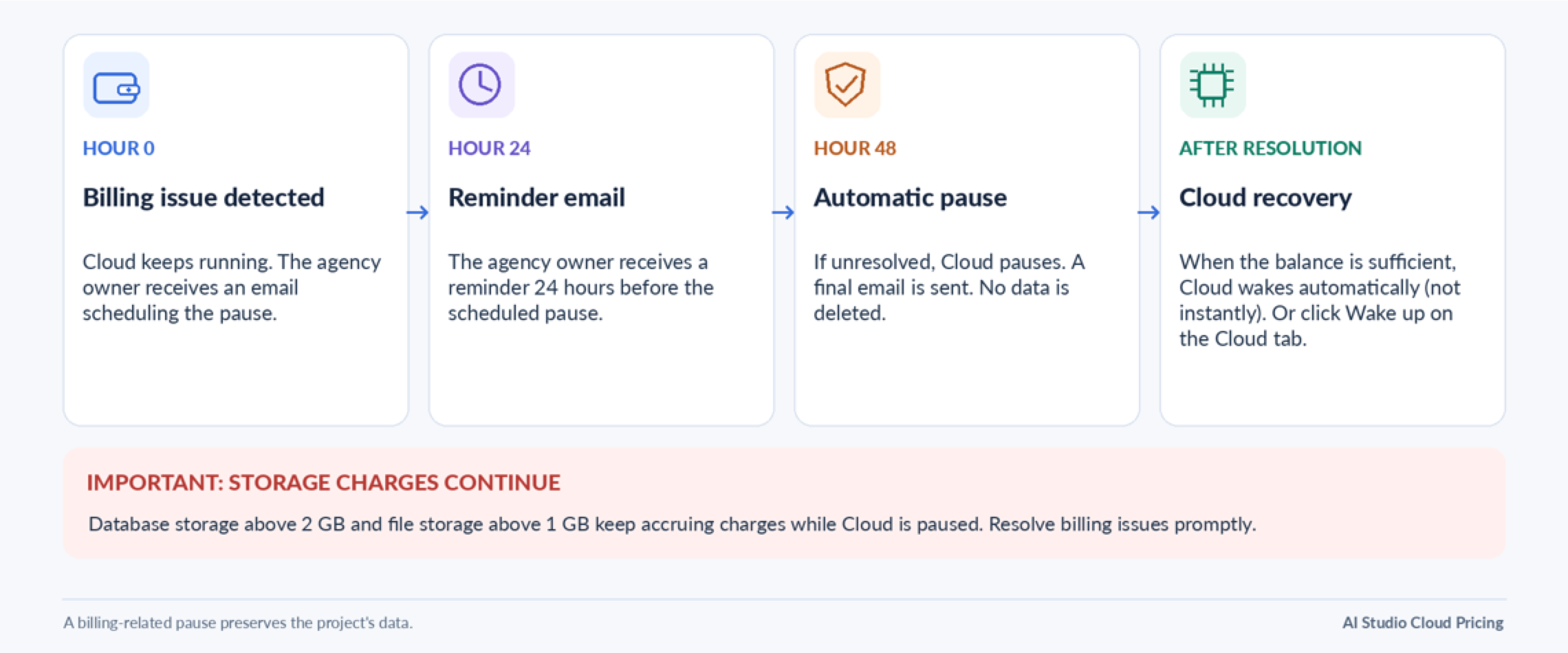
If your wallet has insufficient funds or your spending limit is reached, Chat To Clients CRM provides a 48-hour period before automatically pausing Cloud. This gives you time to resolve the billing issue and avoid an interruption.
What happens when a billing issue occurs:
Usage Emails
Chat To Clients CRM sends Cloud usage notifications to agency owners when storage exceeds the included allowances. These alerts help identify when additional charges may begin.
Database storage: The agency owner receives an email when a project's database storage exceeds the free 2 GB allowance.
File storage: The agency owner receives an email when a project's file storage exceeds the free 1 GB allowance.
Automatic pause: The agency owner receives notifications when a billing-related pause is scheduled, 24 hours before the pause, and after Cloud has been paused.
Cloud Pricing Examples
Your monthly Cloud cost depends on the instance selected and any storage exceeding the free allowances. The following examples illustrate how different types of apps may be billed.
Note: These examples use 730 hours per month and assume the stated resources and storage levels remain unchanged. Actual charges depend on usage.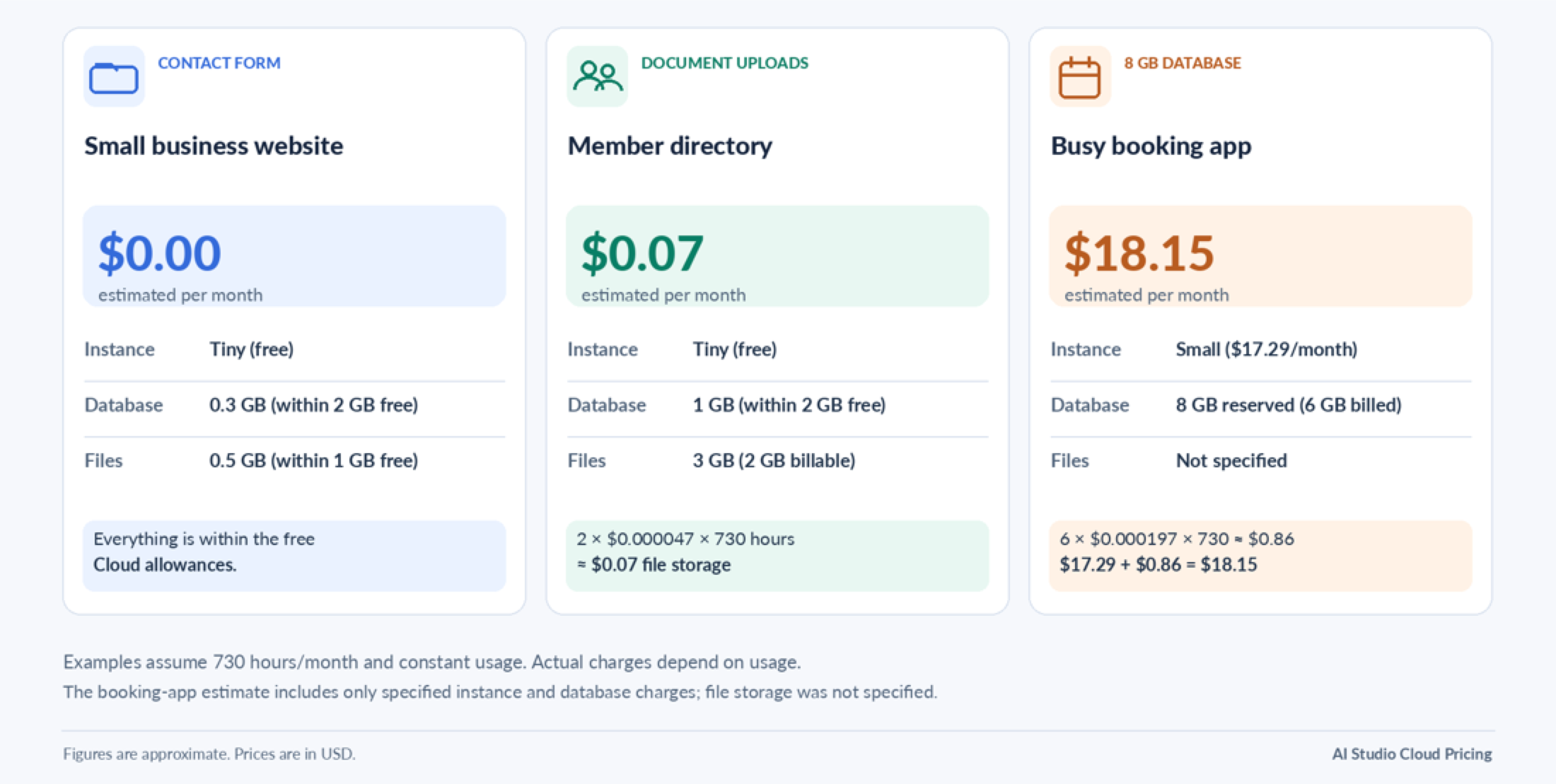
Frequently Asked Questions
Q: Can I use the free Cloud allowances with a paid instance?
Yes. Every project receives 2 GB of database storage and 1 GB of file storage free, even when using a paid instance. The Tiny instance itself is also free.
Q: Can I reduce database storage after upgrading it?
No. Database storage increases are permanent for that Cloud environment. Charges continue based on the reserved size until Cloud is removed.
Q: Will I still be charged if I pause Cloud immediately after resizing?
Yes. The hour in which you change instance size is billed as a full hour of both the previous and new sizes. Pausing during that hour does not eliminate those charges. Instance charges stop for subsequent hours when Cloud remains paused throughout the entire hour.
Q: How can I stop all Cloud charges?
Removing Cloud stops instance, database storage, and file storage charges. However, this permanently deletes your database, users, and files. Pausing Cloud stops only instance charges for fully paused hours.
Q: Can agencies pass Cloud costs on to their sub-accounts?
Yes. Cloud uses the same agency rebilling settings configured for AI Studio, with no separate setup required.
Q: What happens if my wallet runs out of funds?
Your project continues running for 48 hours while the agency owner receives notifications. If the issue remains unresolved, Cloud pauses automatically without deleting data. Once the wallet balance is sufficient, Cloud wakes up automatically, although recovery may take some time. You can also use Wake up on the Cloud tab.
Q: Are AI Studio messages included in Cloud charges?
No. AI Studio messages, including Optimize → Send to chat and Try to fix, are billed separately as AI Studio usage.
Q: Why am I charged for storage that I'm not using?
Database storage is charged based on reserved capacity, even when some space is empty. File storage, however, is charged only for the actual space used above the free allowance.