
WhatsApp Conversation: Call Recording
WhatsApp Call Recording and Transcription
Record WhatsApp calls and automatically generate written transcripts in Chat To Clients CRM to keep important customer conversations accessible.
Call recordings and transcripts appear directly in Conversations, alongside the contact's messages. Teams can replay calls, review speaker-separated transcripts, and reference important details without relying on manual notes.
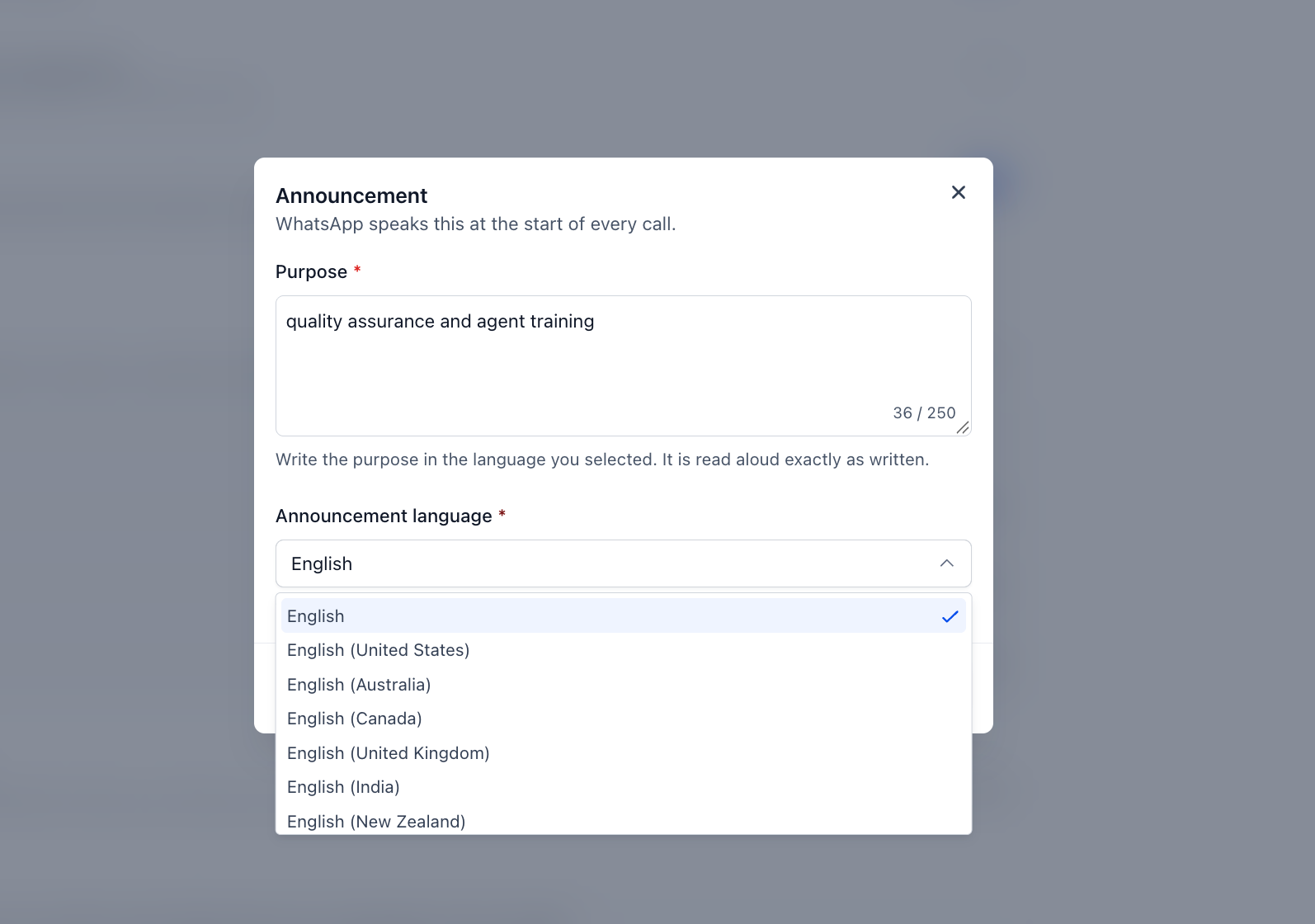
Configurable consent announcements also help inform customers before recording begins.
TABLE OF CONTENTS
What Is Call Recording and Transcription?
WhatsApp Call Recording and Transcription allows businesses to automatically capture voice conversations and convert them into written transcripts.
Once enabled for a WhatsApp number, completed call recordings and transcripts are saved in the contact's conversation history, making them easy to review alongside previous messages.
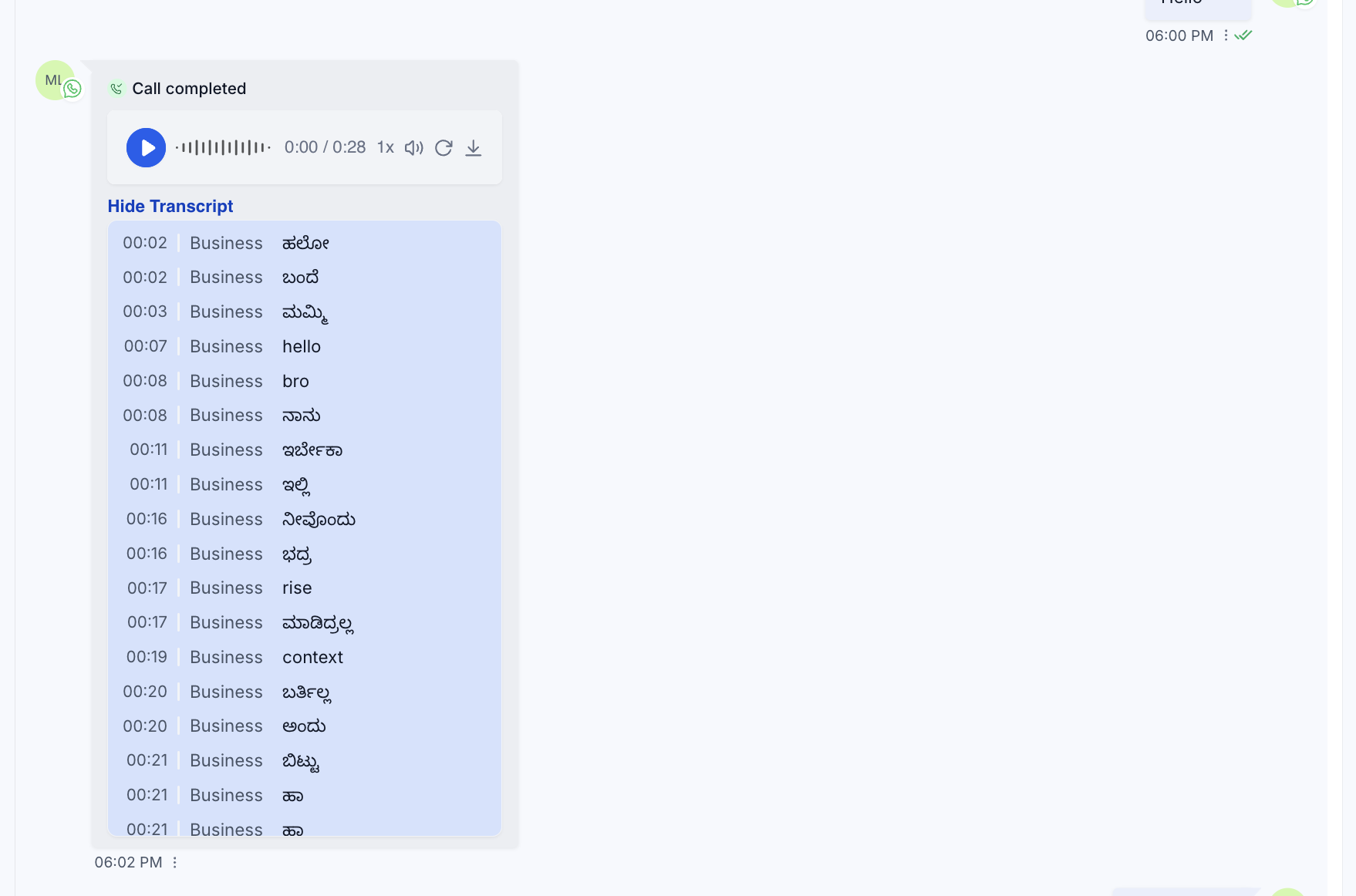
Transcripts distinguish between team members and customers, helping users understand who said what. The feature also automatically detects the language spoken during a call and includes a configurable recording consent announcement that plays before recording begins.
Note: This feature is currently available free of charge. However, Meta may introduce charges for its usage in the future.
Key Benefits of WhatsApp Call Recording and Transcription
Keeping a record of customer calls helps teams maintain accurate information, improve collaboration, and deliver more consistent service. With recordings and transcripts accessible in Conversations, users can focus on the customer during the call and review important details afterward.
Centralized Conversation History: Access WhatsApp call recordings, transcripts, and customer messages in one conversation thread.
Accurate Call Records: Review what was discussed, including customer requests, commitments, and agreed next steps.
Faster Call Reviews: Use playback controls and written transcripts to locate important information without listening to an entire call.
Reduced Manual Note-Taking: Stay focused on the conversation while recording and transcription capture the details.
Improved Team Collaboration: Help managers review customer interactions and provide feedback based on actual conversations.
Smoother Customer Handovers: Give team members access to previous call details without requiring customers to repeat information.
Multilingual Support: Automatically detect spoken languages for transcription and configure consent announcements in supported languages.
WhatsApp Call Recordings and Playback
Call recordings preserve the audio from completed WhatsApp conversations so teams can revisit important details when needed. Recordings appear directly in the contact's Conversations thread, keeping them connected to the customer's communication history.
Once a recorded call is available, users can:
Play the recording: Listen to the conversation directly from Conversations.
Navigate through the audio: Scrub through the recording to locate specific moments.
Adjust playback speed: Speed up playback to review longer conversations more efficiently.
Review conversation context: Reference the customer's existing WhatsApp messages while listening to the recording.
These controls are particularly useful when reviewing customer requests, verifying details, or preparing follow-up communication.
How to Enable Call Recording
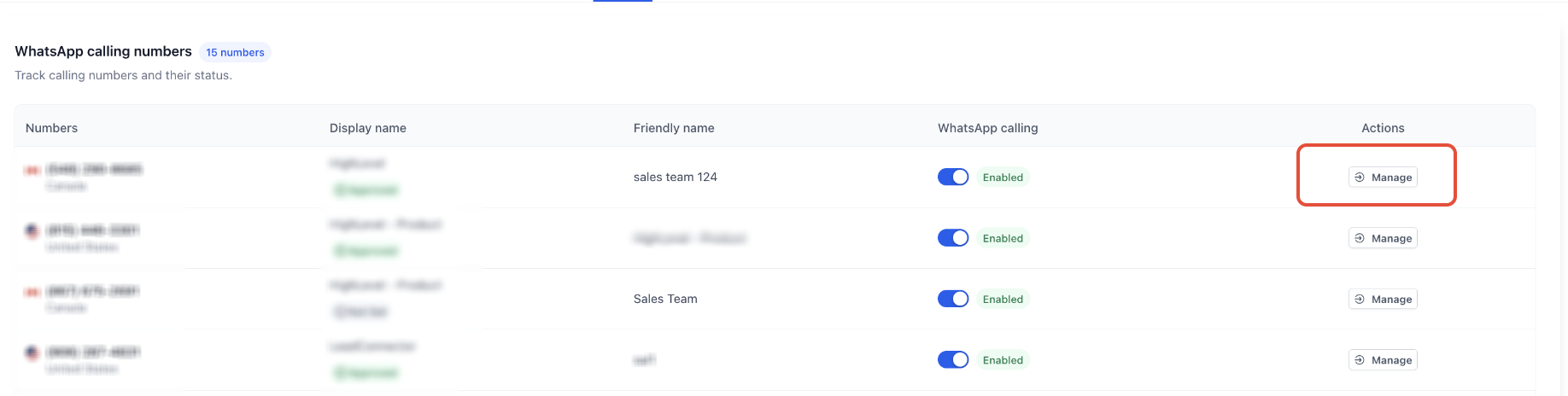
Go to Settings > WhatsApp > Calling > Click on the Phone Number
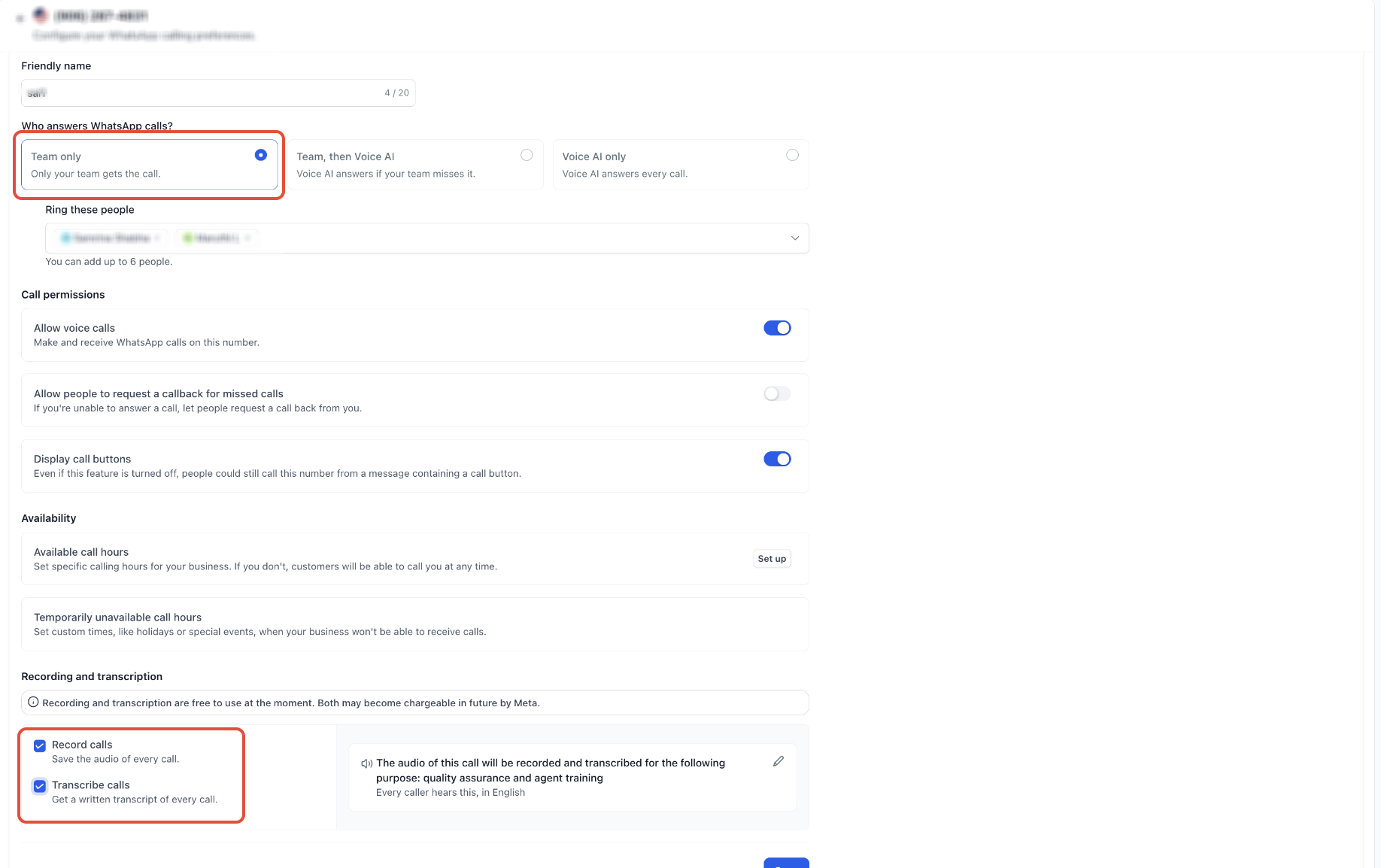
Enable Call Recording and Call Transcript
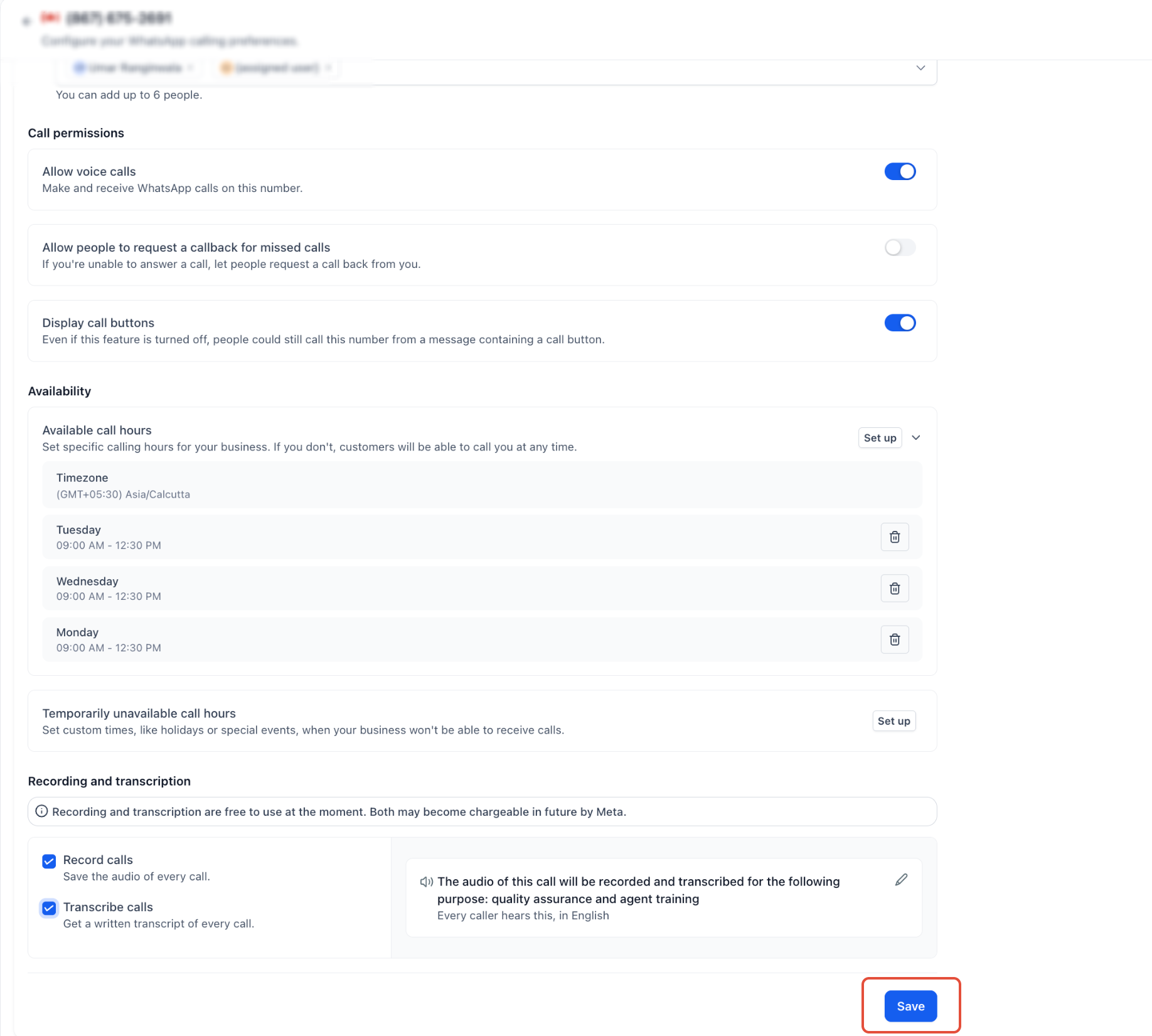
Click Save
How to Change the Recording Language
Multiple Languages Supported: Call recording supports multiple languages. You can select the language to enable transcription in a different language.
Click on the Pencil Icon
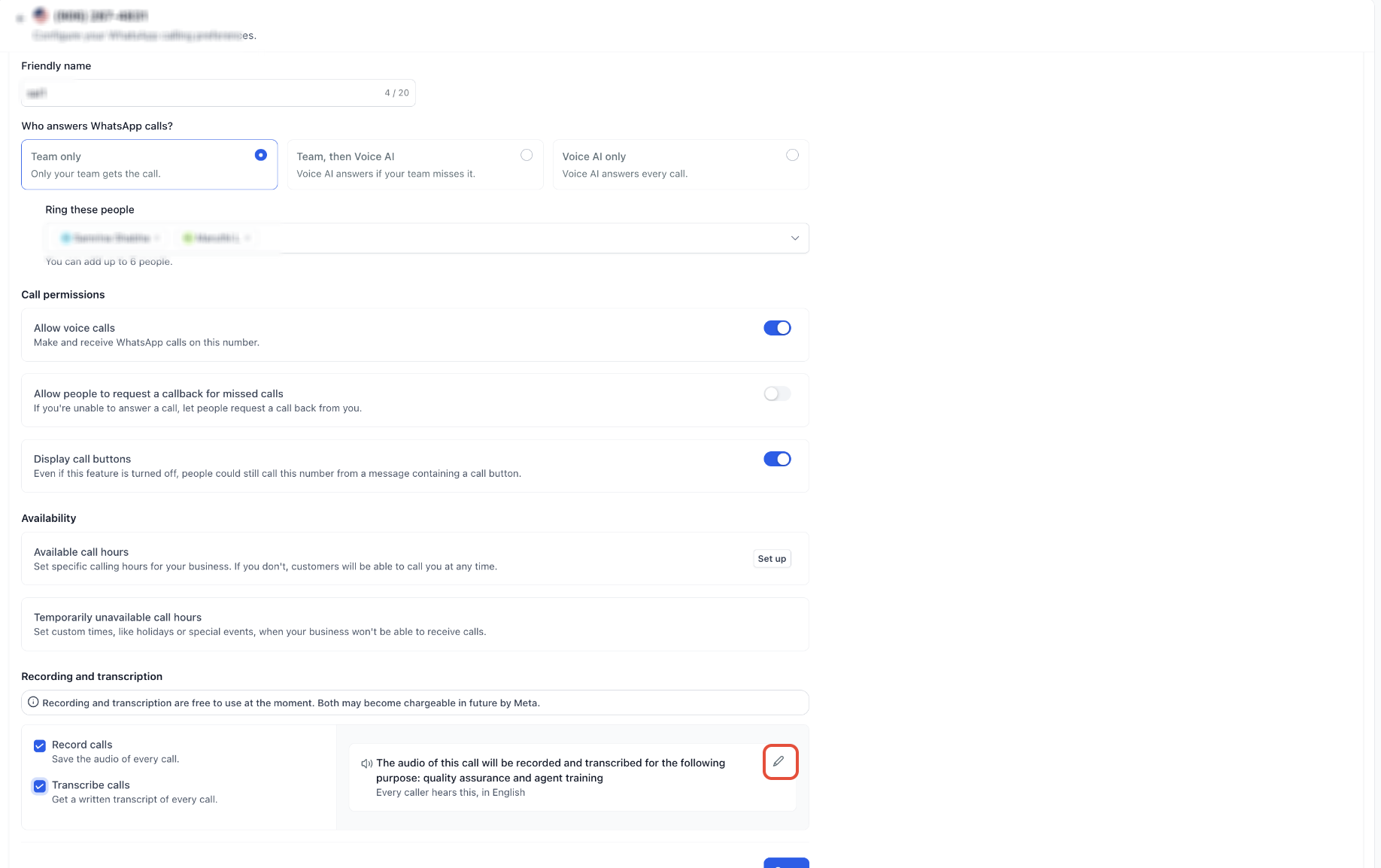
Select the Language You Want to Use
How a Recorded Call Appears
Once a call is recorded and the transcript is processed, it will appear in the contact's conversation view as shown below.
How Your Team Can Use Recordings and Transcripts
Revisit Property Enquiries
A real estate agent can return to the recording and clarify the details of what was discussed during a property enquiry before following up — no need to rely on memory.
Sales Manager Review
Sales managers can scan transcripts for questions, objections, and agreed next steps, then listen to the relevant audio when tone or context matters. Coaching can begin with an actual customer interaction rather than a hypothetical scenario.
Smoother Handovers
When another team member takes over, they have the original conversation to refer to — not just a brief note saying "customer interested."
Notes and Follow-Ups
Transcripts serve as a reference when preparing notes, summaries, and follow-up messages. Important details no longer need to be reconstructed from memory.
The value is not simply having a recording. It is being able to return to the conversation when a decision, commitment, or detail matters.
Recording and Transcription Pricing
According to the release details, recording and transcription are currently free. When pricing is introduced, the two features will be priced separately.
Frequently Asked Questions
Q: Can I configure call recording and transcription for a specific WhatsApp number?
Yes. Recording and transcription settings are configured at the WhatsApp number level. Select the number you want to configure under WhatsApp Calling settings.
Q: Does the consent announcement language need to match the language spoken during the call?
No. The consent announcement language determines how the recording notice is delivered. Transcription automatically detects the language spoken during the conversation.
Q: Why can't I find the WhatsApp Calling settings?
WhatsApp Calling must be available for your sub-account, and the connected number must meet the applicable eligibility requirements. Review the WhatsApp Calling in Chat To Clients CRM guide for setup requirements and availability.
Q: Can I review a call without listening to the complete recording?
Yes. When a transcript is available, you can read the conversation to find relevant details. You can also use the recording's playback controls to move through the audio and adjust playback speed.
Q: Why is a transcript not immediately available after a call ends?
Transcripts are generated after call processing. The transcript may not appear immediately when a call finishes. Check the contact's conversation again after processing has completed.
Q: Does enabling WhatsApp call recording also enable recording for standard phone calls?
No. The configuration described here applies to WhatsApp Calling. Standard phone-system recording and transcription use separate configurations.