
Create Funnels and Websites with Funnel AI in Ask AI
Funnel AI in Ask AI lets you create a funnel, website, or landing page by describing what you need in a conversational prompt. Instead of starting with a blank page or manually configuring every section, you can tell Ask AI about your business and goal, review the proposed approach when clarification is needed, and watch the page take shape directly inside the conversation.
TABLE OF CONTENTS
- What is Funnel AI in Ask AI?
- Key Benefits of Funnel AI in Ask AI
- Eligibility and Access Requirements
- How Funnel AI Handles Your Request
- Plan Review and Approval
- Live Generation Preview and Progress Checklist
- Editing the Generated Funnel or Website
- Publishing, Domains, Tracking, and Workflows
- Current Limitations
- How to Create a Funnel, Website, or Landing Page with Funnel AI in Ask AI
- Frequently Asked Questions
- Related Articles
What is Funnel AI in Ask AI?
Funnel AI combines conversational guidance with Chat To Clients CRM's page-generation tools so you can move from an idea to an editable asset faster. After generation is complete, you can open the result in the Funnel or Website Builder to make additional changes, connect domains, publish, configure tracking, and use workflows as you normally would.
For example, you might ask:
Build a lead-generation funnel for my dental practice.
If your request does not include enough information, Ask AI can request details such as your business type or goal before generation begins.
Key Benefits of Funnel AI in Ask AI
Funnel AI reduces the work required to turn an idea into a usable funnel or website. By starting with a natural-language request, you can focus on the business outcome you want instead of manually building the initial page structure.
Create from a single prompt: Describe the funnel, website, or landing page you need directly in Ask AI.
Get guided clarification: Ask AI can request missing information when your original request is too broad.
Review the approach before generation: When clarification is required, Ask AI presents a short plan so you can understand what it intends to create.
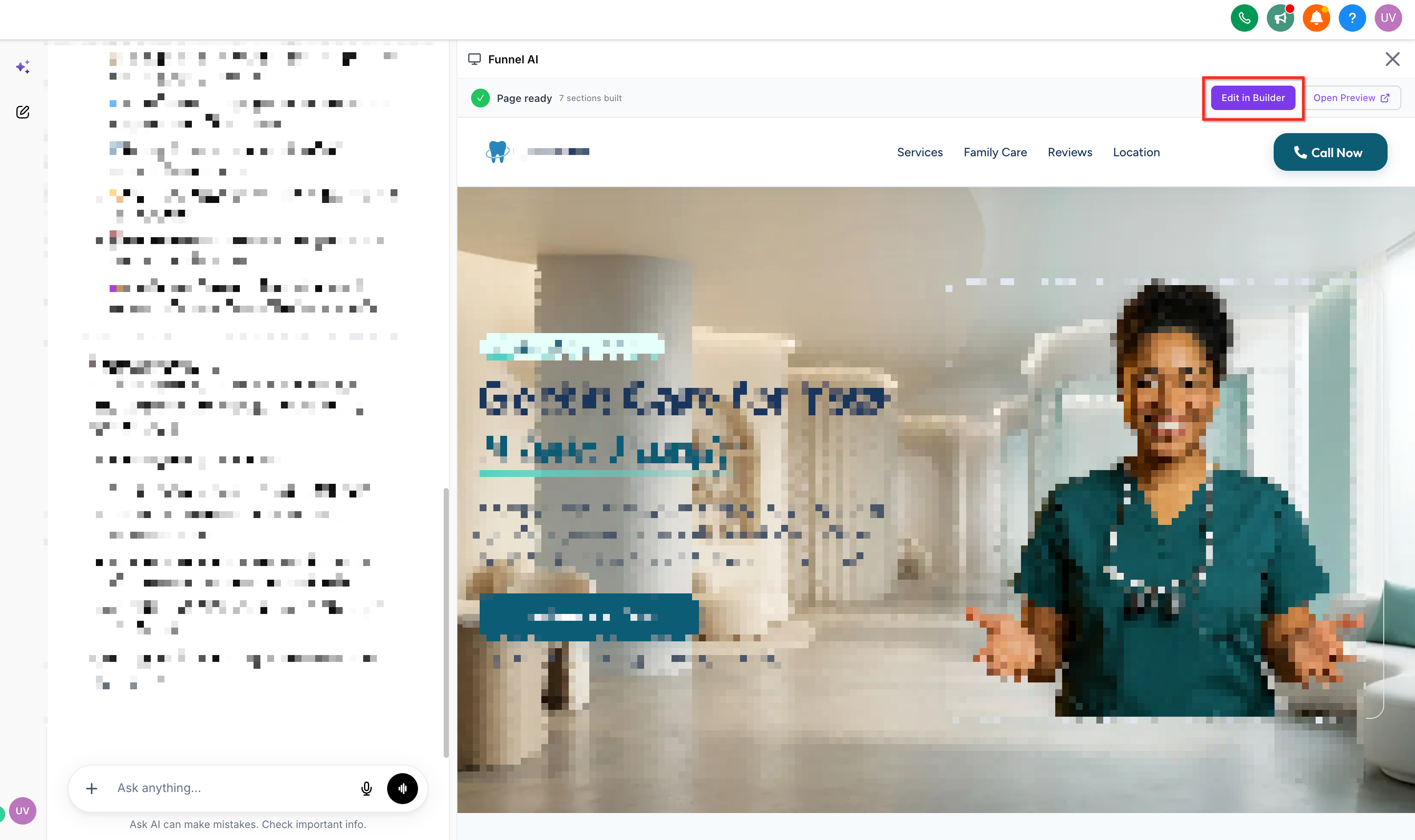
Monitor generation in real time: A live preview panel shows the page being generated.
Track progress clearly: An in-chat checklist shows the generation stages as they are completed.
Continue editing in the builder: Use Edit in Builder to open the generated asset and make additional changes.
Use standard Chat To Clients CRM functionality: Generated assets behave like regular Chat To Clients CRM funnels and websites, allowing you to use normal publishing, domain, tracking, and workflow functionality.
Eligibility and Access Requirements
Access controls help ensure Funnel AI is available only to users who have the appropriate permissions and are working in a sub-account where the feature is enabled. Understanding these requirements can help you distinguish an access issue from a generation issue.
To use Funnel AI through Ask AI:
The user must have the Funnel & website AI permission.
Funnel AI must be enabled for the applicable sub-account.
If a user does not have access, Ask AI displays a message explaining that the feature is unavailable instead of attempting an unsuccessful generation.
For more information about user access, see Sub-account: User Roles, Permissions and Assigned Data.
How Funnel AI Handles Your Request
Funnel AI uses the information in your Ask AI message to determine what should be created. Providing a clear business type and objective can reduce follow-up questions and help the generated result better match your intended use case.
You can request assets such as:
A lead-generation funnel
A business website
A campaign landing page
A service-specific page
A promotional or conversion-focused funnel
A more detailed prompt can include:
Business type
Target audience
Primary goal
Offer or service
Desired conversion action
For example:
Create a landing page for a residential roofing company that wants homeowners to request free roof inspections.
If your request is too vague, Ask AI can ask for additional details such as the type of business and the goal of the page.
Plan Review and Approval
Reviewing the proposed plan helps ensure Funnel AI understands what you want before it starts generating the asset. This is especially useful when your original request requires additional clarification.
When Ask AI needs more information:
Ask AI requests the missing business or goal details.
You provide the requested information.
Ask AI presents a short creation plan.
Review the plan before proceeding with generation.
A clear plan can help confirm that Funnel AI has correctly interpreted the page type, business context, and intended conversion goal.
Live Generation Preview and Progress Checklist
The live generation experience gives you visibility into what Funnel AI is doing while the asset is being created. Instead of submitting a request and waiting without feedback, you can follow the build process from the Ask AI conversation.
During generation:
A live preview panel displays the page as it is created.
A checklist in the conversation tracks each generation stage.
Completed stages are reflected as the process progresses.
The finished result appears when generation is complete.
Generation usually takes approximately 2–4 minutes, although completion time may vary depending on the request.
Editing the Generated Funnel or Website
Funnel AI in Ask AI is designed to create the initial asset, while the standard Funnel or Website Builder gives you control over post-generation editing. This separation lets Ask AI handle the initial build while preserving the full editing capabilities available in Chat To Clients CRM.
After generation is complete, select Edit in Builder to open the generated asset.
From the builder, you can make changes such as:
Updating text and images
Adjusting page sections
Modifying layout and styling
Configuring forms or calls to action
Updating page settings
Preparing the asset for publishing
Funnel AI inside Ask AI is currently create-only. To modify the generated asset after creation, open it in the builder.
For additional information about Chat To Clients CRM's AI-powered page-building tools, see Funnel & Website AI.
Publishing, Domains, Tracking, and Workflows
A Funnel AI-generated asset becomes a standard Chat To Clients CRM funnel or website, which means you can continue configuring it with the same tools available to manually created assets. Generation creates the initial experience, while publishing and other operational settings remain part of the normal Chat To Clients CRM workflow.
Depending on your setup, you can:
Connect or assign an appropriate domain
Publish the funnel or website
Configure tracking
Connect forms and conversion actions
Use workflows and automations associated with the generated asset
Creating a page through Ask AI does not mean the page is automatically published to a connected domain. Review your publishing and domain settings before making the asset publicly available.
For more information, see:
Current Limitations
Knowing the current limitations helps you choose the correct workflow and avoid situations where the generated result may not behave as expected.
Funnel AI in Ask AI currently has the following limitations:
Creation only: Ask AI can create the initial funnel, website, or landing page, but additional edits must be made in the Funnel or Website Builder.
WhatsApp known issue: Funnels created through Ask AI over WhatsApp may currently generate as blank. A fix is in progress.
Web Ask AI is unaffected: Use Ask AI on the web for funnel generation while the WhatsApp issue is being resolved.
How to Create a Funnel, Website, or Landing Page with Funnel AI in Ask AI
A clear request and a quick review of the generated plan can help Funnel AI build an asset that matches your business goal. After creation, use the builder to refine the page and complete publishing-related configuration.
Open Ask AI in Chat To Clients CRM.
Enter a message describing what you want to create.
Example:
Build a lead-generation funnel for my dental practice.
If Ask AI requests additional information, provide the requested details, such as your business type or goal.
Review the proposed plan when Ask AI presents one.
Approve the plan to begin generation.
Follow the progress checklist while Funnel AI creates the asset.
Use the live preview panel to monitor the generated page.
Review the finished result when generation is complete.
Select Edit in Builder to open the funnel or website in the appropriate builder.
Make any additional edits and configure publishing, domains, tracking, forms, or workflows as needed.
Frequently Asked Questions
Can I ask Funnel AI to update an existing funnel from the Ask AI conversation?
Not currently. The Ask AI Funnel AI experience is create-only. Open the generated or existing asset in the Funnel or Website Builder to make changes.
Why don't I see Funnel AI in Ask AI?
Confirm that you have the Funnel & website AI permission and that Funnel AI is enabled for the sub-account you are using.
What happens if my prompt does not include enough information?
Ask AI can request additional information, such as your business type or the goal of the page, before presenting a creation plan.
Do I need to publish the generated page manually?
Yes. The generated asset behaves like a normal Chat To Clients CRM funnel or website. Review its domain and publishing configuration before making it publicly available.
Can I connect workflows to an AI-generated funnel?
Yes. Because the result is a standard Chat To Clients CRM asset, you can use supported tracking, forms, workflows, and other standard functionality after generation.
Why is my funnel blank when I create it through WhatsApp?
There is currently a known issue affecting funnel creation through Ask AI over WhatsApp. Use Ask AI on the web until the issue is resolved.