
Chat To Clients CRM Support Journey: What to Expect at Every Stage
Wherever you are in your Chat To Clients CRM journey, you do not have to figure everything out alone. The support available to you evolves as you move from exploring Chat To Clients CRM to building your account and running your business.
During your trial, the focus is helping you find the right place to start. During your first 90 days, you get more hands-on guidance while you build. After that, Chat To Clients CRM Support remains available around the clock whenever you need help.
TABLE OF CONTENTS
- Your Chat To Clients CRM Support Journey at a Glance
- How to Find Support Inside Chat To Clients CRM
- During Your Trial: Find the Right Place to Start
- Your First 90 Days: Build with Chat To Clients CRM Experts
- After Your First 90 Days: Stay Supported
- Need More Hands-On Support? Explore Premium Support
- Learn, Connect, and Keep Growing
- Related Articles
Your Chat To Clients CRM Support Journey at a Glance
Your support needs change as you become more familiar with Chat To Clients CRM. Each stage gives you a different starting point, from personalized onboarding guidance to ongoing technical support and optional dedicated assistance.
How to Find Support Inside Chat To Clients CRM
IMPORTANT: Only Agency Admins/Users Can Access Chat To Clients CRM Support

Chat To Clients CRM Support agents are unable to make changes to an agency account without the consent of a validated Agency Admin or Agency User. If you do not have access to the Agency view, you must reach out to your Agency Admin.
When you need direct help, you can open Chat To Clients CRM’s support experience without leaving the application. This gives eligible agency users a central place to choose the support option that fits their situation.
Log in to your Chat To Clients CRM account.
Locate the blue question-mark button in the top-right corner of Chat To Clients CRM.
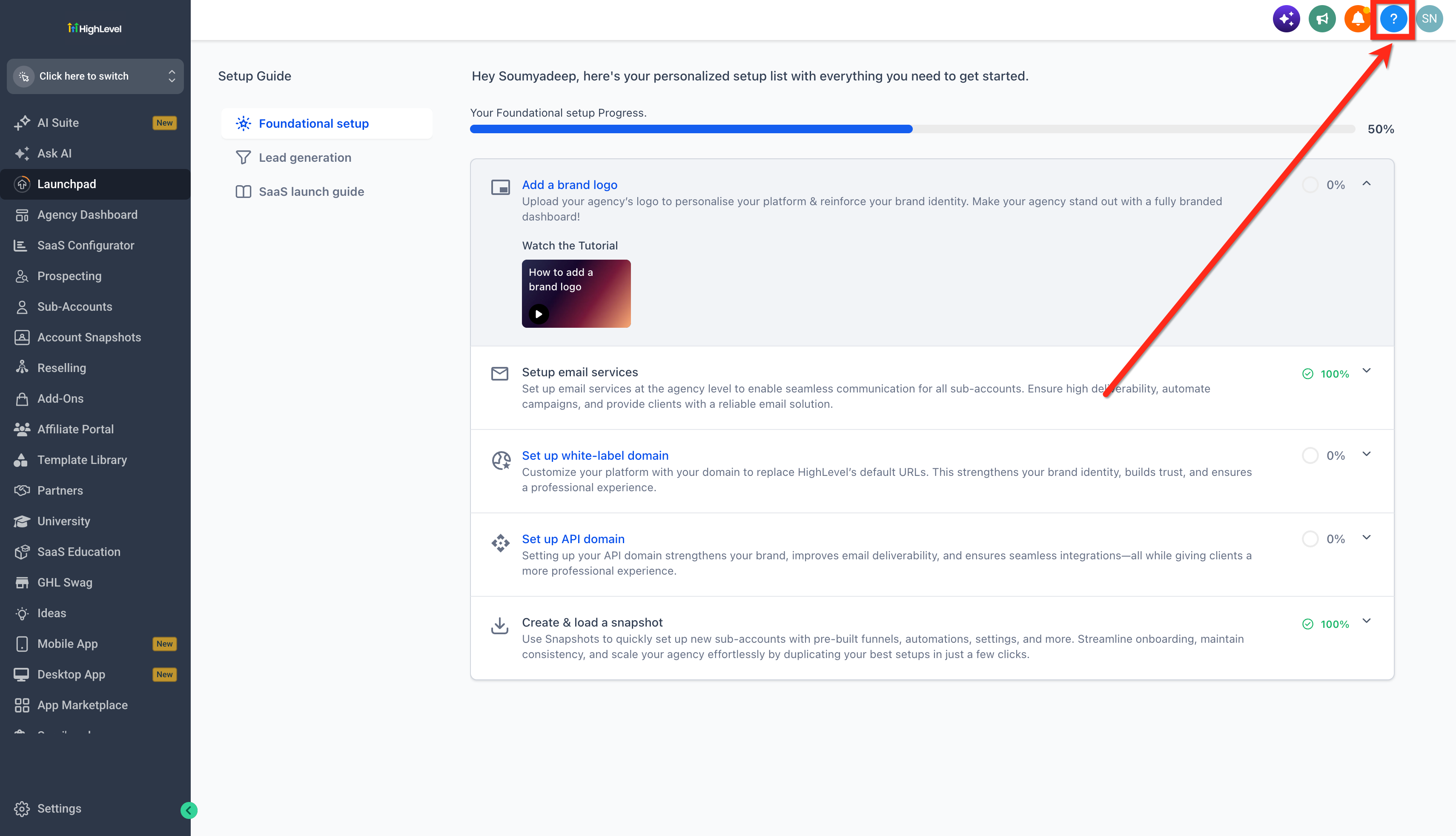
Click the button to open the Help & Support experience.
Choose the available support option that best matches what you need.
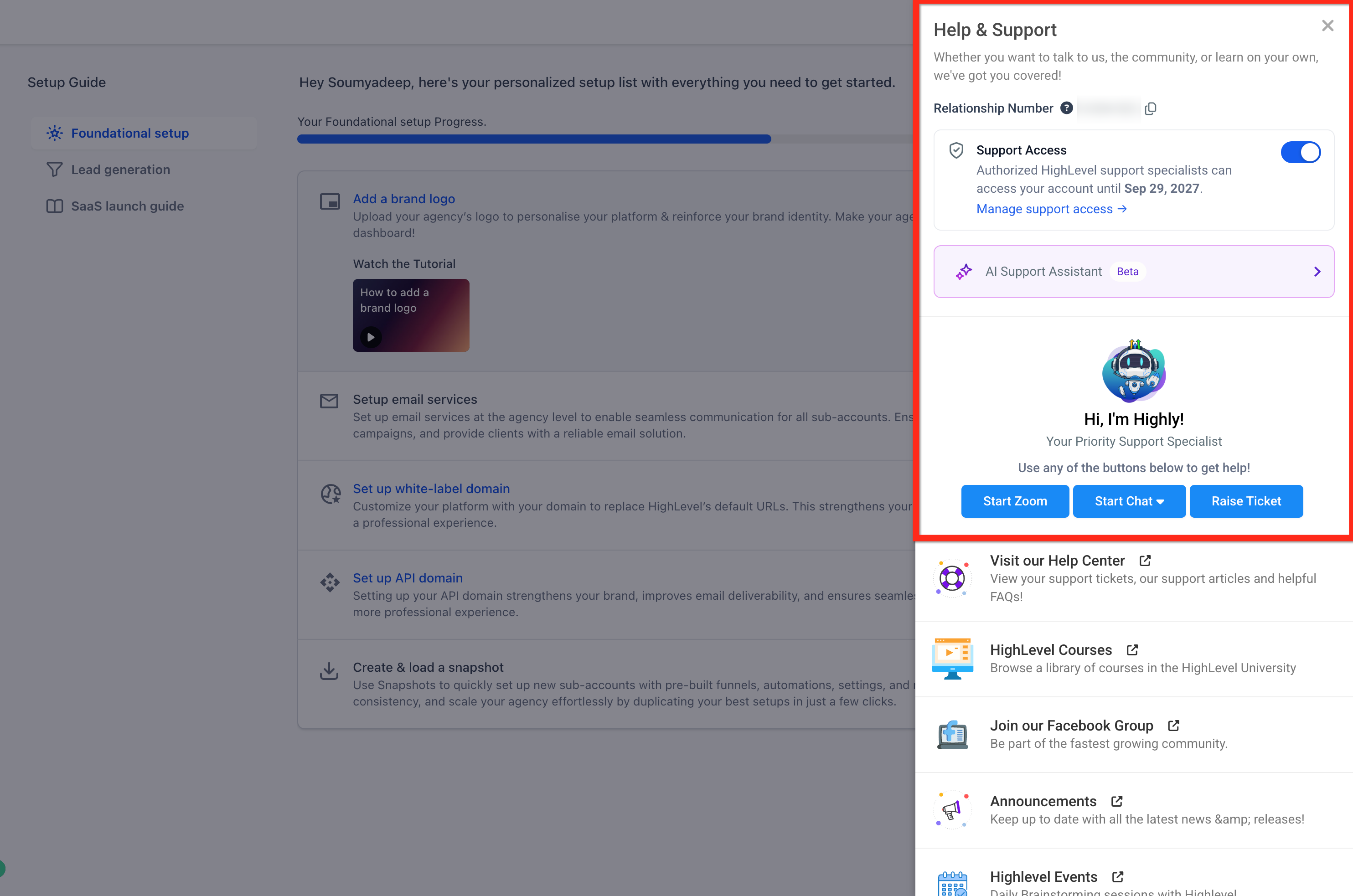
For complete instructions on the individual support channels, see 24/7 Customer Support Options.During Your Trial: Find the Right Place to Start
A Chat To Clients CRM trial gives you a lot to explore. Your first priority does not need to be learning the entire platform. Instead, your Trial Experience is designed to help you identify the tools and setup steps that matter most for your business.
You can join a personalized Kickoff call with a Chat To Clients CRM expert to discuss your business, goals, and intended use of the platform.
Your kickoff can help you:
Identify the most important areas of Chat To Clients CRM to focus on first.
Connect your goals to the features and setup steps that support them.
Build a clearer path from exploring the platform to putting it to work.
Ready to get started?
Start or schedule your Chat To Clients CRM Kickoff
Your First 90 Days: Build with Chat To Clients CRM Experts
Once you become a Chat To Clients CRM customer, the focus shifts from exploring the platform to building the systems your business needs.
During your first 90 days, you can receive hands-on guidance while you configure and adopt Chat To Clients CRM. These working sessions can help you turn what you planned during onboarding into a working setup.
Depending on what your business needs, that can include:
Working through important setup tasks alongside a Chat To Clients CRM expert.
Building or configuring the Chat To Clients CRM tools that support your business.
Getting guidance based on your use case and industry.
Following up on what you built and addressing questions as you continue.
Identifying additional Chat To Clients CRM tools that can help you make progress.
You also continue to have access to Chat To Clients CRM support when you need additional help.
During your first 90 days, Chat To Clients CRM Customer Success is your primary support resource.
Connect with the Customer Success team
After Your First 90 Days: Stay Supported
Getting established in Chat To Clients CRM does not mean you stop needing help. As your account grows, new questions, troubleshooting needs, and more advanced use cases can come up.
After your first 90 days, Chat To Clients CRM Support remains available 24/7 for product questions, technical troubleshooting, and help determining your next step.
Support options include live experiences such as Zoom and chat, along with support tickets when asynchronous follow-up works better. Issues can also be escalated when deeper technical investigation is required.
You do not need to learn every support process here.
See 24/7 Customer Support Options for detailed guidance on Live Chat, Zoom, support tickets, phone support, and other ways to contact Chat To Clients CRM.
Need More Hands-On Support? Explore Premium Support
Some businesses need a closer support relationship as their Chat To Clients CRM setup becomes more important or complex.
After completing your first 90 days with Chat To Clients CRM, you can choose Premium Support as an optional paid add-on. Premium Support adds more personalized and proactive assistance to the standard support experience.
Premium Support includes services such as:
A dedicated Technical Account Manager (TAM).
Priority support handling and faster support access.
Dedicated communication channels, including Slack.
Proactive guidance based on your business and Chat To Clients CRM setup.
More direct support for complex technical needs.
For subscription, billing, setup, and cancellation instructions, see Upgrade to Premium Customer Support at Chat To Clients CRM.
Learn, Connect, and Keep Growing
Direct support is only one part of the Chat To Clients CRM experience. You can also use self-service documentation, guided onboarding, training, live learning, and community resources whenever you want to learn at your own pace.
Chat To Clients CRM Help Center
Use the Help Center when you need product documentation, setup instructions, feature guidance, or troubleshooting information. Hint: It's where you are right now!
It is often the fastest starting point when you know what you are trying to accomplish and want a step-by-step answer.
Visit the Chat To Clients CRM Help Center
Chat To Clients CRM Academy
Use Chat To Clients CRM Academy when you want to go beyond solving one immediate question and build deeper Chat To Clients CRM knowledge.
Academy brings together Chat To Clients CRM education, courses, certifications, events, community resources, and other learning experiences in one destination.
Explore Chat To Clients CRM Academy
Chat To Clients CRM Events and Daily Q&A
Live learning can be useful when you want to hear directly from Chat To Clients CRM experts, learn alongside other users, or explore new strategies.
Chat To Clients CRM maintains an events calendar for virtual sessions, conferences, local Chat To Clients CRM Hangouts, and other experiences.
Explore Chat To Clients CRM Events
You can also register for live Daily Q&A sessions.
Join a Chat To Clients CRM Daily Q&A
Chat To Clients CRM Community
The Chat To Clients CRM Community gives you a place to connect with other users, search existing discussions, share ideas, and learn from the wider Chat To Clients CRM community.
Use community resources for peer learning and discussion. For account-specific technical troubleshooting, use official Chat To Clients CRM Support instead.
Join the Chat To Clients CRM Community