
Phone Number Change Security Alerts and Reversal
A user’s phone number is an important account security field because it may be used to receive login security codes and two-factor authentication codes. Chat To Clients CRM now provides proactive security notifications when a user’s phone number is added or changed, helping users recognize unexpected account updates quickly. When an existing phone number is changed, eligible alerts also provide a secure, self-service way to restore the previous number. These safeguards give users greater visibility and control over security-sensitive profile changes.
TABLE OF CONTENTS
- What are Phone Number Change Security Alerts and Reversal?
- Key Benefits of Phone Number Change Security Alerts and Reversal
- How Phone Number Security Notifications Work
- Phone Number Changes Made by an Admin
- Reversing an Unexpected Phone Number Change
- Security Alerts and White-Label Agencies
- Phone Number Changes and Two-Factor Authentication
- Auditability of Phone Number Reversals
- How To Use Phone Number Change Security Alerts and Reversal
- Frequently Asked Questions
- Related Articles
What are Phone Number Change Security Alerts and Reversal?
Phone Number Change Security Alerts notify the affected user when their phone number is added or changed in Chat To Clients CRM. These alerts help users verify whether the update was expected and identify whether the change was made by them or by an administrator. When an existing phone number is changed, the security alert includes a single-use reversal link that can restore the previous number without requiring the user to log in.
Phone numbers are security-sensitive because they may be used for identity verification and account access. Chat To Clients CRM also uses additional safeguards, including verification requirements for sensitive user-account changes, so these notifications provide an additional layer of visibility after the update occurs.
When a phone number is added or changed, the affected user receives a security alert through supported notification channels.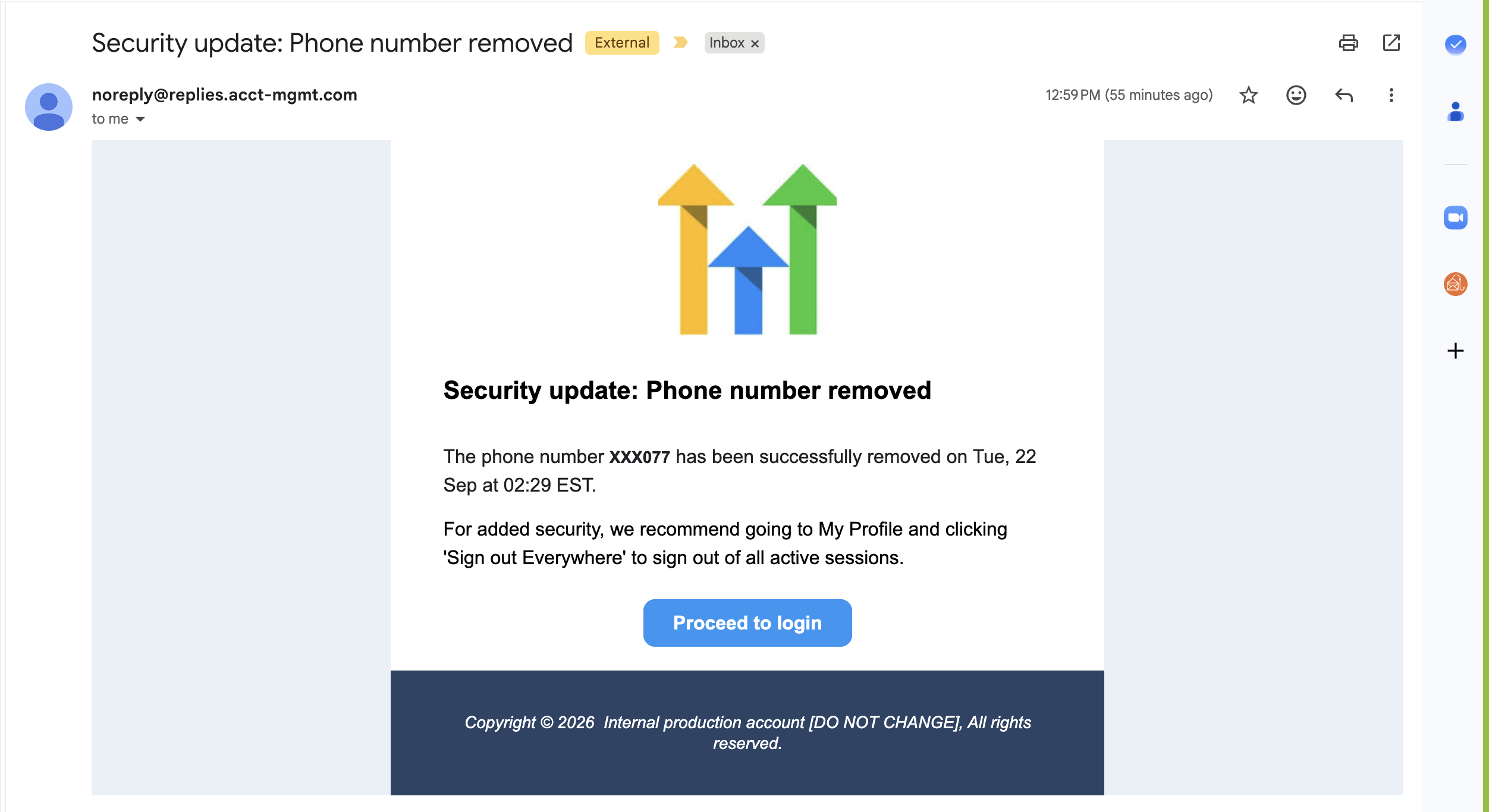
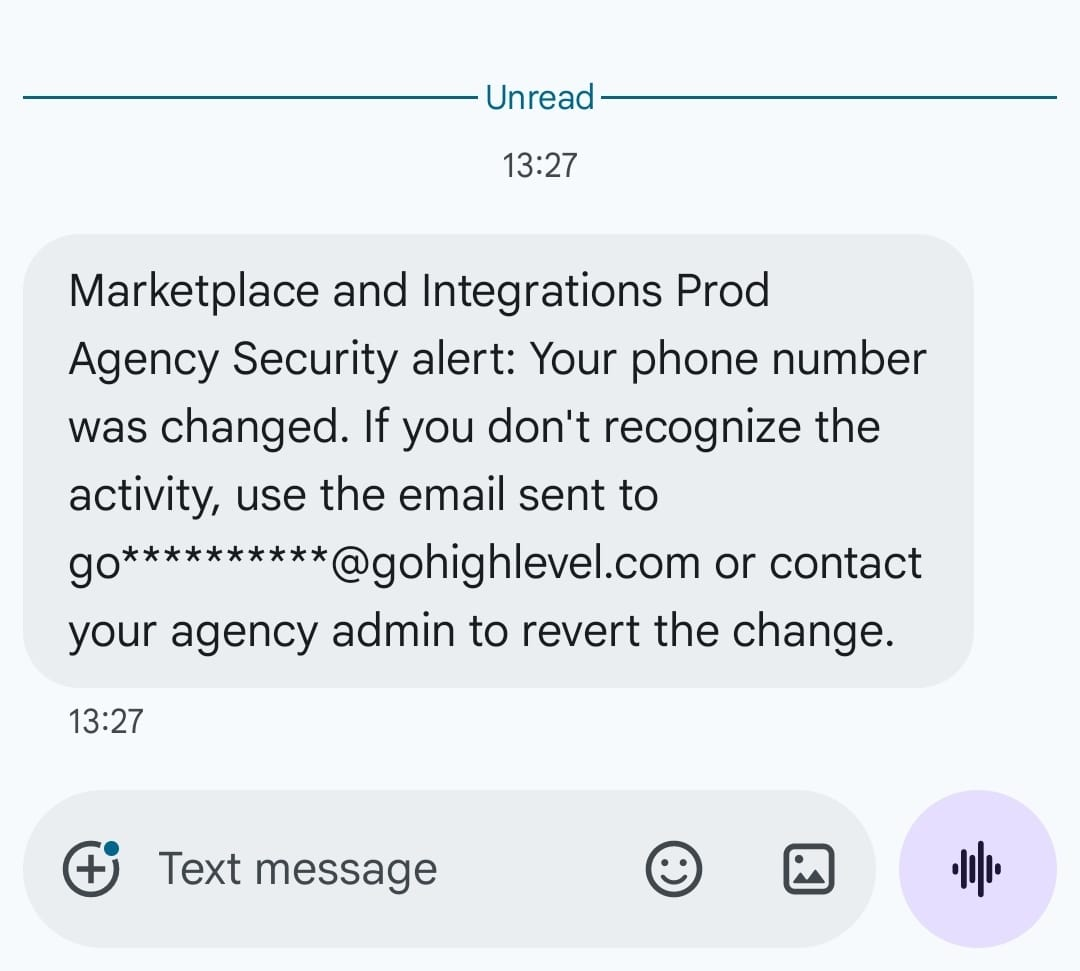
For a phone number change, notifications can include:
Email notification
In-app notification
SMS notification sent to the previous phone number
The notification identifies:
What information changed
When the change occurred, displayed in the user’s timezone
Whether the change was initiated by you or by your admin
What action to take if the change was unexpected
Key Benefits of Phone Number Change Security Alerts and Reversal
Phone-number security notifications give users immediate awareness of changes to an account field that may affect authentication and account access. The reversal option also reduces reliance on administrator or support intervention when an existing number was changed unexpectedly.
Immediate visibility: Users are proactively notified when their phone number is added or changed.
Multiple notification channels: Alerts can reach the affected user through email, in-app notifications, and, for phone-number changes, SMS to the previous number.
Clear change attribution: Users can see whether the update was made by them or by an administrator.
Self-service recovery: An unexpected phone-number change can be reversed using a single-use link.
No login required for reversal: Users can restore the previous phone number even if the change affected their normal authentication flow.
Time-limited protection: The reversal link remains valid for 7 days.
White-label support: Security alerts use the agency’s branding and domain rather than Chat To Clients CRM branding.
Auditability: Phone-number reversals are recorded so security-sensitive activity can be traced.
How Phone Number Security Notifications Work
Security notifications are designed to make sensitive phone-number changes visible to the person whose account information was updated. The notification method depends on whether a number is being added for the first time or an existing number is being replaced.
When a user’s phone number is added or changed, Chat To Clients CRM generates a security alert for the affected user.
For an existing phone-number change:
An email security alert is sent.
An in-app security notification is generated.
An SMS security alert is sent to the previous phone number.
The alert provides information about when and how the change occurred.
A reversal link is included so the previous phone number can be restored if necessary.
Sending an SMS to the previous number is especially important because it gives the person who previously controlled that number an opportunity to recognize and respond to an unexpected change.
If the change was expected, the user does not need to take any action.
Phone Number Changes Made by an Admin
Administrator-initiated changes receive the same security visibility as changes made directly by users. This helps ensure that users remain informed when an administrator updates security-sensitive profile information on their behalf.
Chat To Clients CRM supports user management at both the agency and sub-account levels. Agency users can be managed from Agency View > Settings > Team, while sub-account users can be managed from Sub-Account > Settings > My Staff. Existing user-management controls allow authorized users to edit profile information such as a user’s phone number.
When an administrator changes another user’s phone number, the security alert identifies the action as being performed by your admin.
This allows the affected user to distinguish an administrator-initiated change from one they performed themselves.
Security alerts also cover supported admin-impersonation and user-management flows where a phone number is changed on the user’s behalf.
Reversing an Unexpected Phone Number Change
The reversal link provides a direct recovery path when an existing phone number was changed unexpectedly. Because the reversal does not require a Chat To Clients CRM login, users can act even when the updated number may interfere with their normal authentication process.
Each eligible security alert includes a single-use reversal link.
The link:
Is valid for 7 days
Can be used only once
Does not require the user to log in
Restores the previous phone number
Displays a confirmation after the reversal is completed
If the phone-number change was expected, no action is required.
If the change was unexpected:
Open the security alert.
Review the change details to verify when the phone number was changed and who initiated the update.
Click the reversal link in the alert.
Chat To Clients CRM restores the previous phone number.
Review the confirmation page to verify that the reversal was completed.
Security Alerts and White-Label Agencies
White-label security notifications protect the agency’s branded experience while still delivering important account-security information. Users receive the security alert through the agency’s branding and domain rather than seeing unrelated platform branding.
Phone-number change alerts are white-label safe and use:
The agency logo
The agency domain
Agency-facing branding
The alerts do not display Chat To Clients CRM or Chat To Clients CRM references when delivered through a white-label agency experience.
This allows agencies to maintain a consistent customer experience while still providing security-sensitive notifications.
Phone Number Changes and Two-Factor Authentication
Phone-number change notifications complement existing account-verification safeguards by adding visibility after a security-sensitive update occurs. Users should treat an unexpected phone-number alert seriously because phone numbers may be involved in receiving authentication codes.
Chat To Clients CRM supports phone-based security codes as part of account access and authentication workflows. Existing troubleshooting guidance also instructs administrators to add a user phone number when SMS security codes are required for login.
The phone-number security alert and reversal process is designed to provide an additional safeguard after a phone-number update. It does not replace other identity-verification or two-factor authentication protections used during account-management workflows.
If a phone-number change was expected, the notification can be treated as confirmation of the update. If it was unexpected, the user can use the reversal link while it remains valid.
Auditability of Phone Number Reversals
Recording security-sensitive account activity helps agencies investigate unexpected changes and maintain accountability. Chat To Clients CRM records phone-number reversals so the action can be traced as part of the account’s security history.
Chat To Clients CRM Audit Logs provide time-stamped records of supported account activity and can include information about the user, module, action, and affected changes. Audit Logs are available in both agency and sub-account contexts, with the available scope depending on where the activity occurred.
Every phone-number reversal performed through the security recovery process is recorded. For general account-change investigations, authorized users can access Audit Logs from:
Agency: Settings > Audit Logs
Sub-Account: Settings > Audit Logs
Audit Logs can also be filtered by criteria such as user, module, action type, and time range where those filters are available.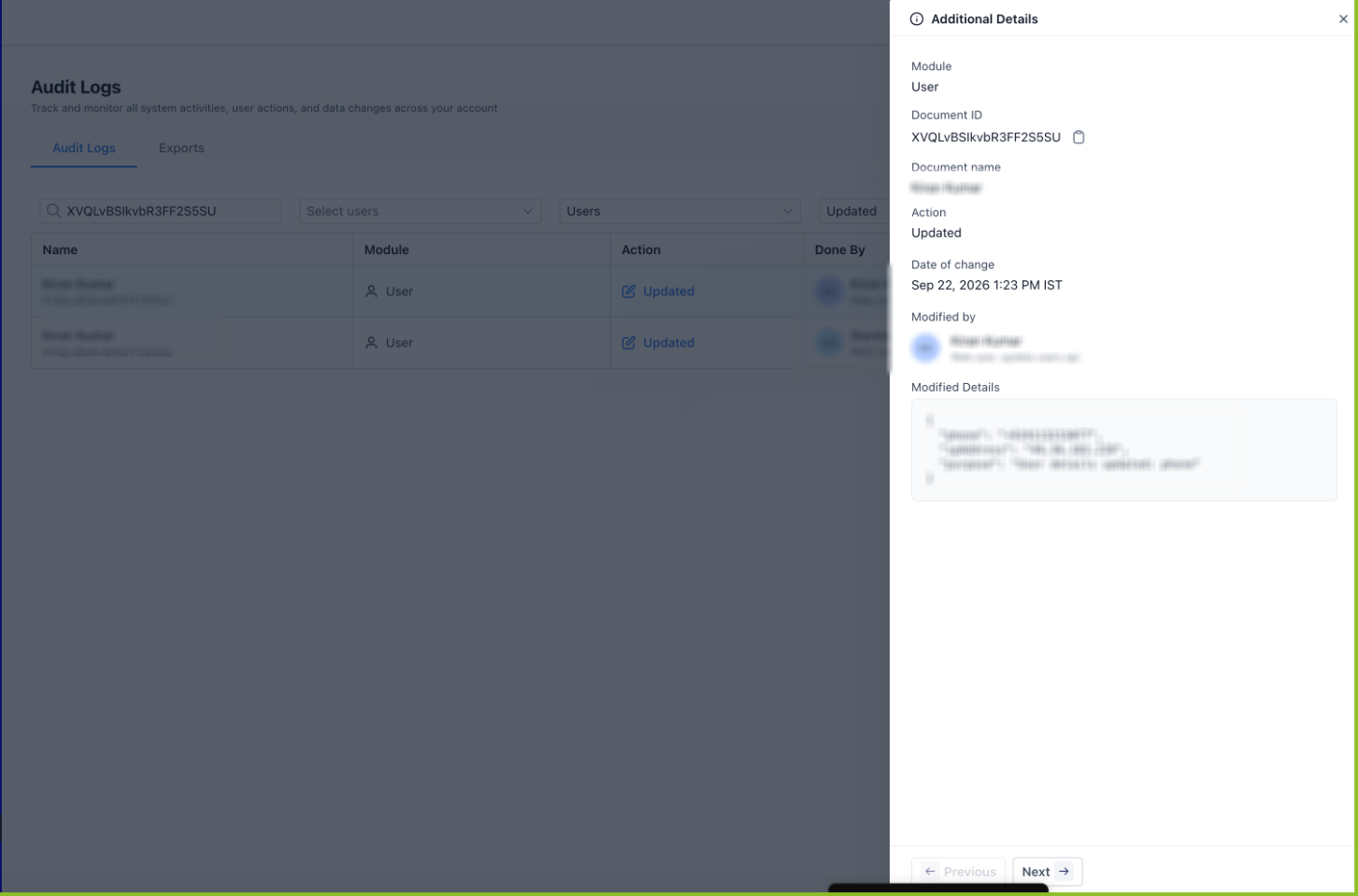
How To Use Phone Number Change Security Alerts and Reversal
Knowing how to respond to a security alert helps users distinguish legitimate account maintenance from an unexpected change. Reviewing the alert promptly is especially important because reversal links are valid for a limited period.
If you made or expected the change
Open the phone-number security notification.
Review the change details.
Confirm that the time and change origin match the action you expected.
No further action is required.
If you did not expect the change
Open the security alert as soon as possible.
Confirm that the phone-number change was not authorized by you.
Review whether the alert identifies the change as made by you or by your admin.
Click the single-use reversal link.
Complete the reversal within 7 days of the original change.
Confirm that the previous phone number has been restored on the confirmation page.
Review other account-security settings and contact your agency administrator if you need help investigating the unexpected change.
Frequently Asked Questions
Q: Do I need to take action when I receive a phone-number security alert?
No. If you recognize and expected the phone-number update, no action is required. The notification serves as confirmation that the change occurred.
Q: How long is the reversal link valid?
The single-use reversal link is valid for 7 days.
Q: Do I need to log in to Chat To Clients CRM to reverse the change?
No. The reversal link can restore the previous phone number without requiring a login.
Q: Can the same reversal link be used multiple times?
No. The reversal link is single-use.
Q: Why is an SMS sent to my old phone number?
When an existing phone number is changed, sending an alert to the previous number helps notify the person who is losing access to that security channel.
Q: Can I tell whether I changed the phone number or an administrator changed it?
Yes. The security alert identifies the initiator as either by you or by your admin.
Q: Will these notifications display Chat To Clients CRM branding for a white-label agency?
No. The alerts are designed to use the agency’s branding and domain for the white-label experience.
Q: What should I do if my reversal link has expired?
The self-service reversal link is valid for 7 days. If the link is no longer valid and the phone number needs to be corrected, contact an authorized agency administrator or the appropriate support channel for assistance.
Q: Are phone-number reversals recorded?
Yes. Reversal activity is recorded for auditability.