
Company domain name field and duplicate prevention
Every company can hold one web domain, such as acme.com. It is what keeps you to a single company record per business, and what the system checks when it looks for the company a new contact belongs to.
TABLE OF CONTENTS
- What the Domain name field is for
- Add a domain to a company
- Keep one company per domain
- Fill in domains for companies you already have
- Things to know
- Frequently asked questions
- Related articles
What the Domain name field is for
Two things depend on it:
- Duplicate prevention. With it switched on, only one company in your sub-account can hold a given domain.
- Matching. When a contact arrives with a business email, their domain is the first thing checked to find their company.
A company with no domain still works normally. It just is not covered by duplicate prevention, and contacts cannot be matched to it by domain until you add one.
You will see the field in three places:
- On the company record as Domain name, under Company Info
- As a column on your companies list
- In imports, smart lists and the API as
domainname, next tocompanylogo
Add a domain to a company
- Open the company record.
- Under Company Info, enter the domain in Domain name.
- Select Save.
Enter the domain on its own. Use acme.com, not https://www.acme.com, and do not enter an email address.
Domains also arrive on their own in two other ways. The system saves one when it creates a company from a contact's email domain, or when it adds a domain to a company that did not have one. And you can add them in bulk to the companies you already have, covered below.
Note: a domain you entered yourself is never overwritten, by matching or by anything else.
Keep one company per domain
Go to Settings > Objects > Companies and turn on Automatically prevent duplicate companies under Automations.
- On, recommended. One company per domain. A second company cannot take a domain that is already in use, so matching always resolves to exactly one company.
- Off. Several companies can hold the same domain. Matching still works the same way, but it has more than one company to choose from.
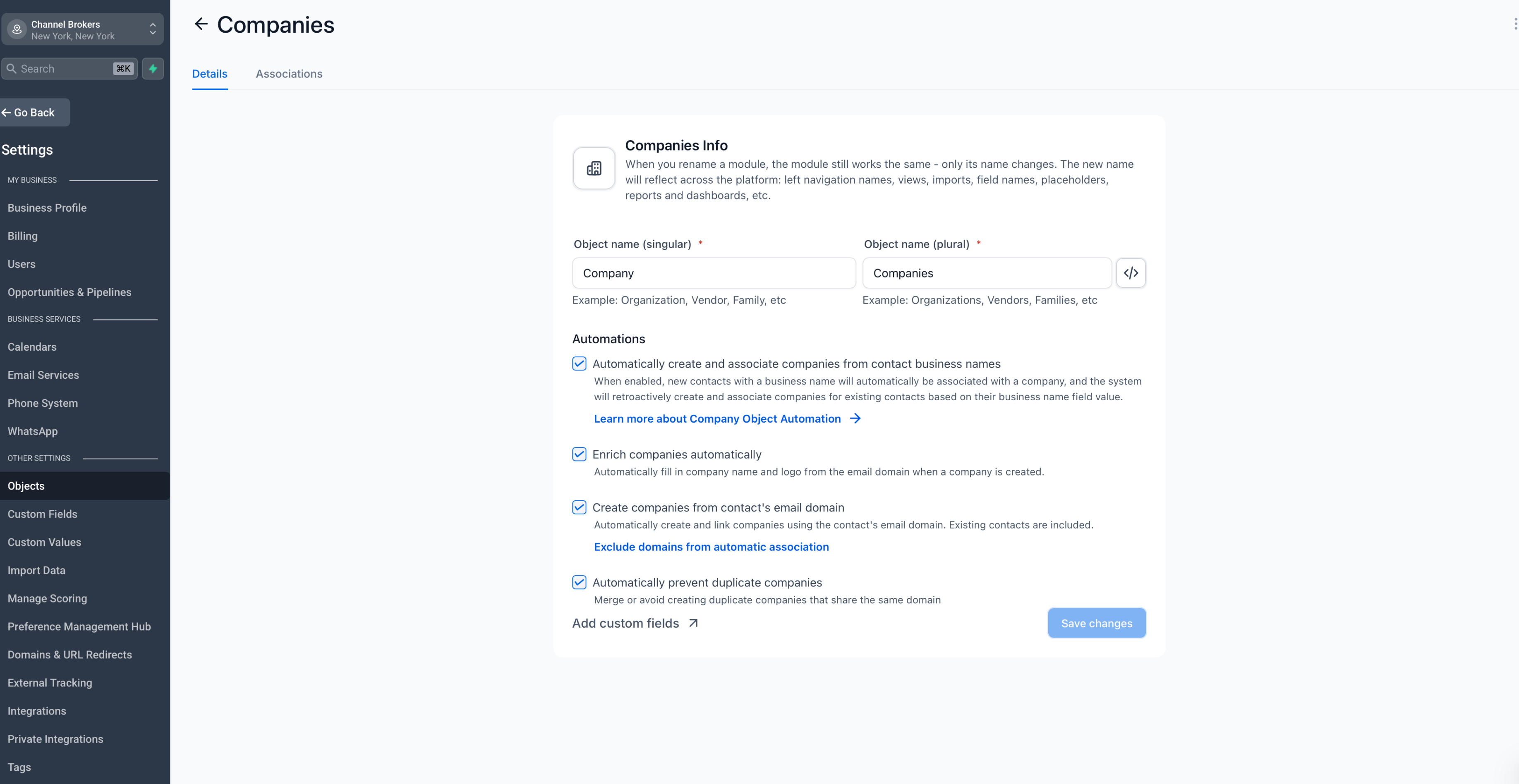
If you turn it off you will see a warning, and the change is recorded so it can be traced later.
Note: this stops new duplicate domains from being created. It does not merge company records you already have. If you already have two records for the same business, they stay separate until you resolve them yourself.
Matching is exact, so acme.com and mail.acme.com count as different domains.
Fill in domains for companies you already have
Companies created before you started using domain matching usually have no domain on them. Until they do, contacts cannot be matched to them by domain and duplicate prevention does not cover them.
When you turn on Create companies from contact's email domain, you are offered Fill in domains for existing companies. It works through the companies you already have and adds a domain wherever it safely can, using each company's website, or looking the domain up from the company name where there is no website.
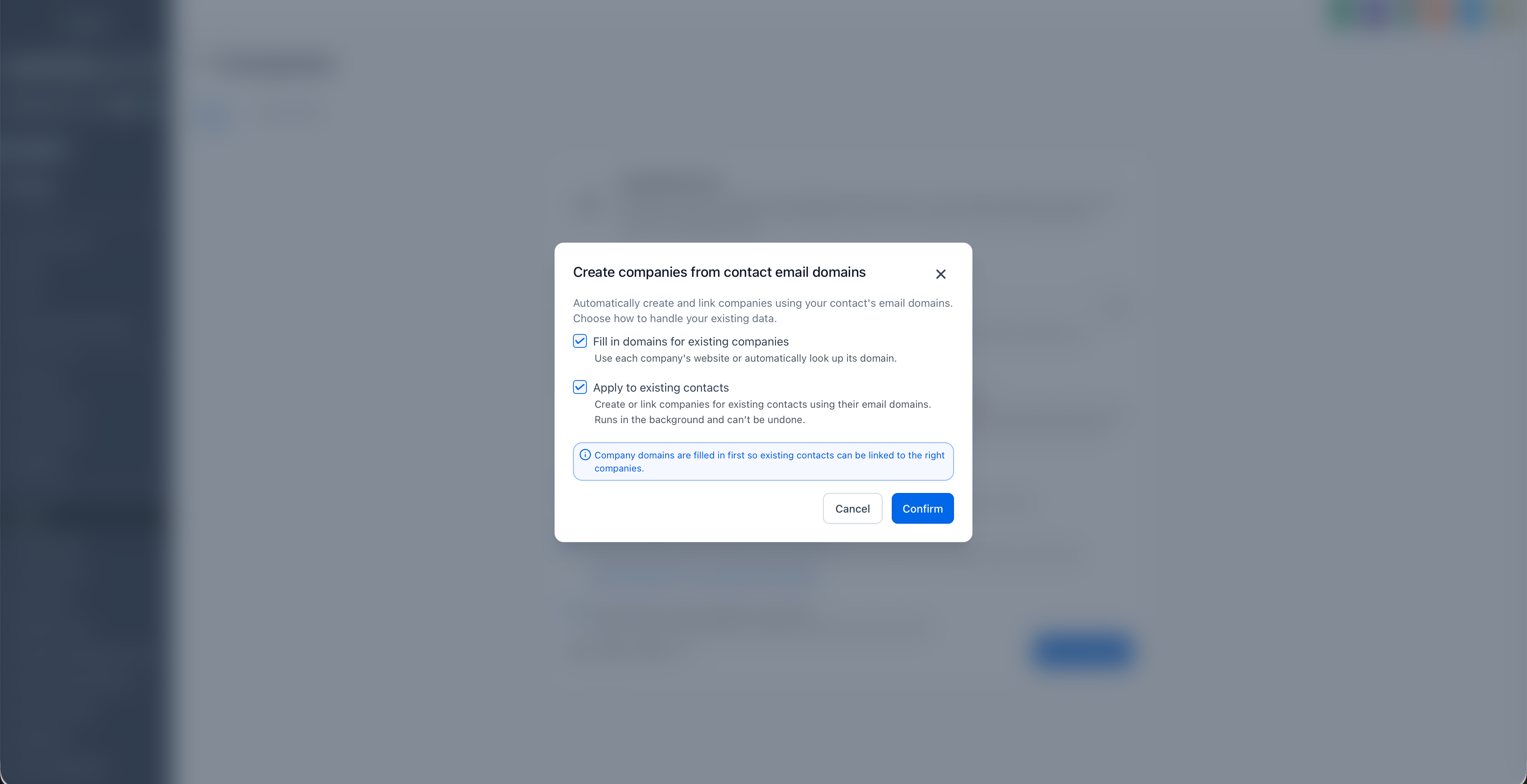
What gets skipped:
- Domains you entered yourself. These are never changed.
- Free email providers, such as a company whose website field contains gmail.com.
- Social and website-builder addresses like Facebook, LinkedIn, Wix, Squarespace and Linktree, so unrelated companies are not all given the same address.
- Values that are not domains, such as a phone number typed into the website field.
- Companies that would end up sharing a domain. If several of your companies point at the same website, none of them is updated, so you can decide which one should own it.
For example, four branch records might all list the same head-office website. Rather than give the domain to whichever record came first, all four are left alone for you to sort out.
It runs in the background and the time it takes depends on how many companies you have. You can keep working while it runs. If you also chose to apply matching to your existing contacts, domains are filled in first, so your contacts attach to the companies you already have.
Note: this does not trigger your workflows, webhooks or integrations. Your automations carry on running normally for companies created or updated the usual way.
Companies you add later pick up a domain when a contact is matched to them, or you can add it yourself on the record.
Things to know
- Domain matching is exact. Subdomains do not count as the same domain.
- A company holds one domain. If a business uses several, keep the main one on the record and handle the rest yourself.
- Duplicate prevention does not merge companies you already have.
- Filling in domains cannot be undone, and it never overwrites a domain you entered yourself.
Frequently asked questions
1. What format should the domain be in?
The domain on its own, such as acme.com. Leave out https://, the www prefix, any path, and do not use an email address.
2. Can two companies share a domain?
Only if you turn duplicate prevention off. We do not recommend it, because matching then has more than one company to choose from.
3. Does turning on duplicate prevention merge companies I already have?
No. It stops new duplicate domains. Existing duplicates have to be resolved by you.
4. Are subdomains matched to the main domain?
No. Matching is exact, so acme.com and mail.acme.com are different domains.
5. Will filling in domains overwrite a domain I set myself?
Never.