
How to Manually Retry Failed Subscription Payments
Manual payment retries allow you to recover failed subscription payments directly from the Subscription Details page in Chat To Clients CRM. For supported payment providers, you can retry the oldest unpaid payment using an existing or newly added card after automatic retries are exhausted or unavailable. You can also choose whether the selected card should be used for future recurring payments on the subscription.
TABLE OF CONTENTS
- What is Manual Retry for Failed Subscription Payments?
- Key Benefits of Manual Payment Retries
- Manual Retry Limits
- How to Manually Retry a Failed Subscription Payment
- Frequently Asked Questions
- Related Articles
What is Manual Retry for Failed Subscription Payments?
Manual retry gives you another way to collect an unpaid subscription payment without leaving Chat To Clients CRM. It complements automatic payment retries by allowing you to initiate another payment attempt when an eligible subscription has an Unpaid or Past due payment.
Manual retries are available for subscriptions using:
- NMI
- Authorize.Net
- Square
- Mercado Pago
Key Benefits of Manual Payment Retries
- Recover failed payments: Retry eligible unpaid subscription payments directly from Chat To Clients CRM.
- Use another payment method: Select an existing saved card or add a new card for the retry.
- Update future payments: Choose whether the selected card should be used for future recurring payments on the subscription.
- Reduce involuntary churn: Provide another opportunity to collect failed subscription payments without using an external collection process.
Manual Retry Limits
Retry limits help manage repeated unsuccessful payment attempts with the same card. Chat To Clients CRM tracks failed manual attempts and temporarily prevents additional retries when the limit is reached.
- You can make up to 3(three) unsuccessful retry attempts using the same card.
- After three unsuccessful attempts, a 24-hour cooldown applies before that card can be retried.
- Chat To Clients CRM displays a localized warning when another retry with the card is not yet available.
How to Manually Retry a Failed Subscription Payment
Manual retries are initiated from the subscription's payment details. The Retry Payment option allows you to select a payment method and attempt to collect the oldest unpaid payment.
- Go to Payments > Subscriptions.
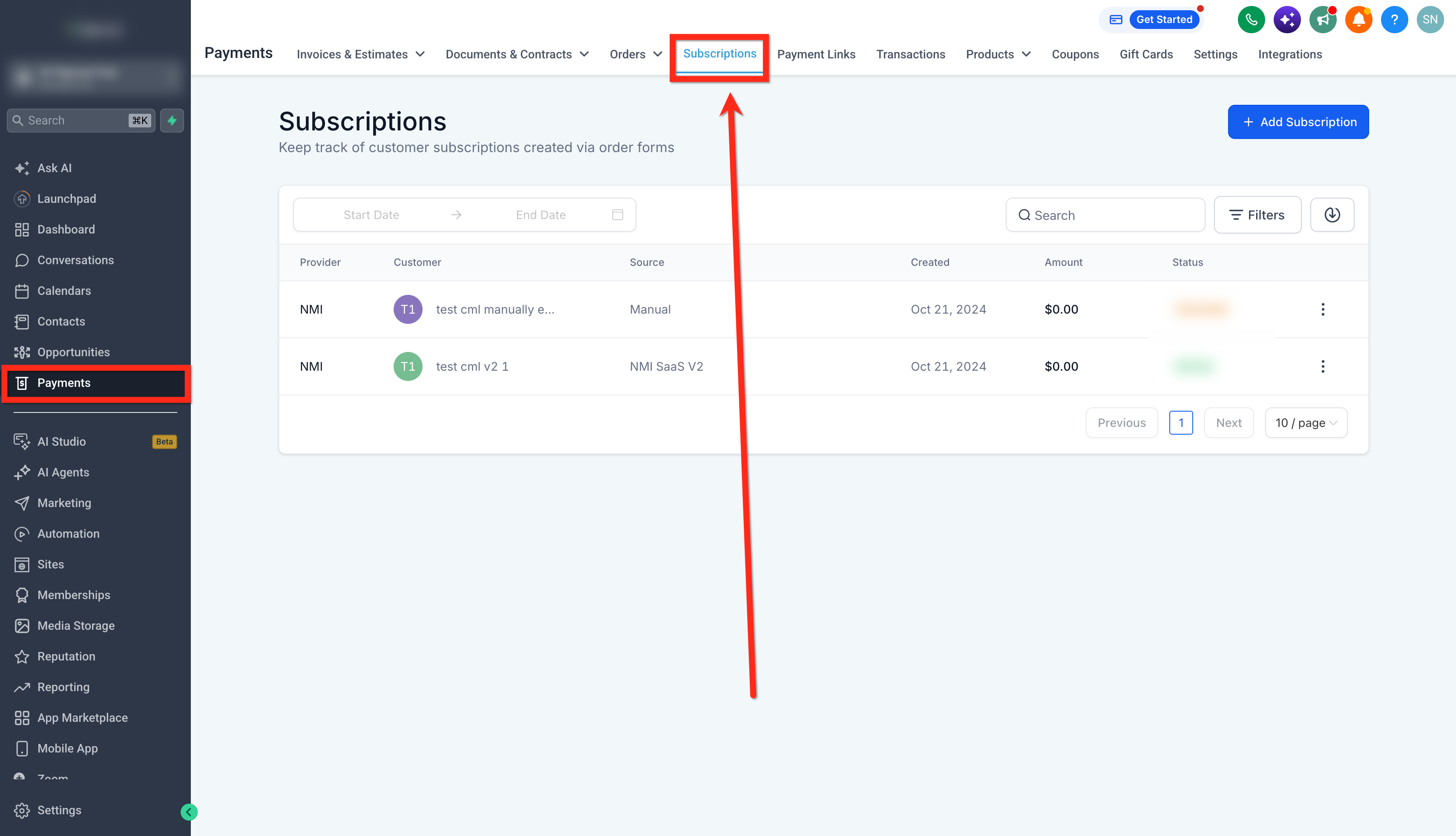
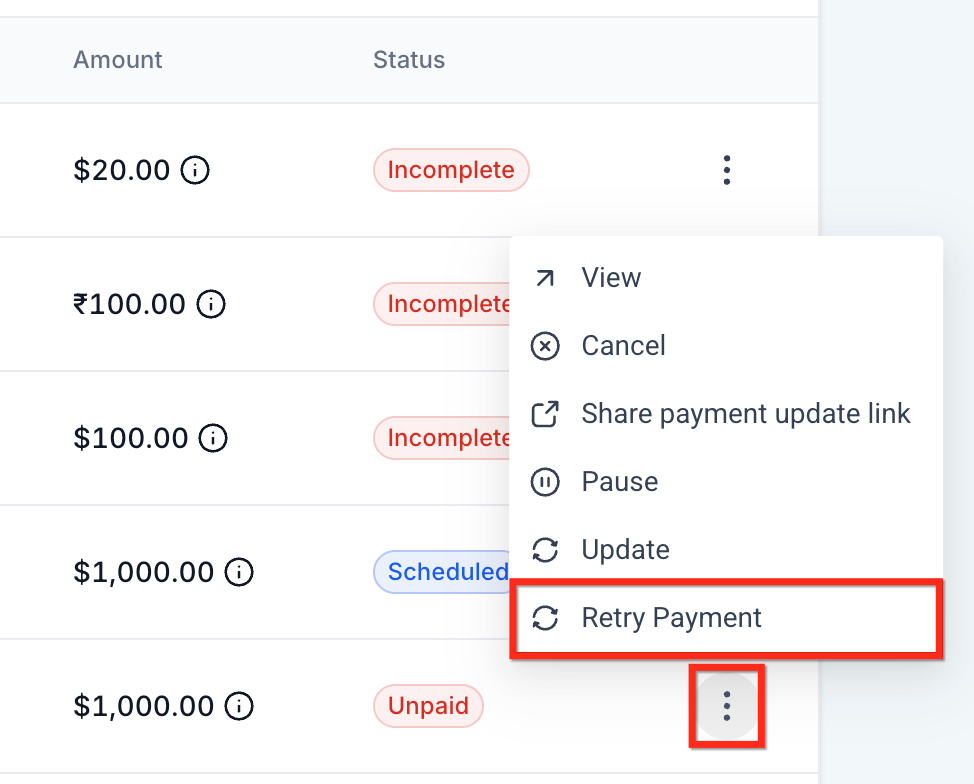
- Locate the applicable failed payment and open its Actions menu.
- Click Retry Payment.
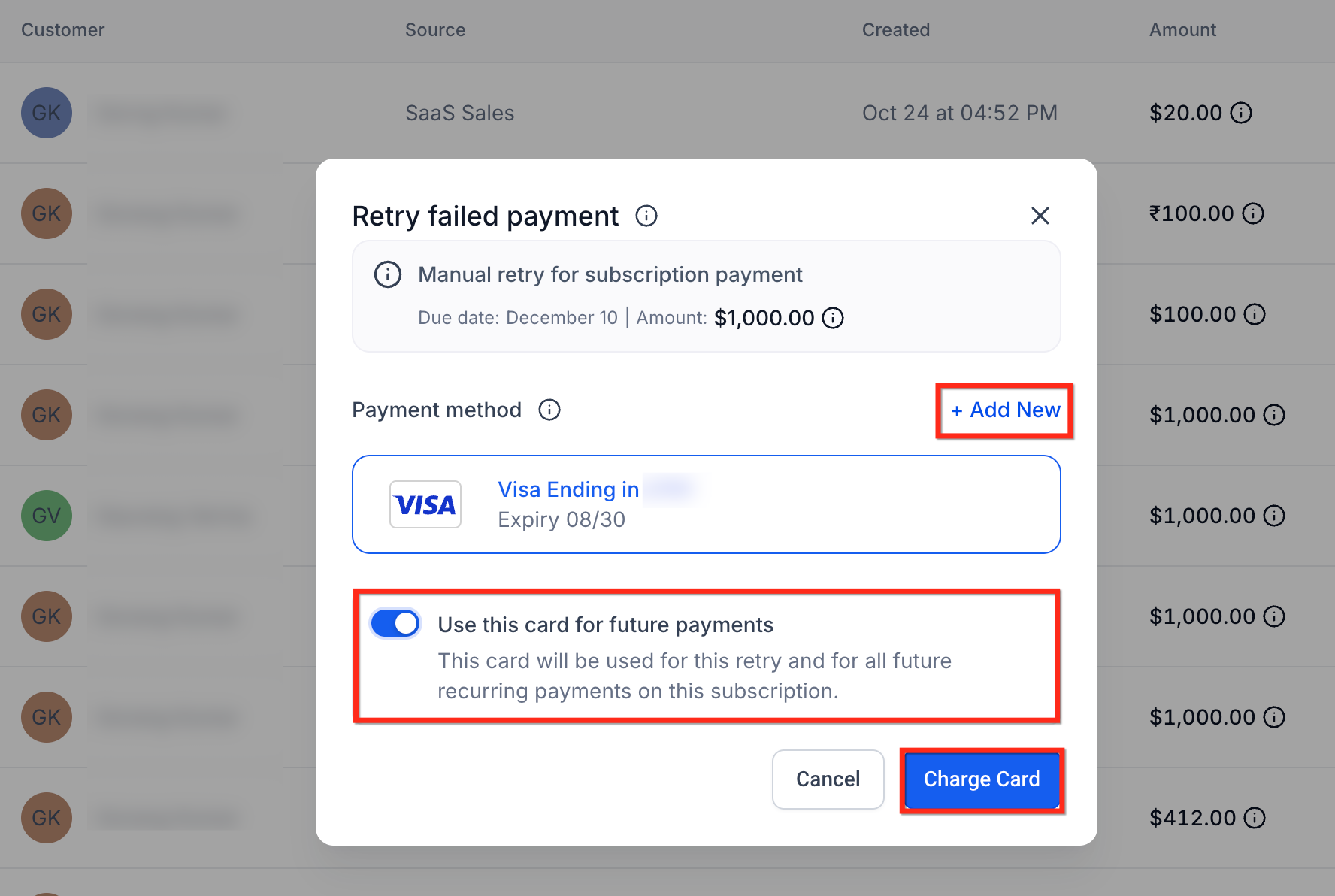
- Review the payment information displayed in the Retry failed payment window.
- Select a saved card or click + Add New to add another card.
- Enable Use this card for future payments if you want the selected card to be used for this retry and future recurring payments on the subscription.
- Click Charge Card to retry the payment.
Frequently Asked Questions
Q: Which payment providers support manual subscription payment retries?
Manual retries are available for NMI, Authorize.Net, Square, and Mercado Pago subscriptions.
Q: Which unpaid payment is retried?
Chat To Clients CRM retries the oldest unpaid payment on the subscription.
Q: Can I use a different card to retry the payment?
Yes. You can select a saved card or add a new card when initiating the retry.
Q: Do I have to use the retry card for future subscription payments?
No. You can choose whether the selected card should also be used for future recurring payments by using the Use this card for future payments option.
Q: What happens if the same card fails three times?
After three unsuccessful retry attempts with the same card, a 24-hour cooldown applies before that card can be retried.