
AI Agency Assistant Plan
The AI Agency Assistant Plan gives agencies a simple way to provide agency-level admins and users with Ask AI and AI Studio usage for $20 per user, per month. Instead of being tied to a single sub-account, coverage follows each enrolled agency user across the sub-accounts where they work. This article explains how the plan works, including eligibility, billing and proration, usage allowances, and user management.
The AI Agency Assistant Plan is currently available in Labs. For more, refer to Labs Features - Complete Overview.TABLE OF CONTENTS
- What is the AI Agency Assistant Plan?
- Included Usage
- Who Can Use the Plan
- How Billing Works
- How to Add a User to the Plan
- How Cancellation Works
- Extra Usage and Overages
- Frequently Asked Questions
- Related Articles
What is the AI Agency Assistant Plan?
The AI Agency Assistant Plan gives agencies a user-based subscription option for Ask AI and AI Studio. For $20 per user, per month, an enrolled agency admin or agency user receives included usage for both AI products across the sub-accounts where they work.
Because coverage follows the user rather than an individual sub-account, agencies can provide team members with consistent AI access across multiple client accounts without purchasing separate coverage for each location. The subscription is billed directly to the agency's card.
| Price | $20.00 per user, per month |
| Covers | Ask AI and AI Studio only |
| Who can be added | Agency Admins and Agency Users |
| Available on | $297 & $497 plans |
| Charged to | The agency's card |
| Scope | Follows the user into every sub-account |
Important: The AI Agency Assistant Plan covers Ask AI and AI Studio only. Other Chat To Clients CRM AI products are not included as part of this subscription.
Included Usage
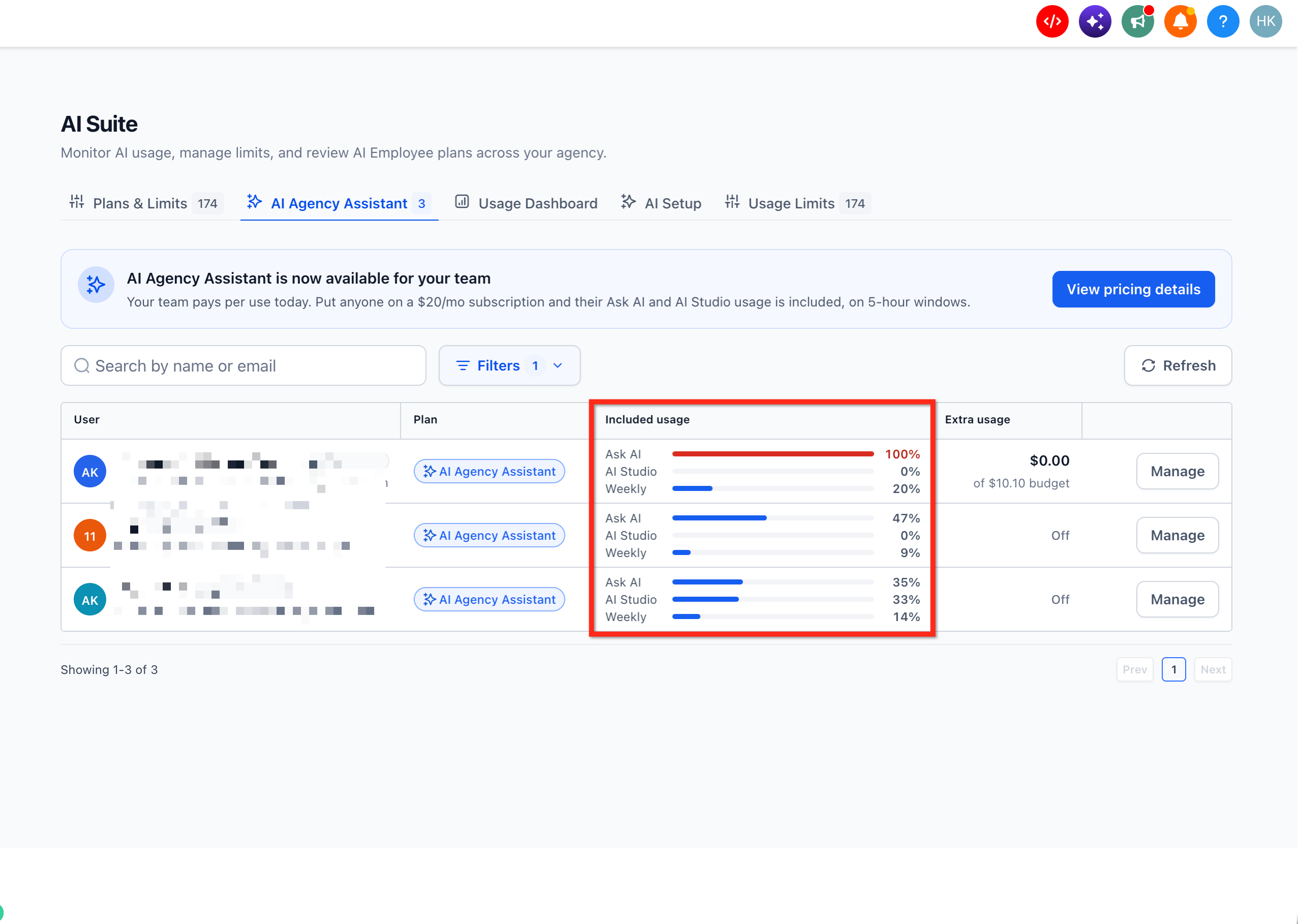
Each enrolled user has three usage meters:
| Usage meter | What counts toward it |
|---|---|
| Ask AI — 5 hours | Ask AI usage only |
| AI Studio — 5 hours | AI Studio usage only |
| Weekly — 7 days | Ask AI and AI Studio usage combined |
Think of these as three moving meters. When you use Ask AI, both the Ask AI meter and the Weekly meter increase. When you use AI Studio, both the AI Studio meter and the Weekly meter increase.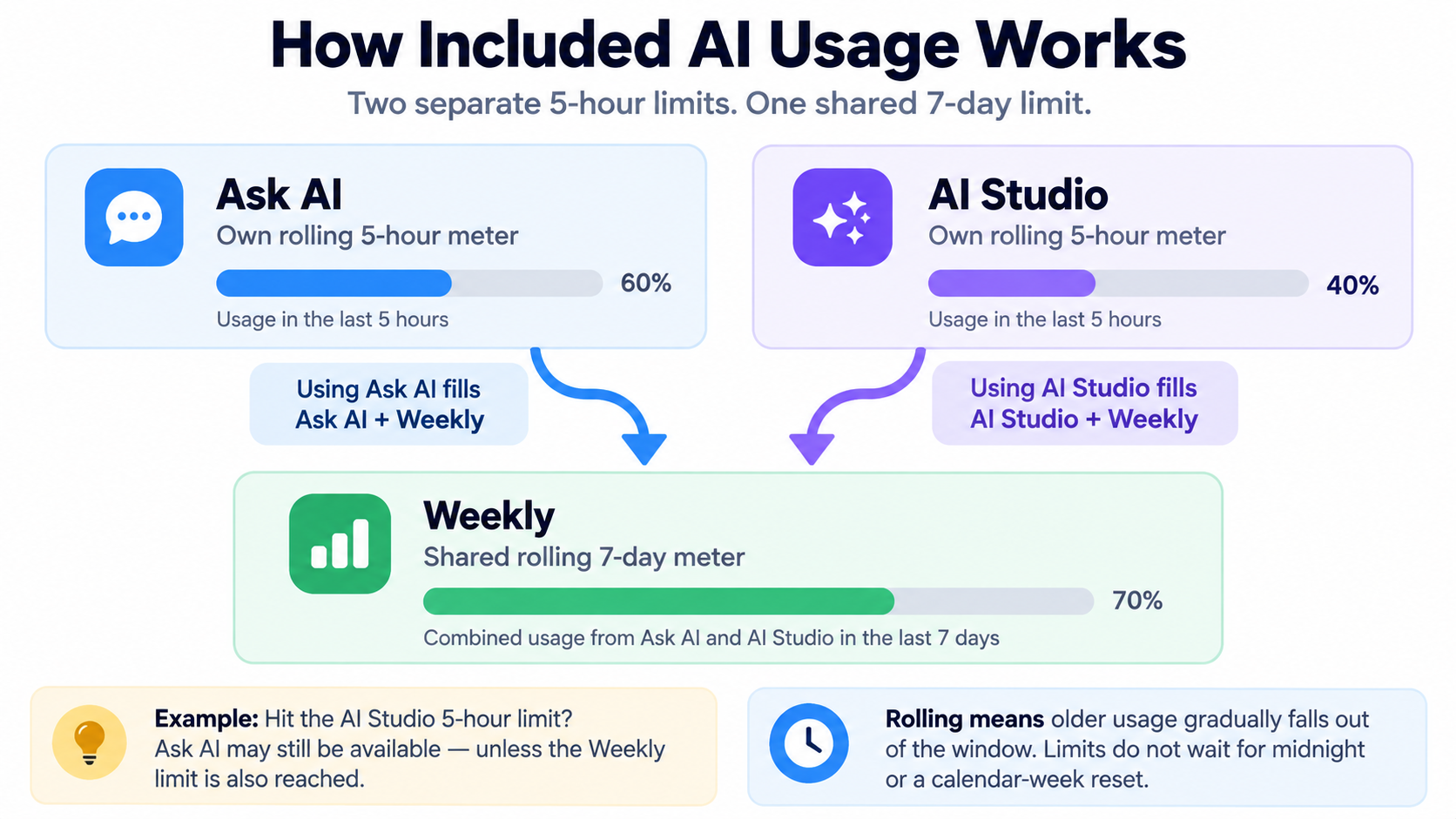
Separate 5-Hour Usage Limits
Ask AI and AI Studio each have their own 5-hour usage limit.
- Reaching the Ask AI limit does not automatically exhaust the AI Studio limit.
- Reaching the AI Studio limit does not automatically exhaust the Ask AI limit.
- You may still be able to use one product after reaching the 5-hour limit for the other.
For example, if you reach the AI Studio 5-hour limit, Ask AI may still have included usage available.
Shared 7-Day Usage Limit
The Weekly meter combines your Ask AI and AI Studio usage over the previous seven days.
If the Weekly meter reaches its limit, your included usage is exhausted across both products, even when one of the 5-hour meters is below its limit.
In simple terms:
- Ask AI usage counts toward the Ask AI meter and the Weekly meter.
- AI Studio usage counts toward the AI Studio meter and the Weekly meter.
How Rolling Usage Limits Work
These limits do not reset at midnight or at the beginning of a calendar week.
The system always measures usage from the previous 5 hours or 7 days. As older usage moves outside the applicable period, included usage gradually becomes available again.
Example: Heavy AI Studio usage may fill the AI Studio 5-hour meter while Ask AI remains available. However, that AI Studio usage still counts toward the shared Weekly meter.
We use 5-hour rolling usage limits and weekly rolling ceilings to help ensure AI resources are shared fairly across all users, preventing unusually high usage from affecting availability or performance while giving everyone consistent, reliable access to AI features.
Who Can Use the Plan
The AI Agency Assistant Plan can be assigned to agency admins and agency users. Sub-account users cannot be added to the plan.
Once enrolled, the user's coverage applies across the sub-accounts where they work. This means the subscription belongs to the user rather than to an individual location.
Note: The AI Agency Assistant Plan is only available on the $297 & $497 plans.
How Billing Works
The AI Agency Assistant Plan costs $20 per enrolled user per month and is charged to the agency's card.
The plan uses a shared agency subscription cycle so agencies can add additional team members without creating a separate renewal date for every enrolled user. Understanding how the first enrollment and subsequent enrollments are billed can help explain charges that occur between renewal dates.
Adding the First User
When the first user is added to the plan, the agency is charged $20 immediately. The date of that charge establishes the agency's monthly renewal date for the subscription.
Adding Any Additional Users
When another user is added during an existing billing cycle, the agency is charged immediately for the prorated remainder of that cycle. The agency does not need to wait until its next renewal date before the newly enrolled user receives plan coverage. On the next renewal, enrolled users continue under the agency's established subscription cycle.
For example, if the subscription renews on the 11th and another user is added on the 9th, the immediate charge covers only the remaining portion of the current billing cycle (2 days). They are then charged for a full month on the 11th.
How to Add a User to the Plan
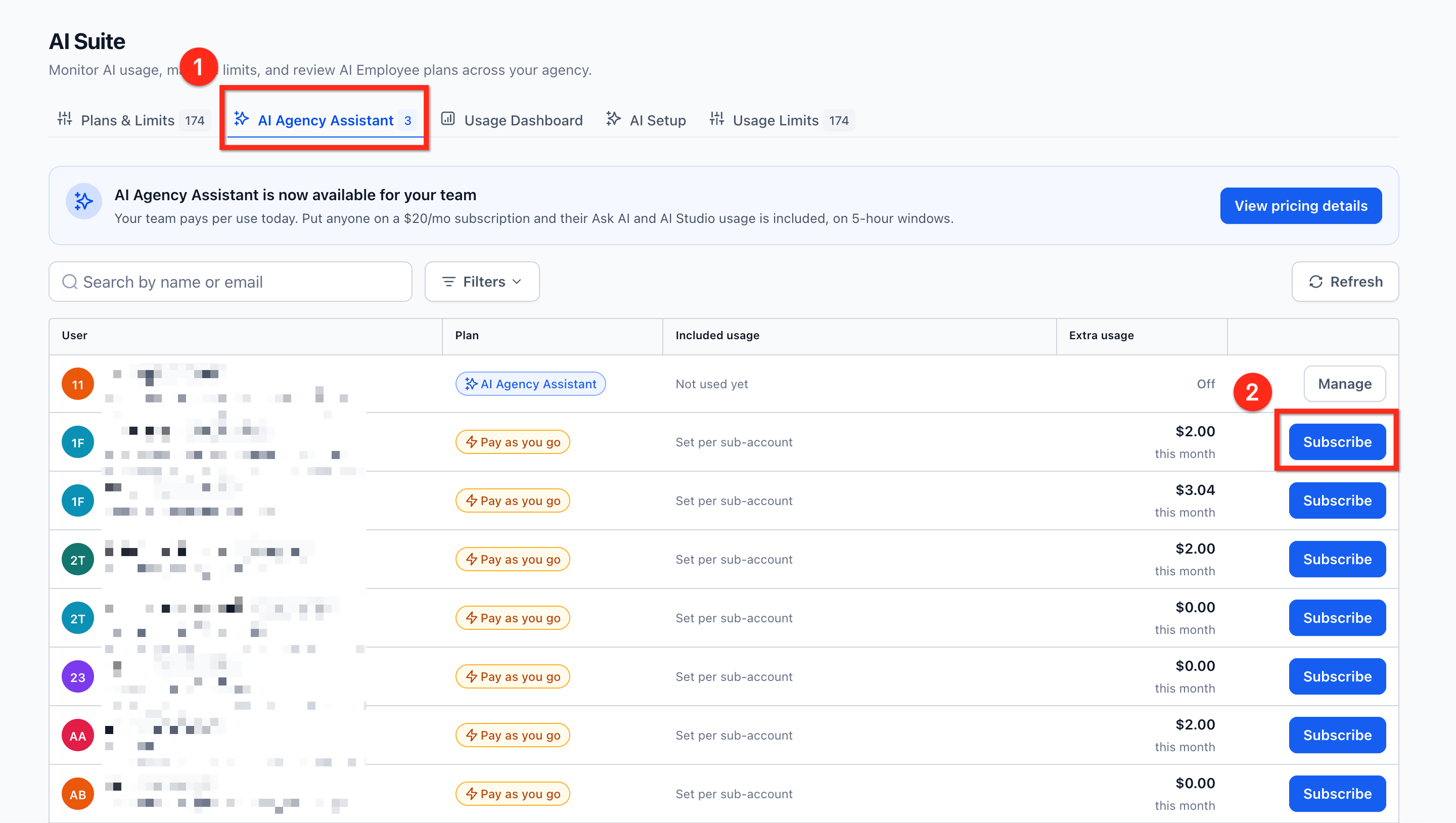
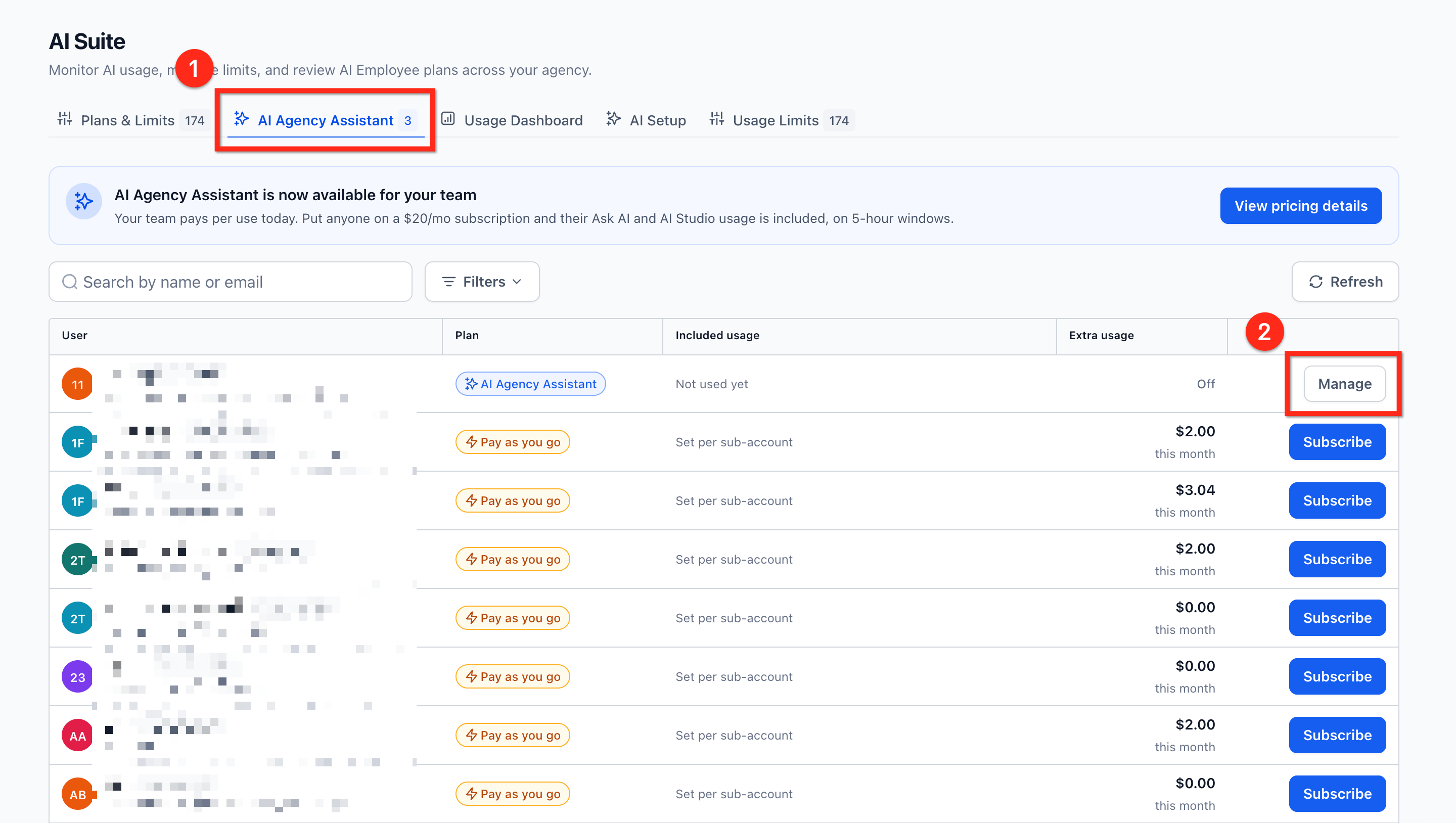
- From your Agency Dashboard, navigate to AI Suite then to the AI Agency Assistant tab.
- Locate the agency user you want to enroll and click Subscribe.
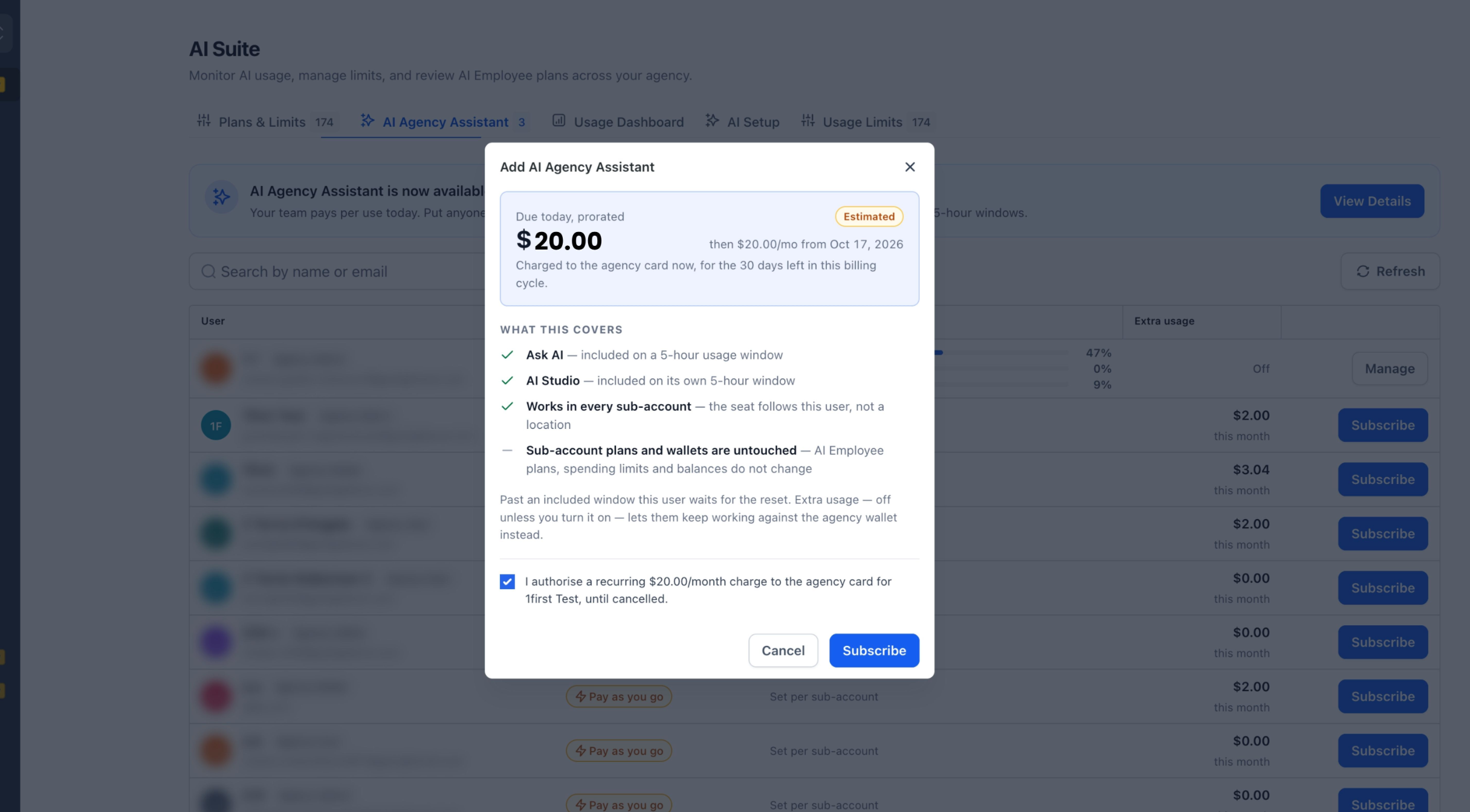
Review the subscription details. If the agency already has an active AI Agency Assistant Plan subscription, the prorated amount that will be charged immediately is displayed.
Select the authorization checkbox and click Subscribe.
How Cancellation Works
Canceling mid cycle will let user use the product until their end date, and will not renew for the next cycle. Once removed, the user's plan allowance ends and their AI usage returns to pay-per-use billing.
If the last enrolled user is removed, the agency's AI Agency Assistant Plan subscription is canceled. The change may take a minute or two to fully appear in Chat To Clients CRM.
Extra Usage and Overages
By default, once a user reaches the applicable AI Agency Assistant Plan usage limit, additional usage is blocked.
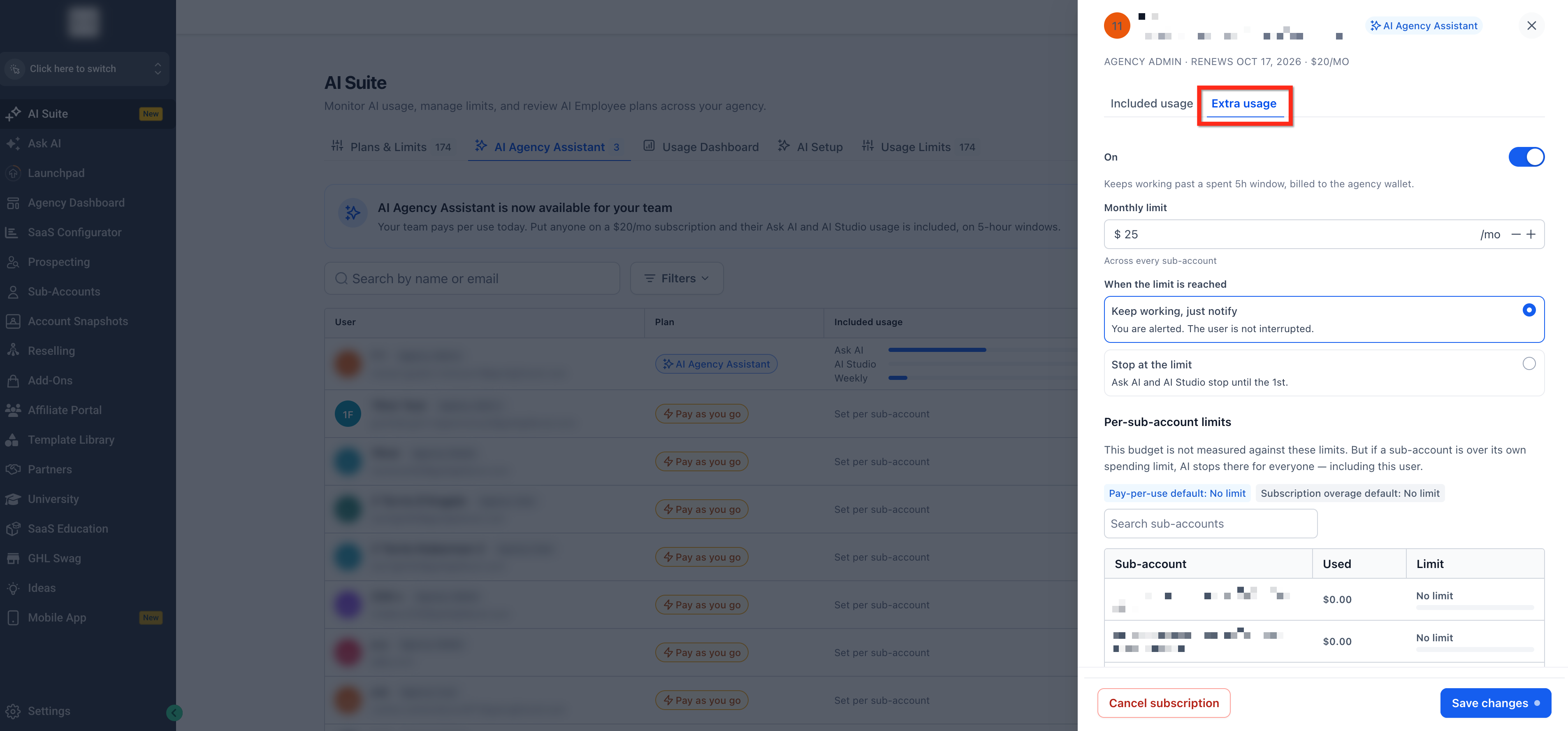
Agencies can optionally enable Extra Usage for individual enrolled users. When Extra Usage is enabled, the user can continue using Ask AI and AI Studio after reaching their included allowance, and the additional usage is charged at the applicable pay-per-use rates.
Important: Extra Usage applies only after both the AI Agency Assistant Plan allowance and any eligible sub-account AI plan usage have been exhausted.
Extra Usage Settings
When Extra Usage is enabled, agencies can configure how much additional usage is available and what happens when the configured limit is reached.
- Monthly Limit: Set the maximum amount of Extra Usage available to the user each month across all sub-accounts.
- When the Limit Is Reached: Choose what happens after the monthly Extra Usage limit is reached:
- Keep working, just notify: The agency is alerted, but the user's AI usage continues.
- Stop at the limit: Ask AI and AI Studio stop using Extra Usage until the monthly limit resets.
- Per-Sub-Account Limits: Configure spending limits for individual sub-accounts. If a sub-account reaches its own spending limit, AI usage stops in that sub-account for everyone.
How to Configure Extra Usage
- From your Agency Dashboard, navigate to AI Suite then to the AI Agency Assistant tab.
- Locate the user to edit and click the Manage button.
- Navigate to the Extra Usage tab. Use the toggle to enable extra usage for the user, configure the settings then click Save changes.
Frequently Asked Questions
Q: Does the plan work in every sub-account, or just one?
Every sub-account that user works in, it follows the user, not a location.
Q: Is it available across all plans?
This can be bought in $297 and $497 plans only.
Q: If a user isn't on the plan, does their usage route to the agency?
No, by default. It only routes to the agency wallet if that sub-account's "Rebill usage from sub-account users only" toggle is turned ON.
Q: Do Ask AI and AI Studio use the same 5-hour usage window?
No. Ask AI and AI Studio each have their own 5-hour usage window, and their reset times are tracked separately. For example, if you use AI Studio from 1 PM to 3 PM, its usage would fully reset by 8 PM. If you then use Ask AI from 3 PM to 5 PM, its usage would fully reset by 10 PM.
Q: What if I hit the limits?
Your usage by default will be blocked. You need to enable overages to continue using the products. For overages, you will be charged pay per use. For more information on per per use pricing, see AI Product Pricing.
Q: Can I resell this plan?
This is an agency only plan so you cannot resell it.
Q: Where can I purchase this plan?
This plan can be purchases from the AI Suite page.