
LC - Phone Messaging Quality Monitoring
LC - Phone tracks two things for every sub-account: how many people reply STOP, and how many of your messages carriers block as spam. If either climbs too high, you get a warning email. If it keeps climbing, bulk and automated SMS is paused for a short period while you fix the cause.
Replying to leads one-to-one in Conversations is never paused.
This article covers quality monitoring, opt-out rates and carrier filter errors (Error 30007). For consent requirements, opt-out language, sender ID, spam handling, and daily sending limits, see the LC - Phone Messaging Policy.
Why we monitor messaging quality
Mobile carriers , not the platform , decide whether your text messages get delivered. When too many people reply STOP to your messages, or too many of your messages get flagged as spam, carriers respond by throttling or permanently blocking your phone numbers.
Carrier blocks are hard to reverse, and they don't stay contained. Sustained poor sending erodes the reputation of the numbers your agency and your clients rely on.
Monitoring gives you early notice while the problem is still fixable, briefly pauses high-risk bulk sending so the damage stops spreading, and helps you get back to healthy delivery rates, before carriers make the decision for you.
What we measure
Two metrics, tracked separately for each sub-account:
| Metric | What It Measures |
|---|---|
| Opt-out rate | The percentage of contacts who reply with a standard opt-out keyword (e.g., STOP) after receiving your SMS |
| Error 30007 rate | The percentage of messages carriers flagged as filtered or blocked (Error 30007, “Message filtered”) |
Both rates are measured over a rolling 7-day window, and only once a sub-account has sent at least 500 SMS in that window. Below 500 messages, no warnings or restrictions are triggered.
RCS messages are excluded from these calculations and from restriction enforcement entirely.
What triggers a warning or a restriction
Thresholds depend on how long the sub-account has been sending SMS. Newer senders have no track record with carriers, so they are held to tighter limits.
- New : fewer than 7 days of SMS sending history
- Established : 7 or more days of SMS sending history
| Sub-Account | Warning at | Restriction at |
|---|---|---|
| New — opt-out rate | ≥ 3% | ≥ 10% |
| New — Error 30007 rate | ≥ 10% | ≥ 50% |
| Established — opt-out rate | ≥ 4% | ≥ 6% |
| Established — Error 30007 rate | ≥ 15% | ≥ 25% |
Either metric alone can trigger a warning or a restriction, they are evaluated independently. Your sub-account moves from New to Established automatically as it builds sending history; there is nothing to configure.
What happens: first, second, and repeated times
Restrictions escalate. The first one is short and you can end it yourself; repeated problems get longer and eventually require a person to review the account.
| Stage | Impact on Sending | How It Ends |
|---|---|---|
| Warning | None. Everything keeps sending. You get an email. | Clears on its own once your rates come back down |
| First restriction | Bulk, workflow, and campaign SMS paused | 12 hours, or sooner if you lift it yourself |
| Next restriction | Bulk, workflow, and campaign SMS paused | 24 hours, or sooner if you lift it yourself |
| Repeated problems | Bulk, workflow, and campaign SMS paused | Support review only — no automatic expiry, no self-lift |
Your rates are watched more closely for a few days (72hours). If they stay healthy, nothing further happens. If they climb again in that period, the next restriction applies right away, which is why it's worth fixing the cause before resuming bulk sends.
A sub-account with fewer than 7 days of sending history does not recover automatically after its first restriction. You'll need to request a Support review before bulk and automated sending is restored.
What still works during a restriction
A restriction stops outbound bulk sending. It does not cut off your ability to talk to leads who are already reaching out.
- One-to-one messages in Conversations, reply to every inbound lead as normal
- Missed Call Text Back (if configured)
- RCS messaging
- Bulk Actions from the Contacts area
- Workflow “Send SMS” actions
- Campaigns
How to get sending restored
Before anything else, fix what caused the restriction, pause the workflows or campaigns that drove the rate up, and clean the list they were sending to. Restoring sending without fixing the cause usually leads straight to the next restriction.
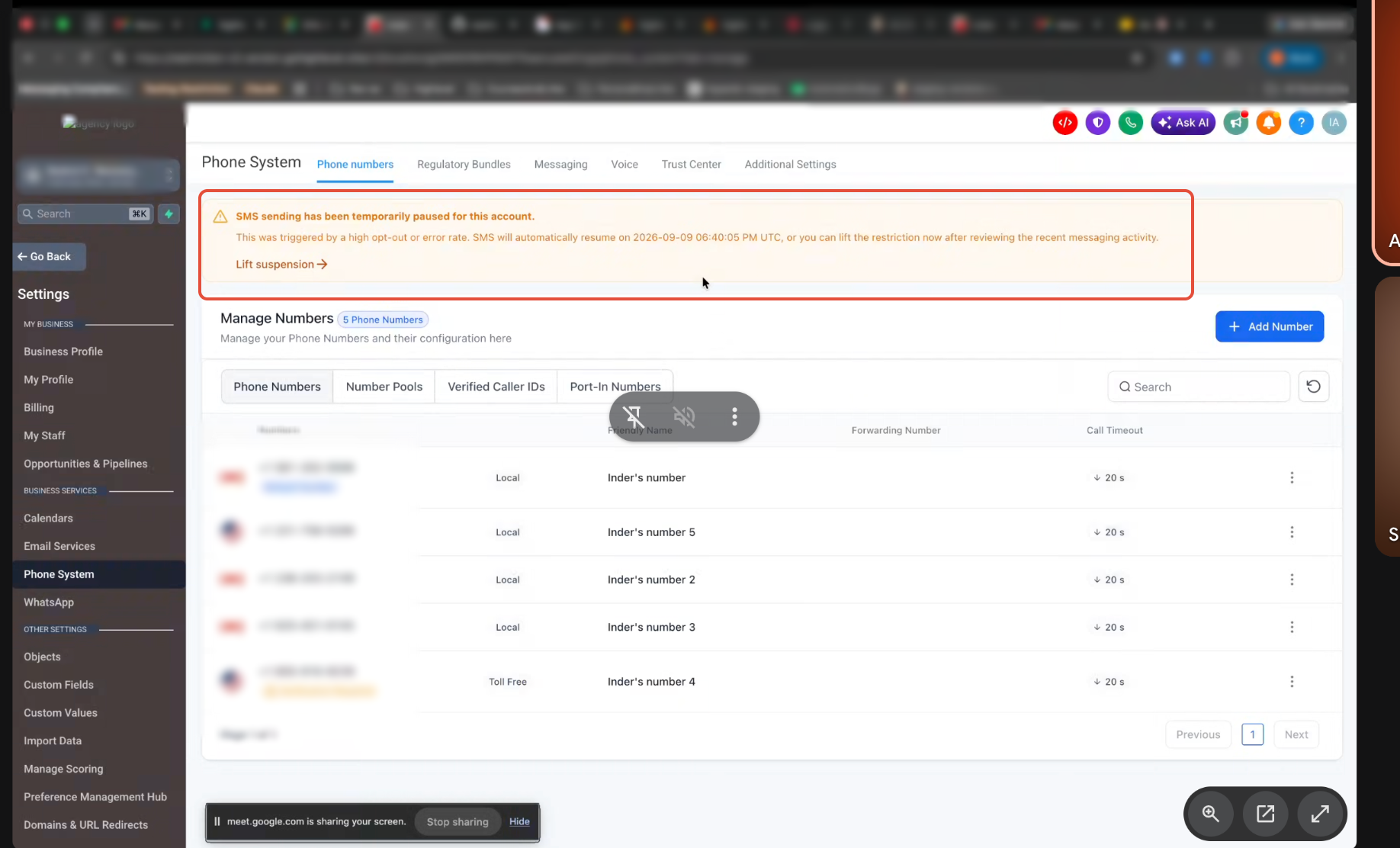
A 12-hour or 24-hour restriction lifts on its own and sending resumes automatically, no action needed, unless a Support review is open.
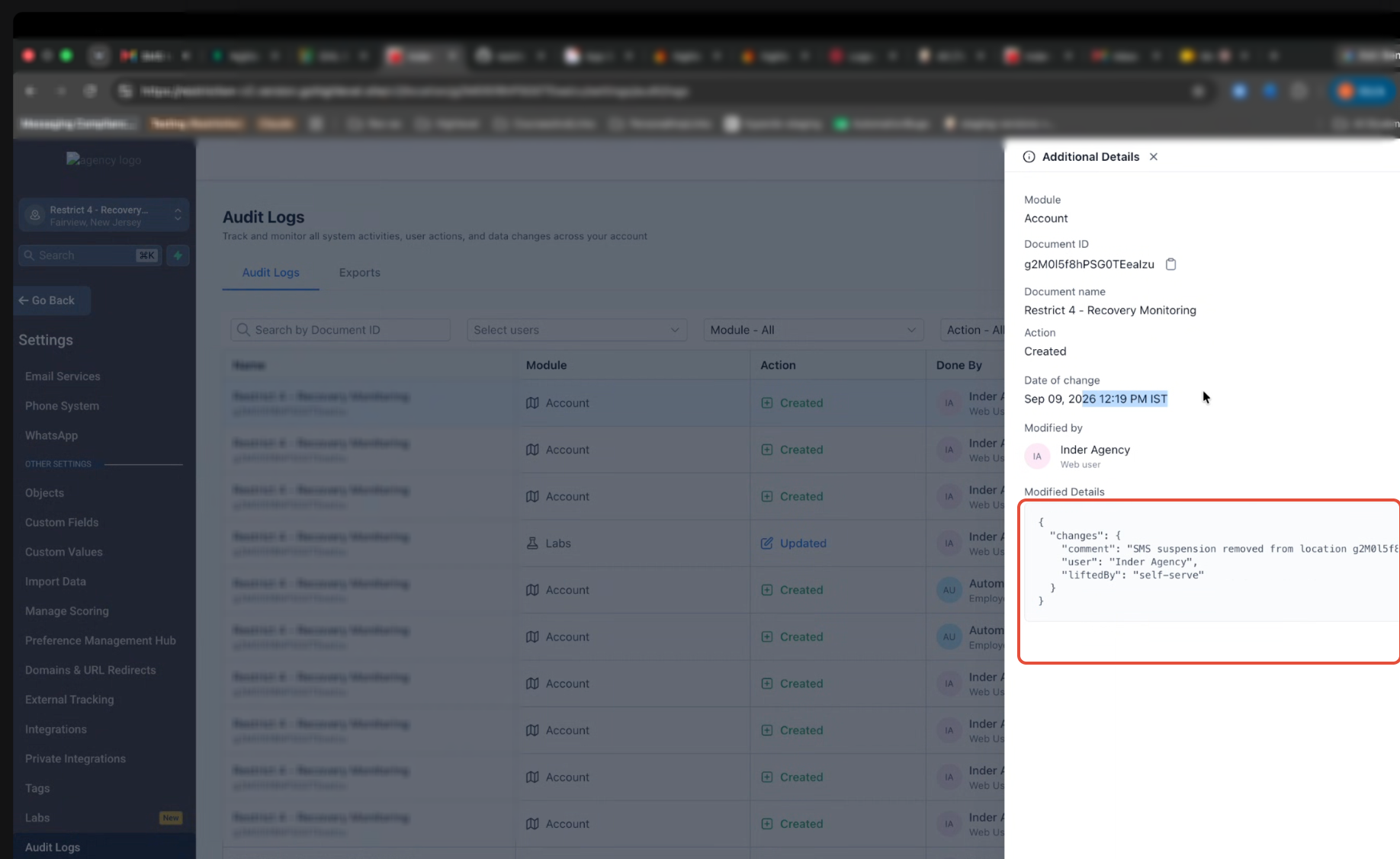
An agency owner or agency admin can end a 12-hour or 24-hour restriction early from the sub-account's phone settings. Regular users don't have this control, and each use is recorded in the audit log.
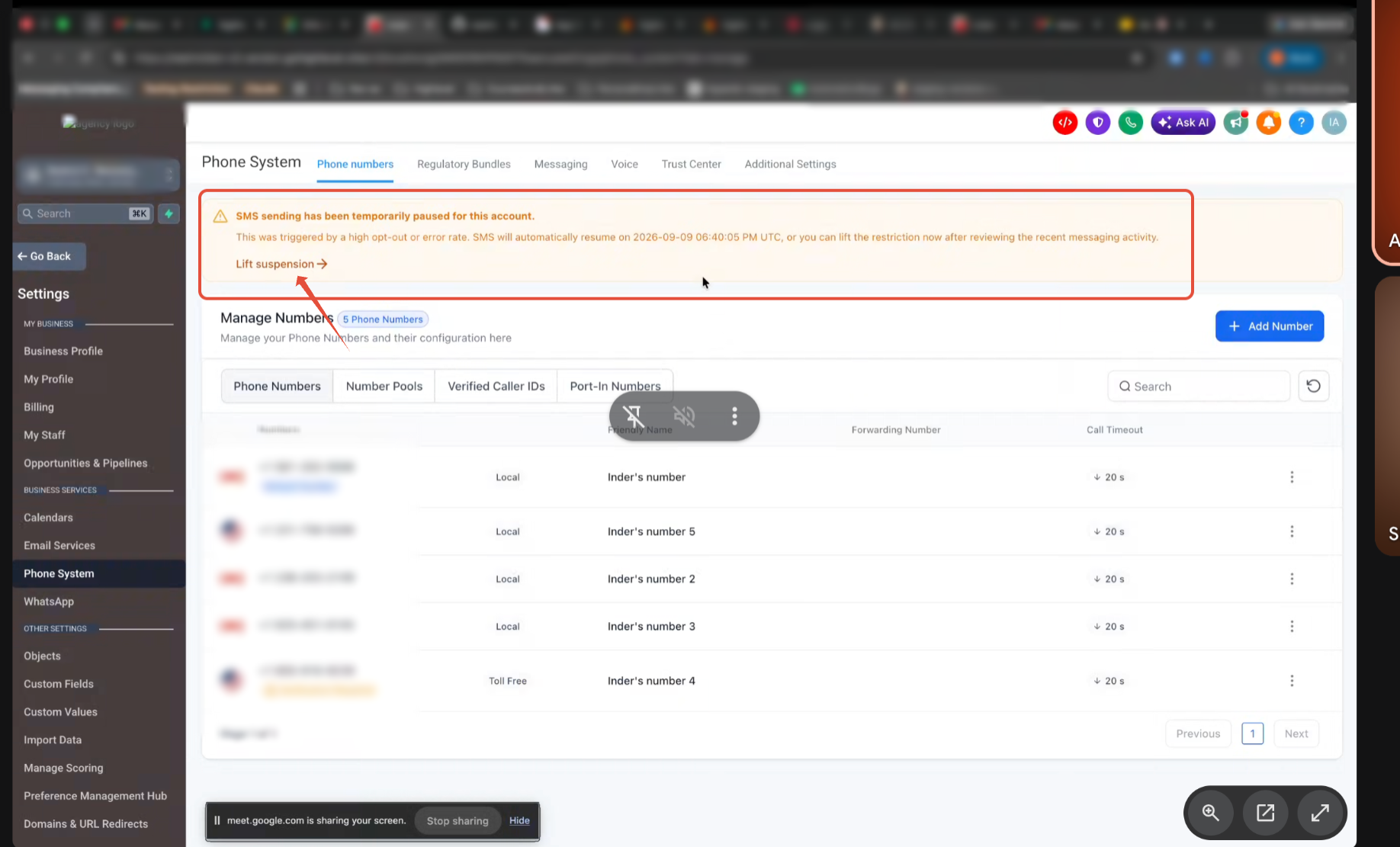
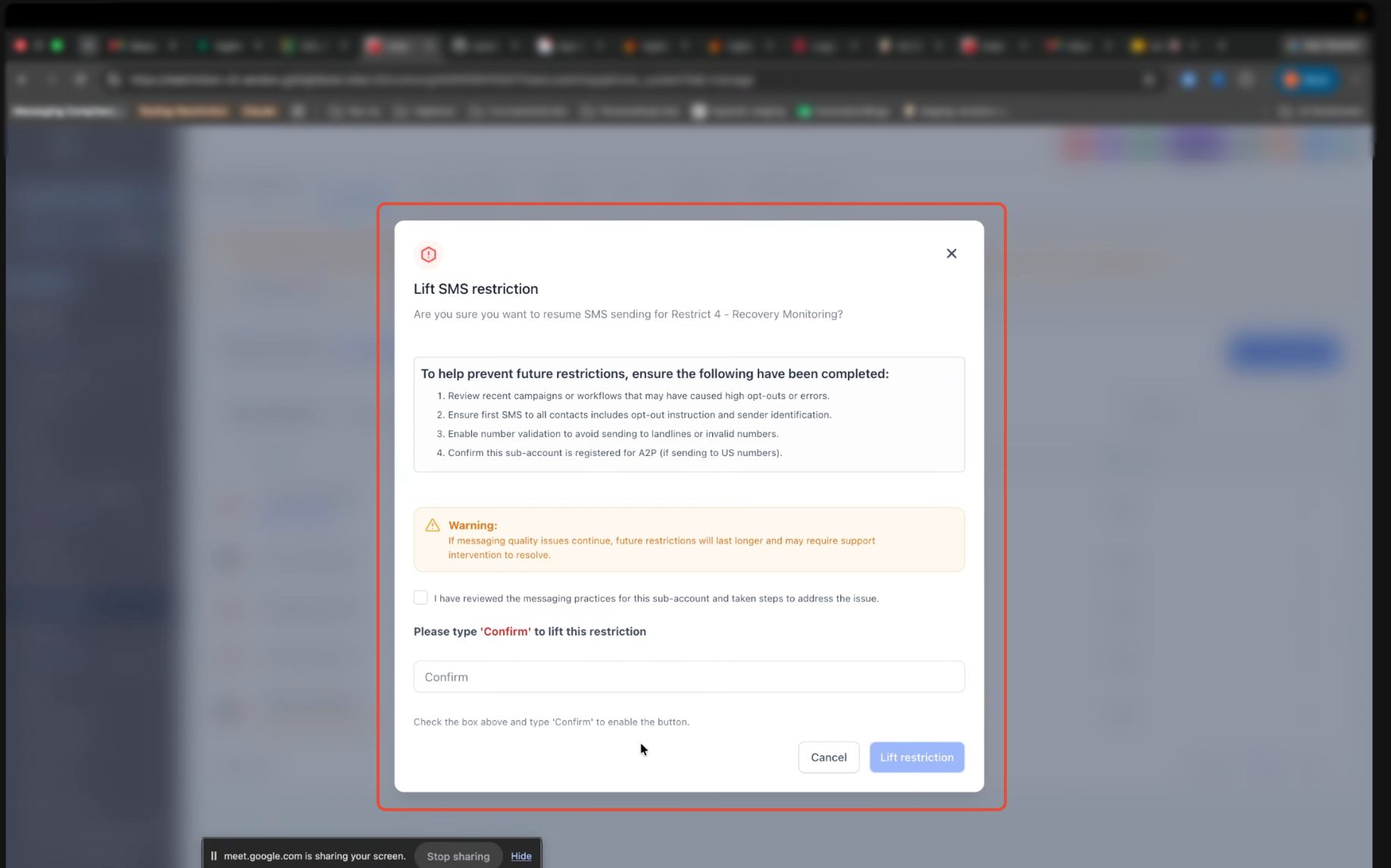
- Lifting restores sending but does not reset your rates, if the same messages keep going out, the next restriction follows quickly.
- You can only do this once every 24 hours.
- It's unavailable while a Support/Manual review is open.
- An audit log entry is created each time self-lift is used.
- Regular users do not have access to the self-lift control.
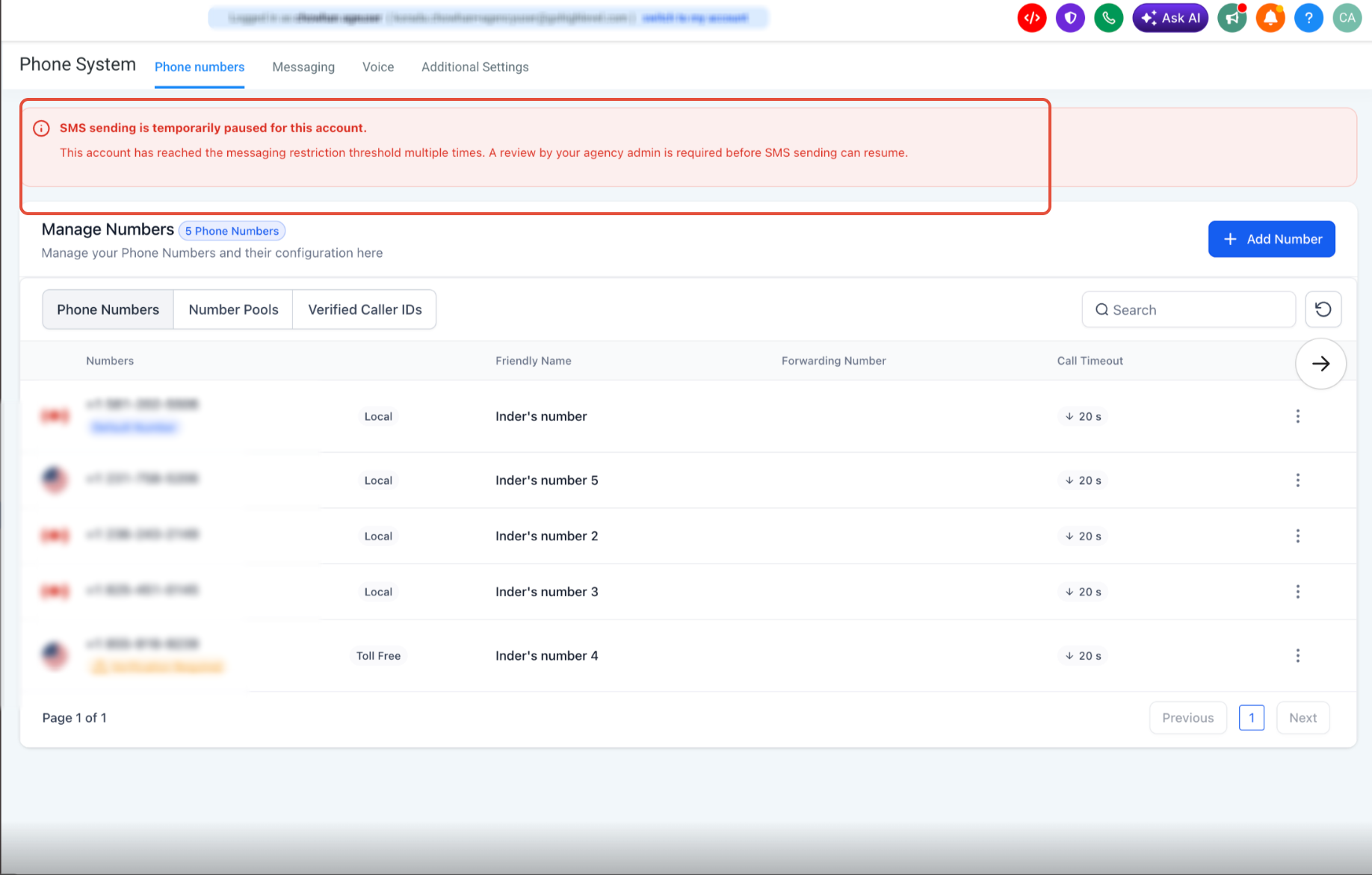
Required when a New sub-account doesn't recover after its first restriction, or when problems repeat on an Established sub-account. A review is also triggered automatically at very high rates, opt-out at or above 12%, or Error 30007 at or above 45%.
Go to Sub-account → Settings → Phone Numbers and submit the Messaging Quality Review form. This creates the Support request for you. Only one open review is allowed per sub-account at a time.
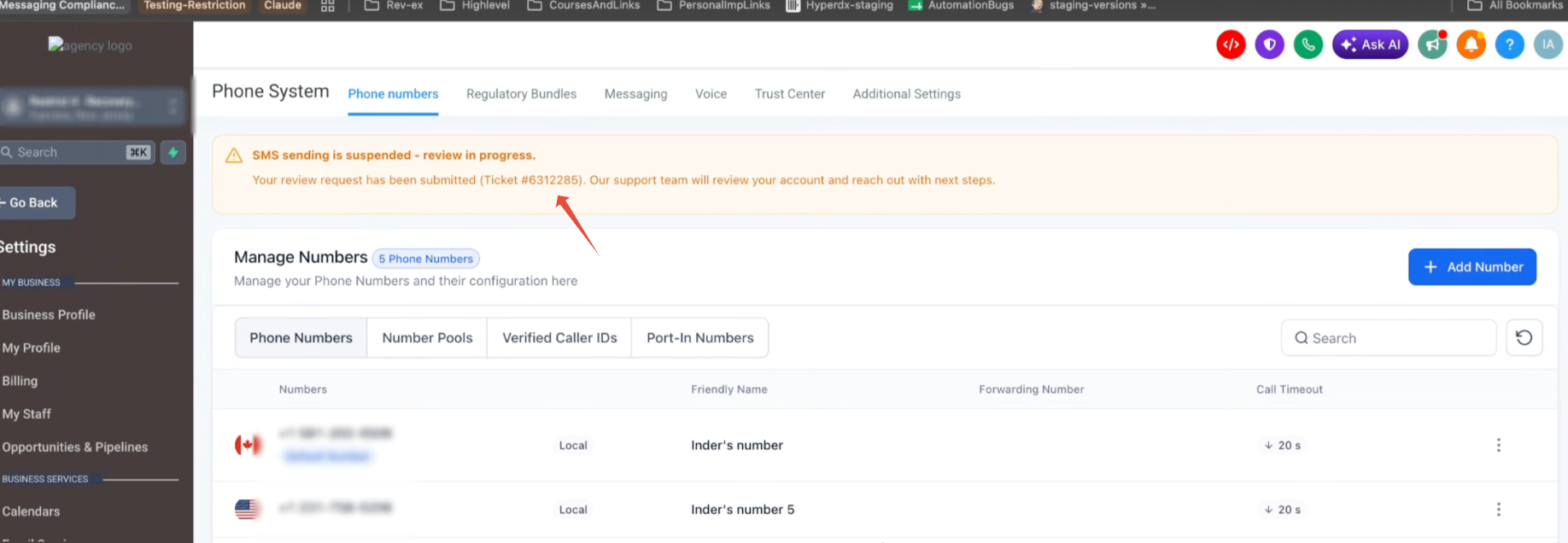
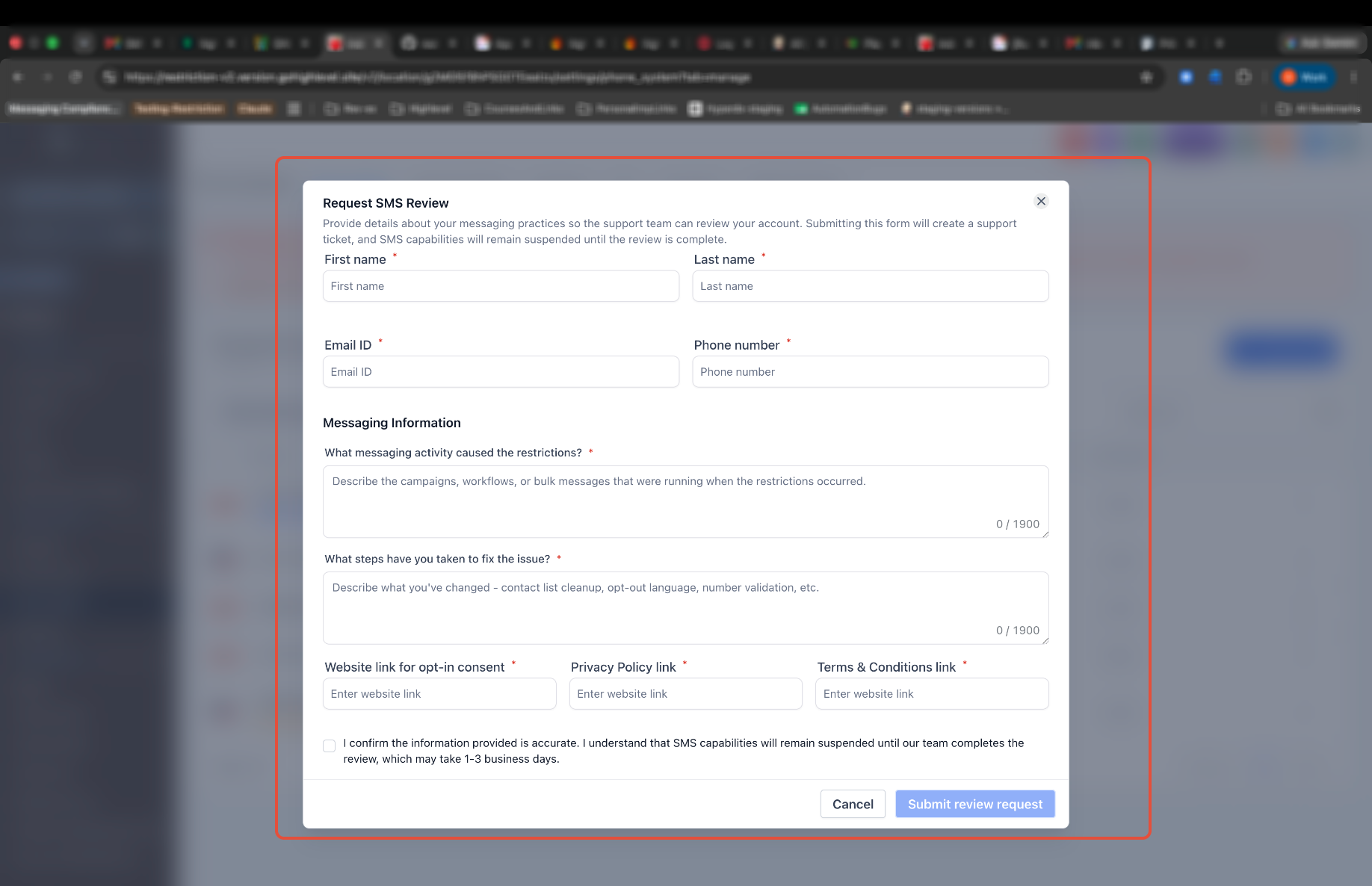
Submitting a review request does not guarantee immediate restoration. Support evaluates your messaging practices, contact consent, and recent sending history first, and only Support can clear a review restriction. Bulk sending stays paused until they do.
How to prevent restrictions
Nearly every restriction traces back to messaging people who didn't clearly ask to hear from you. These habits keep both rates low:
A warning is your free chance to fix things, accounts that act on the first email rarely see a restriction at all. Healthy rates keep your numbers trusted by carriers, which means more of your messages reach real people.
Where to check your restriction history
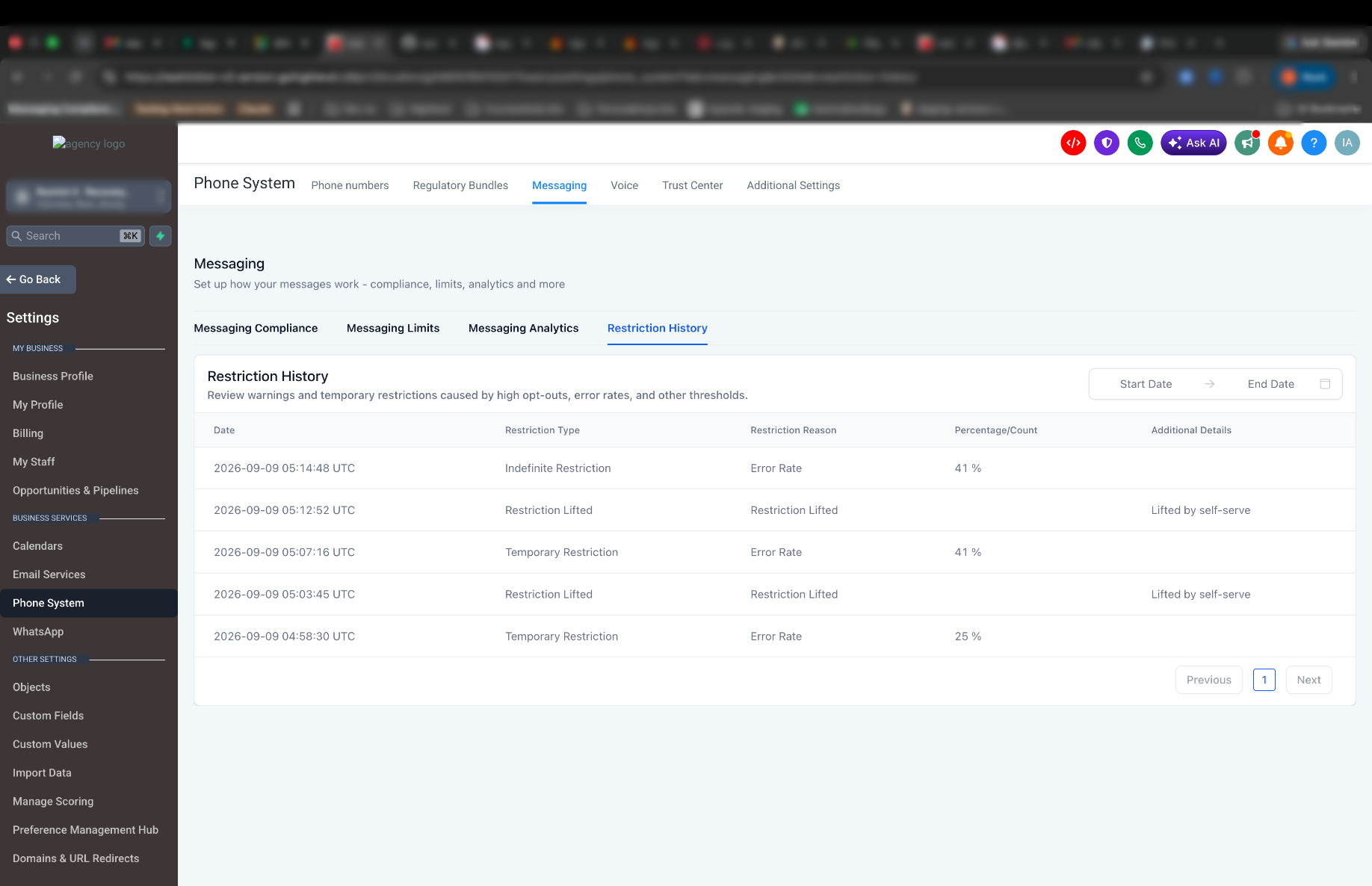
The Restriction History tab shows every restriction the sub-account has had — when it happened, why, and how it ended.
Sub-account → Settings → Phone System → Messaging → Restriction History
Each entry shows:
- Date and time of the event
- Restriction type — temporary or Support review
- The reason, and the rate or count that triggered it
- How it ended, including whether it was lifted early
- Date filters, so you can check a specific period
Emails you'll receive
There are three emails, and they all go to the same people: the agency account owner and the administrators of the affected sub-account.
| What It Means | |
|---|---|
| Messaging quality alert | A rate crossed a warning threshold. Nothing is paused — this is your chance to fix it. |
| SMS temporarily paused | A restriction has been applied. Bulk and automated sending is paused. |
| Support review required | The sub-account needs a Support review, or a review outcome needs your attention. |
Make sure the agency owner email on file is actively monitored. These emails are the earliest signal you'll get that a client's campaign is heading toward a restriction.
Frequently asked questions
- Pause the workflows, campaigns, and bulk actions going to contacts without clear opt-in consent.
- Check that opt-out language and sender identification are in your messages.
- Review the contact list for invalid numbers, landlines, and prior opt-outs.
- Talk to your client before resuming any bulk outreach.