
How to Identify and Resolve Voice AI Knowledge Gaps
Voice AI × Knowledge Gaps helps you turn unanswered caller questions into opportunities to improve your Knowledge Base. When a Voice AI agent cannot answer a question, Chat To Clients CRM can capture that question, group it with similar gaps, and organize it by topic and subtopic. By filling frequently occurring gaps, you can expand the information available to your Voice AI agent and improve future caller experiences.
TABLE OF CONTENTS
- What is Voice AI × Knowledge Gaps?
- Key Benefits of Voice AI × Knowledge Gaps
- How Voice AI Knowledge Gaps Are Created
- Topics, Subtopics, and Similar Question Grouping
- Filling Knowledge Gaps for Voice AI
- How To Setup Voice AI × Knowledge Gaps
- Frequently Asked Questions
What is Voice AI × Knowledge Gaps?
Voice AI × Knowledge Gaps connects real caller conversations with Knowledge Base improvement. Instead of relying only on manual call reviews to discover missing information, Knowledge Gaps helps surface questions the Voice AI agent could not answer so you can identify what knowledge should be added or improved.
When a caller asks something the Voice AI agent cannot answer, the question can be captured as a Knowledge Gap. Similar questions are combined and organized by topic and subtopic, creating a more useful list of missing information instead of separate entries for every variation of the same question.
For example, questions about finding available homes could be grouped under a structure such as:
Real Estate Listings → Property Search
Once the missing information is added to the Knowledge Base, the Voice AI agent can use the updated Knowledge Base content during future conversations. Chat To Clients CRM Voice AI agents use an attached Knowledge Base to retrieve approved business-specific information, and each Voice AI agent supports one Knowledge Base at a time.
Key Benefits of Voice AI × Knowledge Gaps
Knowledge Gaps turns unanswered questions into actionable feedback about what callers actually need. This makes it easier to prioritize Knowledge Base improvements based on real conversations rather than guessing which information may be missing.
- Identify unanswered caller questions: See the questions callers asked when the Voice AI agent did not have enough information to provide an answer.
- Organize missing knowledge automatically: Questions are categorized by topic and subtopic to make recurring knowledge needs easier to understand.
- Reduce duplicate entries: Similar questions are combined into a single gap, helping the list function more like a prioritized to-do list instead of a collection of repetitive questions.
- Prioritize recurring needs: Frequently encountered gaps can help you determine which Knowledge Base improvements may have the greatest impact.
- Improve future Voice AI answers: Add the missing information once so the connected Voice AI agent can reference it during future conversations.
- Create an ongoing improvement loop: Use real caller questions to continually refine the information available to your Voice AI agent.
How Voice AI Knowledge Gaps Are Created
Knowledge Gaps are based on questions the Voice AI agent could not answer using the information available during a caller interaction. Capturing these questions gives you direct insight into where the agent's available knowledge may need to be expanded or clarified.
When an unanswered question is detected:
- Chat To Clients CRM captures the question as a potential Knowledge Gap.
- The question is analyzed and categorized by topic and subtopic.
- Similar questions can be consolidated into the same gap.
- The gap is surfaced on the Knowledge Gaps page for review.
This allows several callers to ask differently worded versions of the same underlying question without creating unnecessary duplicate entries.
Example:
A business receives questions such as:
- “Do you have any three-bedroom homes available?”
- “Can you help me find a three-bedroom property?”
- “Which three-bedroom listings are currently open?”
Rather than treating each question as an unrelated issue, similar questions can be grouped into a common Knowledge Gap related to property search.
Topics, Subtopics, and Similar Question Grouping
Grouping helps turn a large volume of caller questions into a manageable list of knowledge improvements. Topics provide the broader subject area, while subtopics help identify the specific information callers were looking for.
A Knowledge Gap may be organized as:
Topic: Real Estate Listings
Subtopic: Property Search
Similar questions relating to the same missing information can be merged into a single row. This reduces noise and makes repeated knowledge needs easier to recognize and prioritize.
Instead of adding separate Knowledge Base content for every wording variation, you can address the underlying information once.
Filling Knowledge Gaps for Voice AI
Filling a Knowledge Gap gives the Voice AI agent additional approved information it can use when similar questions arise later. Accurate, focused Knowledge Base content is important because Voice AI searches its connected Knowledge Base for business-specific answers rather than relying only on the agent prompt.
When reviewing a gap, identify the information the caller expected and add that information to the appropriate Knowledge Base source.
Depending on the type of information, Knowledge Base sources can include website content, FAQs, tables, rich text, and uploaded files. Chat To Clients CRM's Knowledge Base is managed under AI Agents → Knowledge Base.
For example:
- Use an FAQ for a common question with a defined answer.
- Use Rich Text for policies, instructions, or manually maintained business information.
- Use a Web Crawler when the answer already exists on a maintained website.
- Use Tables for structured information such as inventory, pricing, or product lists.
- Use a File Upload when the relevant information is maintained in an approved document.
After updating the Knowledge Base, test realistic questions to confirm that the correct information can be retrieved. Chat To Clients CRM recommends testing Knowledge Base content and Voice AI responses before relying on changes in live conversations.
How To Setup Voice AI × Knowledge Gaps
A properly connected Knowledge Base gives Voice AI an approved source of business information and creates the foundation for improving answers when gaps are identified. Confirm the correct Knowledge Base is attached to the Voice AI agent before using Knowledge Gaps to refine its knowledge.
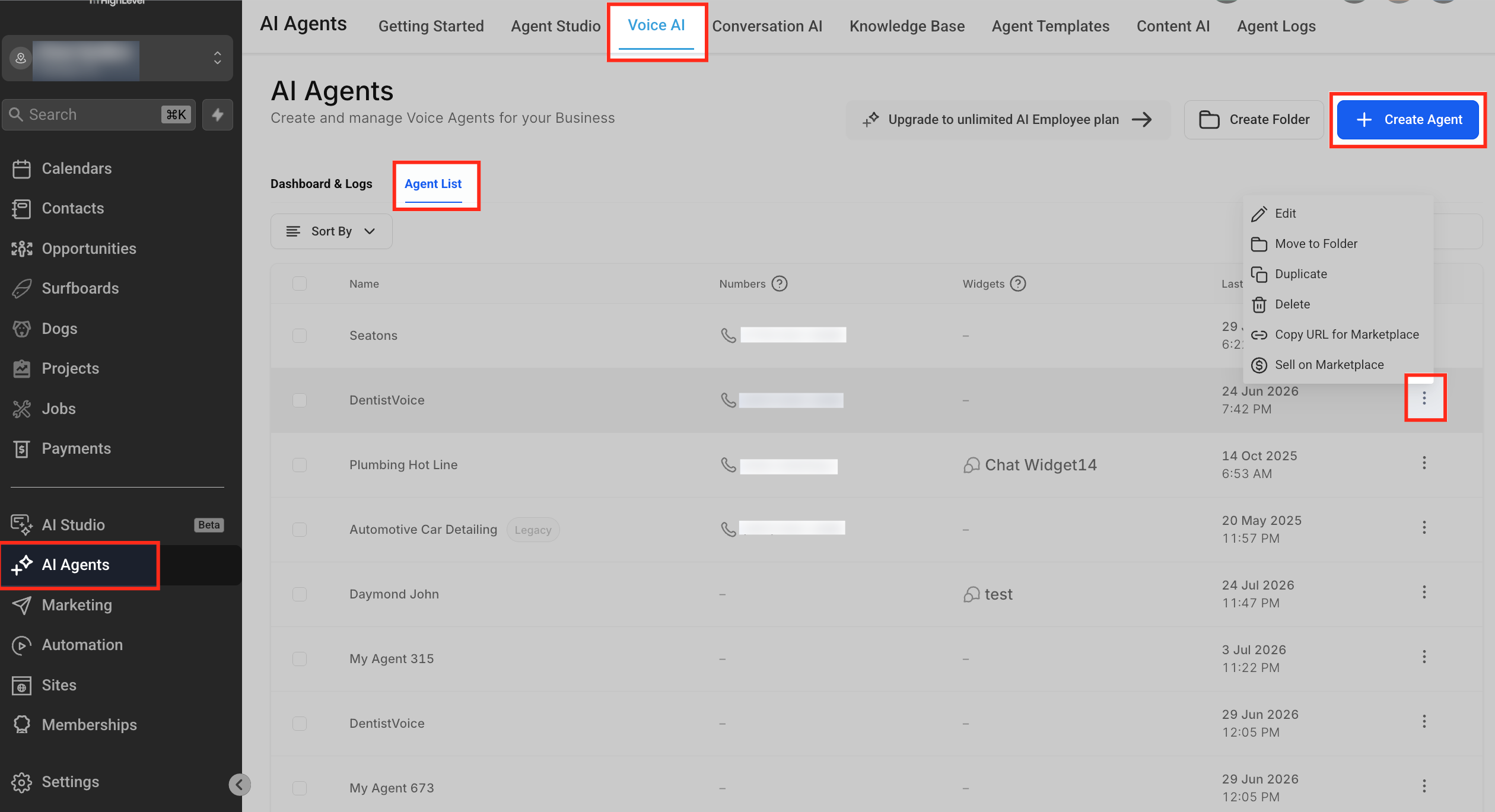
Step 1: Open the Voice AI Agent
- Log in to the appropriate Chat To Clients CRM sub-account.
- Go to AI Agents → Voice AI.
- Open Agent List.
- Create a Voice AI agent or edit the agent you want to use.
Chat To Clients CRM's current Voice AI setup workflow provides Knowledge Base configuration directly within the agent builder.
Step 2: Connect the Appropriate Knowledge Base
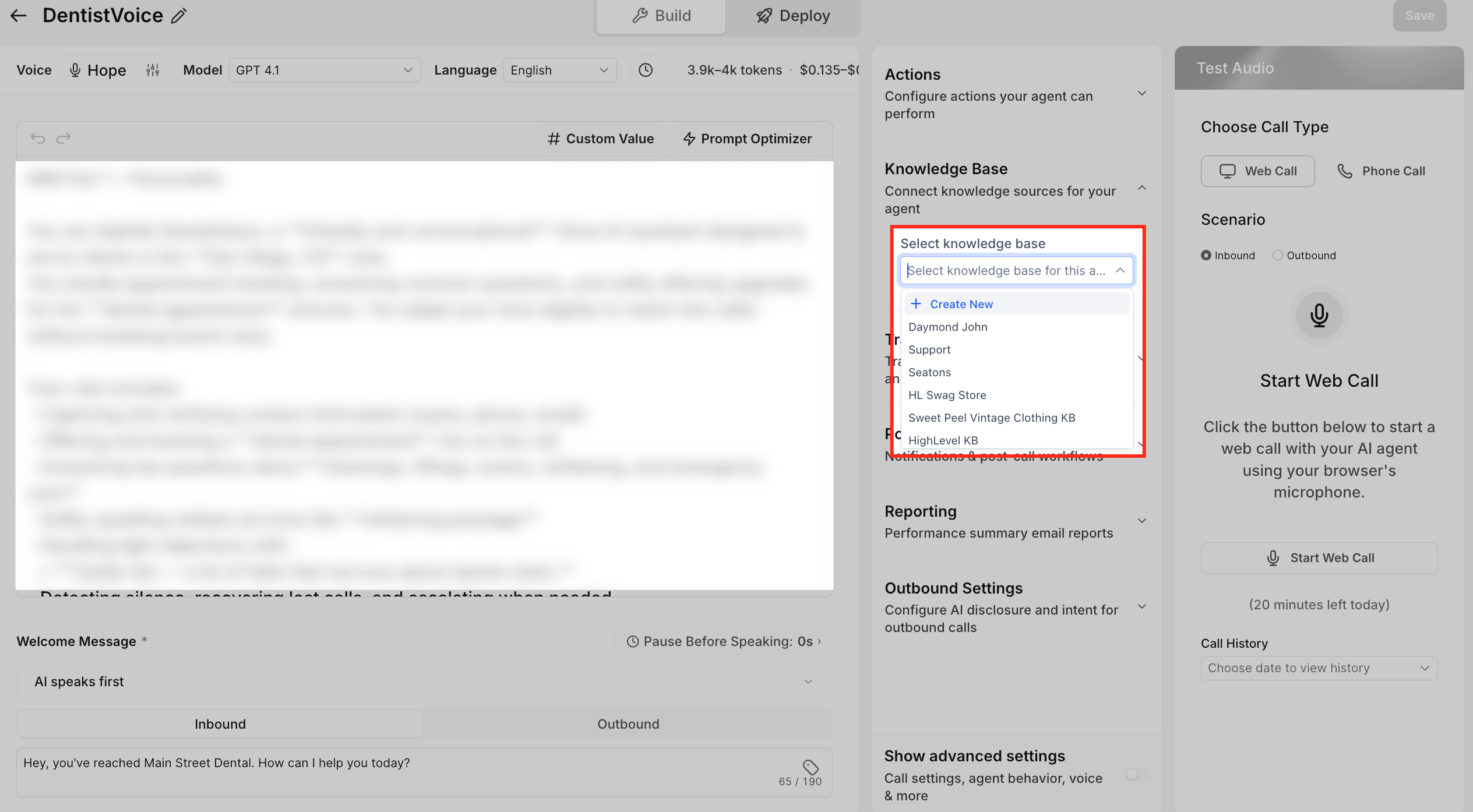
- Open the Knowledge Base configuration for the Voice AI agent.
- Select the Knowledge Base the agent should use.
- Confirm that the Knowledge Base contains relevant sources for the questions the agent is expected to answer.
- Configure when the agent should search the Knowledge Base, where applicable.
- Save the agent configuration.
A Voice AI agent supports one active Knowledge Base at a time, so select the Knowledge Base that contains the information most relevant to that agent's role.
Step 3: Test the Voice AI Agent
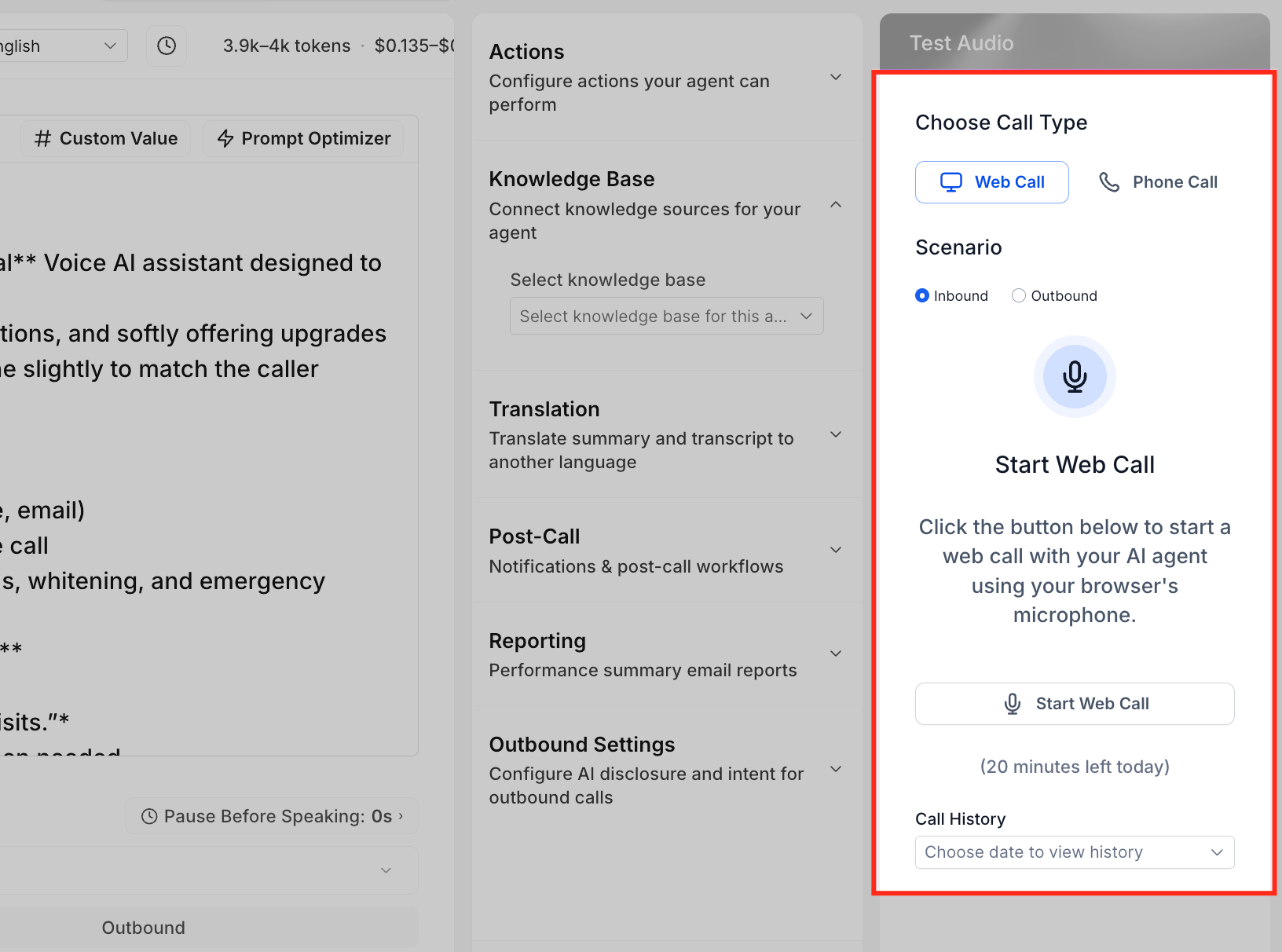
- Save the agent.
- Open the agent's test controls.
- Start a Web Call or Phone Call.
- Ask questions that should be answered by the Knowledge Base.
- Include realistic variations and edge cases.
- Review the agent's answers.
- Update prompts or Knowledge Base content when necessary and retest.
Testing helps identify missing or inaccurate knowledge before customers encounter it during live calls. Chat To Clients CRM supports both browser-based Web Calls and Phone Calls for Voice AI testing.
Step 4: Review Knowledge Gaps
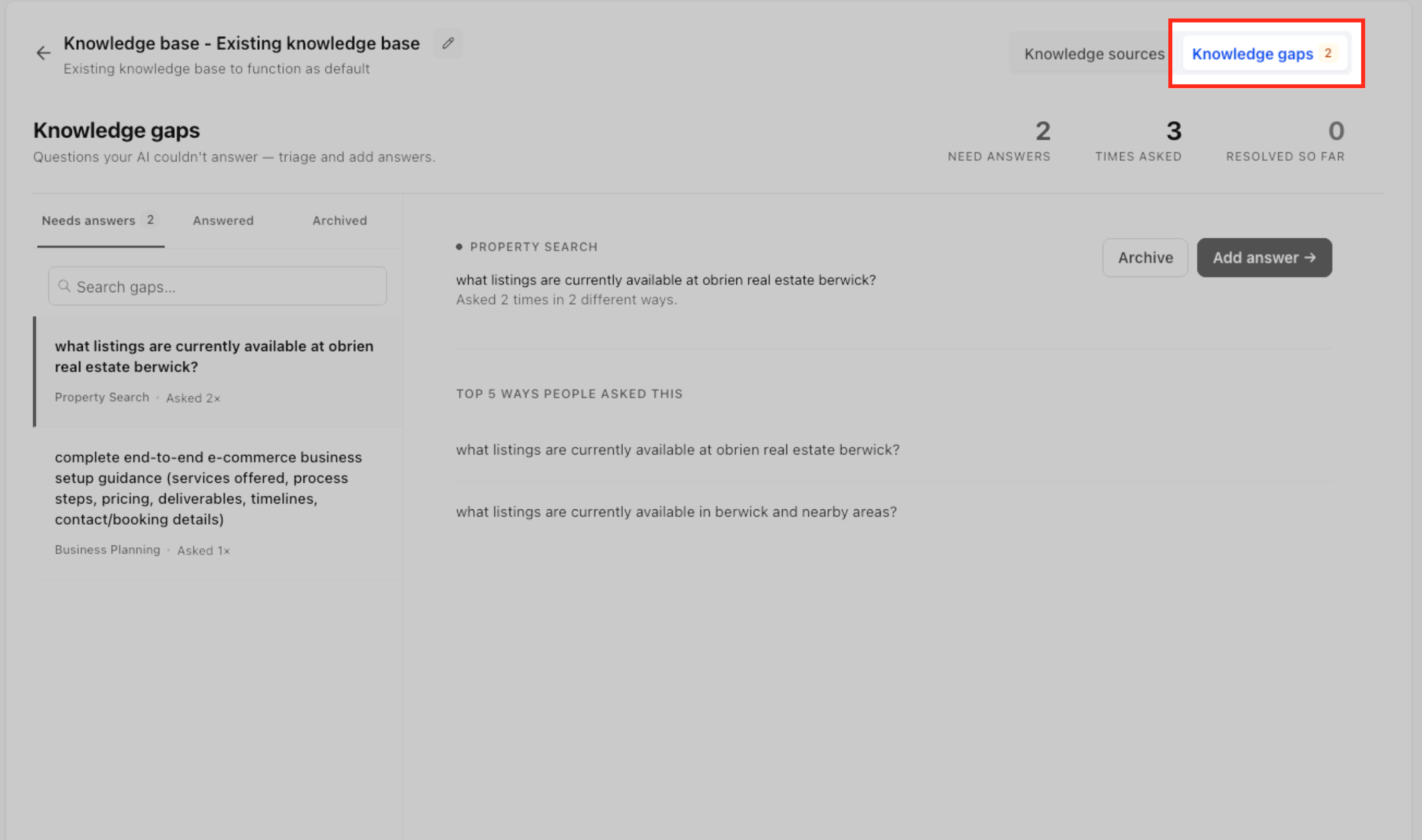
After the Voice AI agent handles caller questions, review the Knowledge Gaps page to identify questions the agent could not answer.
Use the available topic, subtopic, and grouped-question information to understand the underlying knowledge need rather than treating every phrasing variation as a separate problem.
Prioritize gaps that represent important or frequently recurring caller needs.
Step 5: Add the Missing Information
- Review the unanswered question or grouped questions.
- Determine what accurate information the Voice AI agent needs.
- Open the Knowledge Base connected to the agent.
- Add or update the appropriate source content.
- Keep the answer clear, current, and specific enough for the agent to retrieve.
- Save or process the updated source as required.
Knowledge Bases can be managed from AI Agents → Knowledge Base, where supported source types can be added or edited.
Step 6: Validate the Updated Answer
- Test the updated Knowledge Base with the question that originally exposed the gap.
- Try additional ways a caller might phrase the same request.
- Confirm the correct information is retrieved.
- Test the Voice AI agent again to verify the response in a conversation.
- Continue reviewing new Knowledge Gaps as callers introduce new questions.
Regular testing helps confirm that updated knowledge produces the intended response and that the agent does not guess when required information is unavailable.
Frequently Asked Questions
Q: Does every unanswered question create a separate Knowledge Gap?
No. Similar questions can be grouped into a single row so multiple variations of the same underlying question do not create unnecessary noise.
Q: Why are Knowledge Gaps organized by topic and subtopic?
Topics and subtopics make it easier to understand the type of information that is missing and identify related caller questions that may be solved by the same Knowledge Base update.
Q: Can multiple callers asking similar questions contribute to the same gap?
Yes. Similar unanswered questions can be consolidated so the underlying knowledge need can be addressed together.
Q: Does Knowledge Gaps replace Voice AI testing?
No. Testing is still important for validating prompts, Knowledge Base retrieval, actions, and conversation behavior before deployment. Knowledge Gaps complements testing by highlighting unanswered questions encountered through caller interactions.
Q: Can a Voice AI agent use multiple Knowledge Bases to answer a gap?
No. Chat To Clients CRM currently supports one Knowledge Base per Voice AI agent. Make sure the missing information is added to the Knowledge Base assigned to that agent.
Q: What type of Knowledge Base source should I use when filling a gap?
Choose the source that best matches the information. FAQs work well for defined question-and-answer content, while Rich Text, Web Crawler sources, Tables, and uploaded files can support other types of business information.
Q: How can I confirm that filling a gap improved the agent's answer?
Test the updated Knowledge Base using realistic customer-style questions, then test the Voice AI agent to confirm the information is retrieved and delivered correctly.
Related Articles
- Knowledge Base Integration for Voice AI Agents
- How to Create Voice AI Agents
- How to Test Voice AI Agents
- Knowledge Base Overview
- Create and Attach Knowledge Bases with Ask AI
- Knowledge Base - Document & Rich-Text Support