
Use Your Existing Phone Number for Outbound Calls with Verified Caller ID
Voice calling in Chat To Clients CRM is now easier to try because users can place calls using a phone number they already own. This removes the need to purchase a Chat To Clients CRM number before testing outbound voice calling. Businesses can start calling leads and customers faster while deciding whether they need a full Chat To Clients CRM phone number setup later.
TABLE OF CONTENTS
- What is Calling With Your Existing Phone Number ?
- Key Benefits of Calling With Your Existing Phone Number
- When to Use an Existing Phone Number for Voice Calls
- Existing Number vs. Chat To Clients CRM Number
- Important Limitations and Expectations
- How To Setup Calling With Your Existing Phone Number
- Billing Considerations for Voice Calls
- Frequently Asked Questions
- Related Articles
What is Calling With Your Existing Phone Number ?
Calling with your existing phone number allows users to place outbound voice calls from Chat To Clients CRM without first purchasing a Chat To Clients CRM phone number. This helps new users, agencies, and locations test voice calling with less setup effort and lower upfront commitment.
With this update, users can use a phone number they already own to make calls directly from Chat To Clients CRM. This is useful for businesses that want to try voice calling before setting up a dedicated Chat To Clients CRM number, porting an existing number, or configuring a full phone system.
Key Benefits of Calling With Your Existing Phone Number
Using an existing number helps teams start voice conversations faster. It reduces setup friction and gives users a simple way to experience outbound calling before making a longer-term phone system decision.
- Lower Upfront Setup: Users can try voice calling without purchasing a Chat To Clients CRM number first.
- Faster Testing: New locations can make calls sooner using a phone number they already own.
- Easier Adoption: Agencies can help clients experience voice calling without requiring number purchase as the first step.
- Flexible Phone Setup: Users can test outbound calling first and decide later whether to purchase, port, or configure a Chat To Clients CRM-managed number.
- Improved Access to Calling: Locations without a Chat To Clients CRM phone number can still explore voice calling inside Chat To Clients CRM.
When to Use an Existing Phone Number for Voice Calls
Using an existing number is best for users who want to quickly try outbound voice calling in Chat To Clients CRM. This option is especially helpful when a business already has a trusted phone number and wants to start calling contacts before completing a full phone setup.
Use this option when:
- You want to try voice calling before purchasing a Chat To Clients CRM number.
- Your location does not currently have a phone number in Chat To Clients CRM.
- You already own a business phone number you want to use for outbound calls.
- You want a low-effort way to test calling workflows with leads or customers.
- You are helping a client evaluate Chat To Clients CRM voice calling before completing phone number setup.
This option is not the same as porting a number into Chat To Clients CRM. Porting or purchasing a Chat To Clients CRM number may still be needed for full phone system functionality, depending on the use case.
Existing Number vs. Chat To Clients CRM Number
Understanding the difference between using an existing number and purchasing a Chat To Clients CRM number helps users choose the right setup. An existing number is useful for trying outbound calling, while a Chat To Clients CRM-managed number may be needed for more complete phone system configuration.
| Option | Best For | Notes |
|---|---|---|
| Existing owned number | Trying outbound voice calling quickly | Does not require purchasing a Chat To Clients CRM number first |
| Chat To Clients CRM phone number | Full phone setup inside Chat To Clients CRM | Useful for managed calling, SMS, routing, and phone number configuration |
| Ported number | Moving an existing business number into Chat To Clients CRM | Useful when the business wants Chat To Clients CRM to manage the number directly |
The existing Knowledge Base includes verified caller ID setup for using your number for voice calls, outbound calling through the web dialer, and Chat To Clients Phone billing details. These articles may be helpful when configuring or expanding calling functionality.
Important Limitations and Expectations
This feature is designed to reduce the barrier to trying voice calling. Setting expectations helps users understand what this option does and does not replace before they begin calling from Chat To Clients CRM.
1. Purchasing a Chat To Clients CRM number is no longer required before placing voice calls.

2. Support for placing voice calls using a phone number the user already owns.

3. Usage charges may still apply for voice calling. Review Chat To Clients Phone billing details for current voice call pricing and related costs.

4. Using an existing number for outbound calling is different from porting the number into Chat To Clients CRM.

5. Users who need full phone system functionality may still need to purchase, port, or configure a Chat To Clients CRM-managed number.
How To Setup Calling With Your Existing Phone Number
Proper setup ensures Chat To Clients CRM can recognize the phone number you want to use and allows you to start outbound calling with fewer interruptions. Verifying or selecting the correct number also helps contacts recognize your business when you call.
Follow these steps to place a voice call using an existing phone number:
- Log in to Chat To Clients CRM and open the correct sub-account.
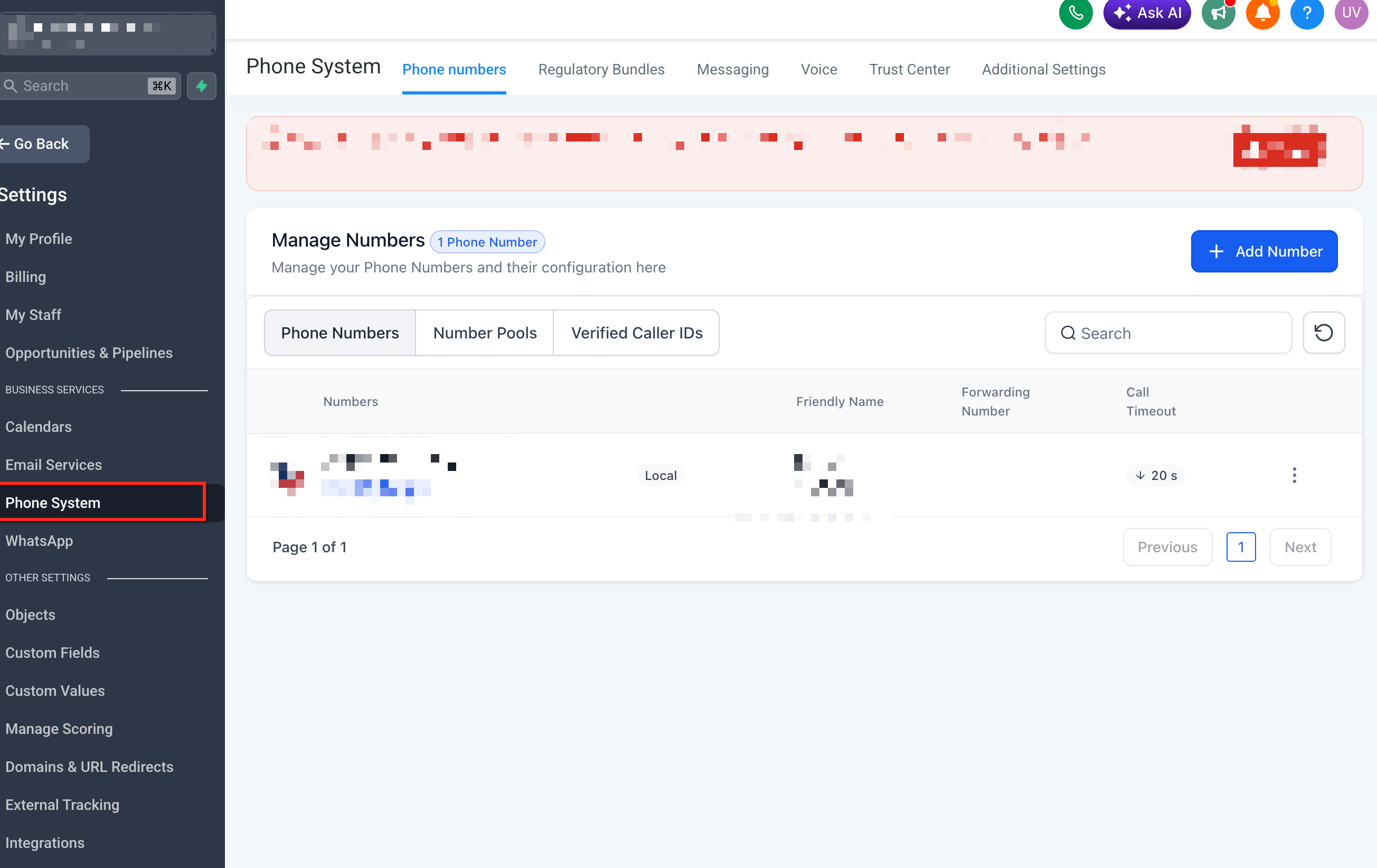
- Navigate to the Phone System available in the Settings where outbound calls are placed.
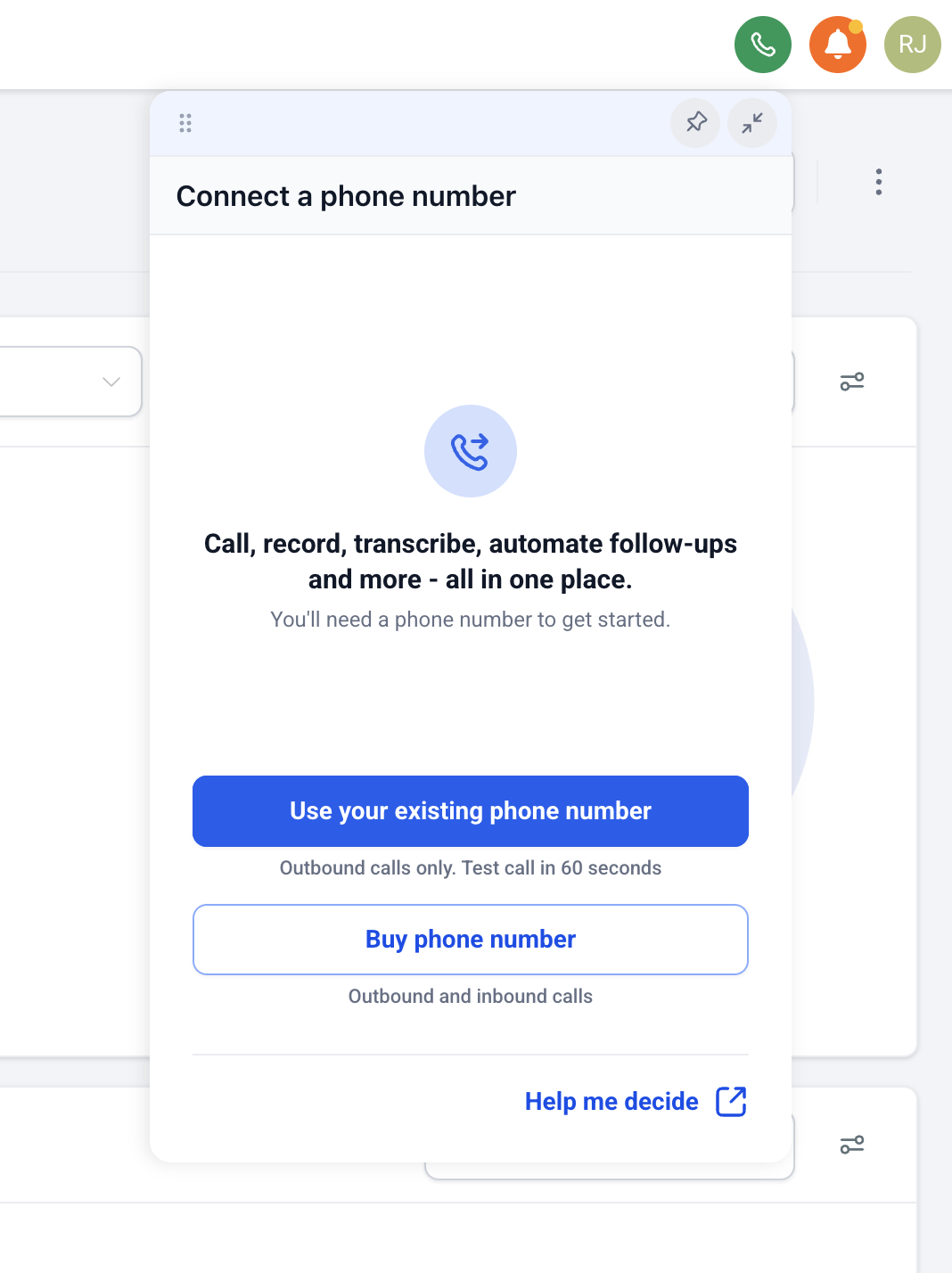
- Choose the option to use an existing phone number, if prompted.
- Enter or select the phone number you already own.
- Complete verification steps shown in Chat To Clients CRM.
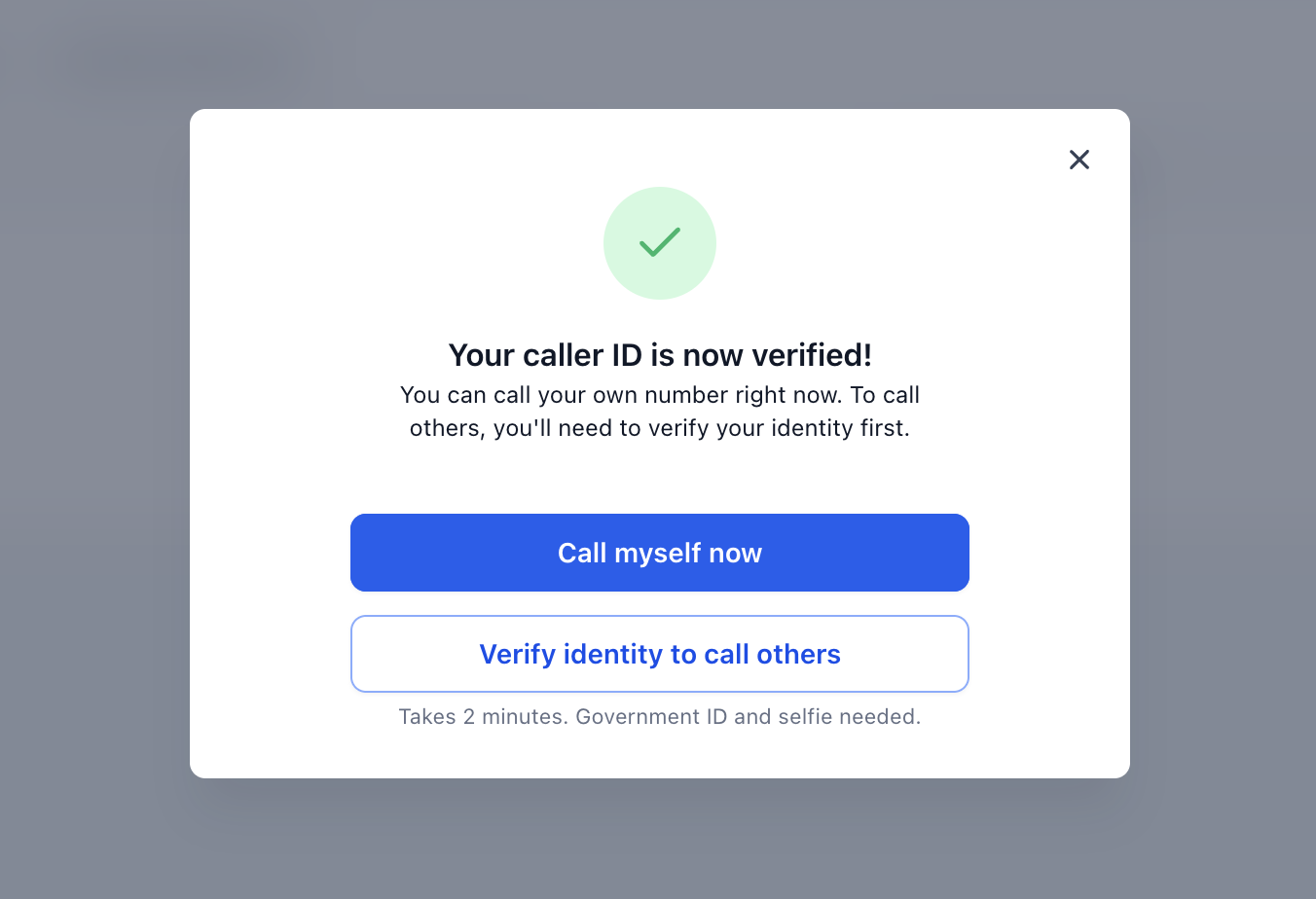
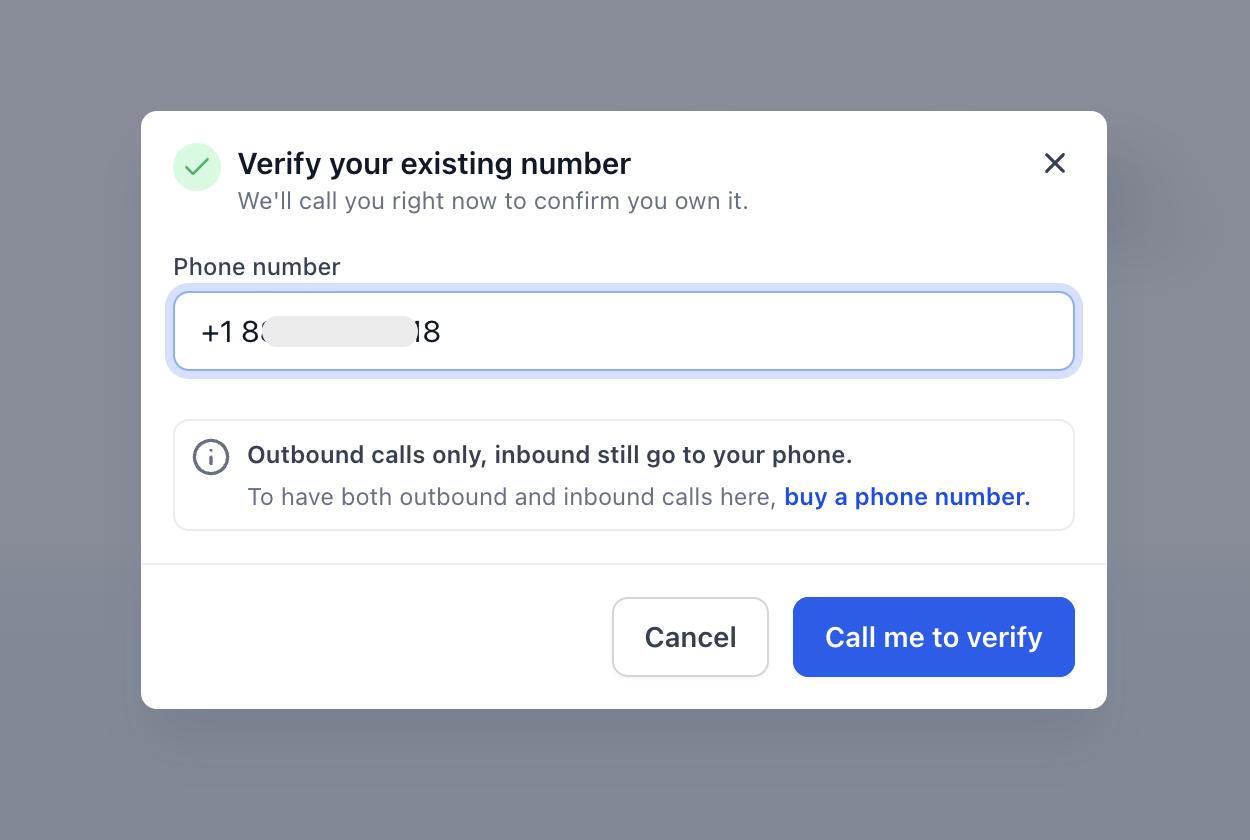
- If a verification call is required, answer the call and enter the provided verification code.
- The existing verified caller ID flow in Chat To Clients CRM uses a verification call and code to confirm ownership of the number.
- If a verification call is required, answer the call and enter the provided verification code.
- Open the Chat To Clients CRM dialer.
- Select the existing number as the calling number, if a “Calling From” or caller ID dropdown is shown.
- Enter the contact’s phone number or choose a contact from Chat To Clients CRM.
- Place the call.
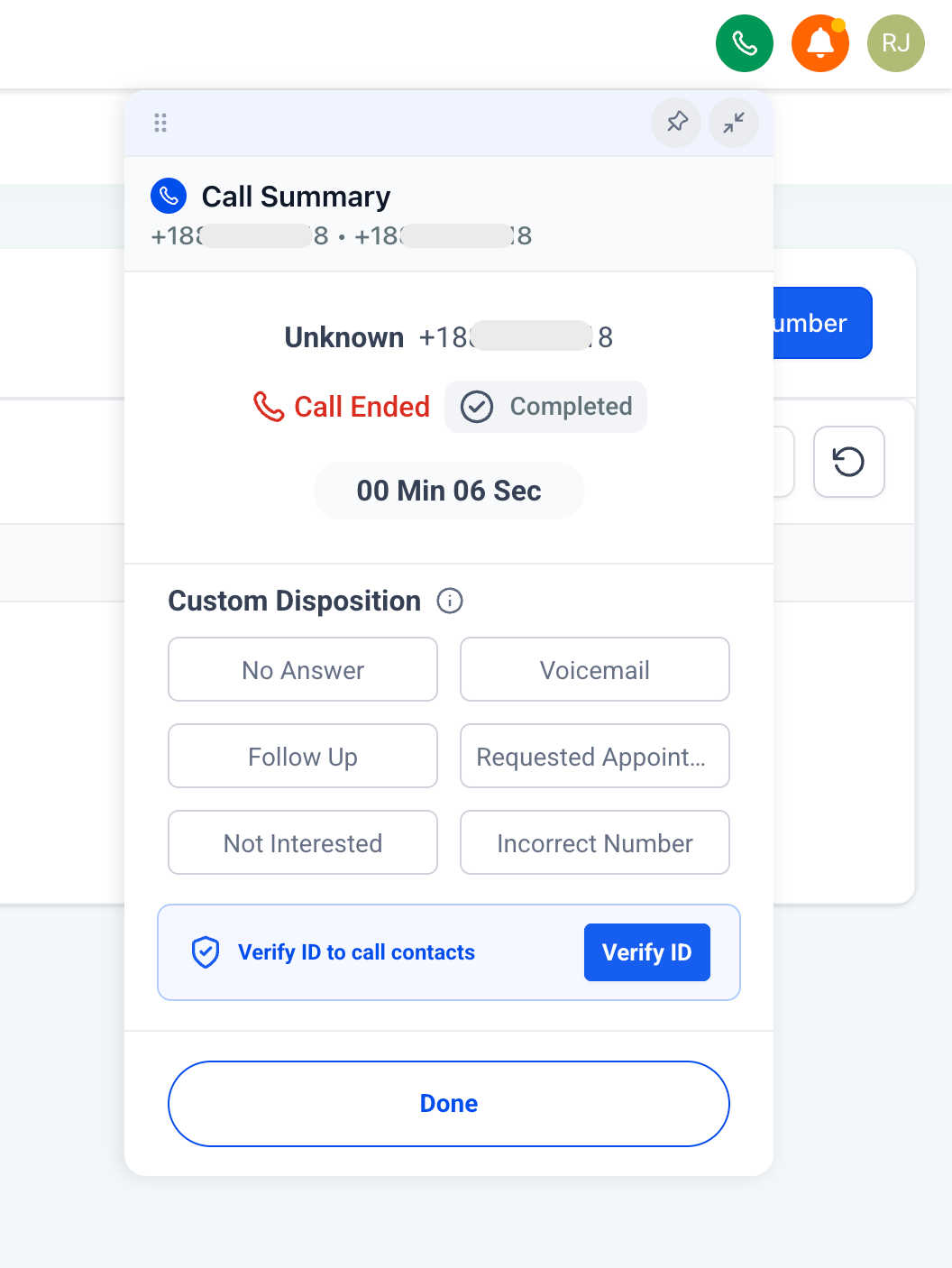
Billing Considerations for Voice Calls
Voice calling may still have usage-based costs even when a Chat To Clients CRM phone number is not purchased first. Understanding billing helps users avoid confusion between phone number purchase costs and call usage charges.
The main cost difference is that users do not need to purchase a Chat To Clients CRM number upfront to try voice calling with an existing number. However, outbound voice usage may still be billed based on the applicable Chat To Clients Phone rates.
Review the Chat To Clients Phone Pricing & Billing Guide for current phone number costs, voice call rates, messaging rates, carrier fees, and rebilling information.
Note- Countries Where Verified Caller ID Is Not Supported for Local Calls
Calls using a Verified Caller ID are not supported for domestic calls in the some countries due to local regulations and/or carrier restrictions like
- India
- Malaysia
- Finland
- Thailand
- Taiwan
- Greece etc
In these countries, calls placed using a Verified Caller ID may be blocked or may not complete reliably. In such cases to ensure successful call delivery, use either a local phone number for the destination country (where supported) or an international phone number to place the call.
Frequently Asked Questions
Q: Do I need to buy a Chat To Clients CRM number before making voice calls?
A: No. Chat To Clients CRM allows users to place voice calls using a phone number they already own, so purchasing a Chat To Clients CRM number first is no longer required.
Q: Can I use any phone number I own?
A: Chat To Clients CRM confirms that users can place calls using a phone number they already own. Use the phone number options shown in Chat To Clients CRM to confirm whether your specific number can be added or verified.
Q: Is this the same as verified caller ID?
A: It may use a similar ownership verification concept, but Chat To Clients CRM does not explicitly confirm that it is the same flow. Chat To Clients CRM’s existing verified caller ID article explains how users verify their own phone number for voice calls.
Q: Can I receive inbound calls in Chat To Clients CRM using my existing number?
A: Chat To Clients CRM only confirms placing voice calls. It does not confirm inbound calling support for existing owned numbers. Users who need inbound call routing may need a Chat To Clients CRM-managed number, forwarding setup, or number porting, depending on their phone setup.
Q: Can I send SMS from my existing number?
A: Chat To Clients CRM only mentions voice calling. It does not confirm SMS support using an existing owned number.
Q: Will I still be charged for calls?
A: Purchasing a Chat To Clients CRM number first is no longer required, but voice usage charges may still apply. Review Chat To Clients Phone billing details for current call pricing.
Q: Is using my existing number the same as porting it into Chat To Clients CRM?
A: No. Using an existing number for voice calls allows you to place calls with that number. Porting moves number management into Chat To Clients CRM.
Q: Can I purchase or port a number later?
A: Yes. Using an existing number to try calling does not prevent users from purchasing a Chat To Clients CRM number or porting a number later if they need a fuller phone setup.
Q: Is this the same as Verified Caller ID?
A: Yes. Your existing phone number is verified and added as a Verified Caller ID, allowing it to appear as the caller ID for outbound calls placed through Chat To Clients CRM.
Related Articles
- How to Set Up Verified Caller ID (Use your number for Voice Calls)
- Outbound Calls with Dialer in Chat To Clients CRM Web App Softphone
- Chat To Clients Phone Pricing & Billing Guide
- Getting Started - Setup Email, Phone, and SMS
- What is Chat To Clients Phone?
- Overview of Phone Number Configuration Options