
Launchpad Contextual In-App Nudges
TABLE OF CONTENTS
- What are Contextual In-App Nudges?
- Key Benefits of Contextual In-App Nudges
- Dynamic Contextual Link Options
- Automatic Nudge Suppression
- Example Contextual In-App Nudges
- Frequently Asked Questions
- Related Articles
What are Contextual In-App Nudges?
Key Benefits of Contextual In-App Nudges
- Reducing onboarding friction by offering immediate, context-sensitive support.
- Driving higher action completions on LaunchPad, which contributes to improved trial-to-paid conversions.
- Providing personalized assistance through dynamic links that directly address where users are stuck.
- Enhancing overall user satisfaction by streamlining the onboarding process with minimal interruption.
Dynamic Contextual Link Options
- Support Article – Directly opens detailed documentation for in-depth guidance.
- Tutorial Video – Offers visual, step-by-step instructions for a more intuitive learning process.
- Kickoff/Implementation Call Link – Simplifies scheduling of personalized implementation or strategy sessions.
- Chat with Support AI – Provides real-time interactive support to quickly resolve issues.
Automatic Nudge Suppression
Example Contextual In-App Nudges
- Log in to your Chat To Clients CRM account and navigate to the LaunchPad section.
- Begin an onboarding action—whether that’s starting a guided tour, watching a tutorial, or engaging with a flow.
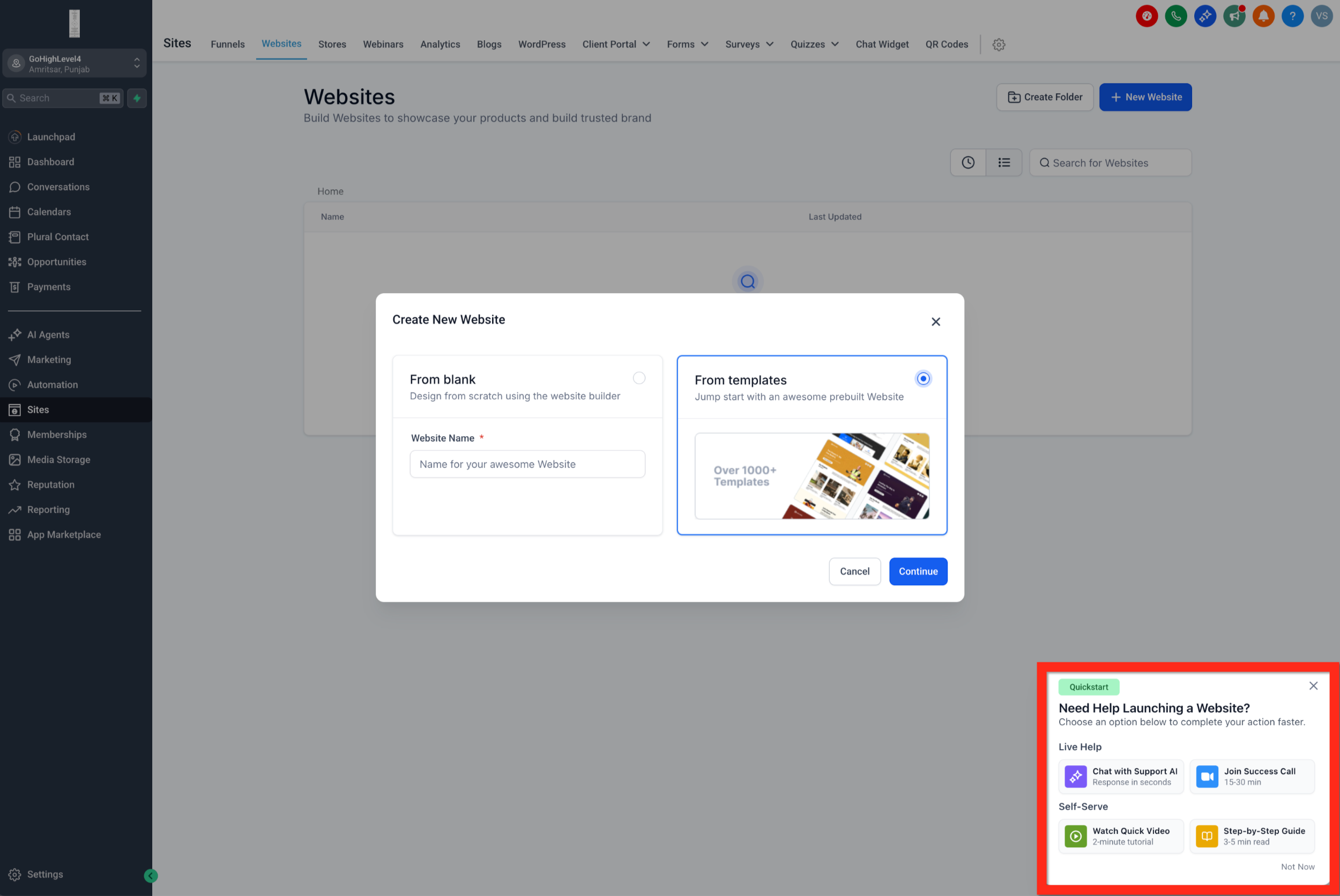
- When you pause, abandon, or linger during an action, a contextual nudge will appear featuring one or more dynamic links.
Frequently Asked Questions
Q. When do Contextual In-App Nudges appear?
Contextual In-App Nudges may appear when a user starts an onboarding or LaunchPad-related action but does not complete it, leaves the flow, or spends additional time on a tutorial or setup task.
Q. What can a Contextual In-App Nudge include?
A nudge may include one or more helpful resources, such as:
- A relevant support article
- A tutorial video
- A kickoff or implementation call link
- Chat with Support AI
The resources shown can vary depending on the context.
Q. Why am I not seeing a Contextual In-App Nudge?
You may not see a nudge if:
- The related onboarding action has already been completed.
- Another user in the same sub-account has completed the action, causing the nudge to be suppressed.
- LaunchPad is not available for your current plan, sub-account, or user role.
- The system has not detected a need to show a contextual nudge.
Q. Why did a nudge disappear?
Contextual nudges are automatically suppressed once the related action is completed.
If any user in the same sub-account completes the action, the related nudge may be removed for all users in that sub-account.
Q. Will every nudge show the same resources?
No. Contextual nudges can display different resources depending on the action or task being completed.
A nudge may include one or more relevant links rather than showing every available resource each time.
Q. Can I manually trigger a Contextual In-App Nudge?
Contextual nudges are displayed automatically based on user activity and onboarding progress. They are not manually triggered by the user.
Q. Can I dismiss a nudge?
If the current product behavior allows users to dismiss the nudge, keep the existing documented behavior here. If dismissal is not explicitly documented, I would avoid adding this FAQ until the behavior is confirmed.
Q. Why does another user in my sub-account no longer see the nudge?
Nudge suppression applies at the sub-account level. Once the related action is completed by any user in the sub-account, the associated nudge may be suppressed for everyone in that sub-account.