
How to View Snapshot Assets
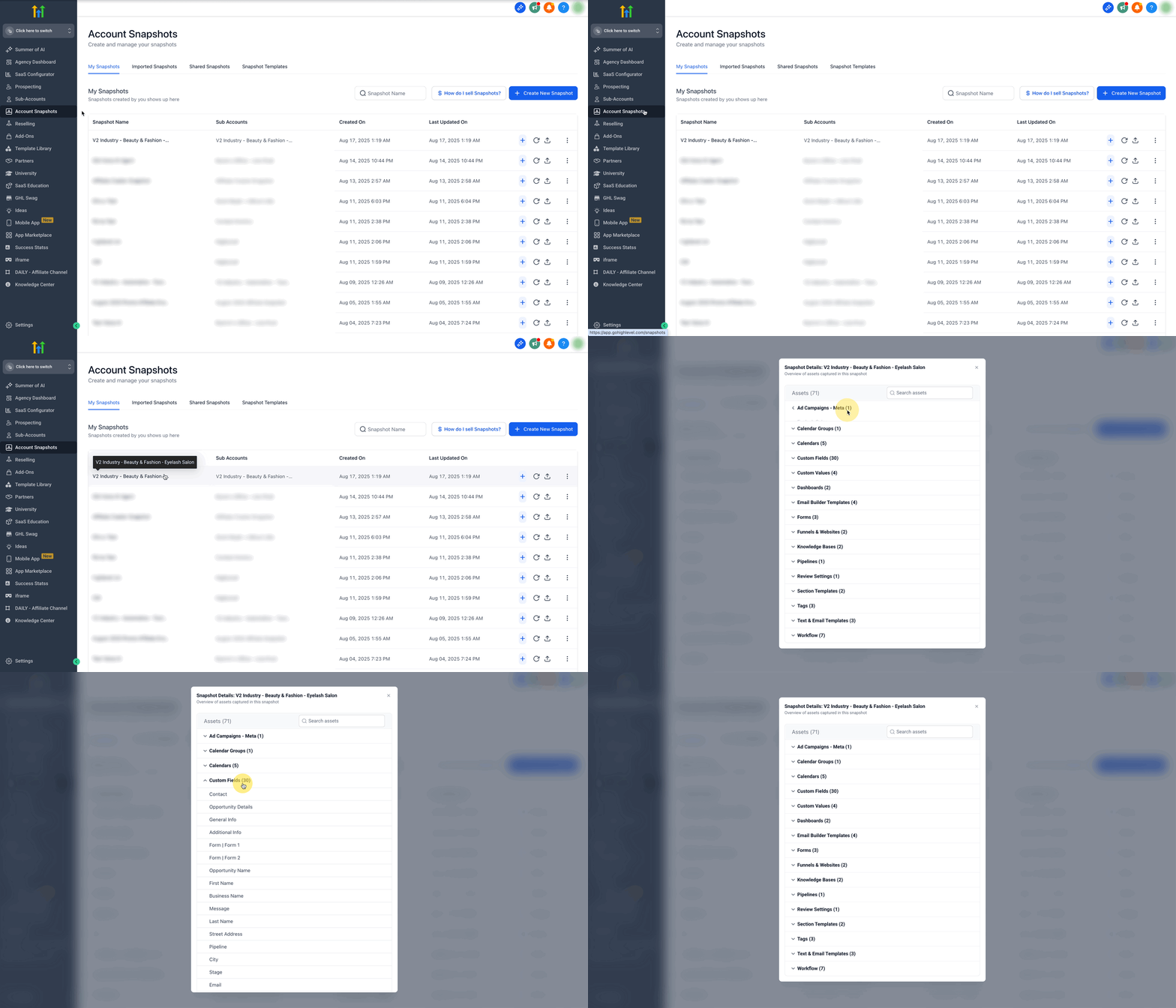
Chat To Clients CRM’s Snapshot Asset Viewer—You can now easily view the contents of a snapshot directly from the Account Snapshots page. Simply click on a snapshot to see a list of all the assets it contains.
TABLE OF CONTENTS
- What is Snapshot Asset Viewer?
- Key Benefits of Snapshot Asset Viewer
- Viewing Assets
- Search Functionality
- Supported Asset Types
- Frequently Asked Questions
- Related Articles
What is Snapshot Asset Viewer?
Snapshot Asset Viewer lets you open any snapshot from the Account Snapshots page and immediately see a structured list of every asset it contains. By being able to view snapshot contents up front, the viewer eliminates guesswork and prevents surprise overwrites when you load, refresh, or share snapshots.
Understanding a snapshot’s contents before loading or sharing prevents accidental overwrites and incomplete migrations. The Viewer brings that insight forward, eliminating the need to download or load a snapshot just to see what’s inside.
Key Benefits of Snapshot Asset Viewer
Enhanced Transparency: Instantly audit all assets before loading or sharing a snapshot.
Improved Efficiency: Search by keyword to locate specific assets without manual scrolling.
Error Prevention: Verify contents to avoid overwriting the wrong funnels, emails, or automations.
Streamlined Management: verify contents before loading, sharing, or refreshing, reducing costly mistakes.
Faster Troubleshooting: Identify missing components when a snapshot fails to behave as expected.
Audit Readiness: keep a clear inventory of assets for compliance or internal reviews.
Viewing Assets
A clear asset list ensures you know exactly what you are working with before you import or refresh.
Navigate to Settings → Account Snapshots.
Choose My Snapshots, Shared Snapshots, or Imported Snapshots.
Click any snapshot’s name and instantly view all assets without additional navigation.
Search Functionality
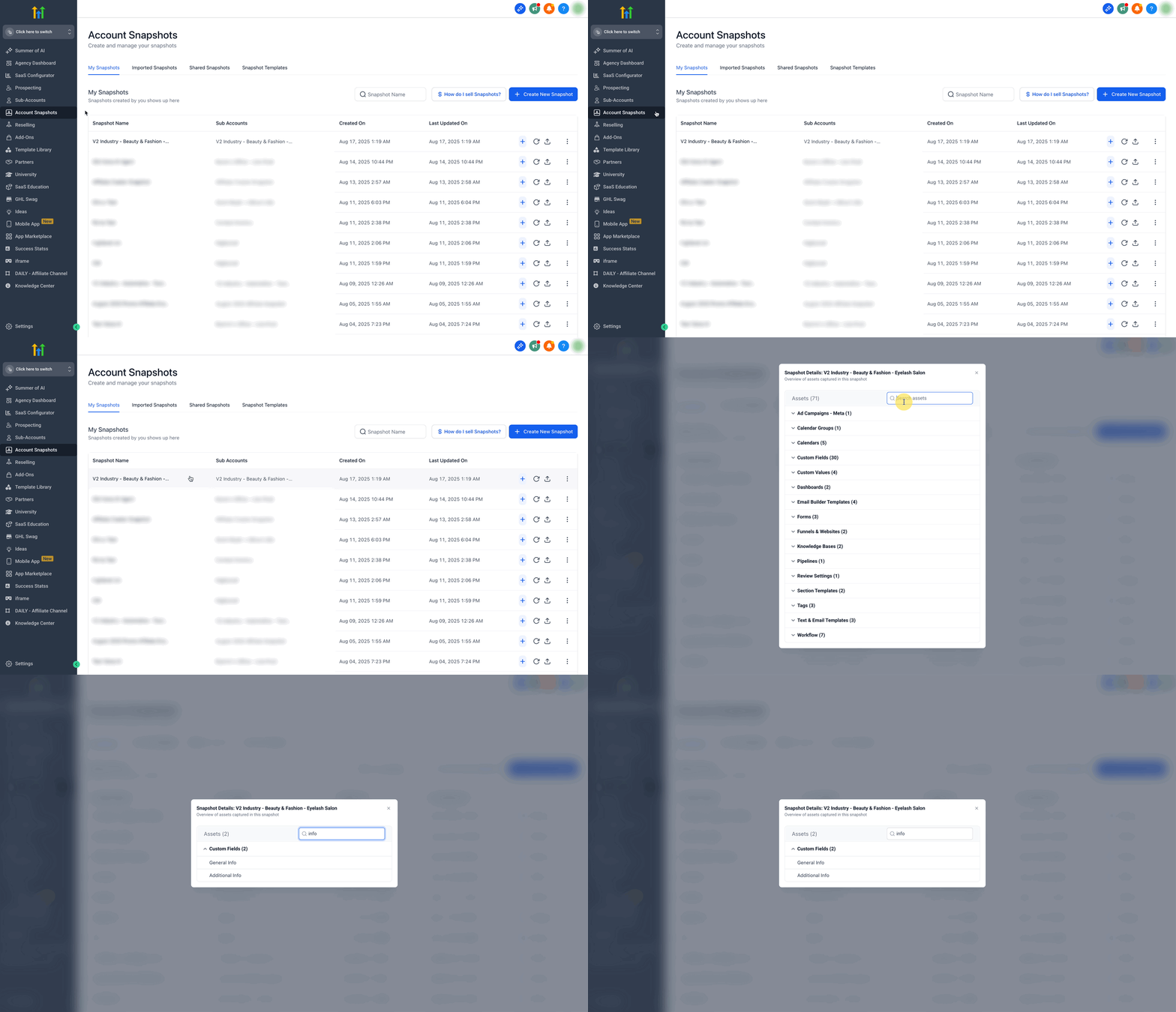
The live search bar filters the asset list as you type, letting you pinpoint a single email, workflow, or funnel step within seconds.
Click the Search assets field at the top right of the asset list.
Enter any keyword—the list narrows in real time.
Clear the field to return to the full inventory.
Supported Asset Types
Snapshot Asset Viewer displays every asset category Chat To Clients CRM supports in snapshots, giving you complete visibility.
Funnels & funnel steps
Websites & pages
Workflows
Email templates & campaigns
SMS templates
Calendars & calendar settings
Forms & surveys
Products & offers
Webinars
AI Studio projects
Need a refresher on snapshot contents? See Snapshots – Overview.
Frequently Asked Questions
Q: How do I access Snapshot Asset Viewer?
From Agency view → Account Snapshots and click any snapshot name.
Q: Can I search for specific assets?
Yes—type a keyword in the search bar above the asset list to filter instantly.
Q: Which snapshot categories support the Viewer?
The Viewer works inside My Snapshots, Shared Snapshots, and Imported Snapshots.
Q: Will the asset list update when I create a new snapshot?
Absolutely. New snapshots appear immediately and can be inspected with one click.
Q: What asset types are displayed?
Funnels, websites, workflows, email/SMS templates, forms, calendars, products, AI Studio projects and more—everything supported by Chat To Clients CRM snapshots.