
Create a New Sub-Account Using Snapshot
This article will show you how to quickly create a new sub-account in Chat To Clients CRM using a snapshot. This process automatically loads assets like funnels, workflows, and settings into the new account, saving you setup time and ensuring consistency across sub-accounts.
TABLE OF CONTENTS
- Overview of Creating a Sub-Account Using a Snapshot
- Key Benefits of Creating a Sub-Account Using a Snapshot
- Prerequisites
- How To Create a New Sub-Account Using a Snapshot
- Frequently Asked Questions
- Related Articles
Overview of Creating a Sub-Account Using a Snapshot
Creating a sub-account using a snapshot allows agencies to easily create a new account that includes all the tools, workflows, settings, and assets packaged in the selected snapshot. Once the sub-account is created, the snapshot is automatically loaded into it, eliminating the need for manual loading of a snap-shot after creation. This streamlines the onboarding process and ensures the new account starts with a consistent, prebuilt setup.
Key Benefits of Creating a Sub-Account Using a Snapshot
Using snapshots to create sub-accounts helps agencies set up standardized sub-accounts faster.
Faster onboarding: Pre-loads all essential assets and settings, reducing manual setup.
Consistency Across Accounts: Ensures desired accounts include the same assets and settings.
Time savings: Eliminates repetitive configuration for each new sub-account after creation.
Error reduction: Reduces the risk of setup mistakes or missing assets.
Prerequisites
Understanding the setup requirements helps ensure the process is successful the first time.
Must have Agency Admin access
Snapshot must already exist in your account
Snapshot should include the key assets you want duplicated (funnels, triggers, calendars, etc.)
Optionally, import or create the snapshot beforehand:
How To Create a New Sub-Account Using a Snapshot
These steps will walk you through creating a new sub-account based on the desired snapshot.
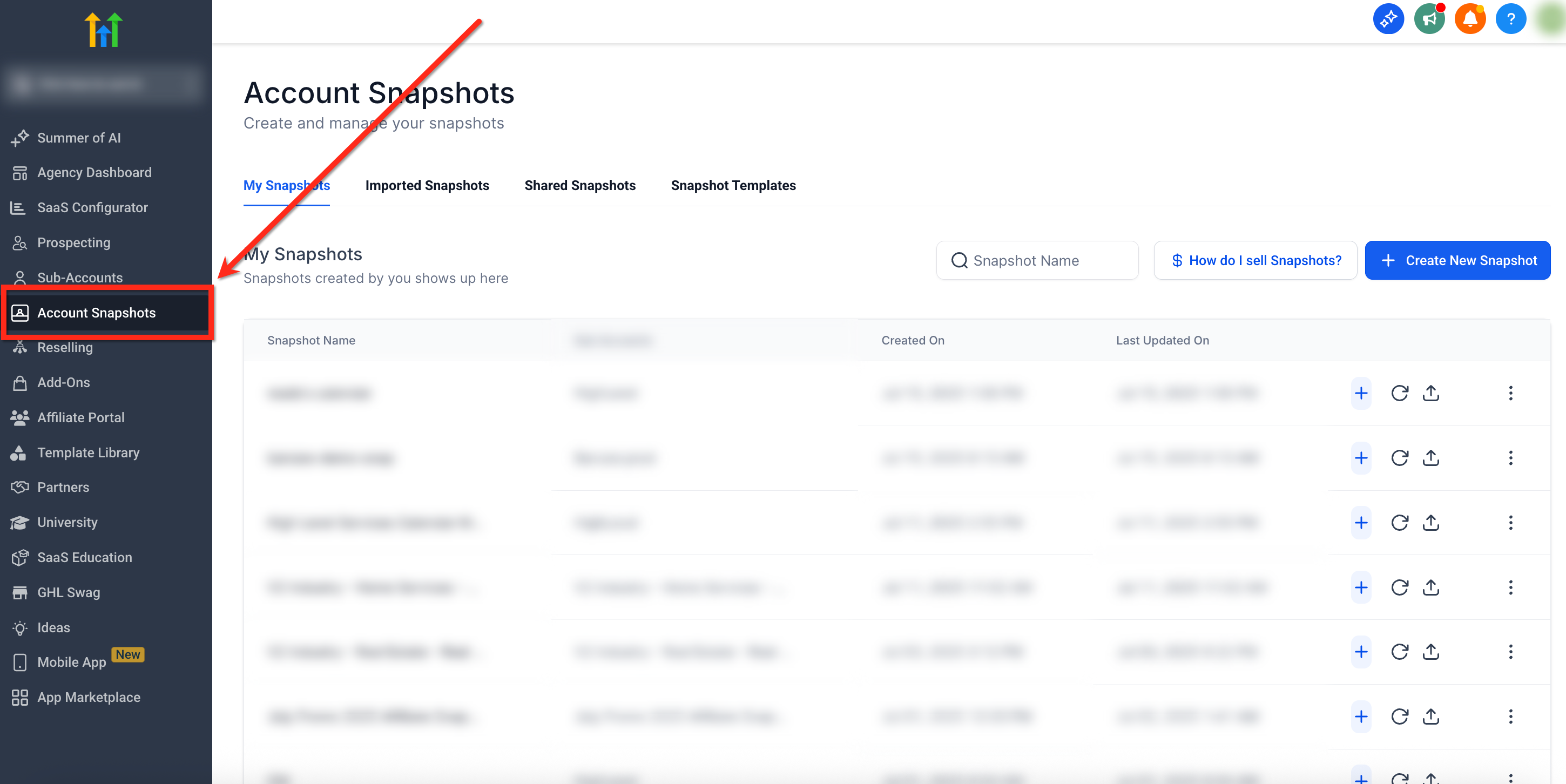
Step 1: Navigate to Account Snapshots
- From your Agency Dashboard, click Account Snapshots on the left-hand menu
Step 2: Select Snapshot
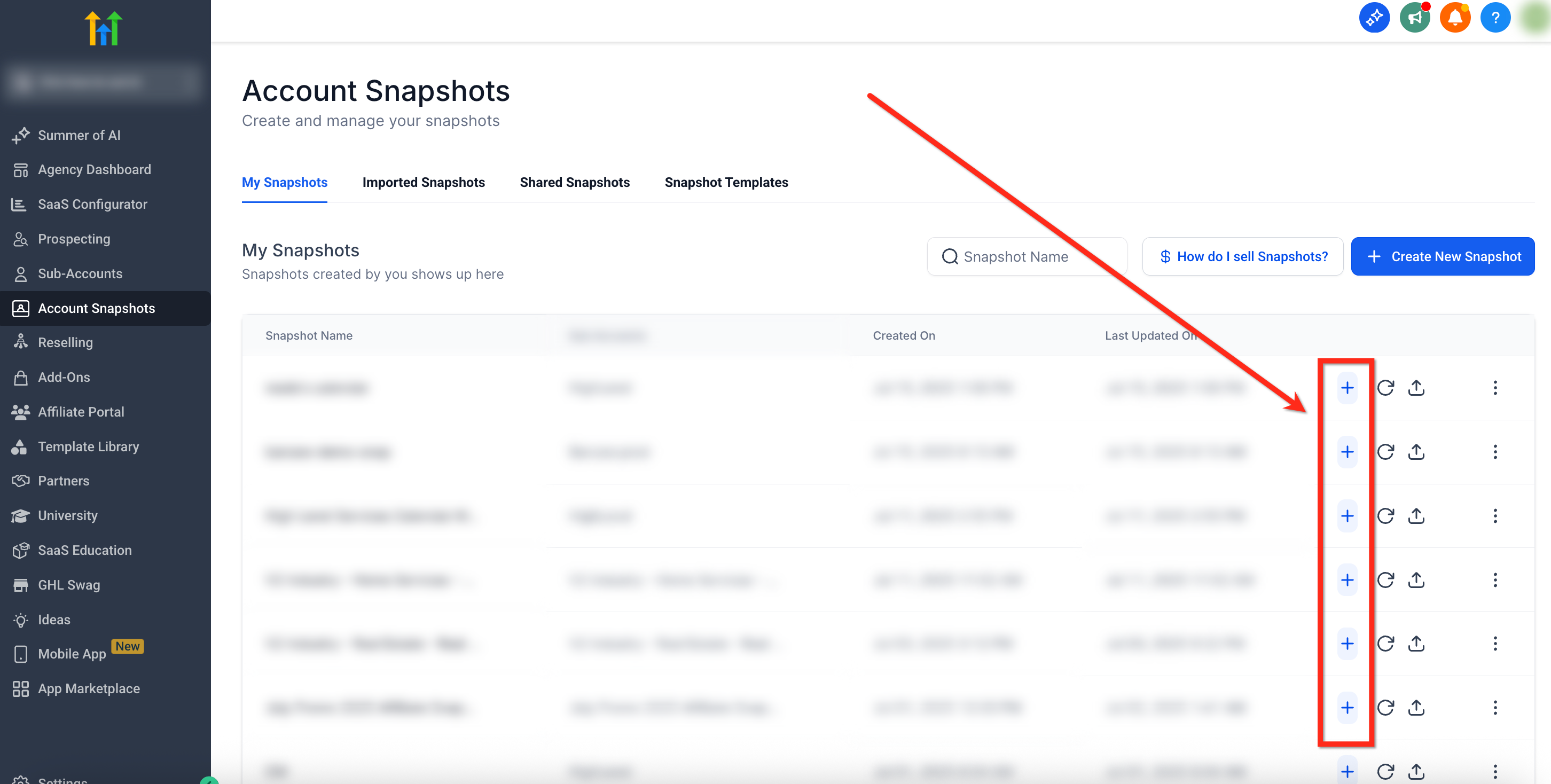
- Locate the snapshot you'd like to use as the base for the new sub-account
- Click the blue Create New Account (+) button beside the snapshot
Step 3: Create Sub-Account
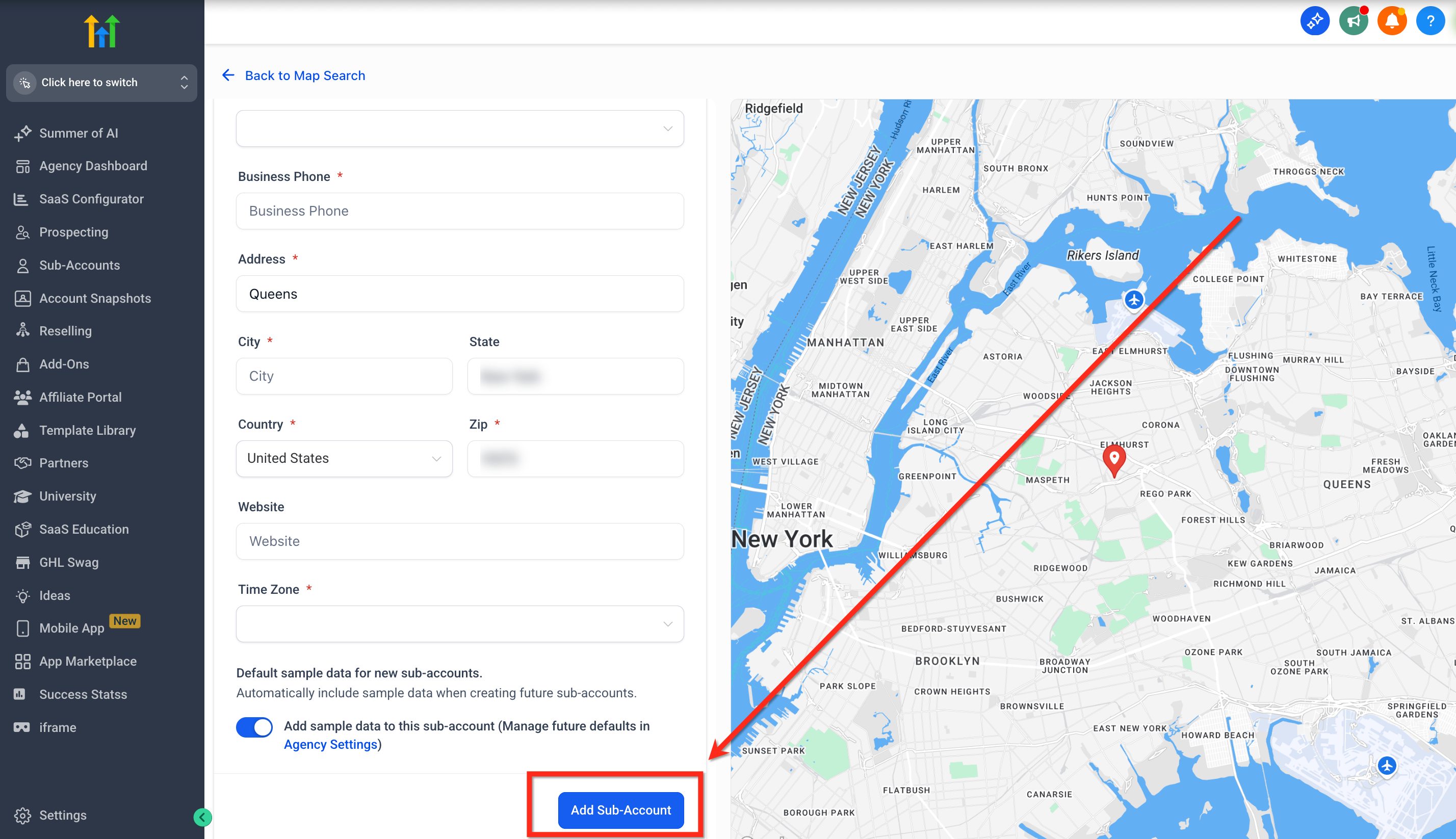
- A new window will open to fill out the new sub-account information
- Once all information has been entered, click Add Sub-Account
Frequently Asked Questions
Q: Can I delete a snapshot from an account after it's created?
No, once applied, a snapshot cannot be “unloaded" or "deleted". You can delete or modify specific elements manually.
Q: What access is needed to create sub-accounts using snapshots?
Only users with Agency Admin permissions can perform this action.
Q: What assets are included in snapshots?
Funnels, forms, workflows, calendars, settings, and more depending on what was saved in the snapshot. For more information, read Snapshot Overview.
Q: Will the snapshot overwrite anything in the new sub-account?
No. Since the sub-account is being created fresh, there is nothing to overwrite. The snapshot is applied during account creation, so its contents become the initial setup.
Q: Can I apply more than one snapshot to a new sub-account?
Not during the creation process. Only one snapshot can be selected when creating a sub-account. However, you can manually apply additional snapshots after the sub-account has been created.
Q: What happens to funnels and websites after loading from a snapshot?
When you load a snapshot into a sub-account, all included funnels and websites are copied over as drafts. They won’t be live until you connect a custom domain and publish them.