
Workflow Trigger - Coupon Code Redeemed
Easily automate actions when a coupon code is successfully redeemed in a completed transaction. This article walks you through everything you need to know, from setup to key benefits, so you can seamlessly trigger workflows whenever a customer uses a coupon in a confirmed purchase. Perfect for customer engagement, loyalty rewards, internal alerts, and post-sale follow-ups.
TABLE OF CONTENTS
- What is the Coupon Code Redeemed Workflow Trigger
- Key Benefits of Coupon Code Redeemed Workflow Trigger
- Configuring Coupon Code Redeemed Workflow Trigger
- Available Filters
- Recommended Workflow Actions for Coupon Redemptions
- Frequently Asked Questions
- Related Articles
What is the Coupon Code Redeemed Workflow Trigger
The Coupon Code Redeemed trigger fires when a coupon code is successfully redeemed in a completed transaction. Unlike the Coupon Code Applied trigger, which fires anytime a coupon is applied (regardless of whether transaction is completed or not), this trigger activates only when the order is finalized and payment is complete.
It’s an essential tool for marketing and sales teams who want to track actual coupon redemptions and take immediate, post-sale actions such as sending thank-you notes, tagging high-value customers, or triggering loyalty rewards.
Key Benefits of Coupon Code Redeemed Workflow Trigger
Using this trigger unlocks targeted post-purchase workflows that boost customer satisfaction and streamline operations:
- Post‑Purchase Engagement: Instantly send thank‑you emails, onboarding resources, or cross‑sell offers once a coupon is used in a purchase
- VIP Segmentation: Tag customers who redeem high‑value or exclusive coupons so you can nurture them with loyalty campaigns
- Team Coordination: Alert fulfillment, sales, or support teams in real time so high‑discount or limited‑edition orders get priority handling
- Performance Monitoring: Gather data on which coupon codes convert best and use that insight to refine future promotions
Operational Efficiency: Automatically monitor redemption and trigger follow-ups without manual checks
Configuring Coupon Code Redeemed Workflow Trigger
To set up this trigger, head to your workflow builder and follow these steps:
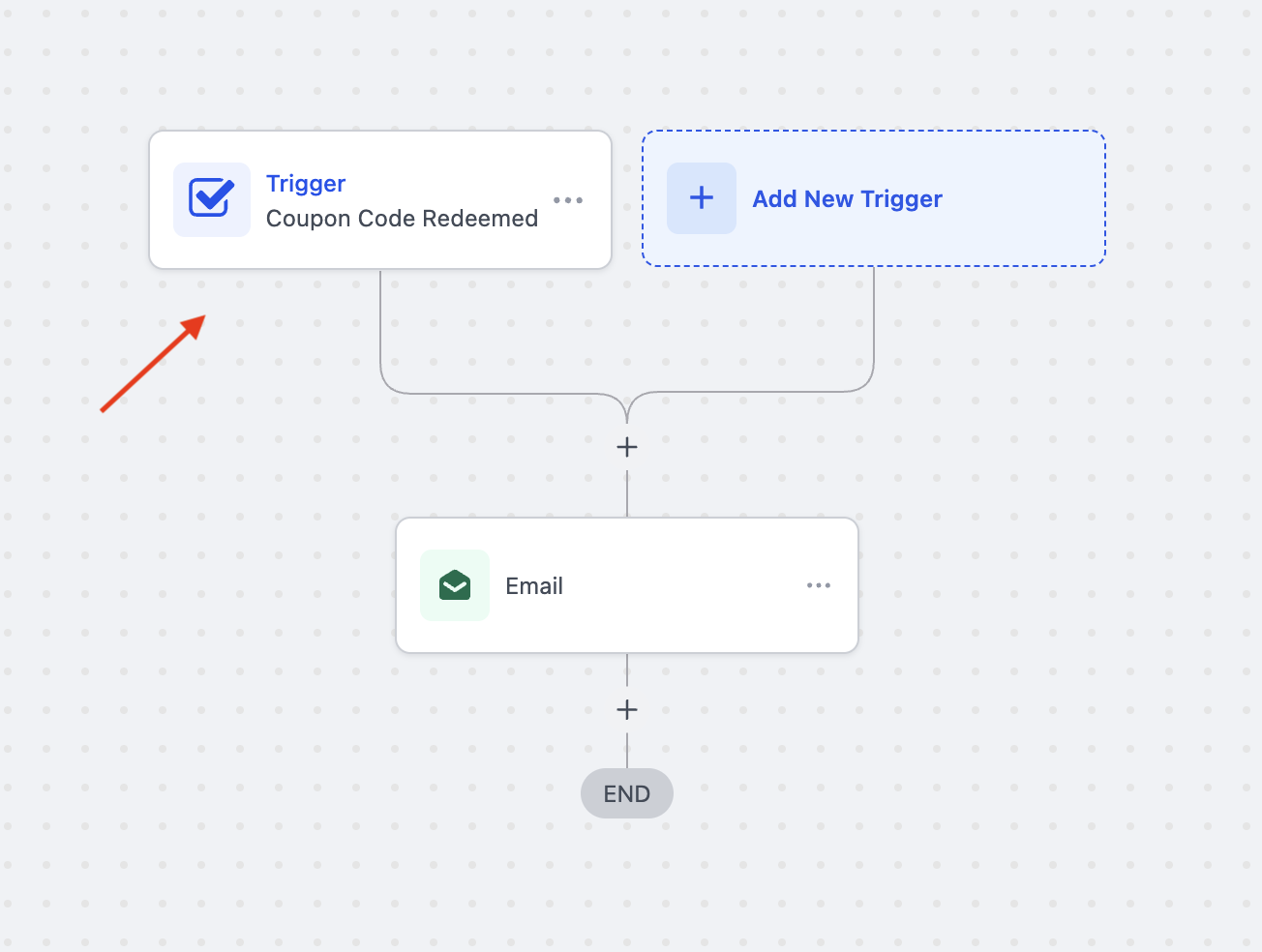
Step 1: Add the Trigger to Your Workflow
- Navigate to Automation > Workflows
- Either create a new workflow or edit an existing one
- In the workflow builder, click + Add New Trigger to get started
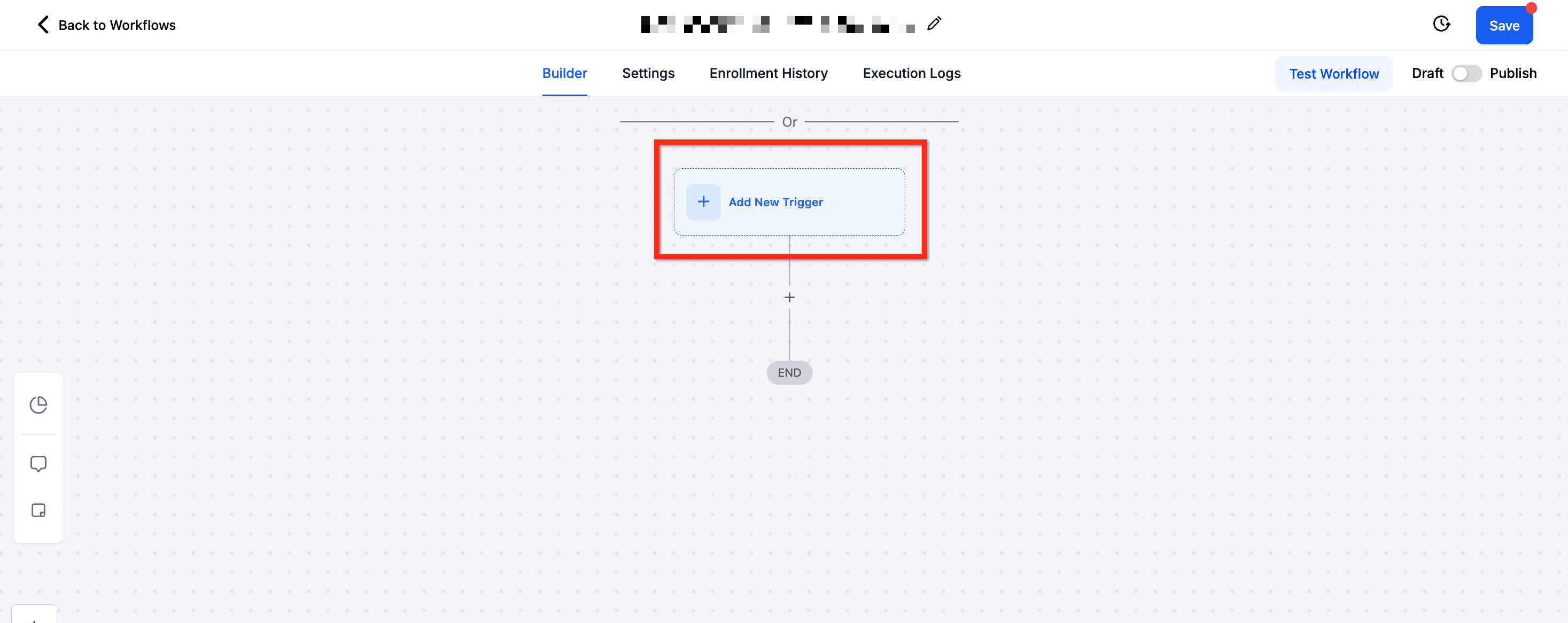
Step 2: Choose the Trigger Type
From the list of available triggers, scroll to the Payments section and select Coupon Code Redeemed.
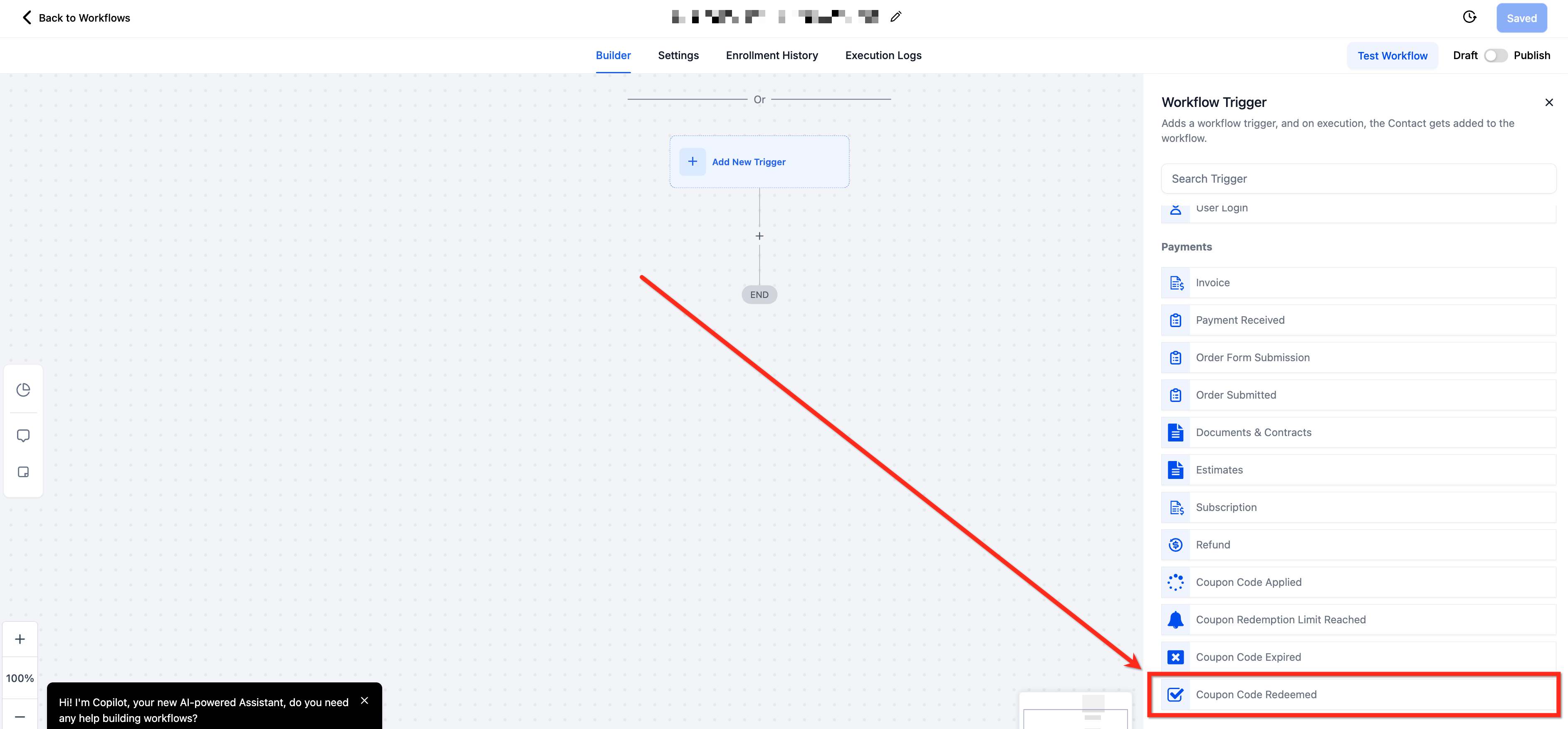
Step 3: Name Your Trigger
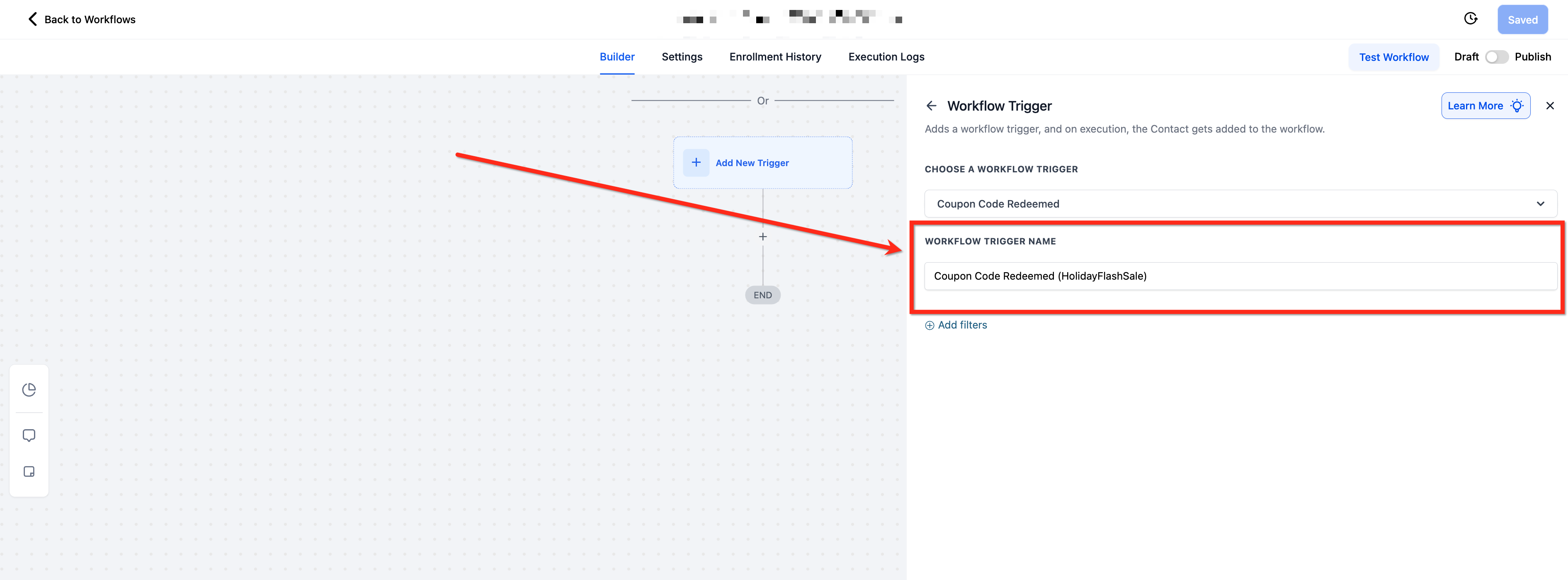
- Provide a descriptive name in the Workflow Trigger Name field to keep your workflow organized
- Example: Coupon Code Redeemed (HolidayFlashSale)
Step 4: Apply Filters to Target Specific Scenarios
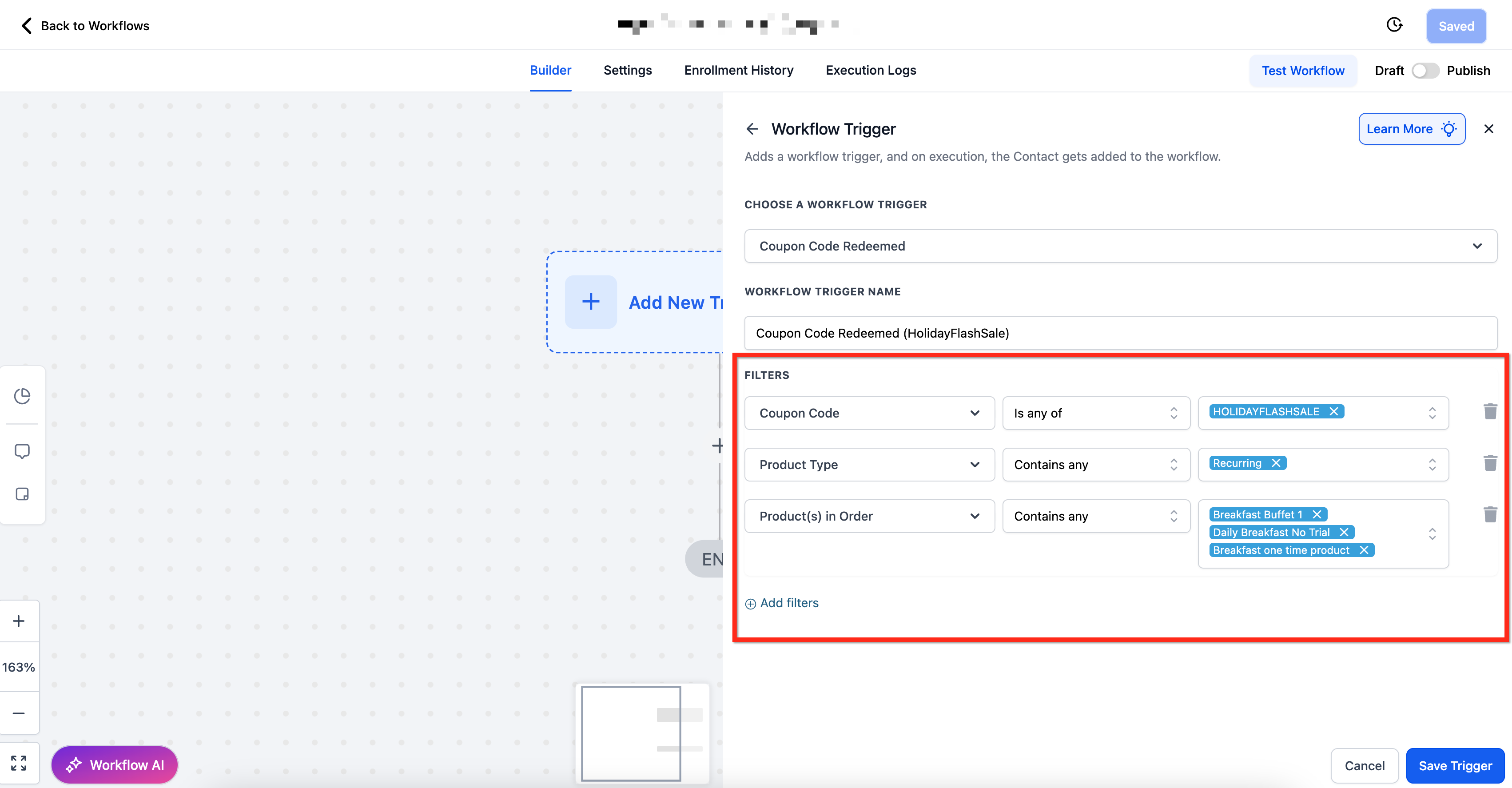
- After naming the trigger, you can apply filters to narrow down exactly when this workflow should fire
- To add filters, click + Add Filters
- Each filter comes with specific operators (like Is, Contains, Greater Than, Before/After) to precisely target the conditions you care about. Click Here to See List of Available Filters
Step 5: Save and Build the Workflow
- Once your trigger and filters are configured, click Save Trigger and start adding your desired actions to the workflow
- When finished, use Test Workflow to confirm everything’s working as expected, then Publish the workflow to activate it
Available Filters
Filter | Operator(s) | Input Type |
| Contact Email ID | Contains Phrase / Is Not Empty | Text Input |
| Contact Tag | Contains Phrase / Is Not Empty | Text Input |
| Coupon Code | Is Any Of / Is Empty / Is None Of / Is Not Empty | Multi-Select Dropdown of Coupon Codes |
| Coupon Name | Is Any Of / Is Empty / Is Not / Is Not Empty | Multi-Select Dropdown of Coupon Names |
| Coupon Type | Is / Is Empty / Is Not / Is Not Empty | Amount / Percentage |
| Coupon Value | Equals To / Greater Than / Greater Than or Equal To / Is Empty / Is Not Empty / Is Not Equal To / Less Than / Less Than or Equal To | Numeric Input Box |
| Order Value (Before Discount) | Equals To / Greater Than / Greater Than or Equal To / Is Empty / Is Not Empty / Is Not Equal To / Less Than / Less Than or Equal To | Numeric Input Box |
| Product Collection | Contains Any / Is Empty / Is None Of / Is Not Empty | Multi-Select Dropdown of Product Collections |
| Product Type | Contains Any / Is Empty / Is None Of / Is Not Empty | Multi-Select Dropdown of Product Types (One Time vs Recurring) |
| Product(s) in Order | Contains Any / Is Empty / Is None Of / Is Not Empty | Multi-Select Dropdown of Products |
| Redemption Count (per coupon) | Equals To / Greater Than / Greater Than or Equal To / Is Empty / Is Not Empty / Is Not Equal To / Less Than / Less Than or Equal To | Numeric Input Box |
| Source | Is / Is Empty / Is Not Empty / Is Not | Single-Select Dropdown |
Recommended Workflow Actions for Coupon Redemptions
After setting up your Coupon Code Redeemed trigger, consider adding these actions to optimize customer retention, upsells, and internal alerts:
Send Email: Thank the customer for their order and offer a follow-up promo
Add Tag: Label customers based on the coupon they redeemed (e.g.,
FlashSaleUser)Internal Notification: Alert your sales or marketing team when key coupons are redeemed
Send SMS: Deliver a thank-you message or special offer for future purchases
Create/Update Opportunity: Add high-value redeemers to your sales pipeline for follow-ups
Frequently Asked Questions
Q: Will this trigger fire if a coupon is applied but the order isn’t completed?
No, this trigger only fires when a coupon is successfully redeemed in a completed transaction. Use the Coupon Code Applied trigger to automate actions at the checkout stage.
Q: Can I track which products the coupon was redeemed against?
Yes, use the Product(s) in Order and Product Collection filters to narrow down based on product selections at the time of coupon redemption.
Q: What happens if I don’t apply any filters?
The workflow will trigger for every coupon redeemed in any completed transaction. It’s a good practice to use filters like Coupon Code Is or Coupon Type Is to target specific promotions.
Q: Can I trigger actions based on the order value or coupon value?
Yes, you can use the Order Value (Before Discount) and Coupon Value filters with operators like Greater Than and Less Than to control when your workflow fires.
Q: Can I monitor redemption limits automatically with this trigger?
Yes, use the Redemption Count (per coupon) filter to trigger actions when a coupon’s usage reaches a specific number.
Q: What if multiple coupon are used in a single purchase?
This trigger evaluates each coupon independently. Apply filters to target the specific code(s) you want the workflow to respond to.