
How to Use the Listings Suggestions Feature
This article explains how to use the new Suggestions feature in Listings to efficiently manage updates submitted by publishers like Google Business Profile (GBP), Facebook, and Yelp. With this tool, you can easily review, accept, or reject proposed updates, helping ensure your business information is consistent and credible across all platforms.
TABLE OF CONTENTS
- How to Manage Publisher Suggestions in Listings
- What is the Suggestions Feature?
- Key Benefits of the Suggestions Feature
- How to Review and Manage Suggestions
- Key Features of the Suggestions Interface
- Centralized Suggestion Hub
- Seamless Data Syncing
- Improved Data Quality & Control
- Frequently Asked Questions
- Related Articles
What is the Suggestions Feature?
The Suggestions feature allows businesses to manage updates submitted by third-party publishers to their listings. These suggestions may include changes to business hours, names, addresses, and more. Businesses can now review, approve, or decline these changes from one centralized location, reducing manual editing while maintaining control over public-facing data.
Key Benefits of the Suggestions Feature
Gain full control over how your business appears across directories with fast, accurate update management.
Quickly review and take action on publisher-submitted updates
Eliminate manual data entry and sync efforts
Keep listings consistent across all platforms
Improve brand trust with accurate business data
Maintain centralized control of your business profile
Prevent unauthorized or incorrect updates from publishers
How to Review and Manage Suggestions
Learn how to navigate the Suggestions Hub, evaluate updates, and sync approved changes across publisher networks.
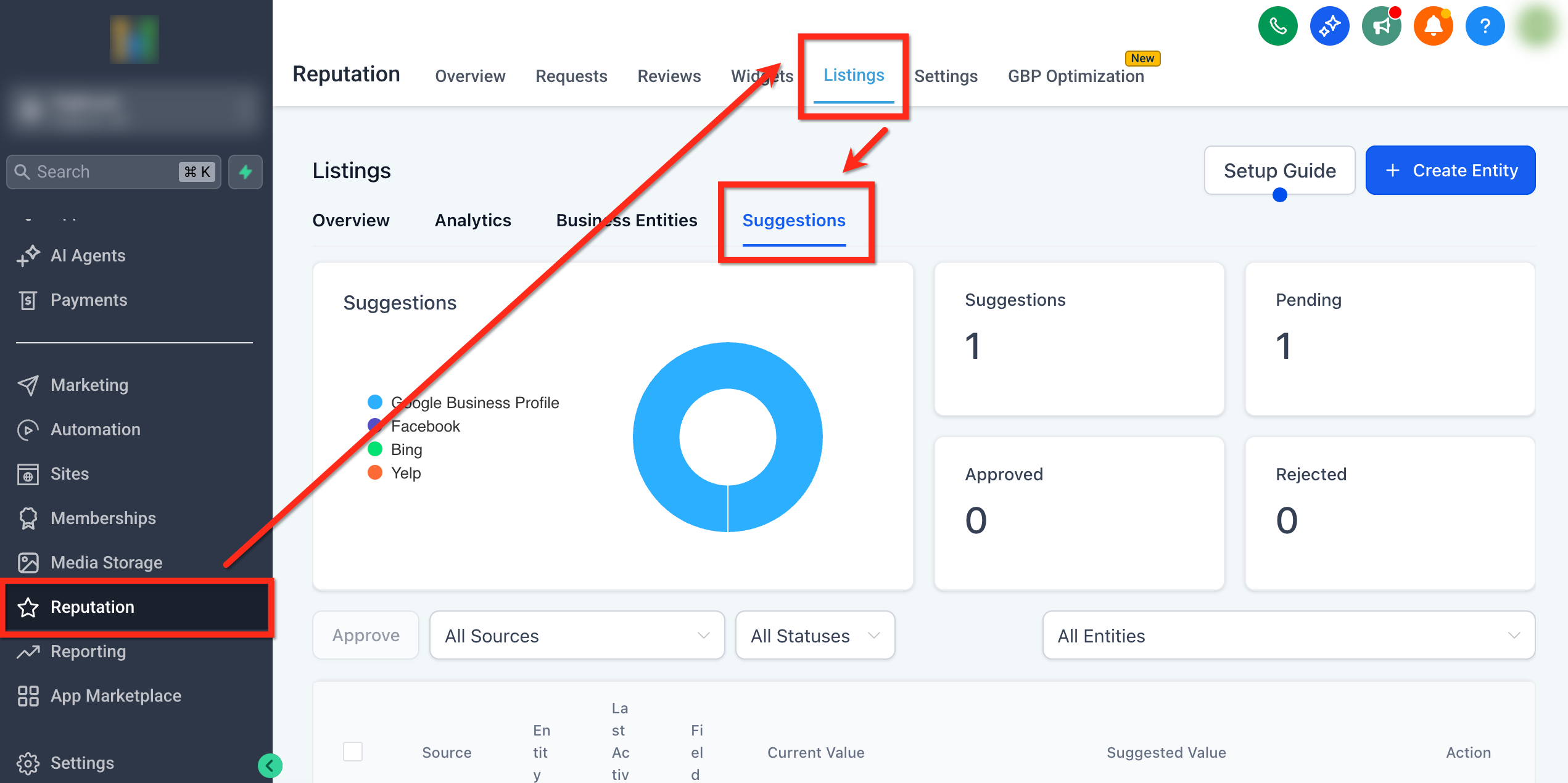
Step 1: Navigate to Suggestions
Use the left-side menu to navigate to Reputation
Click Listings in the to open the listings dashboard .
Click the Suggestions tab to open the Suggestions interface.
Step 2: Review Suggestions
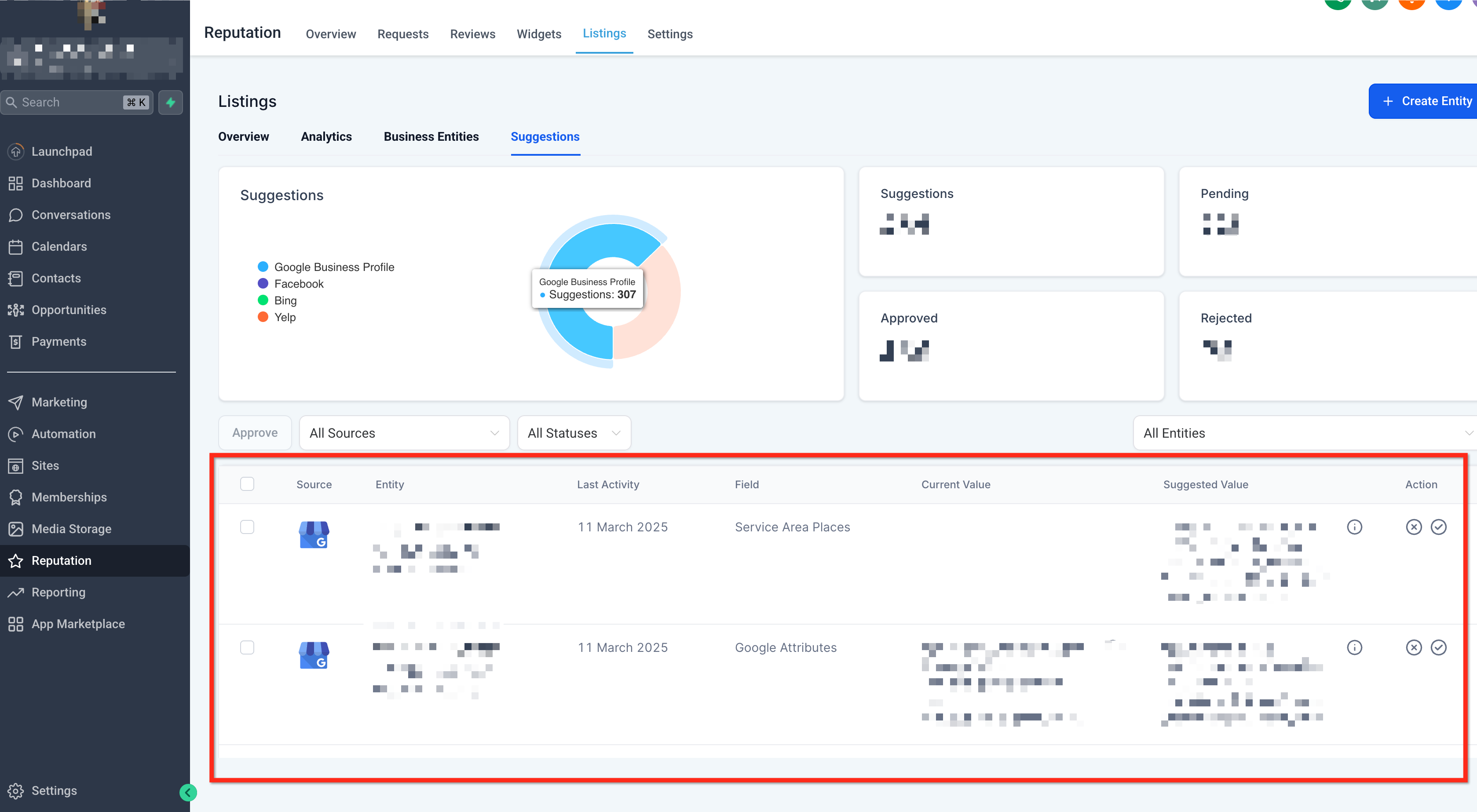
You’ll see a list of pending suggestions from publishers such as GBP, Facebook, or Yelp.
Compare the Suggested Value with your current listing data.
Click Accept (✔️) to apply the change or Reject (X) to decline it.
If accepted, the suggestion will be updated in your Listings and synced across all connected publishers automatically
Key Features of the Suggestions Interface
Understand the core components that make this feature powerful and easy to use.
Centralized Suggestion Hub
This hub consolidates all external listing suggestions into one organized interface, allowing you to review them efficiently. No more switching between platforms to manage updates.
Seamless Data Syncing
Once a suggestion is accepted, it’s instantly updated in your Listings and distributed across all connected publisher networks. This ensures that your customers always see the most up-to-date business information, regardless of where they find you online.
Improved Data Quality & Control
By keeping control over which suggestions are accepted, your team can prevent unauthorized or incorrect changes from impacting your brand presence. This ensures your listings are always accurate and consistent.
Frequently Asked Questions
Q: What types of updates can be suggested?
Publishers may submit changes such as business name updates, new hours, address modifications, phone number corrections, and more.
Q: What happens after I accept a suggestion?
The update is immediately applied to your Listings and synced with all connected directories like Google, Facebook, and Yelp.
Q: Can I undo a rejected suggestion?
Rejected suggestions are removed from the list, but if a publisher re-submits the same suggestion later, you’ll be able to review it again.
Q: Are publisher suggestions always accurate?
Not necessarily. Publisher data may be outdated or incorrect. Reviewing each suggestion manually ensures only relevant and verified data is published.
Q: Can I disable publisher suggestions?
Suggestions cannot be disabled, but they are never auto-applied—your team retains full control and must manually approve each one.
Q: How often are suggestions updated or refreshed?
The system checks regularly for new submissions from publishers and will display them in the Suggestions Hub as they come in.
Q: Is this feature available when using the Uberall Integration?
Yes! The listings suggestions are available for both Yext and Uberall.