
Ask AI Assistant
Ask AI brings AI-first workspace directly into Chat To Clients CRM so users can create content, get answers, generate assets, and complete real actions across the platform — all without leaving the interface. This article covers what Ask AI is, who can access it, its full range of capabilities, how to use it, and common use cases.
TABLE OF CONTENTS
- What is Ask AI Assistant?
- Who Can Access Ask AI?
- Core Capabilities of Ask AI
- Full List of Chat To Clients CRM Products Ask AI Can Control
- 1. Contacts & CRM
- 2. Marketing & Content
- 3. Funnels, Sites & Media
- 4. Calendars & Scheduling
- 5. Payments & Commerce
- 6. Courses & Memberships
- 7. AI & Automation
- 8. Reputation & Reviews
- 9. Phone & Messaging
- 10. Reporting & Data
- 11. Account & Settings
- Reading Ask AI Responses
- Navigating Ask AI Conversations
- How to Use Ask AI Assistant
- Ask AI Use Cases
- Current Limitations
- Frequently Asked Questions
What is Ask AI Assistant?
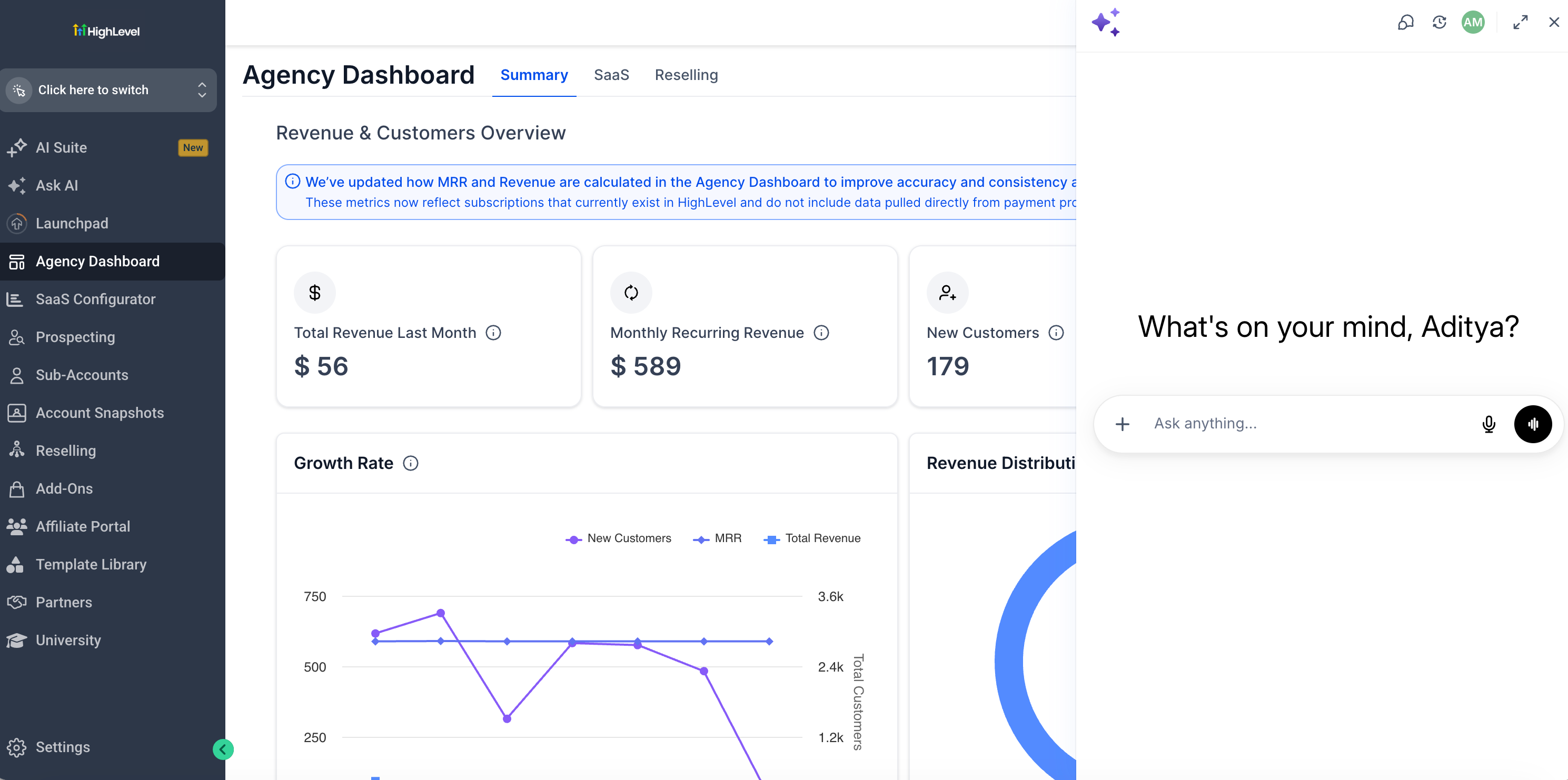
Ask AI is Chat To Clients CRM's built-in AI workspace a copilot with conversational interface that lets users create content, retrieve data, take action on platform features, and get answers using plain language. Instead of navigating through multiple menus and screens, users can describe what they want to do in a single prompt and Ask AI handles it.
Ask AI is deeply integrated with Chat To Clients CRM's platform. It can read data, create records, update settings, generate content, manage contacts, run bulk actions, and coordinate across dozens of modules all from one chat interface. It supports both typed prompts and voice input, and is available in a sidebar panel or in a full-screen workspace for focused, high-volume work. It is also available on the Chat To Clients CRM, Chat To Clients CRM, and white labeled mobile apps, allowing supported users to access the Ask AI workspace from mobile.
Note: To generate personalized or branded content, configure your Brand Voice in Marketing > Branded Content > Brand Voice before using Ask AI for content tasks. |
Who Can Access Ask AI?
User Type | Access |
|---|---|
Agency Admins | Full access — Agency and Sub-account views |
Agency Users | Full access — Agency and Sub-account views |
Sub-account Admins | Available on the Pay per Use, $50 AI Growth & $97 AI Employee Plans |
Sub-account Users | Available on the Pay per Use, $50 AI Growth & $97 AI Employee Plans |
Ask AI can be found in the top navigation bar of your Chat To Clients CRM account. Click the Ask AI icon to open the chat panel and enter your prompts.
Mobile availability: Ask AI on the Chat To Clients CRM, Chat To Clients CRM, and whitelabeled mobile apps is currently available to Agency Admins.
Core Capabilities of Ask AI
Ask AI covers three broad capability types as your copilot: content and image generation, CRM platform actions, and data retrieval / updates for your accounts. The table below outlines the major capability groups with example prompts.
Capability | Description | Example Prompts |
|---|---|---|
Branded Content Generation | Generate on-brand content using your Brand Voice settings for emails, social posts, ads, blogs, and campaigns. | “Write a Facebook ad post using my brand voice.” “Draft a promotional email for our summer sale.” |
Image Generation & Editing | Generate and edit images for campaigns, websites, emails, and social posts directly inside Chat To Clients CRM. | “Generate a hero image for a dental practice landing page.” “Edit this image to add a darker background.” |
CRM Actions & Data Retrieval | Create, update, search, and manage CRM records using plain-language requests across contacts, opportunities, pipelines, calendars, and more. | “Create a contact named Jane Smith with email jane@example.com.” “Show me all open opportunities in the Sales pipeline.” |
Bulk Actions | Execute mass updates across contacts, send bulk SMS, or bulk email to entire lists. | “Send a follow-up SMS to all contacts tagged Webinar-July.” “Tag all contacts from last month's campaign as Q3-Lead.” |
Blog & Content Writing | Draft, write, and publish blog posts with AI assistance, including SEO optimization and structured formatting. | “Write a 1,000-word blog post on the benefits of SMS marketing.” “Generate 5 blog post title ideas for a real estate agency.” |
Funnel Creation Agent | Create funnels through a guided AI experience using business details, templates, and brand personalization. | “Generate a lead magnet funnel for a coaching business.” “Create an appointment funnel for a dental practice.” |
Contact Summary Agent | Summarize contact records — including communications, payments, appointments, and tasks — without reviewing multiple tabs. | “Summarize this contact's history.” “What should I know before following up with this lead?” |
AI Agent Management | Create, configure, and manage Conversation AI chat agents and Voice AI phone agents directly from Ask AI. | “Create a new AI chat agent for my dental practice.” “Set up a voice agent for appointment booking calls.” |
Support & Knowledge Base Search | Search Chat To Clients CRM's help content and get guided answers to platform questions, troubleshooting, and feature how-tos. | “How do I set up A2P registration?” “Why isn't my email domain verified?” |
Ad Campaign Management | Create, list, and review campaign performance across Google, Facebook, and LinkedIn ad platforms. | “Show me my top-performing Google campaigns.” “Create a new Facebook lead generation campaign.” |
Scheduling & Automation | Schedule tasks to run at a future time or on a recurring schedule from within Ask AI chat. | “Send me a contacts report every Monday at 9am.” “Remind me to follow up with this contact in 3 days.” |
| Marketplace App Discovery | Find relevant Marketplace apps and integrations by describing a business need or use case in natural language. | "Is there an IDX integration for real estate available?" |
| Parallel Research and Complex Tasks | Break complex requests into focused tasks, run research agents in parallel, and combine their findings into one response. | "Find stalled opportunities, review follow-up activity, and identify contact data issues." |
Full List of Chat To Clients CRM Products Ask AI Can Control
Ask AI is connected to over 50 modules inside Chat To Clients CRM. Here is a complete breakdown of what it can see, understand, and take action on, grouped by area.
1. Contacts & CRM
Module | What Ask AI Can Do |
|---|---|
Contacts | Search, create, update, and delete contacts; manage tags, tasks, notes, followers, campaign assignments, workflow enrollments, and business associations |
Conversations | Create conversations, send and schedule messages, cancel scheduled messages, add inbound messages, and log outbound calls |
Opportunities & Pipelines | Create and search opportunities, update stages and values, create and retrieve pipelines |
Businesses | Create, update, delete, and retrieve business records |
Companies | Retrieve company information |
Associations | Create and delete associations and relations between entities |
Custom Objects | Create custom object schemas and manage records |
2. Marketing & Content
Module | What Ask AI Can Do |
|---|---|
Emails | Create and delete email templates, retrieve campaigns, manage bulk email campaigns |
Bulk Actions | Send bulk SMS and bulk email to contact lists |
SMS Campaign Onboarding | Guided flow to write, target, and send or schedule your first SMS campaign |
Blogs | Create blog sites and posts, manage authors and categories, AI-assisted drafting and editing |
Social Planner | Connect and manage Facebook, Instagram, LinkedIn, and TikTok accounts; schedule and publish social posts |
Ad Manager | List ad campaigns, review cross-platform performance, create Google Search/Demand Gen, LinkedIn Lead Gen/Website Visits, and Facebook campaigns |
Forms | Retrieve forms and submissions, upload files to custom fields |
Surveys | Retrieve surveys and submissions |
Trigger Links | Create, search, update, and delete trigger links |
Documents & Proposals | List templates and documents, send documents to contacts |
3. Funnels, Sites & Media
| Sr | Module | What Ask AI Can Do |
|---|---|---|
| 1 | Funnels | Fetch funnels and funnel pages, create and manage redirects |
| 2 | Media Library | Upload, organize, trash, and delete files and folders; manage Google Drive as a media storage source |
4. Calendars & Scheduling
Module | What Ask AI Can Do |
|---|---|
Calendars | Connect Google Calendar (OAuth, 2-way sync), create/update/delete calendars, appointments, block slots, calendar groups, and schedules |
5. Payments & Commerce
Module | What Ask AI Can Do |
|---|---|
Invoices | Create invoices, schedules, and estimates; manage auto-payment and invoice cancellation |
Payments | Connect Stripe, create coupons, set up integration providers, manage order fulfillment |
Products | Create, update, and bulk-edit products and prices; manage product collections and reviews |
Store | Create and manage shipping carriers, zones, rates, and store settings |
6. Courses & Memberships
Module | What Ask AI Can Do |
|---|---|
Courses / Memberships | Create course products, categories, posts/lessons, quizzes, assignments, and offers |
7. AI & Automation
Module | What Ask AI Can Do |
|---|---|
Conversation AI | Onboard, create, update, and delete AI chat agents; manage agent actions and dashboards |
Voice AI | Onboard, create, update, and delete Retell voice agents; manage call logs and agent actions |
Agent Studio | List, retrieve, and execute AI agents |
Workflows | Retrieve and list existing workflows (read-only — see Limitations) |
Campaigns | Retrieve and list existing campaigns (read-only — see Limitations) |
8. Reputation & Reviews
Module | What Ask AI Can Do |
|---|---|
Reputation | Connect Google for reviews, create AI review agents, manage review request settings and email templates |
9. Phone & Messaging
Module | What Ask AI Can Do |
|---|---|
Phone System | Search and purchase phone numbers, manage number pools, create and manage WhatsApp templates and flows |
A2P Registration | Full A2P Trust Center registration workflow, brand submission, TCR polling, and resubmission on rejection |
Phone Regulatory | Manage regulatory bundles and addresses, upload supporting documents, check bundle approval status |
10. Reporting & Data
Module | What Ask AI Can Do |
|---|---|
Reporting / Dashboards | Fetch full dashboard data and per-widget metric values |
Custom Fields | Create, update, and delete custom fields and folders using natural-language requests. Ask AI can identify custom fields by name, so you do not need to provide a Field ID. It supports custom fields for Contacts and Opportunities, as well as Custom Object fields. |
Custom Menus | Create, update, delete, and retrieve custom menu links |
Knowledge Base | Create and delete knowledge bases, manage FAQs and trained pages |
Brand Boards | Create, update, and delete brand boards and brand voices |
11. Account & Settings
Module | What Ask AI Can Do |
|---|---|
Users | Create, delete, filter, and retrieve user records |
Sub-Accounts / Locations | Create sub-accounts, manage tags and custom values |
Snapshots | Get snapshots, create share links, track snapshot push history |
SaaS | Create and update plans, manage subscriptions, wallet, and rebilling |
Email Domains | Add sending domains, retrieve DNS records, verify domain configuration |
Email Verification | Chat To Clients Email verification |
Google Integration | Check Google OAuth connection status for Calendar, Gmail, Drive, and Ads |
Facebook Leads | Connect Facebook, configure lead gen form field mappings, sync historical leads |
Facebook Messenger / Instagram DMs | Connect pages, enable inbound messages to Conversations inbox |
Marketplace | Discover relevant Marketplace apps from natural-language requests, retrieve installer details, manage wallet charges, and configure rebilling. |
OAuth | Retrieve access tokens and location access tokens |
Reading Ask AI Responses
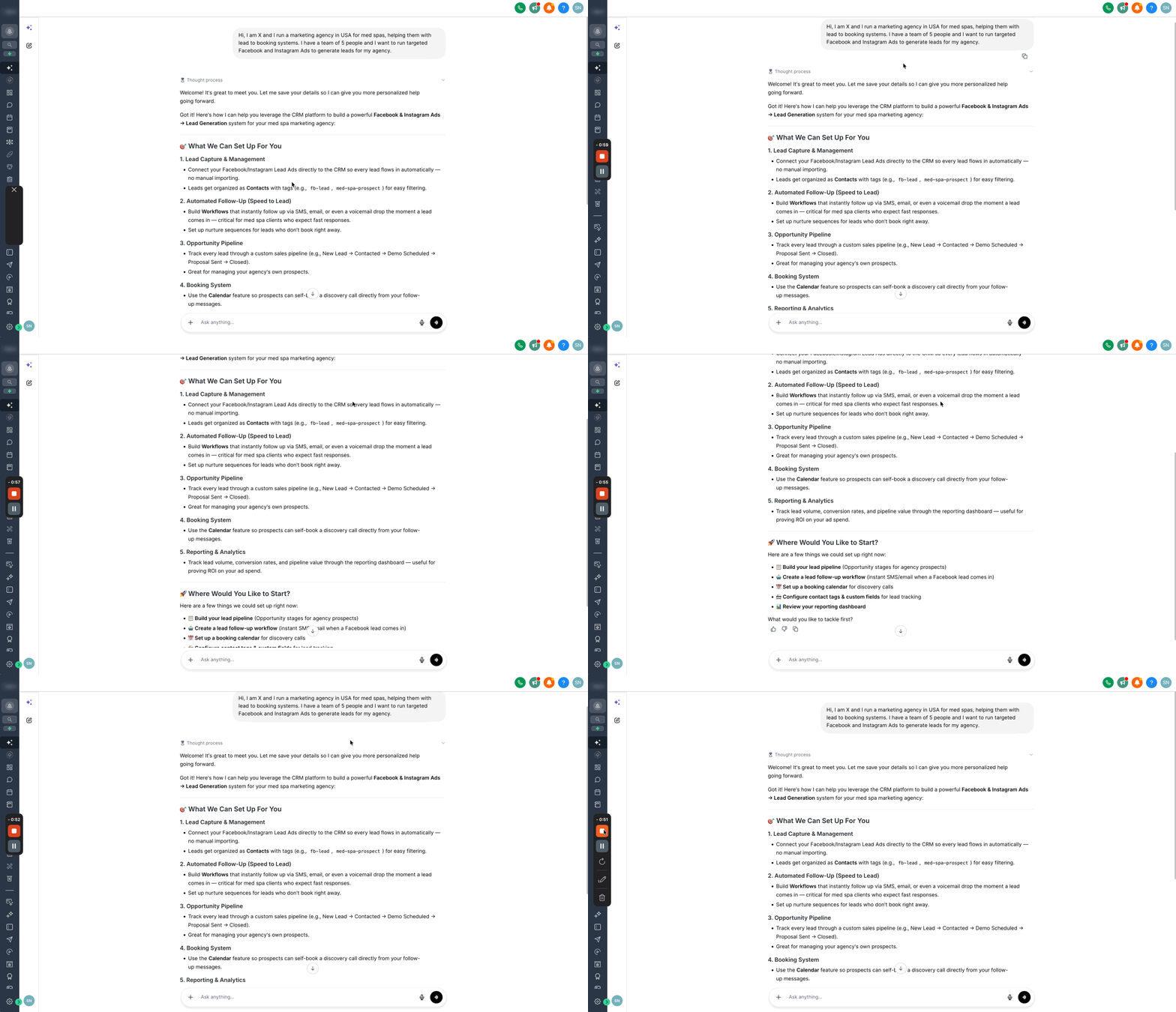
Ask AI responses appear in the conversation view and may include paragraphs, headings, bullet points, numbered steps, structured tables, interactive question inputs, charts, data tables, and copyable code blocks. Responses are formatted to make longer answers easier to scan and act on.
For multi-step tasks, Ask AI displays a live task tracker that shows which steps are complete, in progress, or pending so users always know where a complex action stands.
Some structured responses may appear in collapsible cards to keep longer conversations organized. Users can expand details only when needed.
Navigating Ask AI Conversations
The Ask AI sidebar helps users manage conversations from one place. Users can review previous sessions, return to an existing conversation, or start a new chat when they want to begin a separate task.
If no conversations are available yet, the sidebar empty state helps users understand that they can begin by starting a new conversation or using a suggested prompt.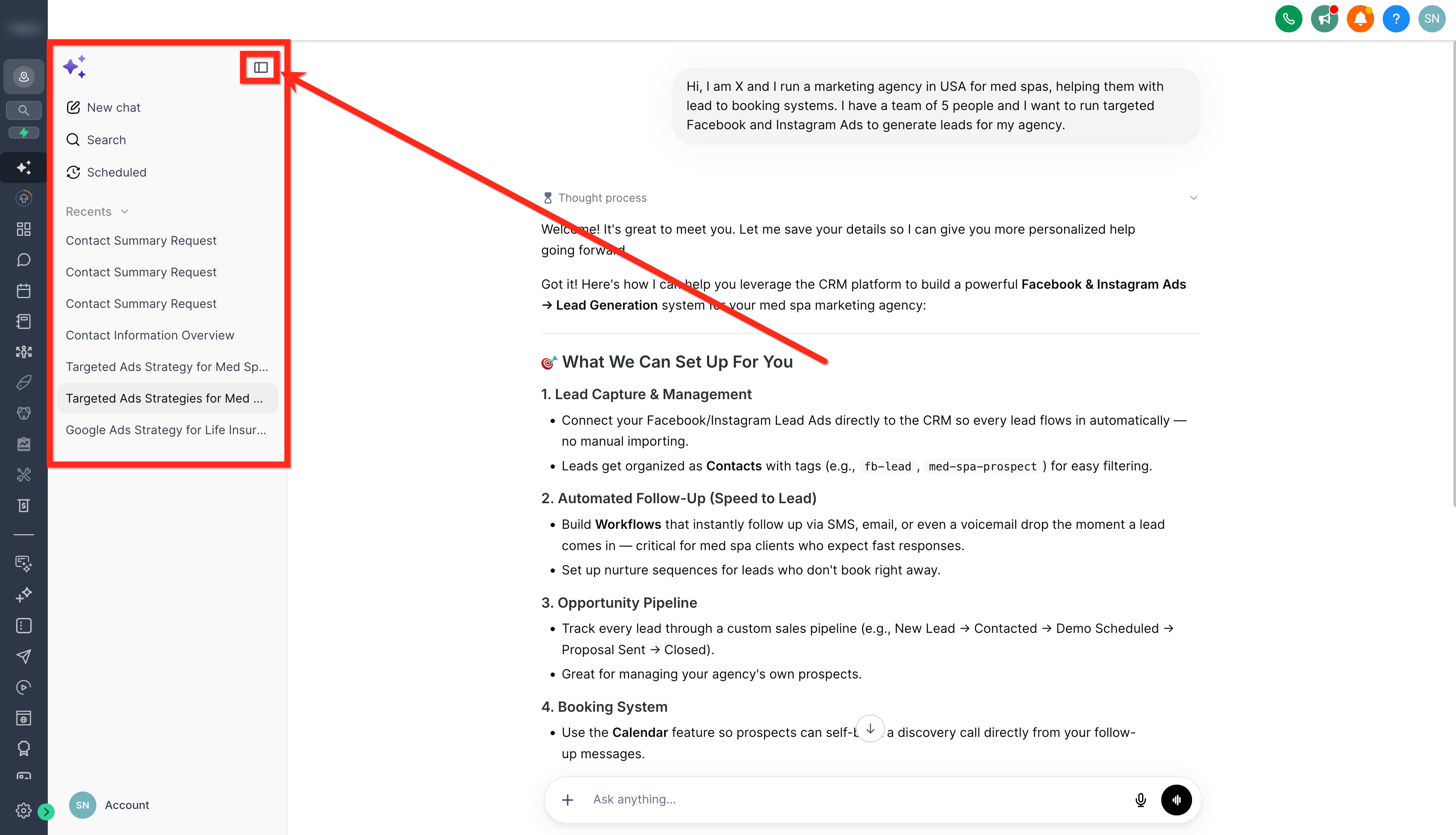
Complex Tasks and Parallel Research
Ask AI can break complex requests into smaller tasks and assign them to specialized research agents. Multiple agents can work in parallel while the main assistant coordinates their work and combines their findings into a single response.
How parallel research works
Ask AI analyzes your request and identifies tasks that can be handled separately.
Each research agent receives a focused assignment and an expected output.
Up to four research agents can run simultaneously. Additional tasks wait in a queue.
Research agents return findings, sources, and relevant file references.
The main assistant combines the results, addresses follow-up needs, and prepares the final response.
Example: Review a sales pipeline
Ask AI can assign separate research tasks to identify stalled opportunities, review follow-up activity, and check contact data quality. It combines the findings into a prioritized action list. If you request bulk changes afterward, Ask AI can prepare a plan for your approval before executing supported updates.
How to Use Ask AI Assistant
Ask AI can be opened from both Agency and Sub-Account views, giving users quick access to AI-powered assistance while working in Chat To Clients CRM. Users can launch Ask AI from the top navigation bar, open the dedicated Ask AI workspace from the left sidebar, or access Ask AI through supported contextual workflows such as Ecommerce Store setup.
Access Ask AI from the Top Navigation
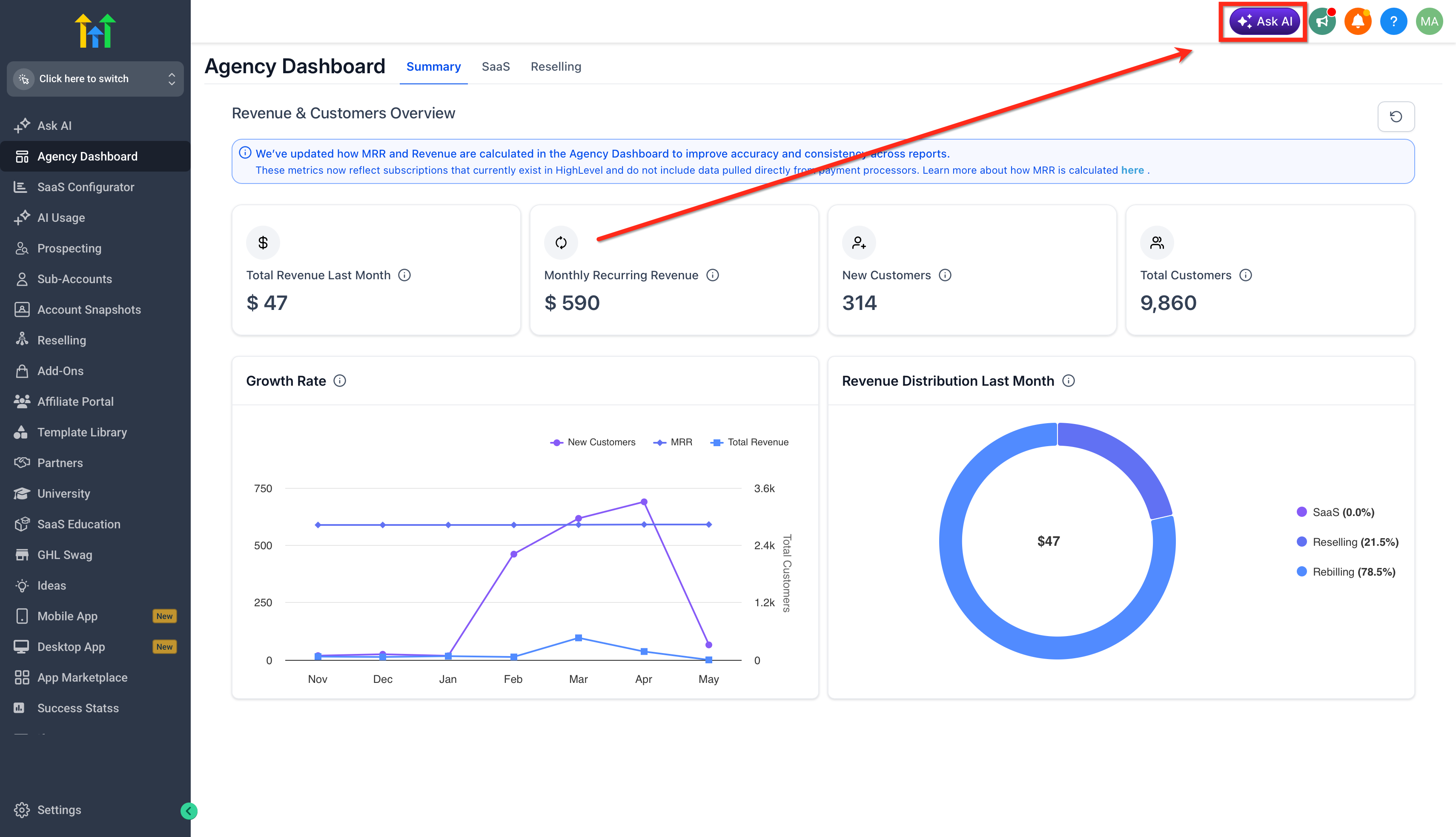
The top navigation route is useful when users want quick access to Ask AI from anywhere in Chat To Clients CRM. This is the fastest way to open the assistant while working in another area of the platform.
- Click on the Ask AI icon in the top navigation bar.
- Type in or Speak what you need: content, a new community, ideas, or questions.
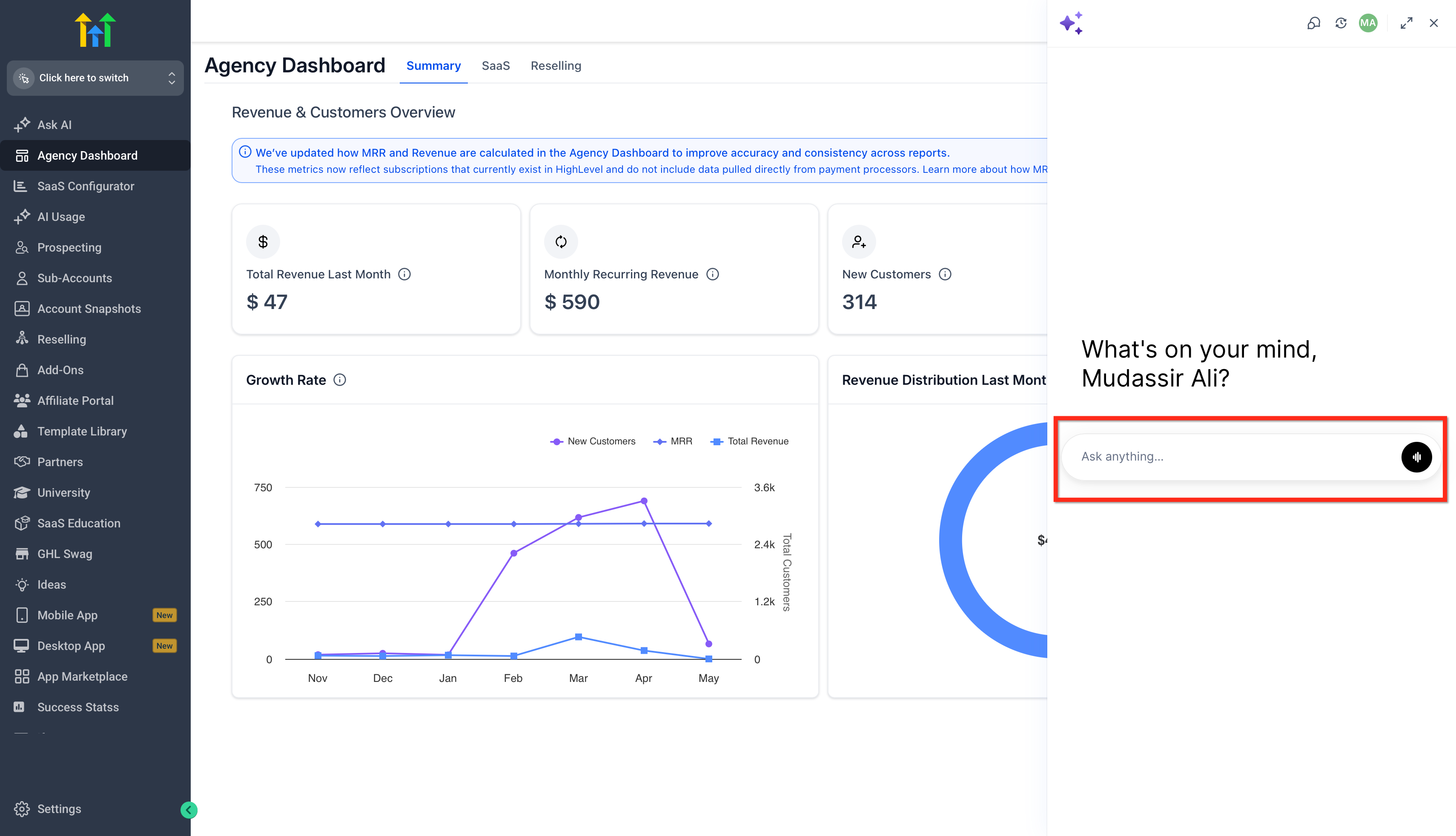
- The bot will guide you or respond instantly with what you asked for.
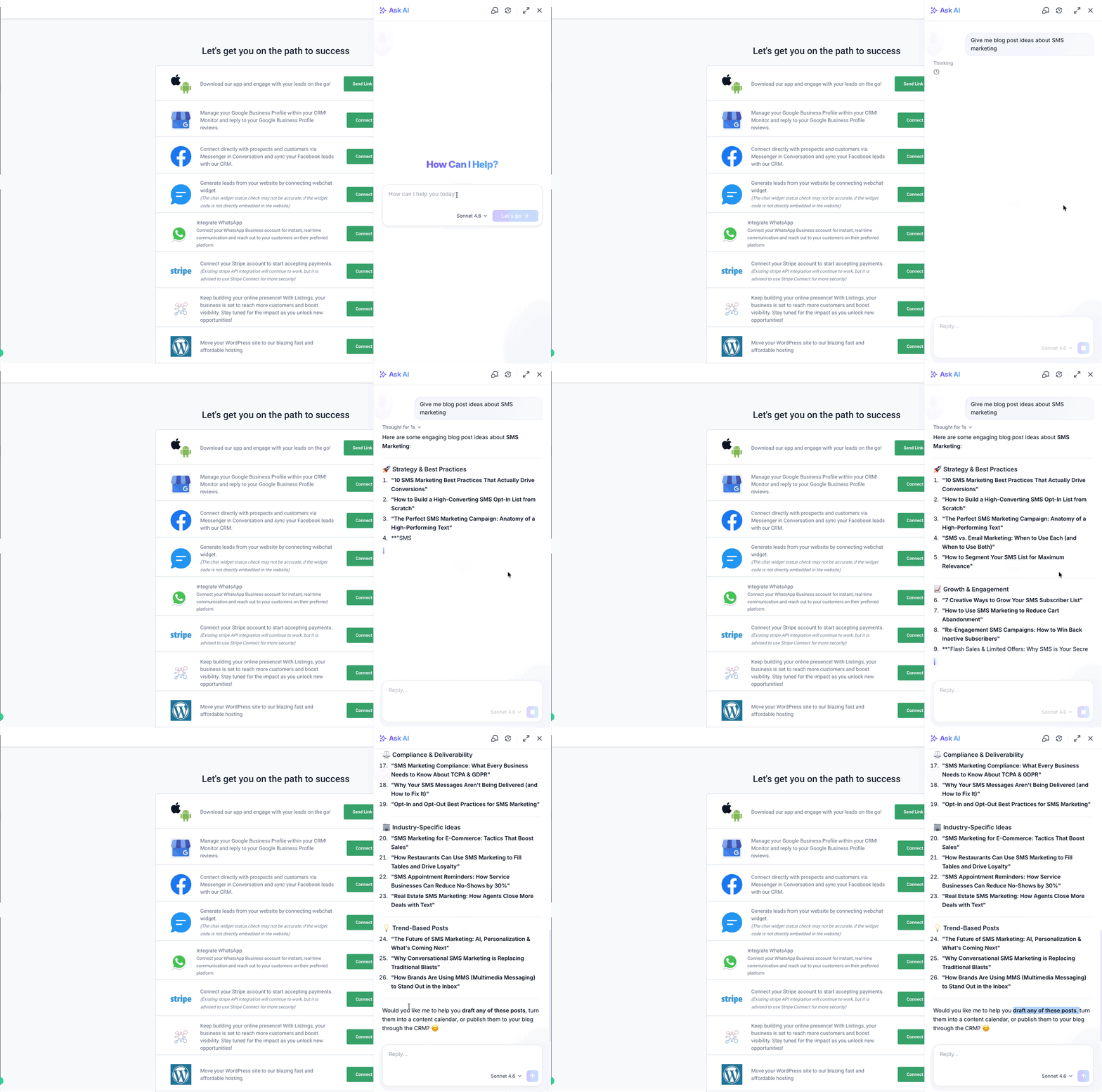
You can start with something like:- “Give me blog post ideas about SMS marketing.”
- “Write a Facebook ad post using my brand voice.”
- “Help me set up a community for local business owners.”
- “Give me blog post ideas about SMS marketing.”
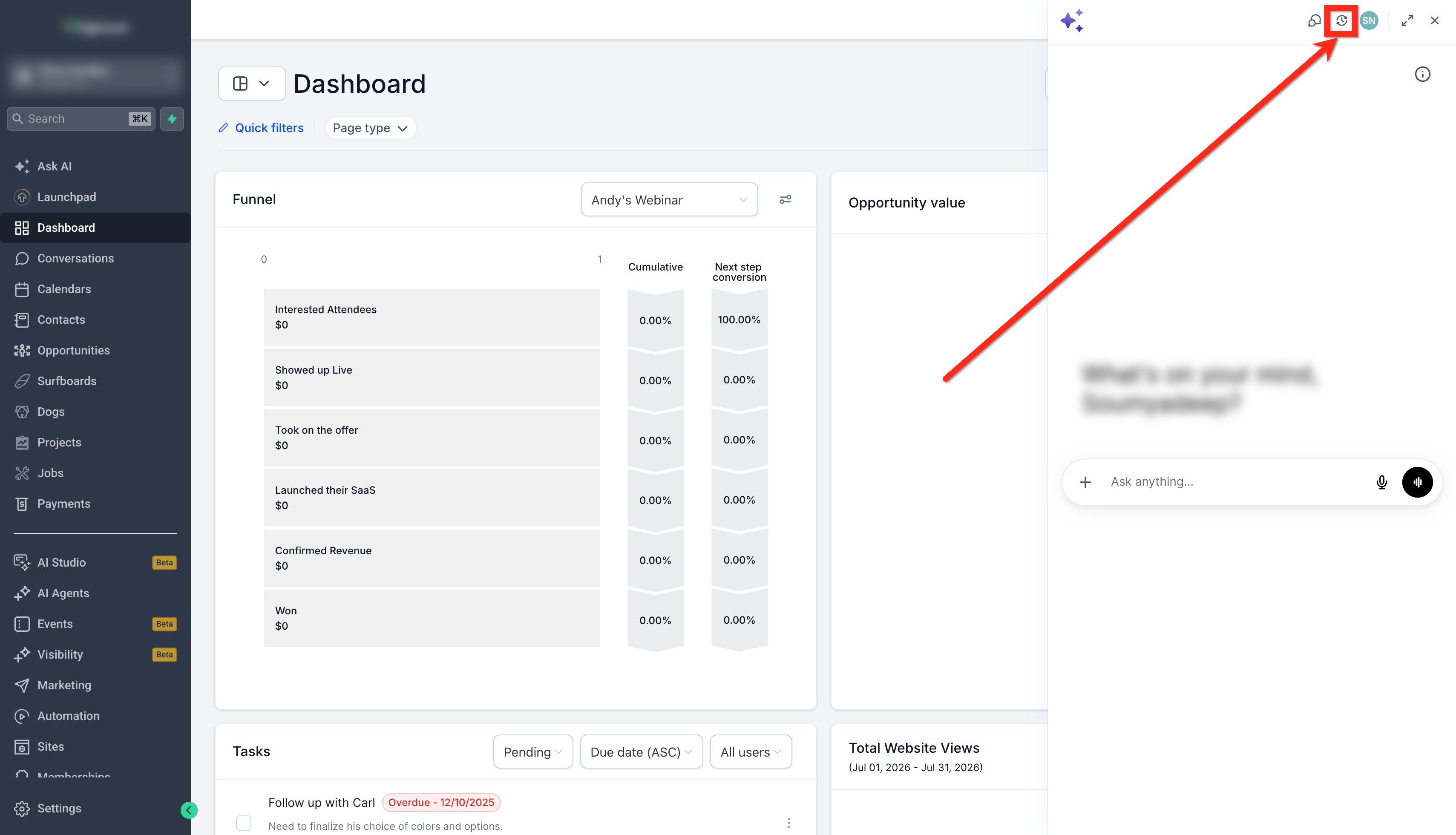
- You can also view the chat history, and go back to older chats directly by toggle next to the full-screen toggle.
Access Ask AI from the Left Sidebar
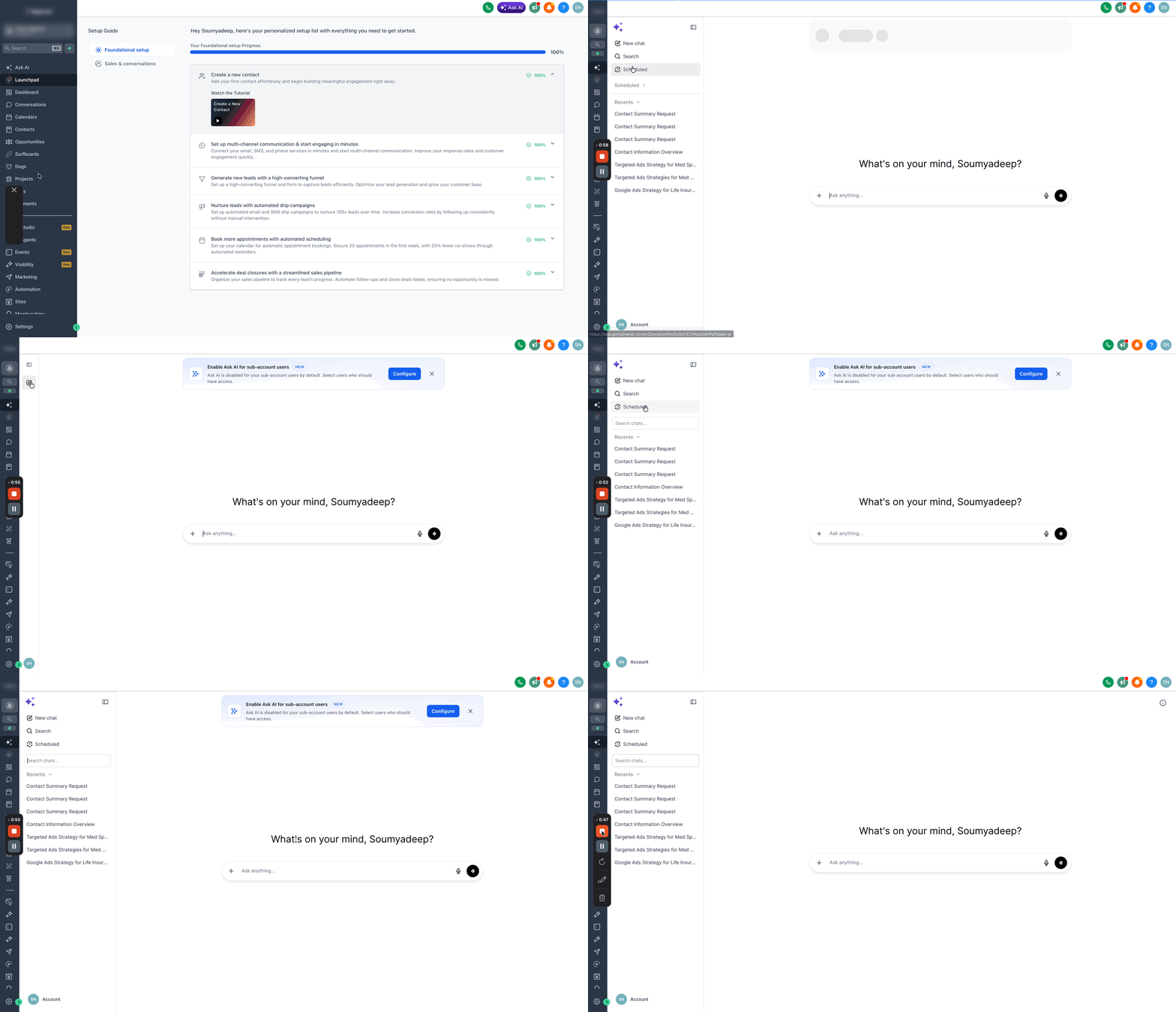
Ask AI opens in a full-screen workspace, so it is not a chatbot tucked in a corner. Use it to focus on real work and complete higher-volume tasks without leaving Chat To Clients CRM. You can access Ask AI from the left navigation at both the Agency and the Sub-account level.
1. In your account, look at the left navigation panel.
2. Click Ask AI (it appears as a dedicated menu item).
3. In the Ask AI workspace, you can:
- Click New chat to start a fresh thread.
- Use Search to find previous conversations (if available).
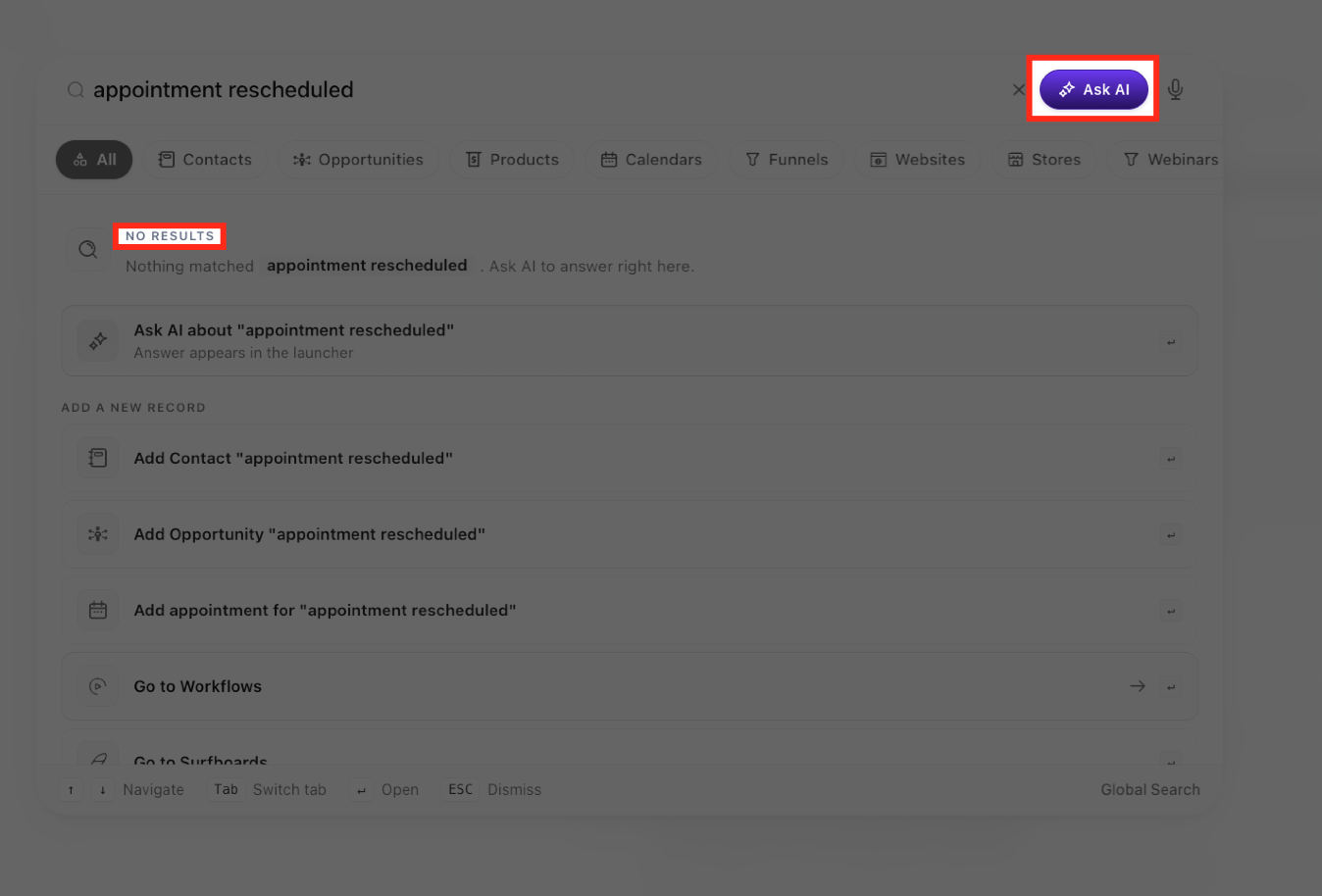
Access Ask AI from Global Search
Global Search provides an additional way to access Ask AI when a search does not return any matching results. Users with Ask AI access can send their existing search query to Ask AI without retyping it or leaving the Global Search experience.
1. Open Global Search and enter your search query.
2. If Global Search returns no matching results, select the Ask AI option.
3. Review the first Ask AI response directly inside Global Search.
4. To continue the conversation, select Continue in Ask AI.
5. Ask AI opens with the existing query and conversation context so you can continue without starting over.
Ask AI Use Cases
Category | Example Prompts |
|---|---|
Contacts & Pipeline Management | “Find all contacts tagged 'Hot Lead' added in the last 30 days.” “Create a contact: Maria Lopez, maria@example.com, +1-555-9876.” “Move all opportunities in 'Proposal Sent' that haven't been updated in 14 days to 'Stalled'.” “Add a note to John Smith's contact: Interested in the Pro plan, follow up Friday.” |
Content & Campaigns | “Write a promotional email for a Black Friday sale using my brand voice.” “Generate 5 subject line options for a re-engagement campaign.” “Draft a 3-part SMS nurture sequence for new leads.” “Create a blog post titled 'Top 5 Reasons to Use Automated Follow-Ups'.” |
Image Creation | “Generate a professional banner image for a real estate open house event.” “Create a square social media image for a summer sale promotion using our brand colors.” |
Calendars & Appointments | “Show me all appointments scheduled for tomorrow.” “Block off Friday afternoon on the main team calendar.” “Create a new appointment calendar called Discovery Calls.” |
Reporting & Insights | “Pull my dashboard metrics for this month.” “How many opportunities were closed-won last week?” “Show me the performance of my Google ad campaigns.” |
Phone & Compliance | “Walk me through registering for A2P messaging.” “Search for available phone numbers in the 512 area code.” “Create a WhatsApp message template for appointment reminders.” |
AI Agent Setup | “Create a new Conversation AI agent for my law firm's intake process.” “Set up a Voice AI agent to handle inbound appointment booking calls.” “Update my chat agent's greeting message.” |
Platform Administration | “Create a new sub-account for Acme Roofing.” “Add a user with admin access: jsmith@example.com.” “Show me all active snapshots available for my agency.” “Verify the DNS setup for our new email sending domain.” |
Marketplace Discovery | “Find an IDX integration for real estate.” “Show me Marketplace apps for lead generation.” |
Current Limitations
Ask AI is expanding rapidly. The following areas are currently read-only or not yet connected:
Area | Limitation |
|---|---|
Workflows | Read-only — Ask AI can retrieve and list workflows but cannot create, build, or edit workflow steps and actions |
Campaigns | Read-only — Ask AI can list campaigns but cannot create or edit them |
Affiliate Manager | Not yet connected — no visibility or control |
Listings / Yext | Not yet connected — cannot manage business listing syncs |
Chat Widget | No standalone configuration — cannot deploy or configure chat widgets directly |
Website Builder (Sites) | No direct access — only Funnels are available; the full Sites/Website builder is not connected |
Raw Call & SMS Logs | Not directly accessible — call and message data surfaces only through the Reporting dashboard |
Automation Execution History | Cannot drill into individual workflow run/execution logs |
IVR / Call Routing | Can purchase phone numbers but cannot configure call routing trees or IVR menus |
These areas are on the product roadmap and will be added in future updates.
Frequently Asked Questions
Q: Is Ask AI available on all plans?
Ask AI is available to all Agency Admins and Agency Users. Sub-account Admins and Users require the Pay Per Use or $50 AI Growth Plan or $97 Unlimited AI Employee Plan.
Q: Will Ask AI ask me before taking irreversible actions?
Yes. For any write, update, or delete action, Ask AI will present a confirmation screen and require your approval before executing the change.
Q: Can Ask AI take action across multiple contacts or records at once?
Yes. Ask AI supports bulk actions including tagging, bulk SMS, and bulk email — and will always confirm the scope of the action before proceeding.
Q: Does Ask AI remember my previous conversations?
Yes. Conversations are saved and accessible from the sidebar. Ask AI also maintains persistent memory of preferences and facts you share over time, so it can personalize responses in future sessions.
Q: Can I use Ask AI by speaking instead of typing?
Yes. Click the microphone icon in the Ask AI input bar to use voice input.
Q: What is the difference between Ask AI and Conversation AI or Voice AI agents?
Ask AI is your personal AI Copilot inside Chat To Clients CRM — it helps you get work done. Conversation AI and Voice AI are customer-facing agents that communicate with your contacts via chat and phone. Ask AI can actually help you build and configure those agents.
Q: Can Ask AI generate images?
Yes. Ask AI can generate new images and edit existing ones using your brand colors and style. Just describe what you need and it will create it inline in the chat.
Q: How do I get the best results from Ask AI?
Be specific. Include names, dates, pipeline names, tags, or any relevant context in your prompt. The more detail you provide, the more accurate and useful the response will be.