Granular Permissions for Snapshots
Overview
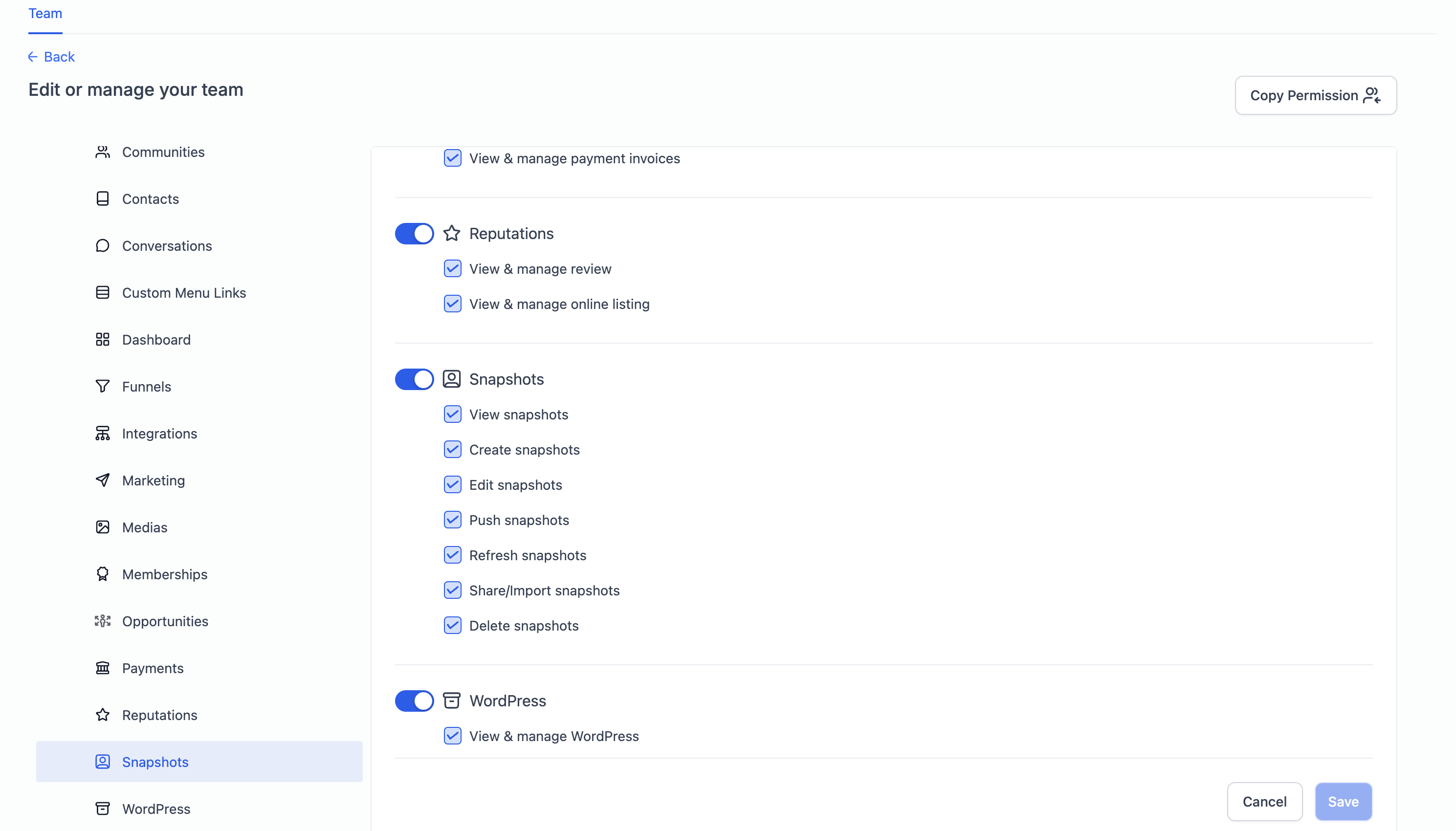
The granular permissions feature for Snapshots provides more control over who can perform specific snapshot-related actions within the system. With this update, admins can assign precise permissions to users, ensuring better security, compliance, and workflow management.
Available Snapshot Permissions
The following Snapshot actions are now permission-controlled:
View Snapshots – Allows users to browse and access snapshots.
Create Snapshots – Grants users the ability to generate new snapshots.
Edit Snapshots – Permits modifications to existing snapshots.
Share/Import Snapshots – Enables users to share and import snapshots.
Push Snapshots – Grants access to pushing snapshots to accounts.
Refresh Snapshots – Allows users to update snapshot content.
Delete Snapshots – Permits users to remove snapshots permanently.
How to Manage Snapshot Permissions
Admins can control these permissions for each team member by following these steps:
Navigate to Settings in your account.
Click on Team to view your team members.
Select the user whose permissions you want to modify.
Click Edit User Option.
Go to the Snapshot Scopes section.
Enable or disable specific snapshot permissions as needed.
Click Save Changes to apply the updates.
Why Use Granular Permissions?
Enhanced Security – Ensures users have only the access they need, reducing the risk of unauthorized actions.
Better Compliance – Helps organizations enforce internal policies and prevent data misuse.
Streamlined Workflow Management – Assigns appropriate permissions based on user roles, improving operational efficiency.
Best Practices
Regularly review and update user permissions to match role changes.
Restrict access to sensitive actions like Delete Snapshots and Push Snapshots to trusted team members.
Educate team members on their permissions and responsibilities to avoid accidental modifications.