
Understanding Default Phone Preferences for New Sub-Accounts
When creating new sub-accounts, certain settings are pre-applied to streamline the setup process. These settings ensure that sub-accounts are configured optimally from the start, reducing manual adjustments. However, users can modify them at any time to better suit their operations.
TABLE OF CONTENTS
- What are Default Phone Preferences for New Sub-Accounts?
What are Default Phone Preferences for New Sub-Accounts?
Default phone preferences are agency-level settings that determine how specific Chat To Clients Phone features are configured when a new sub-account is created. Setting these preferences in advance helps agencies establish a consistent starting configuration across new sub-accounts while reducing the need to configure the same phone settings individually after account creation.
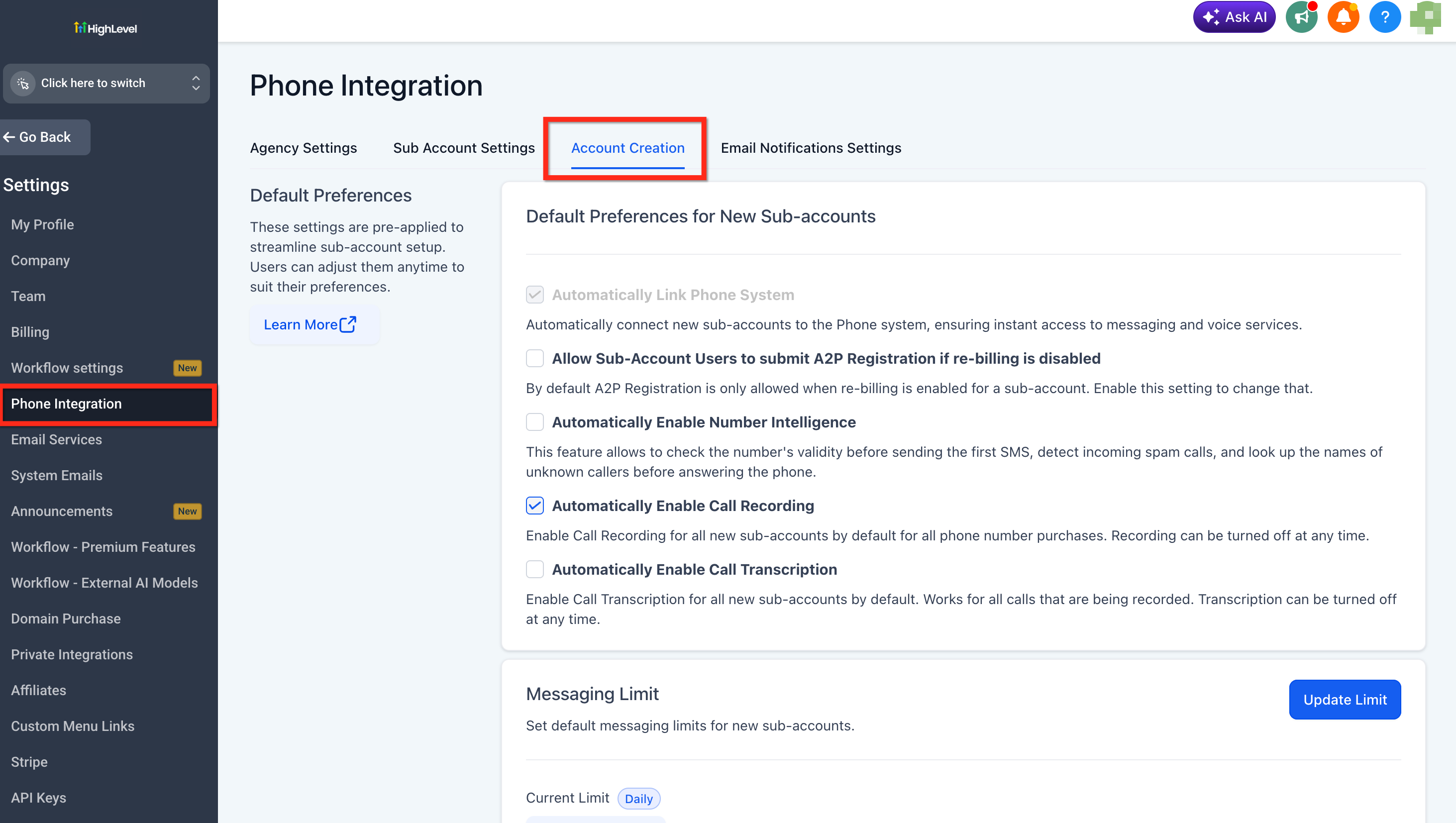
Agency admins can manage these preferences from the Account Creation area under Agency Settings > Phone Integration.
Key Benefits of Default Phone Preferences
- Consistent onboarding: Apply standardized phone preferences when new sub-accounts are created instead of configuring the same defaults repeatedly.
- Phone system provisioning: Control whether the Chat To Clients CRM phone system is automatically linked to newly created sub-accounts.
- A2P registration access: Determine whether sub-account users can submit A2P registration when phone re-billing is disabled.
- Number Intelligence defaults: Decide whether Number Intelligence is automatically enabled for new sub-accounts.
- Messaging controls: Establish the messaging model that newly created sub-accounts begin with based on the agency's available messaging configuration.
How to Modifying These Settings
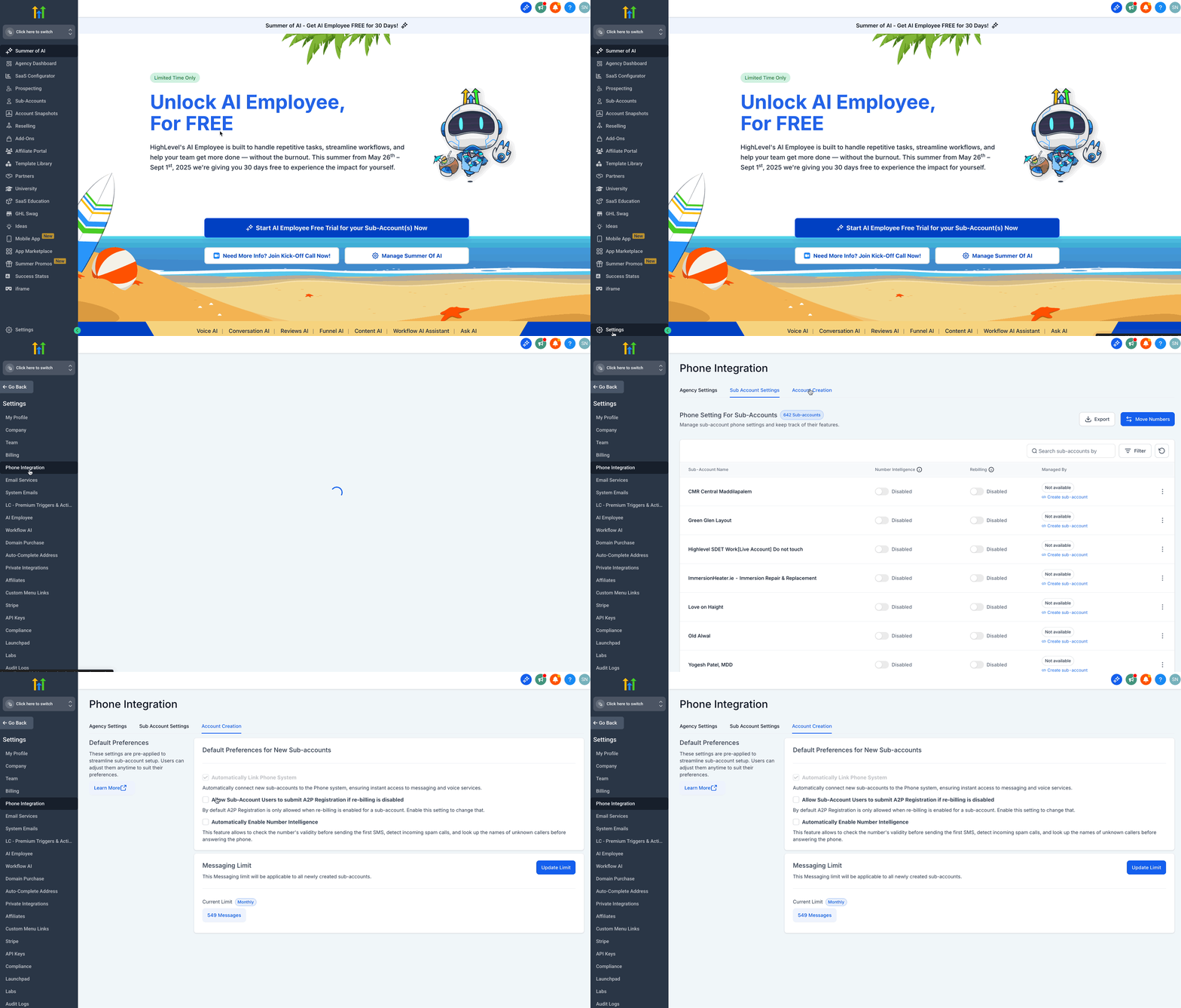
Users can adjust these preferences anytime based on their operational requirements. To make changes:
- Login to your Agency Account and click on Settings.
- Click on Phone Integration.
- Click on the Account Creation tab.
- Update the settings based on your needs.
Understanding Default Preferences
1. Automatically Link Phone System
Pre-enabled by default
This setting ensures that new sub-accounts are automatically connected to the phone system. It provides instant access to messaging and voice services, eliminating the need for manual setup.
2. Allow Sub-Account Users to Submit A2P Registration if Re-Billing is Disabled
By default, sub-accounts can only submit A2P (Application-to-Person) registration if re-billing is enabled. Enabling this option allows users to submit A2P registration even when re-billing is disabled. (Optional setting)
3. Automatically Enable Number Intelligence
This feature provides enhanced phone number intelligence by:
- Validating numbers before sending the first SMS
- Detecting incoming spam calls
- Looking up the names of unknown callers before answering
Enabling this setting improves the efficiency and reliability of phone communication. (Optional setting)
4. Messaging Limit
The Messaging Limit applies to all newly created sub-accounts. The selected limit determines the messaging capacity for new sub-accounts, ensuring compliance with usage policies.
- Current Limit: Messaging Ramp (default setting)
- Users can modify this setting as needed.
Frequently Asked Questions
Q: Will changing these default phone preferences update my existing sub-accounts?
No. These preferences are intended to establish defaults during new sub-account creation.
Q: Does enabling A2P registration access mean the sub-account is automatically registered?
No. Allowing submission gives eligible sub-account users access to initiate the registration process. A2P registration still requires the applicable business, Brand, and Campaign information and must complete the required registration process.