
Overview of Premium Customer Support
Premium Customer Support Upgrade offers enhanced, personalized assistance beyond standard and priority support. This article explains what’s included, why it matters, and how to upgrade to get faster, more proactive help tailored to your business needs.
TABLE OF CONTENTS
- What is Premium Customer Support?
- Key Benefits of Premium Customer Support
- Why Upgrade to Premium Support?
- Premium Support — Eligibility, Pricing & Billing
- Ready to Subscribe?
- Subscription Requirement
- Faster Issue Resolution
- Technical Account Manager (TAM)
- Dedicated Slack Channel
- Proactive & Advanced Support
- How To Setup Premium Support
- Frequently Asked Questions
- Related Articles
What is Premium Customer Support?
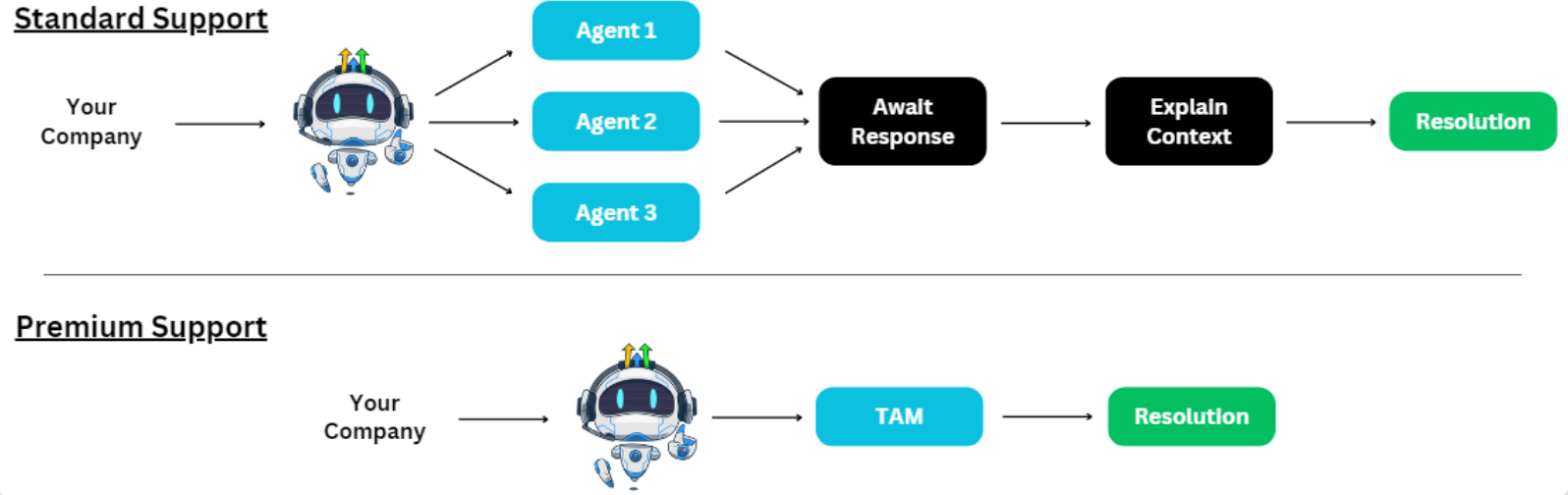
Premium Support builds upon the foundation of Standard and Priority Support by introducing personalized features that foster a stronger partnership with customers. This service enhances traditional support with dedicated technical account management, faster resolutions, and direct real-time communication channels, ensuring seamless issue handling and business continuity.
Key Benefits of Premium Customer Support
Premium Support is not just an upgrade—it is a comprehensive, technical approach to customer service that integrates rapid issue resolution with proactive, personalized support. For further technical details or additional operational guidelines, please refer to the Chat To Clients CRM support documentation or contact your Chat To Clients CRM representative.
Enhanced Customer Experience:
- Faster response times with Chat & Zoom wait times reduced from 6 minutes (Standard) to 1 minute, and ticket first responses from 10 hours to 3 hours.
- Improved overall satisfaction, as reflected in higher CSAT scores.
Streamlined Offerings:
- An upgraded support plan that builds on the proven capabilities of Priority Support, adding key personalized features without complicating your support structure.
Stronger Value Proposition:
- Differentiates our support plans by offering exclusive premium features such as a dedicated Technical Account Manager (TAM) and a private Slack channel for real-time collaboration.
Opportunities for Growth:
- Provides proactive guidance and regular reviews, helping your business scale effectively by ensuring issues are resolved quickly and strategically.
Premium Support Sidebar (In-App Experience):
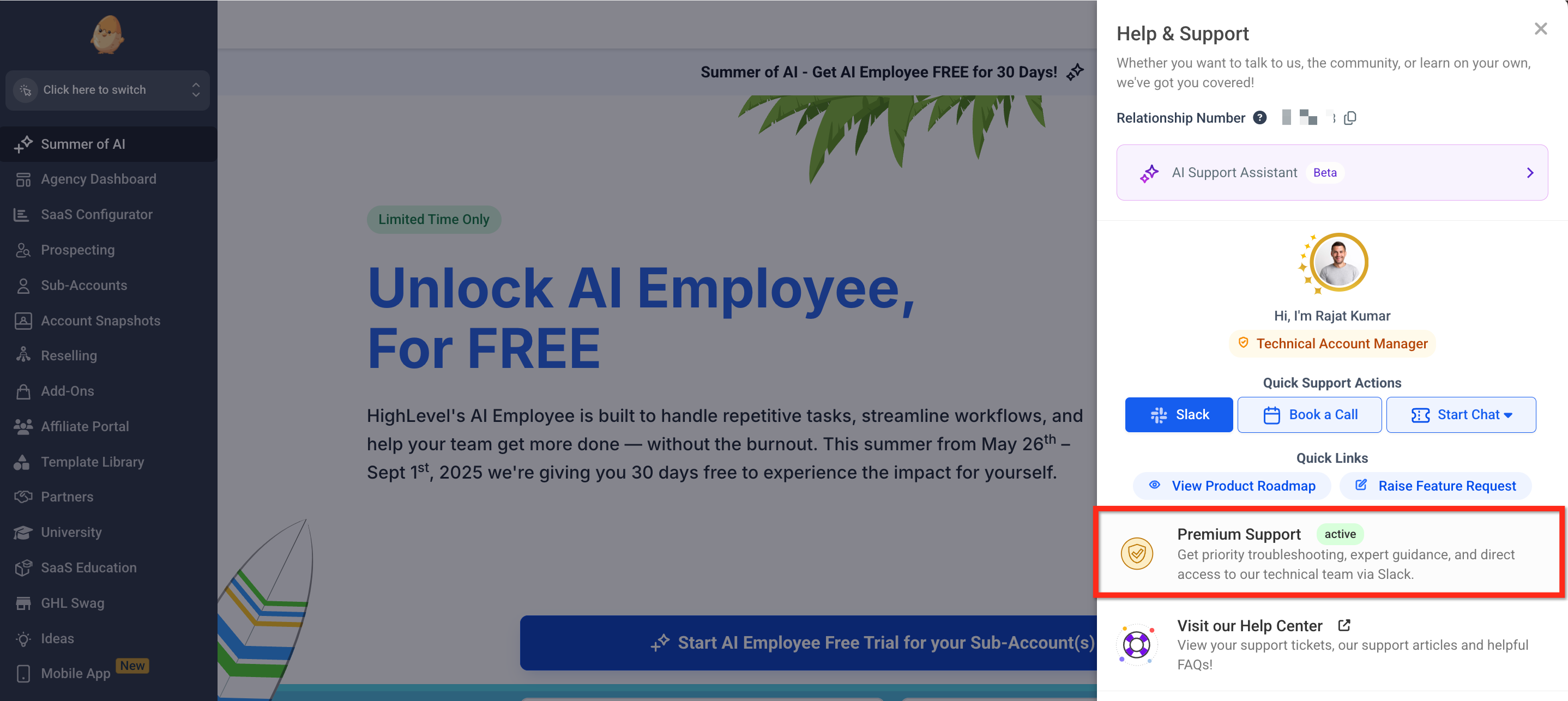
Premium Support includes a refreshed sidebar inside your Chat To Clients CRM dashboard so you can reach expert help without leaving your workspace. The Premium Support sidebar acts as your all-in-one hub for high-touch assistance and key resources.
- Use Slack Support to message the Premium Support team directly.
- Book a Call for live troubleshooting with one click.
- Start Chat to begin a real-time support conversation.
Why Upgrade to Premium Support?
Premium Support is engineered for businesses that require not only rapid issue resolution but also a proactive, partnership-oriented approach. By combining faster response times with dedicated technical resources, Premium Support delivers:
- Priority Issue Resolution: Enhanced routing and direct escalation paths minimize downtime.
- Personalized Assistance: A dedicated TAM maintains a detailed history of your challenges to provide tailored guidance.
- Real-Time Collaboration: A dedicated Slack channel facilitates immediate communication and updates, keeping your team informed and aligned.
| Support Services | Standard Support | Premium Support |
|---|---|---|
| 24/7 Chat, Zoom, Ticket, Phone Support | ✓ | ✓ |
| Support Portal & Self-Service Help Articles | ✓ | ✓ |
| Premium Support Team Issue Routing | ✗ | ✓ |
| Faster Chat & Zoom Response | ✗ | ✓ |
| Faster Ticket Response | ✗ | ✓ |
| End-to-End Ticket Resolution | ✗ | ✓ |
| Technical Account Manager | ✗ | ✓ |
| Premium Support Kickoff Call | ✗ | ✓ |
| Quarterly Business Reviews | ✗ | ✓ |
| Dedicated Slack Channel | ✗ | ✓ |
| Direct TAM Booking Access | ✗ | ✓ |
Premium Support — Eligibility, Pricing & Billing
Before subscribing to Premium Support, review the following eligibility, pricing, and billing details:
| Detail | Premium Support |
|---|---|
| Eligibility | Available after you have completed 90 days with Chat To Clients CRM |
| Monthly Plan | $500/month |
| Annual Plan | $5,000/year — save $1,000 compared with monthly billing |
| Billing | Premium Support is an optional paid add-on and is billed separately from your main Chat To Clients CRM subscription |
| Cancellation | You can cancel Premium Support from your Billing settings at any time. Premium Support benefits remain available until the end of your current billing cycle. |
Ready to Subscribe?
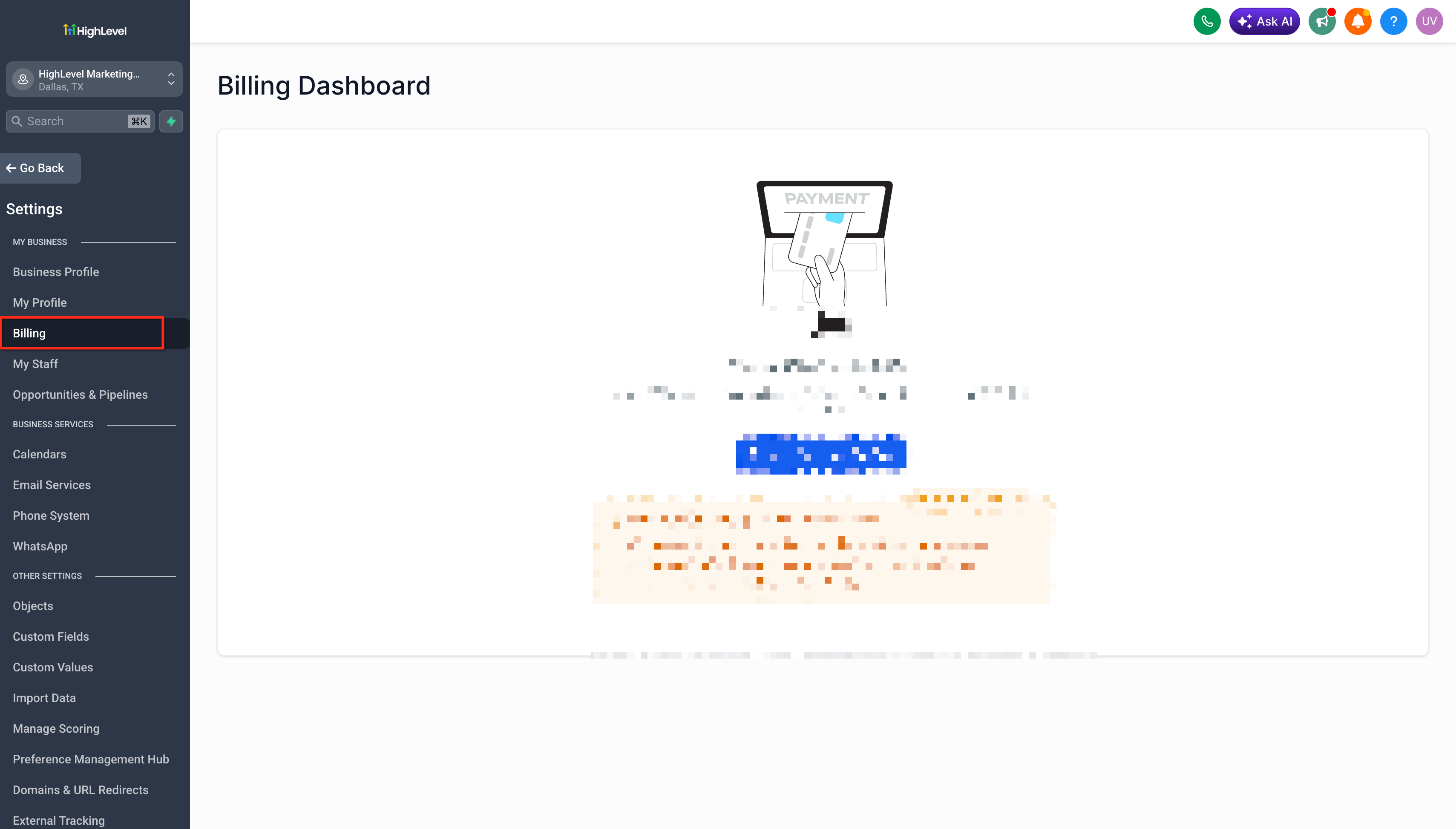
From your Agency account, navigate to Settings → Billing, locate Premium Support under Add-ons, and select Subscribe Now.
You'll be asked to select your billing plan and payment method and accept the Premium Support terms and conditions before completing your subscription.
For complete step-by-step subscription, billing, setup, and cancellation instructions, see How to Upgrade to Premium Customer Support.
Subscription Requirement
When subscribing to Premium Support, you must accept the Premium Support terms and conditions during checkout before the purchase can be completed.
Faster Issue Resolution
Priority Routing and Escalation: Premium Support features direct escalation paths to our development teams, ensuring that issues are addressed quickly and efficiently.
End-to-End Issue Ownership: From the moment a ticket is submitted to its final resolution, a dedicated team takes ownership, reducing the delays of ticket handoffs and ensuring accountability.
Improved Response Metrics: With Chat & Zoom wait times improved to 1 minute and ticket responses down to 3 hours, the streamlined process minimizes operational disruptions.
Technical Account Manager (TAM)
- Dedicated Technical Guidance: Your TAM serves as the single point of contact, understanding your business challenges and historical issues to offer tailored solutions.
- Personalized Engagement: The TAM not only reacts to current issues but also tracks recurring challenges, ensuring that support is aligned with your long-term goals.
- Direct Scheduling for Strategy Sessions: Benefit from direct access for arranging focused strategy sessions, ensuring that your support is proactive and personalized.
Dedicated Slack Channel
Private Real-Time Workspace: Access a dedicated Slack channel that serves as your direct line to Premium Support. This channel centralizes ticket submission, queries, and real-time updates.
Enhanced Team Collaboration: Invite your team to the Slack channel for a unified approach to support, ensuring that all stakeholders stay informed during critical incidents.
Efficient Ticket Management: Submit tickets directly within Slack, where they are routed immediately to your TAM for rapid attention and resolution.
Proactive & Advanced Support
Quarterly Business Reviews (QBRs): Regular QBRs provide in-depth reviews of past support issues, trend analysis, and strategic recommendations to enhance future performance.
Proactive Problem-Solving: Beyond reactive fixes, Premium Support is designed to identify potential issues early and offer proactive solutions that align with your business objectives.
How To Setup Premium Support
Subscribing to Premium Support is simple and ensures you’re always prepared for urgent or complex support needs.
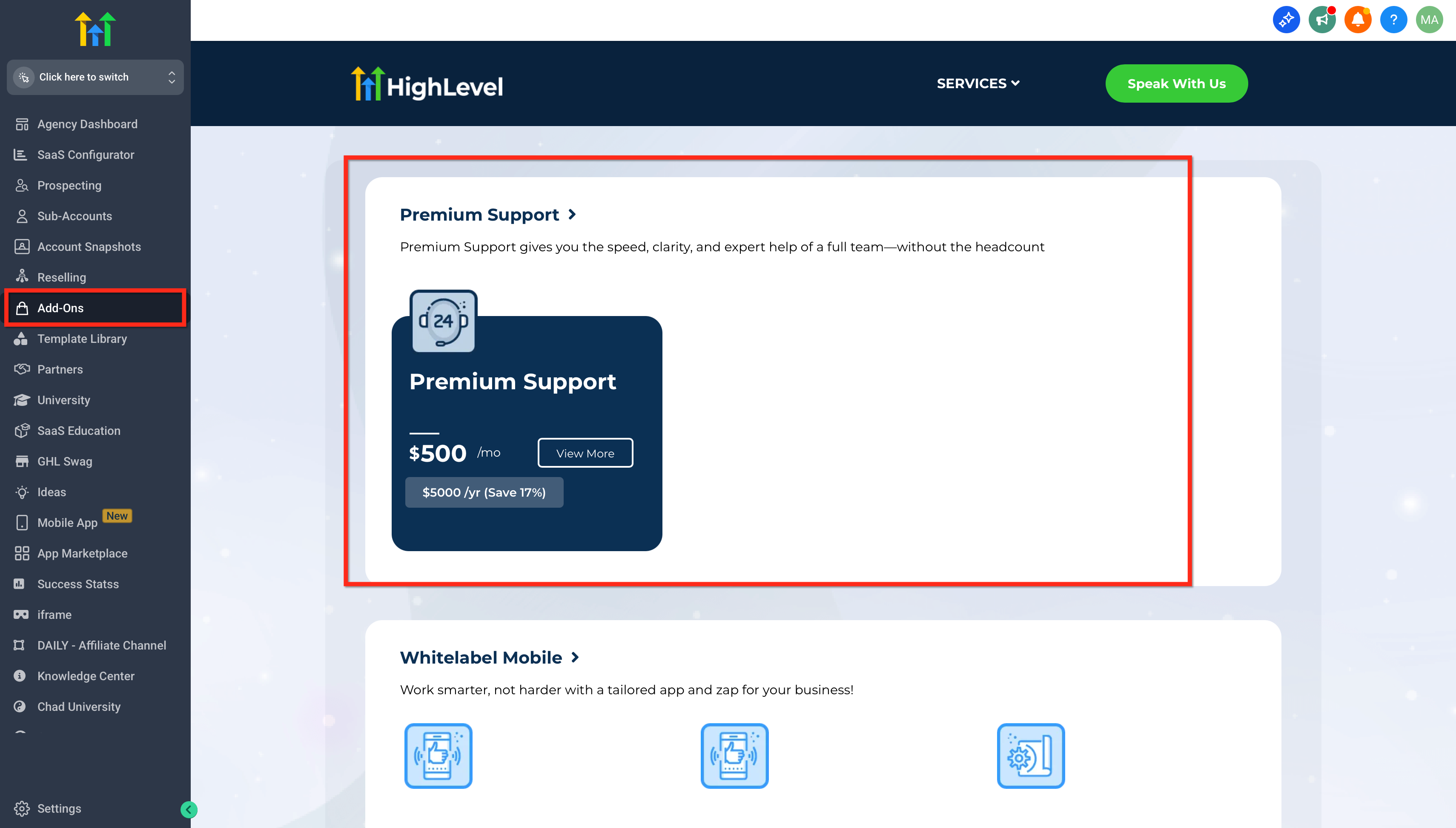
- From your agency dashboard, click Add-Ons
- Locate the “Premium Support” section under Add-ons.
- Click on the Subscribe Now button.
- or visit Premium Support Page
Frequently Asked Questions
Q: What is the difference between Standard and Premium Support?
Standard Support offers 24/7 assistance with standard wait times, while Premium Support provides faster response times, a dedicated Technical Account Manager, a private Slack channel for real-time communication, and proactive Quarterly Business Reviews.
Q: How do I access my Technical Account Manager (TAM)?
Customers with Premium Support are assigned a dedicated TAM who can be contacted directly through the provided communication channels and who offers tailored guidance based on your support history.
Q: Can I invite my entire team to the Slack channel?
Yes, you can invite your team to the dedicated Slack channel to ensure seamless collaboration and visibility across your organization.
Q: How do I submit a ticket in Slack?
Support tickets can be submitted directly within the dedicated Slack channel, where they are routed to your TAM for immediate attention and resolution.
Q: What benefits can I expect from Quarterly Business Reviews?
QBRs provide a structured review of past issues, analyze trends, and offer proactive recommendations to improve support efficiency and align with your business goals.