
How to Migrate from FirstPromoter to Chat To Clients CRM Affiliate Manager
Chat To Clients CRM's guided FirstPromoter import lets you move supported campaigns, affiliates, referrals, and commission history into Affiliate Manager without manually transferring CSV files. The migration process connects directly to FirstPromoter, lets you choose the campaigns and financial data you want to import, and helps resolve existing-contact conflicts before processing begins. After the import, you must review the migrated campaign, configure it as an External Website campaign for this migration use case, install the required tracking script, and verify affiliate links before completing your cutover from FirstPromoter.
What Is the FirstPromoter Migration?
The FirstPromoter migration is an API-based import that connects your existing FirstPromoter affiliate program to Chat To Clients CRM Affiliate Manager. Instead of exporting and formatting affiliate CSV files manually, you can select supported FirstPromoter campaigns and bring their associated affiliate and historical performance data into Chat To Clients CRM.
The guided import can migrate supported data including:
Campaigns
Affiliates
Historical referrals
Commission history
Pending commissions, when selected
Chat To Clients CRM also identifies affiliate email conflicts before the import so you can decide whether to merge the affiliate data with an existing CRM contact or skip that affiliate.
Key Benefits of Migrating to Chat To Clients CRM Affiliate Manager
Moving your affiliate program into Chat To Clients CRM brings affiliate management and CRM data into the same platform. The guided importer also preserves supported historical information so you can transition without rebuilding every campaign or affiliate manually.
Guided migration: Connect FirstPromoter directly instead of manually preparing CSV files.
Historical continuity: Bring supported referral and commission history into Affiliate Manager.
Cleaner contact records: Review duplicate-email conflicts before affiliates are imported.
Commission control: Decide whether pending commissions should be migrated and define payout terms.
Centralized management: Manage affiliates, campaigns, commissions, and reporting inside Chat To Clients CRM.
Flexible tracking: Continue directing affiliate traffic to an external website or a Chat To Clients CRM Funnel/Website using the appropriate External Website campaign and tracking-script configuration.
Before You Migrate from FirstPromoter
Preparing your program before starting the import makes it easier to verify that campaign settings, affiliates, commissions, and tracking continue working after the migration. Record your existing FirstPromoter configuration before making the final switch so you have a reference for post-import validation.
Before starting, confirm that you have:
Your FirstPromoter Account ID
A FirstPromoter API Key with the required read permissions
A list of the campaigns you want to migrate
Your current affiliate links for comparison after migration
Your existing commission and cookie-duration settings
A decision about whether to import Pending Commissions
Your preferred payout terms in Chat To Clients CRM
Access to the website, Funnel, or Website where the Affiliate Manager tracking script will be installed
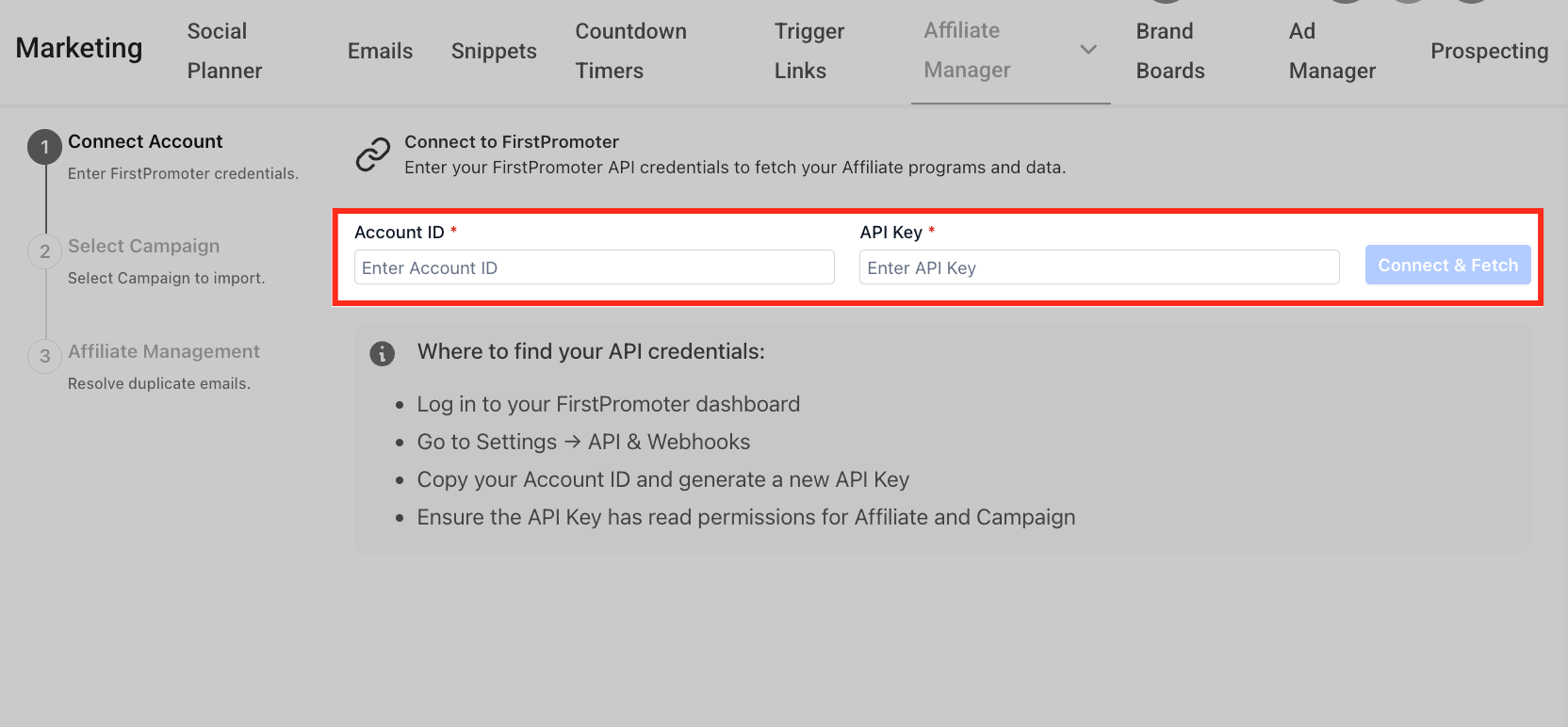
You can find the FirstPromoter credentials used by the importer under:
FirstPromoter > Settings > API & Webhooks
Copy the Account ID and generate an API key with the required read permissions for the affiliate and campaign data being imported.
External Website Campaign Requirement
FirstPromoter migrations require special attention to the destination campaign type because affiliate attribution depends on the tracking configuration used after the migration. For this migration use case, the campaign in Chat To Clients CRM Affiliate Manager should be configured as an External Website campaign.
An External Website campaign allows Affiliate Manager to track affiliate activity using an affiliate link and a tracking script installed on the destination website. Chat To Clients CRM's External Website campaigns support affiliate tracking across the configured website and supported subdomains.
After importing your FirstPromoter campaign:
Open the imported campaign in Marketing > Affiliate Manager > Campaigns.
Confirm that the campaign is configured for External Website tracking for this migration use case.
Confirm that the correct destination website URL is configured.
Review the campaign's commission and tracking settings.
Install the Affiliate Manager tracking script before activating or directing affiliate traffic to the campaign.
Using a Chat To Clients CRM Funnel or Website After Migration
A migrated FirstPromoter program can still send affiliates to a Funnel or Website hosted in Chat To Clients CRM. However, using a Chat To Clients CRM-hosted page does not remove the tracking requirements associated with this FirstPromoter migration setup.
For this migration use case:
Configure the Affiliate Manager campaign as an External Website campaign.
Use the appropriate Chat To Clients CRM Funnel or Website URL as the destination.
Add the Affiliate Manager tracking script to the Funnel or Website.
Verify tracking before directing your affiliates to the migrated campaign.
Important: A Chat To Clients CRM Funnel or Website still requires the Affiliate Manager tracking script when it is being used as the destination for this migrated External Website campaign. Without the required tracking script, referral attribution may not function as expected.
How Affiliate Links Behave During Migration
Affiliate links should be checked carefully before completing the migration because an existing link can be preserved only when it does not conflict with a link already in Affiliate Manager. Knowing which links remain unchanged helps you determine whether affiliates need to update links in websites, emails, ads, or other promotional assets.
No affiliate-link conflict: The existing affiliate link can remain the same.
Affiliate-link conflict: The affected affiliate's link will change to avoid the conflict in Affiliate Manager.
After the migration, compare each important affiliate link with its FirstPromoter equivalent.
If a link changed:
Identify the affected affiliate.
Copy the new Affiliate Manager link.
Notify the affiliate that their promotional link has changed.
Have the affiliate replace the old FirstPromoter link in their active promotional assets.
Test the new link before completing the migration.
Resolve Existing Affiliate Contact Conflicts
Affiliate Manager checks imported affiliate email addresses against existing CRM contacts so you can avoid unnecessary duplicate records. Resolving these conflicts before starting the import helps preserve a clean contact database.
During the Affiliate Management step, Chat To Clients CRM organizes affiliates into views such as:
Total
New
Conflicts
When an affiliate's email already exists in Chat To Clients CRM, choose one of the available actions:
Merge: Keep the existing CRM contact and attach the imported affiliate information to that contact.
Skip: Do not import that affiliate during the current migration.
New affiliates without an email conflict are created as contacts automatically.
Import Commissions and Configure Payout Terms
Commission history helps preserve continuity when you move an active affiliate program from FirstPromoter. The migration preferences let you decide whether unpaid commissions should also enter Chat To Clients CRM's payout workflow.
Pending Commissions
Enable Pending Commissions when you want supported unpaid FirstPromoter commissions included in the migration.
If you leave this option disabled, those pending items are not included in the current import.
Payout Terms
Select the applicable Payout Terms to determine when imported commissions become due inside Affiliate Manager.
Imported commissions retain their supported existing status, such as Pending or Approved, while payout timing follows the payout terms selected during migration.
Product-Based Commissions
Product-based commission rules are not recreated as part of the guided FirstPromoter import. Review and configure any required product-based commission rules directly in Affiliate Manager after the migration.
Add the Affiliate Tracking Script
Importing your FirstPromoter data does not complete the tracking configuration by itself. The migrated campaign needs the Affiliate Manager tracking script on the destination site before you rely on it for affiliate attribution.
To access and install the tracking script:
Go to Marketing > Affiliate Manager > Campaigns.
Locate the imported campaign.
Open the campaign's available ⋯ menu.
Locate the campaign tracking-script option.
Copy the required script.
Add it to the website, Funnel, or Website used by the campaign.
Save or publish the destination pages.
Test the affiliate journey before activating the migrated program.
Validate the Migration Before Switching Off FirstPromoter
Post-migration validation confirms that the affiliate program is ready to operate from Chat To Clients CRM before you retire the previous FirstPromoter setup. Testing links, campaign configuration, commissions, and tracking can prevent lost attribution after the cutover.
Before completing the migration, verify:
The expected campaigns were imported.
The expected affiliates were imported.
Historical referrals are present where supported.
Commission history was imported correctly.
Pending commissions were included or excluded according to your selection.
Payout terms are correct.
Affiliate contact conflicts were resolved as intended.
The campaign is configured as External Website for the migration use case.
The destination URL is correct.
Commission rules and cookie life are correct.
Product-based commission rules have been recreated where needed.
The Affiliate Manager tracking script is installed.
Existing affiliate links were preserved where no conflict existed.
Any links changed because of conflicts have been communicated to the affected affiliates.
A test affiliate visit or referral is tracking correctly.
Do not fully decommission your FirstPromoter setup until the migrated campaign and tracking behavior have been validated.
How to Migrate from FirstPromoter to Chat To Clients CRM Affiliate Manager
The guided importer provides the fastest supported path for moving FirstPromoter campaigns, affiliates, referrals, and commission history into Affiliate Manager. Completing the migration in order makes it easier to resolve conflicts and verify tracking before affiliates begin using the new setup.
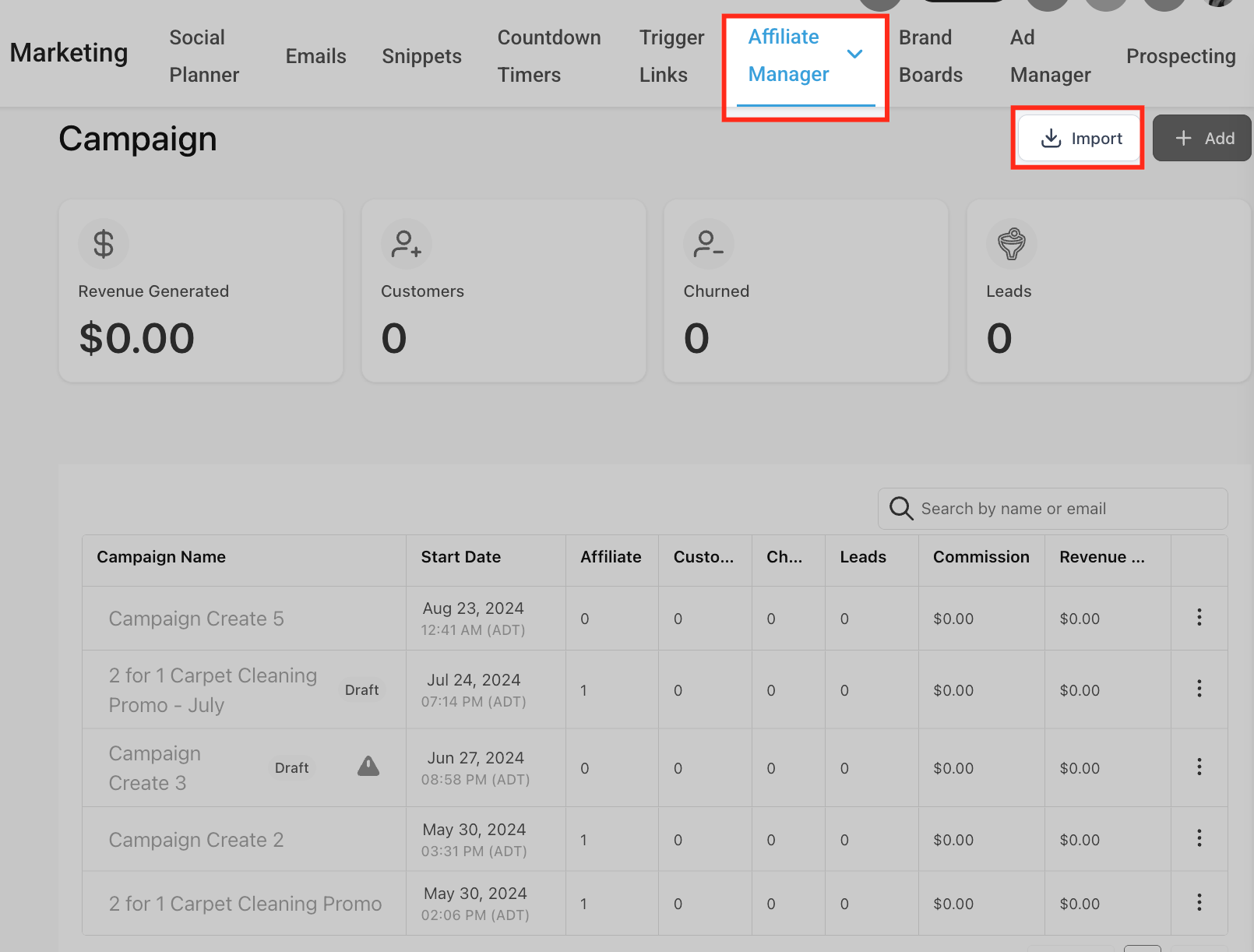
In Chat To Clients CRM, go to Marketing > Affiliate Manager > Campaigns.
Click Import.
Enter your FirstPromoter Account ID and API Key.
Click Connect & Fetch.
Select the FirstPromoter campaigns you want to migrate.
Review the available campaign details, including:
Status
Affiliate count
Commission configuration
Cookie life
Configure the migration preferences.
Enable Pending Commissions if you want supported unpaid commissions imported.
Select the appropriate Payout Terms.
Continue to Affiliate Management.
Review affiliates with existing email conflicts.
Choose Merge or Skip for each conflict.
Confirm that all required conflicts have been resolved.
Click Start Import.
Review the import summary showing the campaigns, affiliates, and historical referrals queued for migration.
Allow the import to process. You can leave the page while processing continues, and Chat To Clients CRM notifies you when the migration is complete.
Open each migrated campaign and configure or verify it as an External Website campaign for this FirstPromoter migration.
Confirm the destination URL.
Install the Affiliate Manager tracking script on the destination website, Chat To Clients CRM Funnel, or Chat To Clients CRM Website.
Review imported affiliates and compare their affiliate links with their previous FirstPromoter links.
Update any promotional links that changed because of a conflict.
Recreate any required product-based commission rules.
Test referral tracking and attribution.
Complete the cutover only after the migrated program has been validated.
Frequently Asked Questions
Q: Does the migrated campaign need to be an External Website campaign?
Yes. For this FirstPromoter migration use case, the campaign in Affiliate Manager should be configured as an External Website campaign. This allows Affiliate Manager to use the required external-site tracking configuration after you move away from FirstPromoter.
Q: Can I use a Chat To Clients CRM Funnel or Website with the migrated campaign?
Yes. You can use a Chat To Clients CRM Funnel or Website as the destination. For this migration setup, the campaign should still use the External Website configuration, and the Affiliate Manager tracking script must be installed on the Funnel or Website for tracking to work correctly.
Q: Do I need to install a tracking script if the destination is already hosted in Chat To Clients CRM?
Yes. For a FirstPromoter migration using an External Website campaign, add the Affiliate Manager tracking script to the Chat To Clients CRM Funnel or Website being used as the destination.
Q: Will my affiliates keep the same links after migration?
They can keep the same affiliate links when there is no conflicting affiliate link in Affiliate Manager. If a conflict exists, the affected affiliate's link will change. Review migrated links before completing the cutover.
Q: What should I do if an affiliate's link changes?
Give the affiliate their new Affiliate Manager link and have them update any websites, emails, ads, social posts, or other active promotional assets that still use the previous FirstPromoter link.
Q: What happens if an affiliate email already exists in Chat To Clients CRM?
Chat To Clients CRM flags the email as a conflict during the import. Choose Merge to attach the affiliate data to the existing CRM contact, or Skip to exclude that affiliate from the current import.
Q: Can I migrate pending commissions?
Yes. Enable Pending Commissions during migration when you want supported unpaid commissions brought into Affiliate Manager.
Q: Does the migration preserve commission history?
Supported historical commissions and their statuses are imported through the guided process. Payout timing follows the Payout Terms selected during migration.
Q: Can I run the FirstPromoter import more than once?
Yes. The guided importer can be run again for additional campaigns or affiliates. Previously imported supported items are not duplicated.
Q: Do I still need to export CSV files from FirstPromoter?
Not for data supported by the guided FirstPromoter importer. The API-based migration replaces the older manual CSV process for supported campaigns, affiliates, referrals, and commissions. CSV upload remains available as a general method for adding affiliates when needed.
Q: When should I stop using FirstPromoter?
Wait until you have verified the imported campaigns, affiliates, commissions, tracking script, affiliate links, and referral attribution in Chat To Clients CRM. Complete the cutover only after the migrated Affiliate Manager setup is working as expected.