
Workflow Trigger - Offer Access Removed
This article explains the "Offer Access Removed" workflow trigger, a tool designed to automate processes when access to a specific offer is revoked. You’ll learn what this trigger does, its key benefits, how to configure it step-by-step, and examples of real-world applications. Finally, we address common questions to help you maximize its utility in your workflows.
TABLE OF CONTENTS
- What is Offer Access Removed Workflow Trigger
- Key Benefits of Offer Access Removed Trigger
- Configuring the Trigger: A Step-by-Step Process
- Use Cases
- Frequently Asked Questions
What is Offer Access Removed Workflow Trigger
The Offer Access Removed workflow trigger activates when a contact’s access to a specific offer is revoked. It enables businesses to automate follow-up actions such as notifying the contact, updating CRM records, or informing relevant teams. By integrating this trigger into workflows, organizations can streamline processes, maintain operational efficiency, and improve communication.
Key Benefits of Offer Access Removed Trigger
- Automated Notifications: Notify contacts and internal teams in real time when access is revoked, ensuring everyone is informed.
- Enhanced Workflow Efficiency: Automate repetitive tasks like updating CRM records or sending emails, saving time and reducing errors.
- Improved Customer Experience: Provide clear communication and next steps to contacts after access is revoked, maintaining transparency and trust.
- Streamlined Operations: Manage access control efficiently, ensuring only eligible contacts retain access to specific offers.
- Customizable Filters: Use filters to refine workflows, targeting specific offers and ensuring accurate automation.
Configuring the Trigger: A Step-by-Step Process
Access Workflow Settings
Navigate to the automation or workflow settings in your CRM platform. Create a new workflow from scratch or select the existing workflow where you want to implement "Offer Access Removed" trigger.
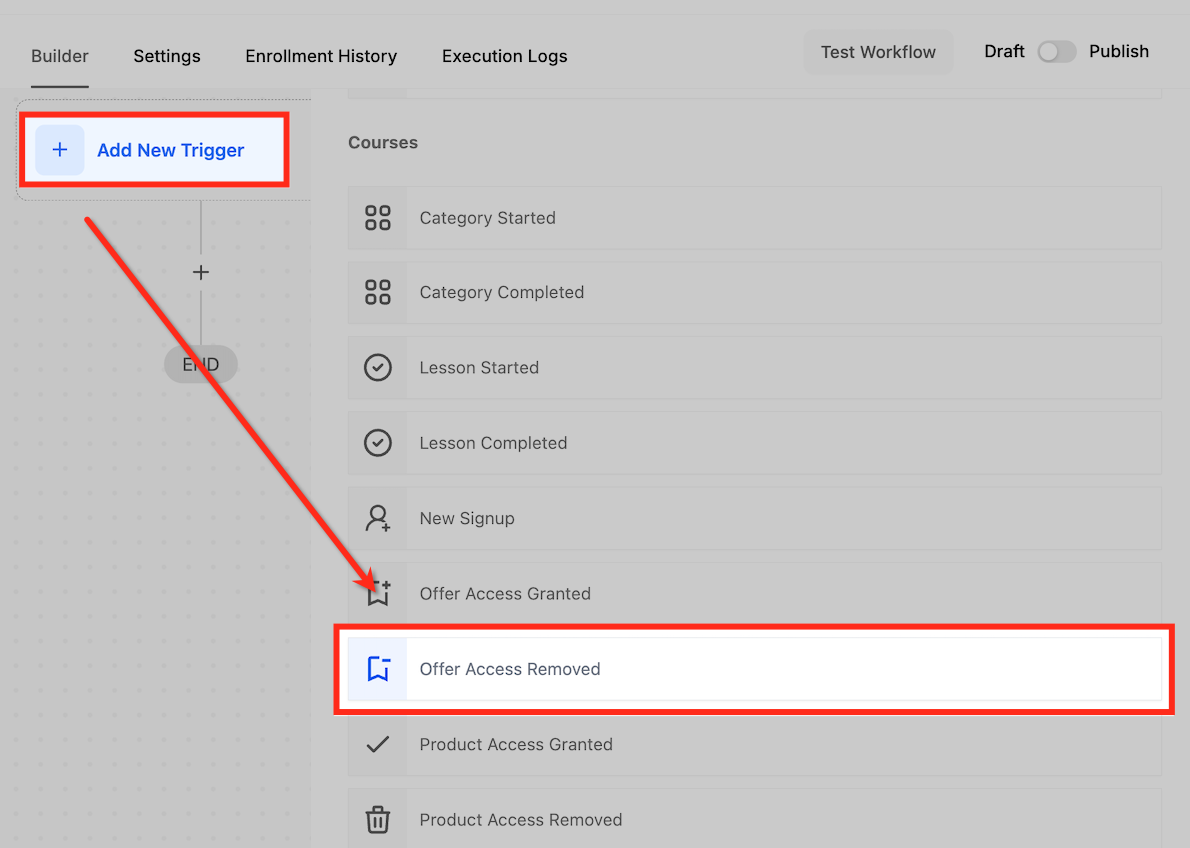
Add a New Workflow Trigger
Click “+ Add New Trigger” and select "Offer Access Removed" from the dropdown menu.
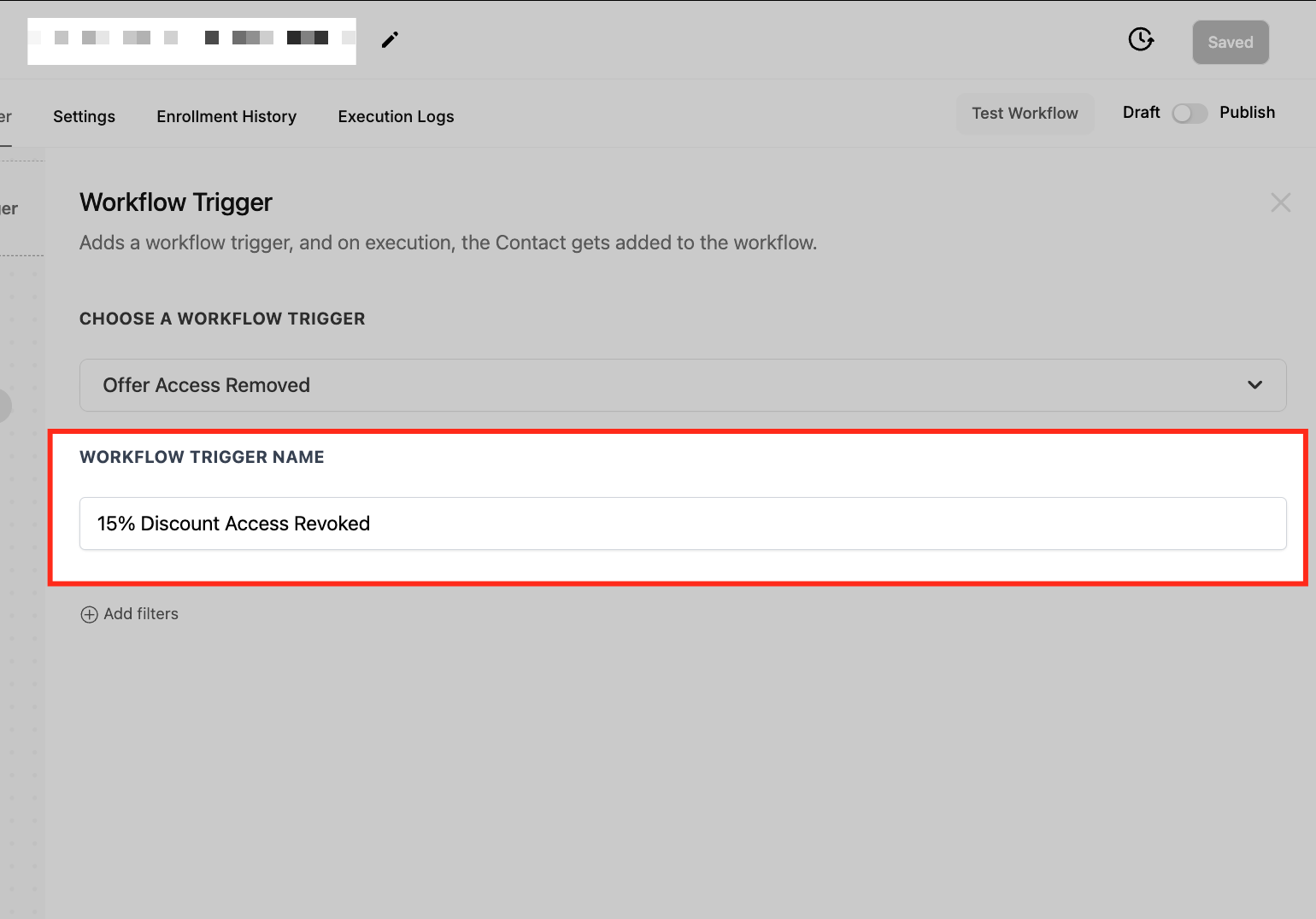
Name Your Trigger
Provide a descriptive name, such as “15% Discount Access Revoked.”
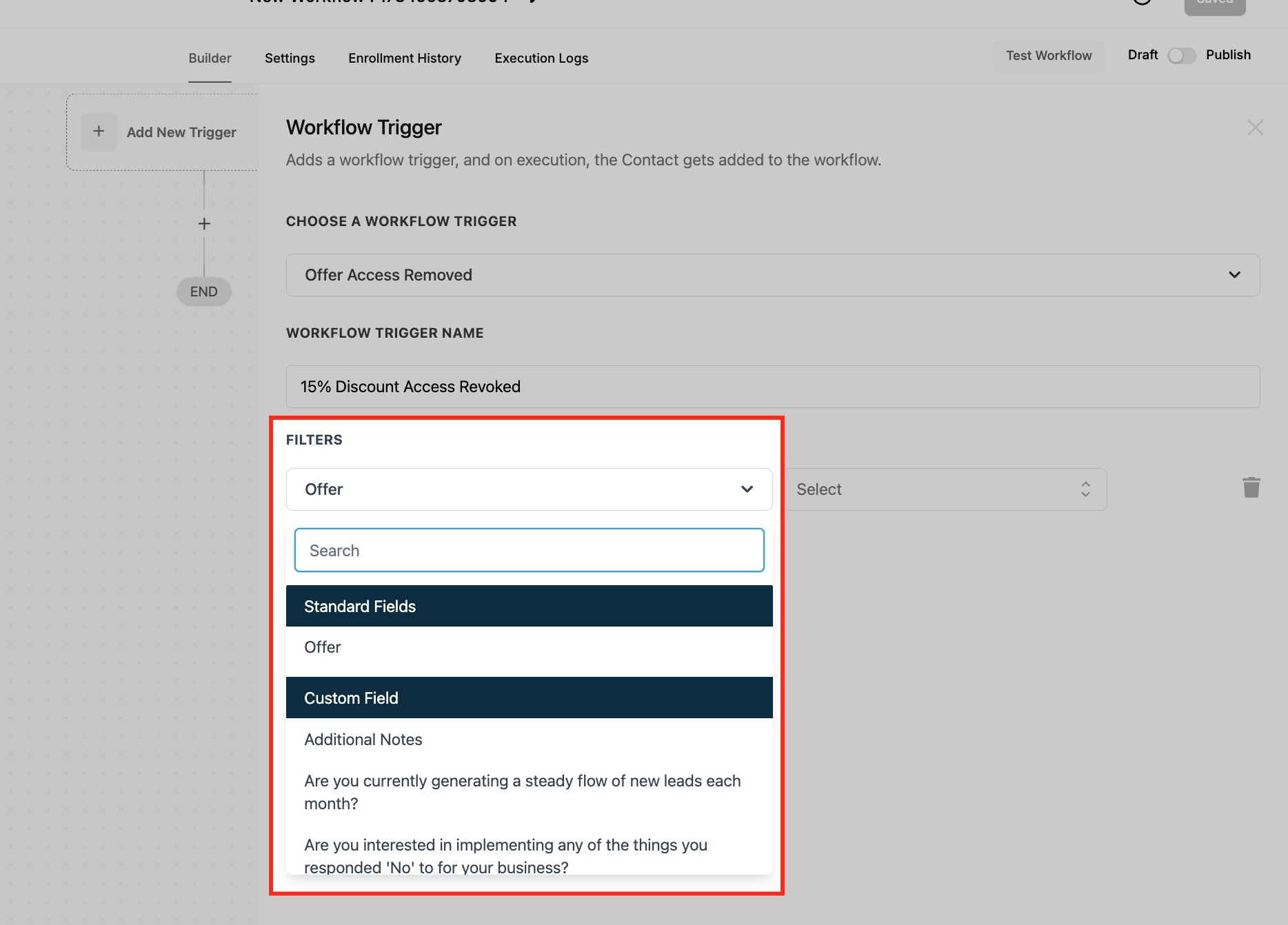
Configure Filters
Refine the workflow activation criteria by setting filters:
Offer
Select the specific offer (e.g., “Early Bird Discount”) that will trigger the workflow upon access removal.
Save the Trigger
Ensure the trigger is saved by clicking the appropriate button.
Test and Publish
Test the workflow using sample data to confirm its functionality. Once validated, enable the Publish toggle to activate the workflow.
Use Cases
Access Revocation Email for Discounts
Scenario: A customer’s access to a promotional discount is revoked, and they need to be notified.
Trigger Setup:
- Trigger: Offer Access Removed.
Filter:
- Offer: “15% Early Bird Discount.”
Outcome: The workflow sends an email informing the customer of the revoked access and providing alternative offers or next steps.
Internal Notifications for Memberships
Scenario: A contact’s access to a premium membership is removed, and the customer support team needs to follow up.
Trigger Setup:
- Trigger: Offer Access Removed.
Filter:
- Offer: “Premium Membership.”
Outcome: The workflow notifies the support team, enabling them to reach out to the contact with potential renewal options.
CRM Updates for Access Tracking
Scenario: Access to a limited-time offer is revoked, and the contact’s CRM profile needs to be updated for accurate tracking.
Trigger Setup:
- Trigger: Offer Access Removed.
Filter:
- Offer: “Exclusive Summer Deal.”
Outcome: The workflow updates the CRM record to reflect the removal, tagging the contact appropriately for reporting
Frequently Asked Questions
Can this trigger handle multiple offers in the same workflow?
Yes, you can configure the workflow to activate for multiple offers by adding more filters or setting broader criteria.
What happens if access to the same offer is revoked multiple times for a contact?
The trigger will activate each time access is removed, so it’s important to design workflows with conditions to avoid redundant actions.
How can I ensure the workflow targets the correct offer?
Use the “Offer” filter to specify the exact offer. Test the workflow with sample data to verify it triggers as expected.
Can this trigger be combined with other triggers in a workflow?
Yes, the Offer Access Removed trigger can be combined with others, such as “Tag Added” or “Opportunity Status Changed,” to create advanced workflows.