
Workflow Trigger - Number Validation
The Number Validation workflow trigger lets you start automation based on the validation result of a contact's phone number. Number Validation checks whether a destination phone number is valid and capable of receiving SMS before the applicable first outbound SMS is sent.
Number Validation is part of Chat To Clients CRM's Number Intelligence feature, which also includes Spam Detection and Name Lookup. Using the validation result in workflows can help you route contacts appropriately and reduce attempted SMS sends to invalid or non-SMS-capable destinations.
Important: Number Validation does not determine whether a contact has consented to receive messages. Continue to follow your applicable opt-in, consent, and messaging-compliance requirements.
TABLE OF CONTENTS
- Key Benefits of the Number Validation Trigger
- Prerequisites
- How the Number Validation Trigger Works
- How to Configure the Number Validation Trigger
- Common Uses for the Number Validation Trigger
- Number Validation vs Messaging Errors
- Frequently Asked Questions
- Related Articles
Key Benefits of the Number Validation Trigger
Number Validation gives workflows a way to respond to phone-number validation results before continuing with SMS-focused automation. This can help teams identify phone-number issues and choose an appropriate next action.
Reduce Invalid SMS Attempts: Identify destinations that should not proceed through an SMS-focused process.
Automate Contact Routing: Route contacts differently based on their validation result.
Improve Contact Data: Flag contacts whose phone information may need correction.
Notify Your Team: Alert team members when a phone number requires attention.
Support Multi-Channel Follow-Up: Route contacts toward another appropriate communication method when SMS should not be used.
Prerequisites
Number Intelligence must be enabled before Number Validation can evaluate applicable outbound SMS destinations. For existing sub-accounts, the feature is managed from the sub-account's Phone System settings.
For an existing sub-account:
Go to Settings > Phone System.
Open Additional Settings.
Locate Number Intelligence.
Enable the feature.
Note: Number Validation, Spam Detection, and Name Lookup are currently part of Number Intelligence and are enabled or disabled together.
Default for New Sub-Accounts
Agency admins can configure Number Intelligence to be enabled automatically for newly created sub-accounts.
Go to:
Agency Settings > Phone Integration > Account Creation
Then enable Automatically Enable Number Intelligence.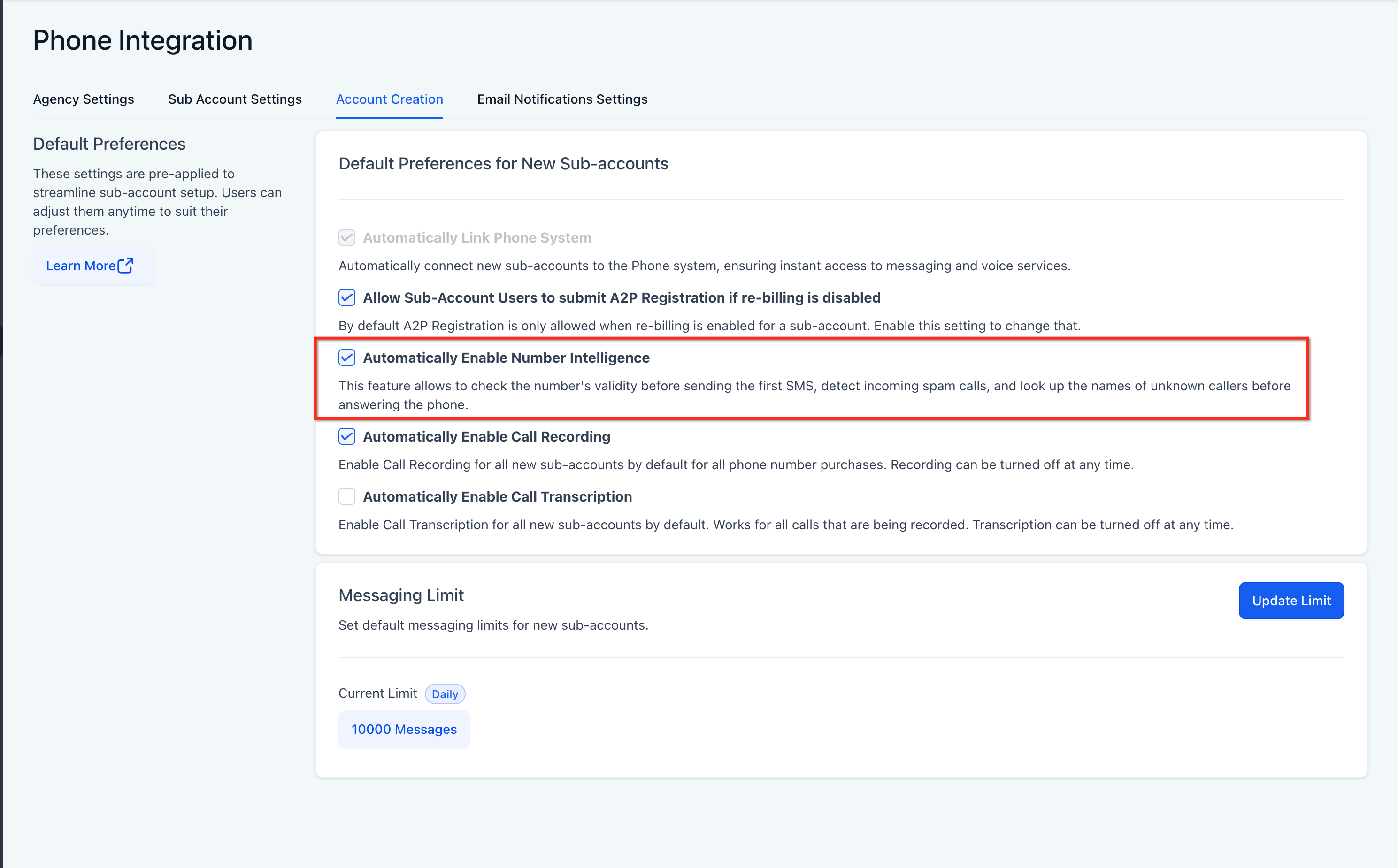
Important: This setting establishes the default for newly created sub-accounts. It does not retroactively enable Number Intelligence for existing sub-accounts.
How the Number Validation Trigger Works
Number Validation does not run simply because a contact is created or imported. Instead, Chat To Clients CRM performs the applicable validation when it reaches the first outbound SMS validation event for that phone number.
The general flow is:
Outbound SMS is prepared → Number Validation runs → Validation result is generated → Number Validation workflow can trigger → SMS is sent or prevented based on the validation result
This means an existing contact can still reach the Number Validation event when Chat To Clients CRM prepares the applicable first outbound SMS to that phone number.
Important: The Number Validation workflow trigger runs from the Number Intelligence validation result. It does not trigger because an SMS later receives a Twilio or messaging delivery error. Use the applicable messaging-error workflow trigger when your automation needs to respond to SMS delivery errors.
How to Configure the Number Validation Trigger
The Number is filter determines which validation result should enter the workflow. This allows you to create different automations based on the result returned by Number Intelligence.
Go to Automation > Workflows.
Create a new workflow or open an existing workflow.
Click Add New Trigger.
Search for and select Number Validation.
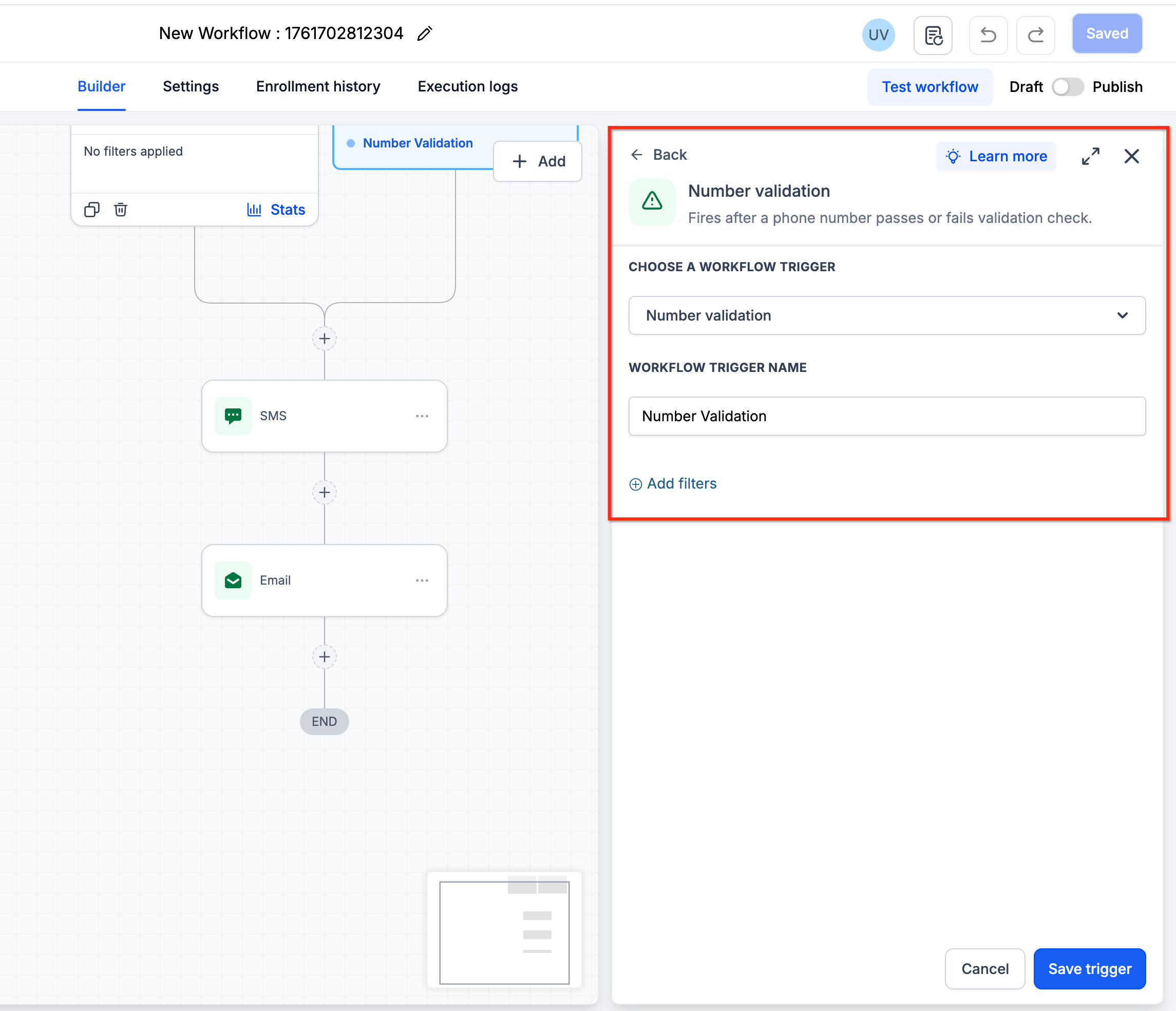
Add the Number is filter.
Select the applicable validation result from the options displayed in the workflow builder.
Save the trigger.
Add the workflow actions that should run when that validation result occurs.
Test the workflow.
Publish when the workflow behaves as intended.
Note: Use the validation options displayed in the current workflow builder when configuring Number is. Available validation results should be selected directly from the UI.
Common Uses for the Number Validation Trigger
Validation results can be used to determine how contacts continue through your automation without treating an unusable phone number as a reason to remove the entire CRM record.
Route Contacts Based on SMS Capability
Use the validation result to determine whether the contact should continue through an SMS-focused process.
For example:
Validation result → SMS-capable destination → Continue SMS workflow
or:
Validation result → Destination should not receive SMS → Alternate follow-up path
Notify Your Team About Phone Number Issues
Send an internal notification when a validation result indicates that the phone information requires attention.
Your team can then review or correct the contact information as appropriate.
Segment Contacts by Validation Result
Use workflow actions to:
Apply a tag.
Update a custom field.
Add relevant contact information.
Route the contact into another workflow.
This can help your team distinguish contacts whose phone information may require additional review.
Request Updated Contact Information
When a phone number cannot be used for SMS, route the contact into an appropriate process for obtaining corrected information.
Depending on the contact's permissions and available information, another communication channel may also be used where appropriate.
Important: Do not automatically delete a CRM contact solely because their phone number receives an invalid or non-SMS-capable validation result. The contact may still contain useful information or be reachable through another appropriate channel.
Number Validation vs Messaging Errors
Number Validation and messaging-error triggers solve different problems. Understanding the distinction helps ensure your workflow starts from the correct event.
| Trigger Type | Use It For |
|---|---|
| Number Validation | Responding to the Number Intelligence validation result before the applicable first outbound SMS |
| Messaging Error / SMS Error | Responding to an error generated during or after an SMS delivery attempt |
For example, if Number Intelligence determines that a destination should not receive SMS, use Number Validation.
If an SMS is attempted and the messaging provider later returns a delivery error, use the applicable Messaging Error trigger instead.
Frequently Asked Questions
Q: When does Number Validation run?
Number Validation runs before the applicable first outbound SMS is sent to the phone number. Creating or importing a contact by itself does not run Number Validation.
Q: Does Number Validation run every time I send an SMS?
Number Validation is designed around the applicable first outbound SMS validation event for the destination number. It should not be treated as a new validation request for every individual SMS.
Q: Does the Number Validation trigger fire when Twilio returns an SMS error?
No. The trigger is based on the Number Intelligence validation result. Use the applicable messaging-error workflow trigger when you need automation based on SMS delivery errors.
Q: Can Number Validation work with existing contacts?
Yes. An existing contact can reach the applicable validation event when Chat To Clients CRM prepares the first applicable outbound SMS to that phone number. Creating or importing the contact itself does not trigger validation.
Q: Does a valid phone number mean I have permission to send SMS?
No. Number Validation evaluates phone-number validity and SMS capability. It does not establish whether the contact has opted in or consented to receive messages.