
Guide to Email Campaign Statistics
Email Campaign Statistics in Chat To Clients CRM helps you track email performance, measure recipient engagement, and understand how your campaigns contribute to conversions and revenue. Review important metrics such as email deliveries, opens, clicks, and orders to identify what resonates with your audience. With performance trends and detailed reporting, you can make informed decisions to improve your email marketing strategy.
TABLE OF CONTENTS
- What is Email Campaign Statistics?
- Key Benefits of Email Campaign Statistics
- Conversion Summary
- Engagement Summary
- Performance Analysis
- How to Analyze Performance Trends
- Top Performing Emails
- Recent Email Analysis
- How to Access and Use Email Campaign Statistics
- Access the Email Statistics Dashboard
- View Statistics for an Individual Email Campaign
- Export Email Campaign Statistics
- Frequently Asked Questions
- Related Articles
What is Email Campaign Statistics?
Email Campaign Statistics is a reporting feature in Chat To Clients CRM that helps you measure the effectiveness of your email marketing efforts. It provides visibility into email activity, recipient engagement, and applicable conversion metrics so you can evaluate campaign results and identify opportunities for improvement.
The Email Statistics dashboard combines reporting from Email Campaigns, Workflow email actions, and Bulk Actions. You can view combined statistics or filter the dashboard to focus specifically on Email Campaigns. For a more detailed analysis of an individual campaign, you can also access its dedicated statistics page.
Key Benefits of Email Campaign Statistics
Understanding how contacts interact with your emails helps you evaluate campaign effectiveness and make data-driven improvements. Email Campaign Statistics provides insights into audience engagement, delivery performance, and conversions so you can identify successful campaigns and optimize future emails.
Monitor Campaign Performance: Track email delivery, opens, clicks, and other engagement metrics to understand how your campaigns perform.
Measure Recipient Engagement: See how contacts interact with your emails and identify opportunities to improve content and calls to action.
Analyze Performance Trends: Review reporting data over time to identify changes in engagement and evaluate campaign results.
Identify Top Performing Emails: Discover emails generating stronger engagement and use those insights to improve future campaigns.
Track Conversions and Revenue: Review eligible orders, attributed revenue, and conversion metrics to understand how email campaigns contribute to sales.
Compare Email Sources: Filter statistics by Email Campaigns, Workflows, or Bulk Actions to evaluate different email activities.
Export Performance Data: Download available reporting metrics in CSV format for additional analysis and sharing.
Conversion Summary
Conversion Summary helps you understand how email interactions contribute to business outcomes, such as purchases and revenue. By reviewing attributed conversions alongside engagement metrics, you can evaluate which campaigns are generating measurable results beyond opens and clicks.
Depending on the reporting view and available conversion data, you may encounter the following metrics:
| Metric | Description |
|---|---|
| Orders / Conversions | The number of eligible purchases or conversions attributed to the email campaign. |
| Revenue | The total revenue attributed to the campaign. |
| Conversion / Order Rate | The percentage of recipients associated with attributed conversions, based on the applicable reporting calculation. |
| Average Order Value | The average value of attributed orders. |
| Revenue per Recipient (RPR) | The average attributed revenue generated per email recipient. |
Chat To Clients CRM uses an email attribution window to determine which qualifying email interactions receive credit for eligible purchases. The default attribution window is five days, and it can be customized.
If a contact engages with multiple eligible campaigns, the most recent qualifying email interaction within the attribution window receives credit for the purchase.
Important: Attributed revenue is not the same as return on investment (ROI). ROI also requires cost or spend information. Conversion data may display as zero if no eligible purchases have been attributed to the campaign.
For detailed attribution settings, eligibility rules, and calculations, see Understanding Email Conversion and Revenue Attribution.
Engagement Summary
Engagement Summary provides a high-level view of how recipients interact with your emails. Comparing delivery, open, and click activity helps you understand whether campaigns are reaching recipients and generating meaningful engagement.
The available reporting views can include the following metrics:
| Metric | Description |
|---|---|
| Sent | The number of emails sent during the selected reporting period. |
| Delivered | The number or percentage of emails successfully delivered, according to available delivery events. |
| Opened | Email open activity recorded through supported tracking. |
| Clicked | Email link-click activity recorded through supported tracking. |
| Unsubscribed | Recipients who opted out of future email communications. |
| Bounced | Emails that could not be delivered, including temporary or permanent failures where reported. |
Unique Opens and Clicks
Unique engagement metrics help prevent repeated activity from the same recipient from being counted multiple times.
Unique Opens: Counts a recipient once even if they open the same email multiple times.
Unique Clicks: Counts a recipient once for applicable email click activity, regardless of repeated clicks.
Unique metrics are useful when evaluating the number of recipients who engaged, rather than the total number of interactions.
Note: Open and click tracking depend on the configured sending provider and tracking settings. Opens are tracking signals rather than guaranteed proof that an individual read an email.Performance Analysis
Performance Analysis helps you evaluate how email metrics change over time. Reviewing these trends makes it easier to recognize engagement patterns, compare reporting periods, and identify areas where campaign performance may need improvement.
Depending on the available reporting controls, you can analyze metrics such as:
Sent and delivered email activity.
Email opens.
Email clicks.
Unsubscribes.
Other supported performance events.
How to Analyze Performance Trends
Open the Email Statistics dashboard.
Select the reporting date range you want to review.
Use the source filter to select Email Campaigns if you want campaign-specific results.
Scroll to Performance Analysis.
Select the available metric you want to analyze.
Review the chart to identify increases, decreases, or recurring patterns.
For example, if email sends remain consistent while unique clicks decline, consider reviewing your email content, audience targeting, and calls to action.
Top Performing Emails
Top Performing Emails helps you identify email content generating stronger recipient engagement. Comparing high-performing emails can reveal which subject lines, messaging approaches, and calls to action are more effective with your audience.
The current unified Email Statistics dashboard supports evaluating top-performing emails using engagement metrics such as open and click rates.
The reporting source determines how an email is represented:
| Email Source | Reporting Unit |
|---|---|
| Email Campaigns | Individual campaign email sends. |
| Workflow Campaigns | Individual email actions within a workflow. |
| Bulk Action Campaigns | Individual bulk email sends. |
When comparing campaigns, consider both engagement rates and the audience size. A campaign with a high open rate but relatively few recipients may require a different interpretation from a larger campaign with a slightly lower open rate.
Note: The earlier Email Campaign Statistics guide described a revenue-ranked top-five display. That legacy description should not be carried into the updated guide as the definition of the current unified Top Performing Emails report.Recent Email Analysis
Reviewing recently sent email campaigns helps you evaluate new activity without relying exclusively on historical trends. Comparing recent campaign results can reveal whether changes to email content, targeting, or sending strategies are producing the expected engagement.
The original Email Campaign Statistics experience included a Recent Email Analysis area that displayed the 10 most recently sent emails. In the current reporting experience, you can review individual sent campaigns through their campaign statistics pages.
To analyze a recent campaign, review its delivery and engagement metrics, conversion results where available, and recipient-level details.
For deeper reporting, see Email Statistics – Summary Page.
How to Access and Use Email Campaign Statistics
Accessing the correct reporting view ensures that you are evaluating the intended campaigns and reporting period. Chat To Clients CRM provides a unified Email Statistics dashboard for comparing email activity and a separate campaign-level statistics view for reviewing an individual send.
Access the Email Statistics Dashboard
Navigate to Marketing → Emails in your Chat To Clients CRM sub-account.
Select the Statistics tab.
Open the email source dropdown near the top of the dashboard.
Select Email Campaigns to focus on marketing campaigns, or All Campaigns to review combined email activity.
Select the appropriate reporting date range.
Review Engagement Summary to understand overall email activity.
Scroll to Performance Analysis to examine performance trends.
Review Top Performing Emails to identify stronger-performing email sends.
Important: Separate Beta activation is no longer part of the documented setup process. Once Email Statistics is available in your sub-account, you can access it directly.View Statistics for an Individual Email Campaign
Individual campaign statistics provide a more detailed view of delivery results, recipient engagement, and conversions. This is particularly helpful when investigating a specific campaign rather than comparing multiple sends.
Navigate to Marketing → Emails → Campaigns.
Locate the sent campaign you want to review.
Click the three-dot menu (⋮) next to the campaign.
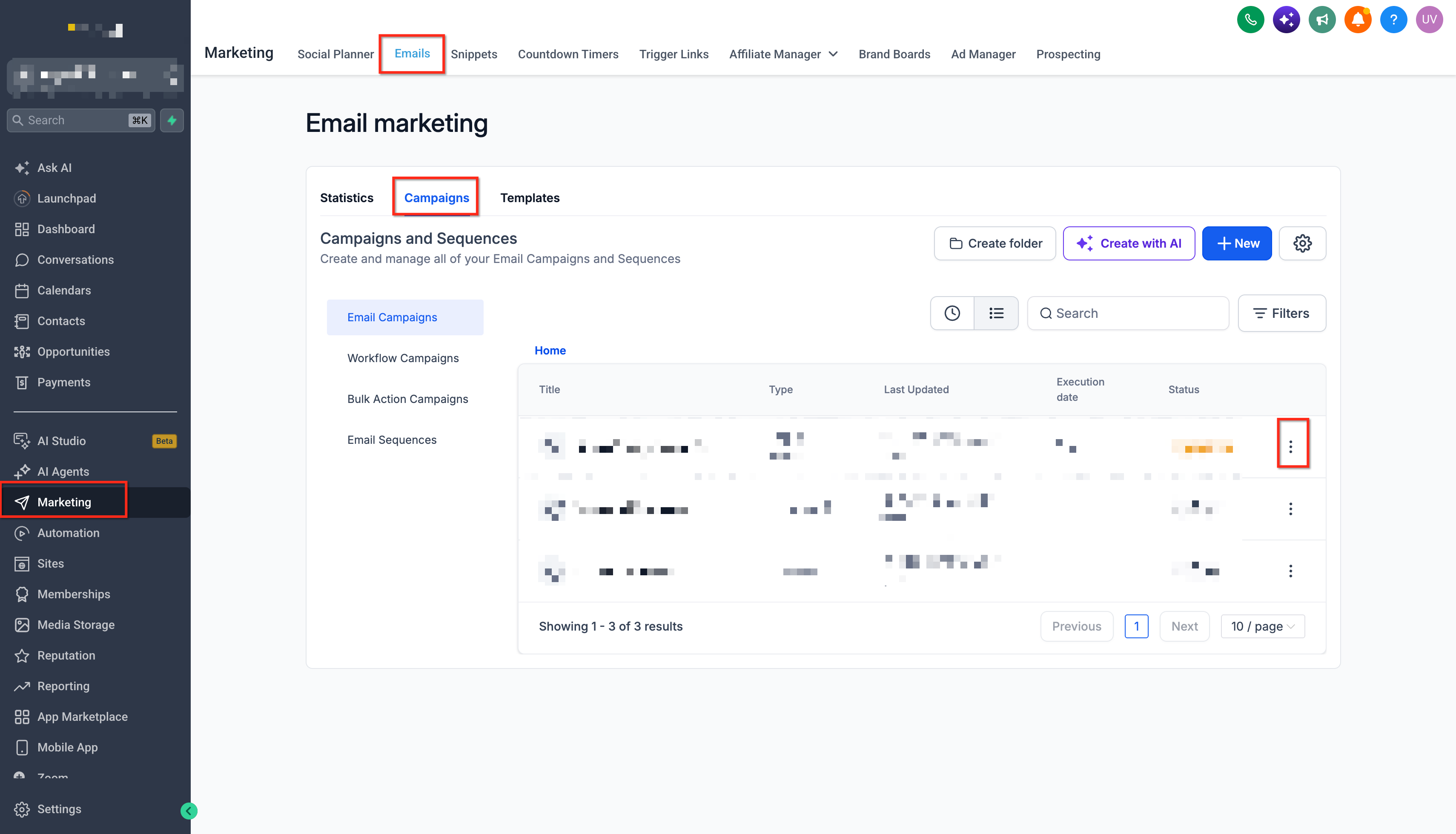
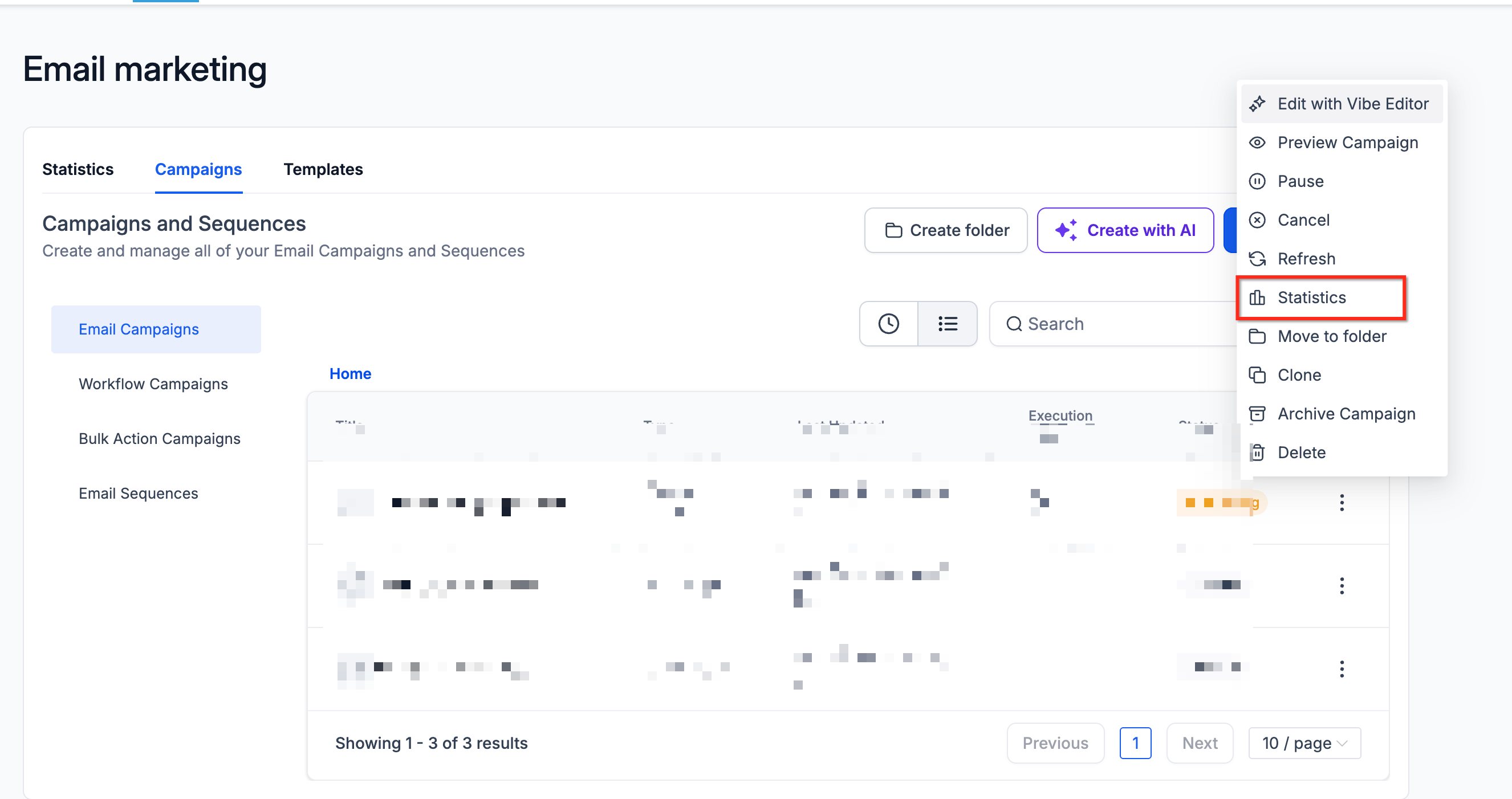
Select Statistics.
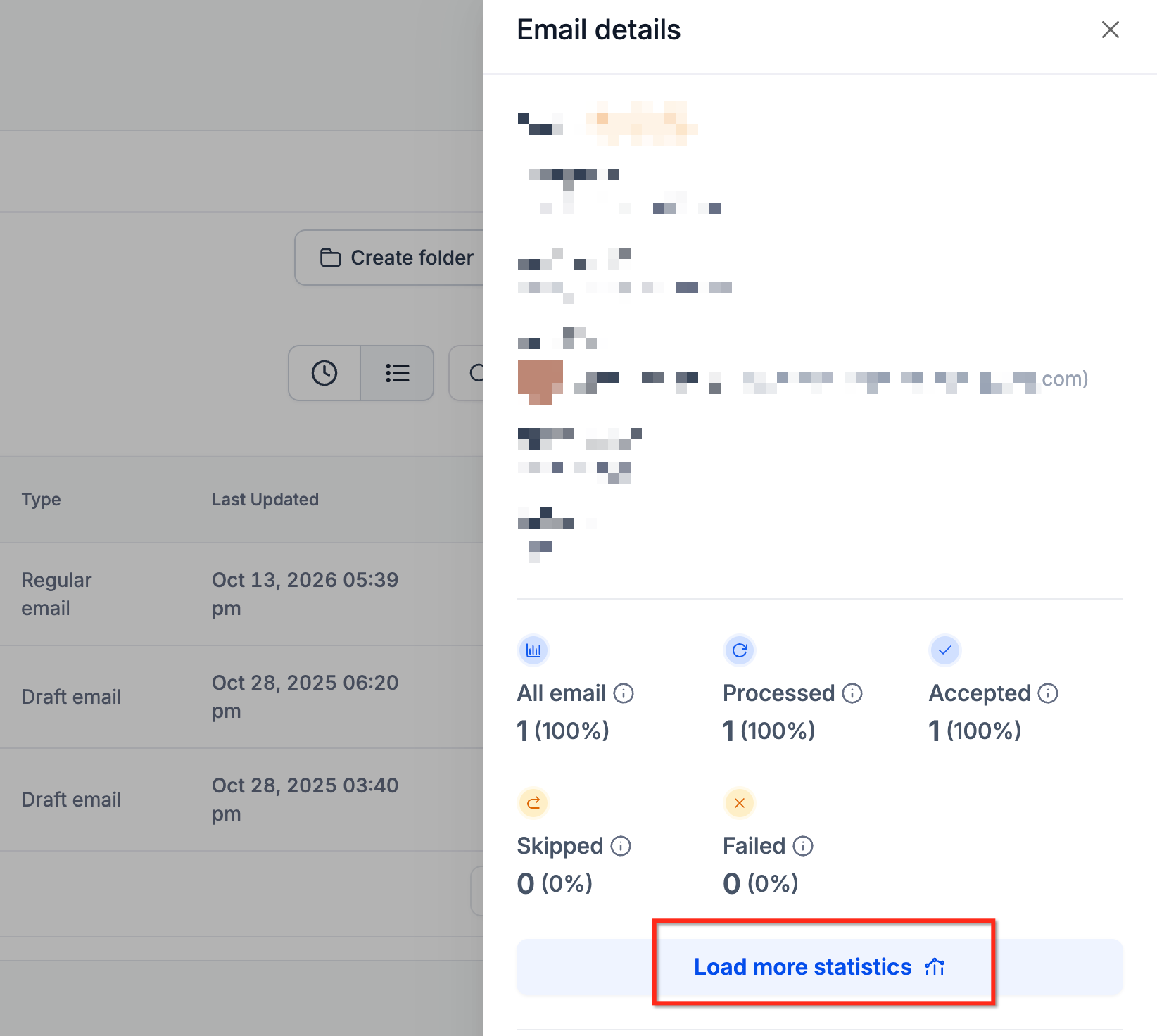
In the statistics side panel, click Load More Statistics.
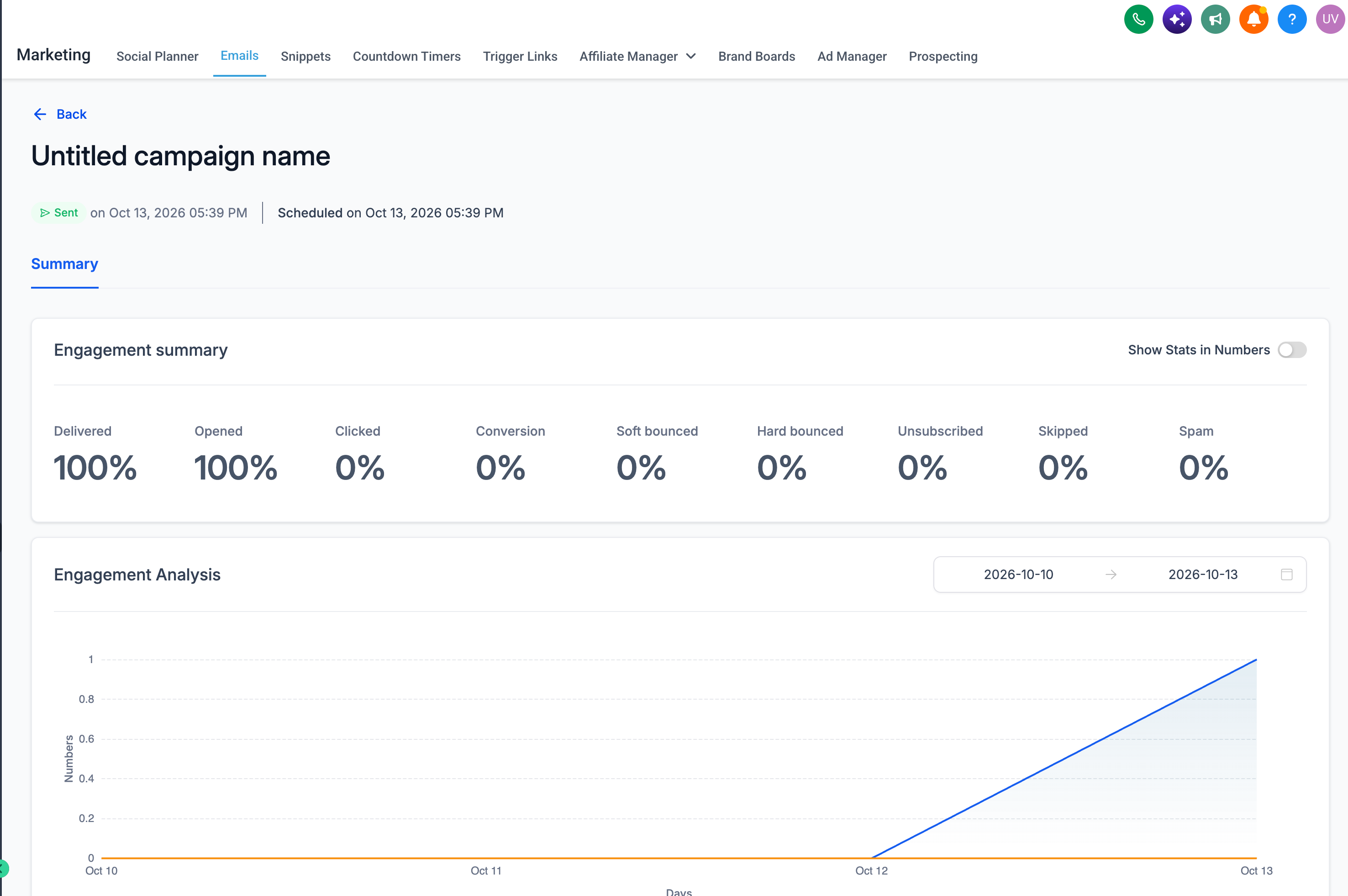
Open the Summary tab to review the campaign's performance.
Use the Details section to review available recipient-level activity, such as delivered, opened, clicked, or unsubscribed.
Export Email Campaign Statistics
Exporting email statistics lets you perform additional analysis or share campaign performance data outside Chat To Clients CRM. Export files are provided in CSV format and can include email activity from the selected reporting source.
Navigate to Marketing → Emails → Statistics.
Select the reporting source and date range.
Click Export.
Enter the email address or addresses that should receive the export.
Click Export to submit the request.
Open the email containing the CSV download link.
Export download links are valid for 30 days after generation. For additional instructions, see Exporting Email Campaign Data.
Frequently Asked Questions
Q: Why are my email statistics not showing immediately after I send a campaign?
Most email statistics update in near real time, but some engagement events may take a few minutes to appear. Confirm that your campaign was sent and that you have selected the correct reporting source and date range.
Q: Why is my campaign showing opens but no clicks?
Recipients may have opened the email without clicking any links. If you expect click activity, confirm that click tracking is enabled and that the links are supported by the tracking configuration.
Q: Why are some delivery or bounce statistics missing?
The available reporting events can vary depending on your configured email service provider. Some providers support open and click reporting without exposing the same delivery or bounce information as Chat To Clients Email or Mailgun.
Q: Why doesn't my attributed email revenue match all purchases made by my contacts?
Revenue attribution only includes eligible purchases associated with qualifying email interactions within the configured attribution window. Purchases outside the attribution window or attribution scope may not be credited to the campaign.
Q: Why does a workflow appear as multiple entries in Top Performing Emails?
Chat To Clients CRM evaluates individual Workflow email actions separately. This helps you identify which specific emails are performing well rather than combining an entire workflow into one result.
Q: What does it mean if the dashboard displays sample data?
Sample data consists of demonstration statistics that help you preview the reporting experience. If a sample-data notice appears, use Clear Sample Data before analyzing actual email performance.
Q: Can I identify contacts who unsubscribed or reported my campaign as spam?
Yes. Open the individual campaign's statistics and review the relevant recipient-level information in the Details area, where available.
Q: Does exporting campaign statistics change any campaign or contact information?
No. Exporting statistics is a reporting action. It does not modify email campaigns, workflows, contact records, or the recorded statistics.