
Set Up Your MarketplacApp Pricing
Monetizing your app on the Highlevel developer app marketplace presents various avenues. This guide walks you through the options and tells you how to set them up.
TABLE OF CONTENTS
- Where can I configure my app's pricing?
- Select payment collection preference (Within the Highlevel platform, recommended)
- External payment page (Not recommended)
- What pricing models can I offer?
- How to use it as a Developer?
- How to Use it as an Agency
- Reselling & markup behavior (agencies)
- Distribution Types and Pricing Models
- Offering Free-trial
- Key Points to Remember
- Usage-based pricing
- How your earnings are calculated
- Earnings Dashboard
- Payout
- Frequently Asked Questions
Where can I configure my app's pricing?
Log in to your Marketplace - Developer account, click on your app and select the 'Pricing' option from the left menu.
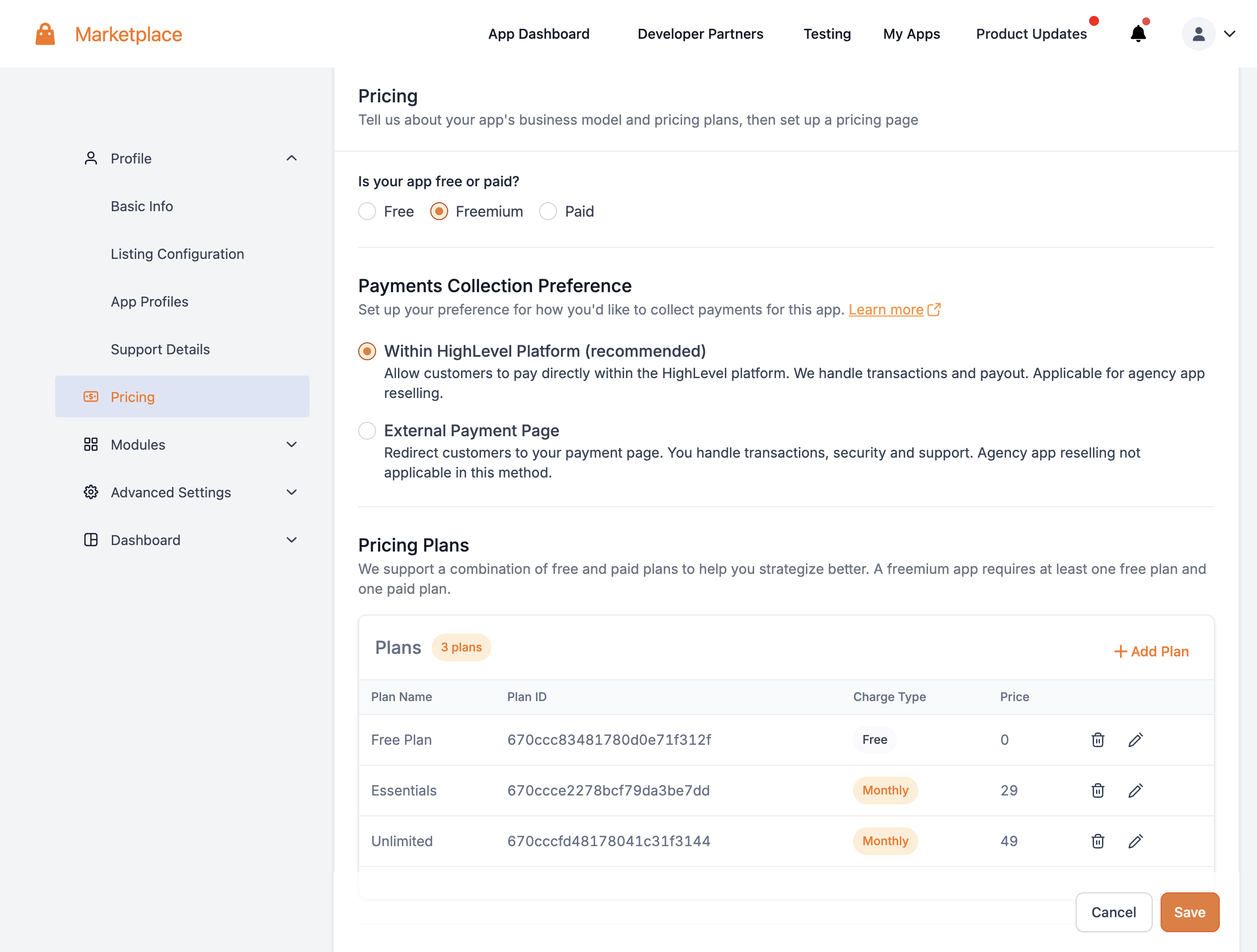
Payment Failure Recovery for Paid Apps
Paid Marketplace apps now use a recovery flow when a charge fails. Instead of pausing the app immediately, Chat To Clients CRM provides a 30-day grace period and attempts automatic retries during that time.
This helps reduce involuntary churn and gives users time to resolve billing issues before access is interrupted.
Select payment collection preference (Within the Highlevel platform, recommended)
This method permits customers (both agencies and sub-accounts) to pay for the app within the Chat To Clients CRM platform. We handle the payment processing and ensure timely payouts to developers.
- Enable agencies to re-sell these apps to their end sub-accounts, enhancing wider adoption and engagement for your app
- Use granular pricing modules offered by Chat To Clients CRM Marketplace platform such as free-trials, etc.
- Streamlined collection and reconciliation of payments.
External payment page (Not recommended)
If you'd rather manage your app's pricing on your platform, choose this option and provide the redirect URL for your external payment page. Customers will get redirected to your payment page during the installation process and upon successful payment the app will be installed in their account.
Add the redirect URL for the payment page.
Note:
- Initially selecting an external payment page allows for later changes to the Highlevel platform. But, once live with internal payment collection, you cannot switch to an external page. Such a change necessitates deleting and recreating the app.
- Agencies cannot resell apps with external payment preference, which reduces your app's adoption chances.
What pricing models can I offer?
Your app can have one of three pricing models, all of which are configurable using Pricing Plans:
- Free
- Paid - Subscription
- Paid - One-time
- Freemium - Combination of Free and Paid plans
You can optionally offer Free-trials on any of the above pricing models.
How to use it as a Developer?
A) Configure your billing meter
- Go to App → Pricing → Billing Meters and create (or edit) a meter with Module Type = Custom Event (API).
- Set Price Type: Dynamic
- Enter Minimum and Maximum price, add a Pricing Page URL (recommended for transparency), and set a Default Price per Unit.
- Save changes.
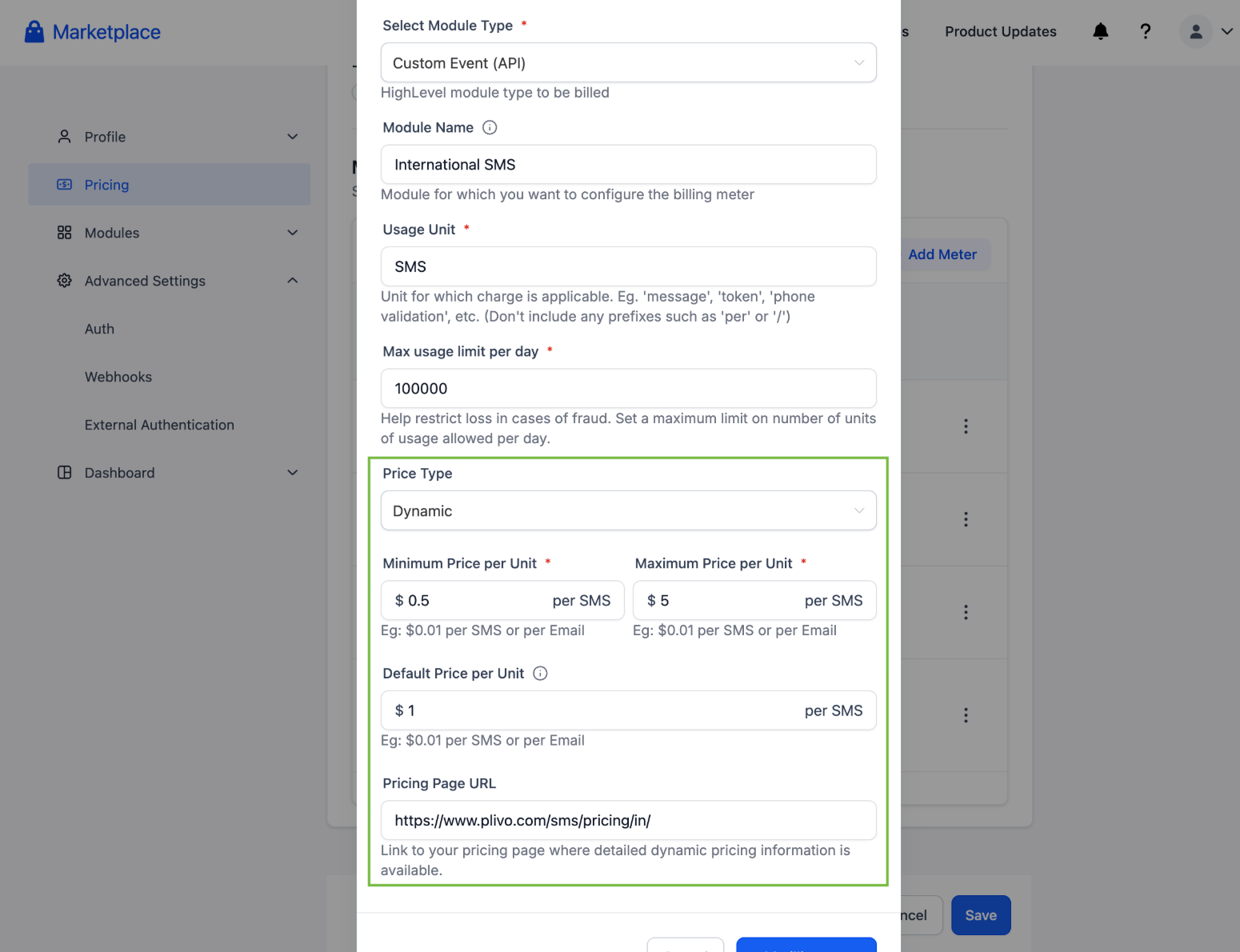
- Use the existing Create Wallet Charge API. Include the new, optional price field when you want to apply a dynamic per-unit price for that charge.
- If price is omitted, the meter’s Default Price per Unit is applied.
How to Use it as an Agency
- In your app’s Pricing section, end users see the price range for dynamic meters and a link to the Pricing Page URL.
- Visibility note: The Pricing Page URL is visible to agency admins only, not to sub-accounts.
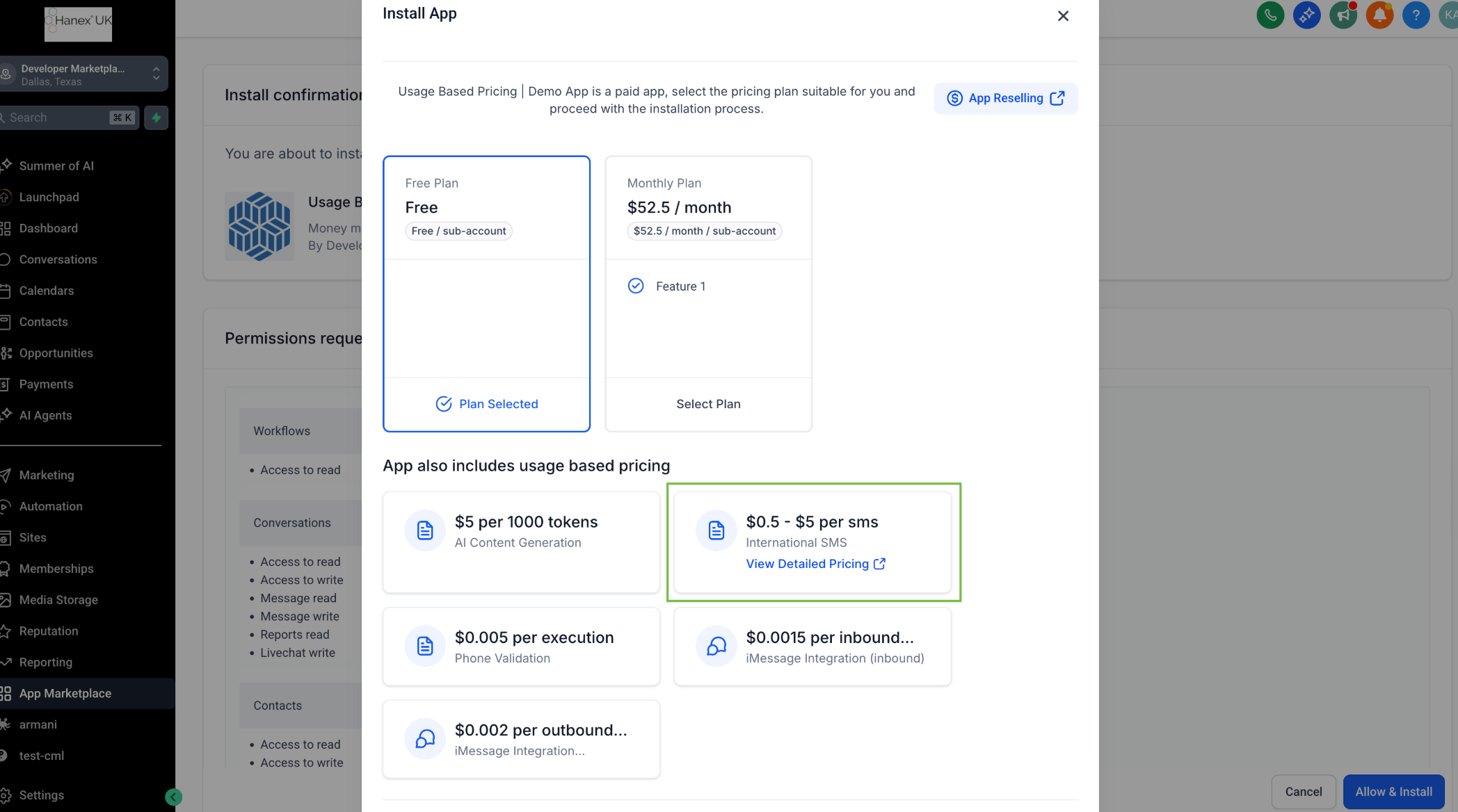
Reselling & markup behavior (agencies)
- Agencies can configure a flat per-unit markup when reselling apps' service (app reselling).
- Because markups change effective end pricing, the Pricing Page URL is hidden from sub-accounts to avoid confusion.
- Example: If an SMS base price is $1.00 (UK) and $1.50 (France), an agency can add a $0.50 markup so sub-accounts pay $1.50 (UK) and $2.00 (France).
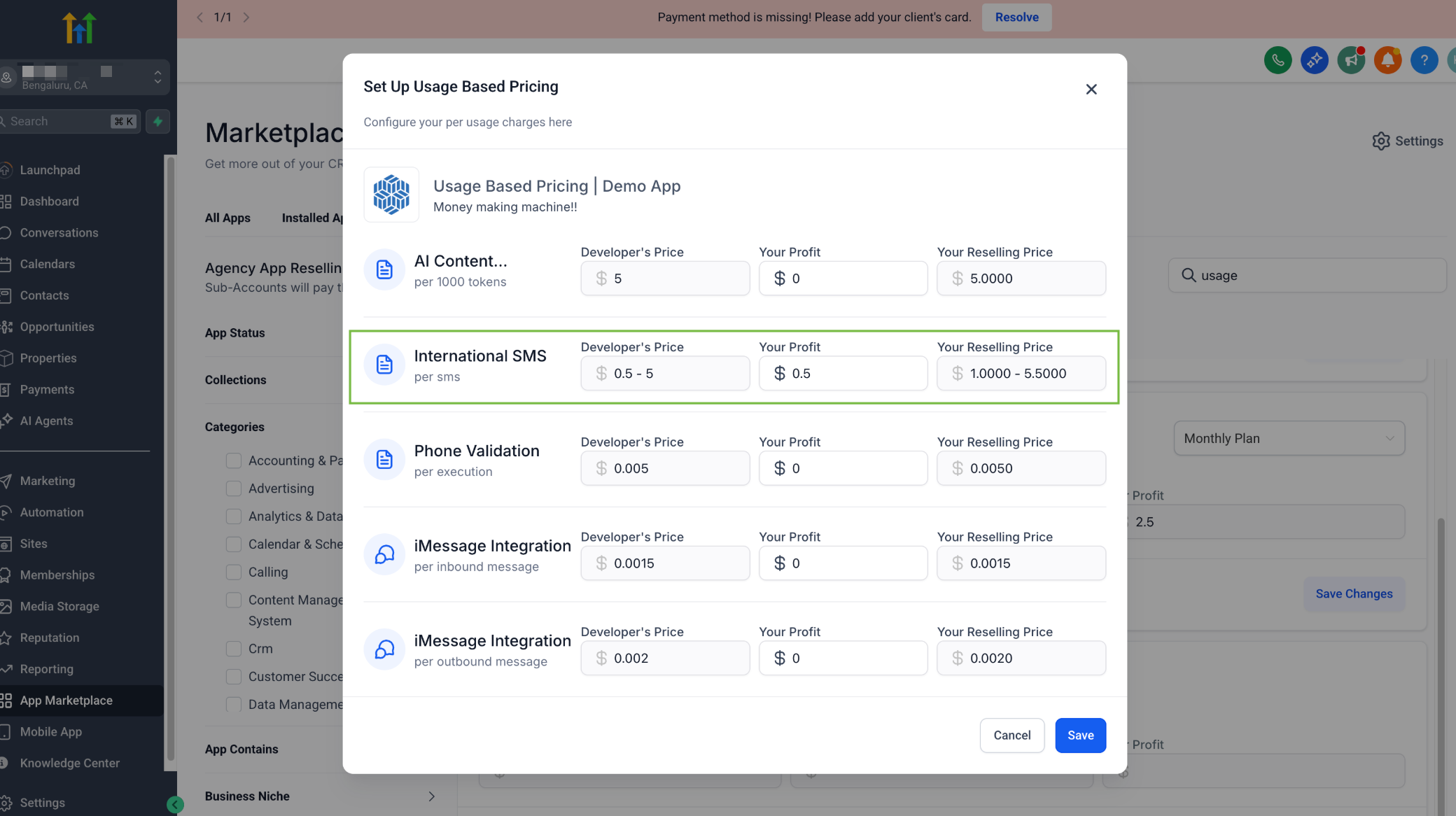
Distribution Types and Pricing Models
To understand distribution types, please refer to this article.
In this section, let's understand how you may customise your distribution type based on who you want to charge.
Let's assume that the agency in the following example has set a flat 5% markup on all Marketplace Apps.
| Distribution Model | App Pricing Model (with example) | Agency pays | Sub-account Pays to agency | Developer Makes |
| Target User: Agency | Monthly: $50/month | $50/month | - | $50/month |
| One-time: $50 | $50 One-time | - | $50 One-time | |
| Target User: Sub-account | Who can install? : Agency & Sub-account | Monthly: $10/month | $10/month | $10.5/month | $10/month |
| One-time: $10 | $10 One-time | $10.5 One-time | $10 One-time | |
Target User: Sub-account | Who can install? : Agency Only | Monthly: $50/month | $50/month | - | $50/month |
| One-time: $50 | $50 One-time | - | $50 One-time | |
| Differential pricing enabled (Monthly) Agency Price:$50/month Sub-account Price: $10/month | $50/month + $10/month per sub-account | $10.5/month | $50/month + $10/month per sub-account | |
| Differential pricing enabled (One-Time) Agency Price:$50 Sub-account Price: $10 | $50 One-time + $10 One-time per sub-account | $10.5 One-time | $50 One-time + $10 One-time per sub-account |
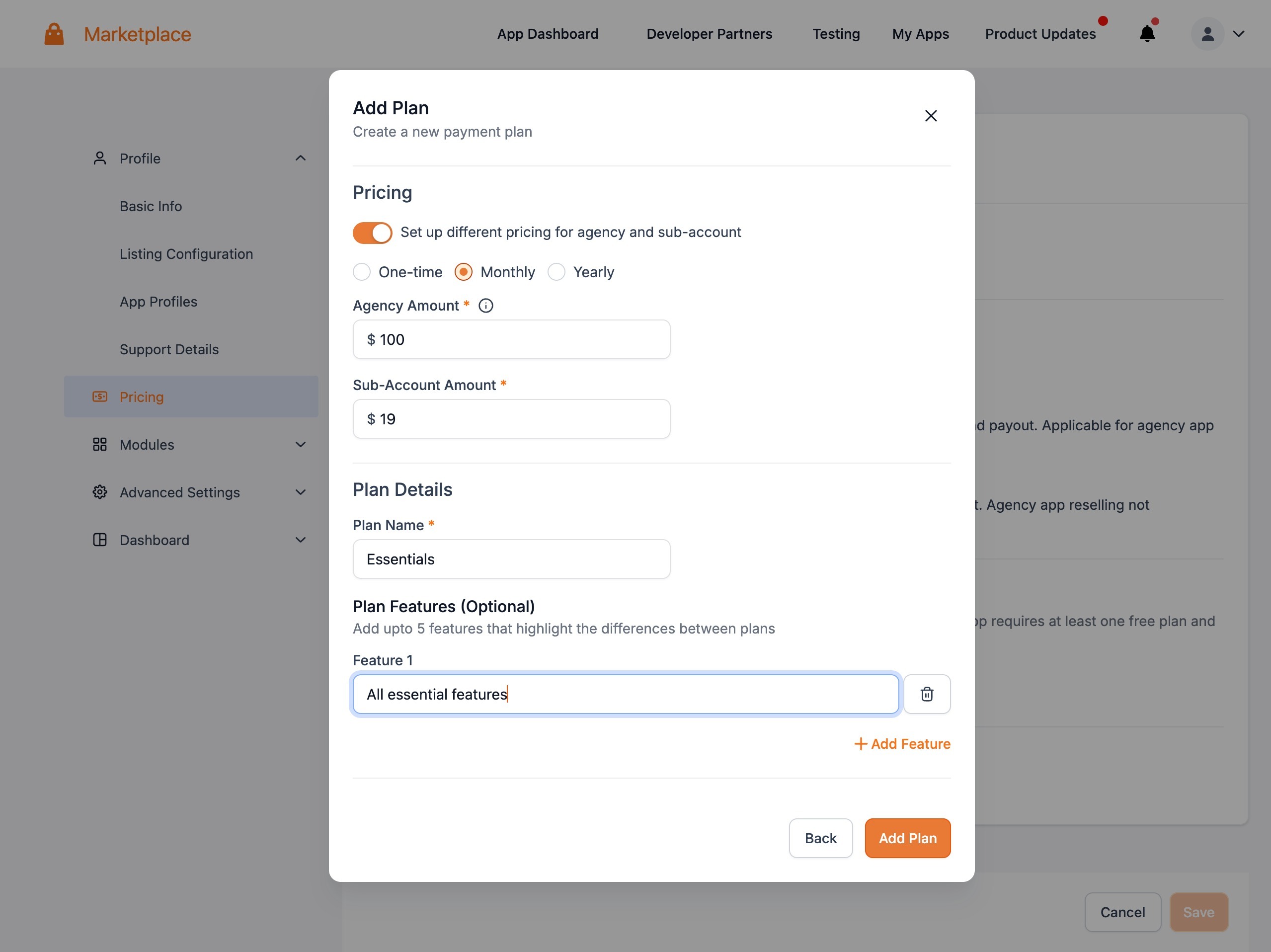
Here's how you setup differential pricing for apps with Target User: Sub-account | Who can install? : Agency Only:
Offering Free-trial
Drive adoption of your app by offering free-trial - full-experience of the app for a limited duration of time.
You can offer anywhere between 1 - 90 days of free-trial to your users.
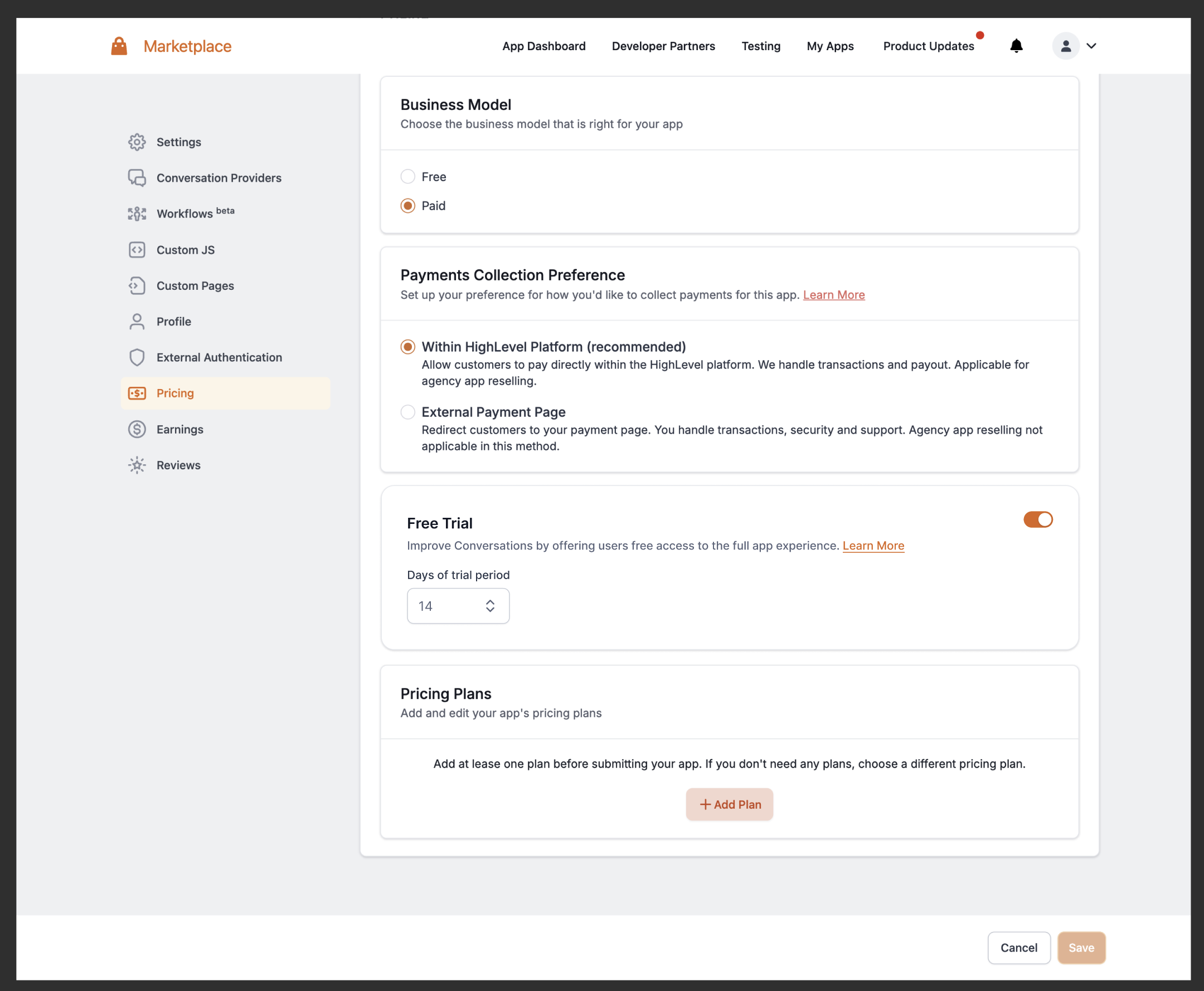
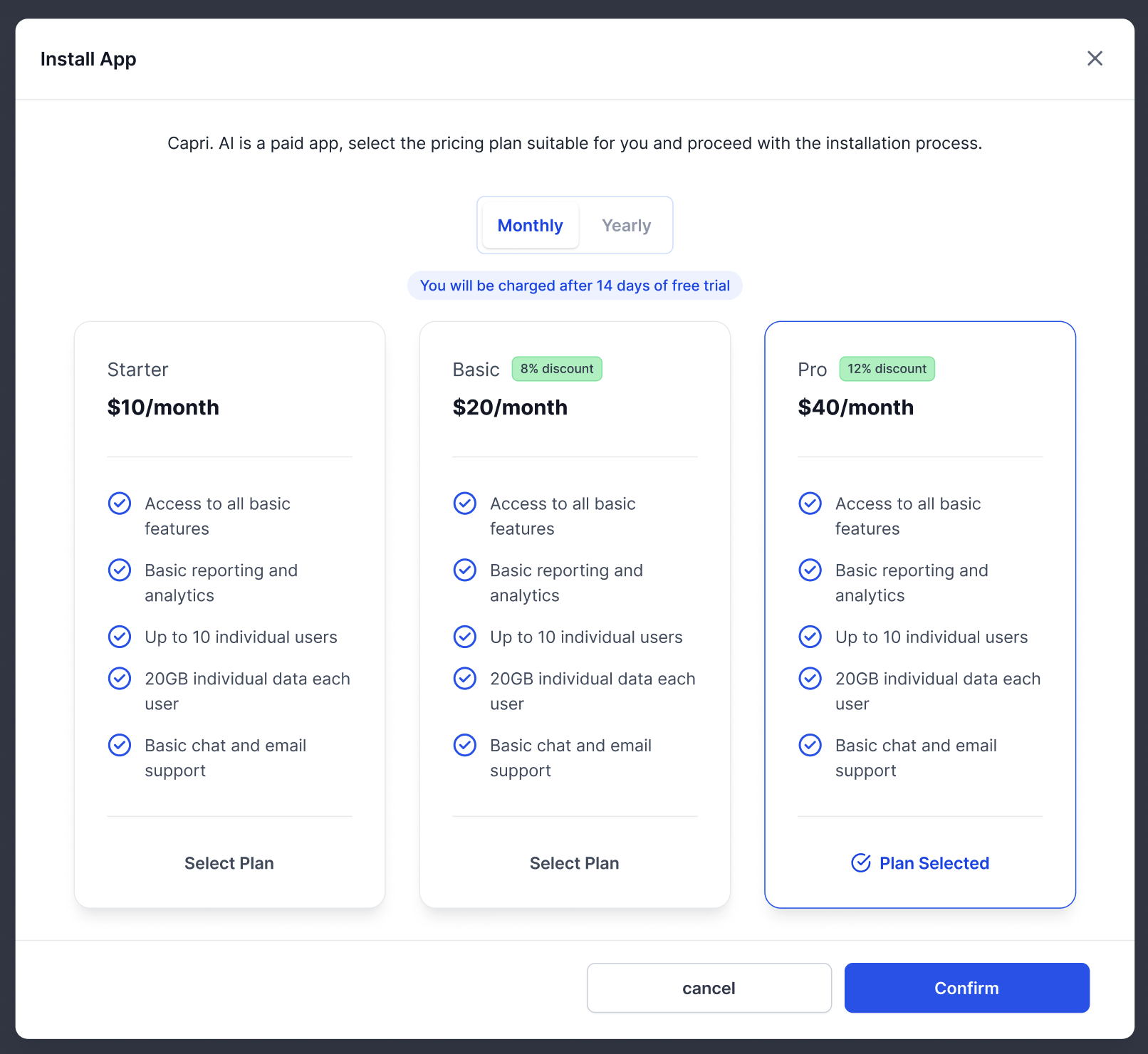
The subscription will initiate automatically after the trial period ends.
Key Points to Remember
- Free trial config is at the app-level, and applies to all pricing plans in your app.
- A user can avail free trial only once per app within a period of 90 days.
- Your users will receive a notification a 24 hours before the trial period ends giving them a heads-up about the upcoming charges.
- In case of payment failures after free-trial, Chat To Clients CRM will notify the users and try to charge them again for 3 consecutive days. After 3 consecutive days of payment-failure, the app will be uninstalled from the user's account.
- You can track free-trial period through AppInstall webhook and Get Installed Locations API.
Usage-based pricing
Here's a loom demonstrating the steps to configure Usage-based pricing on your marketplace apps.
If your app has service whose price may vary, you can opt for dynamic pricing option.
IMPORTANT: Here's the link to API Docs for Usage-based Pricing.
How your earnings are calculated
Your revenue stems from app installations on the Highlevel platform. We currently do not deduct any commission. You receive the entire payment from our customers. However, agencies can markup the price when reselling to sub-accounts. For instance:
Say, a Sub-account app is priced as follows:
- Developer Pricing: $10/month
- Agency Resale Price: $12/month
Here's how the resultant transactions when a sub-account installs the app:
- Sub-account Charge: $12/month
- Agency Charge: $10/month
- Developer Earnings: $10/month
Earnings Dashboard
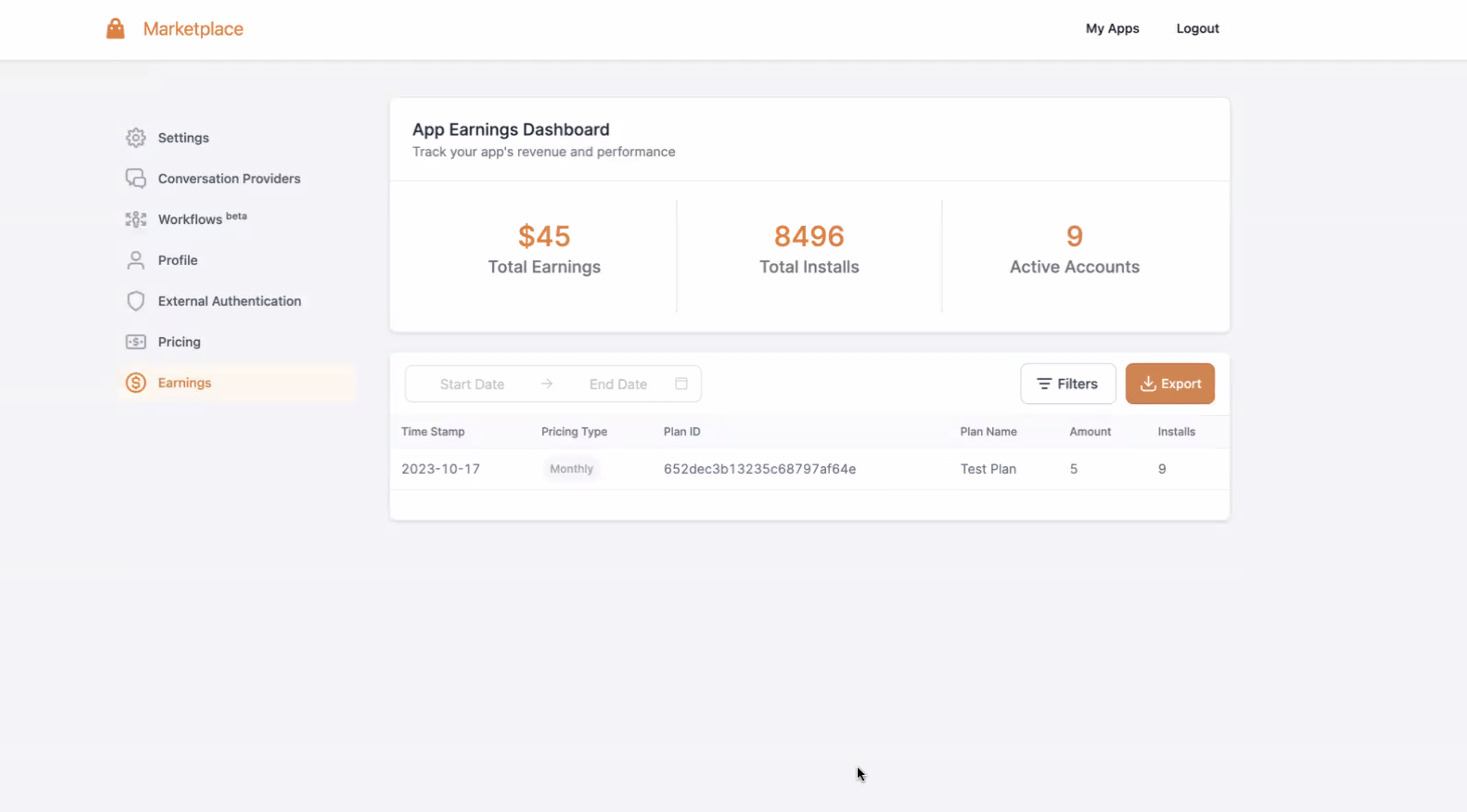
Track your revenue in the 'Earnings Dashboard'. For a live, paid app:
- Total Earnings: Cumulative earnings till date.
- Total Installs: Number of app installations.
- Active Accounts: Current active/installed accounts.
- Use the table below for detailed insights and apply filters as needed.
Payout
We've partnered with Tipalti to facilitate developer payouts, ensuring you have a smooth and efficient transaction process.
How Does the Payout Process Work?
- Developer partners who are eligible for a payout will receive an email invitation to register with Tipalti. This 3-step registration process guides you through everything necessary to ensure compliance and to receive payouts from us.
- After your account is set up and ready, you will begin receiving payouts from Highlevel. The billing cycle is monthly, with payments sent on the 15th of each month for all earnings accrued in the previous month.
If you've already set up Tipalti and your payment status is marked as "submitted," then your payout is in process. Depending on your chosen payout method, you should expect to see the payment within 1-3 days.
To know more about how this works, click here - Tipalti Payout Process