
Social Planner - Recurring Social Posts
Recurring posts provide a streamlined way to create evergreen content across various social platforms, scheduled daily, weekly, monthly, or yearly. Through a simple process, users can generate quality content using AI, schedule it with flexible time settings, and even edit parent and child posts. Take control of your content strategy by utilizing this feature, but be mindful of platforms like Twitter, which may flag repetitive content.
TABLE OF CONTENTS
- What is Recurring Social Posts?
- Use Cases
- How to Schedule Recurring Posts
- Important Pointers
- System sanctity practices
- Frequently Asked Questions
- Related Articles
What is Recurring Social Posts?
The recurring posts feature in the Social Planner is designed to help users maintain consistent and automated social media engagement by scheduling evergreen content regularly. Here's a detailed breakdown of how it works:
- Flexible Scheduling: Users can set the posts to repeat every day, week, month, or year. They can select specific days of the week, date ranges, and post times according to their preferences.
- Content Creation: Users can generate quality content using AI, allowing them to create posts that resonate with their audience quickly.
- Editing Options: The feature allows for edits to both parent and child posts. If changes are made to the parent post, they will be replicated in all child (scheduled) posts. Editing a child's post will not impact the parent's post.
- Recurring Posts Tab: The parent post is added to the Recurring Posts tab once scheduled. Users can access the edit function to change all recurring posts' time and date ranges.
- Scheduled Posts: Individual scheduled posts appear separately, and users can edit each as needed without affecting the others.
- Platform Consideration: It's important to be mindful of the policies of specific social platforms. For example, Twitter may flag content as repetitive if the recurring post feature is used excessively.
- Long-term Strategy: This feature allows for creating long-term content strategies, helping businesses stay in front of their audience without manually posting content regularly.
- Images and Media: Along with the text, users can add images or other media from their library or, through image AI, visually enrich the content.
- Monitoring and Management: Users can track and manage all their recurring posts through a simple interface, providing control over their social media content.
Use Cases
- Promoting Seasonal Offers: A retail store can set recurring posts to promote seasonal sales, offers, or specific products at the beginning of each season. They can easily plan this for the entire year and forget the manual posting process.
- Daily Inspirational Quotes: A motivational speaker or life coach can schedule daily inspirational quotes to engage their audience and reinforce their brand messaging. This consistency helps in keeping the audience connected and engaged.
- Weekly Tips or Tutorials: A tech company or educational platform can set up weekly tutorials or tips to share with their followers. This regular content provides value and helps establish the company as an expert.
- Celebrating Recurring Events: A company can acknowledge and celebrate recurring events like employee birthdays, anniversaries, or national holidays, ensuring that these posts are never missed and adding a personal touch to the company's social media presence.
- Monthly Product Showcases: A manufacturer or distributor can showcase different products every month, providing information, features, and benefits to educate potential customers.
- Content Repurposing: For businesses with a rich content library (such as blogs or podcasts), recurring posts can periodically share or reshare this content to new followers or those who might have missed it the first time.
- Reinforcing Brand Campaigns: If a company has a year-long brand campaign or slogan, recurring posts can consistently remind followers of the brand's core message, ensuring that it stays fresh in their minds.
- Reminder for Regular Events: For organizations hosting regular events like webinars or community meet-ups, recurring posts can act as reminders, ensuring participants have the information they need to join.
- Celebrating Historical Milestones: Museums, historical societies, or educational institutions can use this feature to share historical facts or milestones on the corresponding dates, providing educational content to their followers.
How to Schedule Recurring Posts
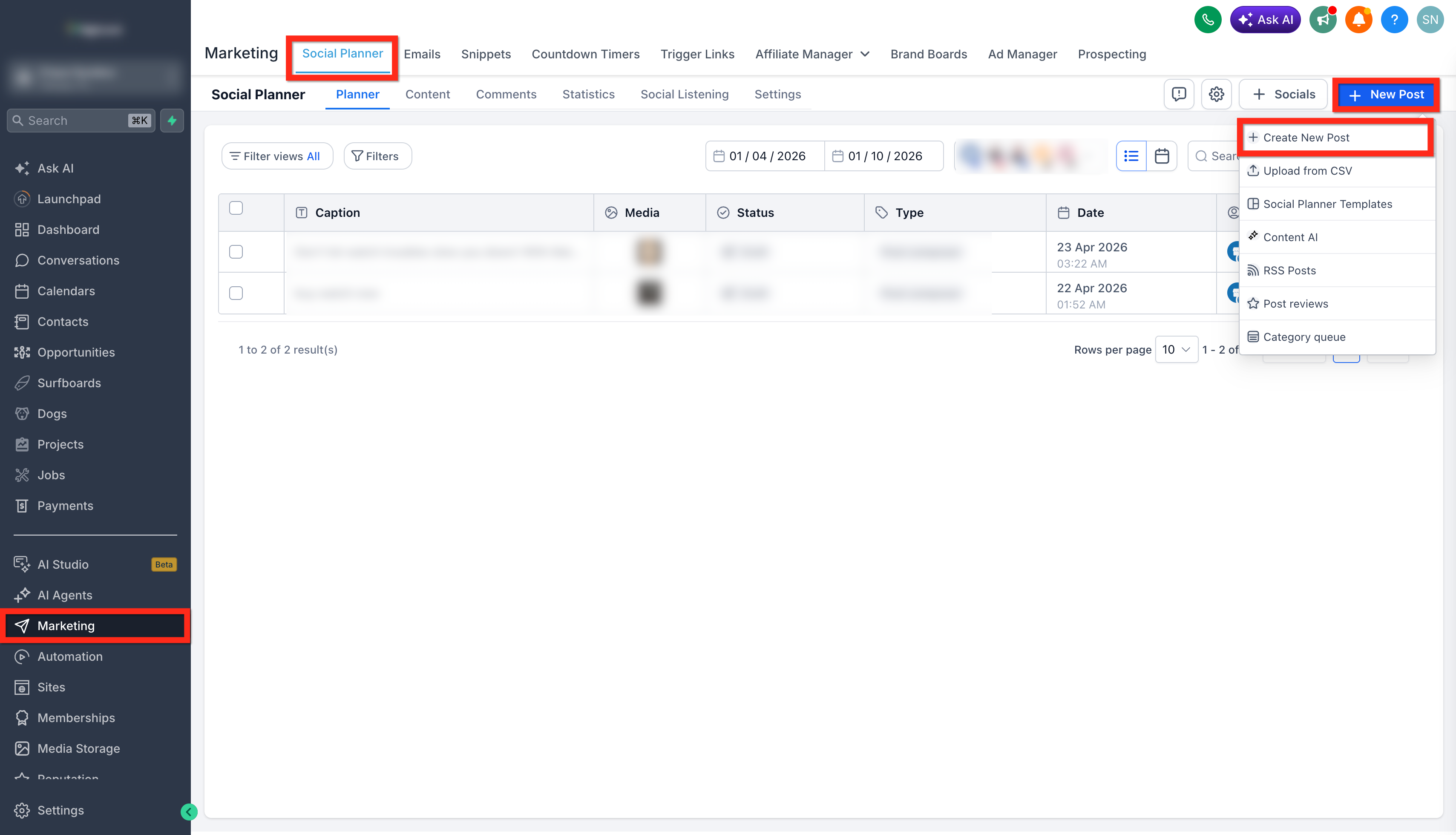
- Go to Marketing > Social Planner.
- Click on New Post > + Create New post.
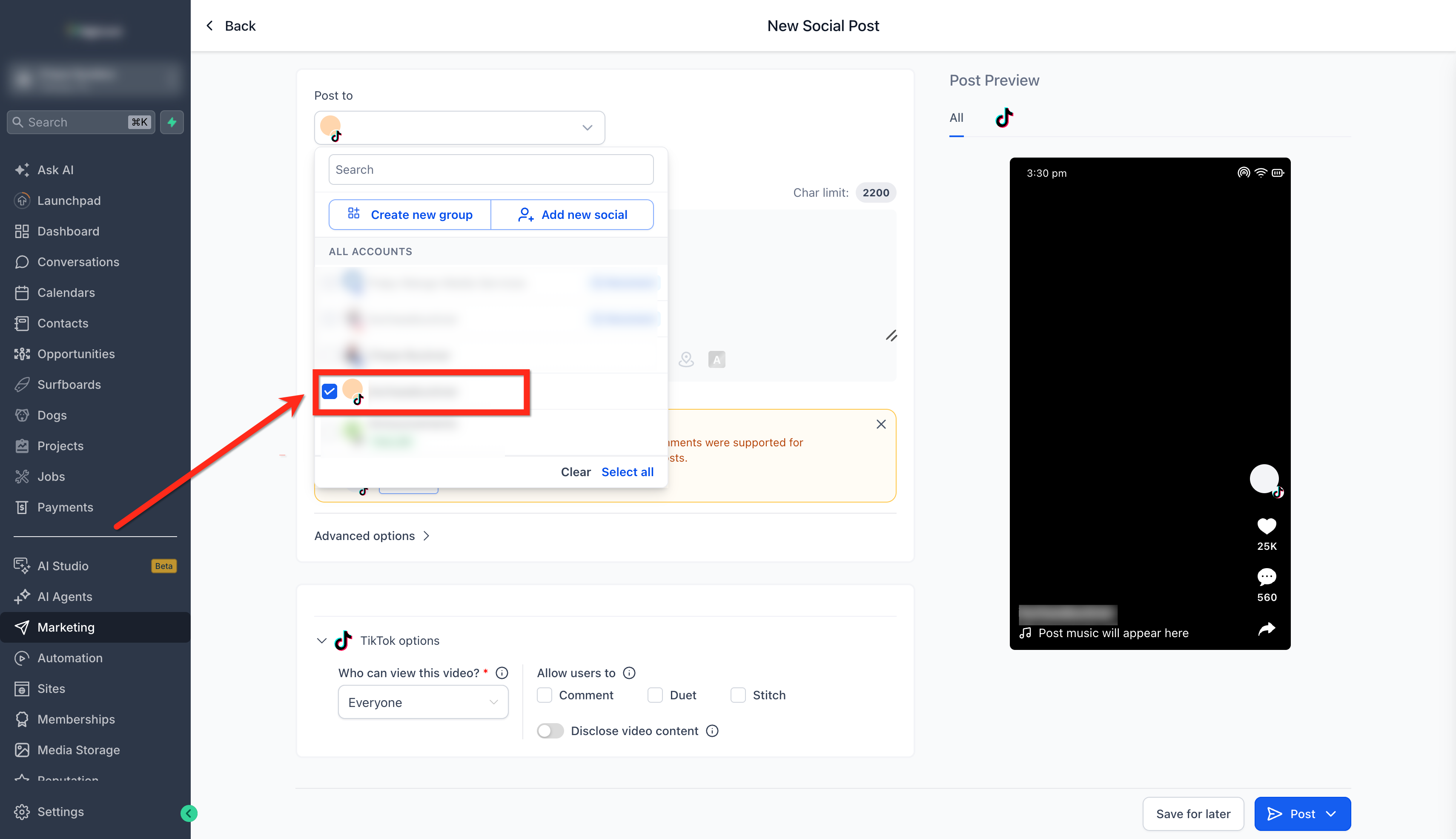
- Select the social account(s) for your post. If you have not connected any social accounts yet, you can still set up the recurring schedule, and Social Planner prompts you to connect before you save or schedule.
- Create the post.
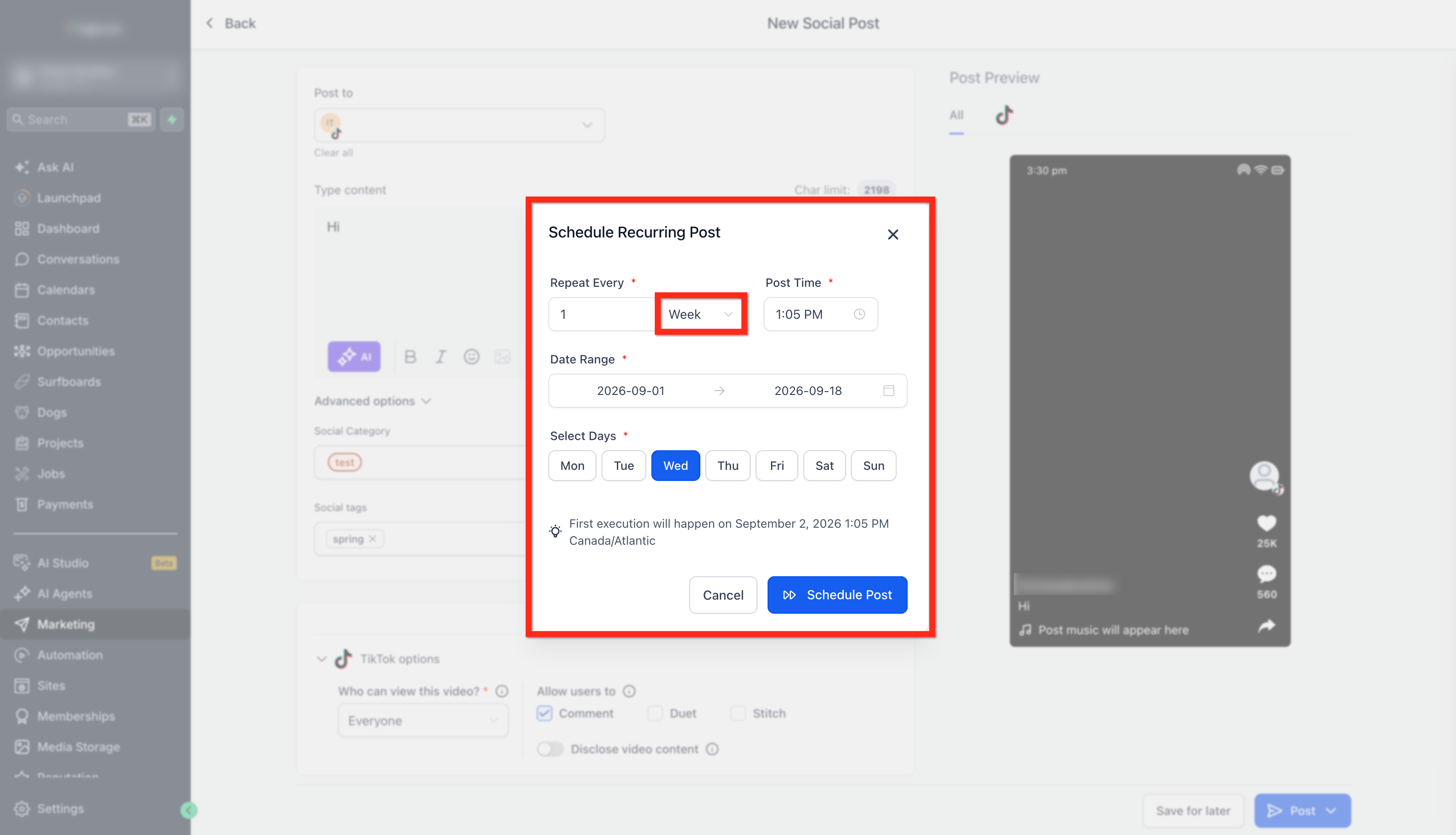
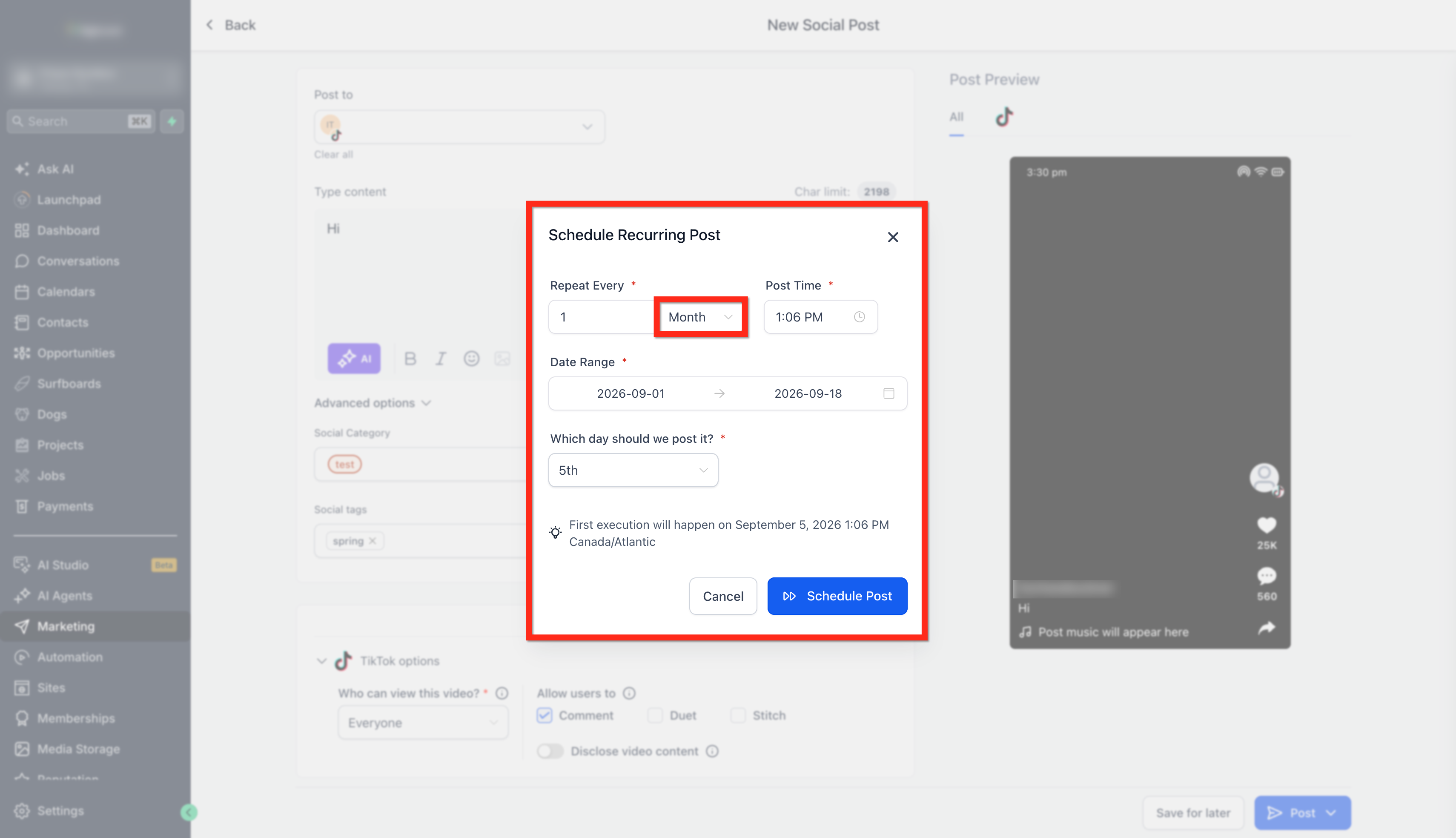
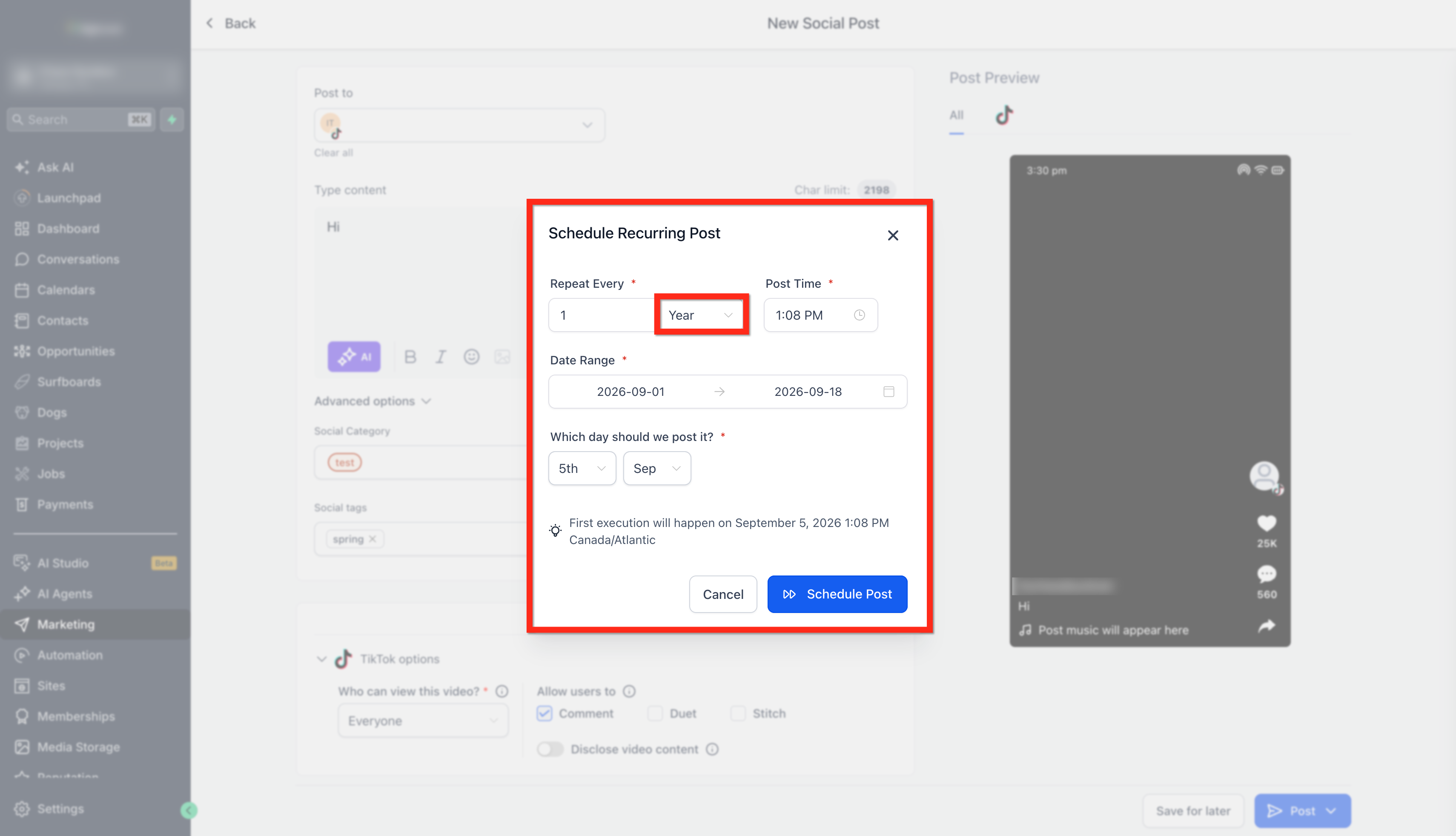
- Click on Posts > Schedule Recurring Posts.
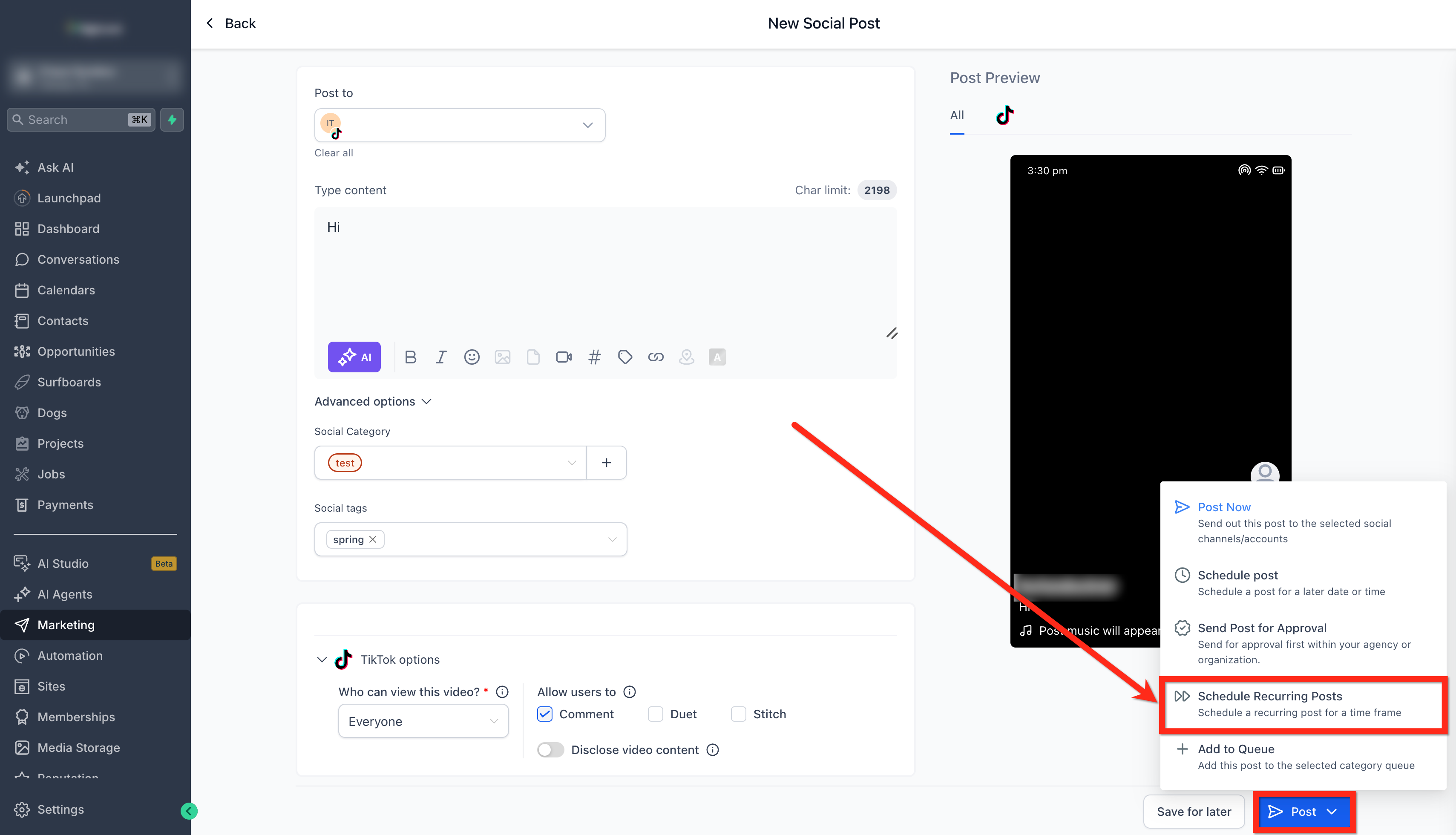
- Day: The user must choose the date and time of posting on repeat everyday.
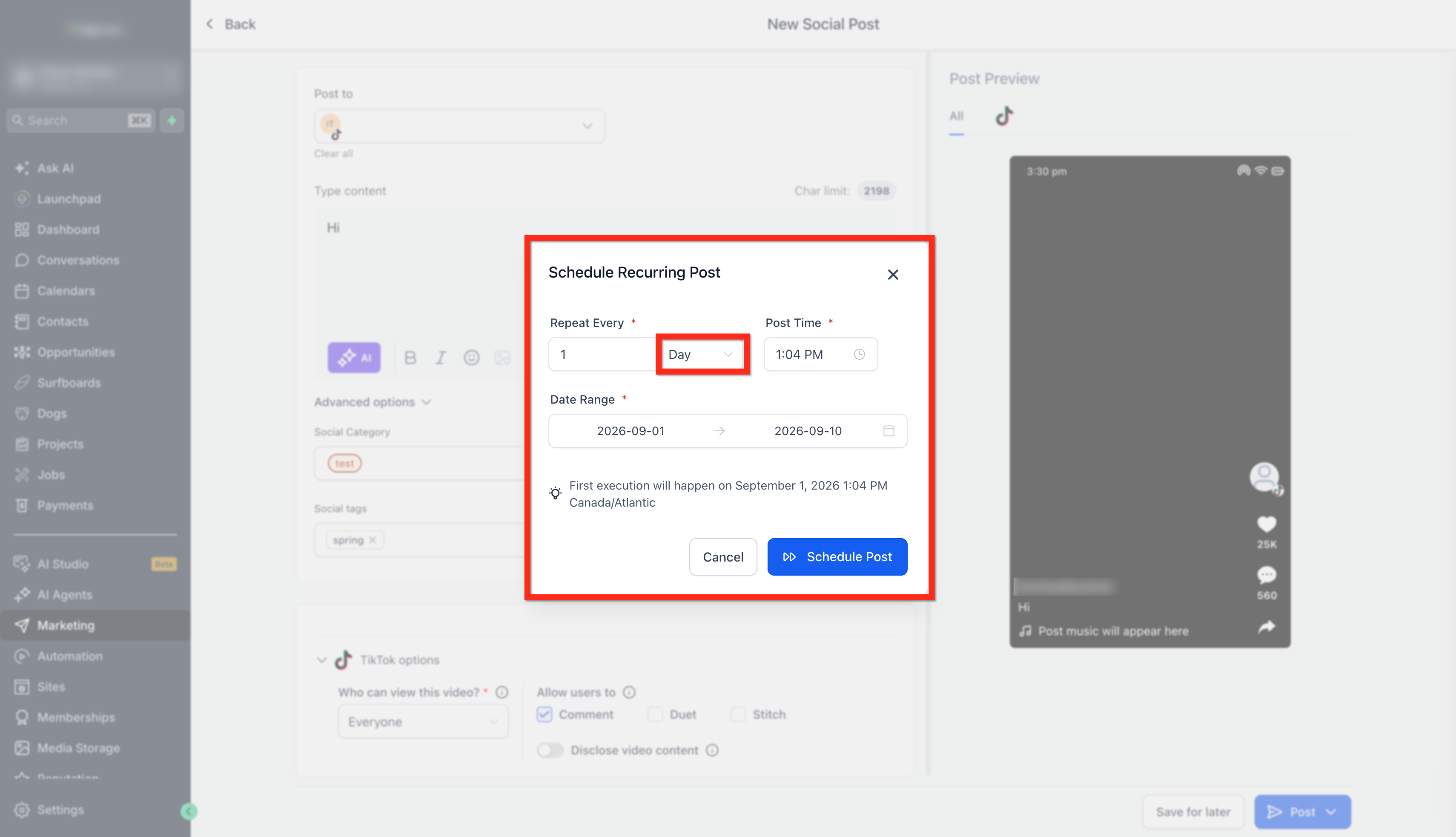
- Week: Users will have to choose day of the week when they would like to repeat schedule between the date range and post time.
- Month: The user will have to choose the date and time of posting on repeat once in a month.
- Year: The user will have to choose the date and time of posting on repeat once in the year.
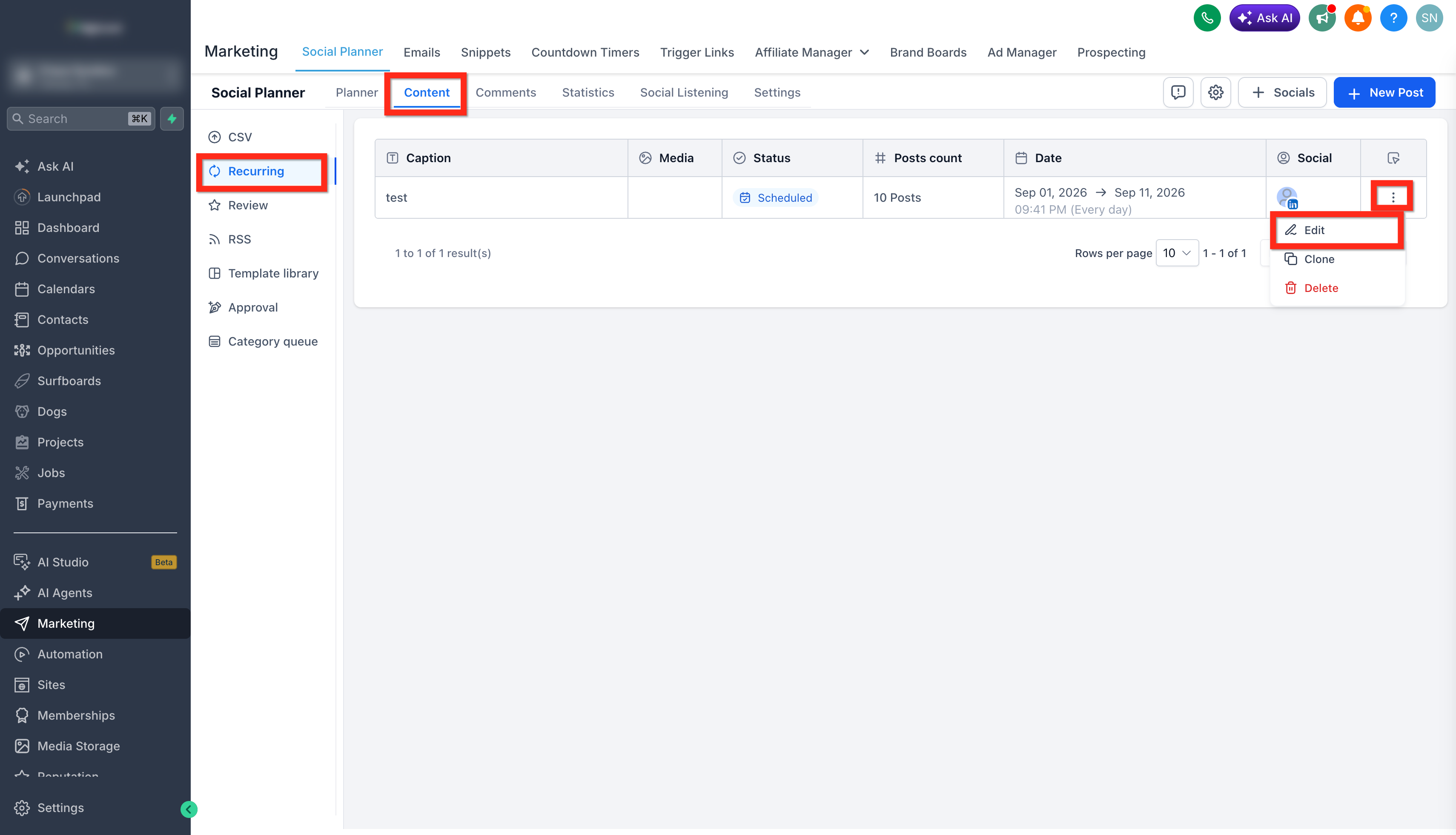
- Once the recurring post is scheduled, the parent post will be added in Content > Recurring tab.
- Click on Edit to change the time and date range.
Important Pointers
Inside the 'Content' tab view:
- Parent post entry is visible and can be edited from here.
- Edit: It will update all entries of the iteration with the selected date and time range.
- Delete: Deletes all parent entries of recurring posts
Inside the 'Calendar' view:
- All individual posts are visible and can be edited from here.
- Edit: It will update all entries of the iteration with the selected date and time range.
- Delete: Deletes the individual recurring post
Inside the 'List' view:
- Immediate active scheduled post (to be published next) is visible and can be edited from here.
- Edit: It will update all entries of the iteration with the selected date and time range.
- Delete: Deletes the individual recurring post
System sanctity practices
Review Regularly: Please review and update recurring posts regularly to ensure relevance, especially if there have been changes to products, offers, or brand messaging.
Compliance with Platform Policies: Different social media platforms have different policies regarding recurring and automated posts. Please be aware of and comply with each platform's guidelines to avoid potential issues.
Time Zone Considerations: If targeting a global audience, please consider scheduling posts according to the different time zones of your target demographics to maximize reach.
Content Backup: Please ensure a backup of all recurring content. Any technical issues could lead to loss of content, and having a backup will prevent unnecessary work in recreating it.
Monitoring Performance: Please note that analyzing the performance of recurring posts helps understand what resonates with the audience. Regularly monitoring insights can guide future content strategy.
Sensitive Issues and Crisis Management: Please be cautious with recurring posts during sensitive times or crises. Scheduled posts that may be inappropriate during unexpected events must be reviewed and managed accordingly.
Integration with Other Campaigns: If ongoing or planned marketing campaigns exist, please ensure that the recurring posts align with the overall marketing and branding strategies.
Legal and Ethical Considerations: Please be mindful of intellectual property rights, permissions, and other legal considerations when using images, quotes, or other content within recurring posts.
Experiment and Iterate: Recurring posts are a tool, and like any tool, they require experimentation to find the most effective way to use them. Please don't be afraid to try different strategies and iterate based on what you learn.
Frequently Asked Questions
Q: Can I set recurring posts for specific holidays or annual events?
Yes, you can schedule recurring posts for specific dates, allowing you to automate posts for holidays or annual events like company anniversaries.
Q: What happens if I edit the parent post of a recurring schedule?
Editing the parent post will replicate the changes in child scheduled posts. However, changes made to individual child posts will not affect the parent post.
Q: Can I mix media types, like images and videos, in my recurring posts?
Yes, you can include various media types, such as images, videos, or GIFs, within the recurring posts to make them more engaging.
Q: How does the recurring post feature interact with different time zones?
You'll need to set the time for your recurring posts considering the time zone of your target audience. Be mindful of global audiences if applicable.
Q: Is there a limit to how far in advance I can schedule recurring posts?
Depending on the specific settings and platform guidelines, you may be able to schedule recurring posts for days, weeks, months, or even years in advance.
Q: Can I pause or temporarily stop a recurring post series?
You cannot pause or temporarily stop a recurring post series
Q: What if I want different recurring posts for different social platforms?
You can create unique recurring posts tailored to each social platform using the Customize Each Post functionality, allowing you to align the content with each network's specific character limits and guidelines.
Q: Can recurring posts be part of a larger campaign with non-recurring content?
Absolutely! You can integrate recurring posts with other marketing strategies and campaigns to create a cohesive and consistent brand message.
Q: How can I ensure my recurring posts are accessible to all users, including those with disabilities?
Incorporating accessibility features like captions, alt text, and other inclusive practices can make your recurring posts accessible to a broader audience.
Q: How do I avoid making recurring posts feel too automated or impersonal?
Mixing recurring posts with real-time, personalized content and engaging with your audience can help maintain a human touch in your social media presence.